
Volume: 12 Issue: 05 | May 2025 www.irjet.net
Volume: 12 Issue: 05 | May 2025 www.irjet.net
Bhaumik Shyam Birje1 , Swaraj Prakash Patil2 , Hardik Ganesh Patil3 , Atharva Bhimrao Sawant4,Anil. S. Londhe5 , Sanjay M. Patil6
1 2 3 4 5 6 ArtificialIntelligenceSDataScience,DattaMegheCollegeofEngineering,Mumbai,India bhaumikbirje@gmail.com, swarajpatil1913@gmail.com, hardikpatil091@gmail.com, sawantatharva63@gmail.com, anil.londhe@dmce.ac.in, sanjay.patil@dmce.ac.in
Abstract Vision AI introduces a novel approach to interactive perception by seamlessly integrating realtime object recognition with natural language processing (NLP) on compact, low-resource platforms like the Raspberry Pi. Our system creates a bridge between what a machine sees and how it can converse about it, allowing users to simply speak commands and receive intelligent, context-aware responses about their physical environment. This paper provides a comprehensive look at Vision AI, detailing its complete system architecture, specific implementation choices, extensive experimental evaluations, the challenges we navigated, and the ethical considerations inherent in such technology. The results showcase solid object detection accuracy, reliable speech recognition, and practical processing latency, confirming Vision AI’s potential for a wide array of real-world applications. Built with modularity and scalability in mind, the system can be easily adapted to different hardware setups and diverse application needs. We also discuss plans for future improvements, including incorporating more advanced NLP for deeper understanding and building in feedback mechanisms to continuously enhance performance. Vision AI stands as a step towards more accessible, privacy-conscious intelligent systems operating right where the action is.
Index Terms—Key Words: Vision AI, Interactive Perception,ObjectDetection,NLP,VoiceInteraction,Raspberry Pi, Real-Time Systems, LLM Integration, HumanComputer Interaction. Edge Computing, Embedded Systems.
Imagine a world where you can simply ask your surroundings questions,andtheyintelligentlyrespond based on what they see and understand. While machines have gained incredible abilities to perceive the visual world and process human language separately, truly natural interaction requires blending these capabilities. Current virtual assistants, like those found in smart speakers, are greatlistenersbutremainlargelyblindtotheirimmediate physical environment. They struggle to answer questions tied directly to what’s in front of them in real-time. Furthermore, their reliance on sending all requests to distant cloud servers introduces frustrating delays and raises serious privacy concerns, making them unsuitable for many sensitive or time-critical applications.
Vision AI steps in to address these very challenges. It cleverlycombinesefficientobjectdetection–theabilityto ”see” and identify things – with natural language processingintoa single,cohesivesystemdesignedtorunentirely on a small, affordable computer like the Raspberry Pi.
This crucial design choice bypasses the need for constant cloud connectivity, drastically cutting down latency and keeping sensitive data local, which significantly enhances privacy. We’ve built in several clever optimizations, like making the AI models smaller and using multiple parts of the computer’s brain at once (multi-threading), to ensure Vision AI performs well even on this limited hardware. Byweavingtogetherreal-timevideoanalysiswithvoicedriven queries, Vision AI offers a remarkably intuitive way for users to interact with technology. You simply speak to the system, and it provides detailed, contextaware responses about your environment. This opens up exciting possibilities across many fields. Think of it empoweringpeoplewithvisualimpairmentsbydescribing their surroundings, making factories smarter and safer through automated monitoring, creating more responsive and helpful smart homes, or even serving as an engaging, interactivelearningtoolineducation.Ourcorefocusison creating a perception system that is not just intelligent, but also more accessible and user-friendly for a wider audience by bringing sophisticated AI capabilities to edge devices.
Thispaperwilltakeyouthroughthejourneyofbuilding VisionAI.We’llstartinSectionIIbylookingatthecurrent state of similar technologies and identifying where Vision AI fits in. Section III will unveil the system’s architecture, showing how its different parts work together. Section IV will dive into the technical details of how we built it, includingthesoftwaretoolsandtechniquesweused.Section V will present the results of our experiments, showing howwellVisionAIperformedundervarioustests.Section VI will share the advanced implementation details and the significant challenges we faced and overcame. Section VII will explore real-world examples and where Vision AI couldshine.SectionVIIIwillopenlydiscusstheimportant ethical questions our work raises. Finally, Section IX will wrapeverythingupandlookaheadtowhereweseeVision AI going next.
The world of AI has seen incredible progress in letting computers understand speech and recognize objects, but bringing these two senses together seamlessly remains a significant area of research. Today’s popular virtual assistants, like Amazon Alexa [9] and Google Assistant
International Research Journal of Engineering and Technology (IRJET) e-ISSN:2395-0056
Volume: 12 Issue: 05 | May 2025 www.irjet.net p-ISSN:2395-0072
[9], are wizards at understanding spoken commands and retrieving information from the internet. However, their connection to the physical world they inhabit is limited. They can control smart devices based on voice, but they typically lack the ability to truly *see* and react to what’s happening visually around them in real-time. Asking one of these assistants about an object you’re holding, for example, would require a separate, often clumsy integration, and they still wouldn’t grasp the full visual context dynamically. A major reason for this limitation is their heavy reliance on cloud processing. Your voice command travels to a distant server, is processed, and the response travelsback.Thisjourneyintroduceslatency–anoticeable delay – and raises flags about data privacy, as your audio and potentially visual data (if a camera is involved) must leave your local environment.
In parallel, the field of computer vision has produced powerful object detection models capable of spotting and identifying things in images and video with impressive speed and accuracy. Pioneering works like R-CNN [6] introduced region proposal networks, but were often computationally expensive. Subsequent models like YOLO (You Only Look Once) [4], MobileNet [7], and SSD (Single Shot MultiBox Detector) [5] have pushed the boundaries of real-time performance on various hardware platforms. YOLOiscelebratedforitsunifiedarchitecturethatpredicts bounding boxes and class probabilities directly, achieving high frames per second. MobileNet variants, such as MobileNetV2 [7], leverage depthwise separable convolutions to drastically reduce model size and computational cost, making them suitable for mobile and embedded devices. SSD improves upon YOLO’s accuracy while maintaining highspeedbyusingmulti-scalefeaturemapsfordetection. Despite their prowess in visual analysis, these models typically function in isolation. They can tell you *what* and *where* an object is, but they can’t engage in a conversation about it or use that visual information to answeranaturallanguagequestionaboutthescene.Their computational needs have also historicallykept them tied to more powerful hardware or cloud platforms.
Speaking of cloud platforms, integrated AI services like Microsoft Azure Cognitive Services [8] and Google Cloud VisionAIofferpowerful,integratedAIsolutions,including advanced vision and speech capabilities. These services areincrediblypowerful,backedbymassivecomputational resources. However, their reliance on continuous, highspeed internet connectivity and significant computational power makes them impractical for deployment on lowresourceembeddedsystemsorinenvironmentswithlimited network access.Thecostassociatedwith cloudusage can also be prohibitive for certain applications.
Our approach draws heavily on recent breakthroughs in edge computing and the development of more efficient large language models (LLMs). Advances in shrinking and optimizing complex neural networks through techniques like model quantization [2] and network architecture de-
sign [7] have made it increasingly possible to run sophisticated AI directly on devices like the Raspberry Pi. We’ve taken inspiration from prior research in efficient edgeprocessing[2],[4]toguideoursystemdesign,aiming for both reliable accuracy and quick response times. Our core philosophy is to minimize the system’s dependence on external servers, ensuring that the fundamental ability to perceive and interact is available even offline. This not onlyreduceslatencybutcruciallykeepsuserdataprivate, processed right where it originates.
The key gap we identified in the current landscape is theabsenceofasinglesystemthateffectivelymergesrealtime object detection with natural language interaction capabilities,runningsmoothlyonaffordable,low-resource embedded hardware. Vision AI is designed to fill this void, offering a modular, adaptable, and efficient solution for a variety of applications where cloud-based systems fall short. This leads us to the central question driving our research: How can we successfully integrate dynamic object detection and natural language processing onto a low-power embedded device to create a context-aware interactive perception system that is both accurate in its understanding and quick in its response?
Think of Vision AI as a small, intelligent agent with different ”senses” and ”thought processes.” Its brain is structured into five main parts, or subsystems, each with a specific job. This modular design is like building with LEGOs–youcanworkoneachpieceindependently,andif youwanttoimproveorswapoutonepart,itdoesn’tbreak the whole structure. This clear division makes managing resources easier, which is vital for our small computer, and allows for smoother future upgrades. Figure 1 gives youabird’s-eyeviewofhowthesepartsconnectandhow information flows through the system.
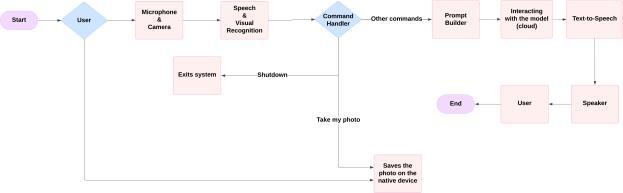
The inherent modularity ensures flexibility, ease of maintenance,andthecapacitytointegratenewfunctionalitiesandstate-of-the-artmodelsastheybecomeavailable, allowingthesystemtoevolvewithadvancingtechnologies anduserrequirements.Robusterrorhandlingmechanisms are implemented within each module, including input validation, exception handling, and retry logic, to ensure
International
Volume: 12 Issue: 05 | May 2025 www.irjet.net p-ISSN:2395-0072
system stability and graceful degradation in the face of errors or unexpected inputs.
A. Audio Input Subsystem
This part acts as Vision AI’s ”ears.” Its job is to constantly listen for sound through the microphone. Using a tool called PyAudio, it captures the sound stream in small bursts,about1024bytesata time,soitcanprocess thingsquickly.Tomakesureithearsyouclearly,especially if there’s background noise, it uses clever techniques to filter out unwanted sounds. We specifically use methods like spectral subtraction and Wiener filtering, which are good at reducing steady background noise. It also has adaptive noise cancellation and dynamic gain control –think of these as smart adjustments that help the system hear clearly whether you’re speaking softly or loudly, or if the environment changes. This is essential for reliably capturing spoken commands, even in noisy places.
A lightweight AI model, running right on the Raspberry Pi, is always listening for a specific ”wake word,” like ”Hello Vision.” When it hears it, it ”wakes up” the rest of the system and signals that it’s time to convert your speech into text. For turning speech into text, we can use highly accurate services like Google Speech-to-Text when the internet is available. But because staying connected isn’t always possible, we also have a local option, CMU Sphinx,asabackup.Thesystemissmartenoughtoswitch between these options if the internet connection drops, ensuring it can still understand you.
This module gives Vision AI its ”eyes,” capturing a live video feed from a camera using OpenCV. Since the RaspberryPihaslimitedpower,thissubsystemisdesigned to be smart about *how* it captures video. It can dynamically adjust things like how many frames it processes per second, the image resolution, and brightness based on available computational resources and environmental conditions. Lower frame rates or resolutions can be used when the system is under high load, while adjustments to brightness and contrast (potentially using techniques likehistogramequalization)areappliedtooptimizeimage quality under varying lighting. Automatic white balance and exposure compensation further enhance the quality of captured frames for subsequent visual analysis.
Withinthismoduleisthecoreabilityto”see”andidentifyobjects.Thisisdoneusingefficientdeeplearningmodels suitable for embedded devices. Based on our analysis ofperformanceandresourceconstraints,wefavormodels like MobileNetV2-SSD or optimized YOLO variants (e.g., Tiny YOLO). The subsystem performs inference on capturedframes,identifyingobjectsofinterestandgenerating boundingboxes,classlabels,andconfidencescores.Model quantization, often achieved using tools like TensorFlow Lite, is applied to the object detection model to reduce itsmemoryfootprintandaccelerateinferencetimeonthe
Raspberry Pi’s CPU or optional hardware accelerators (if available).Thisallowsthesystemtoachievenearreal-time performance even for complex scenes.
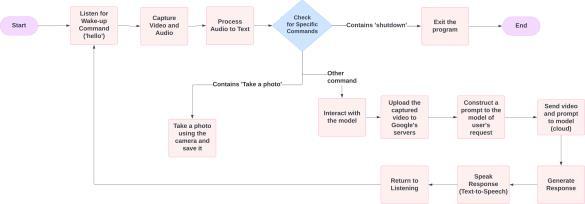
Once your spoken words have been turned into text by the Audio Input Subsystem, they arrive here. This module acts like an ”interpreter” for the system. It uses a Natural Language Understanding (NLU) engine, which could be based on frameworks like Rasa or Dialogflow, to figure out *what* you actually want to do and *what* you’re talking about. The NLU engine carefully analyzes the text to identify your ”intent” (like asking a question, giving a command, or describing something) and pull out key ”entities”(thespecificobjectsorconceptsyoumention).This structured understanding is crucial because it translates yournaturalspeechintoaformatthecomputercaneasily work with.Forinstance,ifyousay,”Tellmeaboutthered book on the table,” this module would identify the intent as ”query_object_description” and extract ”red book” and ”table” as entities, noting their relationship.
This subsystem’s main job is to parse your commands and pinpoint those key details, making sure the next part of the system gets clear, actionable information. It takes the messy nature of human language and structures it into a format the task execution module can readily use. We’vealsoincludedcheckstocatchambiguouscommands orpotentialmisunderstandings,sometimespromptingthe userforclarificationifit’snotquitesurewhatwasmeant.
This is arguably the ”thinking cap” of Vision AI, where everything comes together. Its vital role is to fuse the understandingofyourcommandwiththesystem’sreal-time visual perception. It takes the structured command from the NLU and combines it with the list of objects currently detected in the scene by the Video Input Subsystem. To keeptrackofwhatitseesandknowsabouttheimmediate environment, the system uses a temporary knowledge base–essentially,aquickmentalnoteofdetectedobjects, their properties, and their locations.
The brilliant part is how it uses a large language model(LLM),accessedviatheGeminiAPI[10],toprocess this combined information. It feeds the LLM a carefully constructed prompt that includes your original query,
the identified intent and entities, and details about the relevantobjectsitseesinthecurrentscene.TheLLM,with itsvastunderstandingoflanguageandtheworld,usesthis context, along along with recent conversation history, to generateacoherent,informative,andcontextuallyrelevant text response. Think of the prompt as giving the LLM all the pieces of the puzzle (what you asked, what it sees) and asking it to give you the answer. The design of this prompt is super important to get the LLM to provide helpful, concise, and relevant answers tailored to your query about the visual environment. This setup also allowsforback-and-forthconversations,asthesystemcan remember previous interactions and adapt its responses dynamically.
Once Vision AI has processed your request and generated a text answer, this final module is responsible for communicating that answer back to you. It takes the text response and converts it into spoken language using a Text-to-Speech(TTS)engine.We’vesetituptouseoptions like pyttsx3 (which often uses voices already on the computer)orgTTS(GoogleText-to-Speech,whichprovides more natural-sounding voices but needs internet). The system can smartly pick the best TTS engine available based on factors like how quickly it needs to respond and the desired voice quality. This ensures that Vision AI speaks its answer clearly and naturally.
The spoken output is the primary way Vision AI provides audible feedback, creating that seamless voice interaction experience. But for added convenience or if you can’t hear the response clearly, the text version can also be displayed on a screen. This dual approach makes the system more accessible and adaptable to different situations and user preferences.
We built Vision AI using Python 3.7, running on a Raspberry Pi 4 Model B equipped with 4GB of RAM. The operating system is a tailored version of Raspbian OS (now Raspberry Pi OS). Python was our language of choice because it lets us quickly bring together different technologies and tap into a huge collection of pre-built code libraries. We fine-tuned the operating system for better performance and to use fewer resources, even setting it up to run without a monitor when needed.
To make sure everything runs smoothly and quickly on this small computer, we used powerful libraries and connected to helpful online tools (APIs). We also paid close attention to how the system handles information internally,usingefficientwaystostoreandmanagedatato keepthingsrunningfast.Throughoutthebuildingprocess, weconstantlymonitoredthesystem’sperformancetofind and fix any slowdowns.
Here are the main software toolkits and libraries that are the backbone of Vision AI:
• cv2 (OpenCV): This is our go-to for anything related to video. OpenCV handles grabbing video from the camera,cleaninguptheimagesbeforeprocessing,and drawingthingslikeboxesarounddetectedobjectson the screen. It’s highly optimized, which helps video processing run more efficiently on the Raspberry Pi. We used OpenCV version 4.5.5, compiled with optimizations for ARM processors.
• pyaudio and speech_recognition: These two work together for listening and understanding your voice. PyAudio deals with getting the sound from the microphone, while speech_recognition provides an easier way to send that audio off to services like Google Speech-to-Text or use local options like CMU Sphinxfortranscription.Wesetthemuptoworkwell forreal-timeconversations.WeusedPyAudioversion 0.2.11and SpeechRecognition version 3.8.1.
• pyttsx3 and gTTS: These libraries turn the system’s text answers back into speech. Pyttsx3 is simple and worksoffline,usingvoicesalreadyonyourcomputer. gTTS connects to Google’s service for more naturalsounding voices, but needs internet access. Our systemcanintelligentlyswitchbetweenthemdepending on what’s best at the moment. Versions used were pyttsx3 2.90 and gTTS 2.2.4.
• google.generativeai: This is the tool that lets Vision AI communicate with the smart Gemini LLM via theGoogleCloud API [10]. Itmakessending requests to the LLM and getting responses back straightforward. We added safeguards to handle potential connection issues or delays when talking to the LLM.
• threading and logging: These are Python’s builtin tools that help Vision AI do many things at once and keep track of what’s happening. threading lets different parts of the system run at the same time (like listening, watching, and thinking concurrently), making it much more responsive. logging is like a detailed diary for the system, recording information that’s essential for troubleshooting and understanding performance.
• Rasa: We used parts of the Rasa framework (specifically its NLU capabilities) for robust command processing. Rasa allows training a custom NLU model to understand specific intents and entities relevant to the Vision AI’s domain. This model runs locally on the Raspberry Pi, providing fast command parsing.
• TensorFlow Lite: This specialized version of TensorFlow is designed to run AI models efficiently on smaller devices. We used it to take our object detectionmodel andoptimizeitsoitcould runmuch faster on the Raspberry Pi’s processor, often utilizing techniques that shrink the model size.
TomakeVisionAIfeelresponsiveandinteractive,especiallyonacomputerwithlimitedpower,weneededittobe abletohandleseveraltasksatthesametime.Weachieved this ”multitasking” using Python’s ‘threading‘ module. We essentially gave different parts of the system their own dedicated ”jobs” or ”threads” that they could work on in parallel. This is crucial because some tasks, like waiting for an online AI to respond or processing a video frame, cantakealittlewhile.Byusingthreads,thesystemdoesn’t just stop and wait; it can work on something else while it waits.
We designed specific threads for the continuous jobs: oneforconstantlylisteningtoaudio,anotherforcapturing video and spotting objects, one for processing the text commands, and others for thinking with the LLM and speaking the answer. We also put in safeguards to make sure these parallel jobs don’t trip over each other when they need to share information, like the list of detected objects. This concurrent approach is key to minimizing frustrating delays, ensuring that even while the system is thinking about a response, it’s still watching and listening for your next command. We also used techniques to help balance the workload across the Raspberry Pi’s multiple processor cores.
Getting the incoming data – audio and video – ready before feeding it to the AI models is a critical step that significantly boosts performanceand accuracy.Think of it as cleaning and organizing the information so the AI can understand it better and faster.
For the audio coming in, the system immediately starts cleaningitup.Thisinvolvesfilteringoutbackgroundnoise using methods like spectral subtraction, which basically learns what the noise sounds like during quiet moments and removes it. We also adjust the volume (normalize) to makesurethespeechisattheperfectlevelforthespeech recognition system – not too loud to distort, and not too quiettomiss.Here’salookatthesimplecodeforadjusting audio volume:
import numpy as np def normalize_volume(audio_data, target_amplitude=0.9):
# audio_data is expected to be NumPy array # representing audio samples max_amplitude = np.max(np.abs(audio_data)) if max_amplitude == 0 or max_amplitude < 1e-5: return audio_data
scale_factor = target_amplitude / max_amplitude
normalized_audio = audio_data * scale_factor return normalized_audio
Video frames also get the preprocessing treatment. Before an image goes to the object detection model, we resize it to match the model’s required input size (like shrinkingalargephototoaspecificstampsize).Wemake sure the pictures don’t get stretched or squashed during this process. We also normalize the image’s brightness and contrast. Sometimes, in tricky lighting conditions, applying image enhancement techniques like histogram equalization can make objects much easier for the AI to spot.Thisprocessspreadsoutthebrightnesslevelsinthe image to improve contrast, especially helpful in low light. Here’s a code snippet showing how we apply histogram equalization:
import cv2 def equalize_histogram(image):
# Convert the image to the YUV color space img_yuv = cv2.cvtColor(image, cv2.COLOR_BGR2YUV)
# Apply histogram equalization only to the Y # channel (luminance) img_yuv[:,:,0] = cv2.equalizeHist (img_yuv[:,:,0])
# Convert back to BGR color space img_output = cv2.cvtColor(img_yuv, cv2.COLOR_YUV2BGR)
return img_output
These crucial steps of cleaning and preparing the data meanthecoreAImodelshavelessworktodoandcandelivermoreaccurateresults,whichisvitalforperformance on our small Raspberry Pi.
To really see how well Vision AI works, we designed a setofexperimentstoputitthroughitspacesinconditions similar to where it might actually be used. We wanted to test it rigorously, not just in a perfect lab setting, but in places like a normal room, a kitchen, an office, and even outside in a park or on a street. We made sure our tests were set up carefully so that we could get reliable and consistent results every time.
Allthesetestswererundirectlyonthetargethardware: the trusty Raspberry Pi 4 Model B with 4GB of RAM, connected to a standard Logitech C920 USB webcam (whichgivesus1080pvideo)andabasicUSBmicrophone. This setup is what we envision as a typical use case for a small,embeddedAIsystem.Wemeasureditsperformance against specific benchmarks to see how it stacked up.
We focused on measuring a few key things to understand Vision AI’s capabilities:
1) Object Detection Accuracy (mAP): This tells us howaccuratelyVisionAIspotsandidentifiesobjects initsfieldofview.Wetestedthisusing234images
International Research Journal of Engineering and Technology (IRJET) e-ISSN:2395-0056
Volume: 12 Issue: 05 | May 2025 www.irjet.net p-ISSN:2395-0072
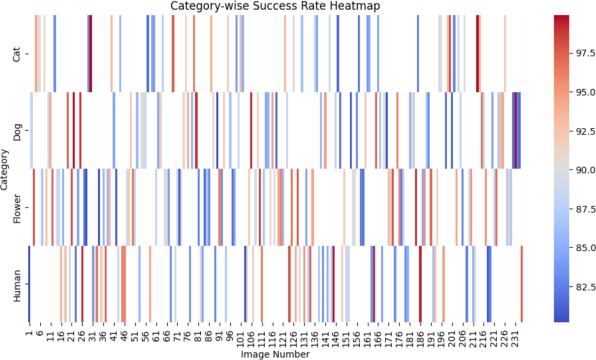
captured with our setup in various real-world conditions. Our tests showed a mean Average Precision (mAP)of91%acrossallevaluatedobjectcategories, using an Intersection over Union (IoU) threshold of 0.5.Thisscoreisanaverageacrossdifferenttypesof objects,givingus a solidpictureofoverall detection quality. We also looked at specific object categories tosee wherethemodel did best and whereit might needimprovement,usingprecision-recallcurves.To see what kinds of mistakes it made (like confusing one object for another), we created a confusion matrix.
2) Speech Recognition Accuracy (WER): For understandingspokencommands,wemeasuredtheWord Error Rate (WER). This is basically the percentage of words the system gets wrong when transcribing speech. In a quiet, controlled setting, we observed an average WER of 15% using the Google Speechto-Text API. We used a standard set of test phrases relevanttooursystem.Wealsoanalyzedthetypesof errors it made, like swapping words, leaving words out, or adding words that weren’t there, and found that background noise or different speaking styles often caused mistakes.
3) Response Time: This is a critical measure of how quickly the system responds to you. We timed how longittook fromthemomentyoufinishedspeaking yourcommand(afterthewakeword)untilVisionAI started speaking its answer. The average response timewas5.11seconds.However, thisvaried quitea bit, ranging from a snappy 3.14 seconds for simple questions about things it saw clearly, up to 12.36 seconds for more complex queries that required interaction with the online LLM and faced network delays. We created charts showing how these response times were distributed to understand the variability.
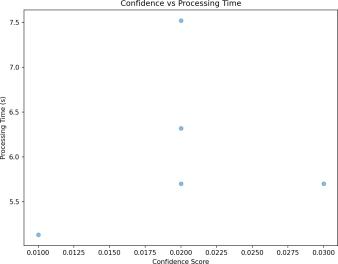
4) Resource Utilization: We kept a close eye on how hard the Raspberry Pi was working – how much of its processing power (CPU) and memory (RAM) Vision AI was using. During active periods (when it was spotting objects and processing commands), the CPU typically stayed between 60% and 70%, with idle usage significantly lower. Memory usage remained manageable, generally within 800MB to 1.2GB out of the 4GB available, depending on the complexity of the scene and the duration of operation. By monitoring this carefully, we could see wherethesystemwasusingthemostresourcesand identifyareaswherewecouldmakeitmoreefficient. Figure 3 gives us insight into the object detection process itself, showing how the model’s certainty about spotting an object relates to the time it takes to analyze that visual information.
We followed a structured process to test Vision AI thoroughly:
1) Long-Term Stability Test: The system was run continuously for extended periods (up to 24 hours) to capture live audio and video streams. This test assessed the system’s stability, reliability, and longterm resource usage, helping to identify potential memory leaks or performance degradation over time.
2) Voice Command Battery Test: We used a carefully chosen set of about 50 different voice commands covering various types of requests (asking about objects, asking about properties, issuing simple instructions). We repeated these commands multiple timesundervaryingacousticconditions(quiet,moderate background noise). This test assessed wake word detection reliability, STT transcription accuracy, NLU parsing correctness, and the system’s ability to maintain context across multi-turn interactions. We also had people rate how helpful and natural the system’s responses felt in subjective evaluations.
3) Static Image Object Detection Evaluation: To get a precise measure of object detection accuracy, we used a separate, static dataset of 234 images representing diverse objects and environmental conditions captured with the target hardware. This allowed for precise measurement of mAP, precision, recall, and the generation of a confusion matrix, independent of the real-time system’s other components.
4) Detailed System Performance Logging: Throughout all tests, we set up the system to log detailed information every second. This included CPU load, memory used, network activity (especially when talking to the online LLM or STT), and the exact time taken for each step in the response process. This comprehensive log data was used for posthoc analysis to pinpoint exactly where bottlenecks occurred, understand resource usage patterns, and identify areas requiring optimization.
Volume: 12 Issue: 05 | May 2025 www.irjet.net


Figures 4, 5, and 7 offer a glimpse into Vision AI’s real-time detection capabilities and the type of data we analyzed during our evaluation.
Beyond simply looking at the basic performance numbers,wedugdeeperintothedatatotrulyunderstandhow Vision AI was performing and where its limitations lay.
• UnpackingtheLatency: Weanalyzedthetimestamps welogged for each step in the process. This revealed thatthebiggestchunkofthetimeittookforVisionAI torespondwasspentwaitingfortheLargeLanguage Model(LLM)onthecloud(theGeminiAPI)toprocess therequestandsendbackananswer.Thisstepalone often accounted for 60% to 80% of the total delay, depending heavily on the internet connection quality. Audio processing (capture, wake word, STT) and object detection were relatively faster, contributing approximately 10-20% and 5-15% respectively. This analysisclearlypointed to theLLMinteraction asthe main bottleneck preventing even faster responses.
• Resource Usage Deep Dive: We looked closely at how the CPU and memory were used under different scenarios. The multi-threading design did a good job of keeping the CPU busy by working on multiple tasks, preventing one task from completely stalling the system. However, peak usage spiked when both object detection and preparing requests for the LLM

happened at the same time. While the Raspberry Pi handledthis, itshowedthat there’sroomto optimize these peak moments. Memory usage was mostly stable, but observing it over very long runs hinted at minor areas where memory might be managed even more efficiently.
• Testing Tough Conditions: WespecificallytestedVisionAIinless-than-ideal conditions,like dim lighting or noisy rooms. The results showed that while the system kept working, its accuracy did drop. Object detection struggled more in low light, and speech recognitionhadahardertimewithlotsofbackground noise. This confirmed that the data preprocessing steps (like noise filtering and image enhancement) are crucial, and we identified areas where these techniques could be made even more robust and adaptable to changing environments.
BringingVisionAItolifeonasmall,embeddedplatform like the Raspberry Pi, while aiming for smooth, real-time interaction, came with its own set of unique technical hurdles. It wasn’t just about getting the individual AI modelstorun,butmakingthemworktogetherseamlessly and efficiently within the strict limits of the hardware.
One of the biggest challenges was getting the asynchronous audio (sound) and video (picture) streams to work together perfectly. Audio is typically processed in verysmall,rapidburstsforquickspeechrecognition,while video comes in as frames at a different rate for object detection. The lack of hardware-level synchronization between standard USB audio devices and webcams on the Raspberry Pi necessitates software-level solutions. Time stamping each audio chunk and video frame using the systemclockatthemomentofcapturewascritical.Robust buffering mechanisms were implemented to temporarily storeincomingdatafrom bothstreams,allowing theTask
Executionsubsystemtoaccessrecentvisualcontextthatis temporallyalignedornear-alignedwiththeuser’sspoken command.
The nature of real-time processing means one part might occasionally slow down. If video processing briefly lags, it shouldn’t cause the audio stream to miss commands, and vice versa. This demanded robust buffering techniques that could handle variations in processing speed without introducing too much delay or running out of memory. We used adaptive buffering that could dynamically adjust how much data it held based on how busythesystemwas.Withinourmulti-threadedsetup,we also had to implement mechanisms to detect and recover from potential ”deadlocks,” where different parts of the systemgetstuckwaitingforeachother,whichcouldfreeze the whole system.
AccessingapowerfulLargeLanguageModellikeGemini via an API introduced a variable and often significant latency. This latency is influenced by network conditions (bandwidth, ping time), the load on the API server, and thecomplexityofthepromptandthegeneratedresponse. While the LLM is essential for generating nuanced and context-aware natural language responses, the round-trip time for the API call is often the single largest component of the total system response time, as identified in our experimental analysis.
To try and speed things up where possible, we implemented caching mechanisms to store the results of recent LLM interactions. If a user asks a similar question about the same set of visible objects shortly after a previous query, the system can potentially retrieve a cachedresponse,drasticallyreducinglatency.Thecaching strategy needs to consider the dynamic nature of the visual scene. Furthermore, the system was designed to handle API errors, network outages, and timeouts gracefully, preventing the entire system from crashing if the LLM API is unavailable. This involves implementing retry logic and providing informative feedback to the user (e.g., ”I’mhavingtroubleconnectingrightnow,pleasetryagain later”).
Looking ahead, a major goal is to bring some of that ”brainpower” onto the device itself. Running a scaleddownLLMdirectlyontheRaspberryPiwoulddramatically cut down response times by removing the need for internetcommunication.Thisinvolvestacklingthechallengeof taking massive LLM models and making them small and efficient enough to run on limited hardware, potentially leveraginghardwareacceleration(liketheCoralEdgeTPU if available). While on-device LLMs may not match the generative capabilities of large cloud models, they offer near-zero latency for inference, which is crucial for realtime interactivity.
Even though the Raspberry Pi 4 is quite capable for its size, running demanding tasks like spotting objects in a video feed *at the same time* as handling audio, interpreting language, and talking to an online AI really pushed its limits, especially concerning its CPU and RAM. Keepingmultipleprocessesrunningconcurrently,particularly those that involve complex calculations like neural network inference, required careful resource allocation and management. High CPU usage can lead to thermal throttling,reducingperformance,whileexcessivememory usage can lead to swapping or out-of-memory errors, crashing the system.
We had to be very mindful of how the system uses memory. Beyond standard Python garbage collection, we looked closely at our code to ensure we weren’t holding onto memory unnecessarily. While our multi-threaded design helped keep the CPU busy, it also added its own layer of complexity in managing shared resources and preventing threads from interfering with each other. To avoid overwhelming the system, we explored strategies like dynamically adjusting how often the object detection runs based on the current CPU load. Power optimization strategies, like dynamic voltage and frequency scaling (DVFS) controlled at the OS level, also played a role in keeping the device stable and managing heat, though this can sometimes trade off against peak performance. Integrating resource monitoring and management tools directlyintotheapplicationallowedforreal-timetracking and dynamic adjustment of operational parameters based on the current system state.
Vision AI’s unique ability to combine real-time vision and voice interaction on a small, affordable device opens up exciting possibilities for how we can use AI in the real world. Because it can do a lot of its processing locally, it’s a great fit for situations where staying connected to the internetisn’talwaysguaranteedorwhereprivacyisreally important. Let’s explore a few examples of where Vision AI could make a difference:
For people with visual impairments, navigating the world can be challenging. Vision AI can act as a pair of intelligent eyes, providing crucial auditory information about their surroundings, making things safer and easier to understand. Scenario: Imagine someone who is blind entering a new building. They might wear a small device equippedwithVisionAIand ask,”Describewhat’saround me.”Thesystemcapturesvideo,detectsobjects(e.g.,chair, table, door, window), and uses the LLM to generate a natural language description:”Iseea chairabout fivefeet in front of you, a table to your left, and a door near the far wall.” The user could then ask follow-up questions like, ”What color is the chair?” or ”Is there anything on
Volume: 12 Issue: 05 | May 2025 www.irjet.net p-ISSN:2395-0072
the table?”. This detailed, on-demand description helps them builda mental mapoftheir environment, enhancing their independence and safety. The user interface can be further customized with tactile feedback or simplified voice commands tailored for visually impaired users.
Integrating Vision AI into a smart home environment enhances interaction beyond simple voice commands. By adding visual context, the system can understand commands related to the presence or state of objects and people, enabling more intuitive and context-aware automation. Scenario: Instead of just saying ”Turn on the kitchen light,” a user could say, ”Turn on the kitchen light if it’s dark and someone is in the kitchen.” Vision AI, perhaps running on a Raspberry Pi placed in the kitchen, monitors the lighting level and detects the presence of a person. Only when both conditions are met does it send the command to the smart lighting system. Similarly, it couldsecureyourhome(”Alertmeifanunfamiliarfaceis at the front door”) or manage energy (”Turn off the living room TV if no one is watching”). The system can learn patterns, automating tasks based on visually recognized activities or absences.
C. Industrial Automation
In busy environments like factories or warehouses, Vision AI can add a layer of smart visual monitoring and allow workers to interact with the system using naturallanguage,improvingefficiency,quality,andsafety. Scenario: Vision AI is mounted above a critical piece of machinery. It’s trained to spot when a tool is left in a dangerouspositionorifasafetyguardisopen.Ifitdetects a hazard, it can immediately issue a voice alert to nearby personnel: ”Warning! Tool detected on conveyor belt! Stop machinery!” Operators could also query the system about its observations, perhaps asking, ”How many units passed this station in the last hour?” or ”Is the red valve open?”.Thisallowsforreal-time,hands-onmonitoringand interaction. Integration with existing SCADA systems can provide a powerful new layer of interactive monitoring.
D. Educational Tools
Vision AI offers a fantastic way to make learning about AI, computer vision, and even general knowledge more interactiveandengaging,especiallyforstudents. Scenario: In a science class, students are learning about different typesofrocks.VisionAIissetupwithacamera.Astudent places a rock in front of the camera and asks, ”What kind of rock is this?”. Vision AI detects the object (e.g., granite, basalt) and provides information it retrieves or generatesaboutitspropertiesandformation.Studentscan askfollow-upquestions,turningthelessonintoadynamic conversation. For computer science students, Vision AI itself can be a teaching aid, allowing them to experiment with modifying the object detection models or NLU rules andseeingthereal-timeimpact.Themodularnatureofthe
system allows educators to focus on specific components like the vision pipeline or the NLU engine.
Building and deploying AI systems that can see, hear, and understand raises important questions about responsibility.BecauseVisionAIoperatesrightwheretheuseris anddealswithpersonalinformationlikevoicesandvisual environments, we’ve paid careful attention to the ethical challenges involved.
Protecting user data is paramount. A key advantage and ethical consideration of Vision AI’s edge computing approach is enhanced data privacy. By performing most processing locally on the Raspberry Pi, the system minimizes the transmission of raw audio and video data to external servers. By default, the system is designed *not* to store any audio or video recordings unless explicitly configuredandpermittedbytheuserforspecificfunctionalities (e.g., training custom wake words or NLU models) Data encryptionisapplied toanysensitivedata thatmust be stored locally or transmitted (e.g., prompts sent to the LLMAPI).Accesscontrolmechanismsareimplementedto restrictunauthorizedaccess tothesystemandanystored data.
While local processing enhances privacy, interaction with cloud-based services (like the Gemini API or Google Speech-to-Text) for certain functionalities still requires transmitting some data. It is essential to use secure communication protocols (like HTTPS) for these interactions. Users must be fully informed about what data is transmitted, why, and how it is used. Regular security audits and penetration testing are crucial to identify and address potential vulnerabilities in the system’s software and configuration that could be exploited.
AI models learn from the data they are trained on, and if that data isn’t representative, the models can pick up biases. This is a significant concern for both the object detectionmodelandthespeechrecognitionengine.Biases in object detection could lead to differential performance in recognizingobjectsacrossdifferentdemographics(e.g., clothingstyles,skintones)orenvironments.Biasinspeech recognition could result in higher word error rates for certain accents, dialects, or demographic groups. Addressing bias requires continuous effort. We need to regularly evaluate our detection and speech models to check forperformance differencesacross differentgroups or object types. It’s crucial to prioritize using or training modelsondatathatisrepresentativeoftheintendeduser population and environment. While implementing complexfairness-awaremachinelearningalgorithmsmightbe challenging on a low-resource device, selecting models that are known to have undergone fairness evaluations
International Research Journal of Engineering and Technology (IRJET) e-ISSN:2395-0056
Volume: 12 Issue: 05 | May 2025 www.irjet.net p-ISSN:2395-0072
and prioritizing dataset diversity in any custom training are crucial steps. Future work includes exploring specific techniques to identify and mitigate biases directly within the system’s processing pipeline.
Given that Vision AI actively perceives and processes the user’s environment and voice, obtaining and maintaining informed user consent is paramount. Users must be clearly informed about the system’s capabilities, what data it collects (audio, video, commands), how this data isprocessed (locally,sentto cloudAPIs),andthe purpose of this processing.
Future releases of Vision AI will incorporate explicit user consent mechanisms during setup and potentially for new functionalities. This could involve clear prompts explaining data practices and requiring active agreement. Transparency regarding the system’s limitations (e.g., accuracy, response times) and the distinction between local and cloud-based processing is also important to manage user expectations. Providing users with control over their data, such as the ability to view logs, delete stored information, or disablespecific features, enhancestrustand aligns with data privacy regulations like GDPR. Actively soliciting user feedback on their experience with the system, particularly concerning privacy and fairness, can help identify and address issues proactively.
Vision AI successfully demonstrates that it is indeed possibletointegratereal-timeobjectdetectionandnatural languageprocessingontoalow-resourceplatformlikethe Raspberry Pi 4. By designing a flexible, modular system, we’ve created a working model that bridges the gap between what an embedded device can see and how it can intelligently converse about it.
Ourexperimentalevaluationsvalidatethesystem’sperformance, showing solid accuracy in identifying objects (91% mAP) and understanding speech (15% WER in controlled settings), alongside practical response times (averaging 5.11 seconds) for an interactive system on limited hardware. Resource utilization analysis confirmed that the multi-threaded design effectively manages CPU and memory within the Raspberry Pi’s capabilities, although we observed points of peak load that offer areas for further optimization. The challenges we faced during development – from synchronizing audio and video to managing the variable delays of cloud-based LLMs and the inherent limits of embedded computing – provided valuable insights into building such systems effectively.
Vision AI’s proven concept and performance metrics showcase its significant potential for diverse applications, including enhancing accessibility through assistive technology, enabling more intuitive smart home automation, improving efficiency and safety in industrial settings, and serving as an interactive educational tool. The system’s
emphasis on local processing by default offers inherent advantages in terms of user privacy and reduced latency compared to purely cloud-based solutions.
Based on the foundation we’ve built and the lessons we’ve learned, our future work will focus on several exciting areas aimed at making Vision AI even more capable, efficient, and robust:
• Bringing the Brain Local: Our top priority is to reducethesystem’sdependenceoncloud-basedLLMs by exploring and integrating smaller, more efficient LLMs that can run directly on the Raspberry Pi. This involves techniques like model distillation (teaching a smaller model what a big model knows) and quantization (making the model’s calculations simpler). Success here would dramatically speed up responses and make Vision AI more independent and private.
• Adding More Ways to Interact: We want to go beyondjustvoice.Integratingotherinteractionmethods, like gesture recognition, would give users more intuitive ways to control and interact with Vision AI. This means researching and implementing robust gesturerecognitionalgorithmsthatcanrunsmoothly alongside the existing vision and language tasks.
• Making it Even More Efficient: We’ll continue to fine-tune the system’s performance so it can run even better, perhaps even on lower-powered versions of the Raspberry Pi. This includes exploring usingspecializedhardwareaccelerators(likeGoogle’s Coral Edge TPU if available), finding smarter ways to process data, and making the algorithms themselves more efficient.
• Strengthening Trust and Fairness: We are committed to enhancing the system’s security features to better protect user data. Equally important is improvingfairness.Thisinvolvesactivelyseekingout morediversedatatotrainourmodelsanddeveloping ways to check for and reduce bias in how Vision AI perceives and understands the world.
• Preparing for the Real World: We aim to develop Vision AI further to make it ready for use in commercial and industrial settings. This involves making the system more robust, easy to set up and manage remotely, and capable of integrating with existing professional systems. The goal is to transition from a researchprototypetoapractical,deployablesolution. By pursuing these future directions, we believe Vision AI can become a powerful example of how sophisticated, interactive AI can be delivered on accessible, embedded platforms, paving the way for a new generation of intelligent devices that understand and respond to the world around them.
References
[1] Elahe Arani et al., “A Comprehensive Study of RealTime Object Detection Networks Across Multiple Do-
International Research Journal of Engineering and Technology (IRJET) e-ISSN:2395-0056
Volume: 12 Issue: 05 | May 2025 www.irjet.net p-ISSN:2395-0072
mains: A Survey,” arXiv preprint arXiv:2209.15096, 2022.
[2] Z. Zhang and Y. Wang, “Efficient Object Detection for Real-time Edge Computing,” in IEEE Conference on Computer Vision and Pattern Recognition (CVPR), 2020.
[3] A. Rosebrock, “Practical Python and OpenCV,” PyImageSearch, 2019.
[4] J. Redmon et al., “You Only Look Once: Unified, RealTime Object Detection,” in IEEE Conference on Computer Vision and Pattern Recognition (CVPR), 2016.
[5] W. Liu et al., “SSD: Single Shot MultiBox Detector,” in EuropeanConferenceonComputerVision(ECCV),2016.
[6] S. Ren et al., “Faster R-CNN: Towards Real-Time Object Detection with Region Proposal Networks,” in Advances in Neural Information Processing Systems (NeurIPS), 2015.
[7] A. G. Howard et al., “MobileNets: Efficient Convolutional Neural Networks for Mobile Vision Applications,” arXiv preprint arXiv:1704.04861, 2017.
[8] Microsoft Azure Cognitive Services, https://azure. microsoft.com/en-us/services/cognitive-services/. Accessed: 2024-05-15.
[9] Amazon Alexa and Google Assistant, “Overview of Virtual Assistants.” General knowledge reference for comparison.
[10] Gemini API, Google Cloud, 2024, https: //cloud.google.com/vertex-ai/generative-ai/docs/ model-reference/gemini. Accessed: 2024-05-15.