TeacherGuide-RaspberryPiPicoLevel11
Copyright©2026
Author:ErinGoodwin
Editors:LindseyOwnandDanaAlkhatib
ISBN:978-981-17737-5-4
Publishedby: SKOOL21PTE.LTD.
71RobinsonRoad,#14-01,068895,Singapore
FirstEditionpublishedbySKOOL21PTELTD-Singapore,2024
SecondEditionpublishedbySKOOL21LLC-UnitedStates,2026
No part of this book may be reproduced, distributed, or transmitted in any form or by any means, including photocopying, recording, or other electronic or mechanical methods, without the prior written permission of the publisher, except in the case of brief quotations embodied in critical reviews and certain other non-commercial uses permittedbycopyrightlaw.
Forpermissionsorinquiries,pleasecontact:
Email:info@skool21org
Website:https://skool21.org
Address:600CaliforniaSt,#13-021,SanFrancisco,CA94108,UnitedStates
Preface WelcometotheFutureofTeachingandLearning! Thankyouforjoiningusonthisexcitingjourney!TheSKOOL21STEMInnovatorsseriesis designednotonlytoignitecuriosityinstudentsbutalsotoempowerteacherstolead meaningful, hands-on STEM learning experiences. Through this series, you will guide young innovators as they explore, design, and solve real-world challenges using science,technology,engineering,andmathematics(STEM).
BuildingonaStrongFoundation EachleveloftheSKOOL21STEMseriesbuildsuponthepreviousone,creatingastrong continuum of learning — from simple machines to advanced 3D modeling. Students travel through key technological eras, from the Industrial Revolution to the innovations shaping our future. No matter their starting point, every learner will discovernewskillsanddeeperunderstandingalongtheway.
LearningbyDoing At SKOOL21, we believe students learn best by doing. Each book comes with a comprehensive STEM kit, enabling students to build, test, and explore concepts through hands-on challenges. As a teacher, you will facilitate engaging projects where students actively create, problem-solve, and apply critical thinking skills — all whilehavingfun.
MakingaReal-WorldImpact Every project is designed to connect learning to real-world issues, inspired by the SustainableDevelopmentGoals(SDGs).Throughthesechallenges,studentsseehow their ideas can contribute to solving problems like clean water access, renewable energy, and environmental conservation empowering them to envision a better world.
TeachingLikeaPro The SKOOL21 STEM program aligns with international standards and best practices, ensuring that both teachers and students are developing the collaboration, innovation, and design thinking skills valued in today’s world. You’re not just supporting schoolwork — you’re preparing the next generation of thinkers, leaders, andchangemakers.
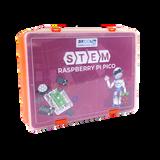
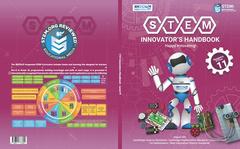
IntroductiontotheKit TheSKOOL21STEMRaspberryPiPicoLearningKitisahands-onelectronicsand codingkitdesignedforLevel11students.PairedwiththeSTEMInnovators Handbook,itintroduceslearnerstoembeddedsystems,physicalcomputing, andreal-worldautomationthroughengaging,project-basedlearning.
AttheheartofthekitistheRaspberryPiPico,acompactyetpowerful microcontrollerpoweredbytheRP2040dual-coreArmCortex-M0+processor. Itenablesstudentstobuildresponsivesystemsthatconnectcodewithrealworldhardware.
TechnicalFeatures
ProgrammingLanguages
CommunicationInterfaces
RP2040chipdesignedbyRaspberryPi
Dual-coreArmCortex-M0+@133MHz
26multifunctionGPIOpinsforinput/outputtasks SupportsMicroPythonandC/C++
16controllablePWMchannelsformotorandsignalcontrol 264KBSRAMand2MBFlashmemory
3externalADCinputsplusa+built-intemperaturesensor
2×UART,2×I²C,2×SPIforsensorandmodulecommunication
USB11withdrag-and-dropprogrammingviamassstorage
8PIOstatemachinesforcreatingcustomperipheralsupport
LessonStructure Each lesson in the handbook follows a structured format to ensure clarity and effective implementation. A sample solution is also found at the end of each lesson.Thestructureincludes:
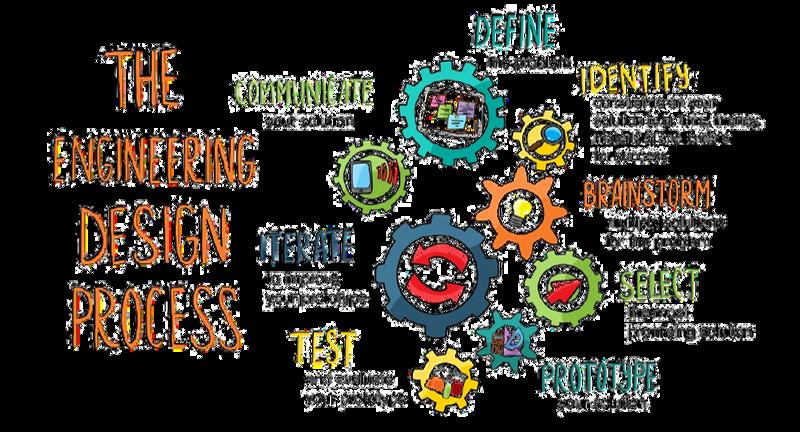
TheEngineeringDesignProcess The Engineering Design Process (EDP) is a systematic approach used by engineers and designers to solve problems and create innovative solutions. It provides a structured framework for developing new products, processes, or systems by following a series of well-defined steps. This process is not only applicable in engineering, but is also widely used in various STEM disciplines to tacklechallengesanddevelopcreativesolutions.
For students in first grade and above, the typical Engineering Design Process follows multiple iterative steps, including identifying a problem, researching, brainstorming,designing,prototyping,testing,andrefiningsolutions.
This structured approach encourages creativity, critical thinking, and iteration, formingastrongfoundationforfutureSTEMlearning.
FosteringSocialSkills STEM activities naturally build key social skills. Teachers can help students practice and strengthen these skills by guiding them during group work, discussions,andprojectchallenges
Keysocialskillsdevelopedinclude:
Collaboration
Encouragestudentstoshareideas andassignrolesduringgroup worktobuildteamworkand respectfordifferentperspectives
CriticalThinking
Promptstudentstoask"why"and "whatif"questionswhensolving problemsordesigningsolutions
EmpathyandRespect
Remindstudentstovalue everyone 'sideasandsupport peersbyusingkind,respectful language.
ConflictResolution
Coachstudentstotalkthrough disagreementscalmlyandfind solutionsthateveryonecan accept
Reflection
Buildreflectionintotheprocessby askingstudentswhatworkedwell, whatwaschallenging,andwhat theywoulddodifferentlynexttime
Communication
Modelclearcommunicationand askstudentstoexplaintheir thinkingandlistencarefullyto teammates
Problem-Solving
Challengestudentstotrydifferent strategieswhentheyface obstaclesandpraisepersistence.
TimeManagement
Helpteamssetmini-deadlines andguidethemtobreakprojects intosmaller,manageabletasks
PresentationSkills
Givestudentsregularchancesto presenttheirworktopeers,using clearspeakingandsupportive feedback
Teamworking
Celebratestrongteamworkby recognizingwhenstudentsshare leadership,encourageeachother, andsolveproblemstogether
Teaching STEM also teaches students how to think, work, and lead. By actively supporting social skills during projects, teachers prepare students not just for academicsuccess,butforfuturecareersandlifechallenges.
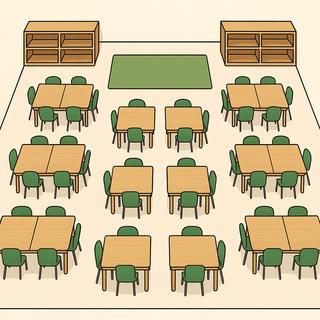
MakerspaceSetup Amakerspaceisacreative,hands-onareawherestudentsexploreSTEM conceptsthroughbuilding,experimenting,andsolvingproblemstogether.This guideisdesignedforteacherswhoarenewtoSTEMandlookingforclearstepsto setupandmanageamakerspace.
MaterialsManagement: STEMClassroomManagement STEMclassesarehands-on,highlyengaging,andoftennoisy—that’sagood thing!Butwithoutclearroutinesandstructures,theycanquicklybecome chaotic.Awell-managedmakerspaceallowsstudentstoexploreandinnovate safely,responsibly,andcollaboratively.
STEMClassSessionRoutine
Setaclearandconsistentstructuretoeachsessionsostudentsknowwhatto expectandstayfocused:
ToolandMaterialsRules:
GroupManagementwithTeamRoles
Groupworkcanbemessywithoutstructure.SKOOL21encouragesstudent collaboration,sorotatingroleshelpsbalanceresponsibilityandensure activeparticipation:
Leader
Material Manager
Reporter
Testing Supervisor
Collectskits/materialsfromtheteacher,ensuressupplies arereturnedpost-build.
Sharesoutcomes,challenges,andsolutionswiththeclass
Evaluatesthemodel,givesfeedback,suggestschanges.
HybridApproach (BlendingAllModels) Usecurriculum-linkedprojectsduringcoreclasses.Forexample,inaGrade4mathclassyou mightuseaSKOOL21projectongearstoteachratios,orinscienceclassstudentsmight buildamodelecosystem Smallerorsingle-sessionactivitiesfitwellhere
Reservelonger,open-endedprojectsforSTEMclassorthemakerspace.Complex engineeringchallenges(robotdesign,3Dmodeling,advancedcoding)needlongerblocks, sothesesuita90-minSTEMperiodorseriesoflabsessions.
Offerstudentsaspaceforexplorationthatdoesn’tfitthecurriculumortimeline.These projectscanbedrivenbystudentinterestandcanspanseveralweekswithoutpressureto “coverthecurriculum.”
LessonPlans andAnswerkey Project1:BotanicalSensor LessonPlan LearningObjectives
Attheendofthelesson,thelearnerswill:
Duration: 90minutes
Buildaworkingtemperatureandhumiditysensorsetup. WriteandrunPythoncodetodisplaytemperatureandhumidityvaluesonanLCD ApplymathematicalformulastoconvertCelsiustoFahrenheitandviceversa. Reflectonhowenvironmentalmonitoringcontributestosustainableagriculture.
Materials
Vocabulary
Tolosewatervaporthroughthestomata
Avasculartissuethattransportswaterthroughoutaplant Anelectricalcomponentthatmeasuresandreportsavalue.
Preparation(TeacherTo-DoBeforeClass)
Logintoalllaptops OpenthePythonIDEyouuseforRaspberryPiPico(Thonny)andsignin toeachlaptoponadifferentgroupaccount LeavetheIDEopentoablankscript FlashandtestonePicopergroup:install/verifyMicroPython,confirmtheUSBserialport appears,andrunasimple“blink”scripttocheckconnections.
Preparetheclassmaterials
Preloadstarterfiles/librariesoneachlaptopandcreateaprojectfolderforsavingcode SetupandtestonesampleworkingRaspberryPiPicodemo(Pico+sensor/LED)for projectiontotheclass.
Checktheprojector/speakers,ensurealllaptopshaveinternet(fordocs)andlocalcopies ofdatasheets,andverifyyoucantransferfilestoPicosoneachmachine.
LearningActivities(Session1)
1 ReadtheIntroductionaloudorassignastudenttoreadit
2 Askstudentstosharetheirpriorknowledgeaboutplantgrowthandenvironmental monitoring.
3. Discusswhytemperatureandhumidityareimportantingreenhouses.
1. ReadtheProblemStatement:"Zarawantstodevelopatemperatureandhumiditymeterto ensurehergreenhousemaintainstheoptimalconditionsneededforidealplantgrowth."
2 Askstudents:
a. Whatistheproblem?(Maintainingoptimalplantconditions)
b. Whoistheclient?(Zara,agreenhousegrower)
c Definetheprojectgoals:
d. Buildaworkingsensorsetup.
e. DisplaytemperatureandhumidityontheLCD.
1. HavestudentsbrainstormhowtointegratetheLCDintotheirdesignforbettervisualisation.
2 Askstudentstosketchtheirdesignandlabelconnections,ensuringclarityforthebuild phase.
1 GuidestudentstocorrectlyinserttheRaspberryPiPicointothebreadboardandlocatethe GND,3V3,andGP16pins.
2. DirectstudentstoconnecttheDHT11sensortotheappropriatepinsontheRaspberryPi Pico:Signal(S)toGP16,Voltage(V)to3V3,andGround(G)toGND
1. InstructstudentstoopenThonnyIDE,navigateto
Project 1a Temperature and Humidity Print.py,anduploadittothePico.
2 Askstudentstorunthecodeandobservethetemperatureandhumidityreadingsprinted intheconsole.Providetroubleshootingsupportasneeded.
1Allowgroupstosharetheirprogresswithanothergroup,andlookforsimilaritiesand differencesinhowtheyarecreatingsofar,recognizingthattheyarenotyetfinished.
EndofSession1
LearningActivities(Session2) 1. Promptstudentstomodifythetime.sleep()valuetoprintthereadingsatdifferentintervals (eg,everysecond,everyhour)
2. Discusshowsensorreadingsatspecificintervalshelpmonitorgreenhouseconditions effectively.
1. GuidestudentstowiretheLCDtotheRaspberryPiPico,connectingSCL,SDA,V,andGpins appropriately.
2 Instructstudentstouploadlcd128 32pyandlcd128 32 fontspy,thenrun Project 1b Temperature and Humidity MeterpytodisplayreadingsontheLCD
3. Directstudentstotesttheirsetupbycheckingifthecorrectvaluesaredisplayedonthe LCD
4 Encouragestudentstoevaluatewhetherthecurrentgreenhouseconditionsaresuitablefor plantgrowthandsuggestadjustmentsifnecessary.
1 Pairgroupsandhavethemsharetheirprojects,discussingdesignchallengesand solutions
2. Askstudentstoimprovetheirdesignsbasedonfeedbackorcreateanalternativedesign toachievethesamefunctionality
1. AssignstudentstoconverttemperaturevaluesbetweenCelsiusandFahrenheitusingthe formulaF=(C×1.8)+32
2 ChallengestudentstographtherelationshipbetweenCelsiusandFahrenheitvalues, highlightingthelinearcorrelation.
1 DiscusshowenvironmentalmonitoringsupportsSustainableDevelopmentGoal15:Lifeon Land.
2. Encouragestudentstowritehowtheirsensorprojectcouldhelpreduceenvironmental impactinagriculture MathandScienceConnection
EndofSession2
AnswerKey
MathandScienceConnection(canbeassignedhomeworkaswell)
IfZarawantsreadingseveryhour,time.sleep()shouldbesetto3600seconds.
Ifhumidityisbelow80%,Zaracanincreasehumiditybywateringplantsor addingahumidifiertothegreenhouse.
TouseGP17insteadofGP16,updatethecodelinedht pin=machinePin(16)to dht pin=machine.Pin(17).
Project2:PredatorDetector LessonPlan LearningObjectives
Attheendofthelesson,thelearnerswill:
Duration: 90minutes
BuildapredatordetectorusingaPIRmotionsensorandRGBLED. WritePythoncodetocontroltheRGBLEDbasedonPIRsensorreadings Analyzepredator-preyrelationshipstounderstandsurvivaltraits. Solvemathematicalproblemsrelatedtopredatordetectionfrequencies.
Materials
Vocabulary
PassiveInfraredSensorwhichdetectsmotion
Acomponentthatprovidesinformation,e.g.,asensor.
Acomponentthatindicatestheresultoftheinput,e.g.,anLED.
Preparation(TeacherTo-DoBeforeClass) Logintoalllaptops OpenthePythonIDEyouuseforRaspberryPiPico(Thonny)andsignin toeachlaptoponadifferentgroupaccount.LeavetheIDEopentoablankscript.
FlashandtestonePicopergroup:install/verifyMicroPython,confirmtheUSBserialport appears,andrunasimple“blink”scripttocheckconnections
Preparetheclassmaterials
Preloadstarterfiles/librariesoneachlaptopandcreateaprojectfolderforsavingcode.
SetupandtestonesampleworkingRaspberryPiPicodemo(Pico+sensor/LED)for projectiontotheclass
Checktheprojector/speakers,ensurealllaptopshaveinternet(fordocs)andlocalcopies ofdatasheets,andverifyyoucantransferfilestoPicosoneachmachine.
LearningActivities(Session1)
1. Readtheintroductionaloudoraskastudenttoreadit.
2. Discusshowpredatorsandpreyadaptforsurvivalusingexamplesofpredator-prey dynamics
3. Highlighttheroleoftechnologyinstudyinganimalbehaviorandbiodiversity conservation.
1. Readtheproblemstatement:"ArshadandMalikwanttocreateapredatordetectorto testifcertainspecieswillsurvivebetterinthewild"
2. Askthestudents:
a. Whatistheproblem?(Testingspecies'abilitytoavoidpredators)
b Whoistheclient?(ArshadandMalik,researchersstudyingwildlife)
3. Definetheprojectgoals:
a. DetectmotionusingaPIRsensor.
b ChangeRGBLEDcolourbasedonPIRsensorinputs
1. Encouragestudentstobrainstormideasforenhancingthedetector,suchasintegrating soundoutputfordetection.
2 Havethemsketchtheirdesign,labellingconnectionsforclarity
1. GuidestudentstoplacetheRaspberryPiPicofacedownintotheprototypeshield.
2 InstructthemtoconnectthePIRmotionsensorwirestotheappropriatepins:
a Signal(S)toGP2
b. Voltage(V)to3V3
c Ground(G)toGND
1. DirectstudentstoopenthefileProject 2a Predator Detector.pyinThonny.
2. AskthemtorunthecodeandtestthePIRsensorbywavingtheirhandtotrigger motiondetection
1. Allowgroupstosharetheirprogresswithanothergroup,andlookforsimilaritiesand differencesinhowtheyarecreatingsofar,recognizingthattheyarenotyetfinished.
EndofSession1 LearningActivities(Session2)
1. PromptstudentstomodifythecodetomaketheRGBLEDblinkfasterwhendetecting motion.
2 Askthemtoexplainhowmodifyingcodecanhelpbettersimulatepredator-prey scenarios
1. 1.GuidestudentstoconnecttheRGBLEDtothePicoPrototypeShield: a.LonglegtoGNDpin bOtherlegstoGP3,GP4,andGP5forred,green,andbluecolors
2 InstructthemtouploadProject 2b Predator Detector RGB LEDpyandtesttheRGBLED behaviorwithPIRsensorinputs.
1. Directstudentstotesttheirdetectorbysimulatingpredatormotion.
2 EvaluateiftheRGBLEDchangescolorsaccuratelybasedonthePIRsensor'sreadings
3 Pairgroupsandhavethemsharetheirdesignsandtestresults
4. Askstudentstoimprovetheirdesignbasedonpeerfeedbackorcreateanalternative mechanismformotiondetection.
1. Assignstudentstosolvetheevaluationproblemsrelatedtopredatordetection frequenciesandexponentialfunctions.
2 Discusshowmathematicshelpsmodelreal-worldscenariosinwildlifeconservation
1. Discusstheroleofpredatordetectorsinbiodiversityconservationandachieving SustainableDevelopmentGoal15:LifeonLand.
2 Encouragestudentstowriteashortreflectiononhowtechnologycanmitigatehumanwildlifeconflicts
AnswerKey
whichareevolutionaryadvantagesforsurvival.
Project3:NutritionTracker LessonPlan LearningObjectives
Attheendofthelesson,thelearnerswill:
Duration: 90minutes
BuildanutritiontrackingsystemusingakeypadandLCDdisplay. WriteandrunPythoncodetocalculateanddisplaynutritionalvalues Applymathematicalconceptstosolvereal-lifenutritionalproblems. Reflectontheroleofnutritioninmaintainingoverallhealthandwell-being.
Materials
Vocabulary
A unit for food energy equivalent to the heat needed to raise the temperatureof1gofwaterby1°C.
Molecules of amino acids which the body uses to build and repair musclesandbones
Molecules of fatty acids which provide energy when burned and are storedinfatcellsinthebodytobeusedwhenneeded
Preparation(TeacherTo-DoBeforeClass) Logintoalllaptops.OpenthePythonIDEyouuseforRaspberryPiPico(Thonny)andsignin toeachlaptoponadifferentgroupaccount.LeavetheIDEopentoablankscript. FlashandtestonePicopergroup:install/verifyMicroPython,confirmtheUSBserialport appears,andrunasimple“blink”scripttocheckconnections. Preparetheclassmaterials
Preloadstarterfiles/librariesoneachlaptopandcreateaprojectfolderforsavingcode SetupandtestonesampleworkingRaspberryPiPicodemo(Pico+sensor/LED)for projectiontotheclass.
Checktheprojector/speakers,ensurealllaptopshaveinternet(fordocs)andlocalcopies ofdatasheets,andverifyyoucantransferfilestoPicosoneachmachine
LearningActivities(Session1)
1 ReadtheIntroductionaloudorassignastudenttoreadit
2 Askstudents:
a.Whyistrackingfoodintakeimportant?
bHowdoesunderstandingnutritionhelpusmakehealthierchoices?
3 Discussreal-lifeapplicationsofnutritiontrackingsystems,suchasfitnessappsordiet plans.
1 ReadtheProblemStatement:"FazalandDaliawanttoensuretheyareeatingadequate amountsofprotein,carbohydrates,andhealthyfatseachday Canyouhelpthemcreate anutritiontrackingsystem?"
2 Askthestudents:
a Whatistheproblem?(Trackingdailynutritionalintakeaccurately)
b. Whoistheclient?(FazalandDalia.)
3. Definetheprojectgoals:
a Buildasystemtotracknutrientintake
b. DisplaythenutritionalbreakdownonanLCD.
1 Havestudentssketchtheirdesigns,ensuringallcomponentsarelabeledand connectionsareclear.
2. Discusswaystomakethesystemuser-friendlyfordifferenttypesofusers.
1. GuidestudentstoconnectthekeypadpinstothefollowingRaspberryPiPicoports usingM-FDupontwires:26,22,10,11,19,18,17,16
2. EnsuretheLCDisconnectedasfollows:
a. SCL->GP21
b SDA->GP20
c V->VBUS,G->GND
1. InstructstudentstoopenThonnyIDEandupload Project 3a Nutrition Tracker KeypadpytotheRaspberryPiPico
2 Runthecodetoensurethekeypadvaluesarecorrectlyprintedintheshell
3. GuidestudentstouploadProject 3b Nutrition Tracker Display.pyandverifythat nutritionaldataappearsontheLCDdisplay
1 Allowgroupstosharetheirprogresswithanothergroup,andlookforsimilaritiesand differencesinhowtheyarecreatingsofar,recognizingthattheyarenotyetfinished.
EndofSession1 LearningActivities(Session2) 1 Askstudentstomodifythecodetotrackcarbohydratesinsteadofproteins
2. Encouragethemtodiscusshowtrackingspecificnutrientscansupportdifferentdietary goals(eg,low-carbdiets)
1 Guidestudentstocompletethewiringandcodingprocess
2. Testthesystemtoensureitcalculatesanddisplaysnutritionalvaluesaccurately.
3.Directstudentstoinputdifferentmealdataandverifythesystem’scalculations.
4 Encouragethemtoevaluatethesystem’seffectivenessandsuggestimprovements
5.Pairgroupstosharetheirdesignsanddiscusschallengesfaced.
6. Proposealternativedesignsorfeaturestoenhancethesystem’sfunctionality.
1. Assignstudentstocalculatethepermutationsofpossiblemealcombinationsusingthe providedoptionsforbreakfast,lunch,anddinner.
2 Discusshowthesemathematicalconceptsapplytocreatingdiversemealplans
1 Discusstheimpactofnutritiontrackingsystemsonoverallhealthandwell-being
2. Encouragestudentstowriteabouthowsuchsystemscanpromotehealthier communitiesandsupportSustainableDevelopmentGoal3:GoodHealthandWell-being.
AnswerKey
To modify the code to track carbohydrates, change the display text in Project 3b Nutrition Tracker Display.py.
Ifastudentconsumes60gofproteinperdayandtheirrecommendedintakeis 100g,theLCDshoulddisplay:"Stillneed:40g."
Thepermutationsforthreemealswithtwooptionseachare.
A nutritionist designed meal plans with four options each for breakfast, lunch, anddinner:
Calculatethetotalpermutations: Iftheorderofmealscanvary,calculatethecombinationsforthreemeals
Project4:AdaptiveBrightness LessonPlan LearningObjectives
Attheendofthelesson,thelearnerswill:
Buildaworkingadaptivebrightnesssystemusingalightsensor.
Duration: 90minutes
WriteandrunPythoncodetoadjustbrightnesslevelsbasedonambientlight Modeltherelationshipbetweenlightintensityandphotosynthesisusingmathematical principles.
Reflectontheimportanceofadaptivebrightnesstechnologyinenergyconservation
Materials
Vocabulary
Particlesoflightthatcarryenergy.
A device that detects or measures a physical property and records or respondstoit
Checktheprojector/speakers,ensurealllaptopshaveinternet(fordocs)andlocalcopies ofdatasheets,andverifyyoucantransferfilestoPicosoneachmachine Preparation(TeacherTo-DoBeforeClass)
Logintoalllaptops.OpenthePythonIDEyouuseforRaspberryPiPico(Thonny)andsignin toeachlaptoponadifferentgroupaccount.LeavetheIDEopentoablankscript.
FlashandtestonePicopergroup:install/verifyMicroPython,confirmtheUSBserialport appears,andrunasimple“blink”scripttocheckconnections. Preparetheclassmaterials
Preloadstarterfiles/librariesoneachlaptopandcreateaprojectfolderforsavingcode. SetupandtestonesampleworkingRaspberryPiPicodemo(Pico+sensor/LED)for projectiontotheclass.
2 Explainthesciencebehindphotosynthesisanditsconnectiontoenergyconversionin technology. LearningActivities(Session1)
1. Discusstheconceptofadaptivebrightnessanditsapplicationsindailylife.
1 Introducethetask:“Developanadaptivebrightnesssystemusingaphotoresistorsensor thatadjustsbrightnesslevelsbasedonambientlight”
2. Defineprojectgoalsandexpectedoutcomes.
1 Allowstudentstobrainstormpotentialimprovementstotheiradaptivebrightness system,suchasaddingauserinterfaceormakingthesystemmoreefficient.
1 GuidestudentstoconnecttheRaspberryPiPicotothephotoresistorandLEDona breadboard.
2. Ensureproperplacementofresistorsandwirestocompletethecircuit.
1 InstructstudentstoopenThonnyIDEandupload Project 3a Nutrition Tracker Keypad.pytotheRaspberryPiPico.
1. Allowgroupstosharetheirprogresswithanothergroup,andlookforsimilaritiesand differencesinhowtheyarecreatingsofar,recognizingthattheyarenotyetfinished
EndofSession1
LearningActivities(Session2)
1. Askstudentstomodifythecodetochangethebrightnessdynamicallybasedonvarious ambientlightingscenarios
1. Guidestudentstoimplementtheirimproveddesignsandtesttheupdatedsystem.
2. Testthesystemunderdifferentlightingconditions.
3 Evaluatethesystem’sresponsivenessandefficiency
1 Shareprojectoutcomeswithpeers
2. Discusschallengesandproposepotentialimprovements.
MathandScienceConnection
1 ExploretherelationshipbetweenlightintensityandLEDbrightnessthrough mathematicalmodelling.
2. Usetrigonometrytosimulatelightbehaviourthroughouttheday.
1. Reflectontheimpactofadaptivebrightnesstechnologyonenergyconservationandits potentialapplicationsinreal-worldscenarios
EndofSession2
AnswerKey
MathandScienceConnection(canbeassignedhomeworkaswell)
Explain the physics behind photoresistor functionality and its use in controlling LEDbrightness.
Use mathematical equations to model the relationship between light intensity andresistance.
Discussthesocietalbenefitsofadaptivebrightnesstechnology
Applytheconceptofcomplexnumberstoanalyzetheelectricalcircuit.
CalculatetheimpedanceandLEDintensityusinggivenmathematicalformulas.