September 2025



September 2025
Be sure to listen to the AI-generated podcast version of our monthly product update. It’s another convenient way to stay informed about the latest features, enhancements, and important updates while on the go.
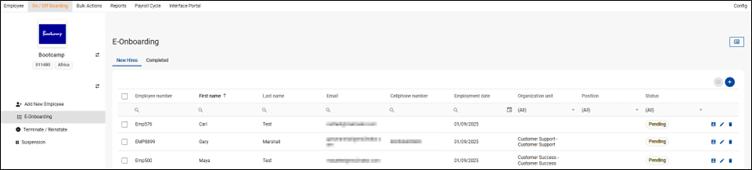
We’re excited to announce the launch of our new e-Onboarding module that’s expected for release in mid-September, designed to streamline the process of adding new employees
The Dynamic Form Builder will serve as the fundamental tool to populate the sections on the New Hire form, which will be completed by the HR Administrator and New Hire respectively
Key Highlights regarding the e-Onboarding flow:
- HR kick off – Once the recruitment process is complete, from a dedicated eOnboarding screen, HR will register a New Hire with options to save progress and come back later.
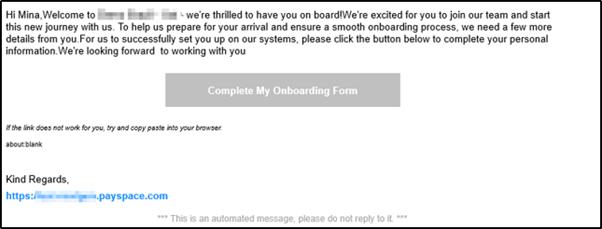
- Welcome email – A message and unique link is generated and sent to the New Hire email address, which they can access to complete their Employee Onboarding From, where they provide their personal details themselves.

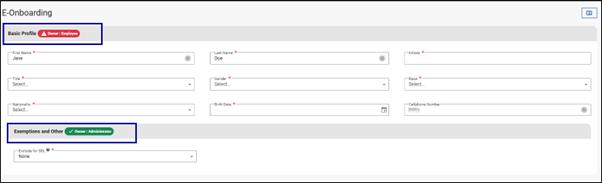
- Collaborative data capture – HR begins filling out their sections of the onboarding form, while the New Hire uses their email link to complete their own part entering personal details and essential information.
- Real-time notification – Once submitted, the HR Administrator is instantly notified, gaining access to review and finalise the New Hire’s details to enroll onto the system seamlessly transferring the completed New Hire record into the standard employee database.
- e-Onboarding Tracking – Successfully onboarded employees will appear under the “Completed” tab, any records still pending, in progress and ready are displayed by status under “New Hires” providing HR teams with visibility into onboarding status and simplifying tracking.

- e-Onboarding API Endpoints – We’re adding e-Onboarding API endpoints for the New Hires tab to ensure seamless integration with your third-party hiring systems.
- Power BI – e-Onboarding has also been added to Power BI and connector templates
e-Onboarding
With the introduction of the e-Onboarding module, we’ve created a bulk action for the swift upload of new hire records
. The Add New Hire (E-Onboarding) bulk upload is available under the On/Off boarding section of the Bulk Actions screen.
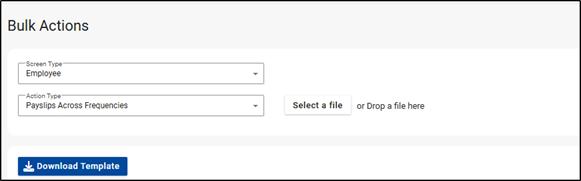
The template includes the following e-Onboarding screen fields:
Dynamic Form Builder goes Continental
After months of dedicated development, testing and fine-tuning, we’re beyond excited to announce the massive expansion of our Dynamic Form Builder –Add New Employee module across 30+ African countries! This rollout is a major step forward in helping our teams, customers and partners across the continent streamline employee onboarding like never before.
Quick Add Form – Customers in the countries listed above will have access to a simplified, single-screen form that will replace the advanced workflow for adding new employees, mirroring the process already implemented in South Africa. Bulk Actions – Both the default template and Quick Add template will be available for selection.
1. Custom Onboarding Forms on Company Level – Customers will be able to define and use their own onboarding templates directly from the “Add New Employee” screen. For a more detailed onboarding process, the Advanced Workflow will still be available
2. Bulk Actions – When custom onboarding templates are configured and activated, an additional dropdown will appear in the “Add New Employee” bulk action. This will also allow users to streamline their onboarding bulk uploads by including additional employee information within a single upload that is not part of the standard bulk upload i.e. Leave Setup, Positions or Dependants.
That’s not all …
The Dynamic Form Builder now offers enhanced flexibility and control in customising form layouts with the addition of a Designer tab. This new tab, located alongside the existing Entities tab, provides powerful capabilities for organising fields, customising section (group) names and restructuring forms to improve usability. Users can now visually configure and structure their form layouts in the Designer tab, using fields selected in the Entities tab.
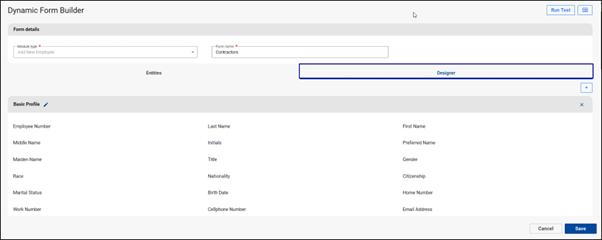
With the new Designer tab, users will have the following capabilities:
- Custom Group Naming -Form sections (referred to as Groups) can be renamed to match business or process-specific terminology. A slide-out menu will appear to confirm changes.
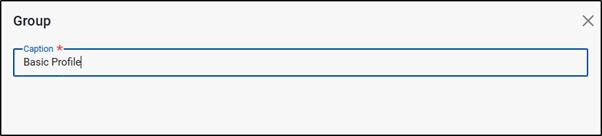
- Drag and Drop Fields– Easily change the order of fields within a group using drag and drop.
- Group Reordering – Rearrange entire form groups using drag and drop to adjust the flow and layout of the form.
- Move Fields Across Groups – Fields can be moved from one group to another, offering flexibility in structuring form layouts.
- Create Custom Groups – Users can create additional groups to organise forms more intuitively.
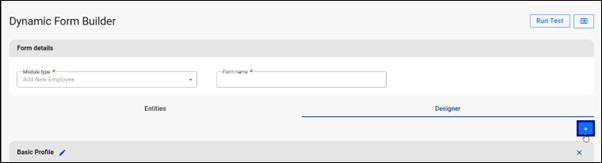
- Sub-Group – Users can create sub-groups by dragging and dropping a newly created group into an existing main (parent) group. Sub-groups can also be moved between different main (parent) groups using the same drag and drop.






EWA is a technology that integrates with the payroll system enabling employees to access a portion of their already earned salary at any point during the pay cycle.
Growing popularity in the US, UK, Singapore, and Indonesia.


NO Cost NO MORE Advances Adds to EVP at NO COST Assists staff retention
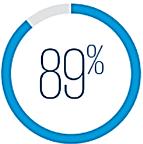
of surveyed workers would be willing to work longer for an employer offering EWA.
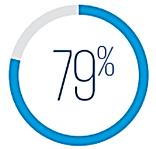
of surveyed workers are more willing to switch to employers already offering EWA.
• % of salary that can be accessed during the month.
• Amount of the minimum and maximum loan application
• Number of loan applications permissible during the month
• The period that the “window” for loans is open.

PnA, Sasol, Amrod, Bidvest, Smollan, Truworths Group, Sage, Switch Telecom, City Lodge, Sea Harvest, Total Energy, Macsteel, Continental Tires, Spar, Steers…

Joint Communication 2 of 2025: Cloud Computing and Data Offshoring – 25 July
On 25 July 25, the FSCA and Prudential Authority released Joint Communication 2 of 2025, signalling plans to draft a Joint Standard with clear rules for cloud use and data offshoring. This guidance emphasises the role of boards, trustees and senior management in managing risks tied to these technologies.