
PARENTS
TO ALL STUDENTS AND PARENTS:
This is a brief instruction about how to use Dulwich College Seoul IT system provided to all students and parents.
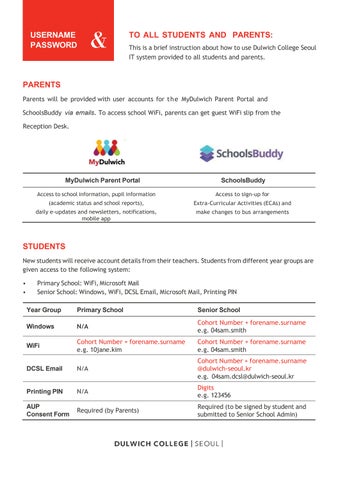
Parents will be provided with user accounts for the MyDulwich Parent Portal and SchoolsBuddy via emails. To access school WiFi, parents can get guest WiFi slip from the Reception Desk.


MyDulwich Parent Portal SchoolsBuddy
Access to school information, pupil information (academic status and school reports), daily e-updates and newsletters, notifications, mobile app
STUDENTS
Access to sign-up for Extra-Curricular Activities (ECAs) and make changes to bus arrangements
New students will receive account details from their teachers. Students from different year groups are given access to the following system:
• Primary School: WiFi, Microsoft Mail
• Senior School: Windows, WiFi, DCSL Email, Microsoft Mail, Printing PIN
Year Group
Primary School
Windows N/A
Cohort Number + forename.surname
WiFi
e.g. 10jane.kim
DCSL Email N/A
Printing PIN N/A
AUP Consent Form Required (by Parents)
Senior School
Cohort Number + forename.surname
e.g. 04sam.smith
Cohort Number + forename.surname
e.g. 04sam.smith
Cohort Number + forename.surname @dulwich-seoul.kr
e.g. 04sam.dcsl@dulwich-seoul.kr
Digits
e.g. 123456
Required (to be signed by student and submitted to Senior School Admin)
