• Activate Your New Member Benefit
• Fiduciary Duties
• New and Improved REALTORS® Store
• Upcoming Board Events
• Board of Directors Applications Open
Fiduciary Duties
A brokerage firm has a duty to safeguard its clients' trust accounts and ensure that the funds are kept separate from the firm's own operating funds. If a bank where a client's trust account is held fails, the brokerage firm has a responsibility to take appropriate steps to protect its clients' funds.
Activate Your New Member Benefit
If you're a primary or secondary REALTOR® member with an active SABOR MLS, you now have access to the FOREWARN app. The FOREWARN app is a proactive safety resource that allows members to verify the identity of their business prospects.
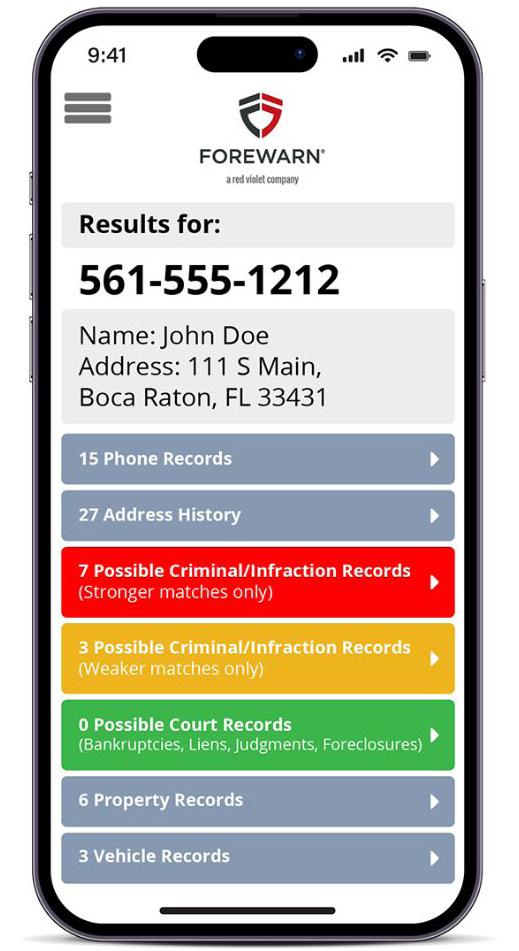
Setting up your account is quick and easy!
1. Head to app.forewarn.com/ membersetup and enter your email address when prompted to do so. Be sure to use the same email address that this email was sent to as it will serve as your FOREWARN ‘Username.'
2. You will receive an activation email from FOREWARN, open it and click the link as instructed. If you do not see the email, be sure to check your junk/spam folder.
a. If you do not see the email after checking your junk or spam folder, this may be due to your account not being set up because FOREWARN does not have your cell phone number. Please contact FOREWARN Support at (561) 7574551 to provide them with your number.
3. You will be prompted to enter an authentication code that will be texted, or optionally read to you via automated call, to your phone number on file. Upon completion, you will be prompted to create a password.
a. If you are not receiving the text/call authentication code, FOREWARN may have the wrong phone number on file.
Please contact FOREWARN Support at (561) 757-4551 to update them with your correct cell phone number.
4. You are now ready to download the FOREWARN app.
5. After activating your account, you can also log into your FOREWARN account from any web browser via the FOREWARN. com homepage (click ‘Sign In’ at top-right) or via this link: https://app.forewarn.com/ If you already have a subscription with FOREWARN but would like to use your member benefit with SABOR, you will have to contact FOREWARN about cancelling.
In addition to contacting your attorney, some actions that a brokerage firm could take in this situation can depend on several factors, including but not limited to, the amount of money involved, the jurisdiction in which the account is held, and the specific terms of the client agreement. In general, however, the brokerage firm should:
• Notify the client: The Broker should notify the affected clients as soon as possible, explaining the situation and the steps that the firm is taking to protect their funds.
• `Work with regulators: The Broker should work with regulatory authorities to ensure that the clients' funds are protected and that any necessary legal requirements are met.
• Transfer funds to a new bank: The Broker should transfer the clients' funds to a new bank as soon as possible and ensure that the funds are held in a separate account from the firm's own operating funds.
• Keep accurate records: The brokerage firm should maintain accurate records of all transactions related to the transfer of funds and any other actions taken in response to the bank failure.
Overall, the brokerage firm has a fiduciary duty to act in the best interests of its clients and to take reasonable steps to protect their assets, including funds held in trust accounts.
APRIL 2023 OFFICIAL MONTHLY
NEWSLETTER FOR SAN ANTONIO AREA REALTORS ® KEEPING POSTED
IN THIS ISSUE:
Co l abor a t e St r eamlin e enhanc e El evate Execut e
San Antonio – The San Antonio area saw a 17% decrease in total home sales for the month of February with 2,287 closed listings, according to the Multiple Listing Service (MLS) Report from the San Antonio Board of REALTORS® (SABOR), which reports all areas contained within the MLS. The area also saw steady increases in average and median home prices with 2% increases from February 2022, now at $365,678 and $310,000, respectively. Residential rental also saw a slight increase of 3% with the average price now at $1,804.
“In February, we saw a 28% decline in existing home sales but also a 28% spike in new construction homes,” said Sara Briseño Gerrish, SABOR's 2023 Chair of the Board. “Homes stayed on the market for 70 days, an 84% increase from the same time last year. The months of inventory is being reported at 3.3 and 93.5% of homes closed of their original listing price. To close February, there were 3,531 new listings, 2,407 pending listings and 9,712 active listings.”
Bexar County saw a 16.4% decline in home sales with 1,612 closed listings in February 2023. The price per square foot increased 2.4% to $168 and 93.7% of homes closed for their original list price. The average home price for the area had an increase of 4.4%, now at $341,204 and the median price increased 3.3% to $294,945. The other three major counties in the state, Travis, Harris and Dallas also saw increases, with median home prices being reported at $500,000, $309,340 and $355,500, respectively.
Across Texas, 21,838 homes were sold in February, a 14% decrease from 2022. Average home prices slightly increased by 0.7% and median prices by 0.3%. Homes stayed on the market for 65 days, with 2.6 months of inventory and 93.7% closing for their original list price. The state closed the month with 30,777 new listings, 73,219 active listings and 25,491 pending sales.
2,287
According to the San Antonio Board of REALTORS®, 2023 continues to see a decline in home sales
San Antonio Area February 2023
Average Price $365,678
Median Price $310,000
Total Sales
UPCOMING BOARD EVENTS
Great SABOR Food Fight Begins 1
Breaking Barriers 11
A COMPLETE LIST OF COMMITTEE MEETINGS, EDUCATION COURSES, AND OTHER BOARD EVENTS CAN BE FOUND ONLINE AT
WELCOME NEW AFFILIATE MEMBERS
Angulo, Alexis - GreenWorks Inspections & Eng.
Bailey, Keith - Consumer One Financial Inc
Barraza, Guadalupe - A&E Pest Contfol
Boyles, Allen - By Design Home Staging
Burleson, Justin D - HHI Texas
Farmer, Paul - 615 Media
Gutierrez, Carolina - Birdy Maintenance, LLC
Hernandez, Edgar - Primary Residential Mortgage
Mark, Kevin - Mutual of Omaha Reverse
Martinez, Manuel - By Design Home Staging
Moravits, Wayne - Monticello Homes
Rueda, Juan - By Design Home Staging
Schmidt, Jennifer - Monticello Homes
Thunert, John - Above All Air
Torres, Jesse - Yes! Handyman Services
Trevino, Bertha - Monticello Homes
Watson, Ethan - By Design Home Staging
Zepeda, Juliann - Nexa Mortgage
2023
APRIL
SABOR.COM.
@SanAntonioBoardofREALTORS @SABoardREALTORS @saboardrealtors @SABoardofREALTORS @SABoardREALTORS company/san-antonio-board-of-realtors
New and Improved REALTORS® Store Join SABOR’s Board of Directors, Applications Now Open
Have you checked out the new REALTORS® Store inside the San Antonio Board of REALTORS® building? It is the only premiere retail outlet for everything real estate in San Antonio. Show off the REALTOR® brand with a new tote bag, cap, drinkware or license plate frame. Take your open house to the next level with balloons and guest books. Plus, take great pictures of your clients with our new signage. Take a look at some of the new items:

Are you looking for a way to share your knowledge, energy and passion for real estate? Then consider applying for SABOR’s Board of Directors! As one of the largest associations in the country, members of SABOR’s Board of Directors are recognized on a local and national level for their dedication to the advancement of the real estate industry.
The Board of Directors consists of REALTOR® members who may serve two consecutive three-year terms. As the largest trade association in South Texas, and in the top 20 REALTOR® associations in the country, it is a significant commitment to lead this organization.
SABOR Directors are a fiduciary of the association. That means they have a special legal responsibility in connection with the administration, investment and care of SABOR and its assets. This requires Directors to make careful, good-faith decisions in the best interest of SABOR and its members. Their decisions must be made independently and free of any undue influence from any person or organization, including any other association, MLS, or brokerage. They are charged with acting on behalf of the members by determining appropriate actions that best serve the whole membership, while the staff executes the daily management of the Board-directed policies.
The Board of Directors has the authority to:
• Approve expenditures of the Association
• Set dues
• Set public policy positions as they pertain to the real estate industry
• Establish governing policies of the Association
• Approve member programs, products and services

Board of Directors meetings are typically held once a month.
How to Apply
To apply, simply complete and submit the online application, and if you meet the eligibility requirements, you will be contacted for an interview with the Local Nominating Committee. The application is available at bit.ly/3ZHuUQz. Applications close on Friday, May 12 at 5 p.m.
If you would like more information or need help with your application, contact communications@ sabor.com.
All this and more at the REALTORS® Store!

For more information, call (210) 593-1200 or email store@sabor.com to place an order.
Thank You to Our Advertisers
Gold Platinum IBC Bank
Jefferson Bank SWBC
Silver
American Home Shield
Barton Carpets
Bella Vista Homes
Capital Farm Credit Coldwell Banker D'Ann Harper, REALTORS®
David Weekly Homes
Fidelity National Home Warranty
Gateway Mortgage
HHI Home Inspections & Pest Control
Home Builders Inspection Group

KB Homes
Bronze

Alamo Area Virtual Tours
Alamo Title Company
AmeriFirst Mortgage
Becker Properties
Central Hill Country Board of REALTORS®
Cher Miculka - Exit Premier Realty
Choice Home Warranty
Comfort Air
Exchange Resources
FBC Mortgage
First American Home Warranty
Four Rivers Board of REALTORS®
Fresh Coat Painters
Frontier Title
Gold Financial Services

Goosehead Insurance -The Sparks Agency
Grant Lopez
Guaranteed Inspection Services

Highland Homes
Independence Title
Jan Hicinbothom
The Junkluggers of San Antonio
Jurassic Realty
Keller Williams Heritage
Kerrville Board of REALTORS®
Luxury Home Magazine
Marquis Williams
BOARD OF DIRECTORS
Marty Chrisman
Motif Boutique Brokerage
Netco Title, Inc.
NextGen Real Estate & Finance
Phyllis Browning Company
Pillar to Post Home Inspections
Primary Residential Mortgage
San Antonio Builder Guide
Sara Briseño Gerrish
Legacy Mutual Meritage Homes

Movement Mortgage
NARPM
Old Replublic Title
Perry Homes
Real Estate Newsline
SABOR
Sharp Frame Media
TAPFCU View Homes
Schotts Inspections
Spire Risk Management
Security Service Federal Credit Union
Security Service Title Company
Stewart Title
The Esteem Group at Guaranteed Rate
The Mortgage Network Walthall, Sachse, and Pipes, Inc.
The Role of a Board Member
Jesse Bugarin Kenny Cunningham Christine Denney Courtney Gill
Jan Hicinbothom Marty Hutchison Mari Mitchell Chad Nall
Anna Ramos Courtney Rosen Scott Small Ronnah Stabenow
Mindi Stange Ed Zapata
Chairman Sara Briseño Gerrish Chair-Elect William Curtis Secretary/Treasurer Reagan Williamson Members-At-Large Donna Drayton
Immediate
Past Chair Tracie Hasslocher
