International Research Journal of Engineering and Technology (IRJET)
e-ISSN: 2395-0056
Volume: 05 Issue: 03 | Mar-2018
p-ISSN: 2395-0072
www.irjet.net
Book Reader Using Raspberry Pi for Visually Impaired S. Aditi1, SP. Annapoorani2, A.Kanchana3 1,2 Student,
Dept. of Computer Science and Engineering, Panimalar Engineering, College, TN. Professor, Dept. of Computer Science and Engineering, Panimalar Engineering College, TN. ---------------------------------------------------------------------***--------------------------------------------------------------------2. PROPOSED METHODOLOGY Abstract - This paper aims at making an open-source audio 3 Assistant
book software to build a book reader with raspberry pi controls. Here in this paper, we present the Pi Book reader which can read a real book aloud and also turn the pages of the book. The overall process of the project involves Image to Text conversion and then Text to Speech conversion. The image to text conversion is carried out with the help of OCR [Optical Character Recognition]. The Optical Character Recognition Technology can be used to convert various kinds of documents like images, scanned documents and PDF files. The OCR algorithm involves various stages like Scanning, Preprocessing, Feature Extraction, Classification and Recognition. Finally, E-Speak voice command software is used to convert the obtained text from OCR into speech command. This converted speech is read aloud by a speaker connected to the Raspberry Pi. The programming language that we have used is python. This project is practical and of great use for the visually impaired. Key Words: Raspberry Pi, OCR, Text to Speech Conversion, E-Speak software, Python.
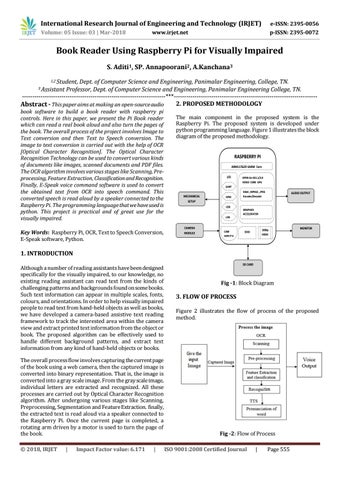
The main component in the proposed system is the Raspberry Pi. The proposed system is developed under python programming language. Figure 1 illustrates the block diagram of the proposed methodology.
RASPBERRY PI ARM1176JZF-SARM Core I/O
OPEN GL–ES1.1/2.0 VIDEO CORE GPU
UART
MECHANICAL SETUP
GPIO USB LAN
CAMERA MODULE
CAM MIPI/CSI
H264 , MPEG2 , JPEG Encoder/Decoder
AUDIO OUTPUT
GRAPHICS ACCELERATOR
1080p HDMI
SDIO
MONITOR
1. INTRODUCTION Although a number of reading assistants have been designed specifically for the visually impaired, to our knowledge, no existing reading assistant can read text from the kinds of challenging patterns and backgrounds found on some books. Such text information can appear in multiple scales, fonts, colours, and orientations. In order to help visually impaired people to read text from hand-held objects as well as books, we have developed a camera-based assistive text reading framework to track the interested area within the camera view and extract printed text information from the object or book. The proposed algorithm can be effectively used to handle different background patterns, and extract text information from any kind of hand-held objects or books. The overall process flow involves capturing the current page of the book using a web camera, then the captured image is converted into binary representation. That is, the image is converted into a gray scale image. From the gray scale image, individual letters are extracted and recognized. All these processes are carried out by Optical Character Recognition algorithm. After undergoing various stages like Scanning, Preprocessing, Segmentation and Feature Extraction. finally, the extracted text is read aloud via a speaker connected to the Raspberry Pi. Once the current page is completed, a rotating arm driven by a motor is used to turn the page of the book. Š 2018, IRJET
|
Impact Factor value: 6.171
|
SD CARD
Fig -1: Block Diagram
3. FLOW OF PROCESS Figure 2 illustrates the flow of process of the proposed method.
Fig -2: Flow of Process ISO 9001:2008 Certified Journal
|
Page 555