

1 LESSON PLAN
Lesson Topic
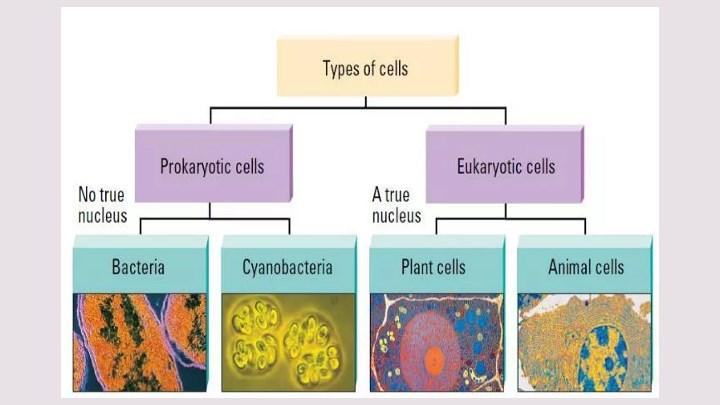
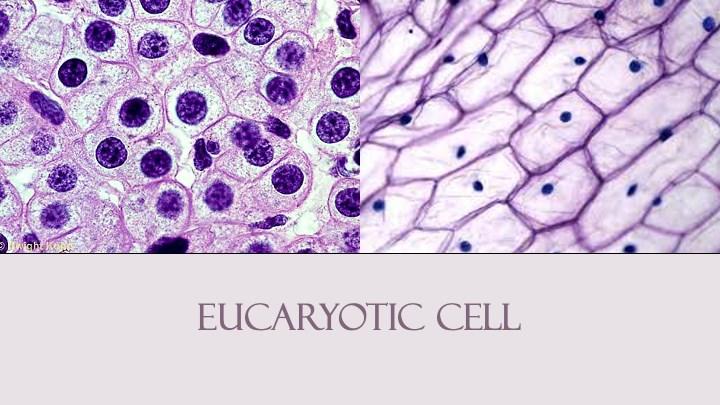
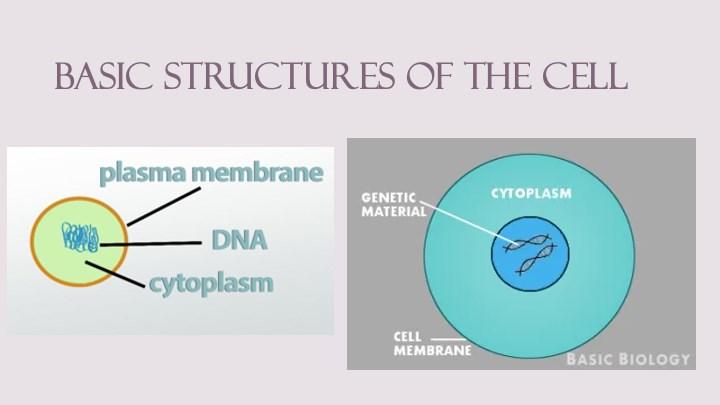
Procaryotic vs eucaryotic cell
COUNTRY: BULGARIA
Subject
Biology 9 40 min 26
Type of the lesson Interactive, Practice-Based
Context
Links with previous lesson(s)
Cross curricular links before the lesson
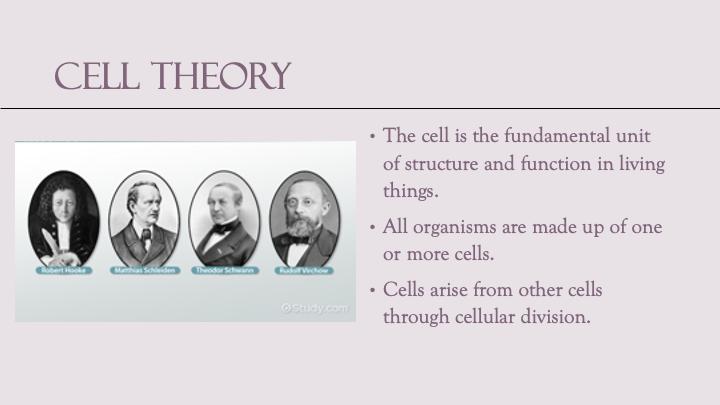
Students are already familiar with the basics of cell types and structures and the fact that the cell is the basic unit of life and that all organisms are made up of at least one cell. They know the essence of Cell theory.
• Science
In the previous years in the Science classes they have studied about cells and their basic components. They have observed cells under microscope and have drawn what they see.
• Chemistry
In the Chemistry classes they got acquainted with the basic instruments and techniques used in the lab.
• Technology and Engineering: 3D modeling software is used studying and creating models of cells, cell structures and organic molecules. Challenge students to build similar virtual prototypes, fostering STEM skills.
Learning Objective:
Understand, compare and contrast the differences between eukaryotic and prokaryotic cells
Identify cell organelles and match them with their specific role and function within the cell.
Understand the relationship between the structures and functions of cells and their organelles.

Learning Outcomes:
By the end of this lesson, students will be able to:
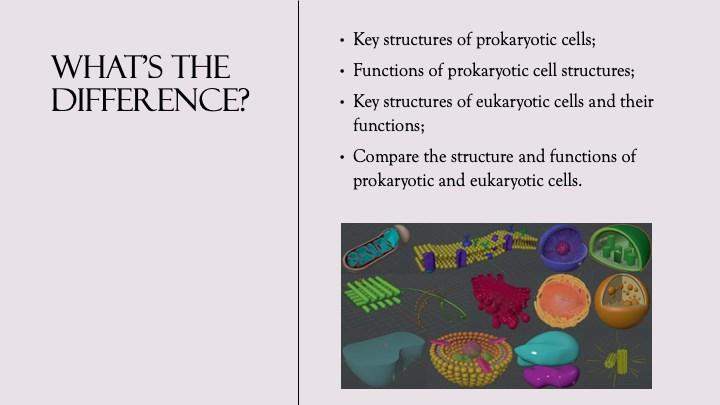
1. Identify the key structures of prokaryotic cells.
2. Explain the functions of prokaryotic cell structures.
3. Identify the key structures of eukaryotic cells.
4. Explain the functions of eukaryotic cell structures.
5. Compare the structure and functions of prokaryotic and eukaryotic cells.
Pre Lesson-Preparation
Presentation on types of cells , worksheets, Virion’s Biology application
ICT and VR Resources, Skills, and Apps
Hardware: Oculus VR glasses, tablets/computers, interactive board.
Teacher: Basic VR navigation, 3D modeling software usage.
Students: Navigating within a VR environment, simple manipulations of 3D shapes
Software and Apps
3D modeling app (Tinkercad VR mode).
Key Vocabulary
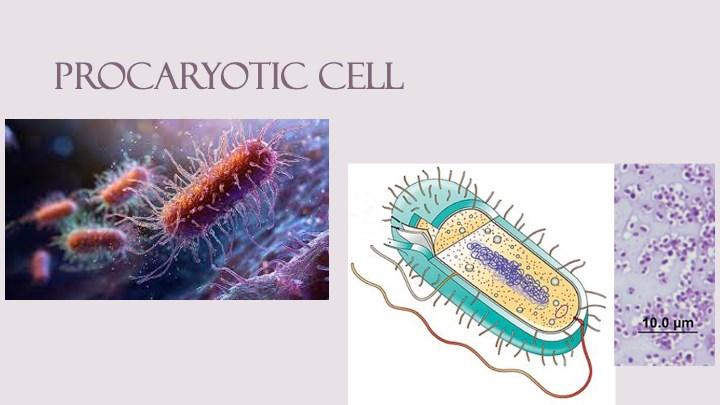
Flagellum, Nucleoid, Capsule, Pilli, Mesosomes, Ribosomes
Lysosome, Mitochondria, Golgi apparatus, Vacuoles, Endoplasmic Reticulum, Centriole, Cytoskeleton
Key competencies development:
By the end of this lesson, students will develop the following key competencies:
• Science and technology competences;
• Digital competences;
• Personal, social and learning competences – collaboration and team work.
• Critical thinking, scientific reasoning, and problem solving to make informed decisions.
Formal and non-formal methods applied in the lesson:
Discussion on types and kinds of cells, Direct Instructions, Guided exploration, Differentiated Instructions, Technology-based learning, Group learning, Problem-solving tasks

Resources e.g. TEL, Other Adults, Materials and Equipment
Assessment Strategies Used to Ensure Progress of All Learners
Learner Activity Identify the techniques used to d ifferentiate for ALL L earners
Teacher Activity Objective s & Outcomes, Teaching A ctivities, R evisiting O utcomes & Consolidation
Link to Learning Outcome number
Time (min)
Computer, projector or interactive board.
V erbal responses . Observing students’ activity during the discussion
Watch the presentation. Take part in the discussion.
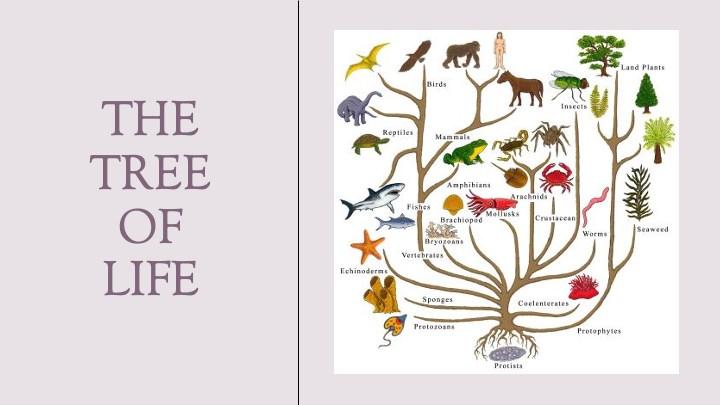
I ntroduction . Present power point: What’s the Difference? Plant, Animal, and Bacterial Cells
Discuss ion –What are the differences? W hich organisms are builtup of these cells?
Basic Unit of Life Worksheet (one per student)
Oculus VR glasses, 3D Virion biology app
5 1, 3
Observation.
Choose partners. Study the worksheet
Presents the objectives of the lesson and guides the forming of teams of two. Gives the worksheets.
5 1, 2, 3 , 4, 5
Observation.
One of the students explores procaryotic cell lab and the other –eucar yotic cell lab. Fill in the worksheets.
Guide through VR experience. Help teams if necessary. Circle to assist students . Have students discuss the functions of the organelles.
15 1, 2 , 3, 4
Worksheet submission. Worksheet s, assessment criteria
Present their worksheets, share experience .
Final question : What are the similarities and differences between procaryotic and eucariotic cells?
Organize discussion and sharing team experience.
10 2, 4, 5

Discuss experiences. Differentiation Techniques . Openended questions. Peer feedback.
Recap and reflect.

2 LESSON EVALUATION
What was successful / not so successful? What was the impact of this on student progress?
Evaluation
Pupil Learning & Progression
Allthestudentsshowedgreatinterestandmotivationandmostlyachievedtheintendedlearning outcomes My knowledge is based on the final discussions, students’ activities and attitude. Standards used are the standards adopted by Bulgarian Ministry of Education for Biology in 9 grade.
Basedon theenhancedengagement andunderstanding ofthe concepts of structure and function on cellular level All pupils managed to complete their tasks in time and nearly all worksheets were perfectly filled in.
Teaching & Classroom Management
One of the prerequisites for creating an environment that facilitates positive behaviours is to know your students well, forming a small teams of two is another one. The introduction of the topic and the learning objectives in a way that will motivate students for highly conductive learning is also very important. And finally the innovative method of VR 3D modelling is very helpful.
Planning & Subject Knowledge
How could you further develop pedagogy to address errors and misconceptions in your planning?
• Introduction could be more motivating through a short quiz or Kahoot before the VR session to identify misconceptions and gauge students' prior knowledge.
• During the lesson, encourage students to explain their thinking processes and ideas. This can prevent misunderstandings and going into wrong direction.
• I should present to the class the common errors made during the VR session, and analyse and correct them together with the students.
• Students should be given more active part encouraging them to explain concepts to one another. This not only reinforces learning but also helps clarify misconceptions.
How could you develop imaginative and creative approaches to further match individual needs and interests?
• Individual approach: Create different challenges corresponding to students’ interests and capabilities with varying levels of difficulty in the VR environment.
• Independence: Give the students the opportunity to choose their tasks and even to create virtual scenes and ideas for VR activities
• Integrated learning: Combining different subjects like science, maths, history, arts and so on Cross-Disciplinary Projects: Combine mathematics with art or history by exploring how pyramids were used in different cultures, encouraging broader engagement.
Teaching with VR implementation
What was different compare the teaching without VR.
Students show great interest in this innovative learning technology, they are more motivated to participate in lesson activities and like the challenges.
What are the benefits.
Motivation and active participation helps achieve learning objectives . Problems, appeared during the lesson.
The first steps in VR setup required more time. Some students didn’t feel very well at the beginning.
Basic Unit of Life Worksheet
1. Mark the structures of the procaryotic cell.
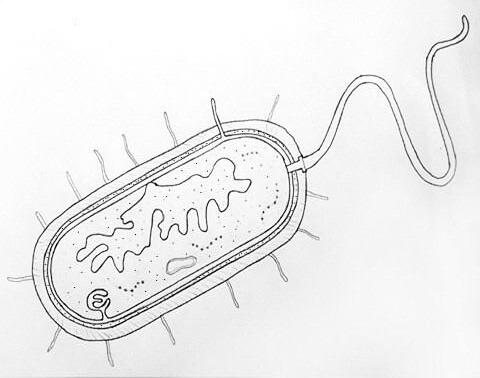
2. Mark the structures of the eucaryotic cell
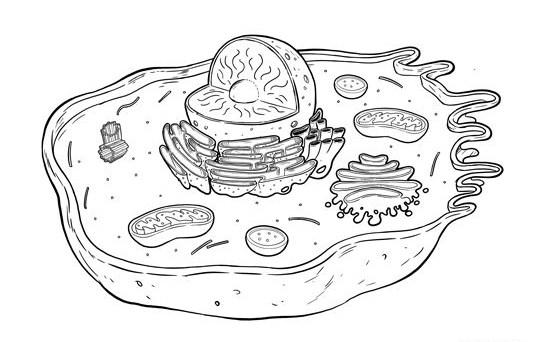
Team members:
3. Fill in the table. Mark with „+“ or „“ the presence or absence of the cell structures.
Cell structures
Capsule
Cell wall
Cell membrane
Cytoplasm
Nucleus
Nucleoid
Rhibosomes
Mitochondria
Golgi apparatus
Endoplasmic reticulum
Lysosomes
Procaryotic cell Eucaryotic cell
4. Task for excellence! Why procaryotic cells build up only unicellular organisms and eucaryotic cells build up both unicellular and multicellular organisms?
Lesson Plan country:

SCHOOL:
Lesson Topic
Structure of a eukaryotic cell
Subject Class Duration (min)
Name of the teacher
Biology 9 40 Irena Borisova
Type of the lesson Students number
Combined lesson – exercise and practical activities 26
Context
Links with previous lesson(s)
Cross curricular links before the lesson
The students have already studied and are familiar with the structures in the eukaryotic cell.
• Human and Nature, 5th and 6th grade – Photosynthesis and Respiration;
• Biology, 7th grade – Plant Kingdom, Kingdom Fungi, and Animal Kingdom;
• Biology, 9th grade – Chemical Composition of the Cell and Prokaryotic Cell;
• English Language – Using Diagrams in English.
Learning Objective:
To develop knowledge about the structure and functions of cellular structures; to clarify the diversity of cells in relation to their location in the multicellular organism and the function they perform.
Learning Outcomes:
By the end of the lesson, each student should know and be able to:
1. Name groups of cellular organelles;
2. Identify and describe cellular structures using a diagram or model;
3. Characterize cellular structures based on their structure and function;
4. Establish connections and dependencies between structure and function at the cellular level;
5. Compare cell structures and identify functional relationships between them

Pre Lesson-Preparation
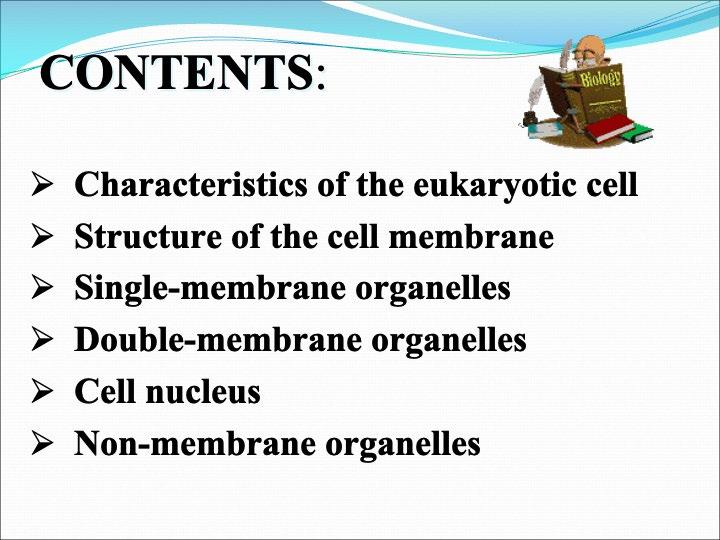
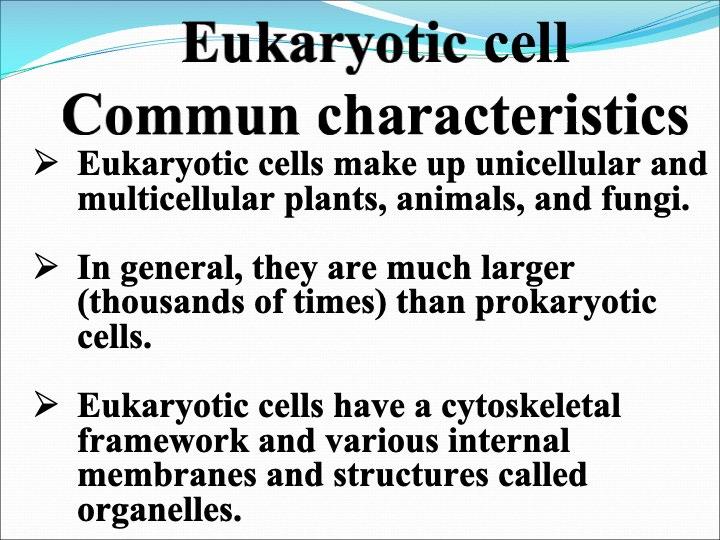
Presentation on Cell Structures – "In the World of a Mini-Galaxy: The Eukaryotic Cell" Worksheet
Virion’s Biology Application
ICT and VR Resources, Skills, and Apps
Hardware Equipment: VR headsets, tablets or computers for working with interactive applications, interactive whiteboard.
Teacher: Working with an interactive whiteboard and presentation software. Using Basic VR applications and 3D modeling software.
Students: Working with interactive educational applications. Navigating within a VR environment and performing simple manipulations of 3D shapes.
Software and Apps
3D Modeling App: Tinkercad VR Mode
VR Applications: Google Expeditions – for virtual exploration of cellular structures
Inside a Cell – Google Arts & Culture
Additional Educational Videos: Khan Academy
Key Vocabulary
The new words students will learn during the lesson.
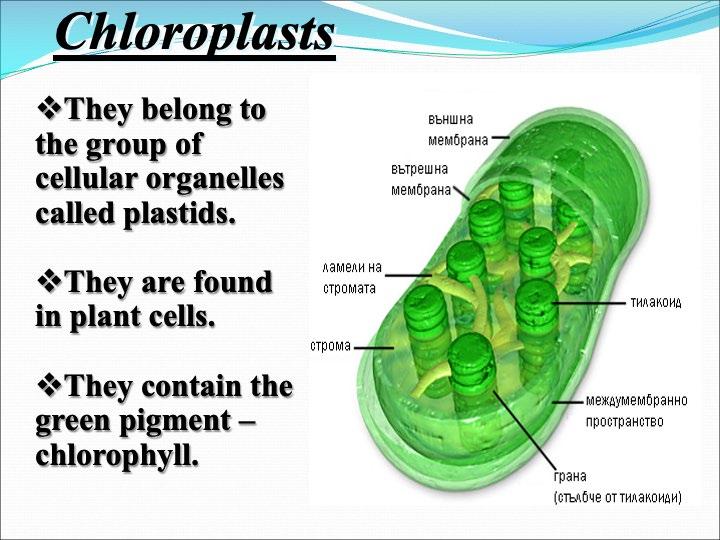
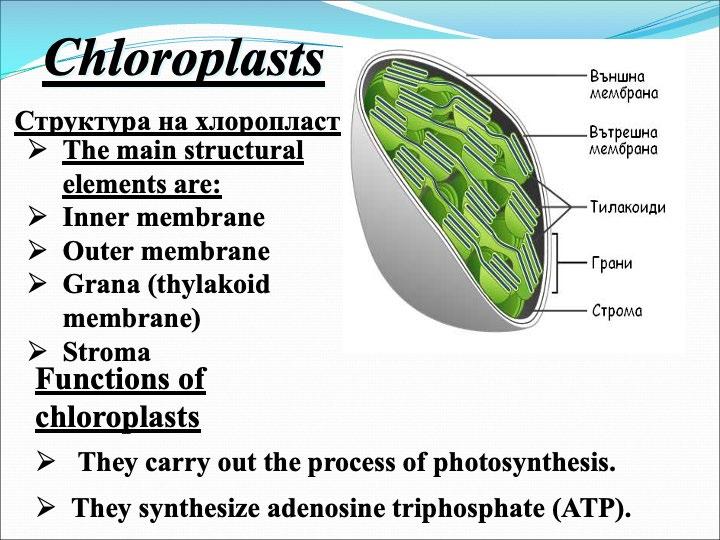
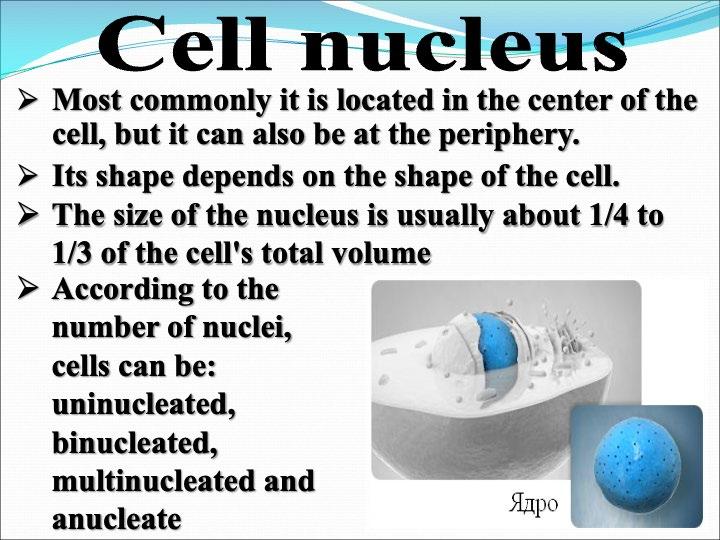
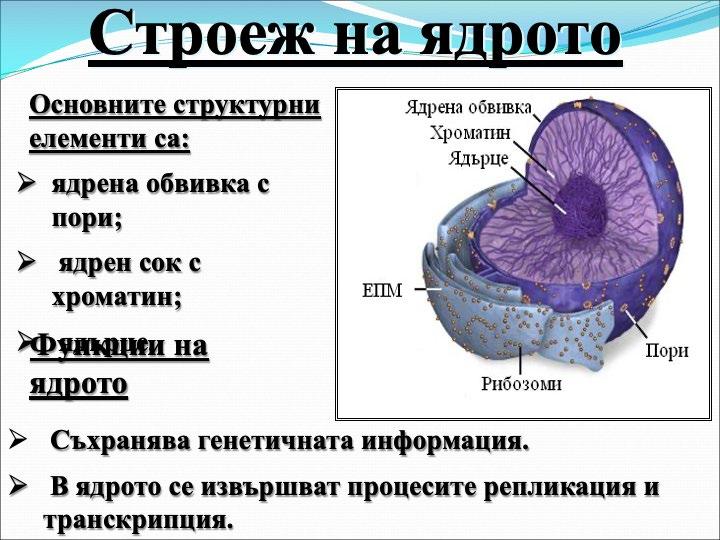
Nucleus, Endoplasmic Reticulum, Lysosome, Mitochondria, Golgi apparatus, Vacuoles, Chloropast, Centriole, Cytoskeleton
Key competencies development:
By the end of the lesson, each student will develop the following key competencies: Science Competences – Comparing cell structures and identifying functional relationships between them.
Digital Competences – Using VR technology to explore cellular structures.
Initiative and Entrepreneurship – Designing and creating models of cellular structures.
Personal and Social Competences – Teamwork, collaboration, and critical thinking.
Formal and non-formal methods applied in the lesson:
Methods:
• Discussion
• Observation
• Independent work with a worksheet
• Building a diagram
• Group discussions
• Presentation
• Project-based activity
Resources e.g. TEL, Other Adults, Materials and Equipment
Assessment Strategies Used to Ensure Progress of All Learners
Learner Activity Identify the techniques used to d ifferentiate for ALL L earners
Teacher Activity Objective s & Outcomes, Teaching A ctivities, R evisiting O utcomes & Consolidation
Verbal responses. Observing students’ activity during the discussion Computer, projector or interactive board.
The students participate in the discussion by pointing out characteristic elements of the structure of the eukaryotic cell, as well as the cellular organelles studied so far, including their structure and functions.
1 Introduction: The teacher organizes a discussion on the structure of the eukaryotic cell and the types of cellular organelles according to their structure. A conclusion is made about the fundamental similarities in the structure of eukaryotic cells. The diversity of cells is clarified in relation to their location in multicellular organisms and the functions they perfo rm.
Eukaryotic Cell Structures Worksheet (one per student)
Observation and reflection, worksheets.
The students compare their charts with those on the board, correct any mistakes, and fill in any missing information. They identify the figures that illustrate the corresponding organelles.
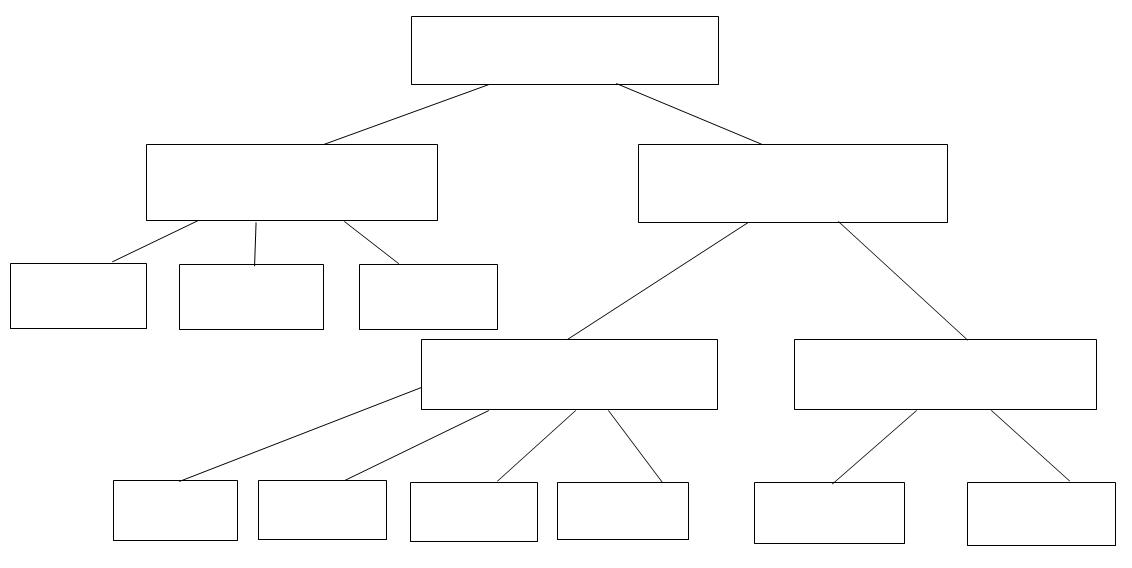
2,3,4 The teacher distributes a worksheet to the students –a flowchart of organelles. A student is chosen to fill in the chart on the computer. The chart is then displayed using a multimedia projector after everyone has completed it.
Oculus VR glasses, 3D Virion biology app
5
10
Observation
The students could enter a virtual environment and explore cellular structures using VR headsets. по двойки.
2,3,4,5 Guidance through the VR experience. The students work in pairs –this encourages collaboration and the exchange of ideas.
20

T ake notes in the worksheet on the structures of the cell Worksheets, assessment
Present their worksheets, share experience.
5 Organize discussion and sharing team experience. Summarize the results of the students' work, comments on the knowledge and skills they demonstrated. A task (project) is assigned for the next lesson –to create a model of a cellular structure.
1 LESSON EVALUATION
What was successful / not so successful? What was the impact of this on student progress?
Evaluation
Pupil Learning & Progression
All the students showed interest and eagerness to work, and the majority of them achieved the planned learning outcomes. This is evident from the final discussions and activities of the students. Standards used are the standards adopted by Bulgarian Ministry of Educationfor Biology in 9 grade.
The progress in the students' knowledge is confirmed by the cellular structure projects presented to the class in the following lessons.
Teaching & Classroom Management
The lessons held in the non-traditional classroom have a different organization and activities for both the teacher and the students. These types of lessons contribute to greater interest and motivation for learning. Students are required to perform tasks related to more scientific communication and movement to successfully complete the tasks. The application of the innovative method of VR3D modelling is very beneficial and engaging.
Planning & Subject Knowledge
The update of knowledge at the beginning of the lesson can take the form of a short discussion to assess the level of prior knowledge and address any misconceptions.
Encourage students to share their feelings and thoughts while working with the Oculus headsets. This can help anticipate mistakes, which can be corrected in real-time.
Encourage students to explain concepts to each other. This promotes more effective learning and helps clarify misunderstandings.
Assign tasks and activities with varying levels of difficulty in the VR environment, adjusted to the interests and abilities of the students.
Allow students to create their own virtual laboratories and come up with ideas for VR activities.
Teaching with VR implementation
What was different compare the teaching without VR.
The students performed the tasks and activities from the challenges with interest.
What are the benefits
Non-traditional learning through experience in a VR environment leads to improvement in the understanding of new scientific concepts.
Problems, appeared during the lesson.
The initial setup for the VR experience required more time
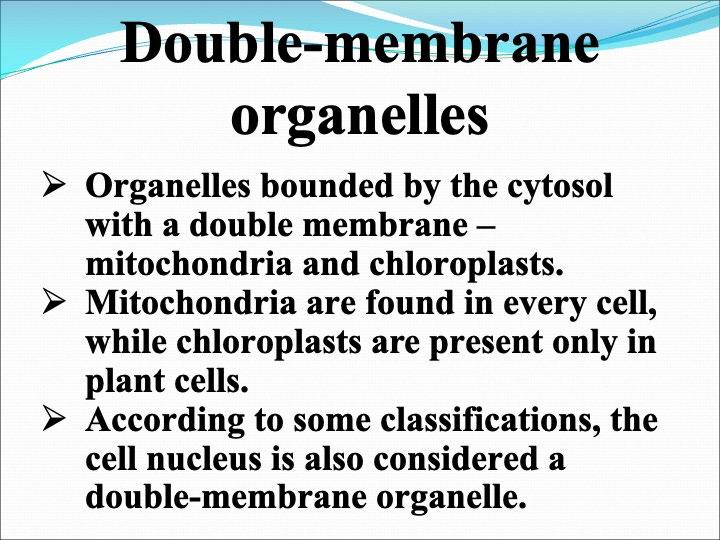
The cellular organelles of a eukaryotic cell include
Name: ......................................................................................................... Class ............. № ........
Task: Complete the table by writing down the structure and function of each cellular organelle.
Cellular Organelle Schematic drawing Structure Function Cell Membrane
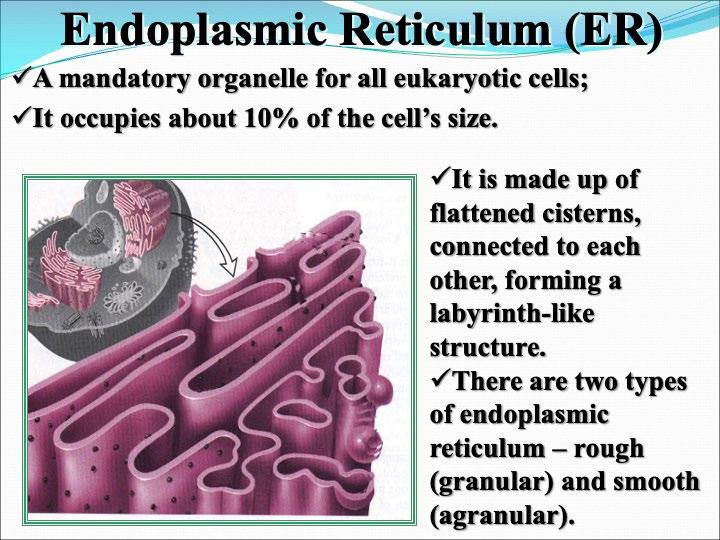
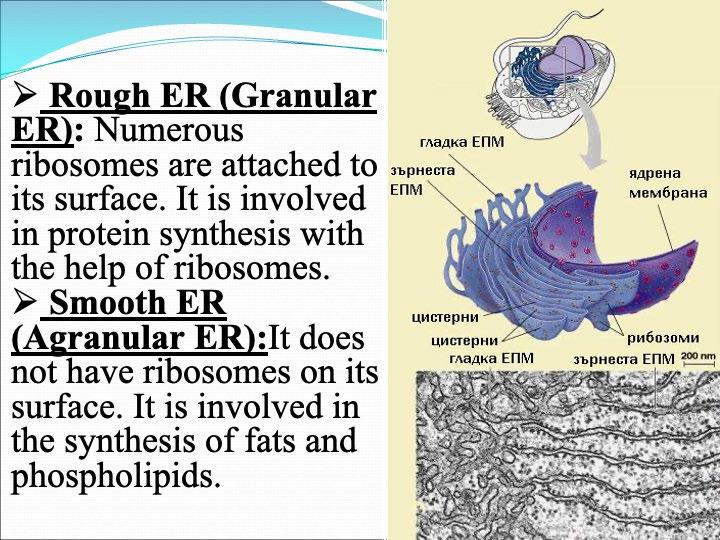
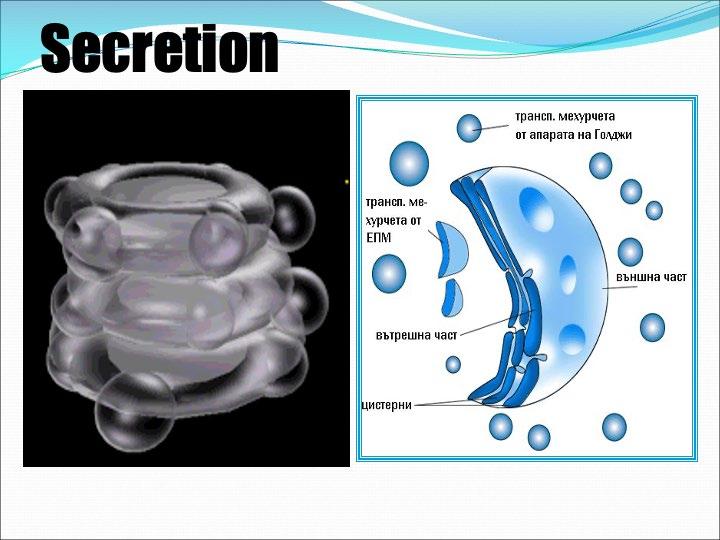
Endoplasmic Reticulum
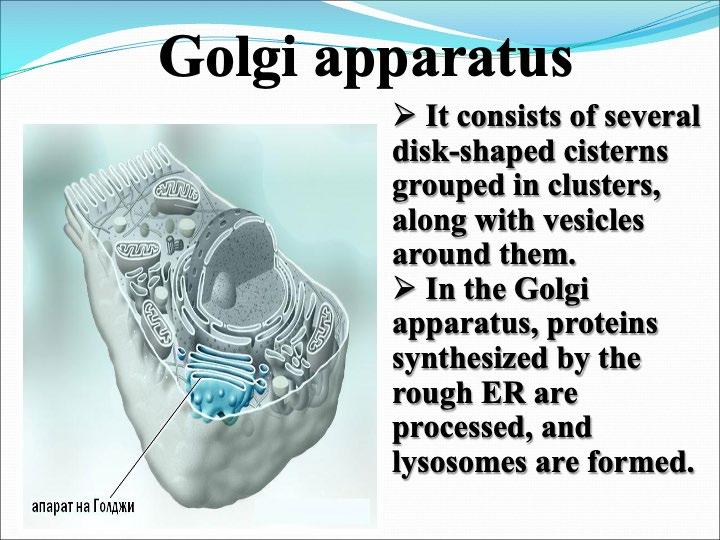
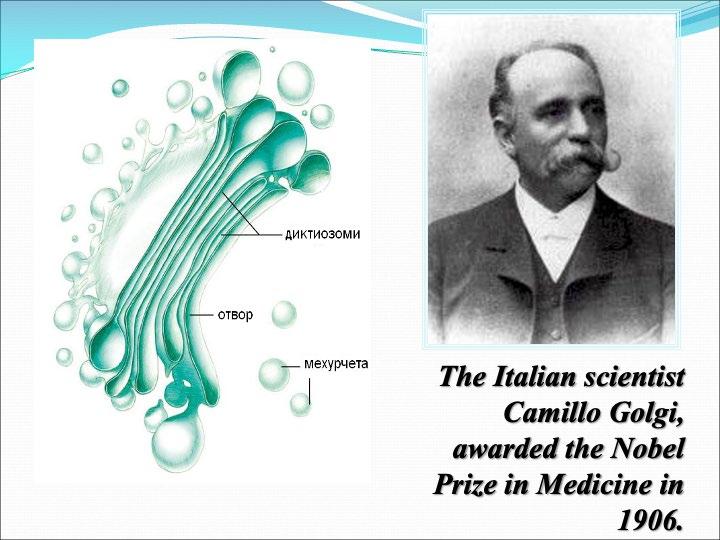
Golgi Apparatus
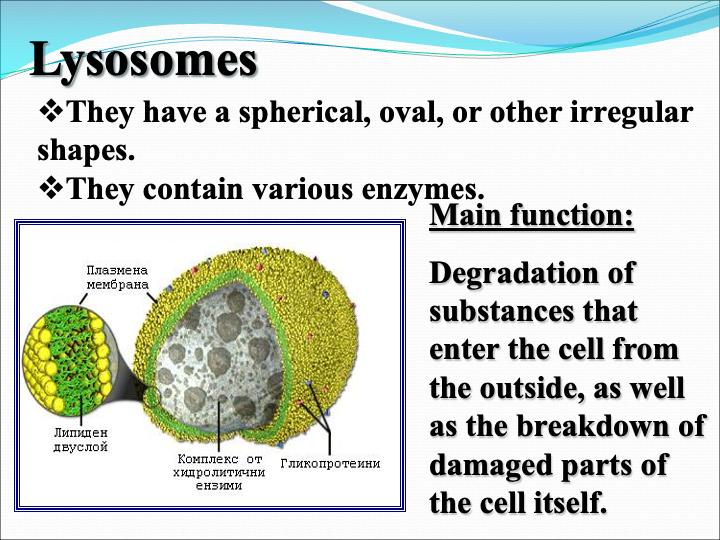
Lysosomes
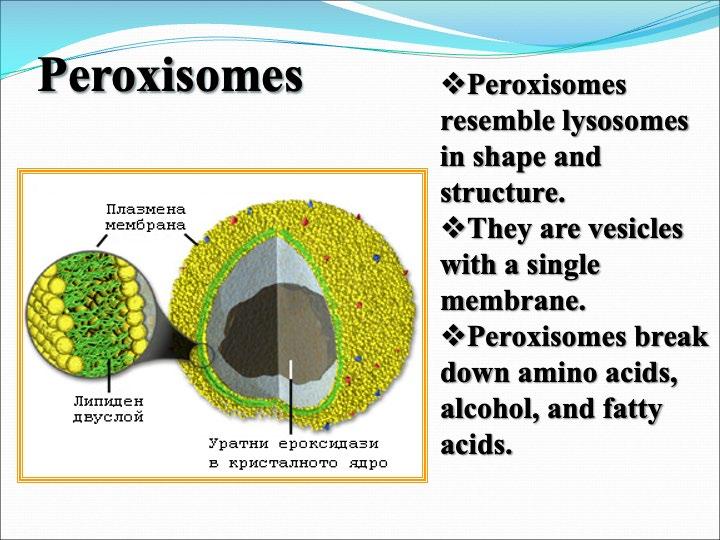
Peroxisomes
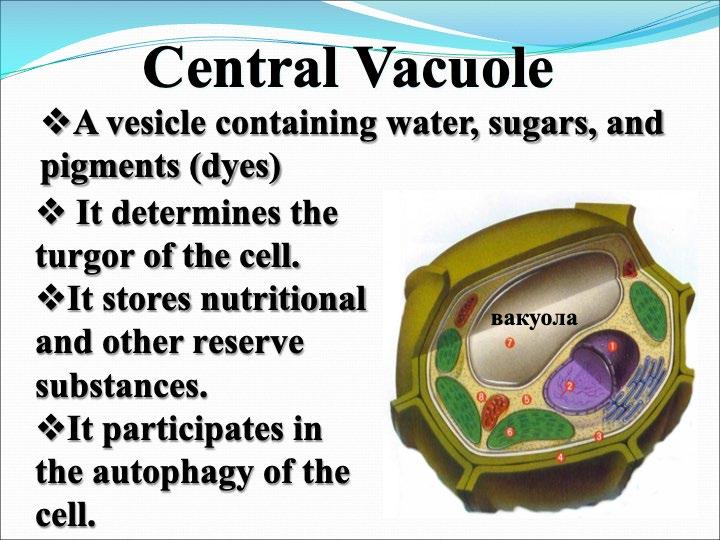
Vacuole
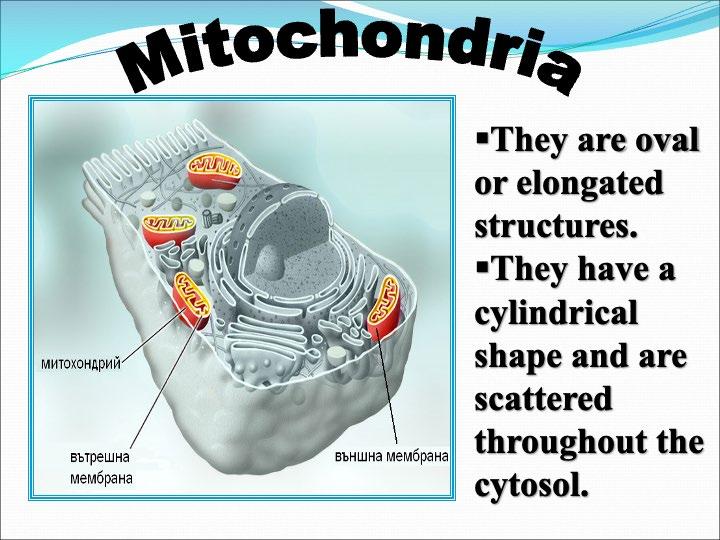
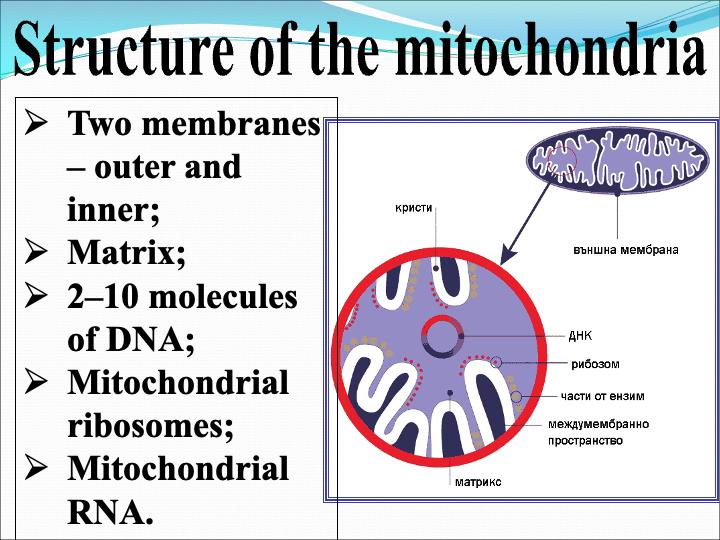
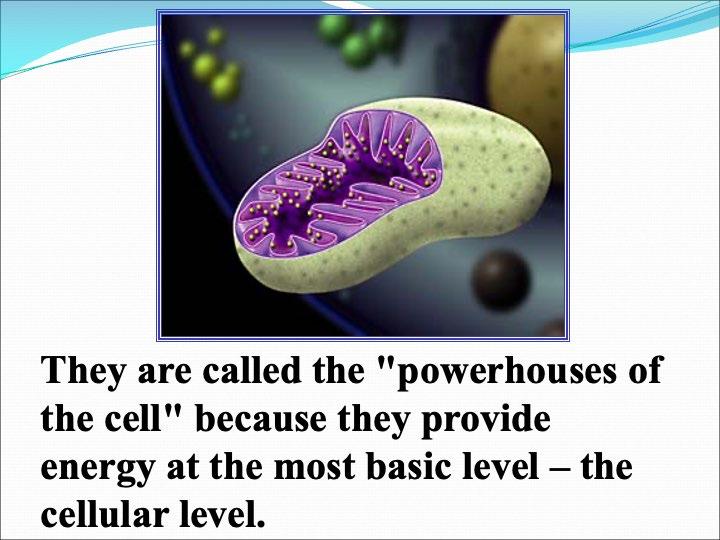
Mitochondria
Chloroplasts
Nucleus
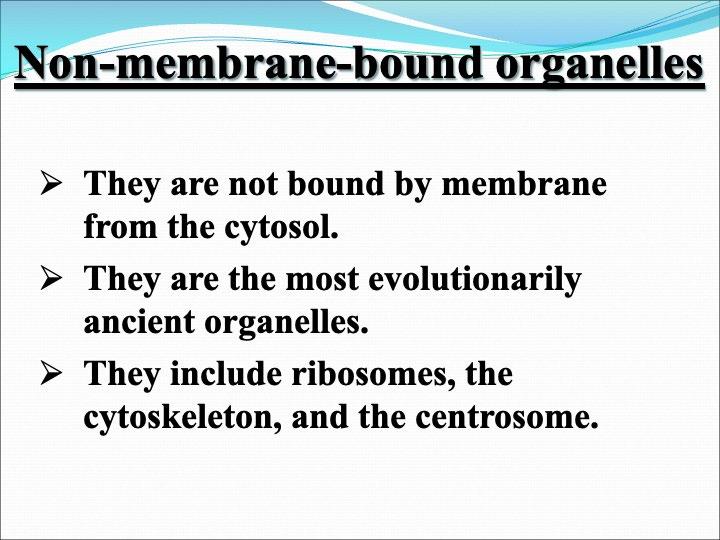
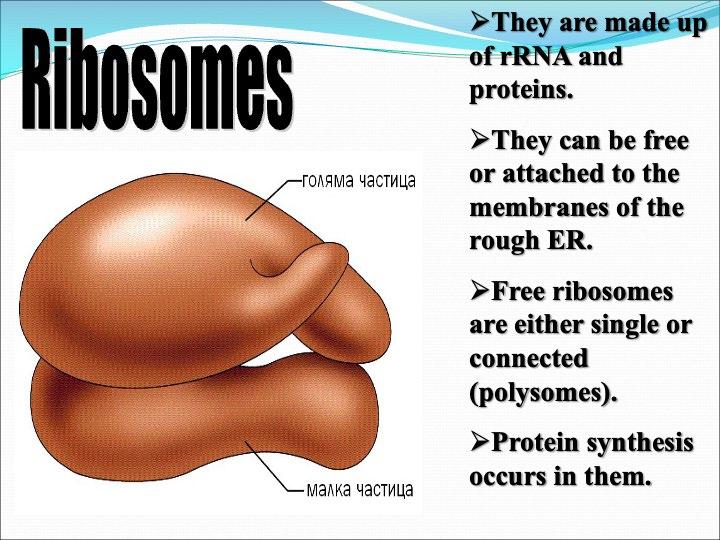
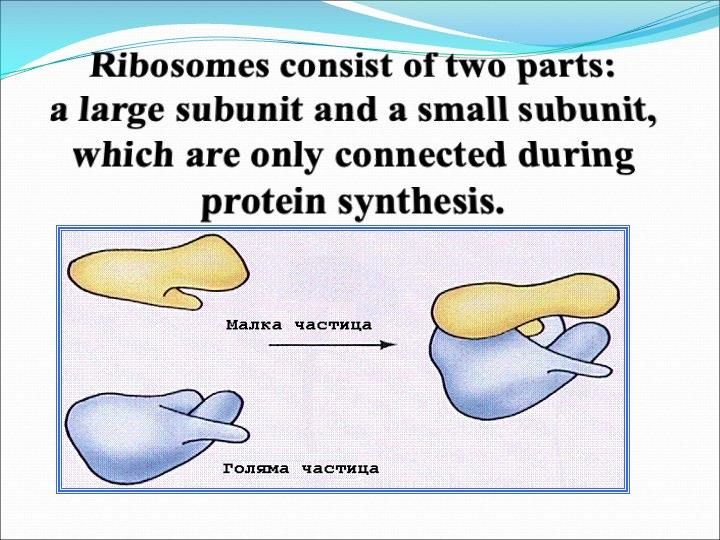
Ribosomes
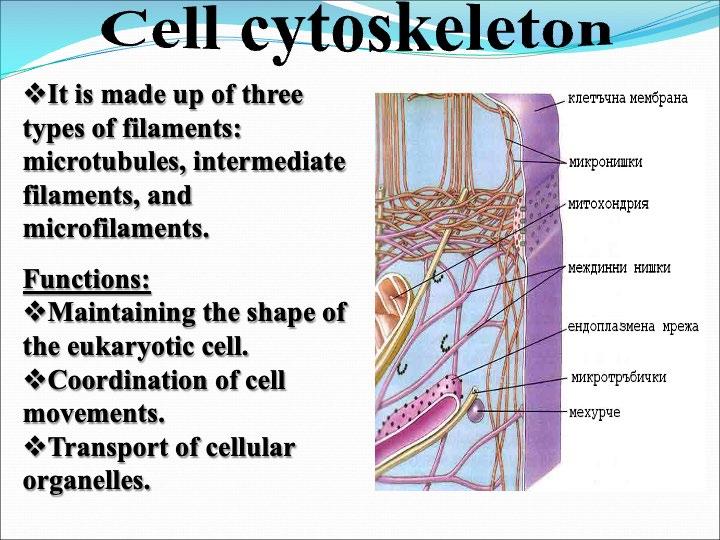
Cytoskeleton
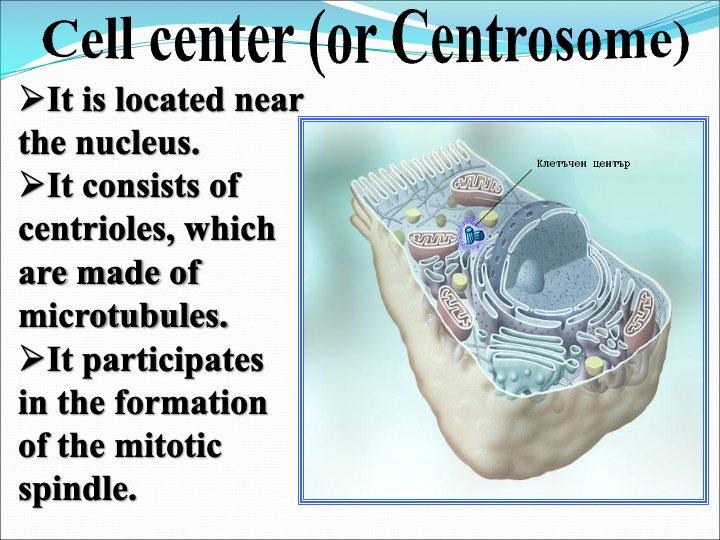
Centrosome
Task: Complete the diagram so that it accurately reflects the structure of a eukaryotic cell.
1 LESSON PLAN
Lesson Topic
Cells and their functions
Subject Class Duration (min)
COUNTRY: GERMANY
SCHOOL:
STADTTEILSCHULE LOHBRÜGGE
Name of the teacher
Biology 9 90 Nele Kaestner
Type of the lesson
Students number
Interactive with different methods and social forms 26
Context
Links with previous lesson(s)
In our biology curricula for “Stadtteilschulen” in Hamburg is written:
“Information and communication
The basic concept of information and communication describes the fact that living beings record, forward, process, store and respond to sensitive information. Communication takes place at different system levels: In a multicellular organization
All organs, tissues, cells and their components are constantly involved in communication.”
And also:
Apply work techniques
The students…
E1.1 is properly taken into account with laboratory material and technical equipment the safety regulations.
E1.2 microscope properly, taking safety regulations into account https://www.hamburg.de/resource/blob/798368/4a4ae47a31b14fb40d06d07b4ebfe405/biologiedata.pdf (last accessed on January 27, 2025)
So, we have a unit of lesson hours to learn about all cell organelles and their functions, how they work together in the complex way of living beings. The students also have to learn to work with a microscope as part of the unit.
Cross curricular links before the lesson
Medical History
• About the discovery of cell organelles and the history myths about life and cells.
Art and Design
• Students can built their own cells with different materials like paper mache or playdough.
Science
• Students get an impression of a laboratory.
• They get the feeling of a science discovery.
Learning Objective:
To explore and deepen all cell structures and the difference between plant cells and animal cells in a different way with the 3D-structure.
Learning Outcomes:
By the end of this lesson students will be able to
1. use VR glasses
2. name the difference between animal and plant cell.
3. know all cell organelles by name.
4. have a visualisation of cells in 3D-structure what they will remember, when they also watch cells under the microscope.
Pre Lesson-Preparation
VR-glasses, IPads for connecting with the glasses, PC connected to glasses for presentation and to show what students have to do. A special learning plan like game instructions to make sure students know what to do. A paper sheets to save the learning growths.
ICT and VR Resources, Skills, and Apps
VR glasses with the learning apps, tablets, computer, Interactive board
IT skills the teacher and the students will need for this lesson.
Teachers need to be firm with VR glasses, the app, the using of interactive whiteboards and the connection with the glasses.
Students need to be able to work in an 3D-VR-Reality without feeling sick. They should try to handle with the navigation of the glasses.
Software and Apps
VIRION Biology App
Key Vocabulary
The new words students will learn during the lesson.
Nucleolus, Cell Nucleus, Ribosomes.Vesicles, Rough endoplasmic reticulum (ER), Golgi apparatus, Microtubules, Smooth endoplasmic reticulum (SER) Chloroplasts
Key competencies development:
By the end of this lesson, students will develop the following key competences
1. Digital Literacy: Using VR technology to explore biologic contexts.
2. Biological competences: Knowing the cell structures of different cells (plant and animal cell) and having an idea of the 3D-structure.
3. Collaboration: Working in pairs, one person working in VR, the other one is guiding trough while she is watching on IPad what the other one is doing in VR.
Formal and non-formal methods applied in the lesson:
teachers lecture, direct instructions, couple working, group work, plenary discussions with reflection parts.
Assessment Strategies Used to Ensure Progress of All Learners Resources e.g. TEL, Other
Learner Activity Identify the techniques used to d ifferentiate for ALL L earners
Teacher Activity Objective s & Outcomes, Teaching A ctivities, R evisiting O utcomes & Consolidation
Interactive Whiteboard, presentation how to handle and VR glasses and IPads
Materials and Equipment 10 1 Teachers lecture about how to use VR glasses and teacher enlightenes the students of the possible health risks. F irst steps of trying to handle VR glasses. They sit in pairs. At first one person tries to handle, the other is watching the activities on the IPad
Questioning In the way the students try to get in the app, you can make sure that they understood how to handle it. Otherwise they would not have come in.
1 Pl enary talk about how it felt and which are difficulties in using L. talk about their difficulties and how they felt. Open talk with asking for more posts.
Students control and help each other. Teacher goes trough the rows being available for questions.
1 T he teacher request to change rolls. The other students is now watching the activities of the other trough IPad, while the other one is trying to handle VR.
Interactive Whiteboard, presentation how to handle and VR glasses and IPads 25 24 The teacher requests the students now to play the game and to fill out the paper sheet he will give to them, O ne student plays, the other one is watching his doing on IPad and fills out the paper sheet .
Students control and help each other. Teacher goes trough the rows being VR glasses and IPads Paper sheet with cell structures to get filled out.
VR glasses and IPads Paper sheet with cell structures to get filled out.
Students control and help each other. Teacher goes trough the rows being available for questions.
available for questions. 25
The students change roles, so that the one who was watching the doing of the other is now continuing the game. The other one is watching the doing of the other and fills out the rest of the paper sheet.
24 The teacher request s the students to change roles.
Plenary talk /
The students reflect this methods of teaching/learning.
1 The teacher asks the students to interrupt their gaming and to switch of the VRglasses. He is asking the students how it was and what their resume is about that way of learning cell structures.
working Paper sheet
The students overview their answers and correct them/ complete them if necessary
24 The teachers ask the students to overview their answers on the paper sheet in their working couples. The teacher announces that next lesson hour will start with comparing the answers in the paper sheet of all groups.
5
Couple
2 LESSON EVALUATION
What was successful / not so successful? What was the impact of this on student progress?
Evaluation
Pupil Learning & Progression
Did all the pupils achieve the intended learning outcome? (How do you know? What are the standards being used to measure success?)
For introduce into VR technology and to start the app, preferably to play the whole game, 90 min are not much time for the students. Obviously, the competence of the students to work with VR is quite different. Some are used to play with VR. It was easier for these students to get into the content of the app. They started earlier to work properly; the others needed more time to come into the handling VR. Other students needed many rests because of health problems like nausea. These where the reasons why the outcome was different as well.
The paper sheet was a good instrument to measure success.
But with the announcement that we will talk about all themes of the paper sheet, the teacher can make sure that at the end of the following lesson all students have all answers on their paper sheet.
How do you and your pupils know they have ALL made rapid progress? Again, how are you measuring these outcomes?
The pupils nouned their outcome was not that big as they expected. They said they would have learned the content even faster if they had worked conservatively with work sheets, books or explain videos, but they all said it was fun for them to try the new technology. Nevertheless, some of them said they even learned not that much because of their health problem while using the glasses.
For measuring the outcomes, the worksheet was necessary.
Teaching & Classroom Management
How has your planning and teaching created an environment that facilitates positive behaviours, highly conducive to learning?
It was a lot of planning and organising before, because our classrooms where not furnished for this kind of lessons. So, we needed a special room which also has enough sockets for loading the VR glasses.
Also, it is necessary to put all the tables away to avoid injuries while the students were acting in VR.
Planning & Subject Knowledge
How could you further develop pedagogy to address errors and misconceptions in your planning?
How could you develop imaginative and creative approaches to further match individual needs and interests?
I think it is very important to have enough time, also for brakes. It is necessary to let the students enough time for trying the VR without solving the challenge in biology app, otherwise they get lost.
So, it is a huge expense in planning and using the VR with a little success in learning. It is more an experience which is fun for the students and is motivating them. For that it is senseful to cooperate with the other classes in the same age, because than you can charge the expense with more colleagues, and it is profitable for more students.
Teaching with VR implementation
What was different compare the teaching without VR.
- huge expense
What are the benefits.
- Motivated students
- It was an access for students that normally are not that interested in this subject.
- The students honour your engagement in modern technology
Problems appeared during the lesson.
- sickness
- it took too long for some students to concentrate, because of less variety you have normally in a school lesson
- technical problems with the app
- individual problems were difficult to solve, because everyone is on a different level in that game
1 LESSON PLAN
Lesson Topic
COUNTRY:BULGARIA
Periodicity in the properties of the atoms of the chemical elements
and preservation of the environment
Type of the lesson А lesson for new knowledge
Context
Links with previous lesson(s)
Students already know that atom`s number (the number of protons) determines the place of the element in the periodic table.
Associate the number of electrons with the electronic configuration, which is a key for the regularities between periods and groups.
According to the place of the element in the periodic table students can determine valence and interaction between elements.
Cross curricular links before the lesson
Physics and Astronomy – nuclear structure, nuclear reactions
Biology and health education – the role of the chemical elements in biological processes
Mathematics – numerical dependence in the periodic table, determining the least common multiple
Learning Objective:
The change in metal and non-metal character in periods and groups is explained through demonstration. What is the connection between the atom`s radius, electronegativity and ionization energy
Learning Outcomes:
1. Students should understand the principles of the ordering og the chemical elements in the periodic table.
2. Students should be able to identify the regularity(interdependence) between periods and groups.
3. Students should apply their knowledge in finding and positioning chemical elements in the periodic table.
Pre Lesson-Preparation
Materials on the subject, scientific films, worksheets
ICT and VR Resources, Skills, and Apps
Interactive board, VR glasses the teacher – good knowledge for work in VR environment the students – basic skills for work in VR environment
Software for VR glasses
Key Vocabulary
Ionization energy
Atom`s radius
Electronic affinity
Electronegativity
Key competencies development:
1. Applying the scientific approach to analysing data and establishing regularities.
2. Analysing the interrelations between the structure of the atom and the properties of the elements
3. Using specialised software with interactive versions of the periodic table
Formal and non-formal methods applied in the lesson:
Discussion and questions
Teamwork
a game connected with the use of VR glasses
Assessment Strategies Used to Ensure Progress of All Learners
Learner Activity Identify the techniques used to d ifferentiate for ALL L earners
Teacher Activity Objective s & Outcomes, Teaching A ctivities, R evisiting O utcomes & Consolidation
Teacher`s introductory questions to help students Oral comments and answers
Students` activity: finding a chemical element and placing it in the correct place in the periodic table using VR glasses
Introduction, updating the knowledge from previous lessons
Navigator in the VR adventure
Teacher`s activity: dispute resolution, group support Discussion
Feedback
Students` activity: representing the qualities characterising the properties of the atoms for each discovered element
Summarising and assimilation
Summarising and assimilation
2 LESSON EVALUATION
What was successful / not so successful? What was the impact of this on student progress?
Evaluation
Pupil Learning & Progression
Combining different assessment methods such as participation in discussions and answering questions during the lesson, engagement in group activities, interactive games allow for an objective measurement of the knowledge, skills and competencies, acquired on the topic. This ensures that every student will have the opportunity to demonstrate their strengths.
By using the following indicators: practical activities by students and observation by the teacher distributing worksheets students` discussions
All these indicators will help to assess students` progress in a holistic way, reflecting both their knowledge, skills and motivation.
Teaching & Classroom Management
Creating a positive classroom environment is a key to motivating students and achieving effective learning.
These are some of the techniques I apply(use):
I engage students in discussions, debates through questions that provoke thought, students` participation in laboratory exercises independently and in teams
Planning & Subject Knowledge
Through participation in training courses and exchanging experience with colleagues who have participated in training courses that were new to me
Teaching with VR implementation
The lesson conducted using VR glasses has nothing to do with a traditional one. It requires diligent preparation, but it is worth. The interest and motivation of the students are enormous. They fulfilled the assigned task with great enthusiasm.
Worksheet
Write in the chemical sign of the first element you found…………..
Point its place in the Periodic system group and period
Write in the chemical sign of the second element you found…………..
Point its place in the Periodic system group………………. and period………………
Write in the chemical sign of the third element you found…………..
Point its place in the Periodic system group and period
Write in the chemical sign of the fourth element you found…………..
Point its place in the Periodic system: group………………. and period………………
Write in the chemical sign of the fifth element you found…………..
Point its place in the Periodic system group and period
Arrange the chemical elements that you found in ascending order of the Electronegativity
Arrange the chemical elements that you found in descending order of the Atomic radius
Arrange the chemical elements that you found in ascending order of the Ionisation energy
Arrange the chemical elements that you found in descending order of the Electronic affinity
1 LESSON PLAN
Lesson Topic
COUNTRY: GERMANY
SCHOOL:
Introduction to the Periodic Table of Elements
Subject Class Duration (min)
Chemistry 8 90 min
LEOPOLDINUM DETMOLD
Name of the teacher
Type of the lesson Students number
Introduction to a new topic: PTE 29
Context
Links with previous lesson(s)
Cross curricular links before the lesson
In this series of lessons, the pupils draw on their previous knowledge from Year 7, in which they can use the topic of substances and their properties and the topic of metals as previous knowledge.
It is the beginning of a new topic
Alternatively, the VR lesson can be held at the end of the series of lessons on the topic of the "periodic table". Students use the VR interaction to practically apply the knowledge they have already learned about the periodic table.
Learning Objective:
to learn about the Periodic Table of Elements and understand its basic structure. to categorize elements into groups and periods. to practice organizing elements using a VR-game
Learning Outcomes:
1) understanding the structure of the periodic table: Students can explain the basic structure of the periodic table, including the terms periods and groups.
Students can describe what periods and groups mean in the periodic table and how they group the elements according to their chemical properties.
2) assigning elements to groups and periods:
Pupils can correctly assign elements to a group (e.g. alkali metals, noble gases) and a period (e.g. 2nd period, 3rd period) based on their position in the periodic table.
Students can classify the elements into the appropriate groups and periods according to their electronic structure and chemical properties.
3) understanding the chemical properties of elements
Students understand that elements in the same group share similar chemical properties because they have the same number of valence electrons.
Students can recognize and describe basic properties of elements (e.g. reactivity, metallic character) in relation to their position in the periodic table.
Pre Lesson-Preparation
VIRION’s Chemistry application, Worksheets with a simplified version of the Periodic Table, Periodic Table poster (optional)
ICT and VR Resources, Skills, and Apps
Hardware: Oculus VR glasses, tablets/computers, whiteboard with beamer.
Teacher
• The teacher should have a solid understanding of how VR technology works, including setup, troubleshooting, and the general operation of VR headsets and controllers.
• Familiarity with the specific VR software and applications used for educational purposes is essential.
• The ability to troubleshoot basic technical issues, such as device connectivity or software malfunctions, is crucial for maintaining a smooth classroom experience.
Students
• The student should have a basic understanding of how to use technology, such as operating a computer or mobile device.
• Familiarity with basic VR interface navigation (e.g., using controllers, menu interactions, and adjusting settings) can be helpful.
• Comfort with digital tools and the ability to follow instructions for setting up and adjusting the VR equipment is necessary.
• The student should understand safety guidelines for using VR, including being aware of the space around them to avoid accidents or collisions with physical objects.
• Knowledge of how to take breaks and manage time to prevent eye strain or fatigue is important.
VIRION’s Chemistry application
Key Vocabulary
Periodic Table, Element, Period, Group (or Family), Valence Electrons, Alkali Metals, Alkaline Earth Metals, Halogens, Noble Gases, Atomic Number, Atomic Mass (or Atomic Weight), Electron Configuration, Isotope, Metals, Nonmetals, Metalloids
Key competencies development:
Scientific Understanding and Knowledge: Understanding the structure and organization of the Periodic Table.
Analytical and Critical Thinking: Analysing and categorizing elements based on their chemical properties.
Problem-Solving Skills: Applying knowledge to solve problems (e.g., categorizing elements correctly in the game).
Collaboration and Teamwork: Working together with peers in the game-based activity.
Technological Literacy: Using technology to enhance learning (e.g., through online tools or VR if applicable).
Communication Skills: Explaining scientific concepts and processes clearly.
Time Management and Focus: Managing time and maintaining focus during activities.
Formal and non-formal methods applied in the lesson:
• Direct Instruction: Introduction of concepts through lecture and visual aids.
• Guided Practice: Hands-on categorization exercises in pairs/groups.
• Interactive Game ("Periodic Table Challenge"): A competitive, timed game where students place elements on the Periodic Table.
• Group Collaboration: Problem-solving and group discussion to understand element properties.
• Reflection and Discussion: Class discussions and individual reflections on what was learned.
• Homework/Independent Practice: Extension activity to solidify understanding outside of class.
LESSON STRUCTURE & DETAILED PLAN OF ACTIVITIES
Resources e.g. TEL, Other Adults, Materials and Equipment
Assessment Strategies Used to Ensure Progress of All Learners
Learner Activity Identify the techniques used to d ifferentiate for ALL Learners
Teacher Activity Objective s & Outcomes,
Teaching A ctivities, R evisiting O utcomes & Consolidation
Resources: Large visual of Periodic Table or digital projector Interactive Periodic Table apps or websites (e.g., Ptable.com)
Assessment Strategy: Teacher asks quick formative questions to check for understanding (e.g., "Can anyone tell me what defines an element's group?"). Observes student responses and adjusts explanations as needed.
Learner Activity: Students take notes on the key concepts. Differentiation: Provide visual aids (chart of Periodic Table) and summaries for students who may need additional support. Some students can use online interactive Periodic Tables for a deeper exploration.
Objective : Introduce the structure of the Periodic Table, its periods, and groups.
Teaching Activity: The teacher presents an overview of the Periodic Table using a large visual (printed or projected). Discuss periods, groups, and the classification of elements (metals, nonmetals, metalloids).
Revisit Outcome: Teacher reinforces the link between elements’ position and their properties.
Resources: Worksheets with partial Periodic Table Teacher's guide with answers to help struggling learners Periodic Table charts
Assessment Strategy: Monitor students’ completion of the worksheet. Review their answers and ask probing questions to test their understanding of the Periodic Table’s organization.
L earner Activity: Students will work individually or in pairs to complete a worksheet. They categorize given elements based on their atomic numbers and properties. Differentiation:Advanced learners : Encourage them to explore periodic trends (e.g., electronegativity, ionization energy).
Objective: Reinforce categorization of elements into periods and groups.
Teaching Activity: The teacher gives a brief explanation of atomic number, and how these influence an element's position on the table.
Revisit Outcome: Remind students of the relationship between elements' positions and their properties.
10 min 1
20 min 1
Struggling learners : Provide simplified lists with clues and direct support.
Resources: Element cards (printed or digital)
Large printed or digital Periodic Table Timer for game
Assessment Strategy: Monitor students' understanding during the game by observing their choices and asking them to explain why they placed elements in specific groups and periods. This also assesses group dynamics and peer support.
Learner Activity: Students participate in the "Periodic Table Challenge" game. They are divided into teams and take turns categorizing elements by their groups and periods. Differentiation:Advanced learners : Provide elements that require more nuanced categorization (e.g., transition metals).Struggling learners : Provide simpler elements with more obvious properties (e.g., Noble Gases, Alkali Metals).
Objective: Engage students in applying their knowledge through an interactive game. Teaching Activity: Teacher explains the rules for the "Periodic Table Challenge" game. The teacher encourages participation, explains the scoring system, and sets a time limit.
Revisit Outcome: Teacher reviews key concepts (groups, periods) as students play.
Resources: Whiteboard for recording key ideas
Digital classroom tools (if available)
Assessment Strategy: Observe student participation in the discussion. Use questioning techniques to assess understanding and give constructive feedback based on students’ answers.
Learner Activity: Students share their observations and insights from the game. They reflect on what they learned and the connections they made. Differentiation:Advanced learners can explain periodic trends more deeply.Struggling learners can discuss what was most challenging in the
Objective: Encourage reflection on what was learned through the game and activities. Teaching Activity: Teacher leads a classwide discussion to reflect on the game. Questions such as "What patterns did you notice in elements of the same group?" and "How did the game help you understand the Periodic Table better?"
game and receive further clarification.
Assessment Strategy: Homework will be reviewed for accuracy in categorization and understanding of the element's properties. Teachers will assess how well students apply the Periodic Table’s concepts to realworld examples.
Learner Activity: Students work independently on their homework task, researching their assigned element. Differentiation:Advanced learners : Encourage more indepth research (e.g., isotopes, electron configurations).
Struggling learners : Provide a scaffolded template with specific questions about the element.
Objective: Solidify understanding through independent practice.
Teaching Activity: Teacher explains the homework task: Students will research a chosen element, its group, period, and properties, and write a short report.
Revisit Outcome: Reinforce the connection between elements’ properties and their placement in the Periodic Table.
min 1&2
Resources: Access to computers/tablets for online research Element information sheets or resources (websites, books) 5 min 1&2
Resources: Exit tickets or digital polling tool (if available)
Assessment Strategy: Quick exit tickets: Students write down one thing they learned and one question they still have. This helps gauge what’s clear and what needs more attention in future lessons.
Learner Activity: Students ask questions or provide final thoughts on the lesson. They summarize what they learned in their own words.
Objective: Recap and consolidate key learnings.
Teaching Activity: The teacher quickly summarizes the key concepts learned today and links them to the next lesson. Encourage any final questions or thoughts.
2 LESSON EVALUATION
What was successful / not so successful? What was the impact of this on student progress?
Evaluation
Pupil Learning & Progression
To assess the success of this lesson on the Periodic Table of Elements, the following strategies were be employed:
- Questioning
- Observation
- Group Discussions
- Collaborative Work
The pupils completed their tasks with obvious success. On the one hand, this is due to the high level of motivation generated by using the VR unit. On the other hand, it is due to the intuitive approach offered by the chosen material.
Teaching & Classroom Management
Active learning techniques, immediate feedback and a supportive classroom culture, help to encourage behaviours that gets students to learn deeply and for a long time.
Planning & Subject Knowledge
By anticipating misconceptions, using formative assessments, and applying scaffolded support, the teacher can help students correct errors as they occur and deepen their understanding of the Periodic Table. Active and reflective teaching practices ensure that misconceptions are addressed immediately, allowing for a more effective and inclusive learning environment. Additionally, continuous reflection on teaching methods, along with collaboration with peers, can lead to continuous improvement in addressing and preventing student errors.
Teaching with VR implementation
Benefits:
The VR-game tended to capture the students’ attention more effectively, especially when compared to traditional methods. The novelty and gamified aspect of VR made learning more engaging and fun, motivating students to actively participate.
The interactive features allowed the students to manipulate elements, visualize atomic structure, and explore different patterns in the Periodic Table.
The use of the VR-application is customized to suit different learning paces. Students were able to progress through interactive VR modules at their own speed, revisiting concepts as needed, which is difficult to achieve in a standard class setting without VR.
Problems appeared during the lesson.
The pupils were enthusiastic about the playful element of the app. However, the entertainment quality of the series of lessons led to reduced concentration in several pupils. This made it more difficult to motivate them to take notes and deepen the content in the “real world”.
1 LESSON PLAN
Lesson Topic
Periodic table
Subject Class Duration (min)
COUNTRY: GERMANY
SCHOOL: GOETHE-SCHULE FLENSBURG
Name of the teacher
Chemistry 10 90 Andreas Matz
Type of the lesson Students number Interactive lesson, pair work. 25
Context
Links with previous lesson(s) Pupils use their knowledge of the structure of the periodic table of elements. However, it could also be used without prior knowledge.
Cross curricular links before the lesson
Nothing
Learning Objective:
The students practice locating the elements in the periodic table.
Learning Outcomes:
1. Operation of the technology
2. Searching and sorting the elements
3. Reflection on their experiences
Pre Lesson-Preparation
Oculus Quest, Virion Chemistry App
ICT and VR Resources, Skills, and Apps
VR Glasses, iPad, WLAN
You need to know how to connect the iPad and the Oculus Quests. This must also be technically possible, i.e. the school's network must allow this connection.
Virion Chemistry App, Oculus Quest App
Key Vocabulary
Nothing
Key competencies development:
1. Using the VR technology of the Oculus Quest
2. Sorting elements into the PSE
3. They learn to look out for each other.
Formal and non-formal methods applied in the lesson:
The app itself is designed as a game
Partner work
Resources e.g. TEL, Other Adults, Materials and Equipment
Assessment Strategies Used to Ensure Progress of All Learners
Learner Activity Identify the techniques used to d ifferentiate for ALL L earners
Teacher Activity Objective s & Outcomes, Teaching A ctivities, R evisiting O utcomes & Consolidation
Oculus Quest, iPad, projection screen or display for demonstration
Observation: Do the learners understand how the devices are connected and used?
Listening, asking questions, and gaining initial impressions; visual demonstration, repetition of key points, use of simple language
Introduction to the Oculus Quest, explanation of how it works, demonstration of the app, and connection with the iPad
Oculus Quest, iPad, virtual app featuring the periodic table
Teacher observes learner activities, provides feedback, and addresses uncertainties.
One learner uses the Quest while their partner observes and ensures safety. Learners switch roles after 15 minutes. Pair work encourages collaboration and differentiation through individual pacing.
Notetaking materials for discussion, potentially additional visual aids
Assessment through reflection and discussion: Can learners explain what they learned?
Learners share their experiences, discuss what they have learned, and reflect on their progress.
Open discussion supports learners with different levels through targeted questions. Assessment is carried out through reflection and discussion.
1
2 Guidance and support during the use of the VR app (individual assistance for questions)
3 Reflection and discussion of the activity; collecting feedback on the learning experience
2 LESSON EVALUATION
What was successful / not so successful? What was the impact of this on student progress?
Evaluation
Pupil Learning & Progression
It is unrealistic for all students to achieve all the goals, that is not how teaching and learning works.
I think, yes, they achieve goals at different levels. I recognise this by the fact that they can only sort the respective caves if they can sort at least three elements.
All students never achieve rapid success. But the app allows some to work faster than others. And again: I notice this when they reach the next cave.
Teaching & Classroom Management
I used a good PowerPoint to explain, I gave them the opportunity to try things out and ask questions, I had the students work in pairs so that they could help each other.
Planning & Subject Knowledge
There were no errors or misunderstandings in my planning. The app itself urgently needs to be developed further, but I can't do that.
I have made suggestions on how the app can be significantly improved. I hope that these will be implemented.
Teaching with VR implementation
The pupils are initially highly motivated by the technology to engage with theoretical content, simply because the technology is exciting. Vr also opens up possibilities that normal lessons do not have (dangerous experiments, sub-microscopic things). However, the app itself still needs to be improved in order to utilise the possibilities.
The problem is that it takes up a lot of space and the technology itself is very expensive.
1 LESSON PLAN
Lesson Topic
Periodic Table of Elements
Subject
COUNTRY: FINLAND
Chemistry 9 75 25
Type of the lesson New skills
Context
Links with previous lesson(s)
Students will understand the structure and organization of the periodic table.
Students will learn about the significance of elements' positions on the periodic table.
Cross curricular links before the lesson
Learning Outcomes:
1. The students will understand the structure and organization of the periodic table.
2. The student will learn about the significance of elements’ positions on the periodic table
Pre Lesson-Preparation
Periodic table handouts, computer, document camera and screen, whiteboard and markers, element samples (if available), VR glasses
ICT and VR Resources, Skills, and Apps
VR glasses, computer
The teacher must know how to use VR glasses
VIRION VR Apps
Key Vocabulary
Periodic Table, Element, Group, Period
Key competencies development:
1. understanding of chemical concepts
2. analytical skills
3. scientific literacy
4. critical thinking
5. practical skills
6. communication skills
Formal and non-formal methods applied in the lesson:
Discussion, VR-glasses,
Resources e.g. TEL, Other Adults, Materials and Equipment
Assessment Strategies Used to Ensure Progress of All Learners
Learner Activity Identify the techniques used to d ifferentiate for ALL L earners
Teacher Activity Objective s & Outcomes, Teaching A ctivities, R evisiting O utcomes & Consolidation
1 Briefly review the structure of an atom. Discuss the concept of elements and how they differ from compounds. introduce the periodic table as a tool for organizing elements. discussion computer, document camera
3 Distribute periodic table handouts. Explain the layout of the periodic table (groups, periods, and blocks). Highlight key features such as atomic number, atomic mass, and element symbols. computer, document camera white board 25 5 use VR glasses VR glasses 1 5 2, 4, 6 If available, show samples of different elements or students choose one element and observe that. group work
s tudents explore the properties of these elements (e.g., appearance, state of matter).
computer, document camera, whiteboard
4 summarize the key points covered in the lesson. Answer any remaining questions from students. Provide a brief overview of what will be covered in the next lesson.
2 LESSON EVALUATION
What was successful / not so successful? What was the impact of this on student progress?
Evaluation
Pupil Learning & Progression
I provide a short quiz at the end of the lesson to assess understanding.
Teaching & Classroom Management
Planning & Subject Knowledge
Teaching with VR implementation
If we weren’t wearing VR glasses, we would have used the periodic table on the computer
What are the benefits: novelty and difference Problems, appeared during the lesson: how to use VR glasses.
1 LESSON PLAN
Lesson Topic Chemistry
COUNTRY: FINLAND
Subject Class Duration (min)
Notes about the class (number of the students etc.)
Chemistry 7th grade 45 16-20
Type of the lesson Normal lesson
Context
Links with previous lesson(s) Students has been studied before chemistry and periodic table. It will repeat previously.
Cross curricular links before the lesson -
Learning Objective:
Learn how to use different platform and environment.
Learn how to communicate to each other. Practise to co-operation when only one student is seeing things and need to explain other.
Practice patience, get used to use game controller.
Learning Outcomes:
By the end of this lesson students will be able to talk how to use new user interface Students will be memorized periodic table.
Pre Lesson-Preparation
Charging VR-devices and print lesson plan for students. Be ready to project app instruction to whiteboard.
ICT and VR Resources, Skills, and Apps
VR glasses
Teacher must be prepared and be able to help students, so virtual glasses and apps has to be tested before lesson.
Key Vocabulary
Elements in periodic table.
Key competencies development:
Students must use different environment for learning. They develop their digital skills. There is also possibility to learn foreign language
Formal and non-formal methods applied in the lesson:
Methods to use is telling others what elements each group picked up and what feature or purpose they found in specific element.
2 LESSON EVALUATION
What was successful / not so successful? What was the impact of this on student progress?
Evaluation
Pupil Learning & Progression
Most of the students succeeded to tasks and also having fun during lesson Valuation made during presentation to others.
Teaching & Classroom Management
Planning was quite light. Learning app offer appropriate task. It was clearly and focused one thing. Students work in pairs, and both have things to do. Afterwards they were able to increase their knowledge of elements.
Planning & Subject Knowledge
There would be also possibility made a little competition between students. One way is using the bingo grid where are example 4x4 grid and you have to make line of four. Which group will get the line first will win the contest.
Teaching with VR implementation
VR give you a nice addition to lesson. Someway it makes students eager to subject. So, learning with VR offers enthusiastic to learn subject while paying.
There might be problems using a new interface to students. For this experimental learning new interface might also be the main goal. Then students won’t get frustrated, if everything doesn’t go all right.
1 LESSON PLAN
Lesson Topic
COUNTRY: SPAIN
Exploring and Classifying Chemical Elements in a Virtual Mine
Subject
Chemistry
4ºESO 50
Notes about the class (number of the students etc.)
A class of 30 students, with 15 available VR headsets. Students will work in pairs, sharing one VR headset between two.
Type of the lesson
Interactive, practical lesson with the use of Virtual Reality (gamification).
Context
Links with previous lesson(s)
Cross curricular links before the lesson
Students have previously studied the structure of the periodic table and the main groups of elements in earlier lessons.
• Physics: Basic concepts on states of matter.
• Technology: Use of advanced technological tools (virtual reality).
Learning Objective:
To identify, classify, and organize chemical elements in the periodic table through an immersive virtual reality experience.
Learning Outcomes:
By the end of the lesson, students will be able to:
1. Visually identify chemical elements based on their characteristics.
2. Classify elements into the correct groups in the periodic table.
3. Collaborate in pairs to solve scientific tasks in a digital environment.
4. Gain a better understanding of the organization and layout of the periodic table.
Pre Lesson-Preparation
• Set up the VR headsets and ensure the application is loaded.
• Display instructions on a screen so students know how to use the application.
• Divide students into 15 pairs, with one VR headset per pair.
ICT and VR Resources, Skills, and Apps
15 VR headsets and controllers to be shared between pairs of students.
Virtual reality application for exploring chemical elements in a mine.
Basic handling of VR headsets and use of controls.
Key Vocabulary
• Periodic Table
• Alkali Metals
• Non-Metals
• Lanthanides
Key competencies development:
1. Digital Competencies: Using VR technology to explore scientific concepts.
2. Scientific Competencies: Classifying elements based on their properties.
3. Collaborative Work: Partner-based tasks and problem-solving.
Formal and non-formal methods applied in the lesson:
• Pair work
• Gamified learning
• Interactive exploration
Assessment Strategies Used to Ensure Progress of All Learners
Learner Activity Identify the techniques used to d ifferentiate for ALL L earners
Teacher Activity Objective s & Outcomes, Teaching A ctivities, R evisiting O utcomes & Consolidation
Resources e.g. TEL, Other Adults, Materials and Equipment 5 Introduction Explain the objectives and how to use the VR headset. Listen and ask questions. Observe initial participation. Screen, VR headsets
20 Identifying elements Supervise students as they explore the mine and find elements. Search for and collect elements in the mine, working in pairs. Check elements found by students. VR headsets, app 15 Classifying Guide students in classifying the elements on the periodic table. Classify elements in the virtual periodic table. Evaluate correct classification. Interactive periodic table 5 Reflection Ask questions about what they learned. Share experiences in group discussions. Provide feedback on the process. Screen 5 Conclusion Issue completion certificates for the activity. Celebrate task completion. Distribute certificates. Final certificate
2 LESSON EVALUATION
What was successful / not so successful? What was the impact of this on student progress?
Evaluation
Pupil Learning & Progression
Most of the students managed to classify the elements correctly.
The pair experience encouraged collaboration and shared learning.
Teaching & Classroom Management
The use of VR allowed for an immersive experience, although rotating pairs required effective time management
Planning & Subject Knowledge
To address errors and misconceptions, it is essential to plan for continuous assessment within the virtual reality environment. An effective pedagogical approach could include the following:
1. Immediate feedback in VR: Implement a system where students receive instant feedback when attempting to place elements on the periodic table. If an element is placed incorrectly, a notification could appear explaining why it does not belong in that position. This reinforces learning in the moment and helps correct misconceptions promptly.
2. Group review at the end: After the VR experience, hold a group session to discuss common errors observed during the activity. This allows for clarification of misconceptions that may have arisen among several students and facilitates collaborative feedback.
3. Additional review materials: Prepare visual guides or extra activities to reinforce the differences between element groups, such as metals, non-metals, and others. This can help clarify confusion observed during the game and ensure better content retention.
4. In-game hints: If a common pattern of errors is detected (e.g., confusion between lanthanides and actinides), the game could offer hints or brief reminders about the distinguishing characteristics of the elements before students attempt to classify them.
Teaching with VR implementation
Students showed great interest and engagement due to the VR technology. Alternating pairs for headset usage kept the activity dynamic and engaging.
This plan adjusts the lesson's duration and available resources, ensuring active participation for all students.
1 LESSON PLAN
Lesson Topic
Geometric bodies
COUNTRY: BULGARIA
Type of the lesson
Based on Teaching Approach: Technology-Based lesson
Based on Learning Objectives: Introduction Lesson
Based on Classroom Organization: Small Groups Lesson
Based on Subject Area: STEM Lesson
Based on Learning Methodologies: Inquiry-Based Lessons
Context
Links with previous lesson(s)
Cross curricular links before the lesson
Basic geometric figures – triangle, square, circle, etc.
Parallelogram and triangle theorems.
Transforming measures for length, volume and area.
Analytic geometry and coordinates of the peaks of geometric bodies.
Science – centre of gravity
Arts – drawing geometrics bodies in perspective.
Technology – geometric figures in architecture and design.
Learning Objective:
Students can distinguish basic geometric bodies – cube, prism, cylinder and sphere
Students study the properties of the geometric bodies and calculate area and volume via VR activities.
Develop logical and spatial thinking.
Learning Outcomes:
By the end of this lesson students will be able to:
1. Recognize and classify geometric figures
2. Use the formulas for calculating area and volume.
3. Develop creativity and special thinking.
Pre Lesson-Preparation
VIRION’s Math application
ICT and VR Resources, Skills, and Apps
Hardware: Oculus VR glasses, tablets/computers, interactive whiteboard.
Teacher: Basic VR navigation, 3D modelling software usage.
3D modelling app (GeoGebra, Tinkercad VR mode).
Key Vocabulary
The new words students will learn during the lesson.
Prism Centre of gravity Pyramid, Base, Apex, Edge, Height
Key competencies development:
By the end of this lesson, students will develop the following key competencies …
1. Mathematical Competence: Understanding 3D shapes, spatial thinking.
2. Digital Literacy: Using VR technology to explore mathematical concepts.
3. Collaboration: Working in small groups to discuss VR experiences.
4. Initiative and entrepreneurship through teamwork for creating constructions and architecture models.
Formal and non-formal methods applied in the lesson:
Discussion on types and kinds of geometric forms and figures, Direct Instructions, Guided exploration, analysis of information.
Differentiated Instructions, Technology-based learning, Group learning, Problem-solving tasks, brainstorming.
Resources e.g. TEL, Other Adults, Materials and Equipment
Assessment Strategies Used to Ensure Progress of All Learners
Learner Activity Identify the techniques used to d ifferentiate for ALL L earners
Teacher Activity Objective s & Outcomes, Teaching A ctivities, R evisiting O utcomes & Consolidation
Link to Learning Outcome number
Time (min)
Interactive whiteboard GeoGebra, pictures of geometric figures
Verbal activity of students answering the questions.
Identify geometric figures . Give examples from real life for geometric figures and structures.
Introduces the topic and objectives of the lesson. Shows models o f geometric figures through objects in everyday life and their use.
5 1
Oculus VR glasses, VIRION maths app. Worksheets.
Observation of students' activities.
Students make their first steps with VIRION maths app. Study the worksheets.
Explain to the students how to r esearch basic geometric structures and their characteristics through VIRION maths app . Visual demonstration. Divide the class into teams of 5/6 students. Gives the worksheets one for each team.
10 1, 3
Ocul us VR glasses, 3D VIRION maths app
Assessment based on the results in the worksheets.
Use VIRION maths app to explore geometric figures, use formulas to calculate area and volume. Work only on stage 1 of the virtual maths app. Work together to fulfil the tasks from the worksheet.
Present challenge tasks. Guide through VR experience. Help teams if necessary. Circle to assist students.
20 1, 2
Peer feedback.
Discuss experiences. Openended questions.
Recap and reflect.
5 1, 2, 3
2 LESSON EVALUATION
What was successful / not so successful? What was the impact of this on student progress?
Evaluation
Pupil Learning & Progression
Most of the students achieved the intended learning outcomes. It is judged by the final discussions, students’ activities during the lesson and their attitude. Standards used are the standards adopted by Bulgarian Ministry of Education for Mathematics for 7th grade.
How do you and your pupils know they have ALL made rapid progress? Again, how are you measuring these outcomes?
Our knowledge is based on the enhanced engagement and understanding of the concepts and formulas, all pupils managed to complete their tasks in time. All the tasks in the worksheets were fulfilled very well.
Teaching & Classroom Management
How has your planning and teaching created an environment that facilitates positive behaviours, highly conducive to learning?
In order to create an environment that facilitates positive behaviours it is essential to know your students well, especially when forming the teams. The introduction of the topic and the learning objectives in a way that will motivate students for highly conductive learning is also very important. The innovative method of VR 3D modelling was very interesting and helped them achieve tasks they wouldn’t in formal classroom situation.
Planning & Subject Knowledge
Pre-assessment Activities: Introduce a short quiz or a discussion before the VR session to gauge students' prior knowledge and identify misconceptions.
• At the beginning of the lesson there should be a short discussion on the basic knowledge they need for the lesson and identify misconceptions.
• During the lesson students should be encouraged to share their thoughts and ideas, discuss the concepts and in this way prevent misunderstandings.
• The students must be informed in advance about common errors made during the VR session
• Students should be given more active part encouraging them to explain concepts to one another. This not only reinforces learning but also helps clarify misconceptions.
Teaching with VR implementation
What was different compare the teaching without VR.
Studying with VIRION maths app was very interesting for the students, they were more motivated to participate in the activities and liked the challenges very much.
What are the benefits.
Students’ motivation and active participation helps them achieve the learning objectives. Problems, appeared during the lesson.
The VR setup sometimes takes more time. Some students didn’t feel very well at the beginning and needed more assistance.
1 LESSON PLAN
Lesson Topic
Solid geometry
COUNTRY: FINLAND
Subject Class Duration (min) Notes about the class (number of the students etc.)
Mathematics 9th grade 45 14-20
Type of the lesson
Normal lesson
Context
Links with previous lesson(s) Students has been studied before solid geometry. It will repeat previously.
Cross curricular links before the lesson
Literature, how to read instructions. Visual perception.
Learning Objective:
Learn how to use different platform and environment. Practice patience, they need to wait and solve problems individual in new user interface.
Learn digital skills and using problem solving capasity
Learning Outcomes:
By the end of this lesson students will be able to talk how to use new user interface and solve problems. How to make solid particles with basic figures. Focus to understand that you can make particles combination, united, separated. Opening eyes to see patterns in real world also.
Pre Lesson-Preparation
Charging VR-devices and print lesson plan for students. Be ready to project app instruction to whiteboard.
ICT and VR Resources, Skills, and Apps
VR glasses
Teacher must be prepared and be able to help students, so virtual glasses and apps has to be tested before lesson.
Key Vocabulary
Students will learn some new terms and formulas solid geometry.
Key competencies development:
Students must use different environment for learning. They develop their digital skills. There is also possibility to learn foreign language
Formal and non-formal methods applied in the lesson:
Methods to use is group work and discussion about the new things. Sharing own observations to each other.
2 LESSON EVALUATION
What was successful / not so successful? What was the impact of this on student progress?
Evaluation
Pupil Learning & Progression
Most of the students succeeded to tasks. Valuation made with discussion all together and small groups.
Teaching & Classroom Management
Learning in different way and using virtual environment made possibility to focus strictly one task. Students also need to work individually part of the time. In classroom there is challenges to get focus in learning. When some students haven’t job to do. So, you have to made other learning task which doesn’t include VR-glasses.
Planning & Subject Knowledge
This would be using during normal schoolwork when there is difficulties to understand things in three dimensions. Visualization will help and increase knowledge. There might be specific task for learning. Info boards gives formulas etc. It would be nice to fill formulas oalso om paper while learning and playing VR-application.
There are differences with students and approaches to learning varies. You need to help a lot of some and that’s why instructions have to be more specific.
Teaching with VR implementation
Teaching with the VR gives you another way to help students visualize things, but you can’t know for sure what students will learn with VR. So, it’s a nice addition to lesson. Someway it makes students eager to subject. So, learning with VR offers enthusiastic to learn subject while paying.
Unfortunately, it will give some students nausea. There are also several problems with using devices. Mainly, how to find correct menu, correct app, correct user and so on. For teacher it almost impossible to help students because you can’t see the same what the student is seeing.

1 LESSON PLAN
Lesson Topic
COUNTRY: SPAIN
Exploration of Geometric Shapes in a Virtual Reality Environment
Subject
Duration (min)
Notes about the class (number of the students etc.) Mathematics
60 minutes
Group of 24 students divided into pairs to share 16 virtual reality headsets. Each pair took turns using the VR equipment, ensuring safety and observing the learning process.
Type of the lesson
Exploratory lesson aimed at learning geometry concepts through practical and interactive VR experiences.
Context
Students are familiar with basic geometric concepts (2D shapes), but this is their first experience with 3D shapes in an interactive, virtual reality environment. Links with previous lesson(s) Prior knowledge of simple geometric shapes (such as circles, squares, and triangles) will help them understand how these shapes combine to form 3D structures. The activity also reinforces spatial visualization and the relationship between 2D and 3D dimensions.
Cross curricular links before the lesson
This lesson connects with subjects such as Technology (use of new technologies) and Physical Education (collaborative work and safety).
Learning Objective:
Learn to identify and combine three-dimensional geometric shapes in an interactive environment, developing spatial visualization and collaborative skills.

Learning Outcomes:
By the end of this lesson, students will be able to:
1. Identify basic three-dimensional geometric shapes in a virtual reality environment.
2. Recognize how these shapes can be combined to create more complex figures.
3. Develop skills to work collaboratively in pairs in a shared learning environment.
4. Use digital tools to explore geometric concepts interactively
Pre Lesson-Preparation
Materials: VR headsets (16 units), introductory PowerPoint presentation, video tutorials on using the headsets.
Presentations: Video explaining the use of the application and the basic functionalities of the headsets.
Educational applications: Mathematics VR application that shows different 3D shapes and allows for manipulation.
ICT and VR Resources, Skills, and Apps
Hardware: VR headsets, tablets for control, interactive projector for initial demonstration.
IT skills: Ability to handle VR devices, switch users, and manipulate virtual objects using controllers.
Software and Apps: VR math application with 3D shape models.
Key Vocabulary
o Three-dimensional shapes
o Shape combinations o
Interactive exploration o
Virtual reality
Key competencies development:
By the end of the lesson, students will develop the following key competencies:
1. Digital competence: Using virtual reality for interactive learning.
2. Communication competence: Working in pairs to guide and support each other during the learning process.
3. Mathematical competence: Practical application of geometric concepts in a 3D environment.
Formal and non-formal methods applied in the lesson:
• Free exploration: Students explore the application independently.
• Pair work: One student uses the headset while the other supervises and supports.
• Teacher intervention: Teachers step in when technical or comprehension issues arise, taking over the headset temporarily to see what the student sees.
LESSON STRUCTURE & DETAILED PLAN OF ACTIVITIES
Resources e.g. TEL, Other Adults, Materials and Equipment
Assessment Strategies Used to Ensure Progress of All Learners
Learner Activity Identify the techniques used to differentiate for ALL Learners
Teacher Activity Objectives & Outcomes, Teaching Activities, Revisiting Outcomes & Consolidation
Q&A session to verify understanding before starting exploration.
Observe and ask questions about the headset functionality and the application.
Students will understand how to manipulate objects and navigate the application.
Initial explanation on how to use the headsets and a practical demonstration using the projector.
Oneonone support for those struggling with headset manipulation.
One student uses the headset while the other guides or problemsolves.
Students identify basic shapes and experiment with combinations on their own.
Supervise the exploration activity. Teachers intervene only when necessary.
10 1, 2
Check understanding through practical examples in the app.
Guided reflection for all.
Review progress and clarify common issues. Consolidation of knowledge on geometric shape combinations. Role change and repetition of the process.
20 1, 2, 3
20 2, 3, 4
Share experiences using VR.
Group discussion on the use of the app and what they learned.
Final reflection and session closure.
10 1, 2, 3, 4


2 LESSON EVALUATION
What was successful / not so successful? What was the impact of this on student progress? Evaluation
Pupil Learning & Progression
The use of VR successfully captured students’ attention and promoted autonomous exploration of geometric concepts. There were technical difficulties with some headsets, but they were resolved by exchanging them between groups.
Students became familiar with the use of VR and explored geometric shapes independently. They made progress in understanding 3D shapes, though some needed additional technical support.
Teaching & Classroom Management
The lesson plan allowed for effective classroom management, with clearly defined roles for each pair and support when needed.
Planning & Subject Knowledge
Further use of VR with more shapes and interactive challenges could enhance the lesson, adapting it to different skill levels.
Teaching with VR implementation
The use of VR facilitated an immersive experience and hands-on learning that is difficult to achieve with traditional methods. Benefits included increased engagement and motivation. Challenges were related to initial understanding of functionalities.
2022-1-ES01-KA220-SCH-000089414
1 LESSON PLAN
Lesson Topic
“Electricity and Magnetism”
COUNTRY: BULGARIA
Type of the lesson Laboratory Exercise
Context
Links with previous lesson(s)
Cross curricular links before the lesson
Students already know the concepts of electric field and magnetic field. In previous lessons, quantities related to electric and magnetic fields have been studied.
Learning Objective:
• Science in the 6th grade on the subject “Man and Nature” students studied simple electrical circuits and magnetic fields. In the 7th grade, electrical circuits and electrical quantities are also studied.
• Mathematics
The values of current, voltage, resistance have a magnitude and a numerical value. Size and numerical value are known from mathematics.
• Technology and Engineering: In technology and entrepreneurship classes, electrical circuits are studied.
Understand the relationship between electric and magnetic fields, that changes in the electric field give rise to a magnetic field, changes in the magnetic field give rise to an electric field
That 2 fields are manifestations of 1 single object: the electromagnetic field. The propagation of the electromagnetic field in space is an electromagnetic wave. Light is also an electromagnetic wave.
Learning Outcomes:
By the end of this lesson, students will be able to:
1. Identifies electric charges as a source of electric field.
2. They will know that the flow of current through a wire creates a magnetic field.
3. Explain the that the alternating electric field creates a variable magnetic field.
4. They will know that changes in the magnetic field give rise to an electric field.
5. Explain the that 2 fields are manifestations of 1 single object: the electromagnetic field
Pre Lesson-Preparation
Virion’s Physics application, educational movies “Electricity and Magnetism”: https://www.youtube.com/watch?v=Elv3WpL32UE&ab_channel=NationalGeographic https://www.youtube.com/watch?v=XoVW7CRR5JY&ab_channel=ScienceClicEnglish
ICT and VR Resources, Skills, and Apps
Hardware equipment: computer, laptop, tablets, smartphone, VR glasses, Interactive board, multimedia and white screen.
IT skills the teacher: Basic VR navigation, computer and interactive whiteboard skills.
IT skills the students will need for this lesson: Navigating within a VR environment, computer and interactive whiteboard skills.
Software and Apps
VR Apps, PHYSICS VR EXPERIENCE INTERFACE
Key Vocabulary
The new words students will learn during the lesson.
• Electric cable
• Battery
• Bulb
• Switch
• Ammeter
• Fuse
• Voltmeter
• Electric cable
• Battery
• Bulb
• Switch
• Ammeter
• Fuse
• Voltmeter
Key competencies development:
By the end of this lesson, students will develop the following key competencies:
1. Science competences;
2. Digital competences;
3. technology competences;
4. engineering competencies;
5. VR navigation, computer and interactive skills;
6. Personal, social and learning competences – collaboration and teamwork.
7. “Electricity and Magnetism”: Virtual Reality can help students to interact with virtual circuits and magnetic fields to comprehend electrical and magnetic phenomena more effectively.
Formal and non-formal methods applied in the lesson: group work, discussion, role game.
Resources e.g. TEL, Other Adults, Materials and Equipment
Assessment Strategies Used to Ensure Progress of All Learners
Learner Activity Identify the techniques used to d ifferentiate for ALL L earners
Teacher Activity Objective s & Outcomes,
Teaching A ctivities, R evisiting O utcomes & Consolidation
Link to Learning Outcome number
Time (min)
Computer, projector or interactive board.
Observation.
Watch the educational movies .
Introduction . Present educational movies “ Electricity and Magnetism ” .
E valuating students' answers to see if they are correct and comprehensive . Use textbooks, notebooks and videos.
VR glasses, VR P hysics app
Take part in the discussion.
Reviewing, refreshing knowledge about “ Electricity and Magnetism ”.
5 1, 2
5 3, 4
Observation.
Passing through the "Electricity and Magnetism" rooms with VR glasses. “ Electricity and Magnetism ”: Virtual Reality can help students to interact with virtual circuits and magnetic fields to comprehend electrical and magnetic phenomena more effectively.
Guide through VR experience. Help teams if necessary. Passing through the "Electricity and Magnetism" rooms with VR glasses.
20 1, 2, 3, 4, 5
E valuating students' answers to see if they Students write down the results in class work notebooks.
Take part in the discussion. Sharing team experience.
Final question: What is electricity and electric field ? What is magnetism and magnetic field ?
5 3, 4, 5
Students write down the results in class work notebooks.
E valuating students' answers .
Share VR experience, discuss VR experiences in Electric and magnetic rooms with VR apps. Share what they have learned as they walk through the roomsElectricity room 1, 2 and Magnetism room 1, 2.
Is there a connection between these two fields ? What is an electromagnetic field ?
Organize discussion and sharing team experience. are correct and comprehensive .
Summary, conclusion, feedback .
5 1, 2, 3, 4, 5
2 LESSON EVALUATION
What was successful / not so successful? What was the impact of this on student progress?
Evaluation
Pupil Learning & Progression
All students showed interest, desire to learn through VR reality. They took an active part in the class.
With the observation and experiences with VR applications, the motivation for experiential learning increased and the expected learning outcomes were achieved. To assess students' knowledge, state educational requirements and state educational standards adopted by the Bulgarian Ministry of Education in Physics in 10th grade.
Оn the active participation of students in the class, their participation in the discussion and their answers.
Teaching & Classroom Management
Creating a friendly environment and atmosphere, no unnecessary stress and no negative emotions. Students are allowed to err, тhey thus learn through "trial and error". For a pleasant atmosphere and high motivation, working in the VR environment and the VR experience is important.
Planning & Subject Knowledge
Мainly by using VR apps, VR experience, VR glasses in classes. VR experience helps students to better assimilate the learning material
Teaching with VR implementation
Problems, appeared during the lesson.
Teaching with the implementation of VR achieves better visualization of the learning material, increased interest in the subject and motivation for learning, better assimilation of knowledge and skills by students. Greater durability of knowledge is achieved.
A larger number of VR glasses are needed, to have separate VR glasses for every 1 student per class, in order for the VR excuse to be more complete for better results.
1 LESSON PLAN
Lesson Topic
Electricity and magnetism
COUNTRY: FINLAND
Subject Class Duration (min) Notes about the class (number of the students etc.)
Physics 9th grade 45 14-20
Type of the lesson
Normal lesson
Context
Links with previous lesson(s)
Students has been studied before electricity and now figure out things they already know.
Cross curricular links before the lesson Literature, how to read instructions.
Learning Objective:
Learn how to communicate to each other. Practise to co-operation when only one student is seeing things and need to explain other.
Practice patience, they need to wait and solve problems individual in new user interface.
Learn digital skills and using own memory to solve tasks.
Learning Outcomes:
By the end of this lesson students will be able to talk how to use new user interface and solve problems. How to figure out that electricity is “hidden” many places. Focus to understand that you can also see things with “physics glasses” on.
Pre Lesson-Preparation
Charging VR-devices and print lesson plan for students. Be ready to project app instruction to whiteboard.
ICT and VR Resources, Skills, and Apps
VR glasses
Teacher must be prepared and be able to help students, so virtual glasses and apps has to be tested before lesson.
Key Vocabulary
Students will learn some new terms concerning electricity.
Key competencies development:
Students must use different environment for learning. They develop their digital skills. There is also possibility to learn foreign language
Formal and non-formal methods applied in the lesson:
Methods to use is group work and discussion about the new things. Sharing own observations to each other.
2 LESSON EVALUATION
What was successful / not so successful? What was the impact of this on student progress?
Evaluation
Pupil
Learning & Progression
Most of the students succeeded to tasks. Valuation made with discussion all together and small groups.
Teaching & Classroom Management
Learning in different way and using virtual environment made possibility to focus strictly one task. Students also need to work individually part of the time. In classroom there is challenges to get focus in learning. When some students haven’t job to do. There was opportunity to observation to other students and how they made process.
Planning & Subject Knowledge
This would be part during specific curriculum. Then it would increase knowledge. It could be better planning and time to make specific question what to answer after playing and learning VR-application.
There are differences with students and approaches to learning varies. You need to help a lot of some and that’s why instructions have to be more specific.
There is a lot of possibilities to create ingredients which would help imagination for students.
Teaching with VR implementation
Teaching without the VR is more effective and learning is deeper. You can’t know for sure what students will learn with VR. So, it’s a nice addition to lesson. Someway it makes students eager to subject. So, learning with VR offers enthusiastic to learn subject while paying.
Unfortunately, it will give some students nausea. There are also several problems with using devices. Mainly, how to find correct menu, correct app, correct user and so on. For teacher it almost impossible to help students because you can’t see the same what the student is seeing.
1 LESSON PLAN
Lesson Topic
COUNTRY: SPAIN
Electricity and Electromagnetism with Virtual Reality (Virion Project: VR methodologies for learning)
Subject Class Duration (min) Notes about the class (number of the students etc.)
Technology 4ºESO 55 20
Type of the lesson
Practical lesson with immersive technology (Virtual Reality) focused on the interactive exploration of the concepts of electricity and electromagnetism.
Context
Links with previous lesson(s)
Cross curricular links before the lesson
Students have previously studied the basic concepts of electricity, including current, voltage, and resistance. They have also worked with simple circuits in previous classes. This prior knowledge will help them understand the more complex interactions between electricity and magnetism that they will observe in the simulations.
Previous concepts from Mathematics (equations to calculate voltage, current and resistance), Physics (principles of force and energy) and Technology (use of digital tools and simulations) will be used. Basic technological skills that students have already acquired will also be applied.
Learning Objective:
Students will learn how electricity and magnetism interact, exploring phenomena such as electromagnetism and its application in common devices. Through immersive simulations, they will experience how magnetic circuits and fields work, and how electricity can generate magnetism.
Learning Outcomes:
By the end of this lesson students will be able to:
1. How magnetic circuits and fields work
2. How electricity can generate MAGNETISM
Pre Lesson-Preparation
The materials used in these activities previously are the classroom explanation, based on presentations, notes and questionnaires completed by the students. Once the topic was finished, virtual reality resources were used, basically glasses
ICT and VR Resources, Skills, and Apps
Required hardware equipment: VR glasses, computers and interactive whiteboard.
The teacher must have prior knowledge of both the subject and the new technologies applied to the classroom. To do this, training is received in the use of virtual reality glasses.
Interactive simulations of electrical circuits and electromagnetic fields, which will allow students to observe the behavior of electricity and magnetism in real time.
Key Vocabulary
Circuit, Electric current, Magnetic field, Electromagnetism, Resistance, Voltage
Generator, Electric motor
Key competencies development:
At the end of this lesson, students will have developed the following competencies:
1. Digital competencies: Advanced use of VR tools for scientific simulation.
2. Scientific skills: Understanding electromagnetic phenomena.
3. Collaborative skills: Teamwork to solve problems based on simulations..
Formal and non-formal methods applied in the lesson:
I work in small groups to facilitate the use and discussion around the VR stations.
Debate and discussion about the phenomena observed in the simulation.
Team problem solving: Students will have to apply what they have learned to solve simulated challenges related to circuits and electromagnetism.
Resources e.g. TEL, Other Adults, Materials and Equipment
Assessment Strategies Used to Ensure Progress of All Learners
Learner Activity Identify the techniques used to d ifferentiate for ALL L earners
Teacher Activity Objective s& Outcomes, Teaching A ctivities, R evisiting O utcomes & Consolidation
Link to Learning Outcome number
Time (min)
Observation of initial participation . Presentation on interactive whiteboard, VR glasses.
Listen to the explanation and become familiar with the VR equipment.
Introduction : review of concepts of electricity and magnetism. Explanation of the use of VR glasses. Review the basic principles of circuits and current.
VR glasses with simulations of electrical circuits.
Review of interaction with simulation.
Use VR simulation to build a simple circuit and observe current flow .
Guide to Circuit Simulation in VR :
Creating a Simple Circuit and Observing Current and Voltage.
Understand the basic operation of circuits.
Simulation of electromagnetism in VR, VR glasses.
Evaluation of understanding through questions during the simulation.
Perform simulations to see how electricity generates a magnetic field and manipulate objects such as generators or motors.
Introduction to electromagnetism :
Guide to simulating the interaction between electricity and magnetic fields.
Observe how current generates a magnetic field and how an electric motor
010 1,2
1025 2,3
2545 4,5
Final discussion and consolidation : Questions about the relationship between electricity and magnetism, reallife examples. Reflect on how electricity and magnetism are connected. Participate in the discussion and answer questions about what was observed in the simulation. Final quiz to assess understanding. Tablet for selfassessment questions, printed resources.
2 LESSON EVALUATION
What was successful/not so successful? What was the impact of this on student progress?
Evaluation
Pupil Learning & Progression
Successes: Direct interaction with the VR simulation allowed students to understand abstract concepts, such as electromagnetism, in a more tangible and visual way. The students showed greater curiosity and commitment.
Aspects to improve: Some students needed technical support with the VR equipment. Integrating a short familiarization session before the main lesson could help in the future.
Results achieved: The majority of students managed to correctly explain the observed phenomena and relate them to practical applications (such as the operation of an electric motor).
Measurement of progress: Answers to the questions and the final questionnaire assessed general understanding.
Teaching & Classroom Management
Arranging the classroom in small groups, with shared access to technology, allowed students to collaborate effectively. The use of VR fostered a dynamic and participatory learning environment.
Planning & Subject Knowledge
To improve pedagogy and address errors and misconceptions, it is crucial to apply strategies that allow these errors to be identified and corrected effectively. This includes conducting pre-assessments to detect misunderstandings before the lesson and administering ongoing formative assessments during class. In addition, error-based learning should be encouraged, where errors are seen as opportunities for growth, and visual models or simulations should be used to facilitate the understanding of complex concepts. Immediate and personalized feedback is essential to correct errors quickly, and differentiation of instruction allows teaching to be adapted to different levels of students.
To develop creative approaches that suit individual needs, personalized projects can be offered that align students' interests with lesson topics. The use of emerging technologies such as virtual and augmented reality can motivate students with different learning styles. It is also useful to incorporate gamified activities to capture their attention and encourage collaborative learning through peer tutoring. Finally, providing flexible learning paths allows each student to progress at their own pace, promoting a more personalized and effective learning experience.
Teaching with VR implementation
Benefits: VR teaching allowed students to visually experience how electric current generates magnetic fields and how they are used in devices. This made abstract concepts more accessible.
Challenges: There were minor issues with some students adapting to using technology, which required more time than anticipated.
1 LESSON PLAN
Lesson Topic
Electricity and Magnetism
Subject
COUNTRY: SPAIN
Notes about the class (number of the students etc.)
4º Technology 3º ESO 660 25 students
Type of the lesson
An interactive lesson utilizing immersive technology (Virtual Reality) to explore the principles of electricity and electromagnetism
Context
Links with previous lesson(s)
Cross curricular links before the lesson
Skills in the use of materials and tools, mathematical skills for solving equations, handling units, use of simulation programs, making presentations, teamwork, etc.
Physics, Mathematics, and Computer Science
Learning Objective:
Understand the basic concepts that guide electricity and magnetism.
Apply the fundamental laws and principles governing electricity and magnetism.
Develop problem-solving skills in electricity and magnetism.
Explore the technological applications of electricity and magnetism.
Learning Outcomes:
Understanding of the physical phenomena that govern electricity and magnetism.
Relationship between electricity and magnetism.
Analysis of circuits.
Ability to carry out experiments related to electricity and magnetism.
Pre Lesson-Preparation
Summaries of key concepts in electricity and magnetism
Worksheets with exercises and problems
PDF file with the contents of the unit
PowerPoint presentations or similar
Virtual reality glasses pieces related to the topic
Preparation of materials for practices and projects
Exams and quizzes to measure student progress, with corresponding rubrics
ICT and VR Resources, Skills, and Apps
Interactive whiteboard or projector, virtual reality glasses, laptop, etc.
Teacher: basic computer skills, presentation software, learning management systems, simulation programs and assessment tools.
Students: basic computer skills, presentation software, simulation programs, excel and research skills.
Tinkercad, PhET Simulation Programs
Key Vocabulary
Electricity: Ohm’s Law, electric power, capacitor, electromagnet, relay
Magnetism: Magnetic field, magnetic force, magnetic flux, electromagnetic induction, transformer
Key competencies development:
Mathematical competence and competence in science, technology, and engineering
Digital competence
Personal, social, and learning-to-learn competence.
Entrepreneurial competence
Formal and non-formal methods applied in the lesson:
The project-based method or technological process will be used. After learning the concepts and laws governing Electricity and Magnetism, students will carry out practical exercises where they can observe the application of what has been studied in the unit. Students will work in groups of 3 or 4.
Resources e.g. TEL, Other Adults, Materials and Equipment
Assessment Strategies Used to Ensure Progress of All Learners
Learner Activity Identify the techniques used to d ifferentiate for ALL L earners
Teacher Activity Objective s & Outcomes, Teaching A ctivities, R evisiting O utcomes & Consolidation
Link to Learning Outcome number
Time (min)
Balloons, pieces of paper, wool or silk cloths . .
Direct observation to evaluate experimental skills, followed by a brief reflection on the practice and its results.
Students work in groups of 23, manipulating and observing the results .
Practice to observe static charge. Use wool cloths to charge objects and observe the force of attraction and repulsion between them.
Computer, tablet, VR glasses (to make the simulation more "real"), simulation programs .
Multiplechoice or shortanswer quizzes.
Use simulators to visualize experiences where students can progress at their own pace using interactive and adjustable tools.
Interactive simulation to visualize electron flow through a conductor (Tinkercad, PhET, etc.). Se explican cómo los electrones fluyen en un circuito y la relación entre corriente y voltaje.
Problem sets, calculators, projector or interactive board, Ohm's Law simulators
Written exam with rubrics for evaluation.
Students solve problems of varying difficulty, adapted to their capabilities.
Explanation and problemsolving using Ohm's Law to calculate voltage, current, or resistance in circuits.
Iron filings, magnets, paper or glass plates, notebooks, compasses, wires, and batteries
Students submit a practice report with diagrams and explanations.
Work in groups of 23, manipulate materials and observe results.
Practice for visualizing electric fields with iron filings and using compasses to detect magnetic fields.
55
55
165
110
Large iron nails, enameled copper wire, batteries, paper clips or screws, multimeter, toolbox
Use a checklist to verify the project's functionality and understanding of the concept.
Learn by doing with instructions that are more or less guided depending on the student’s abilities.
Project: Construct an electromagnet to experiment with how increasing the number of turns or the current affects the electromagnet’s strength.
Computer, tablet, VR glasses (to make the simulation more "real")
Write a report following an appropriate template that reflects clarity, originality, and critical analysis.
Investigate the operation of these devices, guided by the teacher. Work in groups or individually, based on comfort.
Operation of transformers and electric motors. Simulate the operation of these devices to check their basis on electromagnetic induction principles.
2 LESSON EVALUATION
What was successful / not so successful? What was the impact of this on student progress?
Evaluation
Pupil Learning & Progression
85% of students achieved good grades on the evaluation tests conducted. These results were based on the assessments for each activity.
Teaching & Classroom Management
The lesson was built on prior knowledge, continuously constructing student learning in a progressive manner, emphasizing practical experiences or simulations with virtual reality programs.
Planning & Subject Knowledge
Teaching with VR implementation
The use of virtual reality glasses proved to be a highly engaging resource, offering immersive and interactive experiences. It facilitated a better understanding and visualization of complex concepts and enabled students with special needs to participate inclusively. Some students experienced motion sickness and had to remove the glasses.