DIGITAL 15
Digital learning tools and technologies to enhance your learning, teaching and assessment









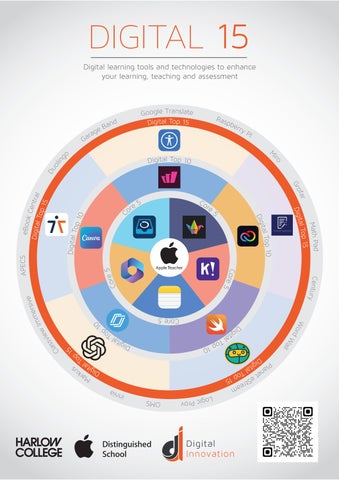
Digital learning tools and technologies to enhance your learning, teaching and assessment
Sh ow bie
T he paperles s classroom. This app is used to assign, collect and review students’ work.
Notes
Capture thoughts quick and easy. Sketch ideas and create checklists.
Padlet
A vir tual bulletin board for tutors and students to share digital content i.e. videos, images and documents.

Microsoft 365
A cloud-based service for Microsoft office apps and storage.
Kahoot
Game-based classroom quiz. Can be played with any mobile device, tablet or computer.
Adobe Express
Suite of apps that allow creation of video stories, web pages, graphics, presentations and photo collages.

Swift Playgrounds
An app that teaches users how to code and build apps using swift.

Canva
An online design tool that allows users to easily create digital graphics.

An interactive presentation and assessment tool, using quizzes, polls and videos.
Wayground
Interactive quiz and assessment platform enhancing learning through engagement and feedback.

Apple’s in-built features that help users adapt the iPad to meet their needs.
Chat GPT
An Artificial Intelligence (AI) programme that generates responses to user enquiries.
Teachermatic
An AI tool that generates teaching and learning resources.

Hart Chatbot
Harlow College’s website chatbot, designed to answer frequently asked questions.
Bodyswaps
A Virtual reality training platform that helps users to develop key soft skills.