Motivating Adult Learners in the Online Environment
Karen Ballengee
William Duncan
Executive Summary
Many schools are businesses are turning to online courses to provide instruction and training. Online course delivery creates a unique set of challenges that must be addressed by instructional designers and online instructors. This professional development session will help the participants to recognize some of the challenges of creating an engaging online learning community.
This is a two-day, face-to face professional development session and will cover the following topics:
• Motivation Theory
• Adult Learning Theory
• The Role of the Online Teacher
• Ways to Engage Online Learners
• Articulate, SurveyMonkey, and YouTube
Intended Audience: This project was designed to for those who teach or intend to teach online learners. Audience members come from a variety of teaching situations including public school, colleges, and local businesses. Due to the limited availability of technology, the course will be limited to 30 participants. The course will be offered again at a future date so that more people can participate.
Team Responsibilities
Team Member Primary Role Responsibilities
Karen Ballengee Project Manager
Project Manager
Broad Goals and Big Ideas
Learning Objectives (shared)
Needs Analysis
Task Analysis (review only)
Learner Analysis (review only)
Contextual Analysis (review only)
Formative Evaluation (write text)
Summative Evaluation (write text)
Types of Learning Experiences
Materials for Training Program
Implementation Plan (Review Only)
References (shared)
Appendix A: Task Analysis
William Duncan Team Member
Learning Objectives (shared)
Needs Analysis (review)
Task Analysis
Learner Analysis
Contextual Analysis
Formative Evaluation (write surveys)
Summative Evaluation (write surveys)
Types of Learning Experiences (review)
Materials (review)
Implementation Plan, including Schedule and Logistics
References (shared)
1. Desired Results
1a. Broad Goals and Big Ideas
Adult learners come to the classroom with different needs and goals than younger learners. Instructors should consider the specific characteristics of adult learners when designing instruction. The use of technology is one way to engage adult learners. As more programs transition from face-to-face to online instruction learners come to the classroom with different needs and goals than younger learners. Instructors of adult learners, it is important to understand the motivations of adult learners and how motivation effects learner participation and retention. SurveyMonkey, YouTube and Articulate are examples of technologies that can support adult learning in an online community.
This training is a two-day, face-to-face professional development session for instructors and future instructors of online learners. The training will provide the learners with knowledge of adult learning and motivation principles. Participants will learn the skills needed to introduce SurveyMonkey, YouTube and Articulate in an online environment. Participants will be given examples of ways to use these technologies to engage their online adult learners.
This professional development training will take place in eight sessions over the course of two days. The first day will include introductions, a preview of learning objectives, a review of relevant learning and motivation theories, the characteristics of adult learners, and the instructor’s role in traditional and online learning. Participants will participate in an online attitude survey using SurveyMonkey. Day One will finish up with groups and individual participants providing feedback on using surveys to engage adult learners, their own attitudes toward instructional technology, and the course.
Day Two will include instruction and practice using YouTube, SurveyMonkey, and Articulate. The learners will select one of these technologies for their final presentation. Each project will be evaluated by the rest of the class using the checklist provided in the learner guide. There will also be a postpresentation survey at the end of the second day. Participants will be provided with copies of all instructional materials and references.
Goal 1: Learners will compare and contrast the role of the traditional teacher and the online teacher. Goal 2: Learners will recognize ways to transfer face-to-face instruction to the online environment.
Goal 3: Learners will relate learning and motivation theories to attitudes of adult learners toward technology use.
The Participants will pick one of the three technologies to complete a project
Goal 4: Learners will express their attitudes toward technology and create a survey with proficient use with SurveyMonkey.
or
Goal 5: Learners will access and examine three videos under 5 minutes in length they would use for instruction on YouTube. or
Goal 6: Learners will access and create an online lesson and quiz with proficient use of Articulate.
1b. Learning Objectives
Goal 1: Learners will compare and contrast the role of the traditional teacher and the online teacher.
OBJECTIVE
1.1 Following the training, leaners will successfully discuss the role of the traditional teacher.
1.2 Following the training, learners will successfully recognize the role of the online teacher.
1.3 Following the training, learners will successfully compare and contrast the roles of the online and traditional teacher.
ALIGNMENT ASSESSMENT EVIDENCE
Discuss the role of the traditional teacher. List the words and phrases.
Collaborate with peers to create the list.
Recognize the role of the online teacher. List the words and phrases.
Collaborate with peers to create the list.
Compare the traits of the traditional and online teacher.
Contrast the traits of the traditional and online teacher.
Diagram the similarities and differences with circles and underlining.
The learners in groups of 5, will write down as many words or phrases about the role of the traditional teacher in 2 minutes.
The learners in groups of 5 will write down as many words or phrases as they can about the online teacher in 2 minutes.
The learners in groups of 5, will circle any phrases that are the same for traditional and online teachers and underline any phrases that are different.
The learners have listed words and phrases about the role of the traditional teacher.
The learners have listed words and phrases about the traditional teacher.
The learners circled the similar phrases and underlined the differences.
Goal 2: Learners will recognize ways to transfer face-to-face instruction to the online environment.
OBJECTIVE
ALIGNMENT ASSESSMENT
2.1 Following the training, learners will successfully recognize three ways to engage online learners. List the ways to engage online learners. Write the list in their learner guide. Choose one engagement technique
Apply the engagement technique to the online module.
List three ways to engage learners online. Use one of these in your online module
EVIDENCE
The learner used one engagement technique in the Articulate Module.
2.2 Following the training, learners will successfully discuss the challenges of teaching online learners.
2.3 Following the training, learners will successfully identify one task or small block of instruction (5-10 minutes) that they can transfer to an online learning module.
List one challenge. Analyze the problem. Generate a solution. Discuss with peers.
Identify the lesson to transfer online.
List one challenge you could face as you transfer a lesson in your subject area from face-to-face to online. How would you mitigate the challenge?
Think of a lesson or task you would transfer from face to face to online. This lesson should be 5-10 minutes
The learner listed the challenge and mitigation in the workbook and discussed the challenge and solution with the class.
The learner identified one 5-10-minute lesson or task to transfer from face-toface to online.
Goal 3: Learners will relate learning and motivation theories to attitudes of adult learners toward technology use.
OBJECTIVE
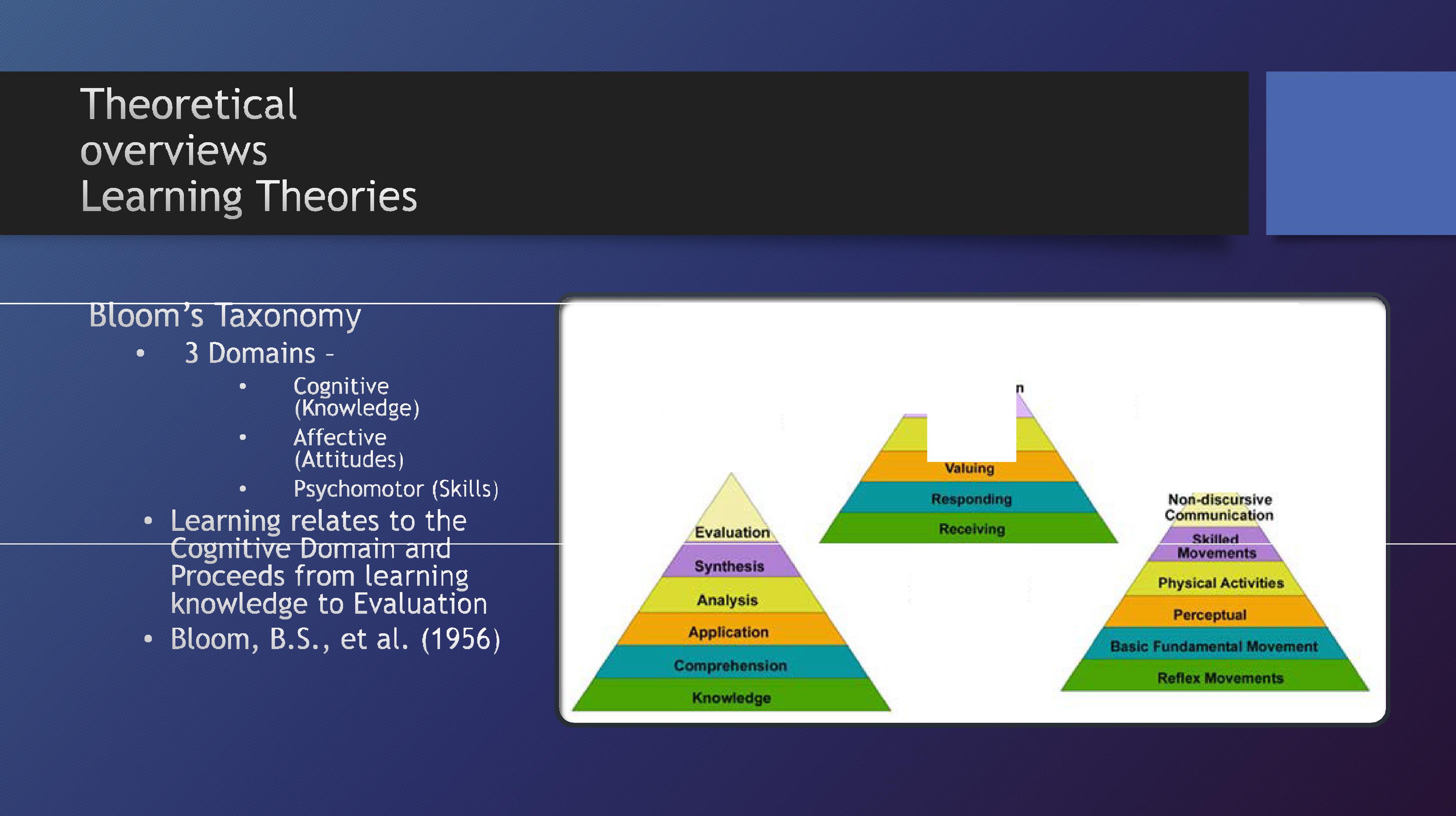
3.1 Following the training, learners will successfully relate the three domains of Bloom’s Taxonomy of Learning to KASI
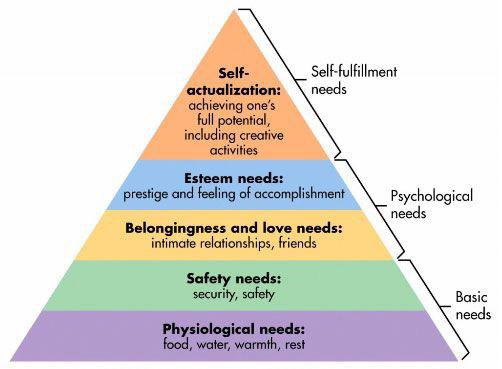
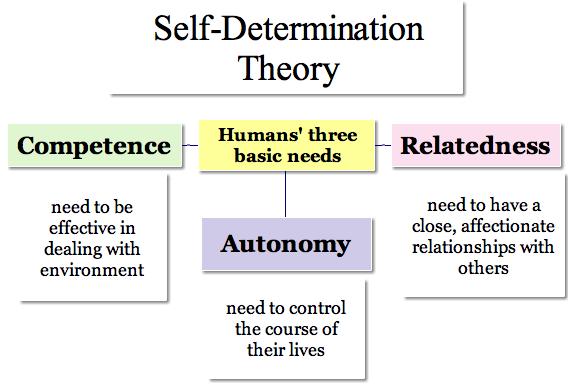
3.2 Following the training, learners will successfully relate the three psychological needs as discussed in Selfdetermination Theory to Maslow’s Hierarchy of Needs
3.3 Following the training, learners will successfully identify characteristics of adult learners.
ALIGNMENT ASSESSMENT
Identify the three domains of Bloom’s Taxonomy of Learning. Compare the domains of Bloom’s Taxonomy with KASI (knowledge, attitude, skills, interpersonal skills)
Identify three psychological needs, as communicated in selfdetermination theory Relate three psychological needs of humans of SDT to Maslow’s Hierarchy of Needs
Brainstorm some of the characteristics of adult learners
Self-identify three characteristics within yourself
Recall the three domains of Bloom’s Taxonomy and relate them to a KASI (knowledge, attitude, skills, interpersonal skills) map in an online quiz format.
Construct a graphic organizer that relates the three basic needs of self-determination theory to aspects of Maslow’s Hierarchy
EVIDENCE
Cognitive domainknowledge
Affective domain attitude
Psychomotor domain skills & interpersonal skills
Autonomy Selfactualization
Competence Esteem
Relatedness Belonging
As a class, construct a list of characteristics of adult learners Highlight characteristics of individuals within the training
Readiness Relevance Agency
Collaboration Clearly defined Goals
Goal 4: Learners will express their attitudes toward technology and create a survey with proficient use with SurveyMonkey.
OBJECTIVE
4.1 Following the training, learners will demonstrate proficient use of SurveyMonkey by designing a 10 question quiz
4.2 Following the training learners will demonstrate proficient use of SurveyMonkey by collecting responses from all group members
4.3 Following the training learners will demonstrate proficient use of SurveyMonkey by analyzing data
4.4 Following the training learners will report to the large group attitudes of small group members to using SurveyMonkey as a learning tool
ALIGNMENT ASSESSMENT
Complete a survey using SurveyMonkey Create a 10 item content relevant quiz using SurveyMonkey
Collect statistical data from a minimum of 5 individuals who take the quiz you created
Complete an instructor generated survey on SurveyMonkey
Create a 10 item quiz using SurveyMonkey
Collect performance data from learner generated quiz
EVIDENCE
Learner completed an instructor generated survey on SurveyMonkey Learner created a functioning content relevant quiz using SurveyMonkey
Learner enlisted a minimum of 5 individuals to take the quiz they created Learner collected statistical data about performance on the quiz they created
Analyze the data you collected to revise the quiz you created.
Discuss with the quiz takers their attitudes toward using SurveyMonkey as a learning tool
Report the attitudes of learners to the large group.
Analyze performance data
Revise quiz
Discuss attitudes about the effectiveness and limitations of using SurveyMonkey as a learning tool Report results of discussion
Learner analyzed performance data for the quiz they created Learner revised the quiz in light of their analysis
Learner discussed and discussed with classmates their attitudes about the quiz they took using SurveyMonkey and their attitudes toward SurveyMonkey as a learning tool.
Goal 5: Learners will access and examine three videos under 5 minutes in length they would use for instruction on YouTube.
OBJECTIVE
5.1 Following the training, learners will search YouTube and choose 3 videos under 5 minutes in duration that are relevant to their teaching situations
5.2 Following the training, learners will create a reference list of the YouTube videos they have chosen (including time stamp)
5.3 Following the training, learners will discuss their attitudes about using YouTube videos as a learning tool
ALIGNMENT ASSESSMENT EVIDENCE
View YouTube videos related to course content
Select 3 videos to use in teaching course content.
Create a reference list of the YouTube videos, including URL and running time, you have chosen to use in teaching course content
Discuss the value of the videos chosen as learning tools.
Report the attitudes of learners to the large group.
Preview and choose 3 instructional videos of under 5 minutes’ duration to use as learning tools.
Create a reference list for the three YouTube videos chosen.
Learners chose 10 videos relevant to their teaching objectives
Learners selected 3 videos under 5 minutes in duration to use for instructional purposes
Learners created a reference list of the 3 videos they chose to use in teaching course content
Discuss the value of using YouTube videos for instructional materials
Learners discussed their attitudes about using videos from YouTube as instructional materials
Learners communicate their attitude to their classmates
Goal 6: Learners will access and create an online lesson and quiz with proficient use of Articulate.
OBJECTIVE
6.1 Following the training, learners will successfully build a module in articulate using 5-10 slides and 35 quiz questions at the end.
6.2 Following the training, learners will successfully insert a photo or illustrated character into to their Articulate module.
6.3 Following the training, learners will insert one photo into their articulate module, practicing proper copyright etiquette.
6.4 Following the training, learners will successfully add questions to their quiz, using one drag and drop and one hotspot type question.
ALIGNMENT ASSESSMENT
Learners create a lesson. Learners explained a concept in the module. Learners built the slides.
Learners used the character to build the slide.
Create one 5-10 slide module with 3-5 quiz questions.
EVIDENCE
The learner used 5-10 slides
The learner used 3-5 quiz questions.
Learners build the slide by adding a photo. Learners evaluate the copyright status of the photos.
Create quiz questions. Test the learners. Discuss learner attitudes toward Articulate. Report learner attitudes to the large group.
Insert one character in the module. The character will have one pose and one facial expression.
Insert one photo in the module.
The learner used one photo or illustrated character in their articulate module. The learner created a pose and a facial expression for the character.
The learner inserted one photo into Articulate. The photo was the learner’s original, was purchased, or met the terms of Fair Use.
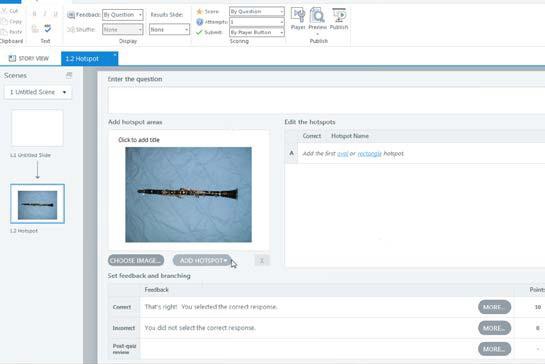
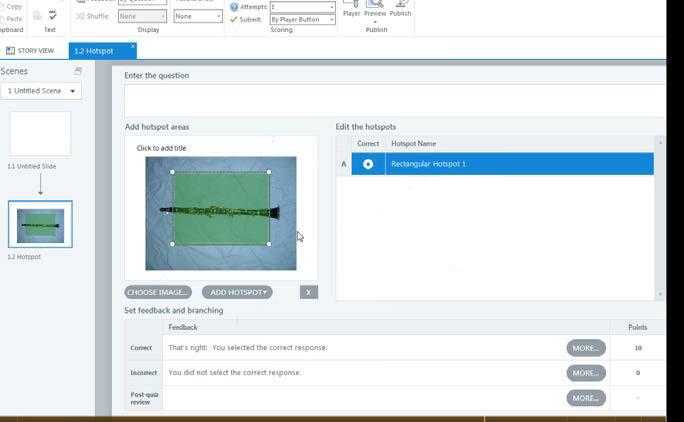
Create one drag and drop and one hotspot quiz question.
The learner had one drag and drop and one hotspot question in their quiz.
1c. Needs Assessment
Summary of the study’s purpose
The purpose of this study is to determine what instructional solutions should be provided to combat the high learner dropout rate in online courses. Initial research indicates a lack of engagement as the main reason learners drop online courses. This study will determine what instructor training, academic support, IT, and learner mentoring resources are needed.
4. School Data Dropout rates/Course evaluations/Instructor evaluations
Summary of the Results
WHAT IS
A high number of learners are dropping online courses. Course evaluations indicate a lack of learner engagement.
GAP=NEEDS
More training in engagement techniques and more Instructional Technology
WHAT SHOULD BE Learner engagement should improve and the dropout rate should be close to that of the face-to-face environment.
People to Ask
• Key stakeholders
• Instructors who teach online courses
• Instructors who do not teach online courses
• Instructors who will need to transition from traditional to the online classroom in the future
• Learners who take online courses
• Learners who have dropped out of online courses
• Instructional Designers and Technologists
• Administrators
Things to Observe
• Instructors’ willingness to transfer face-to-face instruction online
• Instructor knowledge of engagement strategies for online learners
• Samples of online courses of the instructors
• Learner attitudes toward online instruction
• School resources such as instructional designers or technologists
Things to Study/Analyze
• Literature, books and articles on online learner retention and engagement
• Instructor evaluations
• Learner data (online and f2f) such as drop -out rates.
• Experience, training, and resources for those who teach online courses
• Learner surveys and reasons for online course drop
• Online learner survey on learner engagement
• Adult learning and motivation theories
Problem or existing situation (what is)
Online learners don’t feel a connection in the online classroom and have a high drop rate.
Desired situation (what should be)
Learners should feel a sense of online learning community and retention rates should improve
Individual or Group Questioned
Possible Causes or Indicators Solution Alternatives
Instructors of face-to-face courses Are not comfortable teaching online courses Do not wish to teach online
Online instructors Some are not comfortable with the technology
Conduct professional development with the instructional technologist Offer incentives such as merit pay or funds for professional development
Provide a successful online instructor as a mentor
Administrators Online dropout is high Provide time for professional development for improvement
Instructional technologists No one requests their services Hold professional development sessions. Go to the instructors and show them strategies for online teaching
Online learners Online is impersonal Assign a peer mentor
Online learners The instructor never answered my email or questions
Online learners The subject was too difficult for online
Create a policy that the instructor must answer emails in 48 hours
Offer online tutoring
Online learners Technical difficulties Set up am IT help desk with convenient hours for the working learner
Online learners Do not know where to go for technical or instructional help
Create a learner orientation Set up an IT helpdesk
Stakeholder
Administrators
Instructors
Online learners
Instructional designers and technologists
Project Roles
Project Manager
Team Members
Instructors
Technology SME
Materials coordinator
Instructional Technologists
Recorder
School
Expectations
High learner success rate/low dropout rate
Resources, training, and support to teach online
Convenient education/academic support and accommodations for special needs/engaging environment
Instructor support and participation in professional development activities
Project Responsibilities
Responsible for determining deadlines, overall content,
Develop objectives
Write content
Create needs assessment, learner analysis, contextual analysis, procedural analysis and implementation plan
Create instructional materials
Oversee formative and summative evaluations
Set up the PowerPoint
Hand out materials
Teach the content
During the technology portions, facilitate the use of Voice Thread, Articulate, and Video
Assist with the learner projects
Create printed materials, gather all materials, set up before the professional development
Procure the laptops and set up before the training
Records all answers from interviews and focus groups. Puts the data in a word document, excel spreadsheet, or chart.
Constraints Resources
Some subjects are not easy to teach online
IT Budget
Teacher
Learner
Some are unwilling to transition to the online environment
Some are unwilling to seek help in an online environment
Instructional Design Staff
IT Staff
There are several teachers identified as master online teachers
Peer tutors and online mentors
Final Report:
The information from the interviews, focus groups, and surveys indicates the following recommendations.
Results and Recommendations
Non-instructional:
Instructor availability was one concern learners expressed in the focus groups. These learners suggested that instructors hold virtual office hours so that they might answer any learner questions. Learners also mentioned instructor response to email was slow. It is recommended that the school institute a policy that instructors of online courses must answer emails within 48 hours. An IT learner help desk with convenient hours would help to eliminate any learner IT issues. Peer tutors and mentors would help the learners in some of the more difficult online courses. Online orientation will help to acquaint the online learners with the online classroom and help them to navigate the resources available to them. Ideally, the learners would complete this orientation and be familiar with the online environment before classes start.
Instructional
Most instructors indicate a willingness to teach in the online environment, but few instructors feel that they have the resources necessary to effectively engage the learners. Professional development sessions and one-on-one help from the Instructional Technologist are recommended. There were several instructors recognized by the administration and learner evaluations as the masters of online instruction. These instructors can mentor those who are less experienced at online teaching.
Recommendations Summary
Non-Instructional
• Offer library support for online learners
• Offer virtual office hours for instructors
• Create a 24-hour IT helpdesk
• Conduct online learner orientation
Instructional
• Use expert online instructors as mentors to novice online instructors
• More one-on-one time with Instructional Technologists
• Professional development sessions for online teaching. Topics should include information on adult learning and motivation, online learner engagement, and the use of specific technology tools.
Please refer to Appendix 1-a. for a list of interview questions and a copy of the pre-training faculty questionnaire.
1d. Task Analysis
Prerequisite Analysis:
A pre-training survey will be administered to participants to determine the level of experience and their attitudes regarding technology use in education, specifically, YouTube, SurveyMonkey and Articulate. Workshop participants will be divided into different learning groups based on their expressed level of experience and confidence in using these applications.
Topic Analysis
Goal 1: Learners will compare and contrast the role of the traditional teacher and the online teacher.
1.1. Review the role of the traditional teacher.
1.1.a. Discuss the role of the traditional teacher.
1.1.b. List the words and phrases.
1.1.c. Collaborate with peers to create the list.
1.2. Review the role of the online teacher.
1.2.a. Recognize the role of the online teacher.
1.2.b. List the words and phrases.
1.2.c. Collaborate with peers to create the list.
1.3. Compare and contrast the roles of the online and traditional teacher.
1.3.a. Compare the traits of the traditional teacher with the traits of the online teacher.
1.3.b. Contrast the traits of the traditional teacher with the traits of the online teacher.
1.3.c. Diagram the similarities and differences with circles and underlining.
Goal 2: Learners will recognize ways to transfer face-to-face instruction to the online environment.
2.1. Recognize three ways to engage online learners.
2.1.a. List ways to engage online learners.
2.1.b. Learners will write the list in the learner guide.
2.1.c. Choose one engagement technique.
2.1.d. Apply the engagement technique to the online module.
2.2. Discuss the challenges of teaching of teaching online learners.
2.2.a. List one challenge.
2.2.b. Analyze the problem.
2.2.c. Generate the solution.
2.2.d. Discuss the peers.
2.3. Identify a task or block of instruction to transfer to an online learning module.
2.3.a. Identify the lesson to transfer.
Goal 3: Learners will relate learning and motivation theories to attitudes of adult learners toward technology use.
3.1. Relate the three domains of Bloom’s Taxonomy of Learning to the terms that form the acronym K.A.S.I. (knowledge, attitude, skills, interpersonal skills).
3.1.a. Identify the domains of Bloom’s Taxonomy of Learning.
3.1.b. Compare the domains of Bloom’s Taxonomy of learning with K.A.S.I.
3.2. Relate the three psychological needs discussed in Self-Determination Theory to Maslow’s Hierarchy of Needs.
3.2.a. Identify three psychological needs communicated in Self-Determination Theory.
3.2.b. Relate the three psychological needs to Maslow’s Hierarchy of Needs.
3.3. Identify the characteristics of adult learners.
3.3.a. Brainstorm some of the characteristics of adult learners.
3.3.b. Self-identify three characteristics.
Goal 4: Learners will create a survey with proficient use with SurveyMonkey and express their attitudes toward the technology as a learning tool.
4.1. Demonstrate proficiency with SurveyMonkey by designing a 10 question quiz.
4.1.a. Complete a survey using SurveyMonkey.
4.1.b. Create a 10 item content relevant quiz using SurveyMonkey.
4.2. Collect responses to the quiz created using SurveyMonkey.
4.2.a. Collect responses from a minimum of five individuals who have taken the quiz.
4.3. Analyze collected quiz responses using SurveyMonkey.
4.3.a. Analyze data collected from those who took the quiz.
4.3.b. Revise the quiz based on data analysis.
4.4. Report learner attitudes about using SurveyMonkey to the large group.
4.4.a. Discuss with quiz takers their attitudes toward using SurveyMonkey as a learning tool.
4.4.b. Report attitudes of SurveyMonkey users to the large group. or
Goal 5: Learners will access and examine three videos under 5 minutes in length they would use for instruction on YouTube and express their attitudes toward the technology as a learning tool.
5.1. Search YouTube and choose three content relevant videos under five minutes in duration.
5.1.a. View content relevant YouTube videos.
5.1.b. Select three videos under five minutes.
5.2. Create a reference list, including URL and time stamp, of the YouTube videos chosen.
5.3. Discuss with learners their attitudes toward using YouTube videos as a learning tool.
5.3.a. Discuss with learners their attitudes about using YouTube videos as a learning tool.
5.3.b. Report results of discussion with the large group.
Goal 6: Learners will access and create an online lesson and quiz with proficient use of Articulate and express their attitudes toward the technology as a learning tool.
6.1. Build a module of 5-10 slides and a quiz of 3-5 questions in length using Articulate.
6.1.a. Create a lesson using Articulate.
6.1.b. Explain the concept covered by the lesson.
6.1.c. Build a module of 5-10 slides using Articulate.
6.1.d. Build a quiz of 3-5 quiz questions.
6.2. Insert a photo or illustrated character into the Articulate module.
6.2.a. Create a new slide.
6.2.b. Choose a character from the Insert menu.
6.3. Insert a photo, paying attention to copyright issues, into the Articulate module.
6.3.a. Create a new slide.
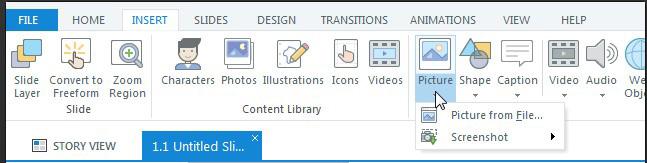
6.3.b. Choose Photo from the Insert menu.
6.3.c. Select a photo and insert the photo into the slide.
6.4. Create a quiz containing at least one drag and drop question and one hotspot type question using Articulate.
6.4.a. Create a new slide.
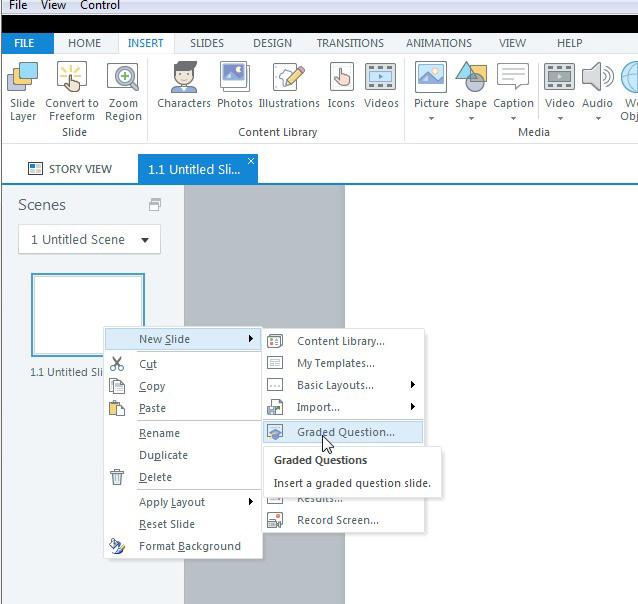
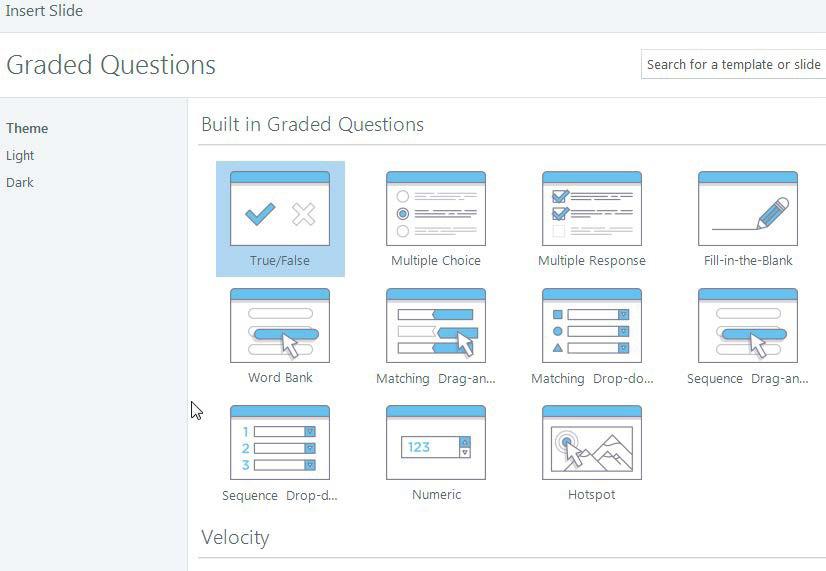
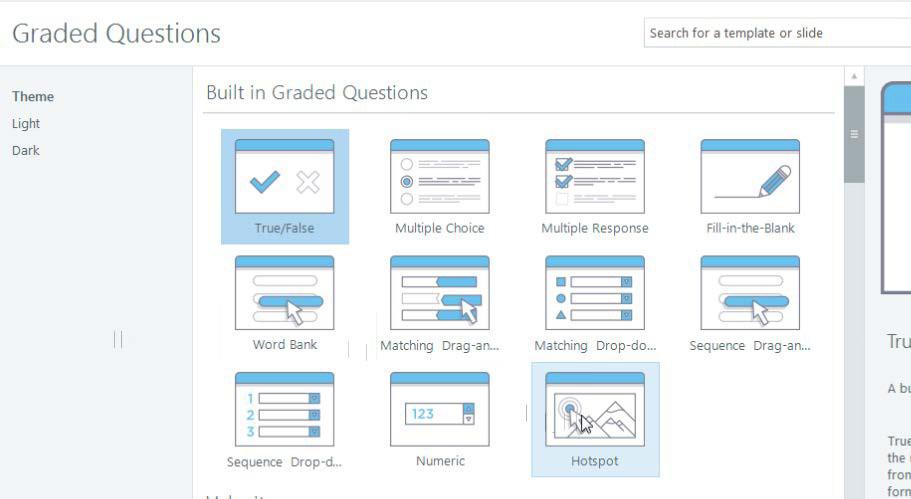
6.4.b. Choose Graded Question in the New Slide menu.
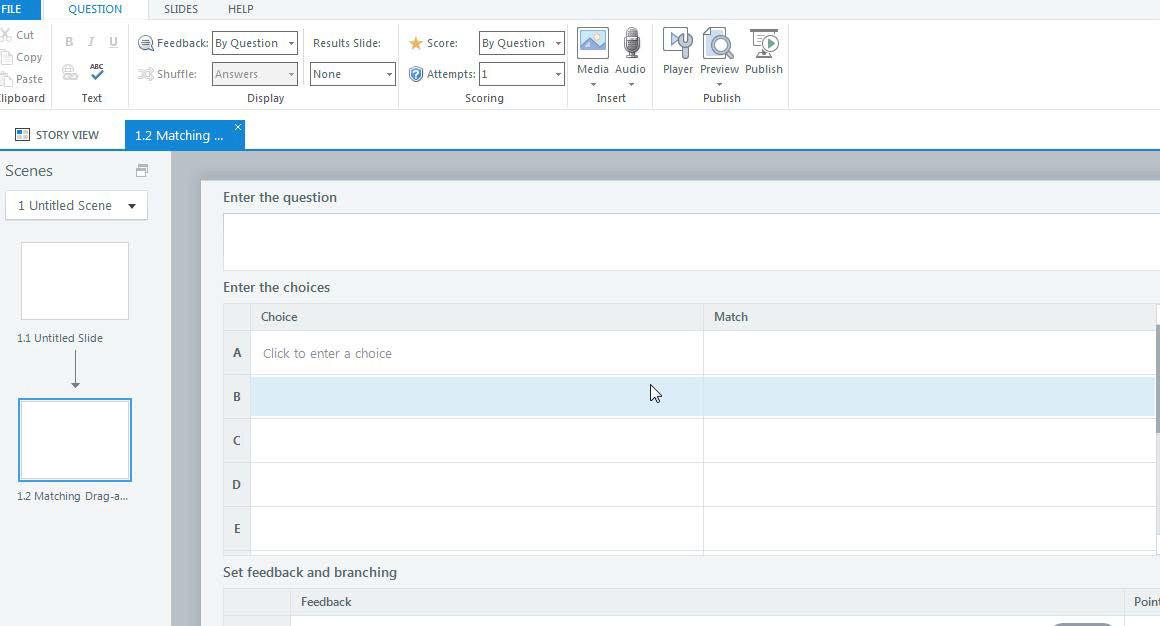
6.4.c. Choose Matching Drag-and-drop question and insert into the slide.
6.4.d. Choose Hotspot question and insert into the slide.
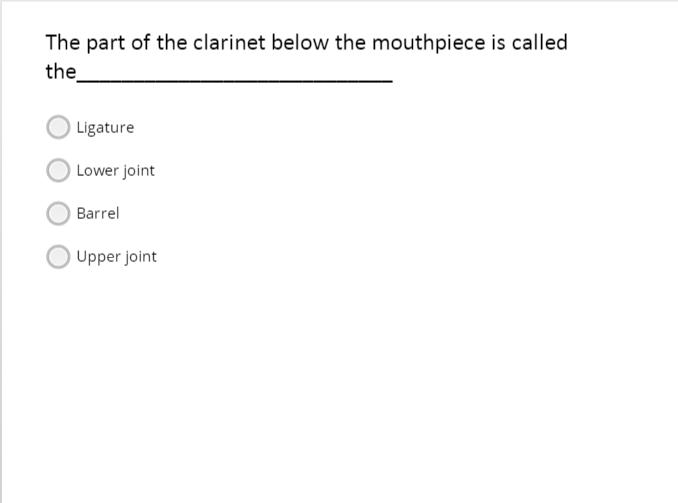
6.4.e. Choose 1-3 other question forms and insert into the slide.
6.4.f. Fill in questions with content information.
Procedural Analysis:
Using the Goals and Learning Objectives described in Sections 1-a and 1-b, Learning Goals 1 and 2 have been detailed in a step-by-step procedural analysis. The analysis focused on determining the steps needed to achieve the observable and measurable goals for each application. These analyses are included in Appendix 1-b.
2. Evidence of Acceptable Results
2a. Formative Evaluation
Before and during the training, the facilitators will conduct formative evaluations. These evaluations will determine if the content is relevant for the target audience. The instructors will conduct several electronic surveys to determine learner attitudes about technology use in the online classroom, learner knowledge on the principles of teaching online, adult learners, and presentation and content. The subject matter experts will be consulted throughout the training to determine if the technology training is realistic and appropriate for those who are new to such technologies.
Participant attitudes toward technology in the online classroom
What experiences do these learners have with online teaching?
Are they willing to use technology in an online environment?
Are they comfortable using technology in the online classroom?
Do they know what technologies are available?
Do they know how to use these technologies?
Participant knowledge of the principles of teaching online learners
Do the participants have knowledge of adult learners?
Do the participants know how to engage online learners?
Are the participants willing to teach learners in the online environment?
Presentation and content
Was the content engaging?
Were the instructional materials and visual aids useful
Was the professional development session too long, too short, or just right?
Did the participants learn enough to use the technology in the online environment?
Was there enough technology for everyone to participate?
Can the participants apply the principles of teaching adult online learners to their online instruction?
Technology training
Is the training realistic for those who are new to the technologies?
Can this training be accomplished in the amount of time?
To view the Formative Evaluation Materials, see Appendix 1-c.
2b. Summative Evaluation
Key questions
1. Are participants able to apply motivation theory and adult learning theory to their online courses?
2. Are participants able to create engaging content for their online courses?
3. Are participants able to use SurveyMonkey to make the online course more interactive and gauge the interest of the participants?
4. Are the participants able to select and use a You Tube video to engage participants?
5. Are the participants able to use Articulate to better explain topics?
6. Are participants able to use Articulate to create more interactive quizzes?
The Summative Evaluation will be conducted to determine if learning and transfer has occurred. This occur directly after learning and six months after the professional development session.
Instrument Time Period
Technology checklist
Participant focus groups
Administrator interviews
Learner engagement surveys
Teacher evaluation surveys
The technology checklist
Directly after the professional development session
3 and 6 months after the professional development session
3 and 6 months after the professional development session
3 and 6 months after the professional development session.
After the next full semester
This checklist will be used after the professional development session. This will determine if the participants were able to perform all of the tasks required to operate their particular technology. The learner participant guide will provide a place for the participants to brainstorm for ideas on how they can use technology in their subject area
Participant focus group
These focus groups will help determine the transfer and use of the information over a long period of time. Are the teachers using the technologies? If so, how?
Administrator Interviews
These interviews will capture the big picture from the administrator’s point-of-view. Questions will determine if, in the administrator’s opinion, any improvement has been made.
Learner Engagement Surveys
These surveys (along with the pre-training surveys) will determine if the participants feel any more engaged than before the training.
Teacher Evaluations
These evaluations can determine if the teachers are using technology more and in more engaging and meaningful ways.
To View Summative Evaluation Materials, see Appendix 1-d
3. Learner Experiences and/or Instruction
3a. Learner Analysis
The “Motivating Adult Learners in an Online Environment” professional development presentation is designed for instructors of adult learners. As adult learners themselves, the participants in the presentation will be provided with some instruction, but predominantly tasks using technology that they will subsequently evaluate as to its utility in teaching adult learners like themselves. The presentation materials are designed to be effective and engaging and consistent with current theories of learning, motivation, and andragogy (teaching adult learners).
Pre-Instruction Learner Survey
1. Which of the following apply to your teaching experience (Check all that apply)?
Face to face only
Online only
Blended (face to face and online)
Face to face sections and online sections
Not currently teaching
2. How confident are you teaching in a face to face learning environment?
Not confident at all/I have not taught in a face to face learning environment
Slightly confident/I have limited experience teaching in a face to face learning environment
Confident/I teach in a face to face learning environment on a regular basis
Extremely confident/I teach exclusively in a face to face learning environment
3. How confident are you teaching in an online learning environment?
Not confident at all/I have not taught in an online learning environment
Slightly confident/I have limited experience teaching in an online learning environment
Confident/I teach in an online learning environment on a regular basis
Extremely confident/I teach exclusively in an online learning environment
4. How long have you been teaching?
Less than one year
1-5 years
6-10 years
11-15 years
16-20
More than 20 years
5. What grade level are the learners whom you teach? (check all that apply)?
K-5
6-8
9-12
2-year post-secondary
4-year post-secondary
graduate/professional
adult learner/enrichment/occupational/technical
6. Which of the following have you used in a learning context (check all that apply)?
Computer
Internet
Smart phone
Tablet
Other (specify)
7. In a learning context, how do you use technology (check all that apply)?
Creating instructional materials and assessments
Asynchronous communication (e.g. email, personal messaging, discussion boards)
Synchronous communication (e.g. Skype, FaceTime)
Image editing software (e.g. Photoshop)
HTML editing software (e.g. Dreamweaver)
Software stored on the Cloud (e.g. Adobe Creative Cloud, Microsoft Office 365)
8. How confident are you creating instructional materials and assessments using technology?
Not confident at all/I have not created instructional materials/assessments using tech
Slightly confident/I have limited experience creating instructional materials using tech
Confident/I create instructional materials for learning using technology on a regular basis
Extremely confident/I create all instructional materials and assessments using technology
9. How confident are you using a learning management system?
Not confident at all/I have not used a learning management system
Slightly confident/I have limited experience using a learning management system
Confident/I use a learning management system on a regular basis
10. If you teach online courses, how many years have you been teaching online courses?
I have never taught online courses
I have taught online course for 1-2 years
I have taught online courses for 3-5
I have taught online courses for 6-10 years
I have taught online courses for more than 10 years
11. What aspect of teaching online courses is most interesting to you?
Technology
Course organization
Time management
Bookkeeping
12. What aspect of teaching online courses is most challenging to you?
Technology
Course organization
Time management
Bookkeeping
13. To which of the following instructional technologies do you have access in your workplace? (check all that apply)
Computer for instructor use
Computer stations for shared use by learners
Computer stations for individual learner use in the library/media center
Tablets/laptop computers for shared use within your department
Tablet/laptop computer for individual learners
Internet access for group/individual learner use in the library/media center
Wireless internet access for group/individual learner use in the library/media center
Wireless internet access for group/individual learner use in the classroom
Whiteboard/Smartboard in classroom
I clicker/REEF polling in classroom
instructor/course web presence with learner access
word processing/spreadsheet/presentation software for learner access
A variety of learner characteristics are embedded in surveys, interviews, focus groups and school data found online.
3b.
Contextual Analysis
Contextual analysis was developed for participants in the Motivating Adult Learners in the Online Environment program and divided between the learning environment and applied environment. In addition to the Pre-Instruction Learner Survey, data analysis will include:
Learning Context
1. Facility
2. Hardware
Optimal classroom with room for small groups to work
Adequate library/m.c.
Minimal computer cart/laptops
Optimal tablet/laptop for individual learner use
Adequate tablet/laptop for small group use
Minimal desktop for instructor with Smartboard/projector and white board
3. Connectivity
4. Software
Optimal Wireless high speed internet connection in classroom
Adequate Wireless high speed internet connection in library/media center
Minimal Wired in router for direct connection to instructor computer and smartboard/white board and projector
Word processing
Spreadsheet
Presentation
Web browser
Performance Context
Optimal classroom/meeting room with room for small groups to work
Adequate library/m.c.
Minimal computer cart/laptops
Optimal tablet/laptop for individual learner use
Adequate tablet/laptop for small group use
Minimal desktop with Smartboard/projector and white board
Optimal Wireless high speed internet connection in classroom
Adequate Wireless high speed internet connection in library/media center
Minimal Wired in router for direct connection to computer and smartboard/white board and projector
Word processing
Spreadsheet
Presentation
Web browser
The contextual analysis allows the trainer to set up the learning context as closely to the performance context as possible, thus lowering the affective filters of participants. As the presentation proceeds, participants will be invited to provide input about adapting use of the technology to their individual requirements.
3c. Types of Learning Experiences and Instruction
This learning experience is a professional development session occurring during two consecutive days. This learning experience has a combination of approaches. The training consists of direct instruction, small group discussion, and break-out groups. The direct instruction will be used for the Motivation Theory and Adult Learner portion of the training. Small group discussion will be used for the Role of the Online Teacher and Ways to Engage Online Learners modules. The participants will break out into three groups, based on the technology they choose. Each technology group will have a Subject Matter Expert to facilitate the training. The subject matter expert will go over the technology step-by-step and then be available to assist the participants while they are working on their final presentation.
See Appendix 2a for the Table of Learning Experiences and Instructional Strategies
3d. Materials for the Training Program
Materials for the training program are found include the table of learning experiences and instructional strategies, which describes the role of the facilitator/trainer, and the participant syllabus, activity sheets, and case studies (i.e. student materials), the MS PowerPoint presentation and technology use handouts, from which the participants will develop their online projects.
See Appendix 2b for materials for the training program.
3e. Implementation Plan
The implementation plan includes a detailed schedule of the two-day (16 hour) training presentation. The schedule is found in Appendix 2-c. The implementation plan also includes logistical information on the physical aspects of the presentation. That information is found in section 3b, Contextual analysis, wherein is found information regarding the facilities (room number, size, and configuration), equipment (computer type and number, network connection), and software (word processor, spreadsheet, presentation, web browser) available in the learning environment and the performance environment. Because there will be participants whose responsibilities involve working with adult learners in educational settings and in business settings, it will be necessary to solicit solutions to logistical problems from participants during the training sessions.
Logistics
Pre-Survey
Students have signed up for one of the three technologies and placed in groups
Students have a ten-minute lesson for technology use
3 rooms are reserved
Internet connectivity is established
Computers are available
There are three instructor computers with projectors
Articulate is installed on the computers
Students have registered for SurveyMonkey
Handouts are printed and distributed
PDFs are available for handouts
Flip charts with sharpies are available.
See Appendix 2c for the Implementation Schedule.
References
Alessi, S. & Trollip, S. (2001). Multimedia for Learning: Methods and Development. (3rd ed). Massachussetts: Allyn & Bacon.
Bender, T. (2012). Discussion-Based Online Teaching to Enhance Student Learning: Theory, Practice, and Assessment. (2nd ed). Virginia: Stylus.
Bloom, B. S., Englehart, M. D., Furst, E. J., Hill, W. H., & Krathwohl, D. R. (1956). Taxonomy of Educational Objectives: The Classification of Educational Goals . Handbook I: Cognitive domain. New York: David McKay Company. [video Learning Domains https://youtu.be/NPBZQ4J46GI ]
Conrad, R., & Donaldson, J.A. (2011). Engaging the Online Learner: Activities and Resources for Creative Instruction. California: Wiley and Sons.
Keillor, C., & Littlefield, J. (2012). Engaging adult learners with technology. (unpublished presentation agenda). Winona, MN: Saint Mary’s University of Minnesota. Retrieved from http://digitalcommons.macalester.edu/cgi/viewcontent.cgi?article=1236&context=libtech_conf
Maslow, A.H. (1943). A theory of human motivation. Psychological Review 50(4) 370-396. Retrieved from http://psychclassics.yorku.ca/Maslow/motivation.htm [video Up and the Hierarchy of Needs https://youtu.be/Iucf76E-R2s 6:25 ]
Patterson, R. Rubelke, C., Llinas, M., Channell, H., Frisz, A., & Pope, D. (2013). Google Apps for Education. (unpublished manuscript).
Ryan, R. M., and Deci, E. L. (2000). Self-determination theory and the facilitation of intrinsic motivation, social development, and well-being. American Psychologist 55(54) 68-78 [video Self-Determination Theory’s Three Psychological Needs https://www.youtube.com/watch?v=3sRBBNkSXpY 1:50]
Seligman, M. E. P., & Csikszentmihalyi, M. (2000). Positive psychology: an introduction. American Psychologist 55(1) 5-14 retrieved from https://msu.edu/~dwong/CEP991/ CEP991Resources/Seligman-PositivePsych.doc [video Flow https://youtu.be/lOg6HmB6-Uc 3:46]
Talab, R.S. (1999). Commonsense Copyright: A Guide for Educators and Librarians. (2nd ed.). North Carolina: McFarland and Company Inc.
Appendices
Appendix 1. Needs Assessment Instruments and Evaluation Materials
Appendix 1a. Needs Assessment Survey
Interviews Administrators
What online classes are offered at your school?
What is the dropout rate for all classes?
What type of support is offered to online learners?
What do you perceive to be the problem with online retention?
Instructional Technologists/Designers
How many people are on your team?
What types of support do you offer for online classes?
Do you offer any additional training for online instructors?
Do instructors take advantage of the training?
Successful Online Instructor
What subject do you teach?
How many learners per course drop the class?
What do you do to reach learners with problems?
What materials do you use to teach online?
Have you worked with the Instructional Technologist/Designer?
Is there any additional support you’d like to have?
What advice would you give to instructors who are new to online teaching?
Online Learners Who Have Dropped a Course
What course did you drop?
Would the course have been better to take face-to-face?
What type of IT support did you receive?
Did you get an online orientation?
Did you have access to library materials?
Did the instructor have convenient virtual office hours?
Would you do better with a peer mentor or tutor?
Instructors of Online Courses (all)
Focus Groups
What does it take to be a successful online instructor?
How do you identify struggling learners?
What types of support do you offer to struggling learners?
Do you hold virtual office hours?
What kind of IT support do you receive?
Why do you think learners drop online courses?
Online Learners(all)
Why do learners take online courses?
What types of problems do learners encounter in online courses?
What types of support do learners have?
What types of support do they need?
Are the instructors available if there is a problem?
What would the ideal online course look like?
How do you as an online learner balance school and your jobs, family, etc.?
Surveys
Instructor Survey
1. Which of the following apply to your teaching experience (Check all that apply)?
Face to face only
Online only
Blended (face to face and online)
Face to face sections and online sections
Not currently teaching
2. How confident are you teaching in a face to face learning environment?
Not confident at all/I have not taught in a face to face learning environment
Slightly confident/I have limited experience teaching in a face to face learning environment
Confident/I teach in a face to face learning environment on a regular basis
Extremely confident/I teach exclusively in a face to face learning environment
3. How confident are you teaching in an online learning environment?
Not confident at all/I have not taught in an online learning environment
Slightly confident/I have limited experience teaching in an online learning environment
Confident/I teach in an online learning environment on a regular basis
Extremely confident/I teach exclusively in an online learning environment
4. How long have you been teaching?
Less than one year
1-5 years
6-10 years
11-15 years
16-20
More than 20 years
5. What grade level are the learners whom you teach? (check all that apply)?
K-5
6-8
9-12
2-year post-secondary
4-year post-secondary
graduate/professional
adult learner/enrichment/occupational/technical
6. Which of the following have you used in a learning context (check all that apply)?
Computer
Internet
Smart phone
Tablet
Other (specify)
7. In a learning context, how do you use technology (check all that apply)?
Creating instructional materials and assessments
1. Which of the following have you used in a learning context (Check all that apply).
Computer
Internet
Tablet
Smart phone
2. Indicate how confident you feel using each of the following in an educational context. Not confident Slightly confident Confident Very confident Computer
3. In a learning context, I use technology to… (Check all that apply)
View instructional videos
Write assignments and papers with a word processor
Communicate via discussion boards or personal messaging
Communicate using real time video (e.g. Skype or FaceTime).
Teleconference (using GoToMeeting, VoiceStream, or Collaborate Ultra)
Multimedia learning sites (e.g. Articulate or Prezi)
Other (please specify)
4. Have you ever watched YouTube videos to help you learn?
I have never watched YouTube videos to help me learn.
I have occasionally watched YouTube videos to help me learn.
I regularly watch YouTube videos to help me learn.
I weekly watch YouTube videos to watch me learn.
5. How effective do you think YouTube is as a learning tool?
Very Ineffective Ineffective N.A. Effective Very Effective
6. Before today, have you used SurveyMonkey in your experience as a learner?
I have never used SurveyMonkey in my experience as a learner.
I have used SurveyMonkey once or twice in my experience as a learner.
I often use SurveyMonkey in my experience as a learner.
All of my instructors use SurveyMonkey for assessments and learner feedback.
7. How effective is SurveyMonkey as a learning tool?
Very ineffective Ineffective N.A. Effective Very effective
8. Have you ever used Articulate in your experience as a learner?
I have never used Articulate in my experience as a learner.
I have used Articulate once or twice in my experience as a learner.
I regularly use Articulate in my experience as a learner.
All of my instruction use Articulate for instruction and assessment.
9. How effective is Articulate as a learning tool?
Very ineffective Ineffective N.A. Effective Very effective
10. For which of the following would you like training for use in a learning environment? (Check all that apply)
SurveyMonkey
YouTube
Articulate
I do not need or want training in any of the above.
Appendix 1-a-ii. Questions for Interviews and Focus Groups
Goal 1: Learners will compare and contrast the role of the traditional teacher and the online teacher.
Procedural Analysis
1.1. Review the role of the traditional teacher.
1.1.a. Discuss the role of the traditional teacher.
1.1.b. List words and phrases that describe the role of the traditional teacher.
1.1.c. Collaborate with peers to create the list.
Procedural Analysis
1.2. Review the role of the online teacher.
1.2.a. Recognize the role of the online teacher.
1.2.b. List the words and phrases.
1.2.c. Collaborate with peers to create the list.
Procedural Analysis
1.3. Compare and contrast the roles of the online and traditional teacher.
1.3.a. Compare the traits of the traditional teacher with the traits of the online teacher.
1.3.b. Contrast the traits of the traditional teacher with the traits of the online teacher.
1.3.c. Diagram the similarities and differences with circles and underlining.
Goal 2: Learners will recognize ways to transfer face-to-face instruction to the online environment.
Procedural Analysis
2.1. Recognize three ways to engage online learners.
2.1.a. List ways to engage online learners.
2.1.b. Learners will write the list in the learner guide.
2.1.c. Choose one engagement technique.
2.1.d. Apply the engagement technique to the online module.
Procedural Analysis
2.2. Discuss the challenges of teaching of teaching online learners.
2.2.a. List one challenge.
2.2.b. Analyze the problem.
2.2.c. Generate the solution.
2.2.d. Discuss with peers.
Procedural Analysis
2.3. Identify a task or block of instruction to transfer to an online learning module.
2.3.a. Identify the lesson to transfer.
Appendix 1-c. Formative Evaluation Materials
We are always looking improve our instruction. Would you help us by answering some questions about your experience with learning with technology? Your responses will be anonymous. Thanks.
1. What experience do you have teaching online classes?
I have never taught an online class.
I have taught an online class once before.
I teach an online class once a year.
I teach only online classes.
2. If you have not taught an online class, are you willing to use technology and teach a class online?
I am not interested in teaching a class online.
I would be interested in teaching an online class if I first receive adequate training.
I would be interested in teaching an online class if I work with people I know.
I would be interested in teaching an online class if the content were relevant to my job or life.
3. Do you have knowledge of how adults learn?
I do not have knowledge of how adults learn.
I have worked with adult learners before.
I have been an adult learner and I work with adult learners regularly.
4. Do you know how to engage adult learners in online learning?
I have no background in working with adult online learners.
I have experienced success engaging learners in an online learning environments.
My learners have consistently commented that I make online learning interesting.
5. Are you confident using technology to teach an online class?
I am not confident teaching an online class.
I am fairly confident using technology to teach an online class.
I am confident using technology to teach an online class.
I am experienced in using technology to teach online classes.
6. Have you used YouTube videos as a teaching tool before now?
Yes
No
7. If you have used YouTube videos to learn before, how confident are you in teaching that way?
I’ve used YouTube videos in teaching once or twice.
I use YouTube videos in teaching on a regular basis.
I could show others how to select YouTube videos for their online classes.
8. If you currently use YouTube videos to learn, how long have you been using it?
Less than one year
1-2 years
3-5 years
over 5 years
9. Will using YouTube videos help your learners to learn together?
I think it will help.
It might help them.
I don’t know if it will help.
I don’t think it will help.
I think it won’t help.
10. Have you ever used SurveyMonkey before now to give a survey or quiz?
Yes
No
11. If you have used Survey to teach before, how confident are you in teaching that way?
I’ve used SurveyMonkey in my teaching once or twice.
I use SurveyMonkey in my teaching on a regular basis.
I could show others how to use SurveyMonkey in their teaching.
12. If you currently use SurveyMonkey in your teaching, how long have you been using it?
Less than one year
1-2 years
3-5 years
over 5 years
13. Will using SurveyMonkey help your learners to learn together?
I think it will help.
It might help them.
I don’t know if it will help.
I don’t think it will help.
I think it won’t help.
Questions for the Technology Subject Matter Experts?
Are the objectives realistic for the first-time user?
Can the tasks be accomplished in our two-day training?
Are the learning objectives appropriate for a first-time user?
How can the training be improved?
Is there anything in the training that isn’t necessary?
Is there any task that could be added to the training?
Appendix 1-d. Summative Evaluation Materials
Technology Checklist
Participant Focus Groups
Have you used any of the three technologies? If so, how?
What are the learners’ reactions? What are some good points? What can be improved?
Administrator interviews
Have you noticed instructors using technology more? Can you give specific examples? What is going well? What can be improved?
Teacher Evaluation Surveys
Name:
Lesson
Engagement Technique:
Lesson contained 5-10 slides of instruction
Lesson contained 3-5 quiz questions
Lesson contained a results slide
Quiz contained one drag and drop and one hotspot question
Photo contained in module
Audio contained in module
Photo and audio follow copyright (either usercreated, purchased, falls under Fair Use)
Photo and audio properly attributed
Engagement technique supported the lesson
Comments:
Appendix 2. Materials, Schedules, Outlines, Etc.
Appendix 2-a. Table of Learning Experiences and Instructional Strategies
Goal 1: Learners will compare and contrast the role of the traditional teacher and the online teacher. Objective Type of Learning Instructional Strategy Rationale
1.1 Following the training, leaners will successfully discuss the role of the traditional teacher.
1.2 Following the training, learners will successfully recognize the role of the online teacher.
1.3 Following the training, learners will successfully compare and contrast the roles of the online and traditional teacher.
Facts/Recall
Facts/Recall
Facts/Recall/Identification
Discuss/Explain The participants will need to understand the role of a teacher.
Discuss/Explain The participants will need to understand the role of the online teacher.
Discuss/Explain/ Compare/Contrast The participants will need to understand how the roles of the online and traditional teacher are similar and different.
Motivational Tell the participants that, although online teaching is different than teaching in the traditional classroom, there are many similarities.
Initial Presentation
First the participants will break into groups of five and write as many phrases as they can think about the traditional instructors in two minutes. Then the class will discuss the role of the traditional teacher. The participants will then get into their groups and write as many phrases as they can about online instructors in two minutes. The class will discuss the role of the online teacher.
Generative Strategy The groups will then compare and contrast the role of the online teacher by circling the similarities and underlining the differences.
Goal 2: Learners will recognize ways to transfer face-to-face instruction to the online environment.
Objective
2.1 Following the training, learners will successfully recognize three ways to engage online learners.
2.2 Following the training, learners will successfully discuss the challenges of teaching online learners.
2.3 Following the training, learners will successfully identify one task or small block of instruction (5-10 minutes) that they can transfer to an online learning module.
Motivational
Type of Learning
Facts/Recall/Identification
Initial Presentation
Generative Strategy
Facts/Recall/Identification
Instructional Strategy
Rationale
Discuss/Explain/Apply The participants will need to know how to engage online learners.
Discuss/Explain The participants will need to know the challenges of teaching online learners.
Facts/Recall/Identification/Application Plan
The participants will need to transfer one of their lessons to an online environment.
The online instructor creates an inviting environment much like the classroom teacher creates an inviting classroom environment. There are a few ways you can welcome your learners into the online classroom and engage them in learning.
The instructor will take examples of activities from the traditional classroom and convert them to the online environment. Examples are introductions, discussions, office hours. The class will then discuss the challenges of the online classroom.
The learners will list in their participant guide three ways they can engage online learners They will come to the training with a short lesson that they want to transfer online. They will list their technology choice and how this technology can be used in the lesson to engage learners. They will also list one challenge and a solution to the challenge.
Goal 3: Learners will relate learning and motivation theories to attitudes of adult learners toward technology use.
Objective
3.1 Following the training, learners will successfully relate the three domains of Bloom’s Taxonomy of Learning to KASI
Type of Learning
Facts/Recall/Identification
3.2 Following the training, learners will successfully relate the three psychological needs as discussed in Selfdetermination Theory to Maslow’s Hierarchy
3.3 Following the training, learners will successfully identify characteristics of adult learners.
Facts/Recall/Identification
Instructional Strategy
Observe slide presentation
Connect Bloom’s cognitive domain with K - knowledge; affective domain with A - attitudes; Psychomotor (skills, interpersonal skills)
Relate learning theory to practical learning
Observe slide presentation
Relate autonomy, competence, and connectedness to Maslow’s hierarchy of needs basic needs, psychological needs, self-fulfillment needs
Rationale
Participants will recognize that learning involves skills and attitudes as well as knowledge
Facts Recall/Identification
Participants will connect motivation theory to the needs of adult learners
Identify that adult learners expect agency, collaboration, and relevance Learners will connect to felt needs of adult learners
Motivational Instructor uses visual presentation to make learning and motivation theory relevant to adult learners
Initial Presentation Instructor will guide learners connect relevant points of learning theory and motivation theory to the characteristics of adult learners
Generative Strategy Learners will connect their needs as adult learners to common points of learning and motivation theory
Goal 4: Learners will express their attitudes toward technology and create a survey with proficient use with SurveyMonkey.
Objective
4.1 Following the training, learners will demonstrate proficient use of SurveyMonkey by designing a 10 question quiz
4.2 Following the training learners will demonstrate proficient use of SurveyMonkey by collecting responses from all group members
4.3 Following the training learners will demonstrate proficient use of SurveyMonkey by analyzing data
4.4 Following the training learners will report to the large group attitudes of small group members to using Survey Monkey as a learning tool
Procedural
Procedural
Identification
Identification
Follow steps to take SurveyMonkey online survey
Complete online survey/quiz
Create 10 question quiz
Collect responses from small group members
Review quiz responses of small group members
Analyze responses
Learners will experience online quiz survey using SurveyMonkey
Learners will practice using SurveyMonkey to create an online quiz and collect quiz data for analysis
Discuss apparent effectiveness of quiz Learners will analyze data to evaluate the effectiveness of the quiz they created
Discuss attitudes of small group members about the value of using SurveyMonkey as an effective instructional tool. Report attitudes to the large group.
Motivational Instructor shifts center of learning experience to learners.
Learners will verbalize attitudes about the use of SurveyMonkey as an effective instructional tool for assessments
Initial Presentation Instructor will guide learners through logging on and taking quiz before turning the technology over to learners to create their own product.
Generative Strategy Learners will choose the technology, create the quiz, analyze the data, and report their attitudes about using SurveyMonkey to their peers.
Goal 5: Learners will access and examine three videos under 5 minutes in length they would use for instruction on YouTube.
Objective
5.1 Following the training, learners will search YouTube and choose 3 videos under 5 minutes in duration that are relevant to their teaching situations
5.2 Following the training, learners will create a reference list of the YouTube videos they have chosen (including time stamp)
5.3 Following the training, learners will discuss their attitudes about using YouTube videos as a learning tool
Identification/Procedural
Procedural
Identification
Instructional Strategy
View content relevant videos on YouTube
Rationale
Select 3 videos under 5 minutes duration Learners will evaluate the value of videos on YouTube. Learners will select three videos to use in their instruction
Create a reference list of content relevant videos for use in instruction Learners will produce a list of YouTube videos, with URLs, to use in their instruction
Discuss the value of YouTube videos and the attitude of small group members toward using videos in instruction
Evaluate the advantages and disadvantages of using YouTube videos in instruction
Goal 6: Learners will access and create an online lesson and quiz with proficient use of Articulate.
Objective
6.1 Following the training, learners will successfully build a module in articulate using 510 slides and 3-5 quiz questions at the end.
6.2 Following the training, learners will successfully insert an illustrated character into to their Articulate module.
6.3 Following the training, learners will insert one photo into their articulate module, practicing proper copyright etiquette.
6.4Following the training, learners will successfully add questions to their quiz, using one drag and drop and one hotspot type question.
Motivational
Initial Presentation
Type of Learning
Procedural/Application
Instructional Strategy Rationale
Explain/Demonstrate Model/Practice
The participants will need to know how to add slides and quiz questions.
Procedural/Application
Explain/Demonstrate Model/Practice
The participants will need to know how to insert an illustrated character into Articulate.
Procedural/Application
Explain/Demonstrate Model/Practice
The participants will need to know how to add quiz questions in articulate.
Explain that Articulate helps to create more engaging instruction. With Articulate, you can add images, sounds, and animations. You can even quiz learners to see what they know.
This instruction will be done in break out groups. Each participant will have a written guide as the instructor demonstrates the procedures step-by-step. The learners will practice by making their own lesson.
Generative Strategy
The learners will get hands-on practice and create an engaging lesson using articulate.
Appendix 2-b. Materials for the Training Program
Professional Development Workshop
Engaging the Online Learner
Syllabus
Welcome to the Online Instructor Professional Development. This syllabus has everything you need to be successful.
Administrative Details
Technology
Since we are working with technology, there will be no eating or drinking in the classroom. We have a limited number of computers for each technology so you will need to sign up for your preferred technology at the beginning of the course. You will be given opportunities in subsequent professional development sessions to try all three technologies.
Restrooms
The restrooms are located by the front door.
Smoking
This is a smoke free campus
Day 1
Introduction
Introduce yourself. Where do you teach? Do you teach online? What are your hobbies? What do you hope to get out of this professional development session?
The Role of the Online Instructor Activity Sheet
Materials: One piece of flip chart paper for each group.
Instructions:
1. In groups of five, take 2 minutes to write down as many words or phrases as you can to describe the role traditional teacher.
2. One group spokesman will discuss the results with the class
3. In groups of five, write down as many words or phrases as you can about the role of the online instructor.
4. One group spokesman will discuss the results with the class.
5. In two minutes, take the list and circle the words and phrases that are similar and underline the phrases that are different.
6. One group spokesman will discuss the results with the class.
Traditional
Examples: Lectures Caring
Online
Examples: Distant Caring
Transfer and Engagement Activity
List three ways to engage online learners.
Think of the technology you have chosen and the lesson you would like to teach. Choose one of these engagement technology techniques to apply to your online lesson.
Technology Used:
Lesson:
Engagement Technique:
Learner Engagement Case Studies
Case Study 1:
Dave is a 43-year-old male who is switching careers. In order to make the switch, Dave has to take an online introduction to Math class online through the local community college. Dave hasn’t been to school since the early 1990s and he has never “attended” school online. It’s three weeks into the class and Dave is already frustrated. Math has never been his subject and he feels alone in his struggle.
1. What can the school to do to help learners like Dave?
2. What can Dave do to help himself?
3. What can the instructor do if he or she realizes that Dave is struggling?
4. What are some ways that this Math course can be personalized?
Case Study #2
Martha is a highly-rated classroom teacher. She recently transitioned to the online classroom and has become frustrated. She feels that she has a grasp on technology, after all, she posts You Tube videos.
1. What questions need to be asked to determine if Martha is using the videos effectively?
2. What other suggestions could you make for Martha?
1. Create a New File
1. Go to the File Menu
2. Select New
Articulate Instructions
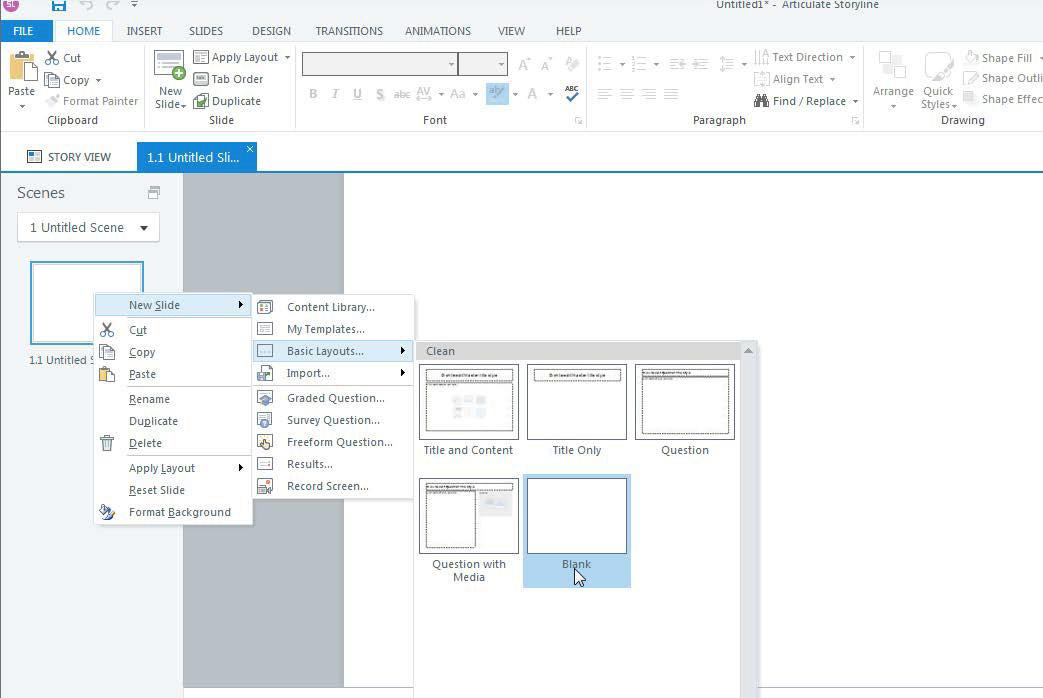
2. Insert a New Slide 1. Right Click 2. Select New Slide 3. Select Basic Layout
4. Select Blank
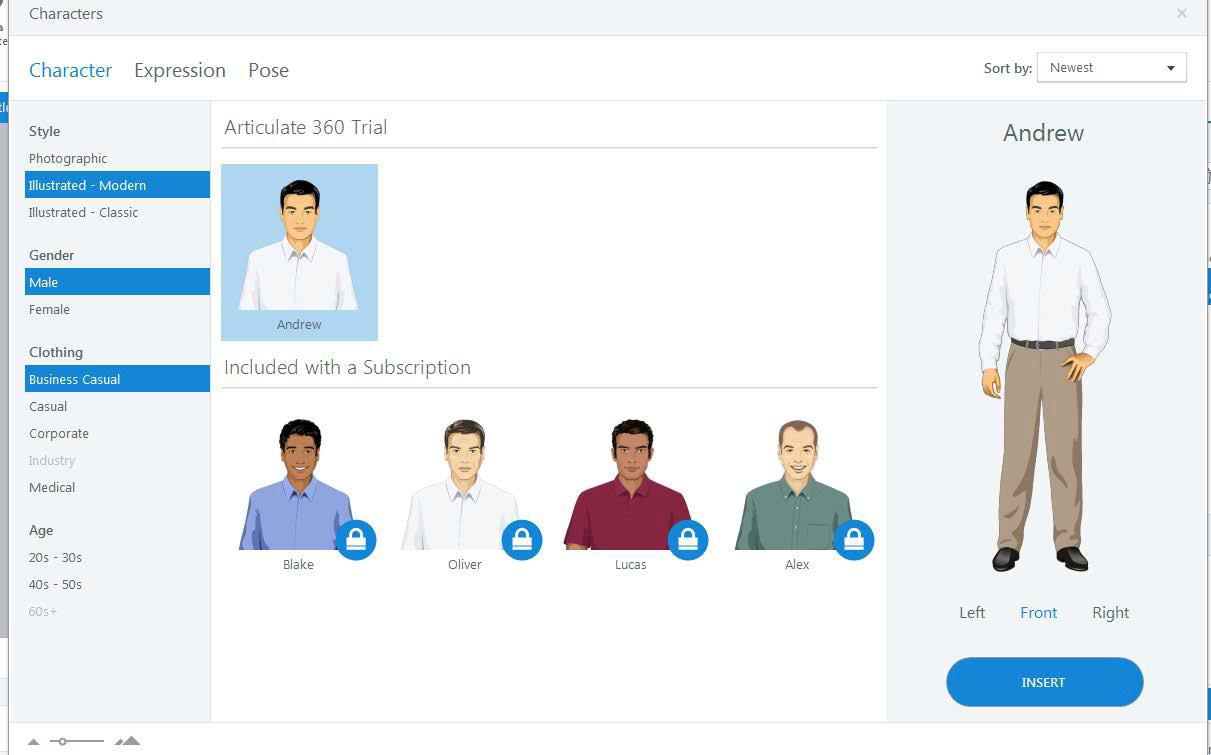
3.Insert a Character
1. Click the Insert tab
2. Select Character
3. Select the style, gender, clothing, and industry, and age of the character.
4. Pick the character on the right
5. Click Insert
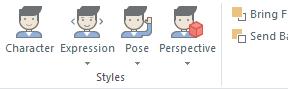
6. Chose the expression, pose or perspective of the character.
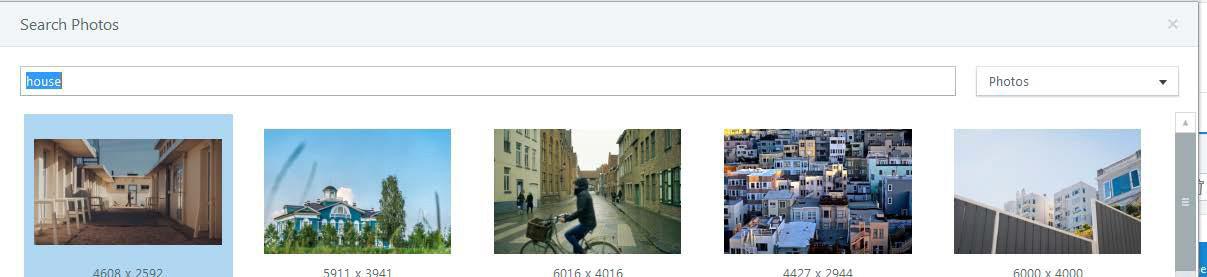
5. Insert Photos or Illustrations 1. Click Insert
Select Photos
3. Select the
6. Insert a Photo From a File 1. Click Insert 2. Select a Picture from File
1:00-2:00 Break Out Groups/How to Use Articulate/SurveyMonkey/You Tube (Technical Training)
2:00-2:45 Break Out Groups/How to Use Articulate/SurveyMonkey/You Tube (Specific Ways to Use in Online Teaching)
2:45-3:00 Break
3:00-3:30 Break Out Groups/How to Use Articulate/SurveyMonkey/You Tube (Brainstorm/Sketch Out Your Idea)
3:30-4:30 Break Out Groups/How to Use Articulate/SurveyMonkey/You Tube (Get Started on Project)
Day 2
Time Activity
9:00-12:00 Work on Lesson Projects
12:00-1:00 Lunch
1:00-4:00 Project Presentation and Critique
4:00-4:30 End of Course Survey
Motivating Adult Learners in an Online Environment
A Presentation for Educators of Adult Learners
Presenters: Karen Ballengee & William Duncan
Agenda – Day One
• Session 1 – Admin details/Introductions/Preview of Learning Objectives
• Break
• Session 2 – Overview of Learning Theories and Motivation Theories
• Lunch
• Session 3 –SurveyMonkey
• Break
• Session 4 – Summing Up -- Group and Individual Feedback;
• Role of the Online Teacher; Ways to Engage the Online Learner;
• Break out Groups (Technology Demonstration)
• Break out Groups (Technology Practice)
• Project Presentations
• End of Course Survey
Agenda – Day Two
• Session 5 – Reflections on Day One; YouTube Video Use with Adult Learners
• Break
• Session 6 -- Introduction to Articulate
• Break
• Session 7 -- Articulate, Part Two
• Break
• Session 8 – Summing Up -- Small Group Presentations and Evaluation Survey; Takeaways
Introductions
Karen Ballengee
Education
M.Ed. Instructional Technology
North Carolina State University
B.A. Music Education
Shepherd University
Certificates
Graphic Design Technology
Hagerstown Community College
Experience – 20 years as a military musician and
woodwind instructor/Master Resilience Trainer
Hobbies –Road cycling
Introductions
Bill Duncan
Education
B.S. Biology
M.A. Linguistics; M.A. Asian Studies
M.Ed. Positive Coaching (2017)
Certificates (Missouri Dept of Elem & Sec Ed)
Biology, Chemistry, General Science, Chinese, TESOL, Online Educator (2017)
Experience
over 20 years of experience in classroom teaching, Homeschooling and Mentoring
Hobbies
Powerlifting
Goals
Goal 1: Learners will compare and contrast the role of the traditional teacher and the online teacher.
Goal 2: Learners will recognize ways to transfer face-to-face instruction to the online environment.
Goal 3: Learners will relate learning and motivation theories to attitudes of adult learners toward technology use.
Goal 4: Learners will express their attitudes toward technology and create a survey with proficient use with Survey Monkey.
Goal 5: Learners will access and examine three videos under 5 minutes in length they would use for instruction on Youtube
Goal 6: Learners will access and create an online lesson and quiz with proficient use of Articulate.
Cognitive
Characterizatio , b-)I Vllue Set
Organization
Affective
Psychomotor
Theoretical Overviews
• Behaviorism – “Most human behavior is learned observationally through modeling: from observing others, one forms an idea of how new behaviors are performed, and on latter occasions this coded information serves as a guide for action.” (Social Learning Theory, Bandura, 1986)
• Constructionism – “Every function in the child’s cultural development appears twice: first, on the social level, and later, on the individual level; first, between people and then inside the child.” (Social Development Theory, Vygotsky, 1980)
Motivation Theories
• Hierarchy of Needs
• Humans act to meet their basic needs, their Psychological needs, then their selffulfillment needs (Maslow, A.H. 1943)
• Self-Determination Theory
• Humans act to meet basic motivational needs of competence (need to do something well), Autonomy (Need to control one’s own life), and Relatedness (need to interact with others with shared experience) (Ryan & Deci, 2000)
How Adults Learn
• Adults need to be ready to learn
• Adults need to see the relevance of learning technology to the task they need to complete
• Adults need to be agents in their learning
• Adults need to work in a collaborative learning environment to construct meaning
• Collaborate with adult learners to determine learner needs
• Collaborate with adult learners on developing learning objectives
• Ensure that learning activities are practical.
• Ensure an approachable, authentic, empathetic, and respectful Learning environment.
Literature Review
• Johnson, M. (2011)
• Adult learners expect content that directly applicable to their lives.
• Adult learners expect expert advice and feedback when handling technical issues.
• When confident in their ability to use technology, adult learners have more positive attitudes toward using technology as a means of self-improvement
• McLeod, J. K. (2007)
• Prior experience is a strong correlating factor with positive attitudes for teachers and learners.
• Field of study (relevance) found to correlate with positive attitudes.
• Students seek more guidance in using technology-based resources when pedagogical and technical issues arise
Surveymonkey
• Survey Monkey is an online survey builder that allows users to create surveys and quizzes that function on computers and mobile devices.
• For our purposes, we want to know our learners attitudes toward learning with technology.
• Copy this link into the location box on your browser and take the sample survey. https://www.surveymonkey.com/r/5J897NX
• Since you have taken a seen an instructional video and have taken a survey using Survey monkey, we want you to take some time and make a survey about how adult learners feel about learning with technology.
• https://www.surveymonkey.com
The Distance Factor
Physical Distance
Being separated in time and place
Transactional Distance
Michael Moore (1984) “There is now a distance between learner and teacher which is not merely geographic, but educational and psychological as well.”
Wegeriff (1998) discovered that the degree of students’ success or failure was closely related to whether each student felt like an insider or an outsider.
The Optimal Role of the Online Teacher
Six Teaching Roles
• Facilitator
• Expert
• Formal Authority
• Socializing Agent
• Ego ideal
• Person who demonstrates compassion and understanding
Student Characteristics
• Independence and Responsibility
• Authoritarianism
• Anxiety
McKeachie (1978)
Copyright
Ask Yourself
• Did you create the work yourself?
• Did you pay to use it?
• Can you claim Fair Use?
Fair Use
Under the Fair Use doctrine, portions of copyrighted materials may be used without permission of the copyright owner provided
• the use is fair and reasonable
• does not substantially impair the value of the materials
• does not curtail the profits reasonably expected by the owner.
You may use the materials for teaching, research, scholarship, and criticism. You may not post any of the materials or graphics on your own website.
Attribution
Even though the terms of fair use apply under certain conditions, the user is still required to acknowledge the copyright holder. Proper attribution includes the author’s name and the date of the work.
• Will the activity help learners use the online tools?
• Does it assist in the social process needed to establish community?
• What type of interaction or collaboration with peers occurs?
• Is reflection required?
• Will a particular problem be resolved?
Conrad & Donaldson (2011)
Measuring Online Engaged Learning
• Rubrics
• Team Assessments
• Reflective SelfAssessments
Conrad & Donaldson (2011)
• Online Icebreakers
• Reflective Activities
• Authentic Activities
• Games and Simulations
• Learner-Led Activities Activities
Conrad & Donaldson (2011)
References
Bender, T. (2012). Discussion-Based Online Teaching to Enhance Student Learning: Theory, Practice, and Assessment. (2nd ed). Virginia: Stylus. Conrad, R., & Donaldson, J.A. (2011). Engaging the Online Learner: Activities and Resources for Creative Instruction. California: Wiley and Sons.
Talab, R.S. (1999). Commonsense Copyright: A Guide for Educators and Librarians. (2nd ed.). North Carolina: McFarland and Company Inc.