4 minute read
Driving instructions


Before carrying out electrical welding on the truck, disconnect the battery. In the event of emergency, disconnect the truck from the power source by disconnecting the recharging plug.
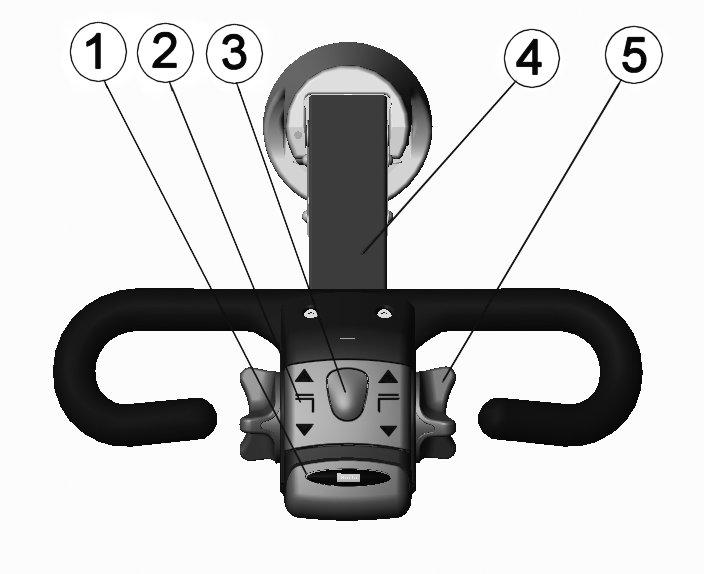
Safety Button (1)
The safety button prevents you from getting squeezed between the truck and an obstacle. When you push it, the truck reverses the travelling direction and stops when the button is released, if also the speed control is released. NOTE Never use the safety button for normal driving. Check the operation of the safety button daily before you start working with the forklift truck.
Valve push buttons (2)
The truck has push buttons for raising and lowering.
Horn (3)
Steering (4)
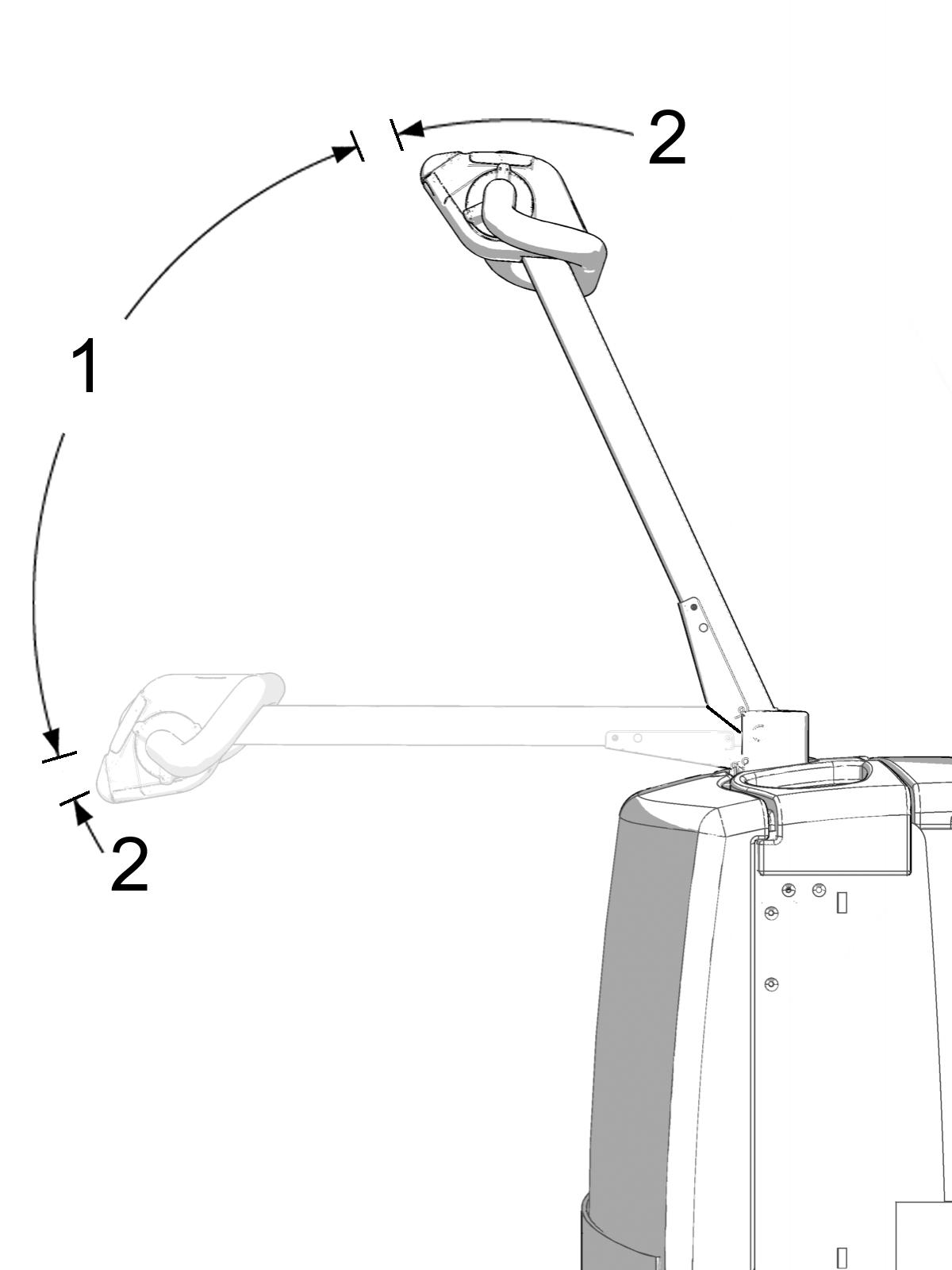
The tiller arm turns ± 100 degrees.
Accelerator (5)
The accelerator is used for controlling the driving speed and for braking. Handle the accelerator gently!
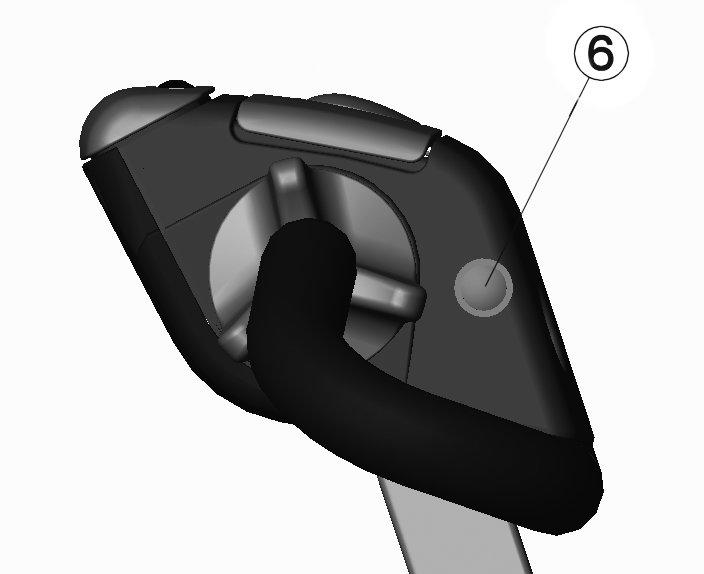
Push button for initial lift (6)
The truck has push buttons for lifting and lowering initial lift.
Daily checks before operation
Carry out the daily maintenance check before using the truck. Neglecting daily maintenance may decrease the safety and reliability of the truck. Notify the site supervisor immediately if you notice an error or deficiency during the check.
• Check the truck externally to see that there are no oil leaks. • Check all wheels for damage or outerwear. • Check the battery fluid in each battery cell. Top up with battery water if needed. The fluid surface should be about 15 mm above the plates (this does not apply to maintenance-free batteries). • Check the gearbox for leaks. Also check the hydraulic pipes, hoses and connectors. No leaks or damage should be found. • Switch on the power and test the operation of the lifting hydraulics by raising and lowering the forks. • Check the operation of the accelerator and steering by driving slowly forward and backward. • Also check the operation of the other electrical functions. • Check that the batteries are charged and locked in place. • Check that the safety button functions. • Check that the emergency stop operates properly. • Make sure that the tiller arm returns to the up position and the parking brake functions properly. • Check the operation of the horn.
Before you start:
• Make sure that the daily maintenance has been carried out. • Turn on the power and tilt the tiller arm to the driving position.
Driving
• Turn the accelerator lightly in the driving direction. • To brake, turn the accelerator in the opposite direction to the driving direction. • Steer the truck smoothly because abrupt movements of the tiller arm may cause a dangerous situation, especially when driving at high speed.
General driving instructions
Practice steering and controlling the truck carefully in a safe area.
• Drive slowly at intersections and when turning. • Handle the truck responsibly and always keep it under control. • Avoid sudden starts and stops. • Steer and brake smoothly. • Decrease the speed if the floor is slippery, for example, because of humidity. • Take great care when driving on a slanted surface. • Do not drive over any loose objects on the floor.
When driving, keep the load lowered and, if possible, tilted backwards. Do not lift the load except when stacking. This does not apply to trucks designed to be driven with the load raised.
Be especially careful:
• When there are other people or objects in the working area. • When the load reduces visibility. • When driving in narrow aisles, make sure that there is enough space for the truck and the load.
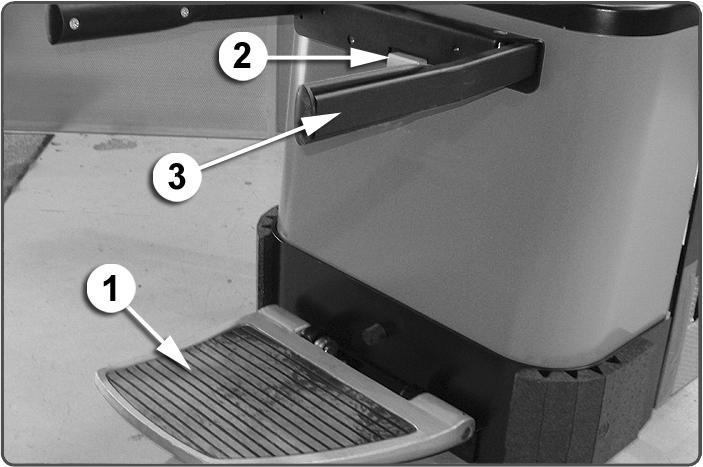
When driving, always keep your body completely within the outlines of the truck. Anticipate any dangers so that you can avoid risks of accident or injury. When driving a pedestrian truck in the direction of the forks, stand behind the truck and keep both your hands on the tiller arm. When driving in the opposite direction, walk beside the truck and keep one hand on the tiller arm. To drive the machine from the riding position, fold down the platform (1) and lift up the safety bars (3). The safety bars keep you within the outlines of the machine and prevent you from losing your balance. NOTE Always lift up the safety bars when operating the machine standing on the platform. When the platform and safety bars are in the riding position, the machine moves faster. When you step off the platform, driving is prevented. To return the safety bars back to the pedestrian operating position, lift them from the hinging point and pull the lock lever (2). The safety bars will fold down. Then lift the platform and gas springs will fold it up.
Speed
Control the speed according to the situation. Take into consideration the load, visibility, and people in the working area and the working environment. Slow down at cross aisles and whenever the vision is obstructed. If the visibility is inadequate, use an assistant to help guide you. Uncontrolled acceleration or braking, excessive speed at turning points, and fast and sudden turning may overturn the load and cause an accident. In all conditions, drive the truck at a speed that enables you to stop it safely.
Stopping the truck
Brake the truck smoothly by turning the accelerator against the direction of travel (tiller arm in position 1). You should anticipate a situation when you must brake and decrease the speed well ahead. When you release the tiller arm to the up position or press it to the down position, the driving circuit breaks and the brake is engaged (tiller arm in position 2).