TN Alignment - eDynamic Principles of Info Tech 1a1b

Page 1


Course Title: Principles of Information Technology 1a/1b

State: TN

State Course Title: Computer Science Foundations

State Course Code: C10H11

State Standards: TN Department of Education - Information Technology

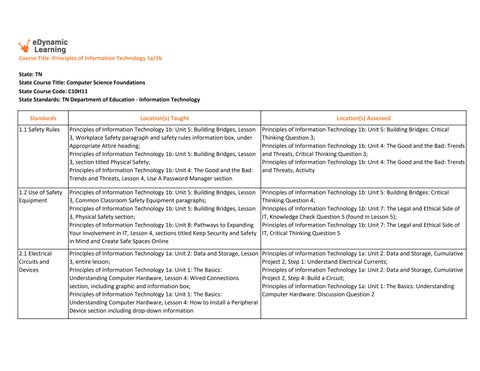
Standards

1.1 Safety Rules

Location(s) Taught

Principles of Information Technology 1b: Unit 5: Building Bridges, Lesson

3, Workplace Safety paragraph and safety rules information box, under Appropriate Attire heading;

Principles of Information Technology 1b: Unit 5: Building Bridges, Lesson

3, section titled Physical Safety;

Principles of Information Technology 1b: Unit 4: The Good and the Bad: Trends and Threats, Lesson 4, Use A Password Manager section

1.2 Use of Safety Equipment Principles of Information Technology 1b: Unit 5: Building Bridges, Lesson

3, Common Classroom Safety Equipment paragraphs;

Principles of Information Technology 1b: Unit 5: Building Bridges, Lesson

3, Physical Safety section;

Principles of Information Technology 1b: Unit 8: Pathways to Expanding Your Involvement in IT, Lesson 4, sections titled Keep Security and Safety in Mind and Create Safe Spaces Online

2.1 Electrical Circuits and Devices

Principles of Information Technology 1a: Unit 2: Data and Storage, Lesson 3, entire lesson;

Principles of Information Technology 1a: Unit 1: The Basics: Understanding Computer Hardware, Lesson 4: Wired Connections section, including graphic and information box;

Principles of Information Technology 1a: Unit 1: The Basics: Understanding Computer Hardware, Lesson 4: How to Install a Peripheral Device section including drop-down information

Location(s) Assessed

Principles of Information Technology 1b: Unit 5: Building Bridges: Critical Thinking Question 3;

Principles of Information Technology 1b: Unit 4: The Good and the Bad: Trends and Threats, Critical Thinking Question 3;

Principles of Information Technology 1b: Unit 4: The Good and the Bad: Trends and Threats, Activity

Principles of Information Technology 1b: Unit 5: Building Bridges: Critical Thinking Question 4;

Principles of Information Technology 1b: Unit 7: The Legal and Ethical Side of IT, Knowledge Check Question 5 (found in Lesson 5);

Principles of Information Technology 1b: Unit 7: The Legal and Ethical Side of IT, Critical Thinking Question 5

Principles of Information Technology 1a: Unit 2: Data and Storage, Cumulative Project 2, Step 1: Understand Electrical Currents;

Principles of Information Technology 1a: Unit 2: Data and Storage, Cumulative

Project 2, Step 4: Build a Circuit;

Principles of Information Technology 1a: Unit 1: The Basics: Understanding Computer Hardware: Discussion Question 2

2.2 Basic Electronic Circuit Behavior

2.3 Counting Systems

Location(s) Taught

Principles of Information Technology 1a: Unit 1: The Basics:

Understanding Computer Hardware, Lesson 6, entire lesson;Principles of Information Technology 1a: Unit 1: The Basics: Understanding Computer Hardware, Lesson 5, entire lesson;Principles of Information Technology

1b: Unit 2: Code Like a Pro!, Lesson 6, entire lesson;Principles of Information Technology 1b: Unit 2: Code Like a Pro!, Lesson 3, section titled Testing Circuits with a Digital Multimeter

Principles of Information Technology 1a: Unit 2: Data and Storage, Lesson 3, entire lesson;

Principles of Information Technology 1a: Unit 2: Data and Storage, Lesson 4, entire lesson

2.4 Gates in Logic Circuits

Principles of Information Technology 1a: Unit 2: Data and Storage. Lesson 4, section titled Logic Gates;

Principles of Information Technology 1a: Unit 8: Programming Pro Tips. Lesson 2, entire lesson

3.1 Occupations Principles of Information Technology 1b: Unit 8: Pathways to Expanding

Your Involvement in IT. Lesson 5, entire lesson;

Principles of Information Technology 1a: Unit 1: The Basics: Understanding Computer Hardware. Lesson 5, Turn It Into a Career call out box;

Principles of Information Technology 1a: Unit 2: Data and Storage. Lesson 2, What Does a Data Analyst Do? Drop down information

3.2 Professional Societies Principles of Information Technology 1b: Unit 8: Pathways to Expanding Your Involvement in IT, Lesson 1, section titled Join a National Club including information box; Principles of Information Technology 1b: Unit 8: Pathways to Expanding Your Involvement in IT. Lesson 3, section titled Professional Organizations as well as the related subsections that follow;

Principles of Information Technology 1b: Unit 8: Pathways to Expanding Your Involvement in IT. Lesson 2, Other Opportunities section including information box within that section

Location(s) Assessed

Principles of Information Technology 1a: Unit 2: Data and Storage, Cumulative Project 2, Step 2: Learn How to Test Circuit Behavior;

Principles of Information Technology 1a: Unit 2: Data and Storage, Cumulative Project 2, Step 5: Test the Circuit;

Principles of Information Technology 1a: Unit 2: Data and Storage, Cumulative Project 2, Step 6: Apply Ohm's Law

Principles of Information Technology 1a: Unit 2: Data and Storage. Critical Thinking Question 1;

Principles of Information Technology 1a: Unit 2: Data and Storage. Knowledge Check Question 3 (found in Lesson 5);

Principles of Information Technology 1a: Unit 2: Data and Storage, Cumulative Project 2, entire project

Principles of Information Technology 1a: Unit 2: Data and Storage. Critical Thinking Question 5;

Principles of Information Technology 1a: Unit 2: Data and Storage. Cumulative Project 2

Principles of Information Technology 1b: Unit 6: Become a Pro at Presentations. Cumulative Project 6;

Principles of Information Technology 1b: Unit 8: Pathways to Expanding Your Involvement in IT. Final Cumulative Project;

Principles of Information Technology 1b: Unit 8: Pathways to Expanding Your Involvement in IT. Critical Thinking Questions 2 and 3

Principles of Information Technology 1b: Unit 8: Pathways to Expanding Your Involvement in IT. Activity 1;

Principles of Information Technology 1b: Unit 8: Pathways to Expanding Your Involvement In IT. Discussion Questions 1 and 2;

Principles of Information Technology 1b: Unit 8: Pathways to Expanding Your Involvement in IT. Critical Thinking Question 5

3.3 Career and Technical Student Organization Introduction

Principles of Information Technology 1b: Unit 8: Pathways to Expanding Your Involvement in IT, Lesson 1, section titled Join a National Club

Principles of Information Technology 1b: Unit 8: Activity

4.1 History of the Internet Principles of Information Technology 1a: Unit 4: Networking Fundamentals. Lesson 1, section titled The Internet or The World Wide Web;

Principles of Information Technology 1a: Unit 4: Networking Fundamentals. Lesson 3, section titled Internet Service Providers; Principles of Information Technology 1a: Unit 1: The Basics: Understanding Computer Hardware. Lesson 1, section titled The Internet of Things

Principles of Information Technology 1a: Unit 4: Networking Fundamentals. Cumulative Project 4 (students create timeline of history of the internet); Principles of Information Technology 1a: Unit 1: The Basics: Understanding Computer Hardware. Discussion Question 1

5.1 Development of Operating Systems

Principles of Information Technology 1a: Unit 3: Systems and Software

101. Lesson 1, Section titled A Brief History of Operating Systems, including slideshow in same section; Principles of Information Technology 1a: Unit 3: Systems and Software

101. Lesson 1, Section titled Matching the System to the Device; Principles of Information Technology 1a: Unit 3: Systems and Software

101. Lesson 2, entire lesson

6.1 Web Terminology Principles of Information Technology 1a: Unit 5: Word Processing. Lesson 1, section titled Terminology; Principles of Information Technology 1a: Unit 7: The World of IT Apps. Lesson 3, entire lesson; Principles of Information Technology 1a: Unit 3: Systems and Software

101, Lesson 1, entire lesson

6.2 Computer Hardware Components

Principles of Information Technology 1a: Unit 1: The Basics: Understanding Computer Hardware. Lesson 2, entire lesson; Principles of Information Technology 1a: Unit 3: Systems and Software

101. Lesson 2, entire lesson; Principles of Information Technology 1a: Unit 4: Networking Fundamentals. Lesson 4, section titled Hardware Layer

Principles of Information Technology 1a: Unit 3: Systems and Software 101. Activity;

Principles of Information Technology 1a: Unit 3: Systems and Software 101. Critical Thinking Question 1

Principles of Information Technology 1a: Unit 5: Word Processing. Activity and Discussion Question 1; Principles of Information Technology 1a: Unit 7: The World of IT Apps. Critical Thinking Question 2;

Principles of Information Technology 1a: Unit 3: Systems and Software 101. Activity 2

Principles of Information Technology 1a: Unit 1: The Basics: Understanding Computer Hardware. Cumulative Project 1;

Principles of Information Technology 1a: Unit 1: The Basics: Understanding Computer Hardware. Critical Thinking Questions 2, 4 and 5; Principles of Information Technology 1a: Unit 4: Networking Fundamentals. Cumulative Project 2

6.3 Computer Networks

7.1 Keyboard Shortcuts

Location(s) Taught

Principles of Information Technology 1a: Unit 4: Networking Fundamentals. Lesson 2, section titled Client-Server vs Peer-Peer, including graphic;

Principles of Information Technology 1a: Unit 1: The Basics: Understanding Computer Hardware. Lesson 3, sections titled NIC€ Components and Computers at Work; Principles of Information Technology 1a: Unit 4: Networking Fundamentals. Lessons 1, 3, 4 and 5 (entire lessons)

Principles of Information Technology 1a: Unit 5: Word Processing. Lesson

1, section titled Terminology, second paragraph;

Principles of Information Technology 1a: Unit 5: Word Processing. Lesson

1, section titled Keyboarding; Principles of Information Technology 1a: Unit 5: Word Processing. Lesson 3, information in dropdown menu under 'Indentation' and 'List'

8.1 Evolution of Cloud Computing Principles of Information Technology 1a: Unit 3: Systems and Software

101. Lesson 6, section titled Where Did The Cloud Come From?;

Principles of Information Technology 1a: Unit 3: Systems and Software

101. Lesson 6, section titled Cloud Hosting; Principles of Information Technology 1a: Unit 2: Data and Storage. Lesson

5, section titled Cloud Storage

8.2 Cloud Technologies Role Principles of Information Technology 1a: Unit 3: Systems and Software

101. Lesson 6, section titled Cloud Hosting; Principles of Information Technology 1a: Unit 3: Systems and Software

101. Lesson 6, section titled Where Did The Cloud Come From?; Principles of Information Technology 1a: Unit 2: Data and Storage. Lesson

5, section titled Cloud Storage

8.3 Models of Cloud Technology

Principles of Information Technology 1a: Unit 2: Data and Storage. Lesson

5, section titled Cloud Storage; Principles of Information Technology 1a: Unit 3: Systems and Software

101. Lesson 6, section titled Where Did The Cloud Come From?;

Principles of Information Technology 1a: Unit 7: The World of IT Apps.

Lesson 2, File Backup section

Location(s) Assessed

Principles of Information Technology 1a: Unit 4: Networking Fundamentals. Cumulative Project 4;

Principles of Information Technology 1a: Unit 1: The Basics: Understanding Computer Hardware. Critical Thinking Question 5

Principles of Information Technology 1a: Unit 5: Word Processing. Critical Thinking Question 4;

Principles of Information Technology 1a: Unit 5: Word Processing. Cumulative Project 5

Principles of Information Technology 1a: Unit 3: Systems and Software 101. Activity (tracing the history of Cloud storage);

Principles of Information Technology 1a: Unit 2: Data and Storage. Critical Thinking Question 2;

Principles of Information Technology 1a: Unit 3: Systems and Software 101. Critical Thinking Question 3

Principles of Information Technology 1a: Unit 3: Systems and Software 101. Activity (how Cloud storage works);

Principles of Information Technology 1a: Unit 2: Data and Storage. Critical Thinking Question 2;

Principles of Information Technology 1a: Unit 3: Systems and Software 101. Critical Thinking Question 3

Principles of Information Technology 1a: Unit 3: Systems and Software 101. Critical Thinking Question 3;

Principles of Information Technology 1a: Unit 3: Systems and Software 101. Activity (how Cloud storage works);

Principles of Information Technology 1a: Unit 2: Data and Storage. Critical Thinking Question 2

8.4 Cloud Technologies

8.5 Internet of Things (IoT)

8.6 Statistical Efficiency and Quality

9.1 Web Design Process

Location(s)

Principles of Information Technology 1a: Unit 3: Systems and Software 101. Lesson 6, section titled Cloud Hosting;

Principles of Information Technology 1b: Unit 5: Building Bridges. Lesson 4, section titled Data Storage and Backup, including 'In the Cloud' dropdown menu;

Principles of Information Technology 1a: Unit 2: Data and Storage. Lesson 2, section titled Back it Up, including dropdown menu

Principles of Information Technology 1a: Unit 1: The Basics: Understanding Computer Hardware. Lesson 1, section titled The Internet of Things, including The Internet of Vehicles call out box;

Principles of Information Technology 1a: Unit 4: Networking Fundamentals. Lesson 1 (section titled The Internet or the World Wide Web) and Lesson 4 (section titled IP Address);

Principles of Information Technology 1b: Unit 4: The Good and the Bad: Trends and Threats. Lesson 1 (Smart Devices dropdown), Lesson 3 (dropdown menu, title Bot), Lesson 4, section titled Change Default Passwords

Principles of Information Technology 1a: Unit 2: Data and Storage. Lesson 1, entire lesson;

Principles of Information Technology 1a: Unit 2: Data and Storage. Lesson 2, entire lesson;

Principles of Information Technology 1a: Unit 2: Data and Storage. Lesson 3, entire lesson

Principles of Information Technology 1b: Unit 1: Web Design. Lesson 4, entire lesson;

Principles of Information Technology 1b: Unit 1: Web Design. Lesson 5, entire lesson;

Principles of Information Technology 1b: Unit 1: Web Design. Lesson 6, entire lesson

Principles of Information Technology 1a: Unit 3: Systems and Software 101. Activity (how Cloud storage works);

Principles of Information Technology 1a: Unit 2: Data and Storage. Critical Thinking Question 2;

Principles of Information Technology 1a: Unit 3: Systems and Software 101. Critical Thinking Question 3

Principles of Information Technology 1a: Unit 1: The Basics: Understanding Computer Hardware. Discussion Question 1;

Principles of Information Technology 1a: Unit 1: The Basics: Understanding Computer Hardware. Critical Thinking Question 1

Principles of Information Technology 1a: Unit 2: Data and Storage. Activity; Principles of Information Technology 1a: Unit 2: Data and Storage. Critical Thinking Question 4;

Principles of Information Technology 1a: Unit 2: Data and Storage. Critical Thinking Question 2

Principles of Information Technology 1b: Unit 1: Web Design. Cumulative Project 1;

Principles of Information Technology 1b: Unit 1: Web Design. Critical Thinking Question 2;

Principles of Information Technology 1b: Unit 1: Web Design. Critical Thinking Question 5

9.2 Troubleshooting Process

Principles of Information Technology 1a: Unit 1: The Basics:

Understanding Computer Hardware. Lesson 5, entire lesson; Principles of Information Technology 1a: Unit 4: Networking Fundamentals. Lesson 6, section titled Network Troubleshooting, including dropdown information box

Principles of Information Technology 1a: Unit 1: The Basics: Understanding Computer Hardware. Cumulative Project 1;

Principles of Information Technology 1a: Unit 1: The Basics: Understanding Computer Hardware. Discussion Question 2;

Principles of Information Technology 1a: Unit 4: Networking Fundamentals. Activity 1

9.3 Flowcharts

Principles of Information Technology 1a: Unit 8: Programming Pro Tips.

Lesson 2, section titled Flowcharts, including slideshow; Principles of Information Technology 1a: Unit 8: Programming Pro Tips.

Lesson 3, section titled Functions;

Principles of Information Technology 1b: Unit 6: Become a Pro at Presentations. Lesson 3, section titled Flowcharts, including graphics and subsection titled Organizational Charts

Principles of Information Technology 1a: Unit 8: Programming Pro Tips. Activity 1;

Principles of Information Technology 1a: Unit 8 Programming Pro Tips. Critical Thinking Question 3;

Principles of Information Technology 1b: Unit 6: Become a Pro at Presentations. Lesson 6, Knowledge Check Question 3

10.1 Roles of Team Members

Principles of Information Technology 1b: Unit 5: Building Bridges. Lesson 4, entire lesson but particularly the section titled Let's Get to Work: A Case Study;

Principles of Information Technology 1b: Unit 5: Building Bridges. Lesson 2, entire lesson;

Principles of Information Technology 1b: Unit 5: Building Bridges. Lesson 3, sections titled Constructive Criticism (and related subsections that follow) and Emotional Safety

Principles of Information Technology 1b: Unit 5: Building Bridges. Activity 1; Principles of Information Technology 1b: Unit 5: Building Bridges. Discussion Question 1;

Principles of Information Technology 1b: Unit 5: Building Bridges. Critical Thinking Question 5

10.2 Importance of Management Skills

Principles of Information Technology 1b: Unit 3: Digitally Speaking. Lesson 1, sections titled Project Management and Communication and Online Workspace;

Principles of Information Technology 1b: Unit 6: Become a Pro at Presentations. Lesson 5, section titled Project Management'

Principles of Information Technology 1b: Unit 6: Become a Pro at Presentations. Lesson 5, section titled Personal Planning and Time Management

Principles of Information Technology 1b: Unit 6: Become a Pro at Presentations. Cumulative Project 6;

Principles of Information Technology 1b: Unit 6: Become a Pro at Presentations. Critical Thinking Question 4;

Principles of Information Technology 1b: Unit 6: Become a Pro at Presentations. Critical Thinking Question 1

Standards

11.1 Client Relations

12.1 Web-Based Writing Assignments

Location(s) Taught

Principles of Information Technology 1b: Unit 5: Building Bridges. Lesson

1, section titled Clients;

Principles of Information Technology 1b: Unit 5: Building Bridges. Lesson 4, section titled Communication;

Principles of Information Technology 1b: Unit 3: Digitally Speaking. Lesson 2, section titled Getting Started with Gmail, and steps that follow

Principles of Information Technology 1a: Unit 5: Word Processing. Lesson 4, entire lesson;

Principles of Information Technology 1a: Unit 7: The World of IT Apps.

Lesson 5, entire lesson;

Principles of Information Technology 1b: Unit 3: Digitally Speaking. Lesson 1, section titled Communication Technology

12.2 Website Creation Principles of Information Technology 1b: Unit 1: Web Design. Lesson 4, entire lesson;

Principles of Information Technology 1b: Unit 1: Web Design. Lesson 5, entire lesson;

Principles of Information Technology 1b: Unit 1: Web Design, Lesson 6, entire lesson

13.1 Social, Legal, and Ethical Issues

Principles of Information Technology 1b: Unit 7: The Legal and Ethical Side of IT. Lesson 3, entire lesson;

Principles of Information Technology 1b: Unit 7: The Legal and Ethical Side of IT. Lesson 4, entire lesson;

Principles of Information Technology 1b: Unit 7: The Legal and Ethical Side of IT. Lesson 5, entire lesson

Location(s) Assessed

Principles of Information Technology 1b: Unit 5: Building Bridges. Activity 1;

Principles of Information Technology 1b: Unit 3: Digitally Speaking. Cumulative Project 3;

Principles of Information Technology 1b: Unit 3: Digitally Speaking. Activity

13.2 Ethical Artificial Intelligence (AI)

Principles of Information Technology 1b: Unit 4: The Good and the Bad: Trends and Threats. Lesson 1, section on AI in Tech Trends, section on AI Ethical Issues in Access to Information

Principles of Information Technology 1a: Unit 5: Word Processing. Cumulative Project 5;

Principles of Information Technology 1a: Unit 5: Word Processing. Discussion Question 1;

Principles of Information Technology 1a: Unit 7: The World of IT Apps. Cumulative Project 7

Principles of Information Technology 1b: Unit 1: Web Design. Cumulative Project 1;

Principles of Information Technology 1b: Unit 1: Web Design. Critical Thinking Question 2;

Principles of Information Technology 1b: Unit 1: Web Design. Critical Thinking Question 4

Principles of Information Technology 1b: Unit 7: The Legal and Ethical Side of IT. Activity;

Principles of Information Technology 1b: Unit 7: The Legal and Ethical Side of IT. Discussion Question 1;

Principles of Information Technology 1b: Unit 7: The Legal and Ethical Side of IT. Discussion Question 2

Principles of Information Technology 1b: U4: Activity

Location(s) Taught

14.1 Data Security Principles of Information Technology 1b: Unit 7: The Legal and Ethical Side of IT. Lesson 2, entire lesson;

Principles of Information Technology 1b: Unit 7: The Legal and Ethical Side of IT. Lesson 1, section titled What's Data Confidentiality All About?;

Principles of Information Technology 1b: Unit 7: The Legal and Ethical Side of IT. Lesson 5, sections titled Non-Repudiation and Conclusion

Principles of Information Technology 1b: Unit 7: The Legal and Ethical Side of IT. Activity;

Principles of Information Technology 1b: Unit 7: The Legal and Ethical Side of IT. Knowledge Check Question 1;

Principles of Information Technology 1b: Unit 7: The Legal and Ethical Side of IT. Critical Thinking Question 5

14.2 Security Breaches

Principles of Information Technology 1a: Unit 2: Data and Storage.

Lesson 2, section titled How Can We Secure Our Data?;

Principles of Information Technology 1a: Unit 3: Systems and Software

101. Lesson 2, section titled Access Control and Security; Principles of Information Technology 1a: Unit 4: Networking Fundamentals. Lesson 6, section titled Network Security and related subsections that follow

14.3 Security Practices Principles of Information Technology 1a: Unit 4: Networking Fundamentals. Lesson 6, section titled Network Security and related subsections that follow;

Principles of Information Technology 1a: Unit 3: Systems and Software

101. Lesson 2, section titled Access Control and Security;

Principles of Information Technology 1a: Unit 2: Data and Storage.

Lesson 2, section titled How Can We Secure Our Data?

Principles of Information Technology 1a: Unit 2: Data and Storage. Critical Thinking Question 3;

Principles of Information Technology 1a: Unit 3: Systems and Software 101. Discussion Question 2;

Principles of Information Technology 1a: Unit 4: Networking Fundamentals. Critical Thinking Question 1

Principles of Information Technology 1a: Unit 2: Data and Storage. Critical Thinking Question 3; Principles of Information Technology 1a: Unit 4: Networking Fundamentals. Critical Thinking Question 1

Principles of Information Technology 1a: Unit 3: Systems and Software 101. Discussion Question 2;

15.1 Digital File Management

Principles of Information Technology 1a: Unit 3: Systems and Software

101. Lesson 3, entire lesson, particularly section titled File Management; Principles of Information Technology 1a: Unit 7: The World of IT Apps.

Lesson 2, entire lesson;

Principles of Information Technology 1b: Unit 6: Become a Pro at Presentations. Lesson 4, section titled File Options

Principles of Information Technology 1a: Unit 3: Systems and Software 101. Cumulative Project 3; expanded Step 3;

Principles of Information Technology 1a: Unit 7: The World of IT Apps. Activity; Principles of Information Technology 1a: Unit 7: The World of IT Apps. Critical Thinking Question 5

Standards

Location(s) Taught Location(s) Assessed

16.1 Programming Language Principles of Information Technology 1a: Unit 8: Programming Pro Tips.

Lesson 1, section titled Programming Languages, including related language subsections that follow;

Principles of Information Technology 1b: Unit 1: Web Design. Lesson 3, entire lesson;

Principles of Information Technology 1b: Unit 2: Code Like a Pro. Lesson 4, entire lesson on mathematical programs

16.2 Software Development Life Cycle Principles of Information Technology 1a: Unit 8: Programming Pro Tips. Lesson 1, entire lesson

16.3 Batch Files Principles of Information Technology 1a: Unit 8: Programming Pro Tips.

Lesson 3, section titled Batch Files including graph titled Common Batch Commands

Principles of Information Technology 1a: Unit 8: Programming Pro Tips. Critical Thinking Question 4;

Principles of Information Technology 1b: Unit 1: Web Design. Critical Thinking Question 2;

Principles of Information Technology 1b: Unit 2: Code Like a Pro. Activity

Principles of Information Technology 1a: Unit 8: Programming Pro Tips. Critical Thinking Question 2;

Principles of Information Technology 1a: Unit 8: Programming Pro Tips. Critical Thinking Question 3

Principles of Information Technology 1a: Unit 8: Programming Pro Tips. Cumulative Project 6

Turn static files into dynamic content formats.

Create a flipbook
Issuu converts static files into: digital portfolios, online yearbooks, online catalogs, digital photo albums and more. Sign up and create your flipbook.
TN Alignment - eDynamic Principles of Info Tech 1a1b by edynamiclearning - Issuu