CSAPHN Australian Immunisation Register (AIR) Guide
September2020
For more information or support, please contact Country SA PHN on:
08 8565 8900
e support@countrysaphn.com.au w countrysaphn.com.au
1
Australian Immunisation Register (AIR) Contents Australian Immunisation Register (AIR)...................................................................................................................... 1 Introduction to the Australian Immunisation Register: .............................................................................................. 2 Benefits of Having Access to the AIR: ......................................................................................................................... 3 Logging onto the AIR: ................................................................................................................................................. 6 Identify an Individual on the AIR: ............................................................................................................................... 7 Recording an Encounter on the AIR: ........................................................................................................................ 10 Encounter Details ..................................................................................................................................................... 12 Recording a Medical Contraindication: .................................................................................................................... 13 Recording a Natural Immunity: ................................................................................................................................ 15 AIR Secure E-mail: .................................................................................................................................................... 17 Reports Available from the AIR Site: ........................................................................................................................ 18 Requesting and Retrieving AIR Reports:................................................................................................................... 19 Payment Statement Menu: ...................................................................................................................................... 21 AIR Contact Details:.................................................................................................................................................. 22 References: .............................................................................................................................................................. 22
CSAPHN Guide to Australian Immunisation Register (AIR)
1
Introduction to the Australian Immunisation Register: The Australian Immunisation Register (AIR) formerly the Australian Childhood Immunisation Register (ACIR) is a national register that records vaccinations given to people of all ages in Australia. This expansion includes adult vaccines such as those given for whooping cough, shingles, influenza, and travel.
The AIR: • • • •
is used to monitor immunisation coverage levels and service delivery, and to identify regions at risk during disease outbreaks. can provide reports to vaccination providers upon request to help identify individuals who are due or overdue for immunisation. makes an information payment to vaccination providers who administer and notify the AIR of a completed National Immunisation Program (NIP) vaccination schedule for children under 7 years of age; and makes an additional incentive payment to vaccination providers who follow up and vaccinate children under 7 years of age who are more than 2 months overdue for their childhood vaccinations.
Data from the AIR: • • • • •
enables the vaccination provider to check the immunisation status of an individual, regardless of where they were immunized. is used to create an Immunisation History Statement. provides information about a child or young individual’s immunisation status to help determine eligibility for Child Care Benefit, Child Care Rebate and Family Tax Benefit Part A supplement. provides evidence of immunisation for those working with vulnerable people, such as those in health, aged care, and childcare; and is used to measure coverage at a national, state and territory, and local level.
This document aims to assist vaccination providers with the use of AIR and its utilities to ensure the timely transfer of immunisation encounter data to the AIR, so individual’s records are up to date. In addition, the AIR data allows vaccination providers to follow up on individuals who have become overdue for their vaccinations.
Helpful Links: • • • •
Read more about accessing the AIR using HPOS Forms Noted in this Guide AIR Education for Vaccination Providers AIR Resources
CSAPHN Guide to Australian Immunisation Register (AIR)
2
Benefits of Having Access to the AIR: A quick access to check the immunisation status of individuals. Utilisation of the AIR secure email - to advise AIR of individuals who have moved away, are overseas, who are un-contactable or various other reasons. • Request and receive automated overdue reports to follow up individuals requiring vaccination (reports can be set up to 12 months in advance); and • Ability to request claims summaries to ensure immunisation data is transferring from Practice Management Software to the AIR and secondly the affiliated provider notification payments are therefore being received by the vaccination provider. • •
How to Request Access to AIR: General Practitioners are automatically recognised as vaccination providers and are authorised to send or receive immunisation data from the AIR. To request access: If you have access to HPOS, you can request access to the AIR by completing the Online Request Access Page. Access is granted overnight. You can log on to HPOS using PRODA the next day.
• • •
If you are a general practitioner and do not have access to HPOS apply for a PRODA account. Once account created, to gain access to your programs in HPOS you need to link your account with any existing registrations (provider numbers, etc.). and when completed fill in the Online Request Access Page. If you are not a general practitioner, complete the Australian Immunisation Register (AIR) – Application to Register as a Vaccination Provider - Form IM004. If you are a general practice with a group of two or more general practitioners wanting to submit AIR data under one practice number and receive all AIR payments into one nominated bank account – you may apply as an organisation by following the steps as outlined under.
CSAPHN Guide to Australian Immunisation Register (AIR)
3
Step 1 Register as a vaccination provider with the AIR • • • •
An Application to Register as a Vaccination Provider - Form IM004 needs to be completed. Once completed, the application form needs to be emailed to the Immunisation Section, Communicable Disease Control Branch Department of Health, for endorsement of the application. Email to: HealthImmunisationAdministration@sa.gov.au Following endorsement of the application, the form is forwarded to the Department of Human Services, Australian Immunisation Registers section for processing. After the application has been approved by the Department of Human Services, a letter will be sent to the applicant indicating the application has been approved and advising of the applicant’s AIR registration number and authentication filename. Separate notification of a temporary password will be sent.
Step 2 Download AIR Authentication file Once you have received your AIR registration number, authentication file name and temporary password you can download the AIR authentication file. To start using the AIR, download your AIR authentication file by going to: www.humanservices.gov.au • • •
Under the ‘Organisations’ title select Health professionals Select Log on located at top Right corner Select Health professionals, then HPOS
• •
Select ‘Log On’, Log On to HPOS Select ‘AIR log on only’
CSAPHN Guide to Australian Immunisation Register (AIR)
4
The Logon screen will be displayed (https://www1.medicareaustralia.gov.au/ssl/acircirssamn)
Under the Logon title, the information displayed is: ‘Please click on the 'Browse' button to locate your authentication file and press the 'Send Authentication File' button. If you have not already downloaded your authentication file, please click here. • • • •
Select the click here text Enter the Username supplied in the first letter received (AIR registration number) Enter the Authentication File Name supplied in the first letter Select Download File
Note: The authentication file name may automatically download into a download file on your computer. Save the authentication file to a central location/folder on your computer, so that if other practice members need to access it, they can locate the file. It is recommended that you store the authentication file name in a new folder named AIR Logon. When saving or storing the authentication file name you cannot change the file name, as this will corrupt the file and you will not be able to access AIR. The AIR Internet Helpdesk can be contacted on 1300 650 039 if you need assistance with downloading your authentication file name. You are now able to access and use the AIR.
CSAPHN Guide to Australian Immunisation Register (AIR)
5
Logging onto the AIR: Go to: https://www.servicesaustralia.gov.au/organisations/health-professionals/services/medicare/hpos • • •
Select Log on to HPOS Select AIR log on only. Enter in the required authentication filename, username, and password.
Once you have logged on to the AIR – the AIR Main Menu will appear as below with the following options: • • • • • •
Reports Menu - lists the reports available for you to produce. Claims Menu - allows you to display details of claims submitted to the AIR. Identify Individual - allows you to display the immunisation history for an individual. Payment Statements Menu - Financial and Payment Statements. Statement Preference Update. Provider Menu - allows you to amend your Internet contact details. Secure email – access gained through the secure email link on the left-hand side of the AIR main menu
CSAPHN Guide to Australian Immunisation Register (AIR)
6
Identify an Individual on the AIR: •
Once logged onto the AIR, select Identify Individual from the options listed on the AIR Main Menu page.
•
The site will be directed to the Identify Individual page as shown below.
(NB. Please note that the claims, payment statements, provider details and secure email as outlined on previous page can also be accessed from the Identify Individual page as well as the AIR main menu page) • •
If the individual is registered with Medicare, they will have an AIR record. If the individual is not registered with Medicare (e.g. 457 or student visa) you can create a new record for the individual.
CSAPHN Guide to Australian Immunisation Register (AIR)
7
You can enter the following to search for an individual: • • • • •
Medicare number and Individual Reference Number (IRN) Medicare number, surname and first name surname, first name and date of birth surname, first name, date of birth and postcode Only a unique match will display an individual’s AIR record.
Match Found: If a match is found, the Individual details page will display due details for vaccinations due as well as immunisation details. A single or double upward arrow in the banners indicates there’s information such as immunisation due details, immunisation history, medical contraindication, or natural immunity. Select anywhere in the banner to expand and view this information.
CSAPHN Guide to Australian Immunisation Register (AIR)
8
Match Not Found: If a match is not found the below screen will display with the message: Individual not found. Please check keying, correct any details, or include extra details and select the Search again button to perform a new search, or record an encounter by selecting the Record Encounter button.
If a match still is not found, you can create a new record by selecting the Record Encounter button. Note: It is important to ensure the individual does not have an existing AIR record prior to creating one. If a duplicate record is created, family assistance payments may be affected until the record can be matched. •
Once the individual has been identified, you can record an encounter or update a previous encounter. To do this select the Record Encounter or Update Encounter options in the left-hand menu.
CSAPHN Guide to Australian Immunisation Register (AIR)
9
Recording an Encounter on the AIR: (including overseas immunisation encounters and immunisation histories) The following two screen shots show the Record Encounter pages for a child and adult: Child:
Adult:
CSAPHN Guide to Australian Immunisation Register (AIR)
10
Once the individual has been identified proceed to enter the immunisation encounter by selecting from the following options: Who performed this encounter? • • •
I performed this encounter. Another provider performed this encounter in Australia. This encounter was performed overseas.
Note for General Practitioners: If I performed this encounter is selected, you can choose the practice locations associated with the account from a drop-down list. Note: if there is only one current location, you will not need to select a Practice Location. The system will automatically record immunisations against your current location.
Schedule (as shown on child screenshot) This field is entered automatically with the due schedule. Select from the drop-down menu to change it.
Date of Service This is the date your patient had the vaccination. For individuals aged under 20 years, the system assumes the vaccinations were all given on the same date and applies that date to all encounters.
This Date of Service applies for all episodes (as shown on adult screenshot) This applies for all encounters. It is a checkbox beside the date of service field only for patients over 20 years of age. It automatically records the same date of service for each vaccination encounter. Select the box to remove the tick and record the date of service for each vaccination separately if required.
CSAPHN Guide to Australian Immunisation Register (AIR)
11
Encounter Details Vaccine or brand Up to 3 National Immunisation Program (NIP) schedule vaccinations and up to 5 non-NIP vaccinations can be entered. •
Select vaccines from a drop-down list or start typing and have the field auto-suggest similar vaccines. Once the vaccines or brands are selected, a list of antigens will display beneath the vaccine.
•
When the vaccines or brands have been entered, select the Add button to record the vaccination encounter. Recorded encounter details will display.
•
To add another vaccination encounter, select the Add Another button.
•
If you identify an error, use the pencil icon to change the vaccination details and select Update, or use the rubbish bin icon to delete and select Remove to complete the action.
•
If the vaccination encounter details are correct select Submit. You will be redirected to a page confirming you have successfully transmitted the encounter and you will get a Claim ID.
Please note: •
The AIR does not display the immunisation history immediately. Check later to make sure the immunisation history has been entered correctly.
•
The Immunisation History form (IM013) or Immunisation encounter form (IM002) may be completed and posted to the AIR if you do not have internet access.
•
You should advise your patients if you are lodging a manual form as their records will not be updated until they are received by the AIR and processed.
Update an Encounter on the AIR To update a patient’s immunisation history: •
Select Update Encounter from the left-hand menu.
•
Select the immunisation you want to change by selecting the pencil icon under the Action column. The pencil will not display for any vaccines that have already been paid or were given by another provider. If you need to update this information, contact the AIR.
•
A pop-up titled Edit Encounter will appear. Information you can edit will include date of service, schedule or dose number and vaccine brand.
•
When the required edits have been made, select Update to submit or Cancel to abandon the changes. After making changes, select Save to record the update to the individual’s record.
CSAPHN Guide to Australian Immunisation Register (AIR)
12
Recording a Medical Contraindication: The following providers can record a medical contraindication: • • • • •
general practitioners paediatricians public health physicians infectious diseases physicians clinical immunologists
The above providers are able to record a medical contraindication either on the AIR secure site or by completing the Australian Immunisation Register - Immunisation medical exemption form (IM011) and returning to the AIR. To record a medical contraindication using the AIR secure site - identify the individual and then select Medical Contraindication from the left-hand menu.
•
You will see a message that exemptions must be in accordance with the Australian Immunisation Handbook.
•
Complete the following information fields: • • • • • •
Practice Location Vaccine or Brand Type - you need to indicate if the exemption is permanent or temporary. Start date - today’s date is automatically entered and cannot be changed. End date - if you have indicated the exemption is temporary, you will need to enter an end date. Reason for the exemption from the drop-down list - you must choose a reason for both temporary and permanent exemptions. Different reasons for exemption will appear depending on the options you select.
CSAPHN Guide to Australian Immunisation Register (AIR)
13
•
Select Add to submit the medical contraindication or Cancel to abandon the action.
•
When you have selected Add the submission screen will appear. You can choose: • • •
Add Another Edit or Delete, or Submit the medical contraindication to the AIR
•
You can only record medical contraindications for 1 vaccine or brand at a time.
•
Repeat the above process for every vaccine or brand you want to report a medical contraindication for.
CSAPHN Guide to Australian Immunisation Register (AIR)
14
Recording a Natural Immunity: •
The following providers can record a natural immunity: • • • • •
general practitioners paediatricians public health physicians infectious diseases physicians clinical immunologists
•
The above providers can record a medical contraindication either on the AIR secure site or by completing the Australian Immunisation Register - Immunisation medical exemption form (IM011) and returning to AIR – see useful forms on page 19.
•
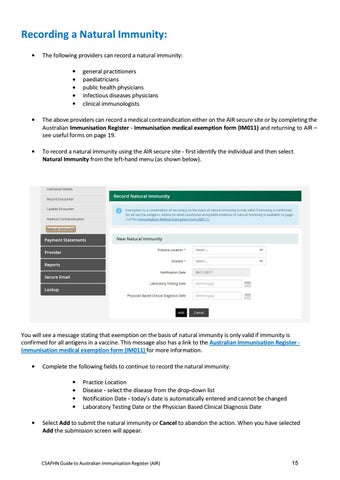
To record a natural immunity using the AIR secure site - first identify the individual and then select Natural Immunity from the left-hand menu (as shown below).
You will see a message stating that exemption on the basis of natural immunity is only valid if immunity is confirmed for all antigens in a vaccine. This message also has a link to the Australian Immunisation Register Immunisation medical exemption form (IM011) for more information. •
Complete the following fields to continue to record the natural immunity: • • • •
•
Practice Location Disease - select the disease from the drop-down list Notification Date - today’s date is automatically entered and cannot be changed Laboratory Testing Date or the Physician Based Clinical Diagnosis Date
Select Add to submit the natural immunity or Cancel to abandon the action. When you have selected Add the submission screen will appear.
CSAPHN Guide to Australian Immunisation Register (AIR)
15
You can choose to: • • •
• •
Add another Edit or delete the natural immunity, or submit the natural immunity to the AIR
You can only record natural immunities for 1 disease at a time. You will need to repeat this process for every disease you want to report a natural immunity for.
Return to Mail Indicator: •
To notify AIR of returned mail received for an individual, select the tick box on the individual’s record as shown in screen shot below
CSAPHN Guide to Australian Immunisation Register (AIR)
16
AIR Secure E-mail:
Contacting the AIR using secure email: The AIR secure email should be used to communicate: •
An immunisation encounter that needs to be amended in cases where an information payment has already been paid or if you did not originally record the vaccination.
•
That an individual is no longer contactable (i.e. no response to mail sent or calls made by provider). The AIR will flag this on the individual’s record if notified.
•
That an individual has moved outside of the vaccination provider’s locality or moved overseas. If notified, the AIR will also flag this on the individual’s record.
Please note: This will remove the individual’s details from the provider’s overdue reports. Provider is unable to view individual’s details, and or, immunisation history however is still able to record immunisation via the ‘Record Encounter’ function on the AIR site. •
If notified, the AIR can put a temporary end date for individuals who are temporarily overseas. This can be lifted at any time by notifying the AIR.
•
The end date will be removed once the AIR has been notified. If an encounter occurs prior to the end date, the end date is not lifted and remains. This would likely ‘pend’ the data and require manual processing by the AIR staff.
•
If an individual returns prior to the end date on the AIR, it is best to remove the end date prior to recording an encounter by contacting the AIR. (However, if an update is made via Medicare, on a [Group Record] this may override the end-date recorded on the AIR).
•
From the Inbox in the Secure Email you may read, file, delete and reply to a message by selecting the message and the appropriate action button.
•
Do not use the secure email function to submit new or confirm existing immunisation details.
•
You can submit new immunisation details through the record encounter function (as explained in previous steps).
CSAPHN Guide to Australian Immunisation Register (AIR)
17
Reports Available from the AIR Site: The AIR produces a number of statistical, identified and access reports for vaccination providers registered to use the AIR site. The reports listed below are made available based on the type of provider that has made the request. The provider type is established when the provider registers with the AIR. Statistical reports: • • • • • •
AIR001A: AIR002A: AIR002B: AIR003A: AIR004A: AIR005A:
Number of individuals registered with the AIR Number (or percentage) of individuals who have received valid vaccinations Number of individuals who have received valid vaccinations, by a selected provider Number of individuals whose consent has been withdrawn Number (or percentage) of valid vaccinations by provider type Number of providers who have submitted valid vaccination information to the AIR
Identified reports: • • • • • • • •
AIR010A: Due/Overdue Immunisation Practice Report AIR011A: Due/Overdue Report by Locality AIR011B: Due/Overdue Report by Vaccination Provider AIR012A: Database exchange report AIR015A: History update report AIR016A: Provider contact details AIR018A: Immunisation Practice Report for Primary Health Networks AIR021A: Due/Overdue Report by Medicare GP
Access report: • AIR031A: Internet access statement
CSAPHN Guide to Australian Immunisation Register (AIR)
18
Requesting and Retrieving AIR Reports: •
Log on to the AIR and select Reports Menu from the AIR Main Menu page
The following options will appear: •
Request a Report lists the reports available for you to produce
•
Modify Reports allows you to modify previously requested reports or delete an existing report request
•
View Reports allows you to display and/or download reports you have previously requested
•
Select Request a Report.
•
The Request a Report page will display the reports made available based on the type of provider that has made the request. Select the relevant report and then OK.
•
The Request New Report page will display. You will need to select an option to indicate the purpose for which you intend to use the information in the report (you can select up to 4 options) and select OK.
CSAPHN Guide to Australian Immunisation Register (AIR)
19
•
Depending on the type of report requested certain report fields need to be completed – follow the prompts on the screen.
•
Once the report has been requested, to view the report select View Reports on the Reports Menu page and follow the prompts.
•
If a previously requested report needs to be modified or an existing report deleted select Modify Reports on the Reports Menu page and follow the prompts.
CSAPHN Guide to Australian Immunisation Register (AIR)
20
Payment Statement Menu: This menu provides access to the following: •
Immunisation Payment Statement to view monthly immunisation payment statements.
•
Immunisation Financial Statement to view immunisation financial statements.
•
Statement Preferences to update immunisation payment statement preferences.
Claims Menu: Claims Summary displays a summary of claims submitted to the Immunisation Register (restricted to 3 months of data).
CSAPHN Guide to Australian Immunisation Register (AIR)
21
AIR Contact Details: Phone: 1800 653 809 for AIR general enquiries Phone: 1300 650 039 for AIR internet helpdesk Email: air@humanservices.gov.au Post to:
Australian Immunisation Register PO Box 7852 Canberra ACT 2610
References: Information has been taken from the Australian Government Department of Services Australia website: https://www.servicesaustralia.gov.au/organisations/healthprofessionals/services/medicare/australian-immunisation-register-health-professionals/about
CSAPHN Guide to Australian Immunisation Register (AIR)
22