1 minute read
Recording an Encounter on the AIR

(including overseas immunisation encounters and immunisation histories)
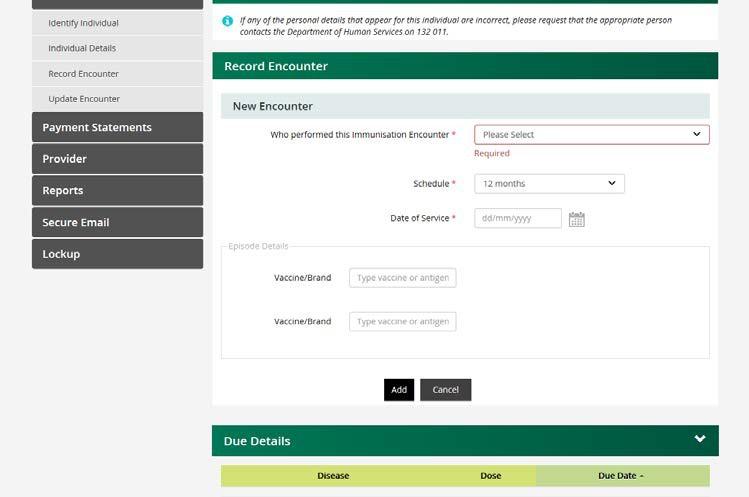
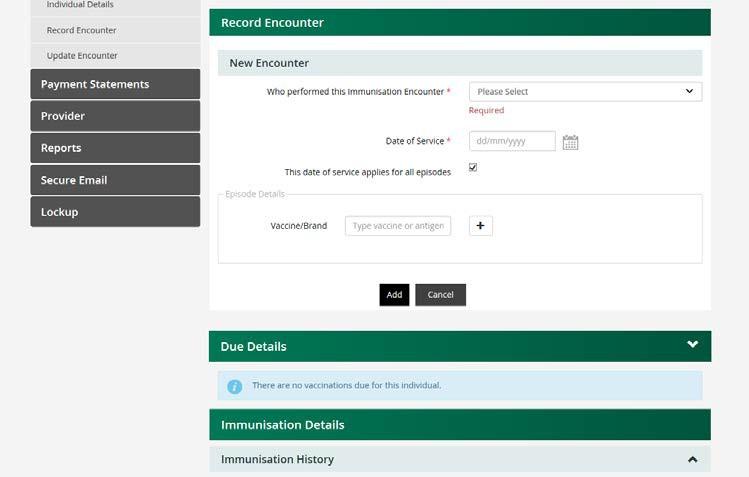
The following two screen shots show the Record Encounter pages for a child and adult:
Advertisement
Child:
Adult:
Once the individual has been identified proceed to enter the immunisation encounter by selecting from the following options:
Who performed this encounter?
I performed this encounter. Another provider performed this encounter in Australia. This encounter was performed overseas.
Note for General Practitioners: If I performed this encounter is selected, you can choose the practice locations associated with the account from a drop-down list.
Note: if there is only one current location, you will not need to select a Practice Location. The system will automatically record immunisations against your current location.
Schedule (as shown on child screenshot)
This field is entered automatically with the due schedule. Select from the drop-down menu to change it.
Date of Service
This is the date your patient had the vaccination. For individuals aged under 20 years, the system assumes the vaccinations were all given on the same date and applies that date to all encounters.
This Date of Service applies for all episodes (as shown on adult screenshot)
This applies for all encounters. It is a checkbox beside the date of service field only for patients over 20 years of age. It automatically records the same date of service for each vaccination encounter. Select the box to remove the tick and record the date of service for each vaccination separately if required.