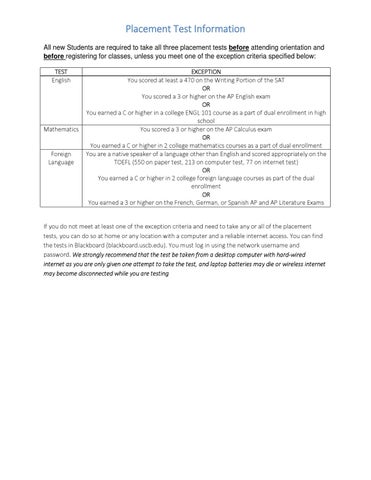
Placement Test Information All new Students are required to take all three placement tests before attending orientation and before registering for classes, unless you meet one of the exception criteria specified below: TEST English
EXCEPTION You scored at least a 470 on the Writing Portion of the SAT OR You scored a 3 or higher on the AP English exam OR You earned a C or higher in a college ENGL 101 course as a part of dual enrollment in high school Mathematics You scored a 3 or higher on the AP Calculus exam OR You earned a C or higher in 2 college mathematics courses as a part of dual enrollment Foreign You are a native speaker of a language other than English and scored appropriately on the Language TOEFL (550 on paper test, 213 on computer test, 77 on internet test) OR You earned a C or higher in 2 college foreign language courses as part of the dual enrollment OR You earned a 3 or higher on the French, German, or Spanish AP and AP Literature Exams If you do not meet at least one of the exception criteria and need to take any or all of the placement tests, you can do so at home or any location with a computer and a reliable internet access. You can find the tests in Blackboard (blackboard.uscb.edu). You must log in using the network username and password. We strongly recommend that the test be taken from a desktop computer with hard‐wired internet as you are only given one attempt to take the test, and laptop batteries may die or wireless internet may become disconnected while you are testing
How to access Placement tests in Blackboard Step 1: Log in to blackboard.uscb.edu with your network username and password. If you do not know your username and password please see the “How to find your network username and password to log in to Blackboard” section below. Step 2: Once you are logged into Blackboard, go to the “Courses” tab in the upper right hand corner
Step 3: Click on a placement test that you need to take. If you do not see any placement tests, please call (843)208‐8033 for assistance. Step 4: Click on the “ASSESSMENT” link on the left hand side of your screen Step 5: Then click on the Assessment link within the page.
2 1
The link will take you to a site where you will: read the instructions, click “Take Me To The Test” and log in with your network username and password to begin. Repeat the process until you have taken all required placement exams.
How to find your network username and password to log in to Blackboard Step 1: Log in to Self Service Carolina (my.sc.edu) If you do not know how to log in to Self Service Carolina, please go to https://my.sc.edu/vipid/ Step 2: click on the “Personal Information” tab
Step 3: click “View Email Addresses”. The information before the @email.uscb.edu is your network username. For example, in the screenshot below, the username is “smcshark”
Step 4: If you do not know your password or have not made one yet, click on the blue my.sc.edu above your email address as shown above. It will take you to a screen with your USC Network Username and a place to set your password, like the example shown below.