Instruction Manual
DVC6200 Digital Valve Controller
D103409X012
June 2011
Section 6 Viewing Device Variables and Diagnostics66 Device Diagnostics Note Device Diagnostics are not available for instrument level AC.
Alert Conditions Field Communicator
Device Diagnostics > Alert Conditions (2‐1)
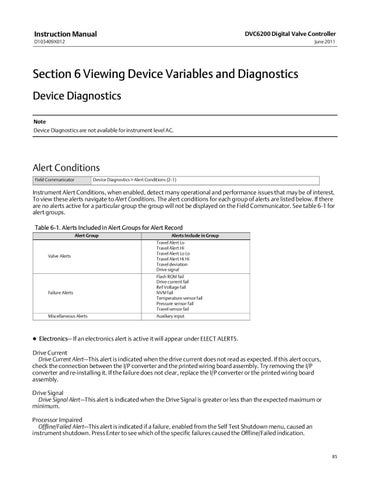
Instrument Alert Conditions, when enabled, detect many operational and performance issues that may be of interest. To view these alerts navigate to Alert Conditions. The alert conditions for each group of alerts are listed below. If there are no alerts active for a particular group the group will not be displayed on the Field Communicator. See table 6‐1 for alert groups. Table 6‐1. Alerts Included in Alert Groups for Alert Record Alert Group
Valve Alerts
Failure Alerts
Miscellaneous Alerts
Alerts Include in Group Travel Alert Lo Travel Alert Hi Travel Alert Lo Lo Travel Alert Hi Hi Travel deviation Drive signal Flash ROM fail Drive current fail Ref Voltage fail NVM fail Temperature sensor fail Pressure sensor fail Travel sensor fail Auxiliary input
D Electronics— If an electronics alert is active it will appear under ELECT ALERTS. Drive Current Drive Current Alert—This alert is indicated when the drive current does not read as expected. If this alert occurs, check the connection between the I/P converter and the printed wiring board assembly. Try removing the I/P converter and re‐installing it. If the failure does not clear, replace the I/P converter or the printed wiring board assembly. Drive Signal Drive Signal Alert—This alert is indicated when the Drive Signal is greater or less than the expected maximum or minimum. Processor Impaired Offline/Failed Alert—This alert is indicated if a failure, enabled from the Self Test Shutdown menu, caused an instrument shutdown. Press Enter to see which of the specific failures caused the Offline/Failed indication.
85