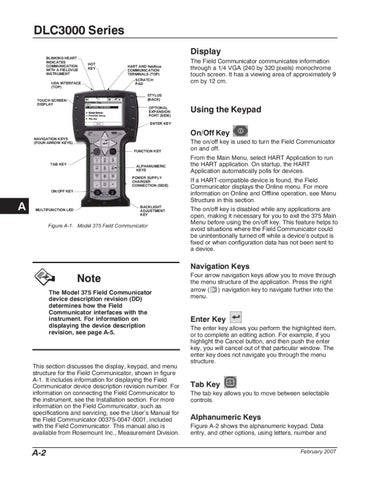
DLC3000 Series Display BLINKING HEART INDICATES COMMUNICATION WITH A FIELDVUE INSTRUMENT
HOT KEY
SCRATCH PAD
IrDA INTERFACE (TOP)
TOUCH SCREEN DISPLAY
HART AND fieldbus COMMUNICATION TERMINALS (TOP)
The Field Communicator communicates information through a 1/4 VGA (240 by 320 pixels) monochrome touch screen. It has a viewing area of approximately 9 cm by 12 cm.
STYLUS (BACK) DLC3000: Tag 1
Process Variables
OPTIONAL EXPANSION PORT (SIDE)
3 Setup 2 Basic Diag/Service 4 Detailed Setup 5 Review
Using the Keypad
ENTER KEY
On/Off Key NAVIGATION KEYS (FOUR ARROW KEYS) FUNCTION KEY
TAB KEY
ALPHANUMERIC KEYS POWER SUPPLY CHARGER CONNECTION (SIDE)
ON/OFF KEY
A
BACKLIGHT ADJUSTMENT KEY
MULTIFUNCTION LED
Figure A-1. Model 375 Field Communicator
The on/off key is used to turn the Field Communicator on and off. From the Main Menu, select HART Application to run the HART application. On startup, the HART Application automatically polls for devices. If a HART-compatible device is found, the Field Communicator displays the Online menu. For more information on Online and Offline operation, see Menu Structure in this section. The on/off key is disabled while any applications are open, making it necessary for you to exit the 375 Main Menu before using the on/off key. This feature helps to avoid situations where the Field Communicator could be unintentionally turned off while a device s output is fixed or when configuration data has not been sent to a device.
Navigation Keys
Note The Model 375 Field Communicator device description revision (DD) determines how the Field Communicator interfaces with the instrument. For information on displaying the device description revision, see page A-5.
This section discusses the display, keypad, and menu structure for the Field Communicator, shown in figure A-1. It includes information for displaying the Field Communicator device description revision number. For information on connecting the Field Communicator to the instrument, see the Installation section. For more information on the Field Communicator, such as specifications and servicing, see the User s Manual for the Field Communicator 00375-0047-0001, included with the Field Communicator. This manual also is available from Rosemount Inc., Measurement Division.
A-2
Four arrow navigation keys allow you to move through the menu structure of the application. Press the right arrow ( ) navigation key to navigate further into the menu.
Enter Key The enter key allows you perform the highlighted item, or to complete an editing action. For example, if you highlight the Cancel button, and then push the enter key, you will cancel out of that particular window. The enter key does not navigate you through the menu structure.
Tab Key The tab key allows you to move between selectable controls.
Alphanumeric Keys Figure A-2 shows the alphanumeric keypad. Data entry, and other options, using letters, number and February 2007