Product Information
Maintenance
Maintenance Intervals
Product Capacity
Product: COMPACT TRACK LOADER
Model: 239D COMPACT TRACK LOADER CD4
Configuration: 239D Compact Track Loader CD400001-UP (MACHINE) POWERED BY C2.2 Engine
Operation and Maintenance Manual
Caterpillar Corporate Radio Media Number -M0085473-03
General Hazard Information
SMCS
i07214428
Foreword
Do not operate or work on this equipment unless you have read and understand the instructions and warnings in the Operation and Maintenance Manuals. Failure to follow the instructions or heed the warnings could result in injury or death. Contact your Caterpillar dealer for replacement manuals. Proper care is your responsibility.
Introduction
Warnings and Compliance
Precaution
Before Operation
Caution
Product: COMPACT TRACK LOADER
Model: 239D COMPACT TRACK LOADER CD4
Configuration: 239D Compact Track Loader CD400001-UP (MACHINE) POWERED BY C2.2 Engine
Operation and Maintenance Manual
Caterpillar Corporate Radio Media Number -M0085473-03
Radio - Entertainment If Equipped
SMCS
When driving, always keep your eyes on the road and hands on the steering wheel, paying careful attention to normal driving tasks. As always, the driver is responsible for safe vehicle operation. Not keeping your eyes on the road and hands on the wheel while driving could result in injury to you or others.
Introduction
i07316460
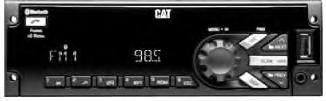
MP3/USB/iPod/Aux/Bluetooth Receiver
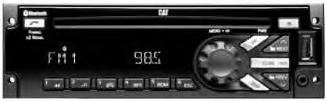
MP3/USB/iPod/Aux/Bluetooth/CD Receiver
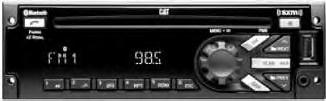
MP3/USB/iPod/Aux/Bluetooth/CD/SAT Receiver
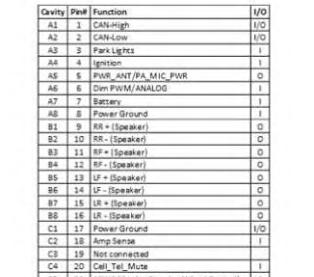
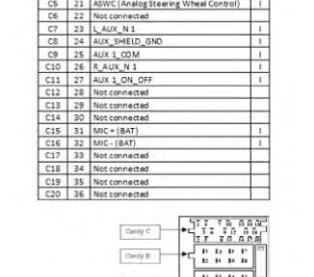
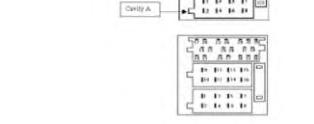
Radio Pin out
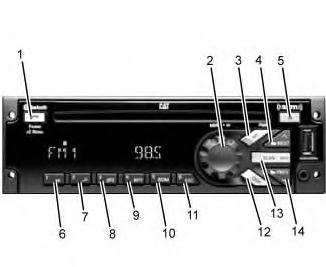
General Radio Receiver Functions
One Hour Timer
PREV (Previous/Reverse)
NEXT (Next/Forward)
EJECT
CLOCK/ALARM
SCAN/ASCAN
ESC (ESCAPE)
Radio (Audio source)
This is the sample of the manual Click on the download link for complete Manual
Manual tuning
Seeking a Station
Display labels
SXM Categories
Category mode Enable/Disabled
SXM Channel Selection
ART UNAVAIL
SONG UNAVAIL
CHECK ANTENNA
SUBSCRIPTION UPDATED - PRESS OK TO CONTINUE
CH UNAVAIL
Playing from an iPod
Playlists
Albums
Genres
Podcasts
Audio Books
Note:
Note:
(Next)
FF/FR (Fast Forward/Fast Reverse)
RDM (Random)
USB MP3 Player and USB Drives
For MP3 Files:
For Unprotected WMA Files:
Playing a USB Device
PREV (Previous)
Note:
FF/FR (Fast Forward/Fast Reverse)
Folder
Folder
Rear Auxiliary
Pairing a Bluetooth Device
Note:
Disconnecting a Device
Deleting one or all Devices
Accepting a Call
Rejecting a Call
Ending a Call
Microphone Mute
Bluetooth Call Output
This is the sample of the manual Click on the download link for complete Manual