


200 CORE SOFTWARE AND COMPANION PRODUCTS
SAGE
ABOUT SAGE
ABOUT PARADISE COMPUTING
SAGE 200
FINANCIALS
COMMERCIALS
MAINSTREAM REPORTING
CL200
SPINDLE DOCUMENT DISTRIBUTION
SPINDLE SELF SERVE
SICON DOCUMENTS
PROJECTS
MANUFACTURING
Contents 26 27 28 30 32 33 34 35 36 37 39 40 BARCODING & WAREHOUSING SHOP FLOOR CAPTURE DISTRIBUTION WEB AUTHORISATION AUDIT LOG INTERCOMPANY CONSTRUCTION MANAGER SAGE 200 DEVELOPMENT SAGE 200 TRAINING PARADISE HOSTING INDEX CONTACT DETAILS 03 04 05 09 12 16 17 19 20 21 22 24
2
About Sage
Discover true business freedom
Global market leader
Sage is a FTSE 100 company with millions of customers in all types of industries around the world. With our partners, Sage is trusted by millions of customers worldwide to deliver the best cloud technology and support.
Unprecedented choice for the perfect fit
All businesses are different and change over time. Recognising both these facts helps shape Sage software to give you choices.
Sage has an extensive ecosystem of add-ons and connects with third party apps. Select options for managing stock, projects, manufacturing processes, customers and payments.
Easily customisable to fit your business needs
Sage 200 can be customised to ensure your software works alongside your individual business processesdelivering truly bespoke solutions, tailored to your needs.

Cost effective business management solution
Control your business and gain complete visibility over your operations. Get business-wide, market-leading software full of the features and functionality you need when you need them – and with scalable solutions that grow with your business.

3
Supporting the ambition of the world’s entrepreneurs.
About Paradise Computing Your Business Partner
for the personal touch
Over 30 years of specialist Sage 200 support
Since 1987 Paradise Computing has been installing and supporting Sage software solutions for a wide range of industry sectors. With over 30 years of experience and knowledge, you are assured of the best possible technical expertise and practical support.
With a dedicated Sage Support Team on hand to ensure you receive the best customer care and advice, we take time to understand your individual business needs and use our experience to provide personalised advice.

In-House Software Development
Our creative Sage and Microsoft development team build powerful, complex, yet user friendly software solutions tailored to fit your business requirements, whether you are a small business or multinational enterprise.
We have extensive experience of website integration, logistics links, bespoke management reporting and a wide range of adaptations from small custom solutions through to entire bespoke modules.
Cloud Hosting
Deploying Sage 200 in the cloud provides secure access to your business data from wherever you are.
Paradise Hosting provides both in-house and Microsoft Azure cloud options, along with LAN support. We can maintain your existing infrastructure or help you migrate to an improved platform.
As a Microsoft Gold Hosting Partner, we are certified to the highest ISO27001 standard in data security and are accredited by the UK Government as authorised G-Cloud providers.
4
Whatever your business needs, we ’ve got it.
Sage 200 A great solution for your business
Discover True Business Freedom
Sage 200 is a powerful business management solution that we continually update with the latest technology to bring you the freedom to work how and when you want.
Designed to manage your finances, customers, and business insight with one solution - and propel your business to the next level.
Manage your business on the move as the power of desktop meets the freedom of the cloud, providing real-time business insights and data integration whenever, wherever you are.

It’s ideal for companies with a turnover of £1 million to £20 million, or typically 10 to 200 employees, across all business sectors and delivers scope to grow.
5
Customisable solutions to support your business

Sage 200 Professional: LAN or Cloud
Sage 200 Professional can be deployed on-premise on your LAN server or in the cloud, with customisable, supercharged features for those businesses with more complex processes. Ideal for manufacturing, wholesale distribution and service industries. Sage 200 Professional delivers a customised solution for more detailed insight and control.
To find out more about Cloud, turn to page 37 for your Paradise Hosting options.
Benefit from a huge range of choices. Businesses with specific needs have the flexibility to pick and choose the modules relevant to their business.
Easy to install and adapt, Sage 200 offers the choice and flexibility to fit the needs of your business as it changes and grows. It’s customisable and extensible, with verticalspecific solutions including Manufacturing, Distribution and links to third-party systems.

6
Discover true business freedom
Choose different modules depending on what your business needs - including Financials, Commercials, Project Accounting, Bill of Materials and Manufacturing
Accurate, timely insight that helps drive success
Save time and support key decisions by getting straight to the business critical data you need - including sales, orders, invoices, productivity, budgets, profits, and much more in one single solution. Sage 200 presents facts and figures in a meaningful way. Get critical insights when and where you need them, as Excel Reporting and Business Intelligence provide powerful trend analysis and intuitive reporting.
Software that fits your business
Choose different modules depending on what your business needs - Financials, Commercials, Project Accounting, Bill of Materials and Manufacturing
Add or remove modules and scale the number of users up or down to match the needs of your business. And choose the payment and deployment options which best suit your business' bespoke needs. Plus, your Business Partner and Developer, Paradise Computing, can help you tailor the software to your individual business requirements and integrate existing tools and applications.
Work smartly and efficiently with greater control
Offering more than just accounts, Sage 200 helps you build a joined up, efficient business - connecting all of your departments - from sales to customer services, and despatch to financials.

Give the right data to the right people, so they see what they need to without being distracted by too much information, and maintain control over sensitive data with permission based users.
Microsoft 365 for Sage 200
Sage 200 is our powerful solution for businesses that caters for everything from finances to sales, customer services and distribution. It combines with Microsoft 365 to provide supercharged software that boosts your productivity and gives you more control over your business. Empower your teams to make decisions onthe-go and access key information via any device, whenever.
7
Access data any time, from anywhere
Sage 200 offers the option to access data when away from the office or out on the road. Users can access key information through an internet connection, enabling you to use a wide variety of mobile devices as well as standard PCs, laptops and tablets.
Sage 200 makes it easy to access critical information when you’re out of the office visiting customers or suppliers, and makes home working straightforward.
Connect your office and your data
Available alongside Sage 200, Microsoft 365 works seamlessly with the tools you already know and use including Outlook and Excel. Microsoft 365 is simple to use, enables anytime, anywhere access and provides quick and easy collaboration across your organisation.
Make decisions based on fact, work in the environment which is most productive for you, and no need for training on new tools.
When you invest in Sage 200, you’ll receive much more than software, you’ll experience the support and insight that comes with Sage 200 Services.
More advice, more insight, more success
At Sage, we believe that helping you achieve business success is about more than just great software. That’s why when you invest in Sage 200, you’ll receive much more than software, you’ll experience the support and insight that comes with Sage 200 Services. Sage 200 Services offers you more - more expertise, more guidance, and more insight - to help you fulfil your business potential. Helping you make the most of your software and extend your business network.
Enjoy access to the Report Design Service, providing you with up to three customised reports each year and a library of how-to webinars on a range of topics including product hints and tips, business advice and current legislation.

Get up and running quickly and easily
Our getting started homepage is designed for new users and includes one-click access to the help centre, so you’ll quickly become familiar with the software and there’s always help at hand. You’ll find how-to videos, quick links to key functions and lots of useful information to help you use the software.
Detailed reporting
Produce detailed reports by region, sales representative, industry type, customer rating account manager, partner and much more. Easily forecast and budget for customers, suppliers and projects.
8
Financials Managing your financial position
Ensure you know the financial position of your company at any point in time. Analyse historical trends and data to give you the accurate information you need to make critical business decisions.

Accurate and up-to-the-minute finances
Be precise with your business finances. Track budgets, drill down into data and deal with all your VAT submissions.
Interactive Dashboards
Use Interactive Dashboards for sales, purchases, sales orders and financials, giving you an even greater view of the health of your business.
Fast track your financials
Cut out the tedious task of re-keying bank payments and connect Sage 200 with your bank account. Watch transactions flow seamlessly into Sage 200 and you simply confirm what you want to post or match - saving you hours of valuable time to focus on more important tasks.
Flexible accounting periods
Gain greater control over your accounting periods, with up to 20 accounting periods, which can be open, closed and re-opened as needed. You can also control the length of period and set up period structures in advance for future years.
9
Financials
Flexible nominal code structure
Enjoy the benefit of in-depth analysis and reporting. Set up departments and cost centres as well as Profit and Loss, balance sheet and cash flow reporting with the option to group accounts for reporting purposes. Make adjustments to previous year journals and roll changes forward to ensure your accounts are accurate and up to date.
Batch data upload
Enter a batch of journals and place transactions on hold for authorisation before committing them to the Nominal Ledger.
VAT flexibility
Choose VAT inclusive or exclusive prices. Online VAT submissions are built in, ensuring you comply with Her Majesty’s Revenue and Customs (HMRC) regulations.
Automated statements
Save time by setting up processes, allowing you to send statements directly to customers.
Invoicing
Get a view of all outstanding customer payments and invoices to help you maintain cashflow easily, with details of the day they are paid, frequency, number of payments made, number still to pay and much more.

Detailed reporting
Produce detailed reports by region, sales representative, industry type, customer rating, account manager, partner and much more. Easily forecast and budget for customers, suppliers and projects.
Manage your cash flow
Effectively manage your cash flow with Sage 200cloud. Make sure you’re up to date with the latest company information at your fingertips.
Bank reconciliation
Save time and increase accuracy by reconciling bank statements alongside your banking software. Reconcile statements with payment and receipt details, record discrepancies, transactions and charges all in one place.
10
Financials
See your balances
See at a glance the liquidity of your accounts using simple enquiries or workspaces, our easy-to-use data management tool.
Advanced multi-currency options
Manage all your foreign currency trading with ease, including exchange rate changes and their impact on business finances across all ledgers and cash book. Move money from one bank account to another, and between currencies to maximise interest earned and minimise overdraft charges.
Understand how changes impact your cash flow
Get an accurate view of your financial status based on actuals and budgets for up to five years. See your short-term and long-term cash position and quickly understand how unexpected delays and expenses will affect your cashflow.
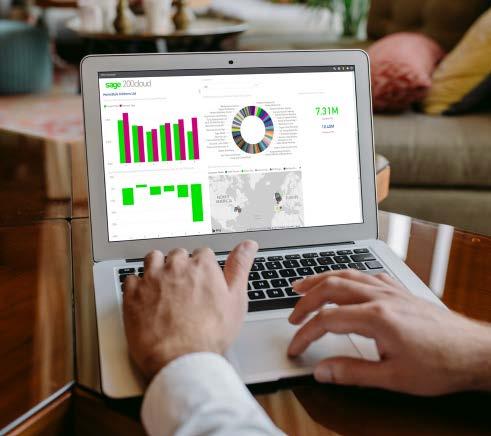
Fixed Assets
Our ‘Fixed Assets’ register allows you to effectively record assets and manage depreciation with either straight line or reducing balance methods. You can view this via a new workspace or choose from two reports for details and valuation.
See also: Mainstream, p.16
11
Commercials Stock
with Sales & Purchase Order Processing
Sage 200 is designed to help you manage every element of your supply chain with a sophisticated stock management system that’s linked to your financial data.
Purchase Order Processing fully integrates with Stock Control, Purchase Ledger and Sales Order Processing, so you’ll know that goods are available to your customer as soon as you receive them. You can respond quickly and efficiently to customer demands and be agile about products and pricing to maintain loyalty and satisfaction, whether you’re in or out of the office.
See the full story of an order
Sage 200 supports complex supply and delivery models. Select different delivery addresses per order line; specify different delivery addresses to one supplier and see price negotiation data - invaluable information that helps orders run smoothly.
Source goods worldwide
Source goods worldwide, purchasing in up to 100 different currencies. View individual costs and overall order costs associated with importing goods on a purchase order.
Make sure business doesn’t stop without you
Apply authorisation limits and alerts to keep orders moving while you’re busy. Easily raise purchase requisitions, authorise and generate orders online, so your business is always on.
Easily reject unexpected or incorrect deliveries, highlighting any discrepancies with invoices and allow for costs that are already committed.
Compile order lists based on Purchase Orders
If you prefer to create your Purchase Orders manually, Sage 200 can help you save time by compiling lists of what you should order, based on shortfall, and what you need for back-to-back orders. You can then decide who to buy from.
Keep a running total
It’s easy to spot errors as you go, as our online solution calculates a running total when you’re matching invoice line items to orders.
Record dispute
Flag up any invoices “under dispute” and they won’t be updated to the Purchase Ledger until the dispute is resolved.
12
Managing your stock
With Sage 200 you get a complete inventory and warehouse management solution to help you optimise stock levels, keep costs down and deliver what your customers want.

Easily control your stock
Quickly and easily access your stock record details, including supplier details, stock levels at each location and pricing information. Pinpoint where your products come from, where they are now, when they were sold and at what price.
Control stock items by serial or batch number, include criteria like ‘sell-by’ and ‘use-by’ dates, as well as specifying your own information for each item. Monitor stock movements and traceability.
Work with different quantities, for example buying tiles by the pallet, storing them by the box and selling by the square metre.
Set up unlimited categories for reporting purposes or to help you locate your products during the sales order entry process.
Effectively manage your suppliers
Get the best deals from suppliers by recording details of price history, lead time, part reference and purchase history, for each stock item. Useful if you need to source an item from another stockist.
13
Managing your stock
Manage your business effectively across multiple locations
If your business works across more than one location, you can manage each location independently for things like replenishment, sales, reporting and stock takes.

Realign stock levels quickly and accurately, and gain a complete view of the stock held in your business, and account for extra costs such as customs duties.
Track your stock
Keep track of your stock by flagging up any inactive stock items. They can’t be ordered, but stay on the system so you can review their full history, and improve efficiency and maintain budget control by keeping track of internal stock movements.
Count the most valuable items or particular products in stock and quickly find stock items by name or reference number when you’re dealing directly with customers over the phone.
Improve efficiency, cut costs and improve customer service
Reduce time taken from order to shipment by choosing to ship direct to your customer from a supplier. Reduce order time for your most important customers by allocating stock to orders as soon as they are received. This gives you the freedom to prioritise your most important customers and keep them happy.
14
Managing your sales orders
Fully customisable and accessible in the cloud via a browser, you can produce sales orders and purchase requisitions, access dashboards and reports and more on-the-go. Turning lost time into productive time. Meaning you don’t have to be in the office to make an informed business decision. Ignite productivity and add value to your business with Sage 200.
Rapid order entry
For standard pricing and delivery addresses, enter your orders in just a few keystrokes and get the goods on their way.
Flexible ordering options
If you need to record more information, switch to full order entry so you can change discounts and add non-stock items. With trade counter order entry, you can create an order, allocate and despatch stock and print an invoice all in one process.
Manage discounts and margins
Give authorised staff the tools to negotiate on prices. See any changes to cost pricing and view the profit on any item or trace discounts over time.
Match your stock to your customers’ needs
Search for stock items to match your customers’ needs during the sales order entry process. Tailor invoice layouts to individual customers.
Work with stock and sales
Handle pricing and credit control efficiently with sales order processing linked to your stock price book and sales ledger. When orders are processed, all the relevant information is updated including stock records, customer balances, VAT return and management reports.
Manage multiple currencies and exchange rates
When customers place orders in their own currency, you control the exchange rates and apply them at order entry or invoice stage, so you manage the risk of exchange rate fluctuations.
Create new accounts and quotes easily
Use existing templates to quickly create sales orders and accounts for new customers. Create pro forma invoices and convert them to sales orders.
Support simple or complex pricing
Easily apply discounts, promotions or price band schemes to multiple customers (even with multiple currencies). With unlimited price bands for each stock item, it’s easy to understand and maintain prices by units of measure (e.g. bottle, case and crate) adapted to your business. Sage 200 can also validate your pricing schemes, making sure you maintain sensible margins.
Maintain profit
Analyse products down to customer or supplier levels, viewing profitability month by month.
15
Mainstream II Business Intelligence for Sage 200
Clean, Intuitive Dashboards
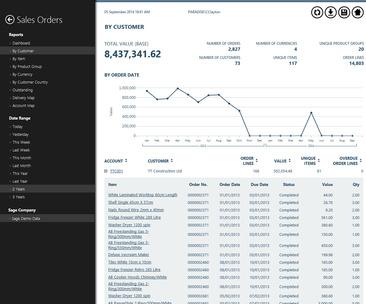
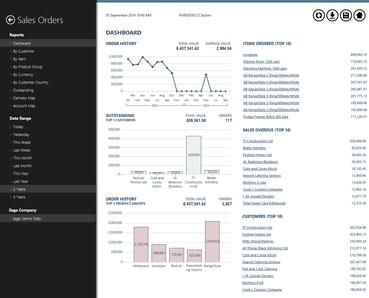
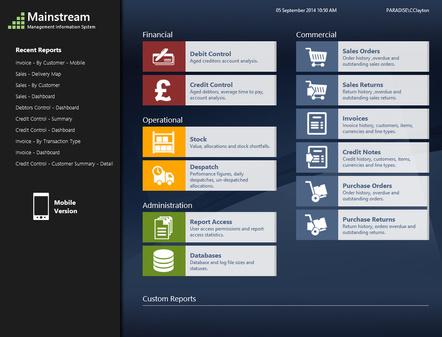
Mainstream II is built on a series of user-friendly intuitive dashboards that you simply access through a web browser. These reports are designed to make it easy for you to quickly get an overview of your business. Colour coding is used to highlight issues that may warrant your attention and items can be clicked on to instantly drill down to more detailed information, without the need to run a separate report.
All information is drawn instantaneously from your Sage database, so there are no overnight updates, just real time information made simple.
A Compelling Business Case
Mainstream II requires no user licenses. You can allow any number of authorised users within your organisation to access Mainstream II reports for no extra cost whatsoever. In addition:
Users only need a web browser to view the reports, reducing the need for technical support
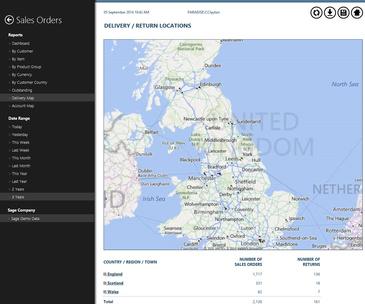
Users can bookmark any report, along with its selection criteria, to make it quick and easy to run again on another occasion
Any Mainstream II report can be exported to Microsoft Excel with a single click, with all formatting preserved
Once purchased, there are no annual maintenance or support costs, your company will own the product in its entirety
Reporting on the Move
Mainstream includes a suite of 10 reports, addressing the most common business needs. The full range of reports can also be run on any device. So no matter where your users are, they can access Sage reports quickly and easily.
Custom Reports Tailored to Your Business
We can develop any non-standard reports you want, based on Sage or other SQL data. Bespoke reports are well-designed and developed quickly, to a simple fixed cost, so you can have what you want when you want it.
InteractiveDashboardViews
LiveSage200DataVisualisation
Unprecedentedinsightintoyourcompany’sdata Accesslivereportsfromanywhere,onanydevice
16
CL200 Connect Live to Sage
200
POWER UP YOUR SAGE 200
CL200 opens up access to real-time Sage account data for all your team

Optimise your valuable Sage 200 information with this easy-to-use Data Viewer and Task Manager. CL200 allows all your staff to view your Sage 200 Professional data in real-time, without the need for additional Sage licenses.
Find the answers quickly
Whole teams can view easy to read dynamic dashboards, displaying real-time business intelligence. With a simple click, drill down to access customer accounts, orders and invoices and create tasks from wherever you work, on any device.
Data Viewer Task Manager 24/7 Access


Real-time access to Sage 200 accounts, orders and invoices

Create activities and follow-ups to improve customer service
Mobile friendly, work from anywhere at anytime on any device

17
Find the answers quickly with CL200
Sage 200 Integration: Enables non-Sage users secure access to Sage 200 Professional
Live Data Access: View Sage 200 accounts, orders and invoices in real-time
Quick Setup: Rapid installation and deployment
Authorised Access: Approve selected users, keep your data safe and secure
User Friendly: No lengthy onboarding or steep learning curve
Easy Migration: MS Excel import and export of bulk records to organise your data
Task Manager: Create activities and follow-ups to improve customer service
Team Collaboration: Centralise your account information and shared document library
File Attachments: Upload documents, attach and store to any Account
Intuitive Dashboards: Live visualisations display your current position at a glance
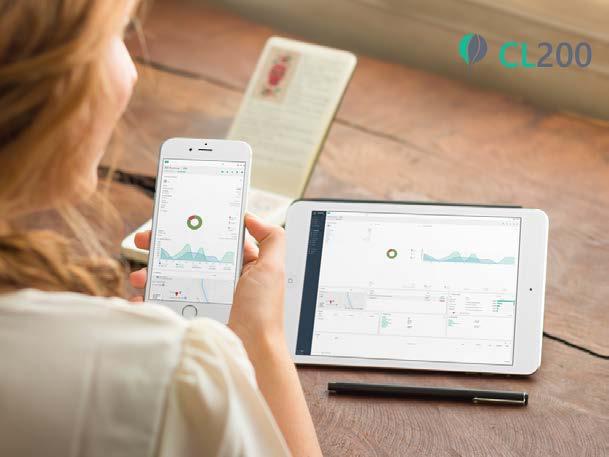
Company Oversight: Dashboard views of Debtors, Invoice History, Sales Pipeline
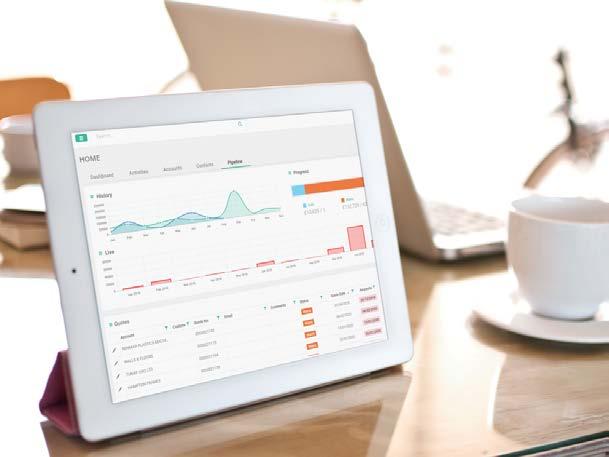
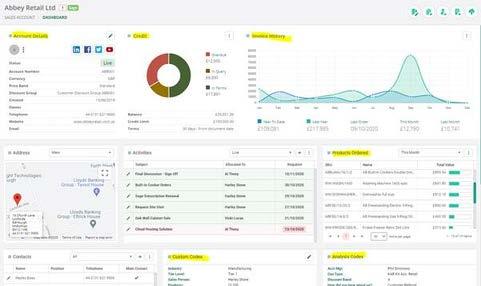
Customer Insight: See order history over last two years and product buying behaviour
Customisable Views: Configure and sort columns to suit individual user preference
Lead Nurturing: Prospect Entry and Tracking for managing your Sales Pipeline
Account Flagging: Add pop-ups and alerts on accounts to highlight critical data
Google Maps: See maps of Account addresses to visualise location details
Microsoft 365: Send emails and create calendar entries in Outlook 365
Responsive Design: Designed to be mobile friendly, work anywhere at anytime
ISO27001 Security: Hosted in a secure Microsoft Azure environment
18
Spindle Document Distribution
Spindle Document Distribution gives you the tools to improve your business efficiency and help make your working day that little bit easier. You could reduce the time you spend processing paperwork by 20%, saving you a day a week.
Batch document distribution
Sends all your documents in batches or individually to exactly where they need to go by email, print, fax or to archive.
Branded document templates
You can easily add different templates for your documents with full colour backdrops and incorporating your full branding. You can add promotional messages which can be tailored specifically to different customer groups.
Spindle Document Distribution is ideal if you work with different types of customers, across different countries or brands. It has the ability to automatically switch templates, language files and different attachments to suit requirements.
Send any type of business communication
Attach and send any document type, such as invoices, statements, remittance advices, quotations, sales orders and so on to any contact, internally or externally, from any business application.
Archive for future retrieval
When documents are distributed, they are automatically archived and can be viewed using the Document Search Tool by searching with the document number, transaction type, date and more.
Distribute to multiple contacts
If you need to send the same document to more than one recipient, additional recipients can be copied into emails or the same document can be attached to a separate email with a tailored message.
Protect documents
Digitally sign your PDF documents to verify your identity and ensure the integrity of the document using advanced Adobe CDS Digital ID. You can also password protect sensitive documents such as pay slips and other confidential information.
Spindle PayThemTM
Get paid faster by adding ‘Pay Now’ buttons to invoices. Your customers can securely pay you online using your chosen payment provider WorldPay or Sage Pay (UK).
Personalise correspondence
With real-time data extracted from your accounting system, you can ensure that documents contain the right information such as contact name, address, email address, account details and payment information. You can also personalise your email message and printed communications.
Add extra attachments
Include additional documents with your electronic correspondence such as related invoices with statements, delivery instructions, terms and conditions of purchase, promotional offers, newsletters etc.
19
Spindle Self Serve
Online Customer Portal
Spindle Self Serve integrates with Sage 200 to deliver real-time financial and accounting information to your staff and customers. This easy-to-use online customer portal allows customers to ‘self serve’ their own account 24/7 and allows staff to quickly view accounts and documents without the need to access Sage 200.
Financial information at your fingertips
Branded with your company logo and colour scheme, Spindle Self Serve is a secure online portal to access customer accounts and documents. With the ability to view sales order and invoice history, including outstanding invoices, your customers have their information at hand to pay you on time.
Reduce copy invoice requests
Copies of invoices are requested for around 5% of all invoices issued, wasting admin time. In 90% of cases, this task can be eliminated by customers accessing their own documents on your customer portal.
Add-on Modules
Order Module
Internal Stock Viewer
External Stock View
Proof of Delivery
Benefits to your company
Staff can view customer accounts without the need to access Sage 200
Remote access to view account information whilst away from the office
Real-time financial and accounting information
Reduce time spent on customer admin queries Promote your business with in-system pop-up messages**
Staff can view current stock availability and place orders**
Benefits for your customers
24/7 online access to view their own account
Customer dashboard with account overview
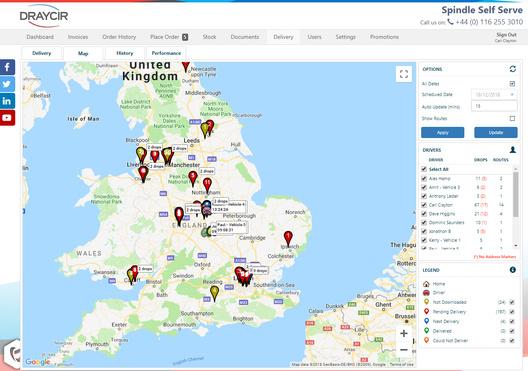
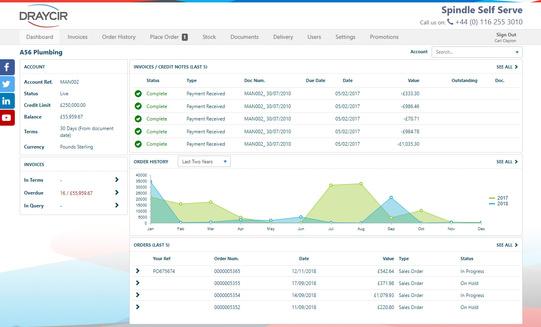
View sales order status and invoice history
Re–print or download PDF invoices and statements on demand*
Customers can view available stock and place orders online at any time**
Browser-based access across all devices
*Spindle Document Management licences required
**Available as additional modules
20
Sicon Documents Document Management Solution
Sicon Documents allows users to scan and retrieve documents while they work in Sage 200, with no additional document management software or indexing steps required. The document indexing information is stored within the Sage 200 SQL database for fast searching. The documents are stored within the Sage 200 attachments path to ensure all documents are backed up within your Sage backup plan.
Drag email attachments into Documents while entering invoices or processing orders
Retrieve documents directly from Sage 200 accounts, orders and transactions
Save time and space (estimated at more than 20% of administrative time)
Some of the Sicon Documents touch points within Sage 200 include: Supplier Account, Purchase invoices and credit notes, Payment authorisation, Purchase Orders and Returns
Customers Account, Sales Invoices and Credits, Sales Orders and Returns
Nominal Ledger: Store copies of Journals calculations in paper or Excel formats
Sales Orders: for example customer purchase orders, signed delivery documents, export documents, etc.
Purchase Orders: for example purchase contracts, delivery documents etc.

Stock Control: item specification documents, change documents, instruction manuals etc.
Bank: statements stored with each bank reconciliation and general bank correspondence
Add your own custom document types to any of the modules within the Documents application
Add mandatory attributes to document types to capture additional information
Documents can be viewed outside of Sage via an additional interface (requires a separate license)
Works with Twain compatible scanners or network copiers
Documents integrates with Sicon WAP to show documents added within Sage 200 on the documents that require approval in the WAP system

21
Project Accounting Managing
your projects
Sicon Projects integrates with Purchase Ledger, SOP, POP, Stock, Time Recording and Works Order Processing to enhance your Sage 200 Projects.
Ideal for all types of project costing and project management, including manufacturing, distribution, construction, software development and contract management.
Improve customer satisfaction
Create more accurate bills delivered by capturing and allocating project costs, overheads and revenues. And collect timesheets and expenses information online from anywhere, saving time and ensuring accurate payments.
By helping you understand the income and expenditure of each project, Sage 200 supports your decision making, giving you the information you need to improve profitability.
Gain a single view of your projects
Make the most of your time, by tracking multiple projects based on time and materials, fixed price contracts or a combination of both. Share information with other areas of your business to save time and reduce administration costs.
For example, convert sales orders and quotations into projects, while ordering and allocating stock for those projects. Or track time and resources and link the results to Sage Payroll.

22
Projects
Integration with other modules
Works Orders can be created and booked to a Job. Time can be booked to jobs directly from the Sicon WAP Time & Attendance or Timesheets modules if this solution is purchased with Projects.
Runs with Multiple Sage Companies
Can be used on multiple Sage companies at no additional cost.
Fully integrated with Sage 200 modules
Purchase invoices can be linked to multiple jobs and cost headings at entry. Each SOP & POP line can be linked to a separate job and show as commitments. Jobs can be created ‘on the fly’. Stock issues and returns can be made to jobs and cost headings.
Labour Recording:
Recording directly into Projects , via a web interface* or the T&A system*.
Work In Progress (WIP) management & Job Profitability
Provides a detailed WIP listing and summary total for each job. Detailed WIP & profitability reports are provided with the product.
Job enquiry and management screen
Provides a simple view of any job, showing all costs and revenues. Drill down to any detail or transaction history. Instantly identify outstanding sales and purchase orders as commitments.
Easy to learn and use
Screens and processes: are designed for non-IT users.
Jobs are quick and simple to setup: just one click will create a job.
Data: most data input is carried out in the normal Sage modules.
Corrections to job postings: can be made via an adjustments function.
Budgets
Overall or detailed budgets: per cost heading (unlimited cost headings).
Budget by cost and by hours: is available.
Budget analysis: runs real time and is available on the enquiry screen.
Reports
A full set of amendable reports are included: designed in the Sage report designer and are all amendable.
23
Manufacturing Managing your manufacturing and production processes
Sicon Manufacturing is a set of additional modules offering the flexibility to choose exactly what you need for your business, whether you have light or more complex manufacturing requirements.
Integrate your Sage 200 with Stock, BOM, Sales and Purchase Order Processing add-ons, including modules for Projects, Works Order Processing and Estimating. This package can be configured for one-off project costed manufacturing or high volume repeat production manufacturing.
Add Material and Resource Planning to provide suggested works orders and purchase orders plus a rough cut capacity plan at labour and machine levels.
Sage is the core system underpinning the business, they give us the confidence to grow and keep moving forward
Nick English and Giles English, Bremont Watch Company

24
Sage 200 & Sicon Manufacturing
Ensure you have the right systems to help you grow profits while delivering the quality your customers expect
From Stock, BOM, Sales and Purchase Order Processing to Projects, Works Order Processing and Estimating, we can configure the right fit for your Manufacturing business.
Projects
Integrating with Purchase Ledger, SOP, POP, Stock, Time Recording and Works Order Processing, Projects provides solutions for clients in manufacturing, construction, software development and all types of contract management. Works Orders can be created and booked to a Job. Time can be booked to a job directly from the Sicon WAP Time & Attendance or Timesheets modules if this solution is purchased with Projects.
Works Order Processing (WOP)
Provides enhanced functionality to the Sage 200 BOM and Stock Control modules. Ideal for manufacturing clients who need a simplified stock allocation and issuing process with the ability to amend works orders during assembly.

Material and Resource Planning (MRP)
Based on material demand from sales and purchase orders, forecast sales orders, free stock and min stock levels plus the Sicon Works Orders module, the MRP module creates suggested works orders and suggested purchase orders. Weekly labour and machine capacity demand is created from Works Orders and generates a rough cut capacity plan.
Kitting
Create single level parts lists using Sage 200 stock items that can be allocated and issued to make a finished product. Kits can be built manually or within a Sales Quote and Sales Order. Where Sage 200 Bill of Materials is too complex, Kitting provides an alternative solution.
25
Barcoding & Warehousing Managing your stock

Real time integration with Sage 200 stock and order processing modules.
Based on an intuitive, highly functional Android operating system interface for use with low cost Android phones, tablets or ruggedised devices. Handheld devices communicate directly with Sage 200 using Web API technology.
Purchase order receipting (received to a configurable 'put away' bin location or directly to the default bin location). Full traceable item support. Option to print product labels with barcodes using Sage 200 report designer label layouts. Option to link new supplier barcodes to supplier stock items on the fly.
Put away of stock from the configurable 'put away' bin location. Full traceable item support. Option to print product labels with barcodes at this point. Sales order picking and despatching. Full traceable support. Prints the Sage 200 despatch note. Stock issues using standard Sage 200 internal area methodology.
Stock issues to Sicon Job Costing and Sage 200 Project Accounting using Sage 200 internal area plus job/project and job/project header selections. Works order picking with full traceable item support. Sicon kit picking and building.
Sicon stock transfer picking (for Sicon Service Manager and Sicon Distribution Manager). Sage 200 stock take update with full traceable item support, (check if completed). Ability to setup multiple companies and warehouses on each tablet and allow the user to switch between them once configured.
Stock enquiry, bin location enquiry, stock balances and images of the stock items.
Add stock and write off stock with full traceable support (with user permissions). Stock transfer, full traceable support (standard Sage 200).
Receive sales order returns, full traceable support.
1. 2. 3. 4. 5. 6. 7. 8. 9. 10. 11. 12. 13. 14. 26
Shop Floor Data Capture (SFDC)

Integration with other modules
Links to both the Sicon Works Order Processing and the Sicon Project Costing modules to allow real-time capture of Operation progress and elapsed times. With the option of creating a route card with barcodes for each operation you can simply scan on and off an operation to capture the elapsed time, update the progress and log any quality notes and nonconformance issues.
Installed and maintained within Sage
Will run on any Android Device
Scan to start and stop elapsed time on any Sicon Operation
Option to capture time & attendance data at arrival / departure
Updates are real time into Works orders and Project costing operations
Users can create a complete timesheet by simply selecting what they are doing throughout the day
Links to the common Sicon Timesheets
Layouts are provided in the Sage 200 report designer to: print route cards for works orders and Project operations
An ideal product for production environments
Additional User license required per SFDC user
27
Distribution Transform your distribution tracking and delivery
Sicon Distribution Modules for Sage 200
Business growth and efficiency can be tough, especially for distribution companies that have to balance inventory, forecasting, and logistics processes with sales, customer service, and everything in between. Luckily, this is where a powerful, easy-to-use wholesale distribution ERP software can help.

The complexity of wholesaling presents major business challenges such as huge product inventories, narrow margins, diverse downstream customer requirements, long lead times, and unpredictable supply.
Three key challenges:
Improve customer service with mobile technologies
Get the most from your stock
Don't let legacy systems hold you back
Delivering the goods
Improve costing, reduce stock holdings, manage seasonal trends, increase telesales productivity and incorporate sales forecasting within future stock projections and suggested purchase order creation.
28
Sage 200 & Sicon Distribution
Warehouse Replenishment
For topping up multiple remote warehouses such as engineer vans, consignment warehouses and production plants.
Material Resource Planning (MRP)
Providing suggested purchase orders to handle future stock shortages. Using current stock levels, sales order and other demand to determine when stock is required based on supplier lead time. See more about Material Resource Planning here.
Reserves & Call Offs
Hold allocated stock for customers within Sage 200 and release via SOP or directly from the reserve. Use SOP & POP contacts to manage commitment to purchase and track progress.
Future Sales
Using historical sales and seasonal trends to forecast future sales demand to drive purchase recommendations.
Process Order Processing (POP) Management
Enhancement for purchasing including supplier delivery KPI’s, inspection of goods, expanded landed costs, supplier quantity breaks and minimum order values.
Pre-Allocation Management
Link purchase orders with sales orders to ensure immediate allocation at goods in. Edit and manage pre-allocations between orders.
Container Management
Manage the full cycle of container creation, linking multiple purchase orders, manage the stages of loading, travel and customs clearance.
Stock Matrix
Handling the creation of colour/size/style/season stock items with grid style SOP/POP order entry for speed of processing.
Sales Order Management
Enhancement for sales processing including Telesales, copy historical orders, complimentary, superseded & discontinued products. Customer delivery KPI’s, stock item customer history, enhanced stock balances views.
29
Web Authorisation (WAP)
Approval processing for your business

WAP is a web based application for data entry and approval processing of business documents including Requisitions, Invoices, Expenses, Timesheets, Holidays, Sales Orders and HR.
Ideal for multi-site or remote distributed organisations, WAP is scalable from 1 to over 2000 users. Runs with Multiple Sage Companies, with all authorisations carried out in one system for multiple companies. Secure setup ensures access is only given to the required companies.
Linking directly to Sage, real-time nominal budget, actual & commitments are analysed. Approval limits and entry limits can be set per user.
Approvals can be based on parameters such as nominal code, project/job, user, document type and value. Real-time analysis of committed costs, nominal and project actual costs against budgets.
30
WAP
Purchase Requisitions

Raise purchase requisitions using Sage 200 suppliers, nominal’s, stock items or free text, project’s and budgets. Automatically create purchase orders into Sage 200 after the requisition is approved.
Invoice Approval
Automatically pick up Sage 200 unauthorised invoices plus scanned images. Create invoices in WAP to allow flexible amendment of VAT and projects during approval. Route invoices for multi-level approval within the WAP system.
Expenses
Streamlined expenses processing via a browser or mobile app, with multi option approval routings based on user, project, nominal codes etc. Expense items are preconfigured per user making selection choices easy, with max claim values per user and claim location. Optional Subsistence claims process with configurable grades and rates to comply with HMRC guidelines. Mileage claims use the integrated Google Maps distance calculator to assist with data entry with additional features for multi stop journeys, deduct normal work commute miles, return journey.
Timesheets
Enter timesheets via the WAP web based interface via PC or mobile device. Track cost, charge and pay rates based on work patterns. Weekly timesheets are submitted for approval when contracted hours are completed with approval options including submitting user or projects selected in the timesheet. Option to track allowances via timesheets such as overnight stay, late working, overseas travel.
31
Audit Log
Better reporting, more detailed analysis
Sicon Audit Log is designed to track field level changes to core financial modules, sales and purchase order processing modules, stock and price book.

Options for ‘Silent’ change logging or user prompted reasons for change which are configurable per Sage module.
This Audit Log module provides a way of tracking changes and reporting them to the relevant user or user group to approve or act upon:
Know that changes have been made to core module field data or sales and purchase orders
Be aware of changes that have occurred in your Sage system
Act quickly on these changes, e.g. to sales orders that may be critical to monthly sales analysis and reporting
Be aware of changes to bank details on supplier accounts
Track changes made to core module data including purchase ledger bank details Choose which Sage 200 modules you need to record changes in Record changes in silent logging mode or select to force a reason and description for the change
A sign-off process provides a full list of every change made
Users can be restricted from signing off their own changes
Sage 200 based reports available to review all historical changes made in each module Sage 200 modules included in the audit log:
Nominal Ledger
Sales Ledger
Purchase Ledger
Cash Book
Stock Control
Sales Order Processing
Purchase Order Processing
Price Book
32
Intercompany Supports unlimited Sage companies

The Sicon Intercompany module fully integrated with the Sage 200 financials ledgers, order processing and stock control module processes. Users can carry out purchase invoice apportionment, nominal journals, cash transfers and stock transfers. Nominal journals or sales and purchase VAT invoices will automatically be created between any of the Sage 200 companies configured within the Sage system.
Create VAT Invoices or Nominal Journals based on company to company VAT relationship
Enter Purchase Invoices and apportion to other Sage 200 companies
Post cash and pay invoices in subsidiary companies
Carry out stock transfers with appropriate financial transactions automatically created
Allow inputting of a sales order (or purchase order) in one company to create a purchase order (or sales order) in another company
Allow inputting of sales invoice (or purchase invoice) in one company to create a purchase invoice (or sales invoice) in another company
Handles companies in foreign base currencies
Exclude Nominal codes where Intercompany VAT invoices are not required
Facilities for Nominal Journal Templates to handle repeat postings
Print sales and purchase VAT invoices for intercompany posting
33
Construction Manager
Capture costs from purchase orders, purchase invoices, stock issues, cash transactions and labour to create reliable and accurate costings linked directly to Sage 200 transactions.
CIS/CITB (available as a single module)
Projects
Retentions (requires Projects)
Applications & Valuations (requires Projects)
Construction Key Features
Sub-Contractors are setup in Sage 200 purchase ledger with relevant CIS, CITB and retention details

Sicon Projects captures costs and revenues for each job, phase, stage and sub stage
Record stock issues, purchase orders, purchase invoices, labour, cash book and nominal costs against each job
Customer applications are processed within a dedicated applications module. Agreed valuations are recorded against each application and relevant invoices generated with detailed cumulative summary data
The Retentions ledger stores all supplier and customer retentions with release dates and options
Print customer applications and manage cumulative valuations and invoice processing
Supplier Applications are logged, valued and cumulative figures updated with options to generate Self-bill invoices or to reconcile to invoices received from the supplier
Detailed aged application and retention reports are included within the construction module
CIS is calculated on paid or allocated invoices based on nominal coding or subcontractor percentage deductions
Print subcontractor payment statements from Sage 200 before submission of CIS
HMRC Approved online submissions of CIS and subcontractor verifications
Job Period Enquiry enables period by period accounting and accrual adjustments
34
Sage 200 Development
Sage Software Integration & Customisation
Bespoke Changes to Sage 200
As an accredited Sage Strategic Partner and Developer, we offer a full range of Sage products, support, training and development to ensure you are making the most of your systems and processes.
In-House Development Team
Since 1989, Paradise has been rolling out bespoke customisations for Sage 200. We understand the challenges that our clients face and our implementation experience will help you and your business make positive transformations.
Whether you are implementing an improvement programme or need a particular pain solving, we have undoubtedly encountered it before and know how to deal with it – quickly and efficiently. Our specialist developers have many years of experience and can customise your Sage 200 with:
Data Import and Export (including EDI)
Links to websites (including eCommerce websites)
Web Services
Integrations to third-party and in-house products
Connections to third-party courier systems

Full-scale Sage 200 add-on modules
Developed in Visual Studio .Net (Visual Basic, Blazor or C#), our bespoke solutions are all created inhouse by our own experienced and dedicated team.
As well as being a Sage Strategic Partner, Paradise is a certified Microsoft Partner with competencies in .Net development. This means we can address your integration and development requirements inhouse and with total confidence, including automated import/export utilities.
35
Sage 200 Training
Maximise the benefits of Sage 200
Experienced Training for Sage 200
Sage 200 offers flexible Enterprise Resource Planning (ERP) software that's perfect for growing businesses to manage their finances. Ensure you are getting the best value from your software with bespoke training, specific to your business processes.
Paradise has been providing bespoke training for Sage 200 products since 1990. Our Sage accredited trainers have a wealth of experience and knowledge, both about the software and also from a business processes point of view.

At our training suite or your office
We offer training courses and workshops at our dedicated training suite located in the heart of the country in Althorp, Northamptonshire, centrally situated between J16 and J18 of the M1. We can also come to your place of work or provide remote online training, whatever suits you best.
Training format
Training is often carried out on a 1-to-1 basis, so is very tailored to your individual requirements. Whether on your site or in our training suite, we recommend small groups of no more than four.
Small groups work best if they are role-focused and those attending have similar or related job functions in the business. Days can be split into two or more sessions with different staff attending separate sessions to suit your team's requirements.
What will be covered in the Training?
Depending on your requirements, Paradise can provide a customised training outline, containing our recommendations at the outset. This can often assist in identifying particular areas of interest. Our trainers are flexible and can provide training on 'a question and answer' basis if preferred, which often works well for existing users. Any subjects can be covered and at any depth relevant to the needs of the candidates.
Sage Add-On Training
The beauty of Sage 200 is that it is highly configurable and there are many add-on products. We regularly provide training for several add-ons including Draycir’s Spindle Document Manager and the Sicon product range.
Follow-Up Service
After your training, our Sage 200 support team and trainers are available for follow-up questions related to the subjects covered on our training.
36
Paradise Hosting Cloud hosting for Sage 200, Sage add-ons and

Since 2004 we have been deploying Sage solutions in the cloud and are trusted by our Sage Customers throughout the UK to provide specialist hosting for Sage 200. We also work with other Sage Partners to provide hosting for their Sage 200 clients.
What is Private Cloud?
If you want to safely and conveniently connect to Sage from anywhere in the world, consider Private Cloud Hosting. Adopting cloud helps you reduce infrastructure costs while scaling resources and being agile. You and your team simply connect to the system via the internet.
Delivering mature solutions
As an ISO27001 certified, Microsoft Gold Cloud Platform Partner (Azure) and Sage Partner, provisioning cloud with Paradise gives you the benefit of years of Sage Cloud technical know-how. This allows you to confidently move forward on your digital transformation journey.

What softwarecan Iuse?
Opt for anything from simple secure file storage to complete server and desktop virtualisation. Migrate any business applications, including Sage 200 or other ERP solutions. Add industry-leading productivity tools like Microsoft 365 for a best-inclass employee experience, providing an end-to-end business solution to transform your clients' working environment.
Key benefits:
Cloud Solutions can be less expensive than ‘onpremises’ IT solutions, and using this approach offers numerous benefits that go beyond cost:
Access for your users from anywhere you work Flexibility to add/remove users and resources on demand

Eliminates the need to provide server or backup resources in terms of hardware and staff time Protects against loss of data by accident or intent
all
your business data
37
Paradise Hosting Collective intelligence for collaborative success
Business without boundaries
Cloud Hosting provides a globally accessible workspace for all your Sage 200 clients', allowing their employees to be connected and productive, regardless of device and location. No longer just a competitive edge, digital transformation is now critical for building business resilience.
Paradise as your cloud hosting partner
Paradise's highly-trained and experienced technical team focus on helping you get the best for your customers' individual business requirements. And rest assured, as your partner, we deal directly with you at all times and never contact your customers, unless you specifically ask us to.
Our approach is centred around connecting people with technology to streamline workloads, boost productivity through collaboration and increase security. In turn this inspires business growth by enabling a happier workforce ecosystem.
91% of employees would like at least some time working from home1
Paradise Computing is Workplace Wellness finalist in the Northamptonshire Chamber of Commerce Business Awards 2021: Creating an environment for employees to succeed through commitment to workforce health and wellbeing. We'd love to do the same for your team. Call us on 01604 655900 today!
1 Murphy, Mark (November 2020): The Surprising Truth About How Many Employees Want To Keep Working From Home. 2 MIT Technology Review Insights (April 2021): The future of work is uniquely human.
61% of executives said their work transformation objectives will focus on reimagining work2
38
Introducing Sage UK
Introducing Paradise Computing as your strategic Sage Partner
Financial Accounting
Stock Control, SOP and POP
Live Sage 200 Data Visualisation and Interactive Management Reports
Data Viewer and Task Manager
Project Accounting
Barcoding and Warehousing
Distribution tools
Handheld functionality
User activity logging
Transactions between businesses
WOP, MRP and CIS
Document Scanning and storage
Document formatting & emailing
Customer website access & ordering
Bespoke tailoring of Sage 200 incl. reports and apps
User training for all levels of user
Options for hosting on Paradise or Azure cloud platforms
Index Sage
Paradise
Financials Commercials
Projects Shop
Distribution WAP Audit Intercompany Construction Documents Document Management Self
Development Training Hosting About Sage
Sicon
Draycir
Paradise Computing Services
200
Computing
Mainstream II CL200
Floor Data Capture
Serve
200
Integrations for Sage 200
Inegrations for Sage 200
Description Product Page Purpose 3 4 9 12 16 17 22 26 28 30 32 33 34 21 19 20 35 36 37 39






Training IT Services Cloud Sage 200 Development www.paradisecomputing.co.uk | 01604 655900 1 Pedigree Farm, Althorp Estate, Northampton NN7 4HE ©2022 The Sage Group plc or its licensors. All rights reserved. Sage, Sage
and Sage product and service names mentioned herein are the trademarks of Sage Global Services Limited or its licensors. All other
are the property of their
logos,
trademarks
respective owners.