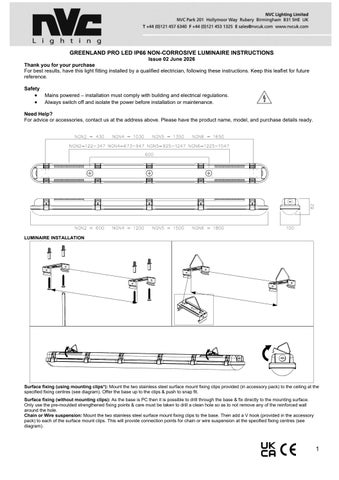

GREENLAND PRO LED IP66 NON-CORROSIVE LUMINAIRE INSTRUCTIONS
Thank you for your purchase
Issue 02 June 2026
For best results, have this light fitting installed by a qualified electrician, following these instructions. Keep this leaflet for future reference.
Safety
• Mains powered – installation must comply with building and electrical regulations.
• Always switch off and isolate the power before installation or maintenance.
Need Help?

For advice or accessories, contact us at the address above. Please have the product name, model, and purchase details ready.
LUMINAIRE INSTALLATION
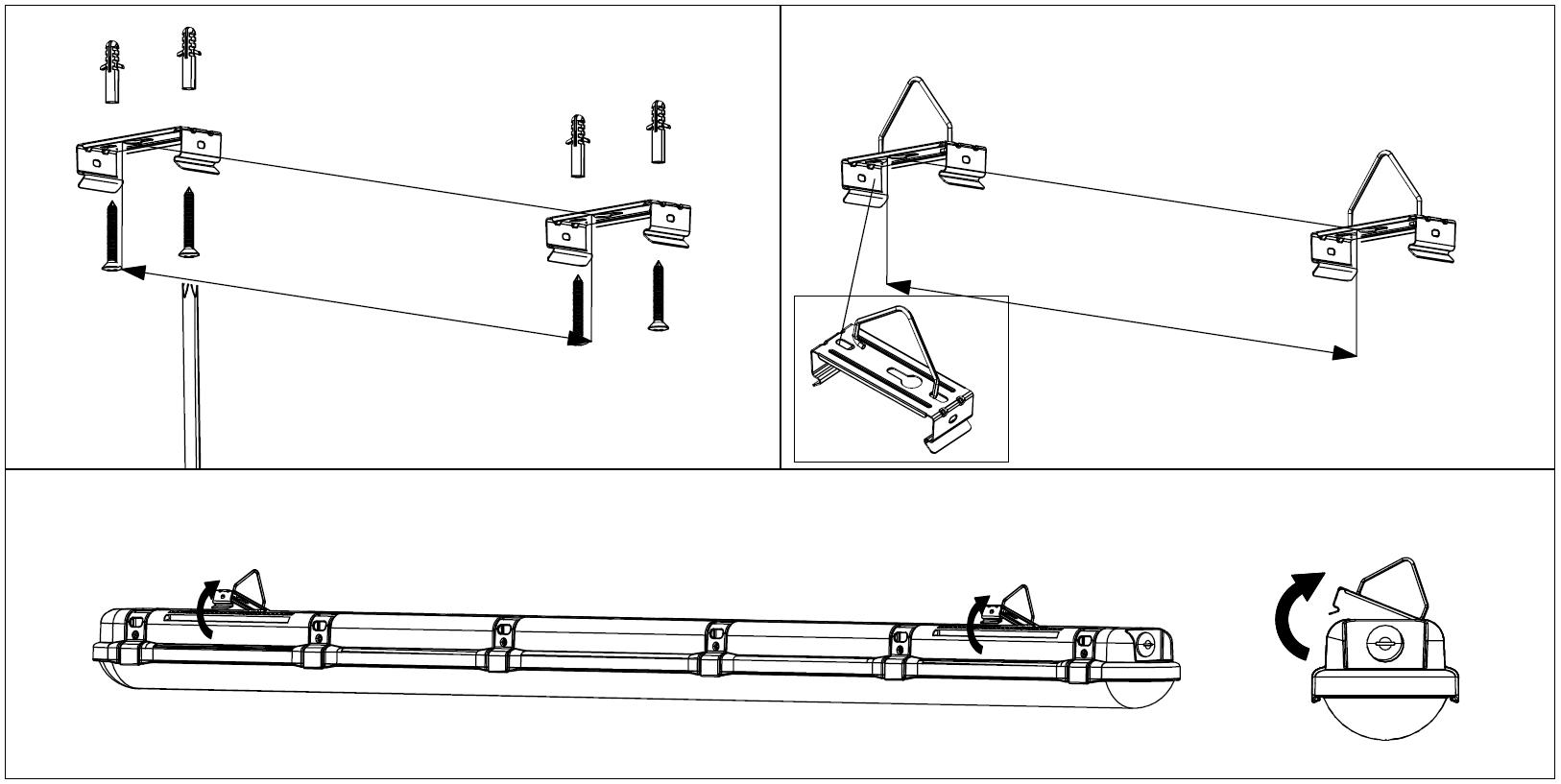
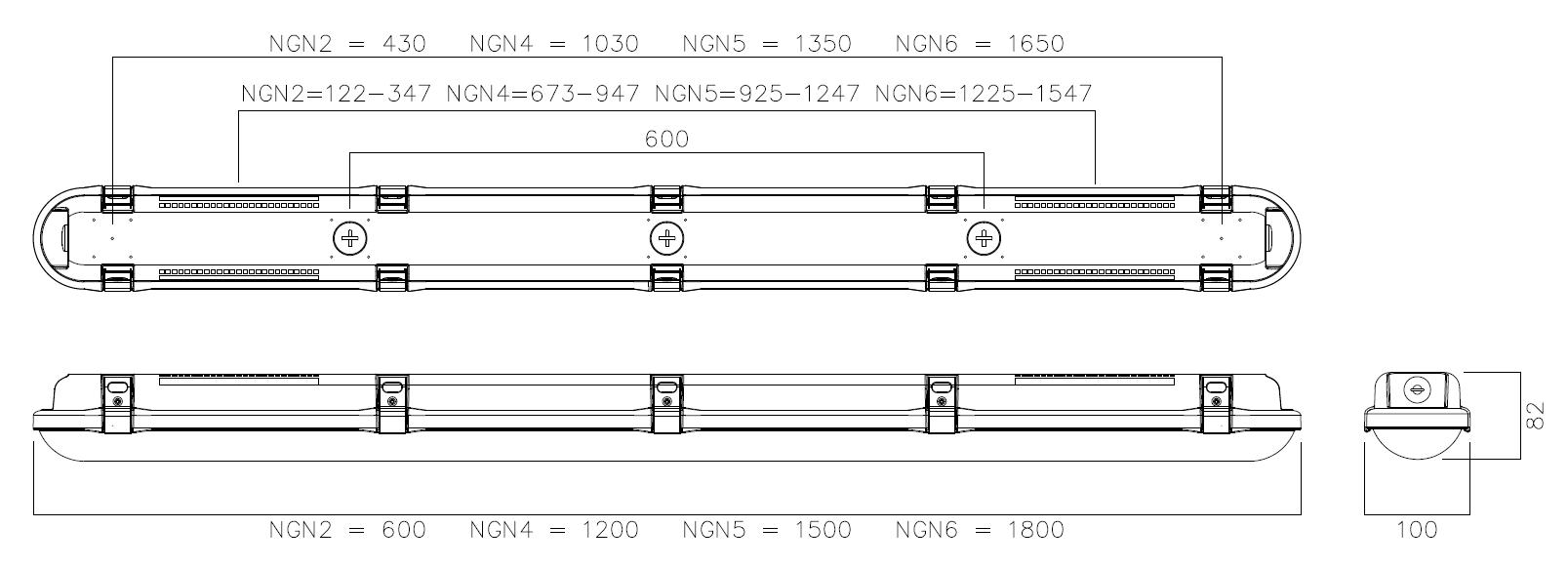
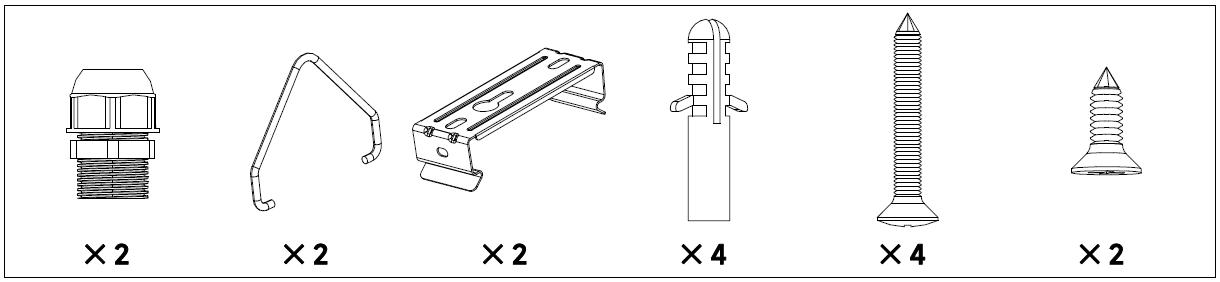
Surface fixing (using mounting clips*): Mount the two stainless steel surface mount fixing clips provided (in accessory pack) to the ceiling at the specified fixing centres (see diagram). Offer the base up to the clips & push to snap fit.
Surface fixing (without mounting clips): As the base is PC then it is possible to drill through the base & fix directly to the mounting surface. Only use the pre-moulded strengthened fixing points & care must be taken to drill a clean hole so as to not remove any of the reinforced wall around the hole.
Chain or Wire suspension: Mount the two stainless steel surface mount fixing clips to the base. Then add a V hook (provided in the accessory pack) to each of the surface mount clips. This will provide connection points for chain or wire suspension at the specified fixing centres (see diagram)


1. To adjust power settings, undo the clips on each side & open the gear tray diffuser assembly. If you need to fully remove from the body, then disconnect the retaining straps
2. Provide mains supply cable & decide best entry position on the base. IP66 glands are provided in accessory pack.
3. Fix the base. This is able to be fixed via the following methods; once chosen, prepare the ceiling/mounting points ensuring the fixing surface/mechanism is sufficient to support the luminaire weight.
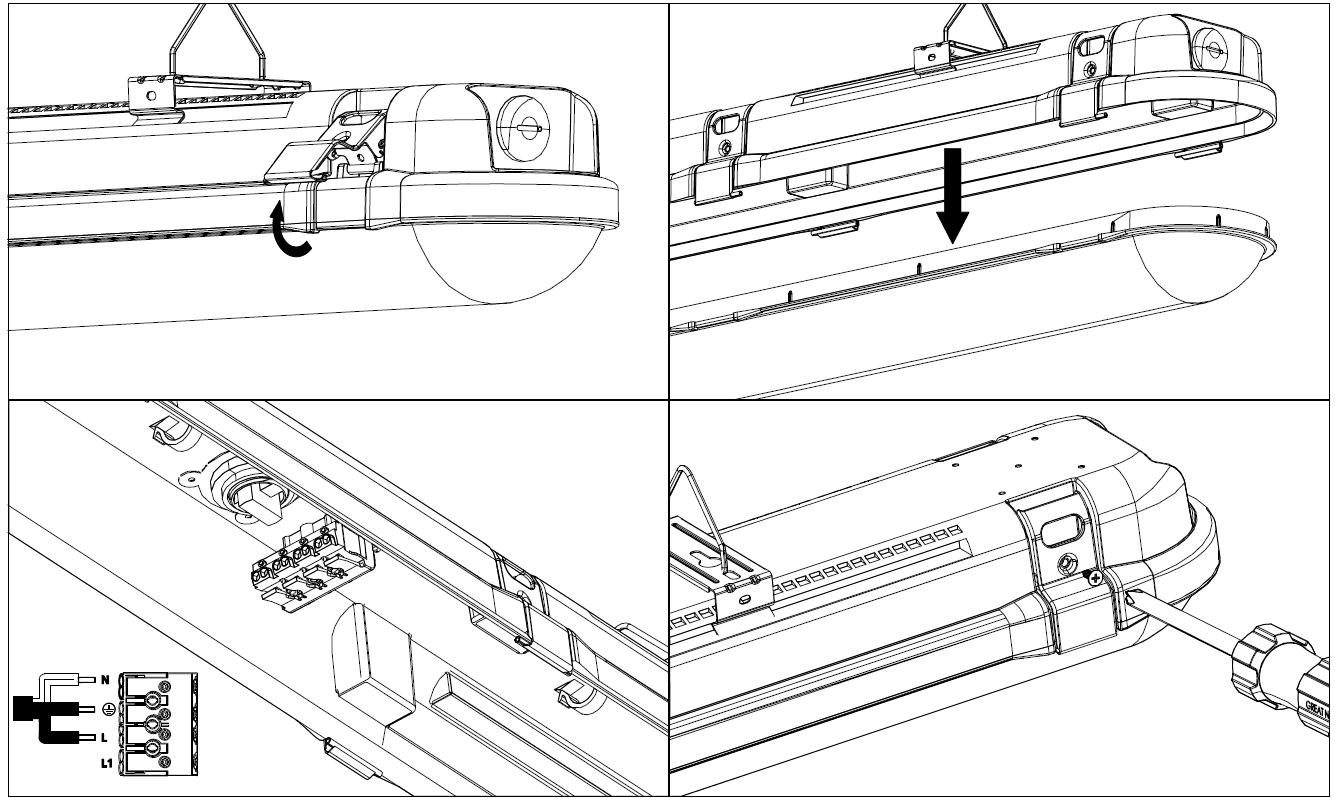
Conduit Suspension*: The base comes with specific 20mm diameter drill out points at various centres (see diagram on first page). These points are reinforced for conduit suspension purposes Care must be taken to drill a clean hole & not to remove any of the reinforced wall around the hole. We recommend the following combination of parts for connection to the base (see assembly diagram to right). These parts will be available from your electrical wholesaler.
4. Route the mains supply cable into the base It is the installer’s responsibility to ensure the IP65 rating is maintained An IP66 cable gland is provided and should be tightened to sufficient torque so as to allow no ingress of moisture.
5. If the gear tray diffuser assembly has been fully removed, refit on to the retaining straps in the base
6. Route the mains supply cable to the terminal block & terminate, ensuring correct polarity is observed.
NOTE! THIS LUMINAIRE MUST BE EARTHED
7. The luminaire has standard wattage selectable DIP switches, which can be changed (see dip switch/output guide on page 4). The default power settings are:
2Ft = 14W, 4Ft = 40W, 5Ft = 60W, 6Ft = 74W
*DISCLAIMER: See dip switch settings on page 4/5, do not use current settings on drivers outside of the specified listed current ranges.*
8. Fit the gear tray diffuser assembly back into position & secure using the snap-fit clips.
9. Reconnect power supply & check for correct operation.
Note! Luminaires fitted with electronic drivers are exempt from insulation resistance tests, as this may cause irreparable damage & would void warranty
10. Optional Linear plug and play M3, STM3 and MW Sensor packs are available, for further details contact NVC Lighting Ltd.
For CCT Adjustable variants, use the slider switch inside the fitting to adjust the CCT setting.
MAINTENANCE
Cleaning should be carried out at regular intervals so as to not impair photometric performance or thermal safety of the luminaire.
Emergency Plug & Play Pack Installation
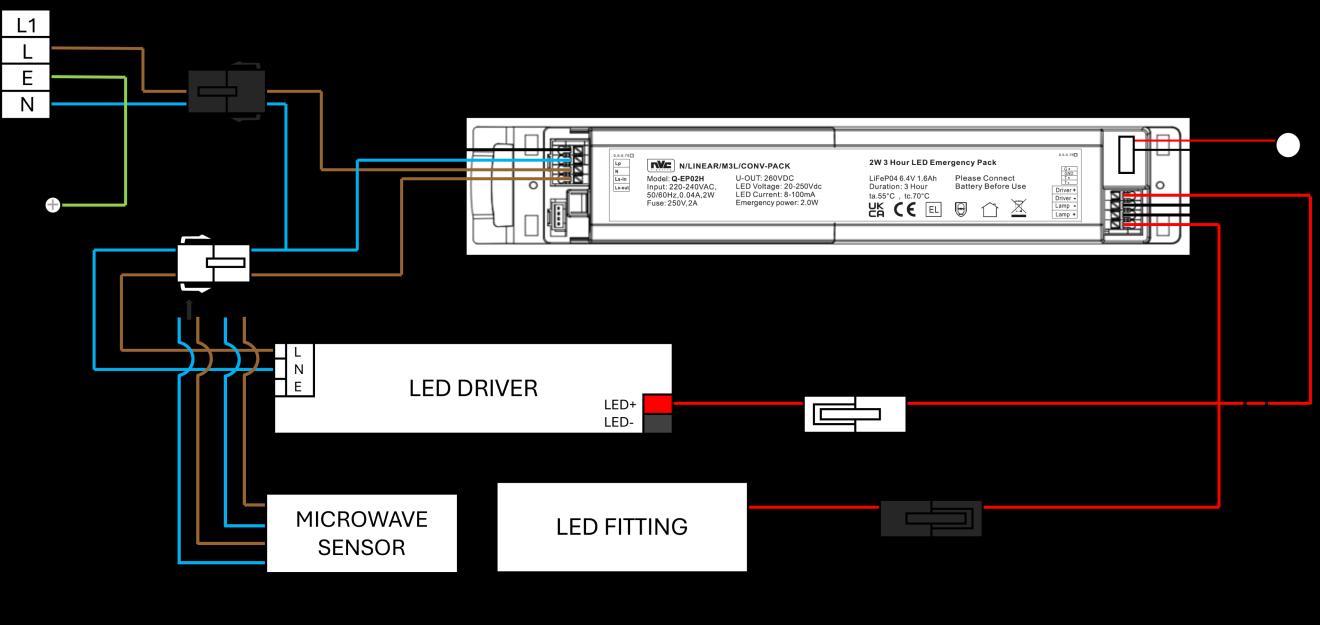
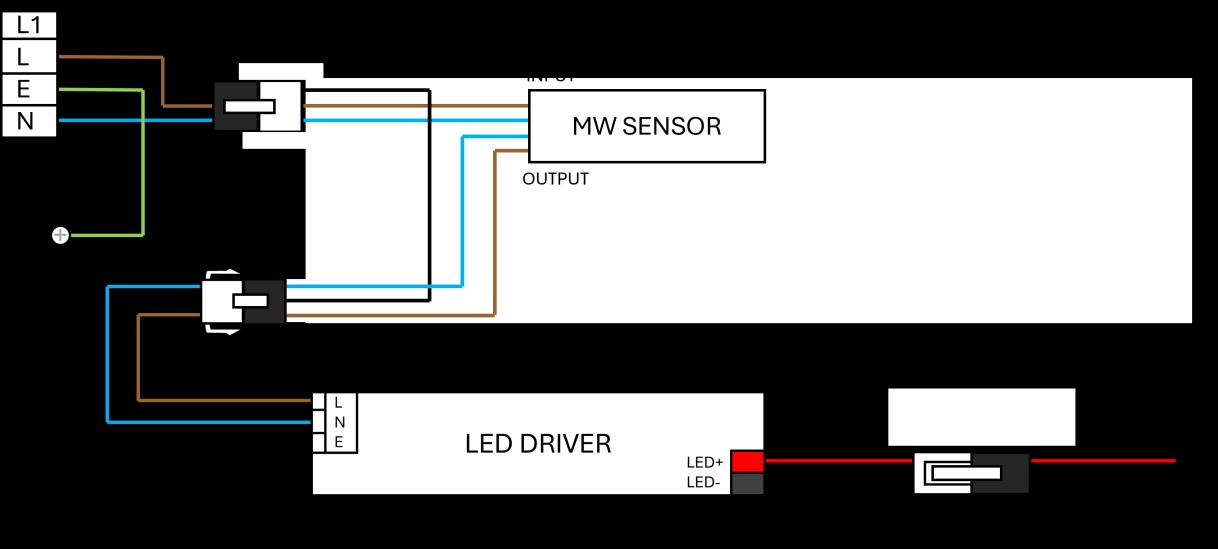
Microwave Sensor Plug & Play Installation Standard Driver DIP Switch Settings
DALI DRIVER SETTINGS
Fitting Size Current
2ft CCT
2ft 4000K
4ft CCT
4ft 4000K
5ft CCT
Dip Switch Pin 1 Pin 2 Pin 3
150mA OFF OFF ON
180mA OFF ON OFF
200mA OFF ON ON
250mA ON OFF OFF
200mA OFF ON ON
250mA ON OFF OFF
300mA ON OFF ON
350mA ON ON OFF
200mA OFF OFF ON
250mA OFF ON OFF
300mA OFF ON ON
350mA ON OFF OFF
200mA OFF OFF ON
250mA OFF ON OFF
300mA OFF ON ON
350mA ON OFF OFF
200mA OFF OFF ON
250mA OFF ON OFF
300mA OFF ON ON
350mA ON OFF OFF
5ft 4000K 350mA OFF ON ON
400mA ON OFF OFF
450mA ON OFF ON
500mA ON ON OFF
6ft CCT
6ft 4000K
350mA OFF ON ON
400mA ON OFF OFF
450mA ON OFF ON
500mA ON ON OFF
350mA OFF ON ON
400mA ON OFF OFF
450mA ON OFF ON
500mA ON ON OFF
MICROWAVE SENSOR INSTRUCTIONS
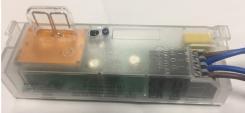
The micro-wave sensor option offers presence detection to provide automatic control of lighting loads. It is installed inside the luminaire so does not affect external aesthetics or IP rating. Manual adjustments on the sensor allow it to be individually tailored to suit your application.
POSITIONING
The luminaire with detector should be sited so that the occupants of the room fall inside the detection patterns shown in the appropriate diagram below:
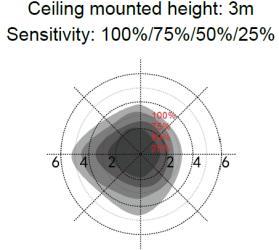
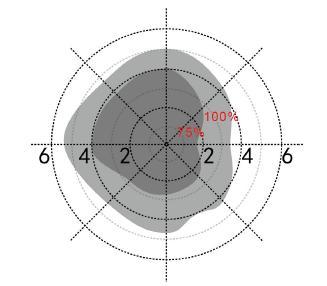
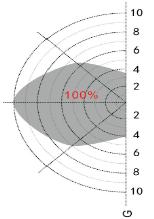
• The diagram is based on a ceiling mounting height. Note that the lower the sensor is installed, the smaller the detection range will be.
• If wall mounted, the detection zone will vary depending on the surroundings but perpendicular reach will be at least 10m
• The area closest to the sensor & also the area more perpendicular to the sensor will have higher sensitivity.
• The distances quoted are approximate & may vary depending on surroundings
• Avoid direct sunlight entering the sensor.
• Do not site within 1m of forced air heating or ventilation.
• Do not fix to a vibrating surface.
• Avoid metallic objects directly in front of the sensor head.
• These sensor kits are capable of switching/controlling more than one luminaire in a ‘master & slave’ set up. This is done by linking non-sensored fittings (slaves) to the one with the sensor fitted (master) using the live output from the sensor.
• Note! DO NOT link other fittings containing MW sensors together in this way, as it can cause false triggering of the sensors.
SETTINGS
The following adjustments can be made using the DIP switches located on the sensor unit.
DEFAULT FACTORY SETTINGS…
Sensitivity – 10m, Time – 20mins, Lux Level control disabled
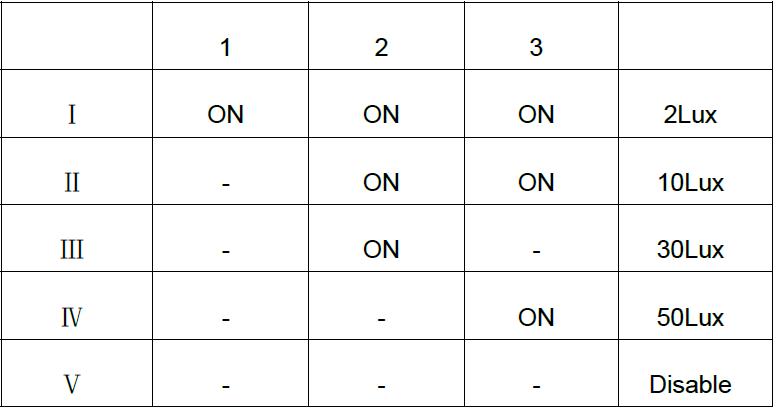
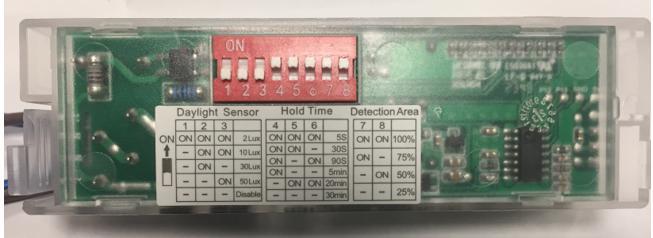
LUX
Set the required Lux level by using S1, S2 & S3 DIP switches as shown below.
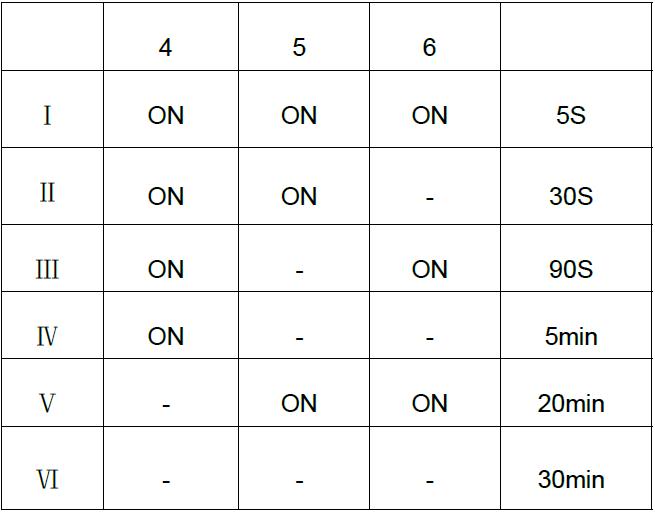
TIME
Set the required time delay between 5 secs - 30 mins using S4, S5 & S6 DIP switches as shown below:
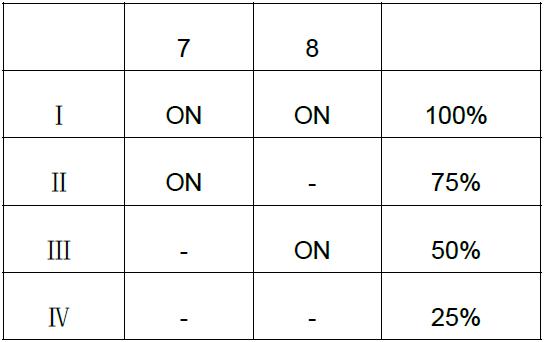
SENSITIVITY
Set the detection range using the S7 & S8 DIP switches as shown below
RATINGS
Power supply : 220-240VAC 50/60Hz
Rated Load : 200W (Inductive) & 400W ( Resistive)
Operating Temperature: -25°C …+60°C
FAULT FINDING
If you experiencing a problem please check through the following before making contact with NVC: Fault - Load does not come on
• Check to see if the live supply to the circuit is good.
GENERAL MAINTAINED EMERGENCY LUMINAIRE INSTRUCTIONS
These instructions should be followed in conjunction with the standard luminaire instructions. Please read carefully and pass to the end user/responsible person for retention and future reference.
INSTALLATION
1. Following the installation of the luminaire in accordance with the standard luminaire installation instructions, a separate permanent live supply should be terminated in the incoming supply terminal block in the luminaire, in the connection marked ‘L PERM’. The permanent supply MUST be taken from the same phase as the corresponding switched supply and MUST be wired at the switchboard so that upon instances of tests, it is isolated at the same time as the switched supply.
2. Once the permanent live supply is connected, connect the battery to the module via the ‘plug and mate’ connector, ensuring correct polarity is observed. Failure to observe correct battery polarity will result in permanent damage to the emergency module/driver.
3. N.B. to avoid potential damage to the battery please ensure the permanent live is energized as soon as possible following connection of the battery to the module.
4. Upon restoration of the power supply to the luminaire, check that the indicator LED fitted within the luminaire illuminates green. This indicates that the batteries are charging and that the charging circuit is healthy.
5. Allow the battery to charge for an uninterrupted period of not less than 24 hours prior to carrying out a full discharge test MAINTENANCE
6. The battery pack in this luminaire must be replaced when it is no longer able to satisfy its full rated duration.
7. In emergency mode the light level of the luminaire will be at a reduced output. Regular maintenance and gentle cleaning are recommended so as to ensure that the Emergency Output Factor (E.O.F) remains at specified levels.
8. Isolate the supply before servicing.
9. Please ensure that the emergency flux is not compromised at any time throughout the design life of the luminaire
10. DO NOT INSULATION TEST
Caution:
The battery pack in this luminaire is a Lithium Iron Phosphate (LiFePO4) type which includes a dedicated protection circuit. If replacing the battery pack, the specification and chemistry must be identical to that detailed on the battery label.
TESTING OF EMERGENCY LUMINAIRES:
Recommended routine test procedures in line with BS 5266-1:2016 & BS EN 50172:2004.
For Self-test Versions see below:
Self-Test Operation: On connection of a permanent live supply, the unit will enter an automatic commissioning cycle as detailed in the table below. During this cycle, the permanent live supply should not be interrupted as this will result in the charging timer resetting to zero and restarting the commissioning process. Following successful completion of the commissioning cycle, in line with BS EN 62034 and BS EN 50172:2004, the unit will perform a 30 second function test automatically at monthly intervals for 11 months, and in the 12th month, a full rated duration test will be performed.
LED Status Indicator during commissioning:
LED Indication
Stage / Period
Green Permanently On 1 – 24h
Green Slow Flash (2s on / 2s off) 2 – Rated Duration
Green Slow Flash (4s on / 1s off) 3 – 24h
Green Permanently On 4 – Normal Operation
LED Status Indicator following commissioning:
LED Indication Status
Green Permanently On
Green Slow Flash (2s on / 2s off)
Green Slow Flash (4s on / 1s off)
Red Fast Flash (0.5s on / 0.5s off)
Notes on Fault Code:
Status
Initial Battery Charge
Duration Test
Battery Recharge and test passed
Commissioning Complete
Normal, Commissioned, Standby Mode
Function Or Duration Self-Test in Progress
Battery Recharge (24h Following Duration Test) and test passed
Battery Disconnected, Battery Duration Fault, Lamp Fault
The unit monitors health/status in both standby (charging), and self-test modes. If the battery is disconnected in standby mode, the LED indicator will ‘fast flash red’, as in the table above. On re-connection of the battery, the LED indicator will revert to green. If the unit detects a fault to either the battery or lamp head during a test, it will ‘fast flash red’, and remain in this status until the fault is fixed and the unit has completed a further successful test.
Note: In order to maintain compliance of the self-test system, the unit is factory set to undertake tests randomly. Because of this, tests may occur at any time in the 30-day interval period. Caution should be exercised where this may be inconvenient, or cause disturbance, such as in hospitals, nursing homes and other premises with sleeping accommodation