CONTENTS
Need to Know Basics for Beginners Identifying & Responding
Acknowledgements
Netsafe would like to thank all the individual moderators, organisations and individuals that contributed thoughts, insights and expertise towards this resource. Quotations featured throughout the guide are anonymised comments from New Zealand moderators, gathered as part of initial research and engagement.
This playbook isn’t a one-size-fits-all solution. It’s a foundation, a set of tools, examples, and approaches that moderators can adapt to fit the purpose, context, and style of their own communities. Every online space has its own kaupapa, tone, and audience, so take what’s useful, reshape what isn’t, and build on it to reflect your group’s values and members. While this resource draws on a range of voices and experiences from across Aotearoa, it is by no means representative of all. It does not speak on behalf of Māori, Pacific, Rainbow, disabled, migrant, or any other communities mentioned, instead, it’s intended as a supportive starting point that encourages continued engagement, learning, and adaptation within your own context.
A Guide to Online Community Moderation Need to Know
Introduction
Identifying & Responding Basics for Beginners
Online community moderators (mods) play an incredibly important role across Aotearoa New Zealand. While some may be employed as professionals to manage organisational or business pages, others are simply willing volunteers in the community, sometimes with little to no experience navigating the complex and often challenging situations they are faced with. Netsafe is here to support all community moderators (mods) with their roles and to maintain positive and safe online spaces in New Zealand.
This resource provides the tools, language, and confidence for mods to build safe, respectful and vibrant online spaces. It outlines laws mods need to be aware of, including the Harmful Digital Communications Act 2015 (HDCA) and how this applies in online community spaces. It also sets out Netsafe’s role under the HDCA. While moderator best practice, scenarios, law and Netsafe suggestions can apply across any online platform, the details on moderation tools are specific to Facebook groups and pages, as one of the most prevalent platforms for community use in New Zealand. Future updates to other platforms and tools may be implemented where resources allow.
How to use this resource
• Read through core chapters for foundational advice
• Explore the Appendix for anything you’re unsure about. It includes quick-reference flowcharts and glossary among other resources.
• Pull from the scripts and holding statements when under pressure
• Share the resources and videos with your co-moderators
Why this matters in Aotearoa New Zealand
Online communities are where we turn for connection, support, and information. In Aotearoa New Zealand, with our diverse cultures and communities spread across the nation, online platforms are a critical space for staying connected and informed. But creating and holding these spaces openly, safely and with balanced views is not always simple.
Mods face unique challenges every day, including:
Psychological and emotional toll
Being exposed to harmful content, like hate speech, harassment, or graphic violent posts, can take a real toll. Over time, this constant exposure can cause stress, burnout, or even trauma. Mods need ways to protect their mental wellbeing while protecting the group.
Real-time and high-volume demands
Content spreads in seconds. One harmful comment can reach hundreds of people before it’s moderated. For mods, this means fast decisions under pressure and sometimes dealing with overwhelming amounts of posts and reports.
Navigating ambiguity and nuance
Harm resulting in serious emotional distress isn’t always obvious. Context is important. Slang, sarcasm, “in-jokes,” or cultural references can hide deeper serious harm that automated tools can miss. Reading between the lines across multiple cultures and languages is tough but necessary, as is maintaining thresholds for restricting content, and removing only what is clearly objectionable or harmful balanced against competing rights and interests.
Balancing freedom of expression with safety
Moderators walk a fine line, letting people share their views, while stopping harm that affects or silences others. This often leads to criticism, some will say you’re being too harsh, others that you’re not doing enough. Getting it right is often trial and error.
Evolving rules and expectations
Platform rules change all the time, and moderators need to stay on top of updates to keep things fair and consistent.
Dealing with difficult or distressed users
It’s not just trolls and scammers. Often genuine users are upset, hostile, or in crisis. Responding with empathy matters, but it’s also draining work.
A Guide to Online Community Moderation Need to Know
CHAPTER 1
What All Moderators Need to Know
Whether you’re just getting started as a mod, or have years of experience, it’s important to be aware of laws that might apply to you, and your community members.
A key piece of legislation which applies to online activities in New Zealand is the Harmful Digital Communications Act 2015 (HDCA). The purpose of the HDCA is to deter, prevent and mitigate harm caused to individuals by digital communications, and to provide victims of harmful digital communications with a quick and efficient means of redress.
The HDCA applies to digital communications which breach a communication principle (set out below) and which cause serious emotional distress to an individual.
“Digital communications” include:
• emails
• social media content (e.g. blogs, posts, comments, images and videos)
• content on messaging and communication apps (e.g. WhatsApp, Messenger) and image/video apps (Snapchat, YouTube).
• posts on community online forums (or chatrooms)
Identifying & Responding Basics for Beginners
The Communication Principles set out some guiderails on appropriate online behaviour and state that a digital communication should not:
1. Disclose sensitive personal facts about an individual.
2. Be threatening, intimidating, or menacing.
3. Be grossly offensive to a reasonable person in the position of the affected individual.
4. Be indecent or obscene.
5. Be used to harass an individual.
6. Make a false allegation.
7. Contain a matter that is published in breach of confidence.
8. Incite or encourage anyone to send a message to an individual for the purpose of causing harm to the individual.
9. Incite or encourage an individual to commit suicide.
10. Denigrate an individual by reason of colour, race, ethnic or national origins, religion, gender, sexual orientation or disability.
Netsafe is currently the Approved Agency to take reports or complaints under the HDCA. The Ministry of Justice is responsible for the Act, policy advice and funding for implementation of the legislation.
While many online communities are positive and helpful spaces to seek advice, share opinions or information, others tend towards divisive or risky interactions that could result in harmful outcomes.
Netsafe often deals with complaints arising out of posts within online communities, for example communities dedicated to shaming ‘bad’ parking or accusing individuals of cheating romantically, community ‘roasting’ pages and other moral outrage focused pages or posts where members are encouraged to share content. These can elicit emotionally charged and witch-hunt style reactions, breach of privacy, harassment and other concerns.
Netsafe may reach out to moderators to request content removal, mediation or other actions, following a report about digital communications within an online community. Similarly, moderators themselves may need to seek assistance from Netsafe in the course of running an online community. Netsafe also facilitates contact with other agencies (with consent) who may be better placed to handle online content or offline harm.
OTHER KEY LAWS TO KNOW ABOUT:
Defamation Act 1992: making statements about a person which adversely affects their reputation and cannot be proved true may breach defamation law.
Privacy Act 2020: disclosing personal information (like doxxing, screenshots) without consent can breach privacy law.
Copyright law: sharing someone else’s copyrighted material (like paywalled news articles, movies, music, PDFs, or live sports streams) can breach copyright law.
Coroners Act 2006: section 71 of the Coroners Act 2006 in relation to suspected suicide, states that unless you have an exemption from the chief coroner, you can’t make public:
• the method or suspected method of the death
• any detail (like the place of death) that might suggest the method or suspected method of the death
• a description of the death as a suicide before the coroner has released their findings and stated the death was a suicide (although the death can be described as a suspected suicide before then).
There are possible legal consequences for a breach of these rules.
Posts offering illegal services (e.g. selling drugs, weapons, counterfeit goods, hacking services) can be offences under the Misuse of Drugs Act, Crimes Act, or other legislation. There may be other criminal, consumer and civil laws relevant to any online actions so if in doubt seek independent legal advice. When Moderators Disagree
A Guide to Online Community Moderation Need to Know
When mods could be held accountable
Identifying & Responding Basics for Beginners
In New Zealand, moderators are not automatically responsible for everything posted in their group or page. However, if you own or have control over a website or online application on which the communication is posted and accessible e.g. because you can moderate or delete the communication, you may be an “online content host” under the HDCA and may attract liability under that Act for the digital communications over which you have control (see e.g. the recent case of Tucker v Pere).
Online content hosts (mods) need to take care that communications on their page or group does not breach the HDCA. More broadly, you could also face legal or reputational risk if you knowingly allow illegal content to remain online or you personally engage in unlawful conduct while acting as a moderator.
TIP:
For anything that looks criminal, don’t try to investigate it yourself. Escalate to the Police, Chief Censor or appropriate agency.
Dealing with objectionable content
Under New Zealand’s Films, Videos, and Publications Classification Act 1993 (FVPC), “objectionable” has a very specific legal meaning. It covers material that depicts sex, horror, crime, cruelty, or violence in a way that is injurious to the public good. Check the Classifications Office for a full outline.
Certain types of content are always objectionable, including:
• Child sexual exploitation material
• Sexual violence or coercion
• Bestiality
• Extreme violence or torture
• Terrorism promotion or instruction
If you ever come across this kind of content in your capacity as a mod, it can be very disturbing and quick action to report and delete is necessary, but there are some key things to remember.
DO NOT screenshot, download, or store the material; possession may itself be an offence. Instead, before removing, take a note of:
• The URL/link
• The profile/account name
• The date/time of the post
• A short description of the content
How to report objectionable content
1. Report to the platform (first and fastest)
Use the site’s reporting tools. Platforms often act quickly under their own stricter terms of service.
2. Report to the Department of Internal Affairs (DIA)
The DIA’s Digital Safety Group leads NZ’s response to objectionable content and can issue legal takedown notices. Use their online reporting form.
3. Contact Police
If the content involves threats, child sexual exploitation, or terrorism:
• Immediate danger: Call 111
• Non-urgent: Use 105 or the Police website. Police enforce the FVPC Act alongside the DIA.
4. Notify New Zealand Customs Service
Customs investigates cross-border crimes, including importation of objectionable material, and works closely with Police and the DIA.
A Guide to Online Community Moderation Need to Know
Key principles for moderators
Help
members protect themselves
No matter what privacy settings your online community has, it’s important that members understand the risks of sharing information about themselves in any online space, particularly more vulnerable members.
Keep reports confidential
Handle member complaints discreetly. Never reveal who reported an issue, even if directly asked. This protects members from retaliation.
Handle direct messages carefully
Don’t screenshot or share private conversations unless they contain threats, doxxing, or evidence of harm. If you must keep a record, log it securely.
Never allow doxxing
Content that reveals someone’s personal details (address, workplace, phone number, family connections) must be removed immediately. Even partial info can put people at risk.
Identifying & Responding Basics for Beginners
Protect moderator data too
Avoid using your personal phone or email for group business. Where possible, use Messenger or a shared admin account for moderation. Decline member friend requests if it blurs boundaries.
Store records securely
Keep mod logs, screenshots, and evidence in a private, access-restricted folder (Google Drive, Dropbox). Don’t share widely or keep longer than necessary.
Respect people’s rights
Under NZ law, people have the right to know what information you hold about them. Only collect what you need, and only for safety or moderation purposes.
Breaches of your communities standard or tikanga
Have a clear understanding of your community standards or tikanga (customs, values, and guiding principles). This may include the approach to use of ancestors’ images or sharing whakapapa.
Be transparent, not personal
If you need to make a group-wide reminder e.g. about doxxing or privacy, phrase it generally:
“We’ve noticed a few recent posts that risk sharing private details. Please remember this group doesn’t allow sharing names, messages, or screenshots without consent.”
The anonymous posting function can be useful in instances where the poster wants feedback on sensitive issues or where their privacy might be at risk. However, this function can be labour intensive for mods when overused and can also be misused by trolls or others as a ‘shield’ when provoking conflict or causing harm.
A Guide to Online Community Moderation Need to Know
The Basics for Beginners - Building Good Community Foundations
As a mod, you help set the vibe for your group or page. You get to shape what kind of space it is, how people treat each other, and what’s okay or not okay to say. There are many ways you can lay the groundwork for a safe, inclusive, and clearly directed online community.
Privacy
Decide which privacy level your community would benefit from.
Public = open and visible. Great for campaigns, local updates, and sharing info widely. But they’re also more exposed as anyone can view the content, so trolls, scams, and harmful posts can spread fast.
Private = only members can see posts, which helps people share honestly and build trust. Best for support and identitybased spaces, but privacy isn’t absolute, screenshots can still leak.
Some formats such as Facebook pages are always public and usually more suited for organisations or businesses to communicate with their audiences or customers.
Establishing kaupapa (your purpose and values)
Your kaupapa is your online community’s reason for existing. It’s your ‘why’, or foundational principle of your group. Whether it’s a local buy/sell group, a parenting support forum, or an activist space, clearly articulating what the group exists for will anchor every moderation decision and guide your group members.
When you establish your community, write a 1–2 sentence purpose statement/ kaupapa that can be referred to during conflict or screening new members e.g.
“Thisisarainbow-friendlyspacetoshare our stories and connect with kindness.”
“Thisgroupisasafeplacetotalkabout ADHD in Aotearoa New Zealand. We’re kind, we’re supportive, and we respect eachother’slivedexperiences.Please check the group rules before posting. Our modteamisheretohelp”
TIP:
Write your kaupapa at the top of your rules or in a pinned welcome post, so it’s easy to find at any time.
Defining community tone
Tone is the emotional “vibe” of your group, is it warm and welcoming? Serious and informative? Debate-friendly or zero-tolerance?
Tips to define tone:
• Reflect your tone in pinned welcome messages
• Train mods to mirror that tone in their comments and warnings
• Use gifs/emojis if it fits your community culture
Common tone approaches:
• Supportive & gentle (e.g., mental health support group)
• Efficient & neutral (e.g., buy/sell or council forums)
• Strong & proactive (e.g., advocacy or watchdog groups)
Building community rules
Good rules or community guidelines help everyone feel safe and know what to expect. Rules should be easy to read, friendly and further reflect the kaupapa of the community. They:
• Show people what kind of community this is
• Help moderators respond to issues transparently and fairly
• Make online safety, cyber security and mental health wellbeing considerations visible and consistent
Your rules should SAVE you from problems in the future:
• Simple – written in everyday language
• Actionable – easy to moderate against
• Values-based – link to purpose and tikanga
• Exact – describe behaviour, not just values
A Guide to Online Community Moderation Need to
Know
Basics for Beginners
Identifying & Responding
• Respect people’s identities
TIP:
Keep rules short and keep them somewhere easy to find, such as a pinned post or in your ‘about’ section. If you can, post reminders every few weeks.
Meta groups have a basic rule template you can use, but it’s a good idea to customise your rules to match your group and adapt them as necessary.
Here’s some examples of rules you could include:
• Respectful language and no personal attacks - disagreement is fine, abuse is not
• No mis/disinformation or false comments
• No sales/promo unless clearly permitted
• No unsolicited DMs: Don’t message other members privately without their consent
• No sharing of private messages or doxxing (sharing anyone’s physical or private details)
• No naming and shaming of people or organisations
• Share your views but be mindful and respectful of others
• No spam, false or malicious advertising or scams
• Don’t share other people’s posts or photos outside this group without their permission
• Ask before giving advice, especially about health or mental wellbeing
• Please do not block admins, as you will be removed from the group
• Stay on topic, this group is for [topic]
• No hate speech for example racism, homophobia, or ableism that crosses the line into incitement or promotion of hatred
• Admins reserve the right to remove posts/comments that breach these rules
• For any concerns, contact the mod team via private message
• What content is able to be shared –i.e. photos, videos, live streams, polls
Te ao Māori considerations:
• Respect the mana of each member
• Practice manaakitanga: be a great host and a respectful guest
• Utilise whanaungatanga: we find ways to connect
• Consider writing your group rules through tikanga principles for shared agreement
Leading by example “Creating a safe and supportive atmosphere matters to most of our members. We’ve tailored our rules to suit that, and the feedback we get is that the group feels friendly and different from others, likely because we don’t shy away from strong moderation.”
- anon, NZ mod
As a moderator, your actions show people what kind of group this is. If you comment calmly, others will too. If you take time to explain things gently, it encourages more open, respectful kōrero.
Even when people are upset or angry, you can model empathy and care. This builds a strong, safe group culture. Plus, it demonstrates you ‘walking the talk’, even to trolls and agitators.
Screening members
On public or private groups, setting up screening questions before accepting member requests is a good way to ensure newcomers understand your group kaupapa before joining, and check for possible scam or troll accounts. Set up member screening questions, like:
• Why do you want to join this group?
• Do you agree to follow the group’s rules?
• Have you read our pinned kaupapa and understand what this group is for?
• Anything else relevant to your group purpose or location.
Check the member profile to see how old it is, if it features a profile image and how many contacts it has, if possible. If the profile is locked, you can only see the image and account age.
TIP:
A good technique is asking prospective members to repeat something from the group rules, or ask a specific question that they need to answer, like “who in your whānau has ADHD?” “What area do you live in Wellington?”
A Guide to Online Community Moderation Need to Know
Values statement builder
If your group has a team of mods, it’s a good idea to make sure you are on the same page when it comes to the values your group will embrace and demonstrate. This will help make decision making smoother when tricky situations pop up in the group, or even within the moderation team.
Ask yourself, what do we value here?
Empathy
Free expression
Physical and online safety
Evidence-based info
Inclusivity
Empowerment
Tikanga Māori
[Other]
Write 2–3 sentences using those values in your own words. This becomes your group’s values summary which can be reflected in your rules but is also a guide for ‘how’ you will apply moderation decisions.
Mod team composition
Sharing the load in moderating online spaces lessens the burden on just one person and introduces a wider perspective for decision making. Establish clear roles and a roster within your mod team that lean into personal strengths and enable quick action when it’s needed.
Identifying & Responding Basics for Beginners
This could include:
• Lead Moderator (final call + main group voice)
• Harm Triage Moderator (handles trauma/hate/mental wellbeing posts first)
• Comms Moderator (writes holding statements + dms)
• Escalation Point Person (knows when to contact Netsafe/police)
• Cultural/ Mental Health/or Traumainformed Advisor (optional but powerful for identity-based groups)
Set up weekly or monthly mod check-ins using a chat function or other dedicated channel, to go over:
• What’s working?
• What’s not?
• Any members we need to watch?
• Are we aligned on tone + rules?
• Crisis situations or conflict in the group
• Wellbeing of Mods - who needs a break?
Group constitution (optional)
For larger or more sensitive groups, consider creating a Group Constitution or moderation charter. This outlines:
• Moderator roles and boundaries
• Decision-making processes (e.g., consensus, rotating lead mod)
• Conflict resolution approaches
• How you’ll engage in collective reflection
A Guide to Online Community Moderation Need to Know
Identifying & Responding Basics for Beginners
Identifying and Responding to Online Harm and Conflict
Moderators (mods) don’t need to know every law or policy word-for-word, but you do need a simple framework for what to do when harmful content or escalating conflict shows up.
3 key questions before acting
1. Could it harm someone?
• Might a post cause serious emotional distress to someone in the group?
• Does it include physical threats or anything that could lead to real-world harm?
2. Does it break the rules?
• Does it go against platform community standards/or the HDCA?
• Is it breaking your group’s kaupapa or rules?
3. Could things get worse?
• Are arguments or pile-ons already forming in the comments?
• Is this the kind of post that could snowball if left alone without admin intervention?
Follow this cycle:
Identify → Respond → Prevent Recurrence
1 Identify
Spot harmful, illegal, or high-risk content quickly. Look out for anything that could cause serious emotional distress, spread false allegations, or break either your group’s rules, the platform’s community standards, or the HDCA.
Keep watch for conflict risk factors:
• Pile-ons where one member is ganged up on as a form of harassment or abuse
• Threads drifting off-topic in a way that reduces constructive engagement and increases harmful interactions or escalating online fights
• “Just asking questions” or other dogwhistling tactics
• Repeated snark, sarcasm, or baiting that hinders constructive dialogue and the quality of engagement
• Situations that present serious or imminent risk of harm or violence
2 Respond
Take clear, consistent action to warn, de-escalate, hide or remove. This might mean removing harmful content, issuing a warning, muting a member, or escalating to Netsafe or Police if the situation is unlawful, criminal or serious. Click to watch Spotting Harm & Calming the Storm
When Moderators Disagree
Inclusion
Moderator Wellbeing Appendix
Manage conflict before harm escalates:
• Step in early with a tone-setting comment
• Use comment slow mode to cool things down
• Freeze a post (turn off comments) if kōrero gets hostile and counter productive
• Remove individuals, not ideas (“This post is being paused due to tone, not your opinion”). Moderation actions focus on the manner of expression not the viewpoint.
• Use calm, neutral language: “We’ve paused this thread while we review comments. Please stay respectful and follow our group’s rules.”
3 Prevent Recurrence
Learn from each incident. Log it in a mod record, tighten your group rules if needed, and use moderation tools to stop repeat problems before they start.
Type
Genuine disagreement
Tone escalations
Bad faith baiting
Hijacked threads
Identity targeting
Post-incident backlash
Description
Moderation Tools & Systems
Consider additional conflict-prevention practices:
• Post “tone reset” statements after heated threads
• Add reminders or updates to your rules periodically
• Use a monthly group reset post to recentre the kaupapa
• Thank members who help de-escalate, modelling respectful behaviour helps set the culture
This simple cycle protects your group, builds trust with members, and shows you’ve taken reasonable steps if your moderation decisions are ever questioned later.
Conflict in online spaces isn’t always bad, but how it’s handled can make or break your group.
Examples
Members have different life views or values Politics, religion, culture, identity
Good-faith discussion turns snarky, sharp, or defensive
Someone posts with intent to provoke or troll
A normal post gets overrun by off-topic fights
Arguments become discriminatory
A harmful post or removal causes member unrest
Accusations, sarcasm, “pile-ons”
"Just asking questions," dog-whistling
Vaccine memes on a housing thread
“You people always…”, coded slurs
“Why was I banned?” “Mods are silencing us!”
A Guide to Online Community Moderation Need to Know
If you have laid a strong foundation through consistent and balanced moderation efforts, community members will often help you uphold the tone and values of the group by responding to agitators with reminders of rules, reporting harmful content to mods, and calling out bad behaviour before it escalates.
“There’s a really solid group who’ll step in and say, ‘That’s not what we do here.’ They’ll gently remind others that naming and shaming isn’t part of this space and by doing so, it resets the tone”
- anon, NZ mod
Harm types:
• Scams & frauds
• False allegations (Mis/disinformation)
• Graphic/violent imagery
• Bullying and harassment
• Deepfakes and synthetic content
• Gang-related or extremist content and intimidation
• Doxxing or exposing private information
• Unverified or misleading theories
• Identity-based abuse
• Encouragement or details of suicide or self-harm
• Discriminatory gendered abuse or online extremism rhetoric
Identifying & Responding Basics for Beginners
What to watch for (online risk factors)
• Sudden spikes in toxic or polarised comment threads
• Floods of AI-written or copy-paste information from fringe or unverified sources
• Links to unverifiable or anonymous websites and images
• Conspiratorial frames (e.g. “they don’t want you to know this”)
• Disclosures of private/sensitive information
• Elevated or serious emotional and/or hostile reactions to any mentions of Aotearoa or te reo Māori words
• Displays of gang insignia, coded threats
• Extremist recruitment materials
• Elevated or serious emotional and/or hostile posts targeting or diminishing identities (e.g. Gender, race, religion)
• Hijacking of posts to spread unrelated controversial content
“That kind of behaviour creates a lot of negativity. When it happens, we step in, posts are taken down, and we remind people to stay respectful. There have been times when the whole moderation team has had to get involved.”
- anon, NZ mod
When Moderators Disagree Inclusion
EXAMPLES YOU MAY HAVE COME ACROSS IN NEW ZEALAND
Scenario
Public health misinformation
Natural disaster events
Racism
High emotion protests
Terror attack
Election period
Gang activity
Extremist recruitment
Example
Pandemics
Cyclone recovery donation scams
Anti te reo Māori comments, posts blaming immigrants for unemployment/ housing shortages
Global conflicts, occupations, animal, fauna and pest control
Domestic and international terrorist events, hate speech and trolling
General elections party-based fights in comments detracting from constructive political discussion
Online Risk Factors
Viral meme links to false information, fake statistics, falsifying circumstances of deaths
Emotional posts, “share this fast” claims, charity impersonation
Identity-based attacks, blame narratives, attacks on culture or language
Hashtag storms, cross-posted rage posts designed to cause online and/ or offline harm
Extremist images, incitement memes
Meme flooding, campaign disinfo, candidates being targeted that can risk physical attacks or mislead audiences and disrupt informed debate.
Animal groups
Gendered abuse
Anti-rainbow rhetoric
Misogyny/online discussion of masculinity
False or misleading information
Community or public figure death (suspected suicide)
Posts glorifying gangs or threatening rivals
certain online content urging people to “protect NZ’s identity” and/or join “patriot” groups, linking to alternative messaging spaces for recruitment
Comment wars over diet, breeding ethics, showing animals, rescue vs breeder care
Anti-feminist memes, promotion of tech facilitated abuse and victim blaming
Posts attacking Pride celebrations
Incel-related slurs, minimising women’s issues
5G towers and overstated health risks, cloud seeding etc.
A member’s post speculates about a local person or celebrity death, saying they “committed suicide” “by the tracks.”
Symbols, videos of weapons, threats to life
Exclusionary framing, links to extremist messaging platforms, calls for offline action, coordinated sharing of extremist viewpoints for the purpose of radicalisation
Threads quickly polarise. Emotional or accusatory tone. Accusations of neglect/abuse.
"Red pill" content, targeted comment chains, coercive control instructions
Targeted harassment, deliberate misgendering
External links to discriminatory forums, dog whistles
Hashtags, fringe YouTube links, anti-corporate sentiment
Speculation about cause, location and method, glamorising tone, repeated sharing, copycat/contagion risk
A Guide to Online Community Moderation Need to Know
Approaches you could take
Identifying & Responding Basics for Beginners
Depending on the context and community, you’ll learn which approach works best. When tricky or potentially harmful content appears, the goal isn’t to silence discussion — it’s to keep kōrero safe, factual, and respectful. You might choose to pause or slow comments, post a holding statement, or share a verified source to correct misinformation. If tension rises, lock or limit threads, remind members of the group kaupapa, or post temporary tone guidelines to reset the conversation. When harm occurs, remove or hide content, log incidents, and offer support to those affected. For ongoing or serious issues, you may need to escalate to Netsafe or NZ Police.
Handled calmly and transparently, good moderation protects both free expression and community wellbeing.
When to escalate
If an online situation objectively appears unsafe and harm is occurring, escalate by doing the following:
Escalation Path Use When...
Another mod You’re unsure, triggered, or overwhelmed
Lead/admin mod Action may impact group direction or trust
Netsafe Helping people to identify and deal with HDCA matters, including harassment, threats, doxxing and more.
Police Threats of violence, child safety risk, suicide threats, extremism concerns
Community orgs As relevant to the situation - i.e suicide helpline, health helpline, Outline, Crisis Line 1737, etc
Set up a mod group chat for real-time coordination
“Setting up a Facebook Messenger just for the moderators in our group worked really well. This way we could comfortably share our experiences, offer advice to each other, as well as explain our thinking behind the decisions we made so that we were all on the same page.” - anon, NZ mod
Discussion prompts for your mod team:
• Do we agree on our group’s threshold for harm?
• How do we handle members who unintentionally spread misinformation?
• Are our members aware of our no-doxxing policy?
• Do we have a pinned post or FAQ to redirect members?
TIPS:
Trust patterns, not just words
• Look for who is being targeted or silenced
• Don’t require hate to be explicit, harm often isn’t
• Back each other up when calling these out
A Guide to Online Community Moderation Need
to Know
Decision trees for moderation
Basics for Beginners
Identifying & Responding
Use these yes/no flowcharts to guide decisions when tension or harm arises. They help take the emotional weight out of decision-making by giving you a clear path forward.
Content risk decision tree
Use this when reviewing a questionable or reported post
Does it breach your group rules or kaupapa? Consider monitoring only or offering guidance.
Is it likely to be upsetting or triggering for any group members?
Leave it up. Consider commenting to maintain tone.
Ask poster to add content warning. Consider hiding post.
Is the content objectively harmful (e.g. does it raise concerns likely to cause serious emotional distress in situations involving posts of hate speech, threats doxxing, incitement to cause violence or scams)?
Is it misleading or contains mis/ disinformation?
YES
Screenshot. Remove immediately. DM user (optional). Log it.
Comment with corrections + source. Warn poster if repeat issue. Monitor closely.
If escalation is needed: Violence, threats, abuse: Contact Netsafe or Police Emotional distress: Offer 1737 / Lifeline links Repeated and or targeted harm against a person: Ban/mute
STILL UNSURE?
Add a “Holding Comment” and DM the user privately. Flag for discussion in mod chat.
Comment fight decision tree
Use this when tension is rising in the comment section
Are comments personal, hostile, or identity-based?
Does the thread involve trauma or conflict escalation? When Moderators Disagree
Are comments heated but still respectful?
Mute participants. Lock thread. DM if appropriate. Reset tone in comments.
Step in with tone-setting comment. Monitor thread.
Consider pausing group temporarily or issuing a reset post. If escalation is needed: Violence, threats, abuse: Contact Netsafe or Police Emotional distress: Offer 1737 / Lifeline links Repeated and or targeted harm against a person: Ban/mute
A Guide to Online Community Moderation Need to
Know
Identifying & Responding Basics for Beginners
Suicide or self-harm disclosure tree
Use this when a post shares experiences of self-harm or indicates suicidal intent. Treat all threats of self-harm seriously. If the person is in immediate danger, call 111.
Is someone’s life at serious risk of imminent danger or serious risk?
Is someone demonstrating suicidal intent?
Is it a past trauma or emotional disclosure?
TIP:
Moderate closely if there’s activity suggesting a suspected suicide in the community. Safe language and images matter. It is a breach of the law (s.71 of Coroners Act 2006) to name the method, the location if it indicates method, and calling it a suicide. It’s a suspected suicide until Coroner confirms otherwise.
Call 111, Screenshot. Hide post. Keep them talking (via DM if you can), stay calm, ask for their location and if there’s someone they’d like you to contact.
Hide post. Screenshot. DM poster with: ‘Kia ora, it sounds like you are having thoughts of self-harm or suicide. If this is happening, we suggest speaking with someone outside of this group for support.
You can free call or text Need to talk? on 1737 or the Suicide Crisis Helpline on 0508 828 865. Both are available 24/7.’
Hide or request content warning (CW). DM poster with helpline links (Need to talk? 1737 Lifeline – 0800 543 354) Debrief mod team.
Help them reframe. Monitor follow-up comments closely.
For more detailed guidance on safe online discussion of suicide, self-harm, or trauma, moderators can refer to the Mental Health Foundation NZ for further training resources, helpline listings, and media guidance including their ‘Safely reporting about suicide guide’
The Nōku te Ao Media Resource and #chatsafe Guidelines also outline practical steps for writing and moderating safely online, including language, imagery, and crisis response.
When Moderators Disagree
Inclusion
Moderator Wellbeing Appendix
Moderator language library
Moderation Tools & Systems
These suggested phrases are tailored for Aotearoa New Zealand-based groups and prioritise kindness, clarity, and tikanga.
PUBLIC COMMENT TEMPLATES (VISIBLE IN THREADS)
Context What to Say
Misinformation post
Conflict/flame war
Graphic or triggering post
“Thanks for sharing this. Just a heads-up: the info isn’t quite accurate - here's a verified source from (insert official source). Let’s stick to facts here to keep everyone safe.”
“We’re going to pause this kōrero for now while things cool down. Please come back with care and respect for our community when you’re ready.”
“Kia ora, please consider adding a content warning at the top of posts with heavy topics (e.g. Trauma, domestic violence). That helps others protect their wellbeing.” However mods should immediately remove anything harmful along these lines.
Privacy breach or doxxing
Hate crimes or abuse
General reset
“We’ve removed this post to protect someone’s personal info. Please don’t share names, messages, or screenshots without consent.”
“This post goes against our group kaupapa. We stand for respectful and inclusive kōrero, any kind of hate crimes isn’t tolerated here.”
“Let’s reset the tone here. We’re all here for different reasons, but we share a space where kindness and honesty can coexist. Ngā mihi for your patience.”
A Guide to Online Community Moderation Need
to Know
PRIVATE MESSAGE TEMPLATES (DIRECT MESSAGES)
Situation What to Say
Warning someone calmly
Supporting a distressed member
On blocking or banning
Identifying & Responding
“Kia ora, just letting you know your recent comment went against our rule about respectful kōrero. We’ve taken it down. Feel free to repost if you want to reword it. Ngā mihi.”
“Thanks for sharing something so personal. We’ve hidden the post for now just to protect your privacy and the group’s wellbeing. If you’d like to repost with a content warning, that’s totally okay. If you need help, 1737 is free to text or call any time.”
“We’ve made the decision to remove you from the group due to repeated harm. Our kaupapa is grounded in harm minimisation, safety and care, this group may not be the right fit. All the best.”
TIPS:
Always log major moderation decisions in your internal records.
When Moderators
Disagree Inclusion
Moderator Wellbeing
Managing public backlash
Moderation Tools & Systems
Sometimes moderating fairly still gets your flak. Don’t take it personally, use structure, systems and communication to help you manage tricky situations.
Steps:
1. Acknowledge members’ confusion (“We hear there’s concern about recent removals…”)
2. Restate kaupapa clearly - rules, reasons, purpose
3. Use a “holding post” - a pinned explanation can calm chaos
4. Use consistent language as a team
5. Mute or remove repeat agitators quietly and without drama
MODERATOR SCRIPTS (QUICK USE)
Situation
Off-topic rant
Script
“This post is getting off-topic. Please bring it back to the group kaupapa or we’ll need to close comments.”
Low-level trolling “This feels more like provocation than discussion. Tone matters.”
Defensive reply to mod “We’re not here to debate moderation in-thread. Please DM us.”
Subtle racism/ dogwhistle
Banned user’s friend complains
“This language isn’t acceptable here, even if it’s implied. We prioritise safety over semantics.”
“We’re not discussing another member’s situation. Thanks for understanding.”
A Guide to Online Community Moderation Need to Know
Live streams: handle with caution
Live streams can help connect your community, but they also come with serious risks. Harmful or illegal content can appear in real time, and once it’s broadcast, it’s hard to undo the damage. Moderators should take extra care before allowing or promoting live streams in any online community.
Best practice for live streams:
Turn off live streaming unless your community specifically needs it (e.g. planned Q&As, verified organisational broadcasts).
If it is a core part of your community approach to content, then:
Pre-approve who can go live and require mods to be present or monitoring during the stream.
Establish clear rules that any live content must:
• Follow community kaupapa and group rules.
• Not include minors without guardian consent.
• Avoid showing distressing or violent material.
• Respect privacy, no filming private property or individuals without permission.
If harm occurs live:
• End or suspend the live stream immediately by clicking the three dots at the top of the post then “Remove post”
• If you can’t remove it mid-stream:
• Mute the member, disable commenting
• Screenshot only the post title or user ID (not the stream)
• Report the user and escalate to Police or Netsafe if necessary
• Log the incident and notify the rest of the mod team
TIPS:
Treat live streams like public events, plan, moderate, and debrief them. Never assume “it’ll be fine.”
Monthly group reset post
Sometimes when things get a little heated or the group has experienced multiple incidents with conflict, it helps to remind everyone about the core kaupapa and rules of the group. Consider when you might need to add a ‘reset post’ and pin it for easy reference.
“Kia ora everyone, just a quick tone reset for our space. This group exists to uplift, not harm. Please revisit the group kaupapa and rules if it’s been a while. We moderate with aroha, but also with boundaries. Thanks for helping keep this group a safe and inclusive space for all.”
A Guide to Online Community Moderation Need to
Know
When Moderators Disagree on Viewpoints
In diverse online communities, especially across Aotearoa New Zealand’s cultural and political spectrum, moderators won’t always agree, and that’s ok.
You may have different personal takes on:
1. Politics and protest movements
2. Treaty rights and co-governance
3. Gender and identity discourse
4. Vaccine info, academic freedoms or science trust
5. Harm vs. opinion vs. satire
What matters is the rules you have set for your online community, consistency and integrity, not total agreement. What to do when you disagree with another mod’s call:
• Pause - don’t argue in public or in the heat of the moment
• Ask - in your mod chat: “Hey, I wasn’t sure about the call on that post. Can we talk it through?”
• Check against group rules and kaupapa Are we upholding shared values, or individual beliefs? Anything in our rules need clarifying or changing?
Identifying & Responding Basics for Beginners
If it doesn’t break the rules or cause harm, it likely stays up. That doesn’t mean you approve, it means you’re upholding space for opinion, diverse viewpoints and welcoming of tough conversations. CHAPTER 4
• Focus on process, not person “How shall we clarify our process next time?” vs. “You’re too soft/too harsh”
When values clash
If the group includes a wide mod team (e.g. progressive + conservative, religious + secular), you’ll need clear rules to manage differences. Agree ahead of time what is considered harm vs. genuine disagreement. Consider a “consensus threshold” system e.g.
• If 2 out of 3 mods agree it’s harm, we act
• Log unresolved issues in a shared doc for escalation or future training
When you personally disagree with a post
You’re a moderator, but you’re also a person, with values, politics, culture, and history. So, what happens when a post goes up that you personally disagree with, but it doesn’t break the rules? E.g.
• A post defending a controversial figure you are offended by?
• A comment that minimises something you deeply care about?
Your role is to hold the line, not the belief
When Moderators Disagree
Ask yourself:
• Is this opinion or harm?
• Is this disagreement or discrimination?
• Is this a debate or a comment with a hidden/double meaning? (dogwhistle)
If it’s a disagreement, it might be hard to read, but that doesn’t make it removable. “Some of the administrators in our group handled comments in quite different ways which was problematic for me. While everyone said they wanted to be nice to others in their moderation, it seemed that at times they took the opportunity to express their own views which included nasty or offensive comments.” - anon, NZ mod
WHAT YOU CAN DO
Situation
You strongly disagree, but no rule is broken
It feels bad but you’re not sure why
The post is valid but tone is harsh
Response
Stay neutral in mod role. Use personal profile (outside group) to express disagreement if needed.
Check with another mod: “Is this close to the line or just uncomfortable?”
Consider adding a tone-reset comment (e.g. “Let’s keep this thread respectful.”)
It keeps happening and affects your wellbeing Step back from moderating for that thread. Tap out temporarily.
You disagree with most of the group’s tone or direction Raise it in the mod chat or meeting. Long-term misalignment may mean it’s time to shift roles.
Discomfort ≠ harm
You don’t need to agree with every post. If you’re constantly reacting to posts on a personal level, ask:
• Am I in the right headspace to mod today?
• Is this group aligned with my values and boundaries?
• Am I holding this tension alone?
A Guide to Online Community Moderation Need to Know
CHAPTER 5
Moderator Wellbeing & Avoiding Burnout
Moderating in Aotearoa New Zealand communities means holding space for others, and sometimes, holding grief, anger, and trauma. Over time, that can drain even the most committed volunteers. This chapter is about protecting your energy, supporting your team, and knowing when to step back.
“If you’re in a day job and you’re doing that as a volunteer group, it [the burden] is huge”
- anon, NZ mod
Spotting the signs of mod burnout
Moderation burnout doesn’t always look like collapse. Sometimes it’s slow, subtle, and cumulative.
Common signs:
• Feeling dread every time you check the group
• Becoming overly subjective, reactive or detached in decisions
• Avoiding inboxes or keyword alerts
• Arguing more with fellow mods
• Feeling guilt after muting/banning someone
• Replaying distressing posts or comments
• Losing empathy for members
• Feeling like you’re “holding it all alone”
Identifying
Protective practices for mods
Set boundaries with the work and model “step-back” culture:
• Don’t moderate your group in bed or during mealtimes
• Rostered off time is essential, share the mod duties with others and stay off when it’s not your time
• Rotate harm-handling duties among mod team
• If a post triggers you, don’t handle it alone
• Have a “tap-out” system: “Hey team, I’m not in a good place to moderate today”
• Affirm rest as a valid mod decision
• Encourage others to do the same
Regular team check-in:
• “What’s one thing that was hard this week?”
• “Any decisions you’re unsure about?”
• “Do we need to reset on tone, rules, or trust?”
• “Anyone need time off modding?”
Use your mod chat channel for peer support:
• Not just logistics, a safe chat to say “that post rattled me”
• Normalise saying “That really got to me”
Debriefing after harmful posts:
• What happened, and how did it affect us?
• Was our response aligned with the kaupapa?
• What would we do differently next time?
• Is there anything we need to clarify publicly?
• Does anyone need to tap out or take space?
When to pause or step away
Moderators don’t need to be heroes, you might need to take a break if:
• You’re regularly dreaming about or reliving harm you moderated
• You’re constantly fearing you’ll ‘get it wrong’
• You’re snapping at people who aren’t doing anything wrong
• You haven’t had a break in over a month
When moderators and members are targeted
Sometimes harm doesn’t just happen inside the group, it gets directed at you or your members personally. Moderators can be doxxed, harassed, or accused of bias, and group followers may also be targeted just for belonging or as a reaction to something they post or comment.
“Some people have developed a real hatred toward me — they’ve gone out of their way to spread false claims, attack me online, and even make threats, including death threats.” - anon, NZ mod
What to do if it happens:
• Act fast: Hide/remove abusive posts, mute or ban the offender. Screenshot everything before removal.
• Escalate: Report to netsafe.org.nz (0508 NETSAFE) or Police (105) if threats are violent. Treat doxxing as a serious privacy breach.
• Protect yourself: Use your moderator/admin role (not your personal profile) when possible. Keep personal details private.
• Lean on your team: Share the emotional load. Use “The mod team” in official posts to reduce individual targeting.
• Support members: If group members are harassed, remind them where to report safely and reassure them the group does not tolerate targeting.
TIP
You are not expected to absorb abuse as “part of the job.” Protecting your own safety is part of protecting the community.
A Guide to Online Community Moderation Need to Know
Identifying & Responding Basics for Beginners
CHAPTER 6
Inclusion
This chapter helps mods create safer, more respectful online environments, especially for Māori, Pacific, Rainbow, migrant, disabled, and other marginalised communities.
It’s about building spaces where people feel they truly belong, not just tolerated.
What inclusion means in an online community
Inclusion isn’t only about who’s allowed in, it’s about who feels safe to speak, be seen, and stay.
Inclusive communities:
• Acknowledge and welcome diverse identities across race, gender, culture, ability, and class
• Clearly name their kaupapa or founding purpose
• Have rules that explicitly protect marginalised people
• Hold space for lived experience, even when it’s uncomfortable or challenges the majority view
In Aotearoa, inclusion can mean recognising Māori as tangata whenua and supporting kaupapa Māori values in how communities are built and moderated.
It means ensuring Māori members aren’t expected to “teach” or defend their identity, and creating space for te reo Māori and tikanga in online interactions.
It also means valuing Aotearoa New Zealand’s wider cultural and social diversity, including Pacific peoples, migrant and refugee communities, disabled and neurodiverse people, and others whose experiences are often underrepresented. Moderators should consider language access, literacy levels, digital accessibility, and cultural cues that shape how people participate online.
Inclusion is active, not passive
You can’t moderate your way to inclusion by being neutral.
Inclusive moderation means:
• Taking action when culturally, linguistically, racially, religiously, or disability-diverse people are silenced or excluded
• Naming discriminatory harms like racism, ableism, transphobia, or classism directly
• Encouraging posts and perspectives that reflect multiple voices, not just dominant ones
• Making space for community-specific language, lived experience, and trauma to be expressed safely.
• Considering accessibility in content — using alt text, plain language, high contrast, and clear visuals where possible.
Moderator
When Moderators
Disagree
Inclusion
Moderation Tools & Systems
Inclusive spaces often need proactive moderation because neutrality alone may not prevent harm.
SIGNS YOUR GROUP MAY NOT FEEL SAFE FOR EVERYONE
Red Flags
Same voices dominate
Rainbow members disengage
Māori, Pasifika or other ethnicities’ comments ignored or argued with
Mods always “both sidesing” harm
Marginalised people leave quietly
Examples
Specific member demographics overrepresented in threads.
Disappearing after anti-gay or anti-trans or “debate” threads.
Especially when expressing seriously emotional distress.
Responding to racism with “everyone calm down.”
No exit comment, just silence.
WHAT INCLUSIVE MODERATION LOOKS LIKE IN PRACTICE
Situation
A member shares cultural harm they’ve experienced
A racist post is made “politely”
Someone posts in te reo Māori
Inclusive Mod Action
Validate. Don’t rush to “fix” tone.
Remove and explain why it was harmful.
Don’t demand translation. Celebrate it.
A migrant member posts in broken English Focus on meaning, not grammar.
Debate becomes identity-erasing
Step in: “We don’t debate lived identity here.”
A Guide to Online Community Moderation Need to Know
Building group rules for inclusion
Include rules that:
• Name protected identities (e.g., Māori, Pacific, trans, disabled)
• Ban identity-based harm clearly, not just “no hate speech”
• Make space for discomfort that isn’t abuse
• Set tone expectations for dominantgroup members
Example rule snippet:
“We prioritise the safety and belonging of Māori, Pacific, Rainbow, and disabled members. We will remove content that undermines these communities, even if phrased politely.”
Language, tone & reclamation
• Allow reclaimed slurs (e.g., queer) only when used in self-identification
• Block or remove if used against others
• Accept te reo, slang, and codeswitching between different languages and styles- don’t require “proper” English
• Watch for tone-policing: asking people to say things “nicer” or spell correctly while ignoring the harm they’re responding to
Identifying & Responding Basics for Beginners
Listening to those most affected
When unsure, centre the voices of those impacted.
Being aware of your own cultural position
As a moderator, reflect on your own background and what lens you bring.
• What values shape how you view conflict?
• Are you giving all voices space — or only those that sound like yours?
• Are you checking bias in how you enforce rules?
Invite feedback from others and be open to learning.
What is trauma-aware moderation?
Trauma-aware moderation means understanding that people might carry pain or past harm, and being gentle, not triggering, in how we manage situations.
It means:
• Offering content warnings (CW) on heavy or sensitive topics
• Using soft, non-blaming language
• Avoiding public shaming
• Giving people space to step away
• Ensure community members are protecting themselves
You are not expected to fix trauma. Just hold the space safely.
LANGUAGE TIPS FOR EMPATHY AND CARE
Instead of Try
This post is upsetting people. This kōrero might be heavy for some. Can we soften the tone a little?
That’s not allowed.
That post might breach our group’s guidelines. Can we find another way to share it?
You need to calm down. We know this topic can bring strong feelings. Let’s all take a breath and come back with care.
A Guide to Online Community Moderation Need
to Know
Identifying & Responding Basics for Beginners
Restoring balance after harm
When harm happens, the goal isn’t punishment, it’s restoration.
Use steps like:
• Acknowledging the hurt
• Removing harmful content
• Offering support to those affected
• Inviting people to rejoin the group positively if they’re willing
Sometimes the best thing is time apart. Other times, it’s a kōrero guided with care.
Ask yourself:
• Who is being made unsafe or silenced right now?
• Who’s carrying the emotional load in this thread?
• Have we listened, or just reacted?
Inclusion often means stepping back, making room, and showing care before clarity.
How to use content warnings (CW)
Content warnings are respectful alerts, not censorship. They help people decide how and when to engage, but they don’t make harmful material safe.
They give a heads up, so people can opt out, scroll past, or prepare for what they are about to read or see.
They are generally advisory and used for posts about trauma, violence, abuse, grief, suicide or any emotionally heavy experience.
Before posting or approving:
• Consider if the content is suitable for the group’s audience and purpose.
• If unsure, ask another moderator for input.
• Avoid language, images, or links that are graphic, sensational, or likely to cause distress.
How to write it: Keep it simple and neutral: Content Warning or (CW): discussion of family violence. Avoid large fonts, emojis, or dramatic phrasing that draws attention. Place the warning before the content.
Remind members gently:
“If your post includes heavy topics like grief or violence, please pop a ‘Content Warning’ at the start, so everyone can look after their wellbeing.”
Download a PDF copy of chapter 6
A Guide to Online Community Moderation
CHAPTER 7
Need to Know
Moderation tools & systems for Meta Groups
Moderation isn’t just about reacting, it’s about designing systems that do some of the work for you, so you can protect your energy, be consistent, and keep your community safe and thriving. Different platforms have a range of tools available to help you manage your community smoothly and automate functions to lessen the workload. These are especially important in setting up a ‘filter’ that stops the most harmful content slipping through, as it’s not often possible to monitor a community 24/7.
Facebook group tools deep dive for beginners
In New Zealand, Facebook Groups are widely used for everything from local school parents networks, through to shared hobbies or issues based discussions. If you’re just starting out as a Facebook Group mod, you’ll need to familiarise yourself with the tools available to help you manage your community.
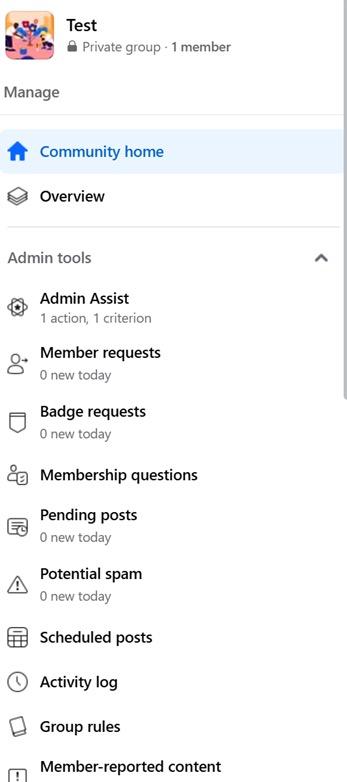
Admin tool panel
As a mod, you will be able to see an Admin Tool panel on the left side of your screen when logged into your group. This is where you’ll find all the controls and insights required to manage and respond to activity.
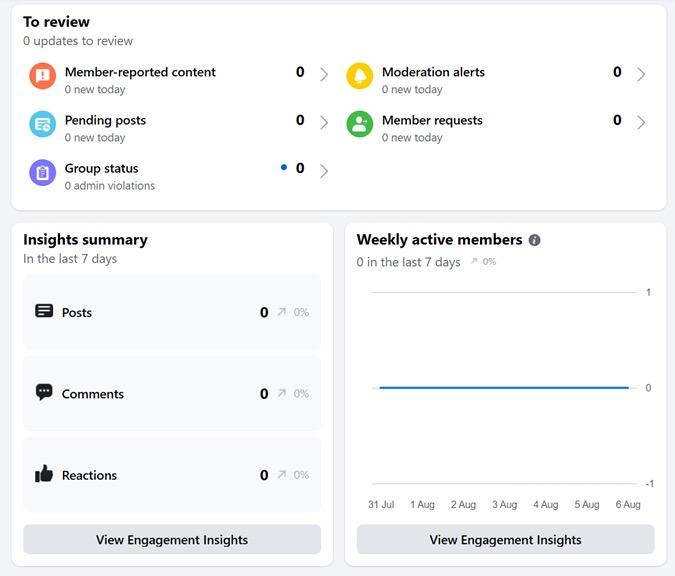
Overview dashboard
If you’re after a quick insight into what requires your attention at a glance, the overview dashboard is a useful function and shows pending posts, membership requests, moderation alerts, conflict warnings, etc, all in one tidy place.
A Guide to Online Community Moderation Need to
Know
Identifying & Responding Basics for Beginners
Admin Assist (Facebook group automation tool)
This is a really helpful function with the ability to set multiple rules for automatic member, post or comment approval, decline, or review based on rules you set up. This is often the first defence against spam or fake accounts, harmful content or repeat offenders.
There are plenty of options based on your group requirements, but as a minimum consider setting up automation to:
• Screening new members
• Auto-removing posts with banned domains or phrases
• Routing posts that contain specific tags (e.g., “CW: trauma”) for admin approval
TIP:
Combine Admin Assist + keyword alerts for a low-effort, high-control moderation system.
When Moderators Disagree
Post approval
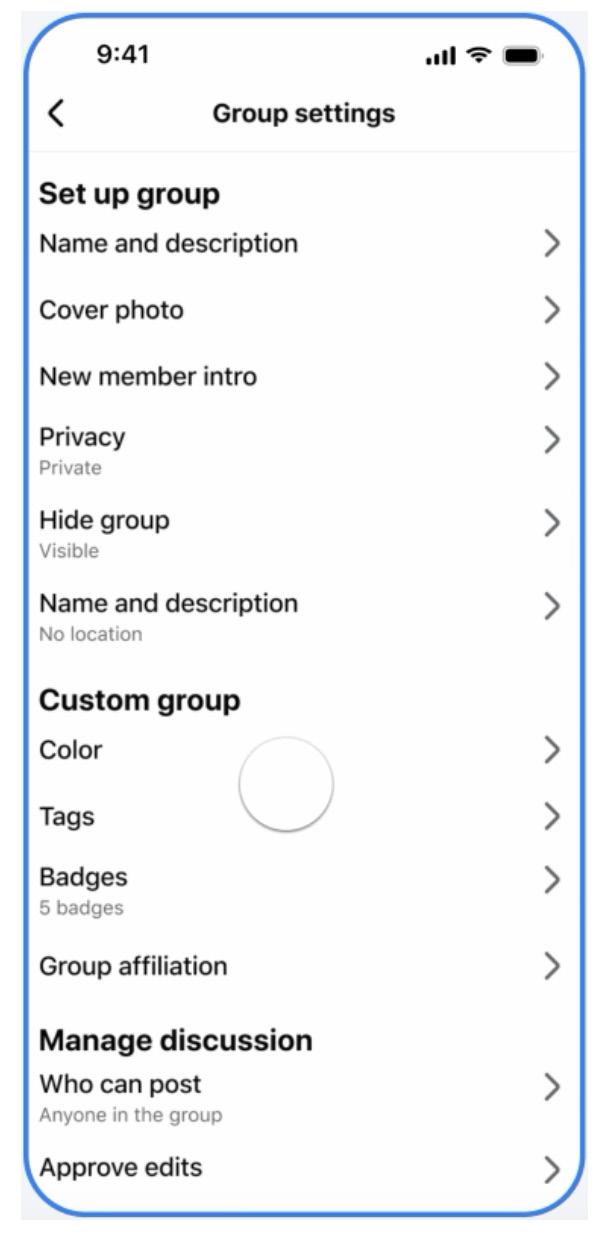
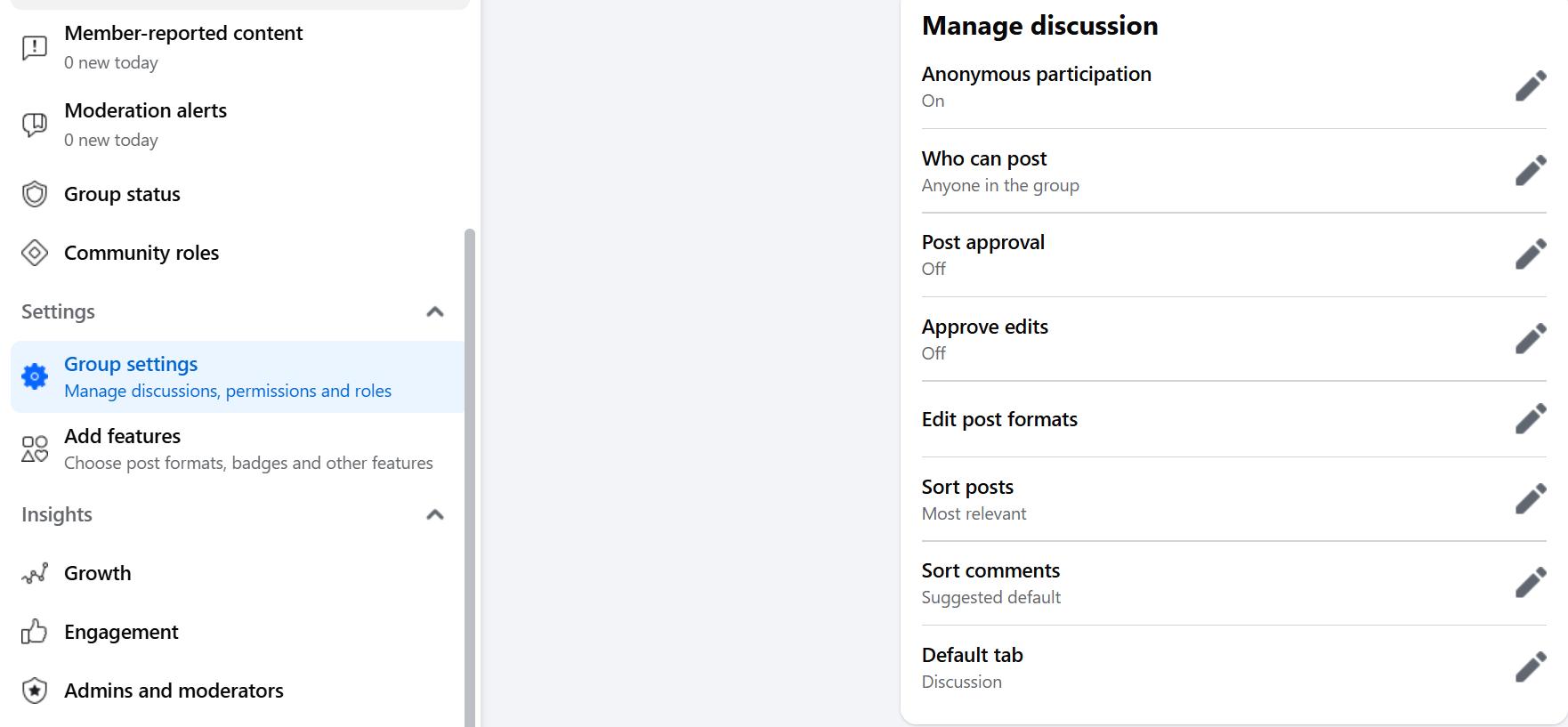
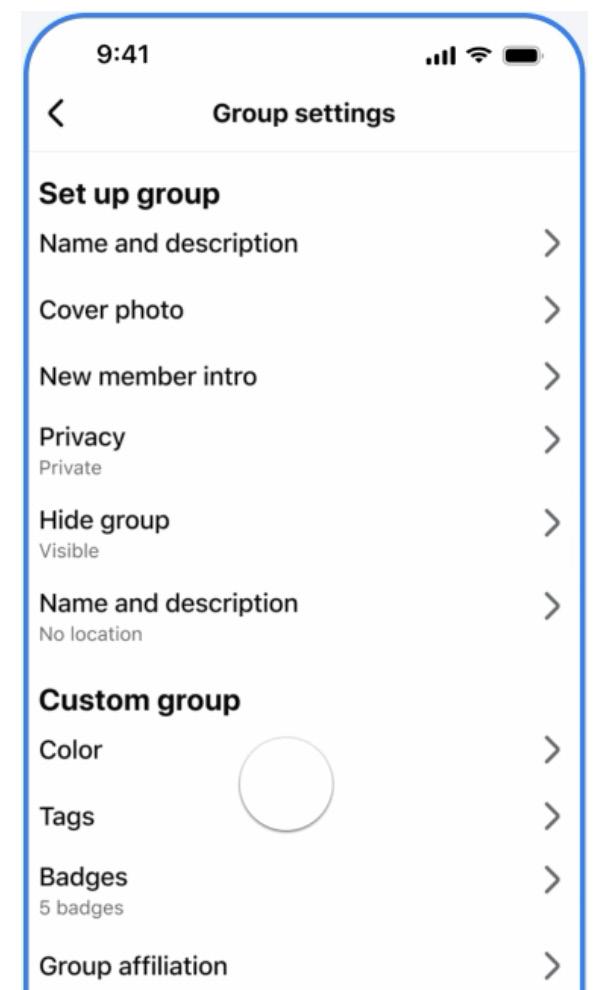
There are times when you might need to turn on post approval for your group, to manage tricky situations and protect members. You can do this in your Group Setting function. Consider using for:
• New members
• High-conflict threads (e.g. During protests, elections or national events)
• Sensitive group topics (health, trauma, activism)
TIP:
Approve posts in batches daily to reduce burnout. Let members know in advance: “This group now uses post approval during high-volume weeks to keep things safe and on-topic.”
A Guide to Online Community Moderation Need to Know
Keyword alerts
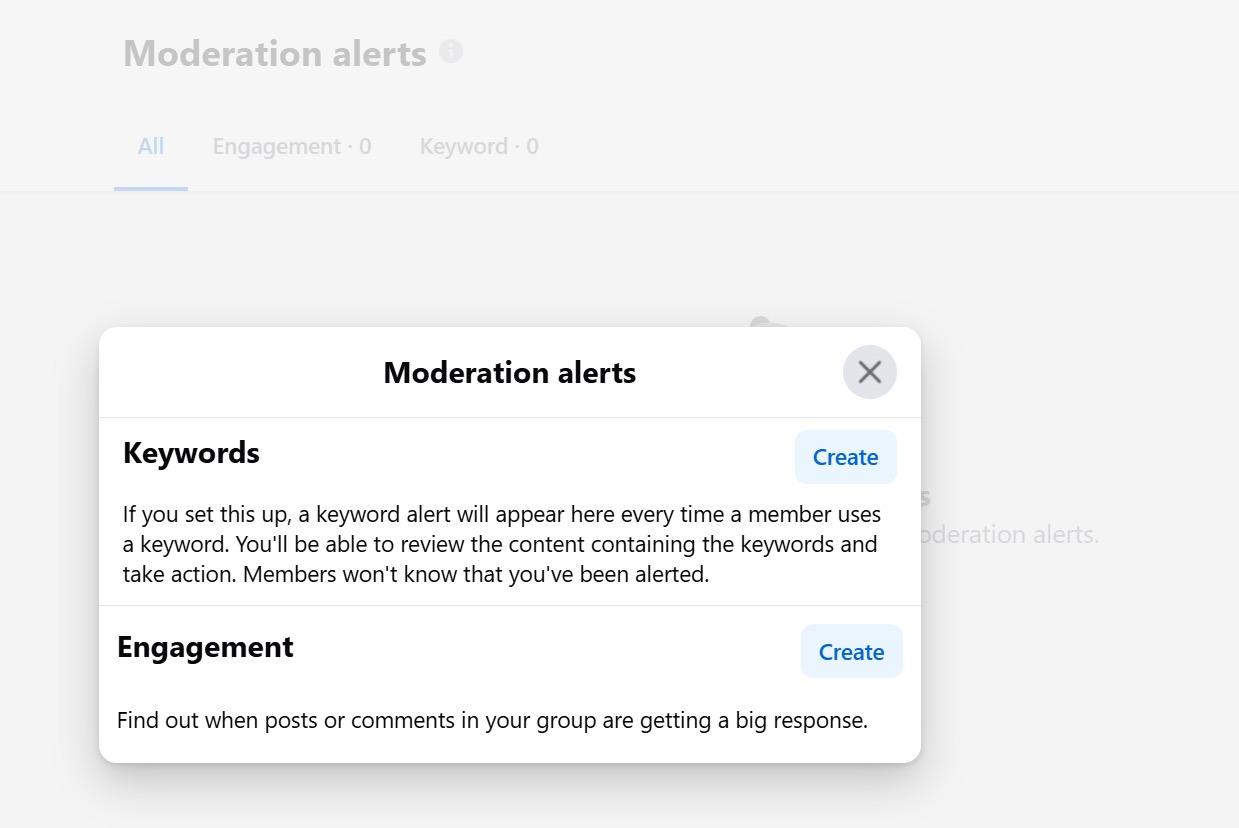
Found under the Moderation Alerts heading, Keyword Alerts will flag content being posted that might need closer attention. These can be a combination of ‘always on’ watch words, or trending controversial topics that require monitoring.
Set these up to flag:
• Hate crimes slurs
• Crisis terms (e.g., “kill myself,” “want to die”)
• Coded language (e.g.”nazi terms” ”)
• Trigger words (e.g., “rape,” “sexual abuse”)
• Other controversial hot button issues
You can review the list of posts/ comments with keywords flagged here too.
• Click each one to review in context.
• Choose to:
o Leave as is
o Remove
o Message member
TIP:
Review alerts weekly. Don’t rely solely on automation, they’re your early warning system, not your gatekeeper.
How to pause posting or comments
Useful during heated debates, trauma incidents, or spam floods.
To Pause Posting:
• Go to Admin Tools.
• Scroll down to Group Settings.
• Use ‘Post Approval’ or temporarily set the group to ‘Announcements Only.’
To turn off comments:
1. Click the three dots (…) on a specific post.
2. Select ‘Turn Off Commenting.’
TIP:
Add a “Tone Reset” comment before pausing or locking.
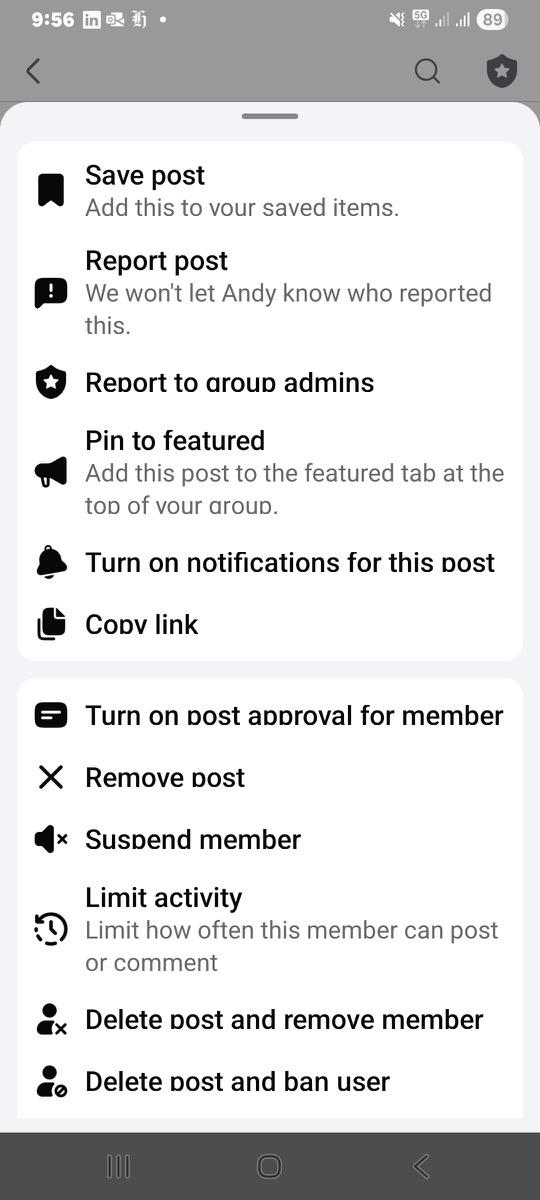
Communities that have a strong, engaged membership and a clear set of rules will often have members that will back up the admin by helping to enforce rules and etiquette. This is either through comments that they leave in response to emerging issues on the page, or by reporting content that could be harmful or against the rules. Anything that is reported, will show up on your dashboard as ‘Reported by Members’ for your consideration and action. When Moderators
Reported by members
A Guide to Online Community Moderation Need to Know
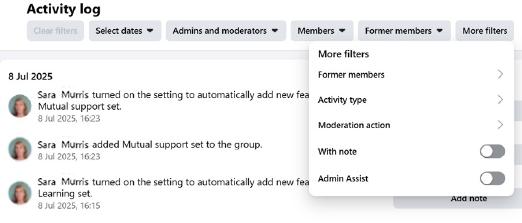
Activity log
Identifying & Responding Basics for Beginners
A key tool for any moderation team is the Activity Log, as this is your go-to audit trail for everything admins and mods have done, including deleting posts, approving members, removing comments, issuing suspensions, etc.
In Facebook Groups you can filter by date, by specific moderator, by type of action or by member and former members.
Automated actions set up with Admin Assist will also get logged here, so you can check in and reverse actions if need be.
Mod resources you can create that might be helpful
• “Mod Incident Log” (online spreadsheet or shared form)
• Shared Folder (screenshots, past statements)
• “New Mod Welcome Pack” (with tone guide, rules, scripts)
• “Debrief Chat” for after big moderation calls or trauma content
BONUS: save time with quick links in your mod chat
Send these direct links to fellow admins:
• Moderation Alerts: facebook.com/ groups/YOURGROUPID/admin_alerts
• Keyword Alerts: facebook.com/ groups/YOURGROUPID/keyword_ alerts
• Admin Assist Rules: facebook.com/ groups/YOURGROUPID/admin_assist
• Member Requests: facebook.com/ groups/YOURGROUPID/member_ requests
AI-enabled features
Many of the automated moderation tools use AI in the background to power results, including the Admin Assist suite and Moderation Assist for Pages. There are other ways moderators can use Meta’s AI tools to improve efficiency and lessen manual tasks.
Meta AI (Beta) can help you rewrite moderator announcements in different tones (friendly, professional, concise) or suggest new post ideas to keep communities engaged. You can also use this to quickly get a summary of post comments, to check how your community is responding to certain content and take a ‘pulse check’
There are plenty of AI tools available from a range of providers to either help with moderation tasks or generate content quickly. They can be a great time-saver, but it’s important to understand how to use these safely and responsibly, particularly in terms of accuracy and privacy. See page 57 in the Appendix for more AI guidance.
Using guides
Guides are one of the most powerful but under-used moderation tools. They let you turn scattered posts into a structured, always-available handbook inside your group. Think of them as a bookshelf for the important stuff, rules, safety info, FAQs, and cultural values, all neatly organised so members can find them anytime.
You can:
• Move any post into a Guide (before or after publishing).
• Organise Guides into themes (Welcome, Safety, Culture, Topical Posts, FAQs, Emergencies).
• Best for permanent reference material members will need again and again.
• Helps new members get up to speed quickly, reduces repeat questions on the same topic, and keeps your group’s culture consistent.
Featured posts
• Featured posts are the “noticeboard” of your group. They sit right at the top of the feed where everyone sees them first. Unlike Guides, they’re not permanent, they shine a spotlight on what matters most right now.
Details:
• Pin important posts so they appear at the top of the group feed.
• Use for time-sensitive or urgent updates (events, announcements, campaigns).
• Only a few can be featured at once — rotate them often.
• Keeps members focused on what’s most relevant today.
A Guide to Online Community Moderation Need to Know
Identifying & Responding Basics for Beginners
Moderation Assist for Facebook pages
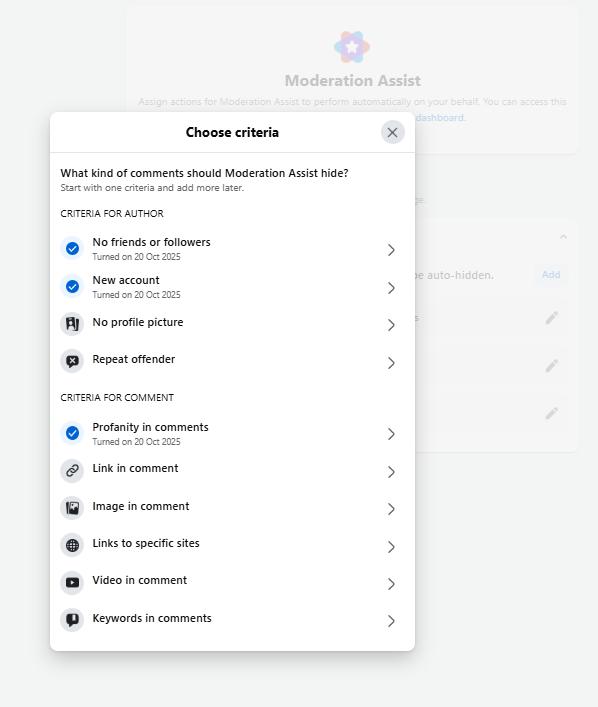
Most public-facing organisations in Aotearoa (schools, councils, community services, NGOs) now rely on Pages to communicate updates and receive community feedback, sometimes hundreds of comments a day. Moderating these spaces well is essential for protecting staff, audiences, and reputations. As Pages are public, comments appear instantly and can spread fast. Meta’s Moderation Assist tools (found under the Professional Dashboard) help automatically hide or review harmful or spam content before it’s seen.
Access:
Go to your Page > Professional Dashboard > Moderation Assist
There are an array of options within the dashboard to hide or flag comments based on certain criteria, including:
• Keyword filtering: Add custom words or phrases (e.g. “DM me,” “crypto,” “giveaway,” “scam”) to automatically hide comments or send them for review
• Profanity in comments: Turn on the “Hide Comments Containing Commonly Reported Words”
• URL & spam filters: Automatically hide comments with external links, repeated emojis, or bot-style behaviour
• Auto restrictions: Limit or ban users who repeatedly have comments hidden
• Inbox alerts: Flag messages containing keywords like “abuse,” “help,” or “urgent”
Best practice
Publish a clear commenting policy on your Page -“We remove abusive, defamatory, or spam comments to protect our community.”
Review hidden comments regularly, automation isn’t perfect.
Meta Support Pros for Pages
Any Meta user managing a government, politics, nonprofit page or Business Account has access to support via Meta Support Pros. This could include providing guidance on day-to-day best practices to answering technical questions you may encounter on Meta platforms. See more on how to access this service.
Meta guidelines and actions
Even if you stay within NZ law, Meta can pause, restrict, or remove your Facebook group/page if its Community Standards are repeatedly broken, and it doesn’t matter if the breach comes from a member, not you.
Meta community standards
Meta may remove or restricts content, accounts, pages and groups for:
• Illegal activity -sale of drugs, weapons, counterfeit goods, hacking services
• Violence & incitement - threats, coordination of harm
• Dangerous organisations and
individuals - bans content that praises, supports or represents entities tied to violence or extremism
• Bullying & harassment - targeted abuse, doxxing, shaming
• Child sexual exploitation, abuse, and nudity - all content that sexualises, exploits, or endangers children
• Hate crimes - attacks based on race, ethnicity, religion, gender, sexual orientation, disability
• Misinformation in specific high-harm categories
• Adult sexual content -nudity, pornography, sexual solicitation and exploitation
Find out more about Meta Community Standards and view the full list here.
Meta is ending the third-party factchecking program and moving to a Community Notes model, starting in the United States. Community Notes lets people add more context to Facebook, Instagram and Threads posts that are potentially misleading or confusing. At the time of writing, third party fact checking on Meta platforms is still active in Australasia.
A Guide to Online Community Moderation
APPENDIX
Need to Know Identifying & Responding
ACTION TOOLKIT – QUICK DECISIONS UNDER PRESSURE
Follow the 3 steps:
Identify → Respond → Prevent Recurrence
1 Identify
Key questions before acting
1. Could it harm someone?
• Might a post cause serious emotional distress to someone in the group?
• Does it include physical threats or anything that could lead to real-world harm?
2. Does it break the rules?
• Does it go against platform community standards/or the HDCA?
• Is it breaking your group’s kaupapa or rules?
3. Could things get worse?
• Are arguments or pile-ons already forming in the comments?
2 Respond
Low
Off-topic, small disagreement, not harmful
Medium May offend, rule-bending, repeat issue
High
Clearly harmful, abusive, threats, scams, criminal
HELPFUL MODERATION HABITS
• Act swiftly before things spiral.
• Stay consistent across moderators.
• Keep a record (screenshots with names, dates, URLs).
• Encourage positive engagement.
• When in doubt, check HDCA/ Platform Community Standards.
Monitor, remind gently
Remove content, send kind warning, consider mute
Remove immediately, report to platform, remove user, escalate if needed
Escalation path Use When...
Another mod You’re unsure, triggered, or overwhelmed
Lead/admin mod Action may impact group direction or trust
Netsafe HDCA, including harassment, threats, doxxing and scam advice
Police Threats of violence, child safety risk, suicide threats, extremism concerns
Community orgs As relevant to the situation - i.e suicide helpline, health helpline, Outline etc.
3 Prevent Reoccurence
Other things to keep in mind
• First offence vs. repeat offender –respond proportionately.
• Reactions of others – is harm spreading or creating fear?
• Tone/intent – mistake vs. deliberate targeting.
• Offline consequences – could this lead to real-world harm?
Balancing expression with safety
• Groups have a Kaupapa, set tone and boundaries.
• Allow diverse views but draw the line at harm or identity-based attacks.
• Be transparent about rules.
• Encourage healthy kōrero, not harmful drama.
PRIVACY TIPS
• Keep reports and warnings confidential.
• Store screenshots securely and only share within the mod team.
• Never reveal who flagged a post.
• Use private mod channels for team discussion.
• Ensure members protect their own privacy.
Download a PDF copy of ‘Action toolkit’
DECISION TREES FOR MODERATION
Use these yes/no flowcharts to guide decisions when tension or harm arises. They help take the emotional weight out of decision-making by giving you a clear path forward.
Content risk decision tree
Use this when reviewing a questionable or reported post
Does it breach your group rules or kaupapa?
Is it likely to be upsetting or triggering for any group members?
Consider monitoring only or offering guidance.
Is the content objectively harmful (e.g. does it raise concerns likely to cause serious emotional distress in situations involving posts of hate speech, threats doxxing, incitement to cause violence or scams)?
Leave it up. Consider commenting to maintain tone.
Ask poster to add content warning. Consider hiding post.
Is it misleading or contains mis/ disinformation?
YES
Screenshot. Remove immediately. DM user (optional). Log it.
Comment with corrections + source. Warn poster if repeat issue. Monitor closely.
If escalation is needed: Violence, threats, abuse: Contact Netsafe or Police Emotional distress: Offer 1737 / Lifeline links Repeated and or targeted harm against a person: Ban/mute
STILL UNSURE?
Add a “Holding Comment” and DM the user privately. Flag for discussion in mod chat.
Comment fight decision tree
Use this when tension is rising in the comment section
Are comments personal, hostile, or identity-based?
Mute participants. Lock thread. DM if appropriate. Reset tone in comments.
Are comments heated but still respectful?
Does the thread involve trauma or conflict escalation?
Step in with tone-setting comment. Monitor thread.
Consider pausing group temporarily or issuing a reset post.
If escalation is needed: Violence, threats, abuse: Contact Netsafe or Police Emotional distress: Offer 1737 / Lifeline links Repeated and or targeted harm against a person: Ban/mute
Suicide or self-harm disclosure tree
Use this when a post shares experiences of self-harm or indicates suicidal intent. Treat all threats of self-harm seriously. If the person is in immediate danger, call 111.
Is someone’s life at serious risk of imminent danger or serious risk?
Is someone demonstrating suicidal intent?
Is it a past trauma or emotional disclosure?
TIP:
Moderate closely if there’s activity suggesting a suspected suicide in the community. Safe language and images matter. It is a breach of the law (s.71 of Coroners Act 2006) to name the method, the location if it indicates method, and calling it a suicide. It’s a suspected suicide until Coroner confirms otherwise.
Call 111, Screenshot. Hide post. Keep them talking (via DM if you can), stay calm, ask for their location and if there’s someone they’d like you to contact.
Hide post. Screenshot. DM poster with: ‘Kia ora, it sounds like you are having thoughts of self-harm or suicide. If this is happening, we suggest speaking with someone outside of this group for support.
You can free call or text Need to talk? on 1737 or the Suicide Crisis Helpline on 0508 828 865. Both are available 24/7.’
Hide or request content warning (CW). DM poster with helpline links (Need to talk? 1737 Lifeline – 0800 543 354) Debrief mod team.
Help them reframe. Monitor follow-up comments closely.
For more detailed guidance on safe online discussion of suicide, self-harm, or trauma, moderators can refer to the Mental Health Foundation NZ for further training resources, helpline listings, and media guidance including their ‘Safely reporting about suicide guide’ The Nōku te Ao Media Resource and #chatsafe Guidelines also outline practical steps for writing and moderating safely online, including language, imagery, and crisis response.
Download a PDF copy of ‘Decision trees for moderators’
AI FOR COMMUNITY MODERATORS
For time-poor moderators and those filling the role as a volunteer, AI tools can help lighten the workload and respond faster. Built-in AI enabled moderation tools are built into most platforms now and help mods set up a first line of defence against online harm. Other Generative AI tools can also be a useful helper for community moderators, but AI doesn’t understand your group’s kaupapa or tone unless you tell it, and it can make mistakes.
What you can use it for:
• Set up keyword filters, member screening and other back-end systems
• Drafting messages & holding statements – calm, neutral, supportive
• Summarising long threads – get the gist quickly without wading through
• Translating tone (for example, from too harsh to gentle, or too formal to friendly)
• Brainstorming tone-setting responses – when you’re stuck for words
• Training support – practice scenarios, inclusive phrasing ideas
AI should help you hold the tone and save time, not replace your judgement.
Getting better results
AI can only work with what you give it. Vague prompts give vague results. The more context and instruction you include, the better the output will match your group’s tone, kaupapa, and needs.
FOR EXAMPLE:
Poor prompt:
“Write a group post about respect.”
Better prompt:
“Write a short, friendly post reminding members in a private Aotearoa parenting group to keep kōrero respectful during heated debates. Include a gentle reminder about our group rules and use plain New Zealand English.”
“I’m a moderator of a private mental health support group in Aotearoa. Write a short message asking members to stop arguing and refocus on respectful kōrero. Keep it kind, calm, and manaenhancing.”
TIPS:
• Include context (who you are, what kind of group it is)
• Specify tone (calm, inclusive, mana-enhancing)
• Tell it how long or what format you need (two sentences, list, announcement)
• Mention what not to do (for example, “avoid emojis,” “keep it neutral”)
Iterating for better results
AI improves when you give feedback. Try adding:
“Make it sound more natural.”
“Use lighter language.”
“Shorten to two sentences.”
“Rewrite with a te reo Māori greeting and New Zealand spelling.”
“Keep it professional but friendly.”
Cultural and contextual awareness
AI tools are mostly trained on global data, not Aotearoa communities, so guide them to localised language and context.
Safe AI use
• Don’t share names, screenshots, or private details in your prompts Instead: paraphrase (“a member made a racist comment” rather than pasting their post).
• Don’t copy-paste confidential moderation discussions.
• Don’t rely on AI to decide what is harmful or illegal, escalate to Netsafe or Police if you’re unsure.
• Use trusted, reputable AI platforms.
• Avoid random plug-ins or bots that may store data unsafely.
Download a PDF copy of ‘AI for community moderators’
GLOSSARY OF TERMS
1737 / Need to Talk?
New Zealand’s free 24/7 mental-health support line. Call or text 1737 to speak with a trained counsellor.
Accessibility (Digital)
Designing online content so it’s usable by people with disabilities — for example, alt text, captions, and clear layout.
Admin Assist (Groups)
A Facebook Group automation tool that pre-approves, declines, or flags posts and members based on rules you set.
AI (Artificial Intelligence)
Technology that performs humanlike tasks such as filtering spam or summarising comments; used behind many Meta moderation tools.
Approved Agency
Under the Harmful Digital Communications Act 2015, Netsafe is the Approved Agency responsible for receiving complaints, assisting victims, and working with online content hosts to resolve harm.
Burnout
Emotional and mental exhaustion caused by prolonged stress; common among moderators exposed to harmful or highvolume content.
Communication Principles
Ten behavioural principles under the HDCA that outline what counts as harmful digital communication (e.g. no harassment, no false allegations, no incitement).
Community Standards
Platform rules on acceptable behaviour. Breaches can lead to post removal or account restrictions even if NZ law isn’t broken.
Content Warning (CW)
A note at the start of a post alerting readers to sensitive or distressing content (e.g. violence, trauma, abuse). Sometimes know as Trigger Warning (TW).
Coroners Act 2006, Section 71 (Reporting Suicide)
Restricts publication of a suspected suicide’s method or details until the Chief Coroner releases findings.
Crisis Terms
Words or phrases that signal distress or imminent risk and should prompt escalation.
Cultural Safety
Ensuring online spaces respect and protect the identities and wellbeing of people from all cultural backgrounds.
De-escalation
Moderator steps that reduce tension, using calm language, slowing comments, or temporarily pausing discussion.
Deepfakes
AI-generated or altered video, images, or audio that convincingly depict people doing or saying things they never did.
Defamation
Publishing false information that harms someone’s reputation; truth and honest opinion are defences.
DIA – Department of Internal Affairs
NZ government agency responsible for addressing objectionable or illegal online content through its Digital Safety Group.
Digital Communication
Any form of online or electronic messaging, including emails, social media posts, comments, images, and videos.
Dog-whistle
Coded language that seems harmless publicly but signals bias or hostility to a targeted group.
Doxxing
Publishing or sharing someone’s private or identifying information (address, workplace, phone number etc.) without consent.
Escalation
Referring a serious or unlawful issue (e.g. threat, harassment, exploitation) to Netsafe, Police, the DIA, or another agency.
Featured Post
A Facebook post pinned to the top of a group feed to highlight important or time-sensitive information.
FVPC
Act (Films, Videos and Publications Classification Act 1993)
NZ law defining and regulating “objectionable” content such as child sexual exploitation, extreme violence, or terrorism material.
Guides (Groups)
A Facebook feature allowing key posts to be grouped into themes (Welcome, Safety, FAQs) for easy reference.
Harmful Digital Communications Act 2015 (HDCA)
NZ law to deter, prevent, and mitigate online harm and provide quick redress for victims of digital communications causing serious emotional distress.
Holding Post
A temporary pinned notice used during high tension to pause discussion and explain next steps.
Holding Statement
A neutral message to pause or deescalate conflict (e.g. “We’re reviewing this post, please pause kōrero for now.”).
Kaupapa
A Māori term for purpose or foundational principle. In moderation, it anchors a group’s values and decisions.
Kaupapa Māori
Māori-led frameworks and values that guide how communities are built and moderated.
Keyword Alerts (Groups)
Facebook tool that notifies moderators when chosen words or phrases appear in posts or comments.
Kōrero
Māori for “conversation” or “discussion.” Used to describe respectful dialogue within online communities.
GLOSSARY OF TERMS
continued
Live Stream
A real-time video broadcast. Moderators should monitor streams closely to prevent harmful or illegal content.
Mana Authority, dignity, and prestige. Moderators maintain mana by acting fairly and respectfully.
Manaakitanga
A Māori value meaning care, hospitality, and respect — hosting others kindly and safeguarding community wellbeing.
Misinformation / Disinformation
False or misleading information shared without (misinformation) or with (disinformation) intent to deceive.
Mod Chat
A private channel where moderators coordinate actions and support each other.
Mod Team / Co-Moderators
The group of people sharing moderation duties and decision-making for a community.
Moderator (Mod)
A person who manages an online community, enforces rules, and keeps discussions safe and respectful.
Moderation Assist (Pages)
Meta’s automated tool for public Pages that hides or reviews comments based on filters such as keywords or spam.
Moderation Log (Mod Log)
A private record of moderation actions — what was removed, why, and by whom.
Multicultural Safety
Ensuring online spaces respect and protect the identities and wellbeing of people from all cultures, including Māori and Pacific communities.
Objectionable Content
Material depicting sex, crime, cruelty, or violence that’s injurious to the public good. Includes child sexual exploitation, bestiality, and terrorism imagery.
Online Content Host
Anyone who owns or controls an online space and can moderate or delete content within it.
Peer Support
Emotional or practical support between moderators to manage stress and prevent burnout.
Pile-on
When multiple users attack or criticise one person in a thread, often escalating into harassment.
Post Approval
A Facebook Group setting requiring moderator review before posts become visible.
Privacy Act 2020
NZ law governing how personal information is collected, used, and shared.
Psychological Safety / Safe Space
An environment where people can participate without fear of ridicule, harassment, or retaliation.
Scam / Fraud
A deceptive scheme designed to steal money, data, or personal information.
Serious Emotional Distress
The threshold of harm under the HDCA — sustained fear, humiliation, or distress beyond ordinary offence.
Tap-Out System
A wellbeing practice allowing moderators to step back temporarily when overwhelmed.
Tangata Whenua
Māori as the Indigenous people of Aotearoa New Zealand.
Te ao Māori
The Māori worldview, values, language, and customs shaping understanding and behaviour.
Te reo Māori
The Māori language, an official language of New Zealand and encouraged in online spaces.
Tikanga
Māori customs and protocols that guide behaviour and decision-making in culturally safe spaces.
Tone Policing
Criticising how someone expresses a point instead of addressing the issue itself, which can silence marginalised voices.
Tone Reset
A moderator comment that re-centres respectful dialogue and reminds members of the group’s kaupapa.
Trauma-Aware Moderation
Recognising that people carry past harm and moderating with empathy and nonblaming language.
Values Statement
A short summary of shared principles (e.g. empathy, inclusivity, safety) that guide moderator decisions.
Wellbeing Check-In / Debrief
A structured chat after handling harmful content to reflect and support each other.
Whakapapa
Māori term for genealogy or lineage, the relationships that define identity and belonging.
Whanaungatanga
A Māori concept of connection, relationship, and shared belonging, the foundation for inclusive moderation.
Download a PDF copy of ‘Glossary of terms’
MOD LOG TEMPLATE (FOR SERIOUS INCIDENTS)
Use this in a shared doc, spreadsheet, or closed mod chat.
FIELD ENTRY
Date & Time
Incident Type
Post Link or Screenshot
Mod Action Taken
Escalation
Notes
EXAMPLE ENTRY: Mod log template (for serious incidents
FIELD ENTRY
Date & Time 04/08/25 8:47 pm
Incident Type Hate speech (anti-trans)
Post Link or Screenshot [File/screenshot stored in folder]
Mod Action Taken
Escalation
Removed post, DM to poster, DM to affected member thread locked
Advised member to contact Netsafe (0508)
Notes Poster banned after repeat behaviour. Original member thanked us for acting quickly. Download
MODERATION SYSTEMS & TOOLKIT QUICK LINKS for Facebook Groups
Task
Post Approval
Purpose
Approve posts before they go live
Keyword Alerts Flag high-risk terms
Admin Assist Rules Automate low-risk moderation
Group Rules
Membership Screening Questions
Incident Log
Moderator Team Roles
Create enforceable standards
Vet new members before they join
Track harms, repeat users, risky posts
How
Admin Tools → Post Approval→ Toggle ON
Admin Tools→ Keyword Alerts→ Add Words
Admin Tools → Admin Assist → Add Condition
Admin Tools → Group Rules → Add Rule
Member Requests→ Ask Pending Members Questions
Use platform log or alternative shared file
Assign clear tasks Document in internal team file or pinned message
Tool
QUICK LINKS
Moderation Alerts facebook.com/groups/[GROUPID]/admin_alerts
Keyword Alerts Panel facebook.com/groups/[GROUPID]/keyword_alerts
Admin Assist Setup facebook.com/groups/[GROUPID]/admin_assist
Member Requests & Screening facebook.com/groups/[GROUPID]/member_requests
Incident Log Template (Google Sheet)
[Insert Link or QR Code]
ACTION CHECKLIST FOR MODERATORS
Situation
Harmful Post Detected
Misinformation Detected
Conflict in Comments
Hate Speech or Identity Harm
Trauma or Self-Harm Content
Doxxing or Privacy Breach
Scam or Fraud
Gang or Extremist Content
Action
Remove immediately → Screenshot → Log it → Optionally DM poster
Link to facts → Warn user (if repeat) → Reset tone in comments
Step in with tone comment → Lock thread if needed → Mute aggressors
Remove → escalate if extreme → reference broken rule
Hide temporarily → DM poster with care → Share support links
Remove → Securely log info → Notify member if relevant
Remove → Ban if repeat → Note scam type (crypto, phishing etc.)
Remove → Screenshot → Escalate to Netsafe or police if threatening
Download a PDF copy of ‘Moderation systems for Facebook Groups’
MODERATOR SAFETY CHECKLIST
When you or your group members are targeted
1. Immediate Response
Screenshot abusive posts, DMs, or comments before deleting.
Hide/remove harmful content fast.
Mute or ban the account(s) responsible.
Post a neutral holding statement if needed: “We’re aware of harassment towards moderators/members. This behaviour is not tolerated here.”
2. Escalation
If threats are violent, stalking-related, or involve children → Call 111.
For online harm that causes serious emotional distress to individuals report to Netsafe (0508 NETSAFE / netsafe.org.nz/report).
If abuse is coming from a coordinated campaign → Flag to the platform via group admin tools.
3. Protect Yourself
Use your group/page role to comment, avoid personal accounts.
Lock down your own profile (privacy check-up, limit who can DM).
Remove personal details (phone, email, workplace) from public profiles.
Don’t engage directly with trolls, moderation is not personal debate.
Refer to the Free to Lead toolkit for more in-depth advice on protecting yourself online.
4. Protect Your Team
Share incidents in your mod chat or log — no one should carry it alone.
Rotate responsibility for dealing with trolls to reduce burnout.
Use collective language (“The mod team has decided…”) to reduce targeting.
5. Protect Your Members
If followers are being harassed, acknowledge it openly: “We’re aware some members have been targeted outside this group. Please report any harm to Netsafe or Police if unsafe.”
Strengthen rules against cross-posting and external harassment.
6. After the Incident
Debrief with your mod team: what worked, what needs to change?
Update rules if harassment revealed a gap.
Check in on team wellbeing, encourage time out if needed.
Log the incident in your Mod Incident Log (screenshots + summary).
REMEMBER:
Your safety comes first. You’re not expected to absorb abuse “because you’re the mod.” Protecting yourself is part of protecting the group.
Download a PDF copy of ‘Moderator safety checklist’
FURTHER RESOURCES
If you, or someone you know, is in danger please call emergency services on 111 immediately.
If you think you, or someone you know, may be thinking about suicide, call your local mental health crisis team or call or text Need to talk? 1737. These services are available nationwide 24 hours a day, seven days.
HELPLINES
Local mental health crisis response teams
Depression Helpline
0800 111 757 or free text 4202 to talk to a trained counsellor about how you are feeling or to ask any questions.
Lifeline
0800 LIFELINE (0800 543 354) or free text HELP (4357).
Need to Talk?
Free call or text 1737 any time for support from a trained counsellor.
Suicide Crisis Helpline
0508 828 865
OUTLine NZ – 0800 OUTLINE (0800 688 5463)
Provides confidential sexuality or gender identity support via telephone.
Youthline
Chat online or email talk@youthline. co.nz or free text 234 or free call 0800 376 633.
Netsafe
For assistance and reporting of online harm, call: 0508 638 723 email: help@netsafe.org.nz or submit a report at netsafe.org.nz
All New Zealand Crisis Support Helplines https://mentalhealth.org.nz/helplines
SUICIDE/SELF-HARM/MENTAL HEALTH RESOURCES
Mental Health Foundation Safely reporting about suicide resource
Mental Health Media Guidelines
ChatSafe
Preventing suicide: a resource for media professionals, update 2023
REPORT / ESCALATE ONLINE HARM
Netsafe (HDCA Approved Agency):
Report online (harm report form)
Call: 0508 638 723 (0508 NETSAFE)
Email: help@netsafe.org.nz
Text: “Netsafe” to 4282
NZ Police: threats, violence risk, child safety risk, extremist content.
111 if urgent danger, otherwise 105 / online reporting.
New Zealand laws mentioned in the guide
(Reference links only — not legal advice)
Harmful Digital Communications Act 2015 (HDCA)
Privacy Act 2020
Defamation Act 1992
Coroners Act 2006 (section 71)
Films, Videos, and Publications Classification Act 1993
Platform policies (Meta / Facebook)
Meta Community Standards hub
Key sections for mods: hate speech, harassment, self-harm, violence/incitement, dangerous orgs/extremism, privacy violations, child safety.
How to report content on Facebook
Download a PDF copy of ‘Further resources’