
FREQUENTLY ASKED QUESTIONS
What items are required to be an accepted builder with New American Funding?
Builder established for a minimum of five years
Completed contractor questionnaire
License
General Liability Insurance
Workmen’s Compensation Insurance or statement of exemption
Government-issued photo ID
Which project documents are required with New American Funding?
Fully executed build contract
Plans
Specs
Elevation (all sides)
Construction Budget
When is a survey required?
Draw Schedule
Initial plot plan or survey (if applicable)
List of subcontractors to be used for the project (if applicable)
Builder is responsible for the builder’s risk insurance on a VA CP 1* close loan
FHA and VA construction-to-permanent loans: An initial and final foundation or as-built survey is required.
Conventional construction to permanent loans: a final foundation or as-built survey with the location of the house if applicable per local county requirements.
Foundation Survey or Structural Engineer Certificate IS required for Manufactured Homes.
Is HOA approval required when the subject property is in a planned unit development?
Yes, HOA approval is required to be obtained by the homeowner’s association.
Is there an initial disbursement to the builder once the loan closes?
Yes, the builder is allowed to receive 10-12%, based on the loan product, of the cost to build or $50,000 (whichever is less). Once the loan closes, a certified check is mailed directly to the builder from the settlement company.
Is the builder required to sign any documents prior to the loan closing?
Yes, the builder is required to sign the contractor acknowledgment form, commencement form and initial draw disbursement form (if applicable).
When are funds disbursed to builders during the construction phase?
The construction loan funds are disbursed periodically during construction as work is completed and verified by inspection.
Disbursement requests are to be made by the builder via the builder portal at https://get.onesiteapp.com/. However, the borrower is required to authorize the disbursement of the funds to the builder.
Land Gorilla’s Draw Support Team will order an inspection once the builder has submitted the draw request via the web portal. Funds are generally dispersed within five business days of the date of request. The amount of the disbursement is based on the work completed, as specified in the inspection report and the budget draw schedule provided by the builder during pre-closing construction loan process.
How do I request a draw during construction?
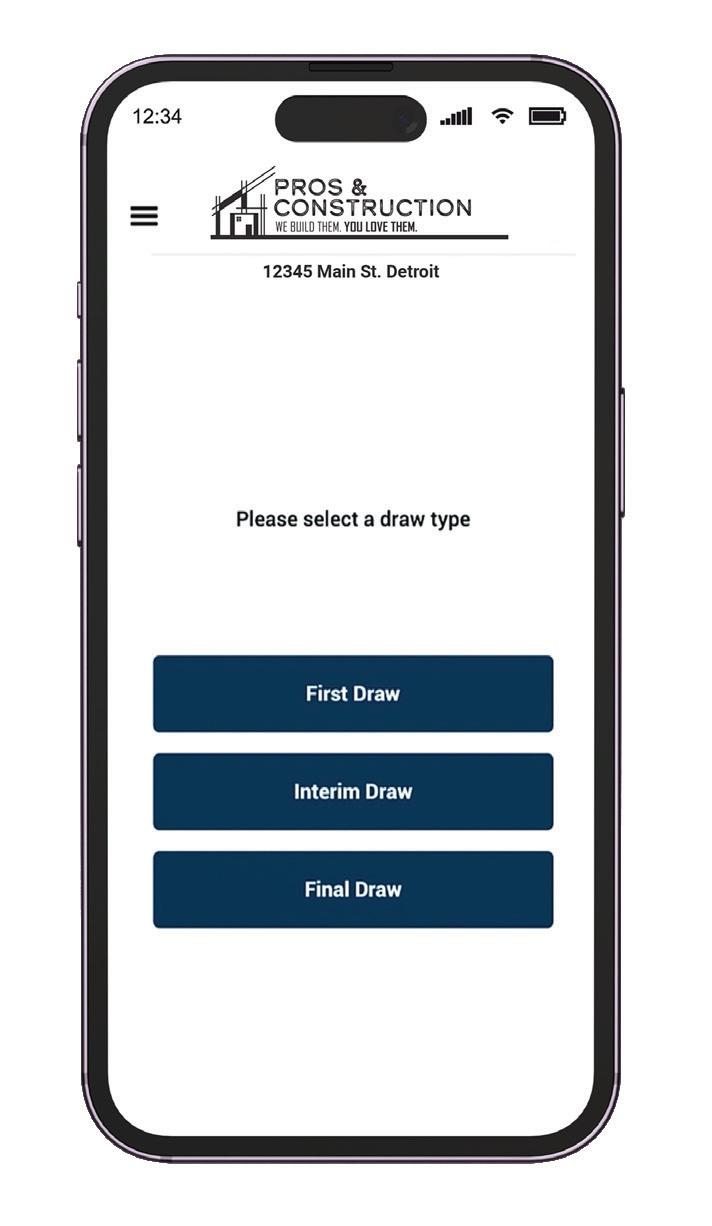
To start a new payment request, select the Request Payment button in the upper right-hand corner of the screen. A pop-up to select the Draw Type (Fig. 1) will open; select the draw to the request.
Once you’ve selected the type of draw, you will see a new pop-up window that allows you to select what you would like to have the draw based on (Fig. 2).
Note: The window containing the options below will only be accessible to users who have been granted permission by the NAF. If you do not see the following options, please reach out to NAF for further information.
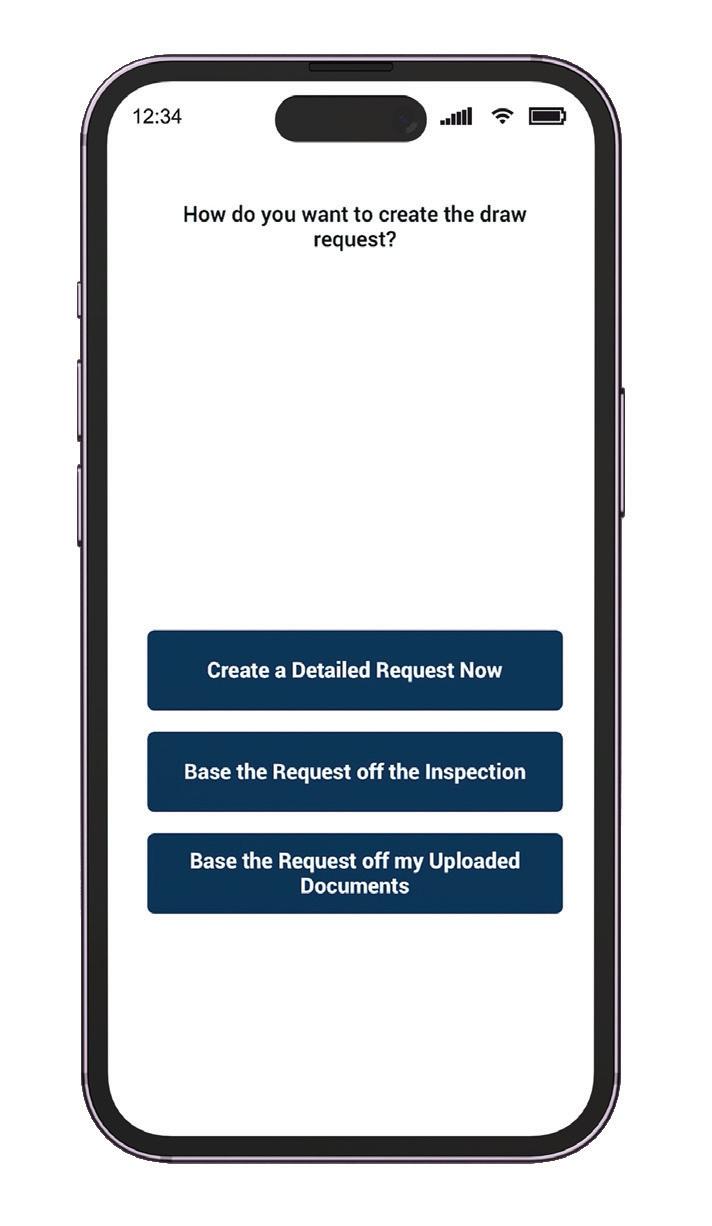

Create Draw By Detail
When selecting Create Draw By Detail, you will need to be presented with the screen in Figure 3.
To complete the payment request, follow these steps:
1. Select a Payee. A drop-down of contacts assigned to the loan will be available (Fig. 3). If the payee is not listed, select Create New Payee and fill in the correct information for the new payee.
2. Request the amount for each line item that is needed to complete the payment request. A dollar amount item can be added or click on the $ symbol to change to a percentage option and then select the percentage from the drop-down which is listed in 5% increments.
a. Continue this process for every item requiring request for payment
b. The available balance for each line item will be present in the balance to finish column.
3. Add supporting documentation if necessary (Fig. 4) to include with the payment request. Additional documents may be added by selecting the plus add documents button.
Below the supporting documents are the following options:
Cancel - To cancel the payment request. A payment request can be canceled in order to start a brand-new request.
Save - To save your progress on the request and return to it later.
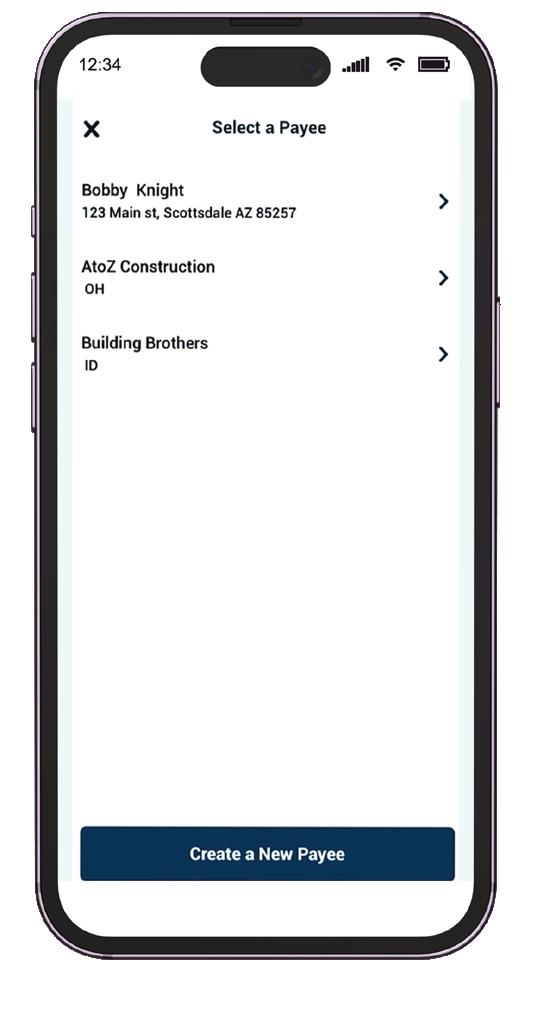
+ Payee - To add an additional Payee. The add Payee option allows for multiple payees on the same payment request and the process is repeated exactly from the initial select payee option.
Submit - To submit your payment request.
Create Draw Based on Inspection
When selecting “Create Draw Based On Inspection”, you’ll see the window in Figure 4.
To complete the payment request, follow these steps:
1. Select a Payee. A drop-down of contacts assigned to the loan will be available. If the payee is not listed, select Create New Payee and fill in the contact information for the new payee.
2. Add supporting documentation if necessary to include with the necessary payment request. Additional documents may be added by selecting the + Add Documents button.
How do I request a material deposit?
Following the instructions above, Select Miscellaneous Draw under “Please Select Draw Type”. By requesting the material deposit, you will be paid no more than 50% of the line item listed on the cost breakdown or the amount being requested on the invoice, whichever is lesser. Material draws would be considered for these specialty items: lumber, windows, appliances, flooring cabinets, countertops, and doors
How many draws can I take?
There will be a total of six draws ($5,000 minimum) for each project; any additional draws will incur an additional fee of $250
per draw. No matter the draw type if a payment is received it is considered a draw and is counted towards the six draws.
What are the final draw requirements?
The final draw process can take 1-2 weeks. It is recommended to begin preparing in advance. The table below shows the typical required documents for Conventional, VA, and FHA situations:
Document
Draw Request Form
Signed by the Borrower and Builder
Final Progress Payment Lien Waiver
Signed by the builder and any parties that provided pre-lien notifications.
Change Orders (if applicable)
Not permitted unless approved by NAF
Final Title Endorsement or Final Title Update
Draw Team will order and provide.
Notice of Completion (if applicable)
Final Survey (if applicable)
Homeowner’s Insurance/Declaration Page
Should include NAF’s Mortgagee Clause and a minimum coverage amount of the replacement cost of the home.
Certificate of Occupancy or equivalent Final Inspection (1004D a.k.a. Completion Report) completed by the original appraiser and ordered by your Draw Support Team.
Termite Treatment (HUD-NPMA-99A/B)
Water Analysis
Warranty of Completion (HUD-92544 / VA26-1859)
Septic Report
1 Year Warranty with evidence of enrollment
Cabo Letter
Radon
USDA Certification of Plans RD (Form 1924-25)
1-year builder warranty (Form ONLY)