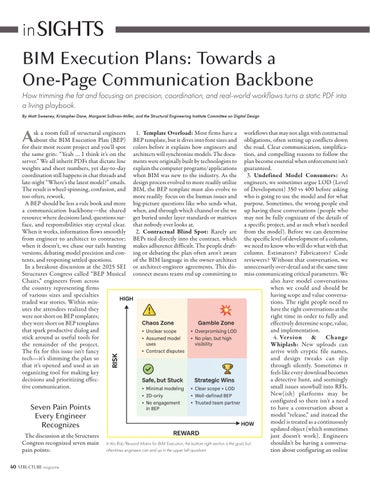
BIM Execution Plans: Towards a One‑Page Communication Backbone
How trimming the fat and focusing on precision, coordination, and real‑world workflows turns a static PDF into a living playbook.
By Matt Sweeney, Kristopher Dane, Margaret Sullivan-Miller, and the Structural Engineering Institute Committee on Digital Design
Ask a room full of structural engineers about the BIM Execution Plan (BEP) for their most recent project and you’ll spot the same grin: “Yeah … I think it’s on the server.” We all inherit PDFs that dictate line weights and sheet numbers, yet day‑to‑day coordination still happens in chat threads and late‑night “Where’s the latest model?” emails. The result is wheel‑spinning, confusion, and too often, rework.
A BEP should be less a rule book and more a communication backbone—the shared resource where decisions land, questions sur face, and responsibilities stay crystal clear. When it works, information flows smoothly from engineer to architect to contractor; when it doesn’t, we chase our tails hunting versions, debating model precision and con tents, and reopening settled questions.
In a breakout discussion at the 2025 SEI Structures Congress called “BEP Musical Chairs,” engineers from across the country representing firms of various sizes and specialties traded war stories. Within min utes the attendees realized they were not short on BEP templates; they were short on BEP templates that spark productive dialog and stick around as useful tools for the remainder of the project. The fix for this issue isn’t fancy tech—it’s slimming the plan so that it’s opened and used as an organizing tool for making key decisions and prioritizing effec tive communication.
Seven Pain Points Every Engineer Recognizes
The discussion at the Structures Congress recognized seven main pain points:
1. Template Overload: Most firms have a BEP template, but it dives into font sizes and colors before it explains how engineers and architects will synchronize models. The docu ments were originally built by technologists to explain the computer programs/applications when BIM was new to the industry. As the design process evolved to more readily utilize BIM, the BEP template must also evolve to more readily focus on the human issues and big‑picture questions like who sends what, when, and through which channel or else we get buried under layer standards or matrices that nobody ever looks at.
2. Contractual Blind Spot: Rarely are BEPs tied directly into the contract, which makes adherence difficult. The people draft ing or debating the plan often aren’t aware of the BIM language in the owner architect or architect engineer agreements. This dis connect means teams end up committing to
workflows that may not align with contractual obligations, often setting up conflicts down the road. Clear communication, simplifica tion, and compelling reasons to follow the plan become essential when enforcement isn’t guaranteed.
3. Undefined Model Consumers: As engineers, we sometimes argue LOD (Level of Development) 350 vs 400 before asking who is going to use the model and for what purpose. Sometimes, the wrong people end up having these conversations (people who may not be fully cognizant of the details of a specific project, and as such what’s needed from the model). Before we can determine the specific level of development of a column, we need to know who will do what with that column. Estimators? Fabricators? Code reviewers? Without that conversation, we unnecessarily over‑detail and at the same time miss communicating critical parameters. We also have model conversations when we could and should be having scope and value conversa tions. The right people need to have the right conversations at the right time in order to fully and effectively determine scope, value, and implementation.
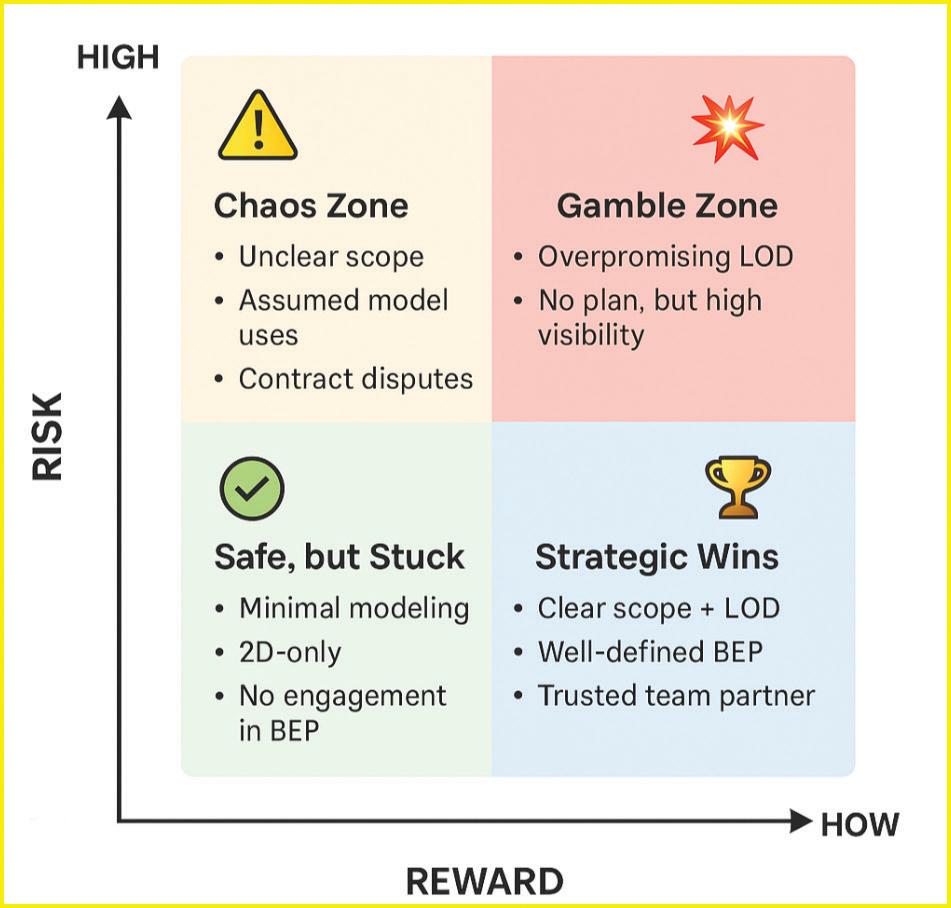
4. Version & Change Whiplash: New uploads can arrive with cryptic file names, and design tweaks can slip through silently. Sometimes it feels like every download becomes a detective hunt, and seemingly small issues snowball into RFIs. New(ish) platforms may be configured so there isn’t a need to have a conversation about a model “release,” and instead the model is treated as a continuously updated object (which sometimes just doesn’t work). Engineers shouldn’t be having a conversa tion about configuring an online
tool when instead we should be talking about a model freeze and risk process to get the right people into the room.
5. Precision & Coordinate Drift: Different models and data sources can end up with different origins, grid sizes, and acceptable tolerances. Sometimes angles are measured in decimal degrees, when degree minute second notation is what’s expected. Sometimes site curves arrive as radii with no center point. All of these end up requiring coordination between models, and could be avoided with effective BEP communication.
6. Reality‑Capture Gray Area: Point clouds are common, but workflows vary. Who converts .e57 to .rcp? What deviation is acceptable (< ½ inch / 12 mm)? If the team doesn’t own a scanner, who defines the formats and hand‑off when scans appear? Who determines when information in the scan will be used in lieu of information in existing drawings or vice versa? Structural engineers in particular (for whom the exist ing elements likely will not appear in reality capture) need to be aware of the limitations of reality capture to flag them early and pre empt them
7. Sustainability Scattershot: Owners hear about embodied carbon, but requirements differ depending on the project. Some teams embed carbon parameters in Revit, others export to spreadsheets and finalize calcula tions there. A placeholder line and a note on any Revit/BIM parameters you plan to track can keep the door open without hijacking the agenda.
What Needs to Change (and What Doesn’t)
How do we address these pain points?
1. Undead BEP: Move the plan from static PDF to a collaborative platform you already own such as SharePoint, Confluence, Autodesk Construction Cloud. Comments and version history turn debates into docu mented decisions. The format matters less than the ability for the team to quickly edit the document and keep it as a living refer ence to how the team has agreed to work together. A useful frame of mind is “if a new person joined the team today, do we have a document that would explain how we (and individual projects we are engineering) actually work?”
2. Bridge the Contract Gap: Recognize that most BEPs are not written into the con tract. This means the document’s usefulness depends less on legal enforceability and more on trust and practicality. Make the plan easy
Get a Six Pack BEP—One
Table, Six Sections
The table below can make these six points actionable to incorporate into your BEP, or if needed, can serve as the starting point of an internal BEP baseline.
# Section What Goes In
1 Project Snapshot and Contacts
One‑liner project blurb and three names: BIM lead, structures lead, coordinate/scan lead.
2 Model Uses and Stakeholders A short table that describes how the model may be used, who creates it, who consumes it, when, and how it’s shared. See the example table below.
3 Precision, Units, and Coordinates Rounding rules, angle units, survey DWG location, shared coordinates, acceptable curve definitions.
4 Version and Change Protocols
5 QA and Review Cadence
6 Sustainability and Future Tech Lot
Model upload rhythm, file naming, model change‑notice templates (Who are the senders?→Who are the recipients?)
Clash thresholds, point‑cloud deviation limit, how results circulate (Teams post Monday 9 a.m.).
Notes about tools or things the model may be needed for in the future. One‑line on carbon tracking creating that discussion point.
Know exactly who to communicate with before models drift.
Align level‑of‑detail with real consumers.
Stop guessing; start aligning.
Kill the need for detective work.
Issues surface before they sink costs.
Door stays open without derailing today’s scope.
Sample Model Uses Table:
Field‑Tested Quick Wins
• Fork‑and‑Trim Sprint—Copy your longest BEP then delete unnecessary sections until it fits on a laptop screen.
• Weekly 15‑Minute Plan Upkeep—Open the live BEP during coordination calls and edit it in real time. If a section goes untouched for a month, archive it to avoid clutter.
• Appoint a “Change Captain”—Determine one defined place to look for uploads and coordinate shifts. Interns are welcome and can be the change captains if you have them—the point is ownership.
• Determine QAQC BIM items at key milestones, such as:
◊ Three‑Strike Naming Rule—Wrong file name three times? Kick it back.
◊ Sustainability Single Metric—Track Revit parameter ‘EC_kg’ for steel tonnage at schematic & 75 % CDs
to use and compelling enough that teams want to follow it, because contract language alone won’t keep it alive.
3. Explicit Communication Triggers and Owners: Every model upload, change notice, coordinate shift, etc. gets a name and a description. Clarity in communication beats software.
4. Precision & Coordinate Rules—Frozen on Day 1: Set rounding (nearest 1⁄16inch? 1 mm?), lock the project coordinate system, write down angle units (deg‑min‑sec), and list acceptable curve definitions (arcs with a center point, NOT radius‑only).
BRIDGE guide
ENERCALC,
LLC
Phone: 800-424-2252
Email: info@enercalc.com
Web: enercalc.com
Product: ENERCALC SEL/ENERCALC 3D
Description: Major ENERCALC updates include expanded support for ACI 318-25 across retaining wall modules, with updated concrete shear limits, simplified concrete shear strength equations, and revised hooked development length provisions with clearer reporting. Rankine Active earth pressure options have been reintroduced for Cantilevered Retaining Walls. Soldier Pile Retaining Wall design has been enhanced with detailed flexural capacity reporting and updated lateral-torsional buckling provisions for square and rectangular HSS sections.
RISA Tech
Phone: 949-951-5815
Email: info@risa.com
Web: risa.com
Product: RISA-3D
5. Reality‑Capture Expectations: Note whether scans will be used and where. If yes, state the best data formats (.rcp, .e57), target density, and deviation tolerance. If no scan ner is planned, we should still list who will manage possible future scans.
6. Lightweight Sustainability
Placeholder: This should ideally be com prised of one bullet point: “Track embodied carbon parameters (Revit ‘EC_kg’) at 30% and 75% CDs; export via Revit Schedule.”
7. Right‑Sized Automation: Looking to include clash detection in Navisworks or a Dynamo parameter audit? List only what
LeJeune Bolt Company
Phone: 800-872-2658
Email: sales@lejeunebolt.com
Web: www.tightenright.com
Product: TNA® Torque + Angle Fastening System
Description: TNA® is the only fastening system that delivers both a quantifiable Snug Tight condition— ensuring every bolt in a connection meets a minimum requirement for tension—and the precise required angle for the perfect final pretension. No other system or method can match the TNA® Torque + Angle Fastening System for producing the highest level of accuracy and reliability in both the snug and final tensioning processes. TNA® Bolts meet requirements of ASTM F3148 and are 100% Melt & Manufacture in the U.S. The Combined Method (Torque + Angle) is an approved RCSC installation method.
Not listed?
Description: With RISA-3D’s versatile modeling environment and intuitive graphic interface you can model any structure from bridges to buildings in minutes. Get the most out of your model with advanced features such as moving loads, dynamic analysis, and over 40 design codes. Structural design has never been so thorough or easy! Monthly 2026 Resource Guide forms are available on our website. www.structuremag.org
runs today and keep future pilots in the parking lot.
Call to Action—Shrink the PDF, Amplify the Conversation
Structural engineers love precise load paths, and we should love precise communication just as much. A one‑page BEP doesn’t just simplify the work—it can clarify it. Convert your legacy BEP into the Six‑Pack layout, filling in precision rules, file formats, and who talks to whom. Post it and then review it weekly as the project progresses. Less paper and clearer conversations result in successful projects and, most importantly, more cohesive, trusting teams. That’s a load path everyone can support. ■
The SEI’s committee on Digital Design is a group that aims to explore and disseminate the benefits, risks, and challenges of implementing the growing set of digital design tools and project execution methodologies to advocate for and improve the practice and business of Structural Engineering.

Find more resource listings in the 2025 2026 Structural Engineering Resource Guide on our website, www.structuremag.org