MRVIS – welcome [Insert information/summary of MVRIS overall. Include:
DVLA exchange Registrations available (competitors) – confidential to customers Brands – limited access to model groups
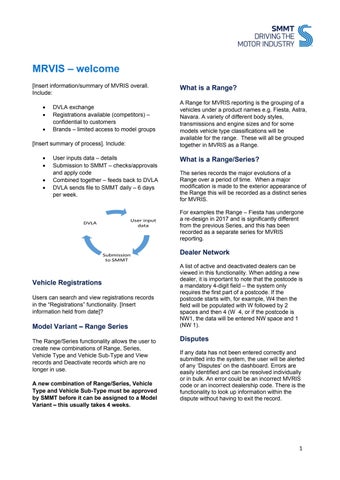
[Insert summary of process]. Include:
User inputs data – details Submission to SMMT – checks/approvals and apply code Combined together – feeds back to DVLA DVLA sends file to SMMT daily – 6 days per week.
User input data
DVLA
Submission to SMMT
Vehicle Registrations Users can search and view registrations records in the “Registrations” functionality. [Insert information held from date]?
Model Variant – Range Series The Range/Series functionality allows the user to create new combinations of Range, Series, Vehicle Type and Vehicle Sub-Type and View records and Deactivate records which are no longer in use. A new combination of Range/Series, Vehicle Type and Vehicle Sub-Type must be approved by SMMT before it can be assigned to a Model Variant – this usually takes 4 weeks.
What is a Range? A Range for MVRIS reporting is the grouping of a vehicles under a product names e.g. Fiesta, Astra, Navara. A variety of different body styles, transmissions and engine sizes and for some models vehicle type classifications will be available for the range. These will all be grouped together in MVRIS as a Range.
What is a Range/Series? The series records the major evolutions of a Range over a period of time. When a major modification is made to the exterior appearance of the Range this will be recorded as a distinct series for MVRIS. For examples the Range – Fiesta has undergone a re-design in 2017 and is significantly different from the previous Series, and this has been recorded as a separate series for MVRIS reporting.
Dealer Network A list of active and deactivated dealers can be viewed in this functionality. When adding a new dealer, it is important to note that the postcode is a mandatory 4-digit field – the system only requires the first part of a postcode. If the postcode starts with, for example, W4 then the field will be populated with W followed by 2 spaces and then 4 (W 4, or if the postcode is NW1, the data will be entered NW space and 1 (NW 1).
Disputes If any data has not been entered correctly and submitted into the system, the user will be alerted of any ‘Disputes’ on the dashboard. Errors are easily identified and can be resolved individually or in bulk. An error could be an incorrect MVRIS code or an incorrect dealership code. There is the functionality to look up information within the dispute without having to exit the record.
1