Hydrants and Access Instructions for Wild Fire Projects (1)

Page 1


HYDRANTS AND ACCESS UNIT

To submit plans for Wild Fire Projects to the LAFD Hydrants and Access Unit, please follow the instructions provided below.

To Submit Plans to LAFD

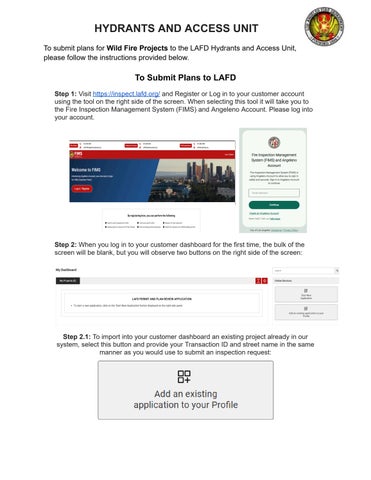
Step 1: Visit https://inspect.lafd.org/ and Register or Log in to your customer account using the tool on the right side of the screen. When selecting this tool it will take you to the Fire Inspection Management System (FIMS) and Angeleno Account Please log into your account

Step 2: When you log in to your customer dashboard for the first time, the bulk of the screen will be blank, but you will observe two buttons on the right side of the screen:

Step 2.1: To import into your customer dashboard an existing project already in our system, select this button and provide your Transaction ID and street name in the same manner as you would use to submit an inspection request:

HYDRANTS AND ACCESS UNIT

Step 2.2: To submit a new project, select this button:

Step 2.3: In either of the above cases, you will be prompted to select or to record a project name. This is to allow you to group multiple LAFD Transaction IDs pertaining to your same project in one place and is for your convenience. You may affiliate your project with an existing project name, or record a new project name This will create expandable and collapsible menus defined by your chosen project names in accordance with whatever conventions you wish to employ for this feature.

IMPORTANT: Proceed through the entire application process without backtracking through prior steps.

Step 3: Specific instructions for submitting new plans are as follows:

Step 3.1: After you have selected the “Start New Application” button, please provide a project name or select an existing project from the drop down

HYDRANTS AND ACCESS UNIT

Step 3.2: Next, identify your submission with a new or existing project address, you will need to identify the project address. Please include the Suite or Unit number, if applicable. If the system is unable to locate your project address, please select the closest address to your project and under comments (Next page) you will then reference the correct project address

Step 3.3: Next, you will need to select the type of plan review or permit you require. Please select “Hydrants & Access.” Your selection is fixed once made and cannot be edited by LAFD plan check staff. If you are unsure of which option you require, hovering your mouse over the available options will display a menu of the types of permits and plan checks available under each.

Step 3.4: Provide the necessary information for your submission in the fields provided. All fields marked with a red asterisk are mandatory Please enter your PCIS Number and a clear description of the scope of work in the “Work Description” field If applicable, please provide any additional PCIS Numbers, correct project address or additional comments in the “Comments” field. Click the “Next” button to continue.

HYDRANTS AND ACCESS UNIT

Step 3 5: Click on the “Add Application” button and select from the drop down menu the specific type of plan check or permit you require:

All Wildfire Projects, please select Hydrants and Access Plan Review for Permit/Review Type*

Please select “Yes” under Expedited for your plan review, as this will place your project in an entirely different queue for the Wildfire. Under Comments: Please reference “Wildfire Project” Click the “Save” button and click the “Next” button to continue

Step 3.6: Record all relevant contact information using the “Add Contacts” button:

Please note that the “Applicant/Sponsor” and “Owner” fields are both mandatory for all submissions The Applicant is the individual or entity submitting the project to the LAFD for review The Owner must be the property/building owner (not a tenant or contractor business owner). You cannot proceed with your submission unless you provide the necessary information for both parties

After you have recorded all applicable project contacts, you must designate the billing recipient Select the appropriate name from the contact information on the right side and click the "Bill to" button Even though all Wildfire Projects are exempt from payment, this step is mandatory to proceed. Once complete, click the "Next" button.

HYDRANTS AND ACCESS UNIT

Step 3 7: You are now looking at the “Review/Submit” screen Please review all of your entries for accuracy and completeness. If you need to make any changes, please click the “Edit” button on the top right corner of the applicable field Once you are satisfied with your entries, click the “Save & Continue” button in the bottom right corner of your screen to continue.

Step 3 8: At this step, you are provided with your draft Transaction ID number Please keep track of this number, but please be aware it will be replaced with your permanent LAFD Transaction ID number after your application is accepted by LAFD plan check staff Click the “Continue” button to continue to the next step

Step 3.9: On the right side of the screen, you will be provided with the opportunity to upload plans Please note there is an upload limit of 100MB Your application will be returned to you if any documentation is missing.

IMPORTANT: Please note your application will not be accepted for review until we have confirmed receipt of the full set of architectural plans (cover page, site plan, floor plan, roof plan, elevation and section views).

Please complete and upload in addition to your PDF plans the following documentation:

● LADBS Permits: LADBS building permit application form The LADBS building permit application will look like the images to follow This LADBS building permit application is mandatory to process any architectural review by LAFD.

HYDRANTS AND ACCESS UNIT

When you have completed all required fields and are ready to continue, click the “Submit for LAFD Screening” button at the bottom of the screen.

Step 3.10: A member of LAFD’s plan check staff will review your submission for accuracy and completeness and will provide you with one of several responses, which you will see on your customer dashboard The screening process is exclusively a determination of whether or not we have enough information and documentation to conduct our review, and is not a commentary on the merits of your request. Possible screening responses include:

● Missing Information: You will be informed what additional information is required (e g Missing PCIS number, Missing Architectural Plans) and will be provided the opportunity to update your application and resubmit for further screening LAFD plan check staff will be able to see what additional information was requested and what was subsequently submitted

● Update Plan: There was some issue with the documentation you uploaded and you will be provided a comment explaining what needs to be rectified, or necessary documentation was not uploaded with the application. This will involve uploading requested documentation

● Application Accepted: Your application has been accepted and you will now have access to your online payment window via your customer dashboard. Upon payment of the required fees, your receipt will be automatically captured and your project immediately and automatically placed in queue for assignment Please Note, all Wildfire Projects are exempt from payment The invoice will indicate a $0 balance and no further action is required from the customer.

Step 3.11: Wildfire Projects are assigned promptly with results anticipated within 5-10 business days Please continue to monitor your Angeleno Account for all project updates

Step 4: Additional helpful information and documentation is available under “Quick Links” at https://inspect lafd org/

Turn static files into dynamic content formats.

Create a flipbook
Hydrants and Access Instructions for Wild Fire Projects (1) by Los Angeles Fire Department - Issuu