
International Research Journal of Engineering and Technology (IRJET) e-ISSN: 2395-0056
Volume: 12 Issue: 12 | Dec 2025 www.irjet.net p-ISSN: 2395-0072
International Research Journal of Engineering and Technology (IRJET) e-ISSN: 2395-0056
Volume: 12 Issue: 12 | Dec 2025 www.irjet.net p-ISSN: 2395-0072
Dija S, Veena Vijayan
Centre for Development of Advanced Computing, Thiruvanathapuram, India
Abstract - Browser Forensics is an inevitable part in a cyber-crime investigations due to the high dependence on internet for everyday tasks. Thus, identifying a suspect’s Internet activities and browser habits is crucial in any investigation. Inthatcontext, a particularlyimportantaspect is collecting information about files uploaded to and downloaded from cloud-based storage platforms such as Google Drive. Every interaction with Google Drive whether uploading or downloading produces a set of artifacts on a WindowsOSSystem.These detailsappearinlocally-generated BrowserFilesby Web Browsers andlogscreated bythelocally installed Google Drive application. This research presents a novel forensic methodology for identifying Google Drive activities done in a Windows OS System and the associated details including name and email-id of the user, who initiated the activity. It analyzes the browser files stored locally across major web browsers, Chrome, Edge, Opera, Yandex, UC Browser, Maxthon, and Firefox. It also analyzes the log files saved by the local Google Drive application to identify the Google Drive activities The paper outlines artifact locations along with the forensic significance to correlate and reconstructcrucialInternetactivitiesoftheSuspectrelatedto the Google Drive Activities. The results demonstrate how cybercrime investigators can accurately identify a suspect’s Google Drive activities in A Windows OS System.
Key Words: Digital Forensics, Google Drive Forensics, Browser Forensics, Cloud Forensics, Internet Forensics
Web browsers have become the primary gateway to the Internetineverydaycomputing,supportingeverythingfrom routine browsing to critical business operations, which is why they play a major role in cybercrime investigations. Browserforensicsfocusesonlocatingandinterpretingthe traces created by the Web Browser. This includes crucial information including the details like visited websites, searchqueries,downloadedfiles,bookmarks,cookies,and cachedcontent,allofwhichhelpinvestigatorsunderstand what a user was doing online. The browsers store a significantamountofthisinformationlocallyintheformof SQLitedatabases,JSONfiles,cachefolders,andsessiondata, providingdependableevidenceofbrowsingactivities.This data becomes an important source of evidence in digital investigations,especiallywhentryingtolinkuserbehavior withtheGoogleDriveActivities.
Cloud services have become deeply embedded in daily computing workflows, enabling rapid data sharing and flexibleaccessfrommultipledevices.Whilethesefeatures improve productivity, they also create opportunities for misuse by the criminals. Criminals increasingly leverage cloud platforms to store, transfer, and conceal digital evidence or illicit material. Studies on cloud storage forensics emphasize the rising frequency of incidents involving Google Drive misuse in data theft, intellectual propertybreaches,andvarioustypesofcybercrimes[1].
Every action performed through Google Drive generates identifiable local traces in a Windows OS system. This includes authentication through email credentials and upload/download operations. These actions leave behind browser-levelartifactsinSQLitedatabases,cookies,session restore files, JSON metadata, and IndexedDB caches. Prior forensic studies highlight the persistence and evidentiary valueoftheseartifacts[3],[4],[7].Beyondwebbrowsers, theGoogleDriveDesktopApp DriveFS maintainsarich collection of logs, metadata caches, and internal event records.Theseincludefilesynchronizationdetails,remote FileIDs,localfilepaths,upload/downloadtimestamps,and account identifiers. DriveFS logs are instrumental for reconstructingtimelinesthatareotherwiseincompletefrom browsersourcesalone.
BrowserforensicsisanindispensablecomponentofGoogle Drive investigations, as most Drive interactions occur through web browsers. Most of the users may not locally installtheGoogleDriveApplicationtheirsystems. Thusthe major focus of the Investigators while trying to analyze Forensicresearchconsistentlyshowsthatbrowsersretain extensiveremnantsofcloudserviceusage[3],[4],[7],[9]. TheseremnantsserveasevidenceofGmailaccountsused, sessionsinitiated,andDrivefilesaccessed.
The default locations for browser profile artifacts in commonly used web browsers on a Windows system are listed in Table 1. These artifacts are stored within the “OS_Drive://Users/User/AppData”directory,anddepending onthebrowser,thefilesmaybelocatedeitherinthe“Local” folderorthe“Roaming”folder.
International Research Journal of Engineering and Technology (IRJET) e-ISSN: 2395-0056
Volume: 12 Issue: 12 | Dec 2025 www.irjet.net p-ISSN: 2395-0072
Table -1: KeyBrowserForensicfileswithemail-ids
Sl.No WebBrowser FilePath
1 GoogleChrome \Local\Google\Chrome\User Data\Default\
2 MicrosoftEdge \Local\Microsoft\Edge\User Data\Default\
3 Opera …\Roaming\Opera Software\OperaStable\
4 Yandex Browser \Local\Yandex\YandexBrows er\UserData\Default\
5 UCBrowser …\Local\UCBrowser\User Data\
6 Maxthon \Roaming\Maxthon3\User Data\<Profile>\
7 MozillaFirefox …\Roaming\Mozilla\Firefox\Pr ofiles\<RANDOM>.default\
Chromum based browsers are a rich source of Drive artifacts due to stable SQLite schemas and IndexedDB architecture [4], [5], [7]. Artifacts include: Google Chrome holdthefollowingdetails.
• Visit history (Drive folder/file URLs containing FileIDs).
• Cookies storing Gmail session and Drive authenticationtokens.
• AutofillsGmailIDs.
• Savedloginrecords.
• Cached Drive web app metadata stored in IndexedDB.
Microsoft Edge mirrors Chrome but stores persistent cookies longer due to partitioned storage and telemetry integrations[3].YandexBrowseroftenstoreslong-livedlogin tokens and Google cookies [9]. UC Browser uses legacy storage structures, storing Gmail IDs and Drive metadata even when Chrome is wiped [3]. Maxthon’s mixed architectureleadstoretentionofbothWebKitandChromium artifacts[7].MozillaFirefox:FirefoxstoresDriveinteractions in:
• places.sqlite(history)
• cookies.sqlite(Gmailauthentication)
• formhistory.sqlite(GmailIDs)
• logins.json(savedcredentials)
• sessionstore.jsonlz4(openDrivetabs)
2.3 Identification of Google Drive artifacts from Browser generated Files
Fromtheresearchconductedwiththevariousartifacts available in the browser files generated in a Windows OS system,thefollowingaretheinformationrelatedtoGoogle Driveartifactsfound.
• History: Reveals Drive folder browsing and file previews.
• Cookies: Associates actions with specific Gmail logins.
• Autofill:ShowsGmailIDsevertyped.
• LoginData:Showssavedorattemptedidentities. Theseartifactsarecentraltoreconstructinguserintended activitiesintheGoogleDrive[3],[9],[11].
Table -2: KeyBrowserForensicfilesholdingemail-ids Key Browser Forensic files with email-ids Sl. No Web Browser FileName Artifacts Format
Google Chrome/ Microsoft Edge/ Opera/ Yandex Browser/ Maxthon Browser
Tables 2 and 3 present the key browser artifact files that store information related to Google Drive activities on a WindowsOSSystem.Table2liststheprimaryartifactsthat containuseremailIDsextractedfromcommonlyusedweb browsers.Incontrast,Table3outlinestheartifactfilesfrom whichDrive-relatedURLsandfiledetailscanberetrieved.
International Research Journal of Engineering and Technology (IRJET) e-ISSN: 2395-0056
Volume: 12 Issue: 12 | Dec 2025 www.irjet.net p-ISSN: 2395-0072
Sl. No WebBrowser
1 Google Chrome /Microsoft Edge /Opera /Yandex Browser /UCBrowser /Maxthon Browser
Drive URLs,File Details, downloads
2 Mozilla Firefox places.sq lite Drive URLs,file preview/d ownload events
From the detailed case studies conducted with Google Chromewebbrowser,ithasbeenidentifiedthatthebrowser filesrevealtheDriveURLvisited,thefilethatwasuploaded ordownloaded,andtheemailaddressassociatedwiththat activity.Thefollowingsectiondescribestheextractionsteps in detail. First, a Google Drive visit can be confirmed by locatingtheDriveURLinChrome’slocallystoredhistory.Fig. 1showsaURLentryrecoveredfromthe downloadstablein theHistorySQLitedatabase.
AftertheDrivevisitisverified,thenextstepistoidentify thespecificfilethatwasaccessed.Fig.1displaysthefilename alongwiththefolderpathoftheaccessedfile.Thefinaland mostimportantstepistoidentifythedetailsoftheuser.For this, the Drive URL is to be parsed to extract the profile identifier(the/u/n/segment),thenidentifytheassociated profiledetailsstoredinanotherbrowserfiletorecoverthe user’semailandprofileinformation.Thefollowingsections explain each of these steps and the supporting artifacts in greaterdetail.
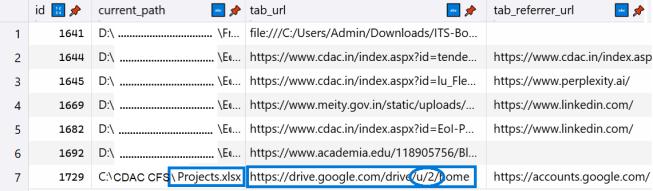
The accessed URL recovered is, that is shown in Fig 1 is, https://drive.google.com/drive/u/2/home Sometime,itcan behttps://drive.google.com/drive/u/1/home
Or https://drive.google.com/drive/u/0/homedependingon theemail-idoftheuserwhoaccessestheGoogleDrive.
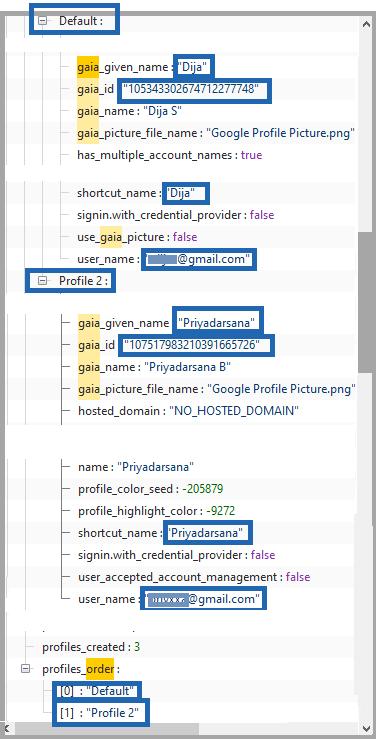
The substring in the Google Drive URL such as “/u/0/”,“/u/1/”,or“/u/2/” indicateswhichuserprofile accessed the Drive content. Additional details about these userscanbefoundinthe“LocalState”file,aJSON-formatted configurationfilegeneratedbyGoogleChrome.Withinthis file,the“profile”→“info-cache”sectionlistsinformationfor the Default profile as well as any additional profiles, as illustratedinFig.2.Thisincludestheuser’semailID,name, and other associated details. The file also contains the “profiles_order” entry under the “profile” header, which specifies the profile numbers and corresponding folder names. By referencing this information, investigators can
International Research Journal of Engineering and Technology (IRJET) e-ISSN: 2395-0056
Volume: 12 Issue: 12 | Dec 2025 www.irjet.net p-ISSN: 2395-0072
accuratelyinterpretthe“/u/n/”identifiersintheURLand determine which user profile performed the Google Drive activity.
InFig.2,twoprofilesarelisted:theDefaultprofile andProfile2.TheDefaultprofileisassignedthenumber‘0’, while Profile 2 is assigned the number ‘2’. Our analysis of multipleGoogleDriveactivitiesshowsthattheDefaultuser always accesses Drive using the URL pattern https://drive.google.com/drive/u/0/home,whereasProfile 2 uses https://drive.google.com/drive/u/2/home. Therefore,inFig.1,thefile“C:\CDACCFS\Projects.xlsx”was accessed by the Profile 2 user, whose email ID can be identified from the “Local State” JSON file shown earlier. Usingthisapproach,investigatorscanaccuratelydetermine whichemailaccountaccessedspecificGoogleDrivefiles.The “Local State” file also stores additional user attributes, including the GAIA ID. GAIA (Google Accounts and ID Administration) is Google’s internal identity management system used to create and maintain Google account identities. Importantly, the same GAIA ID appears consistently for a given email ID across both Chrome browserartifactsandDriveFSlogs whereitisreferredto as the persistable_token. By correlating these identifiers across sources, investigators can reliably attribute Google Drive activities to specific user accounts. This three-step procedureenablesacompletereconstructionofuseractions from locally generated browser and DriveFS artifacts, providing valuable forensic evidence in cybercrime investigations.
2.4 GOOGLE DRIVE DESKTOP APP (DriveFS) Artifacts
ThelocalfilesgeneratedbytheGoogleDriveDesktopApp (DriveFS) are stored in the path Local\Google\DriveFS withintheOS_Drive://Users/User/AppDatadirectoryona Windowssystem.DriveFSgeneratesseveralcriticalforensic artifacts:
• sync_journal.db
• metadata_cache.sqlite
• sync_log.log
• JSONconfigurationfiles
• Account-linkedfoldersunderDriveFSdirectories
These artifacts contain details such as uploaded and downloadedfiles,associatedGmailaccountidentifiers,and local file paths all of which are highly valuable in a cybercrimeinvestigation.
2.5 Identification of Google Drive artifacts from DriveFS generated Files
In the artifacts generated by DriveFS, the GAIA ID Google’s64-bituniqueidentifierforeachuser alsoplaysa
key role. Within DriveFS, this identifier appears as the persistable_token. The following sections explain how this valuecan beusedtoidentifyandseparate theactivities of eachemailaccountassociatedwiththeDriveFSapplication.
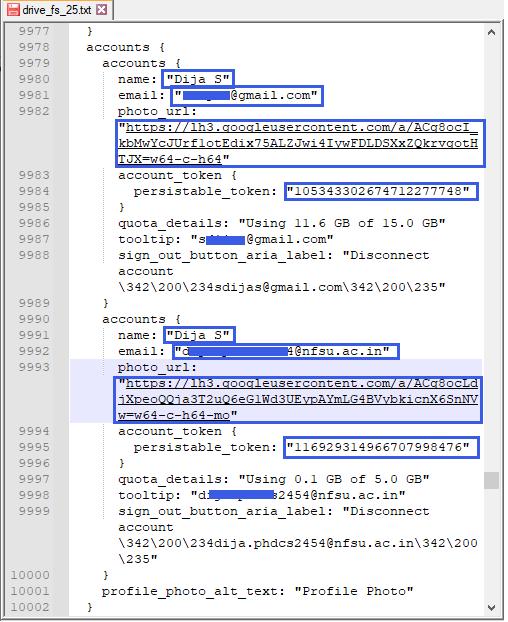
Fig -3:Thedetailsofemailaccountsinformationstored insideDriveFSfiles
From Fig. 1, the GAIA ID of the Default user is identifiedas“105343302674712277748”.ThissameGAIA ID appears in DriveFS as the persistable_token, which is stored inside the drive_fs_*.txt files. Fig. 3 shows how DriveFSsavesthepersistable_tokenforeachconfigureduser account. Since the GAIA ID and the persistable_token represent the same unique identifier for a given email account, they can be directly correlated across browser artifactsandDriveFSfiles.
This unique number provides a reliable way to link the activitytracesfoundinbrowserfileswiththosefoundinthe locallyinstalledGoogleDriveApp(DriveFS).AsshowninFig. 3, the drive_fs_*.txt files also store additional information such as the user’s name, email ID, and even the profile picture URL all of which may be valuable during an investigation.
International Research Journal of Engineering and Technology (IRJET) e-ISSN: 2395-0056
Volume: 12 Issue: 12 | Dec 2025 www.irjet.net p-ISSN: 2395-0072
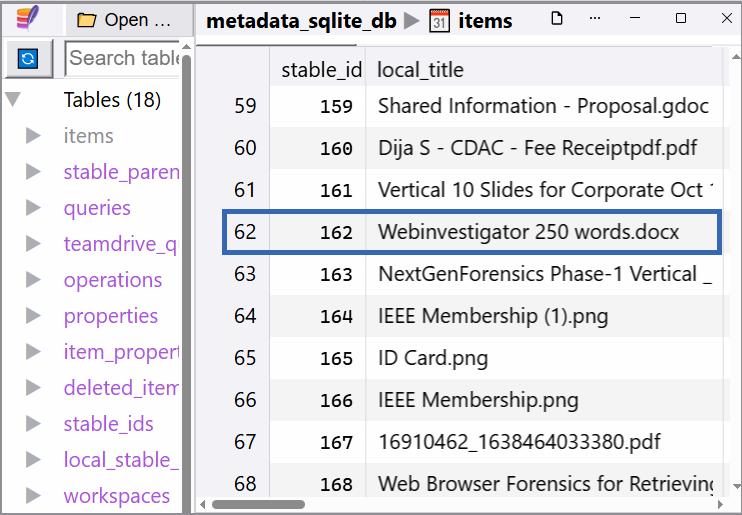
Fig -4:Uploaded/DownloadedFilesusingtheDriveFS
Oncetheuseraccountshavebeenidentified,thenextstepis to extract information about the files uploaded or downloadedthroughthelocallyinstalledGoogleDriveApp (DriveFS).Thisisdonebyexaminingthemetadata_sqlite_db file stored locally. Within this database, the “items” table containsthenamesanddetailsofallfilesthatwereuploaded ordownloadedusingDriveFSasshowninFig-4.TheSQLite database for each user is located in a separate folder, for example:
C:\Users\Admin\AppData\Local\Google\DriveFS\1053433 02674712277748.
This structure shows that DriveFS creates an individual folder for each user account, named using the user’s persistable_token(GAIAID).Therefore,eachaccount’sfile activitycanbefoundinitsrespectivemetadata_sqlite_dbfile underthatfolder.Byanalyzingthe“items”tablewithineach user’sDriveFSdirectory,investigatorscanclearlyseparate and attribute Google Drive activities to specific email accounts. This becomes a critical step in accurately identifyingtheactualsuspectinacybercrimeinvestigation.
2.6 Step by Step Methodology to extract the Google Drive Activities
The steps below describe the process of identifying and correlating Google Drive activities by examining artifacts stored in web browsers and the Google Drive desktop applicationonWindowsOSSystems
Step1:Collectbrowserartifacts
Step2:ExtractallGmailIDs
Step3:ExtractfiledetailsandDriveURLs
Step4:CollectDriveFSlogs
Step5:RetrieveaccountdetailsfromDriveFSlogs
Step6:ExtractfiledetailsfromDriveFSmetadata
Step 7: Correlate browser artifacts with Drive FS data usingthe64-bituniqueGAIA-IDandpersistable-token.
Cloud and browser forensic investigations come with several challenges, such as the use of incognito modes, manual cookie or history deletion, browser profile resets, multiple simultaneous account logins, VPN-based identity masking,andeventamperingwithDriveFSdirectories[1], [3],[6],[8].InGoogleDriveforensicsonWindowssystems, one of the biggest difficulties is the inconsistency and volatilityofbrowser-generatedartifacts.Modernbrowsers frequently change how they store information whether through updated SQLite schemas, altered cookie management,orredesignedIndexedDBstructures which directly impacts the reliability and stability of forensic extraction. Moreover, users can deliberately or unintentionallyeraseevidencebyclearingbrowsingdataor by using private browsing modes, which removes or suppressescrucialentriessuchashistorylogs,cookies,and autofill records. Differences among Chromium-based browsersaddyetanotherlayerofcomplexity:eventhough manyofthemsharesimilarfoundations,browserslikeUC BrowserandYandexexhibitdistinctstoragebehaviorsand retain artifacts differently. Because of these variations, investigatorscannotalwaysrelyonbrowserartifactsalone to reconstruct a complete and accurate picture of Google Driveactivity.
Future work should also look into recovering artifacts from volatile, cloud-linked sources such as RAM captures, whichmaycontaintemporaryauthenticationdataortraces of recent Google Drive activity. Expanding the analysis to mobileplatformslikeAndroidandiOSisanotherimportant direction, as Google Drive is widely used on smartphones andtheartifactsstoredonthesedevicesdiffergreatlyfrom thosefoundonWindowssystems.Anothervaluableareaof researchisexamininghowdeletedorpartiallysynchronized itemscanberecoveredfromDriveFSinternals,sincethese remnantsmaystillholdusefulinvestigativeinformation.In addition, developing advanced forensic tools that can reconstructpartialordeletedartifactsthroughunallocated diskspaceandslackspaceanalysiswouldgreatlystrengthen evidence recovery especially in cases where users have intentionally tried to hide their actions. Such tools would help investigators recover traces that traditional methods might miss, ultimately improving the accuracy and effectivenessofGoogleDriveforensicinvestigations.
Thisresearchpaperpresentsaunifiedandpractical methodology for identifying Gmail accounts and reconstructingGoogleDriveactivitybycorrelatingbrowser artifacts with DriveFS metadata. The study demonstrates
International Research Journal of Engineering and Technology (IRJET) e-ISSN: 2395-0056
Volume: 12 Issue: 12 | Dec 2025 www.irjet.net p-ISSN: 2395-0072
that Google Drive interactions carried out on Windows systems leave behind a substantial collection of forensic tracesinbothwebbrowsersandtheGoogleDriveDesktop Application. Key details such as Drive URLs, file names, timestamps,andmostimportantly,theuser’sidentity(email address, profile information, and GAIA ID) can be successfully recovered from locally stored browser databases, JSON files, and DriveFS logs. Through detailed analysis of SQLite databases, configuration files, and metadata caches, investigators can accurately reconstruct upload, download, and file-access events, even when multipleaccountsareinvolvedonthesamemachine.
The use of the GAIA ID and the DriveFS persistable_token provides a powerful correlation mechanismforreliablylinkingbrowser-baseduseractivity with DriveFS-level evidence, enabling precise user attribution.Thestep-by-stepmethodologyintroducedinthis studyequipsinvestigatorswithastructuredandrepeatable approach to determine exactly which Gmail account performed specific Google Drive operations. Overall, the findingshighlightthestrongforensicvalueofbothbrowser artifacts and DriveFS data in cybercrime cases involving cloud storage misuse. By offering clear extraction procedures and dependable correlation strategies, this research enhances the effectiveness of digital forensic investigations on Windows systems and contributes meaningfullytothebroaderfieldofcloudforensics.
[1]S.Chung,R.S.Humphries,andA.Clark,“CloudStorage Forensics:ASurveyofIssuesandApproaches,”Digital Investigation, vol. 44, pp. 1–15,Mar. 2023, doi: 10.1016/j.diin.2023.301208.
[2] M. Y. Wong and G. Brown, “Forensic Examination of GoogleDriveFileSynchronizationArtifactsinWindows 10,”ForensicScienceInternational:DigitalInvestigation, vol. 39, Jun. 2024, pp. 301–315, doi:10.1016/j.fsidi.2024.300152.
[1] A. Ahmed and T. Kechadi, “A Forensic Analysis of Browser-Based Artifacts for Detecting Online Service Abuse,” Computers & Security, vol. 124, pp. 102–118, Feb.2025,doi:10.1016/j.cose.2025.103322.
[2] L.Ruiz,“ForensicRelevanceofGoogleAccountSession CookiesacrossChromiumBrowsers,”JournalofDigital Forensics, Security and Law, vol. 18, no. 2, pp. 55–75, 2023.
[3] S. Dija, “Browser Forensics of Chromium-Based Web BrowsersinWindowsSystemsInternationalResearch JournalofEngineeringandTechnology(IRJET),vol.10, Issue:10,Nov2024.
[4] J.D.GrimesandP.McCarthy,“ResidualArtifactsofCloud Storage Apps on Windows Systems,” Journal of Cyber
Forensics and Information Security, vol. 13, no. 1, pp. 21–46,2024.
[5] A. Qureshi and D. Karabiyik, “An In-depth Forensic AnalysisofChromium-basedBrowserAutofillArtifacts,” InformationSecurityJournal,vol.33,no.6,pp.212–228, 2024,doi:10.1080/19393555.2024.1001159.
[6] P. Mahajan, “Forensic Recovery of Deleted SQLite RecordsfromBrowserDatabases,”IEEETransactionson InformationForensicsandSecurity,vol.19,pp.4601–4615,Dec.2024,doi:10.1109/TIFS.2024.3378251.
[7] A. R. Alanzi and F. Saleh, “Forensic Investigation of Multi-AccountGoogleLoginArtifactsonWindowsOS,” Journal ofDigital Forensics, SecurityandLaw,vol.19, no.3,pp.10–32,2024.