| LET’S TALK PEDAGOGY
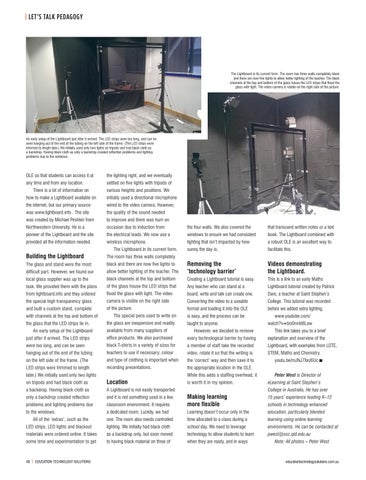
The Lightboard in its current form. The room has three walls completely black and there are now five lights to allow better lighting of the teacher. The black channels at the top and bottom of the glass house the LED strips that flood the glass with light. The video camera is visible on the right side of the picture.
An early setup of the Lightboard just after it arrived. The LED strips were too long, and can be seen hanging out of the end of the tubing on the left side of the frame. (The LED strips were trimmed to length later.) We initially used only two lights on tripods and had black cloth as a backdrop. Having black cloth as only a backdrop created reflection problems and lighting problems due to the windows.
OLE so that students can access it at
the lighting right, and we eventually
any time and from any location.
settled on five lights with tripods of
There is a lot of information on
various heights and positions. We
how to make a Lightboard available on
initially used a directional microphone
the internet, but our primary source
wired to the video camera. However,
was www.lightboard.info . The site
the quality of the sound needed
was created by Michael Peshkin from
to improve and there was hum on
Northwestern University. He is a
occasion due to induction from
the four walls. We also covered the
that transcend written notes or a text
pioneer of the Lightboard and the site
the electrical leads. We now use a
windows to ensure we had consistent
book. The Lightboard combined with
provided all the information needed.
wireless microphone.
lighting that isn’t impacted by how
a robust OLE is an excellent way to
sunny the day is.
facilitate this.
The Lightboard in its current form.
Building the Lightboard
The room has three walls completely
The glass and stand were the most
black and there are now five lights to
difficult part. However, we found our
allow better lighting of the teacher. The
Removing the ‘technology barrier’
Videos demonstrating the Lightboard.
local glass supplier was up to the
black channels at the top and bottom
Creating a Lightboard tutorial is easy.
This is a link to an early Maths
task. We provided them with the plans
of the glass house the LED strips that
Any teacher who can stand at a
Lightboard tutorial created by Patrick
from lightboard.info and they ordered
flood the glass with light. The video
board, write and talk can create one.
Dare, a teacher at Saint Stephen’s
the special high transparency glass
camera is visible on the right side
Converting the video to a useable
College. This tutorial was recorded
and built a custom stand, complete
of the picture.
format and loading it into the OLE
before we added extra lighting.
with channels at the top and bottom of the glass that the LED strips lie in. An early setup of the Lightboard
The special pens used to write on the glass are inexpensive and readily available from many suppliers of
is easy, and the process can be taught to anyone. However, we decided to remove
www.youtube.com/ watch?v=bo0mrkt6Lew This link takes you to a brief
just after it arrived. The LED strips
office products. We also purchased
every technological barrier by having
explanation and overview of the
were too long, and can be seen
black T-shirts in a variety of sizes for
a member of staff take the recorded
Lightboard, with examples from LOTE,
hanging out of the end of the tubing
teachers to use if necessary; colour
video, rotate it so that the writing is
STEM, Maths and Chemistry.
on the left side of the frame. (The
and type of clothing is important when
the ‘correct’ way and then save it to
LED strips were trimmed to length
recording presentations.
the appropriate location in the OLE.
later.) We initially used only two lights
While this adds a staffing overhead, it
on tripods and had black cloth as
Location
a backdrop. Having black cloth as
A Lightboard is not easily transported
only a backdrop created reflection
and it is not something used in a live
problems and lighting problems due to the windows.
is worth it in my opinion.
youtu.be/mJNJ7Xez6Uc n Peter West is Director of eLearning at Saint Stephen’s College in Australia. He has over 15 years’ experience leading K–12
classroom environment. It requires
Making learning more flexible
a dedicated room. Luckily, we had
Learning doesn’t occur only in the
education, particularly blended
one. The room also needs controlled
time allocated to a class during a
learning using online learning
LED strips, LED lights and blackout
lighting. We initially had black cloth
school day. We need to leverage
environments. He can be contacted at
materials were ordered online. It takes
as a backdrop only, but soon moved
technology to allow students to learn
pwest@ssc.qld.edu.au
some time and experimentation to get
to having black material on three of
when they are ready, and in ways
All of the ‘extras’, such as the
48 | EDUCATION TECHNOLOGY SOLUTIONS
046-049_ETS79 Pedagogy.indd 48
schools in technology enhanced
Note: All photos – Peter West
educationtechnologysolutions.com.au
19/07/2017 11:37 am