1 minute read
System Block Diagram


After knowing your computer features, let us show you around your new computer.
Front View
No. Icon Item Description
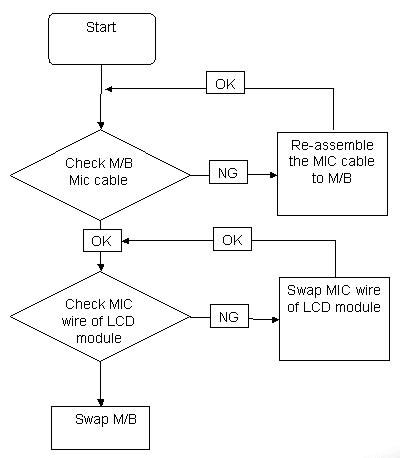
1 Microphone Internal microphone for sound recording.
2 Integrated webcam
Web camera for video communication (for selected models). 3 Display screen Also called Liquid-Crystal Display (LCD), displays computer output. 4 Power button Turns the computer on and off.
5 Wireless LAN communication button/indicator
Enables/disables the wireless LAN function. Indicates the status of wireless LAN communication. 6 Speakers Left and right speakers deliver stereo audio output. 7 Keyboard For entering data into your computer. 8 Palmrest Comfortable support area for your hands when you use the computer.