




The GSEOK website has lots of tools to support the troop and girls in the Girl Scout Cookie Program. Check your email and messages within eBudde to stay in the know for Cookie Season updates. Contact GSEOK Customer Care: customercare@gseok.org 918-749-2551

New “help” bubbles for quick access to tips and info within the platform.
Link to YouTube tutorials on Little Brownie’s channel. Email customercare@gseok.org.
eBudde™ password
Refer to the Digital Cookie Training Index on the GSEOK website. There are 2 versions, one for volunteers and one for caregivers. Use the Help section in Digital Cookie. There are sections for three different groups.
Parents and Girl Scouts Volunteers Customers

After the expenses of the program are covered, the remaining money is used for Girl Scout rewards, troop proceeds and council proceeds. All cookie proceeds stay in Eastern Oklahoma to serve the Girl Scouts in our community.
Troop proceeds are used to fund activities planned by the troop.
Troops earn 82 cents per package to cover the cost of troop supplies and activities.
Cadette, Senior and Ambassador troops may opt out of rewards in exchange for receiving additional troop proceeds for a total of 87 cents per package.
Council proceeds fund events for Girl Scouts, leader training, support to members and maintenance of council property and program equipment. Every package of cookies that is sold, helps keep costs down for troops to attend council events and to use council properties.
The ACH process is used to settle the balance due for cookies between the troop and the council.
February 18 - ACH #1
March 30 - ACH #2
Every troop must have an ACH Authorization form submitted to council.
Troops must ensure that they have funds in their troop account to cover the ACH draft.
The amount due will be listed in eBudde™ on the Sales Report.
ACH #1 is based upon the initial order. Troops with lots of Digital Cookie sales may not have a payment due for ACH #1.
Troops unable to make a full payment for ACH #1 will not be able to get more cookies until this balance is paid.
ACH #2 the final balance due.
If the troop has an issue, they can request an adjustment to their ACH by completing the online ACH Adjustment Request form at least 2 days in advance of the ACH.


The troop is financially responsible for all the cookies that they receive so tracking inventory is very important. Cookie inventory is tracked in eBudde™ and girl inventory will be reflected in Digital Cookie based upon information from eBudde™. Keep your troop records up to date and be sure that they match all paper receipts.
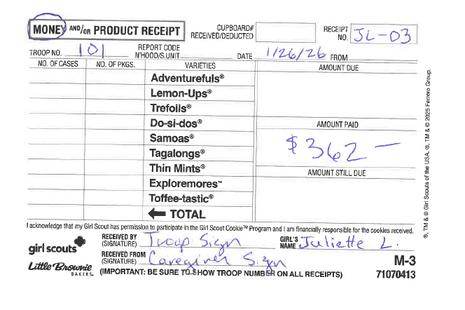
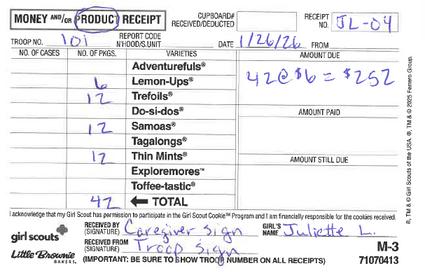
Every paper receipt should have a matching transaction in eBudde™. Add the date (and other notes) in the comment section to make it easy to connect each transaction to the paper receipt.
In the example below:
Line 3 is for a payment made on January 26 and matches the top receipt.
Line 4 is for additional cookies on January 26 and matches the bottom receipt.

If your troop keeps up with entering receipts into eBudde™, your physical inventory should match what you see in eBudde™. This helps you know what cookies you need to fulfill girl requests or to prepare for a booth sale.
The example below is from the bottom of the page in the Girl Orders Tab.
Top row labeled “Girl Totals” shows cookies given to Girl Scouts
Middle row labeled “Troop Order” shows cookies given to troop plus and VGOC donation cookies.
Bottom row labeled “Difference” shows cookies left in troop inventory
The troop physical inventory should match the bottom “Difference” row. If there is an error:
Double check all transactions
ASK FOR HELP


During the sale you may need to make adjustments to your troop inventory so that the troop has a good variety mix. eBudde™ has tools to help you with this.
Cookie cupboards have cookies that troops can order and pick up as needed.
There are cupboards located in several places throughout the council so check the locations near you to find the best option for your troop. These cupboards are run by volunteers who want to support your troop so it is important to check the schedule to see when they are open and available for orders. Cupboards can also: replace damaged cookies for your troop. accept returns from the initial order as allowed. trade varieties of full unopened cases in good condition as inventory allows.
The Cookie Exchange allows troops to post how many extra packages they have of each variety.
Troops needing cookies can use this tool to reach out and offer to take the cookies.
Troops will need to add a transaction in eBudde™ to move them from troop to troop.
Troops who post cookies should update their post once the cookies are claimed.
Refer to the Service Unit Locations chart to find troops close to you.
Aphchi
Cherokee
Cherokee Strip
Crosstimbers
Lakeland
Lake-Wood
Little River
Magnolia
Oak Leaf
Osage
Pine Mountain
Prairie’s Edge
River Crossing
Riversbend
Route 66
Scissortail
Spartan Pass
Three Feathers
Tiak Starr
Tulledega
Whispering Oaks
Will Rogers
Pontotoc, Seminole, Atoka & Coal counties
Tahlequah - Cherokee county
Ponca City - Kay county & part of Osage
Bartlesville - Washington county & part of Osage
Pryor - Mayes county
Wagoner, Muskogee & McIntosh counties
Idabel, Broken Bow - McCurtain county
Durant - Bryan county
Tulsa
Owasso, Collinsville & Skiatook
Antlers - Pushmataha & Hugo counties
Stillwater - Payne, Pawnee & Noble counties
Sand Springs
Jenks
Tulsa
East Tulsa - Union Public Schools
Bixby
Broken Arrow & Coweta
McAlester - Pittsburg & Hughes counties
Okmulgee & Okfuskee counties
Sapulpa - Creek county
Claremore - Rogers & Craig counties
ALL financial donations that a troop receives during the Cookie Program must be applied to either the Council Virtual Gift of Caring (VGOC) or Troop Gift of Caring (TGOC). When a customer makes a donation, they are supporting both a worthy organization who will receive cookies at the end of the sale and Girl Scouts at the same time. Donations to Gift of Caring helps the troop manage remaining inventory at the end of the sale.

Choose a group to receive donated cookies. Examples include firefighters, police, or a local non-profit.
Enter this organization under the GOC tab in eBudde™.
Prepare the troop to share this option with customers.
Tracking donations allows the troop some cushion to cover cookies that may be leftover at the end of the sale. Apply donation money to the extra cookies in the troop inventory.
Use the Girl Orders tab in eBudde™ to enter packages for individual girls in the TGOC column.
Be sure to record the payment too.
If your troop has more donation money than cookies, you have two options: Get additional cookies to fill your TGOC donation need. Apply the remaining donations to VGOC sales.
Deliver the cookies to the chosen group.
Use the Gift of Caring Donation Agreement, form #310 to clarify that the cookies can’t be resold, traded, used for a fundraiser, etc.
The troop should provide a copy of this form with your financial report.
When a customer donates through Digital Cookie, it will automatically update under the VGOC column in eBudde™. The troop can use the VGOC column for donations. Troops should promote this option using the flyer provided from their Service Unit and available online.
VGOC adds credit to the troop for packages sold.
VGOC affects troop payments and is reflected in the total packages sold.
VGOC does not add physical inventory to the troop.
The troop doesn’t handle or distribute VGOC cookies.
The council donates the cookies left in the cupboards to Blue Star Mothers and other local non-profits.
The VGOC program allows the council to have cookies available in the cupboards.

If your troop has more donation money than cookies, you can record the sales using VGOC.
Use the Girl Orders tab in eBudde™ to enter packages for individual girls in the VGOC column.
Be sure to record the payment too.
Both the Girl Scout and the troop can earn rewards for these packages.
Girl Scouts who sell at least 12 VGOC packages will earn a reward. Troops with 100+ total VGOC packages will earn a one time discount in the Girl Scout Store in May.
We moved our start date to be in line with the changes at the national level. Girls and troops can begin taking orders on January 6 when GSUSA is announcing the sale and promoting the new cookie, Exploremores!
Push notifications in the Digital Cookie app!
Streamlined check out flow. More information available to locate the correct booth site.
Expanded payment methods. Cash sales tracking.

New “help” bubbles for quick access to tips and info within the platform.
Link to YouTube tutorials on Little Brownie’s channel.
Improved Digital Cookie connections. Cookie colors added to dashboards and Girl Orders tab.
Updates to add Exploremores where S’mores were last year.
Troops in the Tulsa Metro area must select a delivery station after they submit their troop order.
If your troop is picking up at the warehouse, you can select your time slot now too.
Delivery station names have been updated for this year.
If all Girl Scouts are accompanied by their own caregiver, the adults don’t have to be registered and background checked.
If any Girl Scout attends without a caregiver, there must be at least two adults who are registered and background checked.