
OUR WAYS OF WORKING 2023
Welcome to Folk’s Ways of Working guide.
It’s an in-depth look at ways of working across a number of agency departments.
Process underpins these ways of working. Following process makes your job easier. It makes mistakes harder to make. It means you spend less time on fixing problems, and more time refining your craft and focussing on the bigger picture and your clients. It makes us better at what we do.
This document also gives you an overview of important administration details from how to book holidays, fill in timesheets, to how to set up your VPN to work remotely.
That’s all folks, happy reading!
Routefinder is our agency creative process –a framework to guide you on the key stages of creative ideation from client brief through to final output.

Routefinder is our agency creative process – a framework to guide you on the key stages of creative ideation from client brief through to final output.
• KICK OFF SCHEDULED & SLACK GROUP SET UP: ideally before client brief lands - Client service to schedule kick off meeting and set up project slack group relevant team members included. CS to update Resource Director of incoming brief
• CLIENT BRIEF: shared by CS into slack group and all team members asked to read in advance of internal kick off meeting where it will be discussed and questioned as a multi departmental team
• HRS FOR COST ESTIMATE: CS to then set up estimate on aura and load project plan onto Hive based on estimated hours at this stage. CS to update RD at this point on key timings and team to be assigned once project plan reviewed by RD. Please see Hive ways of working instructions on page 31
• CPA: CPA from Hive project plan to be issued to client for review. Social brainstorm session to be included
• CREATIVE BRIEF: developed by planning as per template and approved by CD in advance. Ensure clear outline of social requirements included. Confirm social budget with clients upfront
• PRODUCTION BUDGET/TIMINGS: clarified by CS based on client budget/live date then shared in slack and included on internal creative briefing document
• MEDIA STRATEGY: client service to liaise with media agency to see if they have been briefed/have indicative media strategy and if not, when this will be ready to share
• AMBITION: for the project set and creative opportunity scrutinised by project team
• QUESTIONS: on client brief collated from all project team members by CS and shared with client
• CLIENT TOUCHES: agreement between planning/CS/Creative project leads as to whether a separate/prior strategy presentation needed before presenting initial creative work
• KEY MILESTONES: internal timings and key client milestones for project to be agreed by project team at kick off and updated in real time on Hive
• HOURS: that CS are quoting client for each dept to be discussed with dept leads and shared with core team once agreed
• CLIENT STRATEGY PRESENTATION: if project team agreed at the kick off to present strategy and creative brief with client, this is to be shared for client input/approval at this stage before moving into creative development
• EXPECTATION FOR CREATIVE PRESENTATION: discussed and agreed with project team at this stage before moving into creative development (e.g number of ideas & level of execution required)
• DATES: agreed with team for internal check ins and client presentation – all dates/times to be scheduled by CS at this stage so time held in all diaries and kept up to date on Hive
• CAMPAIGN IDEAS: multiple ideas developed that tackle the brief in different ways
• TISSUE EXECUTIONS: 2-3 indicative executions for each idea to bring to life
• CD REVIEW: before ideas shared with project team internally, creative team to ensure CD has reviewed in advance
• EVALUATE: Ensure creative is reviewed against agency creative evaluation questions on page x
• ADDITIONAL STRATEGY: based on chosen idea, discuss whether additional comms planning or social and content strategy required to help further creative development and sell the work into the client
• EXECUTIONS: finessed against key media examples to best sell the impact of each idea
• REAL IRELAND FRAMEWORK: audit of executions against “Real Ireland Framework” to ensure that our work is culturally appropriate to modern Ireland – done by Planning/Creative/CS leads on project team
• SCOPING: executions shared with production to ensure budget and timing considerations taken into account before client presentation. CS to co ordinate with production departments and creative to ensure required ballpark scoping is done in advance of client presentation
• CAMPAIGN SELL: Creative/Planning/CS leads to collaborate on most inspiring way to sell ideas for the particular client(s). The sell is everything
• CAMPAIGN SUMMARY: summarising the insight, idea and mechanics of the campaign roll out on one slide for the client
• CAMPAIGN CANVAS: if required – message breakdown per channel and KPIS for each if relevant
• COST/TIMINGS: agreement from production depts that executions being presented can be delivered within budget and on time, or agreement from core team to go in with ‘gold/silver/bronze’ budget options
 CLICK HERE TO VIEW A TRAINING VIDEO ON ROUTEFINDER!
• All client briefs must be written. Client service must ensure we do not accept briefs over the phone or in person without it being written out. If a client doesn’t have their own template, please ask them to fill out ours.
• All client briefings must have a strategist present and creative lead at the session. This is to ensure we unpack the full context, ambitions and understanding as part of the briefing and challenge direction before being shared with the broader team.

Once a brief is received, receipt is acknowledged straight away and next steps are confirmed to the client within 24 hours. Please remind client that Creative Resource meetings are scheduled for Mondays and once this has been processed we can revert with an update.
In some cases the client will have given heads up of incoming brief, in that case steps 2 and 3 can be completed in advance of brief landing.
You create a unique job number under the Brand Pillar for example Vodafone, = V51 on Aura. This job number is then used on all project correspondence, including Slack groups and email subject lines. Please note the job number needs to be approved by Finance in order for time to be able to be submitted, please only share job number once approved.
• Set up a Slack channel. Go to ‘Create Channel’; name your channel, e.g. vodafone_ sponsorship; press create; and invite core project team to the channel.
• Add in team that will be working on this brief. Creative resource will be confirmed by the resource director, see step 5.
• Slack description –This will be your job number.
On our server we already have the CS folder set up – please duplicate file and rename file as follows
– Job number – Job Name – Date.
All files are sent internally by sending details of the file path rather than via attachment.
All correspondence internally in relation to the job is done via a dedicated slack channel.
Note: Creating a file path is easy to do. Simply click on ‘hyperlink’ on your email tool bar and drag your file into the hyperlink address box. Similarly, when linking to an external web address, simply copy the link into this address box. This guarantees accurate filing for the life of the job, whilst also keeping email inbox file size to a minimum where email is being used.
Ensure brief is read and interrogated by relevant client service team members. Share the brief with the Planning Lead and Creative Director on the business. Where feasible organise a meeting with the client to discuss the brief in detail and table questions on the brief. It is best practice to ensure we receive written briefs from clients, not over the phone. Please ensure from the outset the following is detailed in the client brief:
(Note: All briefs should have a budget outlined, if not please ask the client straight away).
Brand Context
Brand Ambition
Objectives – Business, Marketing, Comms
The Task – what does this project need to deliver
Target audience
Insight
KPI’s All deliverables
Timings
Budget
Discuss with the planning and creative lead if we should seek this clarity pre client meeting or go ahead with the client meeting and table questions at this stage.
Attendance at client brief meeting – it is preferable to ensure the Client Service Lead, Planning Lead and Creative Director are in attendance at this initial client brief meeting.
• Planning team will be confirmed by the planning director. Creative team will be confirmed by the resource director working in conjuction with the creative director on the piece of business.
• Creative Resource –Once the brief has been interrogated, set up an estimate for the job on Aura (instructions to follow later in the document). Use these hours as the basis of your timings on your project plan on HIve. Once your project plan has been created the resource director will confirm the creative team for the project.
In addition to this you must attend your client weekly WIP’s with the resource director.
• Once full team is confirmed please add team to Slack channel.
Once your project plan has been created on Hive, you export your timing plan to a PDF to share with the client or issue direct link to CPA to client.
Note, before sending, engage with production leads re; topline timings for delivery of known production requirements. It will be a rough estimate in the absence of creative route and in a lot of cases media plan but clients will require a topline indication of timings.
Ensure social brainstorm session is inclued in your CPA.
Ensure scope of work agreed with client before progressing to development.
• Please ensure that you stay in touch with all agencies depending on the size of the brief. Media, PR, Activation. Ensure there are clear roles and responsibilities outlined and budget allocated to each partner agency. If this is not clear liaise with client to seek this clarity. Liaise with media agency if relevant to discuss timings and expected delivery of media plan and strategy.
CLICK HERE FOR A SIMPLE VIDEO TUTORIAL ON SETTING UP A JOB NUMBER AND SLACK CHANNEL
AND NEED TO KNOW HOW TO OPEN A JOB BAG?? JUST CLICK HERE

At the internal kick off, the core team will attend the session and discuss with the team how to approach the brief. At this point, our goal is to determine any ‘unknowns’ – anything that stands in the way of answering the question.

For example:
• Do we know where growth will come from?
If not, can we do research?
• Do we know enough about the audience?
• Do we know the barriers to growth?
• Are we familiar with previous campaigns?
• How did previous campaigns perform?
• What motivates the client?
• What do they hate?
• What brands does the client admire?
• What work is the client most likely to buy?
Any background information client service have on this issue will help us with our client Q&A session, to ensure we’re leaning on all knowledge on the team. As Client Service is the expert on the brand and the client, please bring all relevant information you have.
SHARE CLIENT BRIEF IN SLACK CHANNEL
Once the team is approved by resource director, CS to share client brief in Slack group and all team members asked to read in advance of internal kick off meeting where it will be discussed and questioned as a multi departmental team. Then set up meeting with core team members from Client Service, Planning and Creative to discuss the brief in detail – align on creative ambition and opportunity for this brief. Additional questions will most likely arise from this session – CS to collate and issue to client.
Agree whether any pre selling contact required before client sees the creative work – for example a creative inspiration session/tissue session might be suggested to get an understanding of the type of work in this space the client is excited by.
Key milestones and internal timings for the project for the project to be agreed and circulated on Slack – i.e. timing of all the meetings that bring you to that first client presentation.
Share CPA from Hive link with team in slack channel. Agree timing with team for first client presentation.
At this stage it is important to draw up a rough estimate for the client. Once approach is agreed by all, review cost estimate again and ensure all key stages are costed for.
• At this stage it is important to draw up a rough estimate for the client. A general rule of thumb is to issue a cost estimate 24–48 hours after briefing as long as deliverables are clear from the client and there is no significant costs scoping that is required that may delay the process.
More about this in the finance section but you caveat the estimate with a line – this is an estimate only, once approach and deliverables are confirmed we will send through a final cost for your approval.
• Once cost is approved by client we must then request that a PO is raised. Please note no work should commence on a job until a PO is received. This is particularly important when third parties are involved. General rule of thumb, no money to leave until PO received.
If required Folk will take the lead in organising interagency meetings to outline who is responsible for what, sharing WIP presentations and lastly making sure that we have a consolidated deck when we come to scheduling Response to Brief 1.
Note:
It is important to note the role of planning during these stages. The role of planning is to listen to people. When we listen, we can define the audience issue communications needs to address. In Folk, the strategic planning team are the voice of the consumer throughout the routefinder process. They take the client brief – full of brand and business objectives – and create a ‘Creative Brief’ which sets human objectives. This means all our work is rooted in how consumers think and feel, not just ‘what brands want to say about themselves’. That would make for very boring and frankly, ineffective advertising. Planning collaborates with Client Service and Creative Teams throughout the process to keep the consumer at the heart of all conversations and to ensure that the work we make is fit for purpose – that it will impact our clients brand and business. That means that we’re saying the right thing in the right place, at the right time.
INITIAL CPA PROVIDED TO COVER MILESTONE BY THIS STAGE IN THE PROCESS! CS! ASK YOURSELF: HAVE YOU ESTIMATED COST FOR THE STRATEGY AND DEVELOPMENTCREATIVE BEFORE MOVING ON?


• To deliver a compelling, consumer based strategy, our planning team will explore the client issue through our ‘inspiration compass’.
• This is planning’s main role.
• Within an agreed timeframe, planning will develop a Creative Brief that translates the client objectives into consumer objectives and through research and insight (inspiration compass), identify how we will inspire growth.
• A Creative Brief is simply strategy on a page. It details:
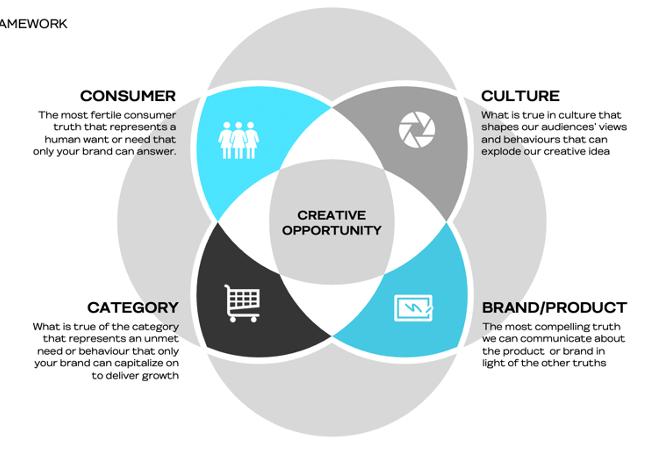
• Who we’re talking to (Audience)
• What stands in the way of growth (Problem)
• How we’re going to connect with them (Proposition)

• Where we’re going to do it (Channel)
• Once the planner has developed the creative brief, it is presented internally to the project team for input. Through collaboration, it is tweaked and finalised before being presented to the client.
• Depending on the scale of the project or the brief, we may develop more than one potential solution so at times, you will have more than one strategy for the client to choose from, resulting in more than one creative brief.
• Where possible, we want client’s to sign off on the creative brief. This results in a more aligned team and it allows us to prepare the client for the type of work they are going to see in creative development.
• A planner will develop a presentation that introduces the insights that led to the final strategy and the final creative brief to the client. The creative director working on the project must attend this session.
• Once signed off by the client, we can brief Creative Teams.
Note hours cover time for strategic planning lead and core agency team to take client brief, interrogate problem to be solves and objectives, collate trends and insights under the themes of Consumer/Culture/Brand/Category, and develop creative brief. Includes time for 1 x strategy check in with client before moving into creative development. Assumes no requirement for primary quantitative or qualitative research. If primary research required, agency hours and third party costs to be scoped accordingly in consultation with the Planning Director overseeing the project.
• Doing this exploration allows us to uncover the fundamentals of our strategy. The planner’s role is then to distill all of the information into one single strategy; a Creative Brief.

• On bigger projects or pitches, we will sometimes do an interim session with the internal team, sharing what we have found and agreeing on the direction for the Creative Brief together. However, unless the planner requests, assume this is not happening.
• There may also be a requirement during this phase for an agency/client strategic workshop or tissue session if timing and budget allow. Discuss with the planning lead.
• The output of this stage is the creative brief which must be approved by the CD. If it is agreed earlier in the process to present the strategy and creative brief with client, this is to be shared for client input/approval at this stage before moving into creative development.
REMEMBER TO RECONCILE YOUR JOB HOURS EACH TUESDAY AND LET THE CORE TEAM AND CLIENT SERVICE DIRECTOR KNOW HOURS TO DATE

• To kick off creative development, the planner and CS will set up a creative briefing session.
• Here, the planner will share the full creative brief.
• For creative briefings, it can be effective to think outside the box. Sometimes, the planner will host a briefing outside the office, host a talk, visit a shop or invite a consumer in – all with the goal of enlivening the brief and making the ‘issue’ at the core of the brief as real as possible. Support and collaborate with the planner on this –the better the brief, the better the work!
• The creative team will then commence the creative ideation process. Planning and creative will meet throughout the creative development process outside of formal check ins. Planning will attend formal check ins.


The creative team will develop multiple ideas that will tackle the brief in different ways.
• Ensure the creative team is briefed in a face-to-face session, with the CD, client service and the planner in attendance. Liaise with the planner in the preparation for this session. Agree if stimulus required – e.g. competitor context, previous campaign material. Agree deliverables for client presentation and number of ideas required.
• Discuss whether social and content strategy or additional comms planning are required at this stage to give further direction to creative.
• In some cases, the relevant production manager should also be present – e.g. the broadcast manager on a brief with a TV component, the social and content campaign director for social engagement etc.
• Expectation for creative presentation discussed and agreed with project team at this stage before moving into creative development.
• Agree dates with team for internal check ins and client presentation – all dates/times to be scheduled by CS after meeting. You will have issued a draft estimate and CPA to the client upon receipt of brief. Continue to liaise with the department leads and if updates can be made to both at this stage update and discuss with client. These are still at draft stage until final creative and outputs agreed.
• Continue to liaise with media agency to see if they have been fully briefed/have indicative media strategy and if not, confirm when it will be ready for review.
Development of 3 creative routes for campaign idea to present to client on agreed date. Presentation will include tissue executions to bring campaign idea to life, but these will be proof of concept only and not fully developed scripts/visuals/copy. If a second presentation is required at this stage, hours to be rescoped accordingly. Assume no third party costs required at this stage for likes of storyboard illustrations or mood films. If required, this will be scoped accordingly along with agency time to develop. Remember RECONCILE THE HOURS EACH TUESDAY AND LET THE CD KNOW HOURS TO DATE AND ENSURE PROJECT PLAN ON HIVE IS UP TO DATE.

Once the creative idea is agreed internally, the core team will support the sell of the creative idea by doing some or all of the following:

• Warm the client up to the work by providing examples of other campaigns with a similar tone/objective/audience. This is done by collating a playlist of work through ‘Love the Work’ which can be accessed for 24 hours.
• Develop storytelling to revisit the agreed strategy in an interesting way.
• Set the consumer, cultural, brand or category context.
• Ensure work is measured against our agency creative evaluation on page 27
• First round tissue session – CS responsible for liaising with full team to get this in the diary. Creative team to get approval of creative territories and adcepts by CD in advance of presentation to core team. Planner on the job will liaise with the creative team in the formation of the adcepts.
• Adcepts that bring the idea to life will be presented at this internal review. Response will be reviewed against the brief and will require input from client service.
• At this stage ensure creative evaluation questions asked - as outlined on page 27. Based on the chosen idea, discuss whether social and content strategy or additional comms planning required for client presentation.
Creative/planning/CS leads to collaborate on most inspiring way to sell ideas for the particular client.
Consider the media plan and channels that will bring the campaign to life in the most compelling way. If joint presentation with media/ PR/activation agencies required ensure regular meetings organised, work and time for each agency in presentation allocated and rehearsals pre client meeting are organised. Cultural audit of work to be considered via our ‘Real Ireland Framework’ prior to client presentation to ensure our work is culturally appropriate to modern Ireland – done by planning, creative and CS leads on team.
Executions shared with production to ensure budget and timing considerations taken into account before client presentation. CS to coordinate with production departments and creative to ensure required ballpark scoping is done in advance of client presentation. Get agreement from production departments that executions being presented can be delivered within budget and on time, or agreement from core team to go in with ‘gold’, ‘silver’ or ‘bronze’ budget options.
CS should also agree with creative all stimulus required for the presentation (scamps, Mac visuals, boards, music tracks, VO samples etc.), and establish who is responsible for sourcing each element prior to client presentation.
Ensure one ‘owner’ of the master deck is assigned to collate input from each department. The first stage is to be presented to the client, complete with agency recommendation and relevant competitor context. Key production considerations will also be given at presentation stage, accompanied by top line costs and timings.
Please ensure the following steps are taken when preparing for this and any client presentation:
1. Schedule a rehearsal with all agency/partner attendees in advance of the meeting. Agree who is introducing the meeting and making introductions, who key speakers are and timing allowance for each individual.
2. If hard copy stimulus required ensure enough time for printing or boarding of materials is allocated.
3. Circulate meeting agenda to client in advance. The agenda should be broken down with time against it for each section, it is extremely important we work to the time allocated for the meeting – our clients are time poor.

4. If meeting in person, do you need to book a room? If so, do we need to arrange breakfast or lunch materials for the meeting? Do you have all IT materials required?
5. If meeting virtually, agree who is sharing their screen. Ensure you log onto meeting at least 5 minutes in advance to ensure link is working, that share screen and sound are working. Have a back up person to share screen in the event of wifi issues. Ensure all
notifications muted if sharing screen. In the main we use Teams or Zoom for client presentations. Some clients will have a preference for one over the other. A Teams link will automatically load on your meeting invite. If you would prefer to use a Zoom account ensure Teams link is removed. If using Zoom please ensure you use a Zoom Pro account, we don’t want to get kicked out of the meeting if the meeting runs over.
6. Once presentation has finished, it is the responsibility of CS to issue a copy of the presentation and any supporting materials, contact report (budget, CPA) to the clients that same day.
7. When attending virtual meetings (both internal and external) ensure that your video is on at all times and you are engaging with the meeting at all times.
1. Is the work presented and laid out in best way possible? What template is best to use? When using the Folk template ensure all fonts loaded on your system and branding is up to date and you are using the most up to date template.
2. Consider who is attending the meeting. Is everyone up to speed with all relevant elements? Do all people /members/ employees attending the meeting have a role in the meeting.
3. Set up – Have we a clear set up, recap of the brief, recap of the KPIs?
4. Are we creating a clear bridge between strategy and creative? Ensure clear summary of the insight, idea and how it works on one slide for the client.
5. Campaign canvas – if required, message breakdown per channel and KPI’s for each if relevant.
6. Can the client take away and easily present to their stakeholders?
7. Next steps – All presentations should have a slide at the end that outlines the topline timings and next steps.
8. Depending on client feedback another round may be needed.

CANWEAFFORDTODO THEEXECUTIONS PRESENTEDBYCREATIVE INTHECLIENTBUDGET?
HAVEWERECONCILED?
HAVESTUDIO, BROADCASTANDDIGITAL BEENAPPRAISED?
Next stage for CS is to agree with the client a date (which is reflected in the CPA) for them to revert with response to the initial presentation. Please request a consolidated response.
There may be requirements at this stage for clarity on key questions, nuances to certain routes which will require clear, concise communication between client service and the client to ensure absolute clarity in the feedback to the creative team.

AE/AM to liaise with Account Director/Business Director in this process –communication and clarity is key and all correspondence and feedback to be captured in job bag and issued in slack channel – this is the job of the AE/AM.
Note: Client service are not expected to simply forward on the amends – amends should be sense checked, and interrogated against wider strategic objectives. Client service have an equally important role as planning and creative in the strategic sell to clients.

• Once the creative idea is signed off by client, the campaign development begins.
• To ensure that the idea is brought fully ‘through the line’ to all touchpoints, the planner will fulfil ‘a connections strategy.’
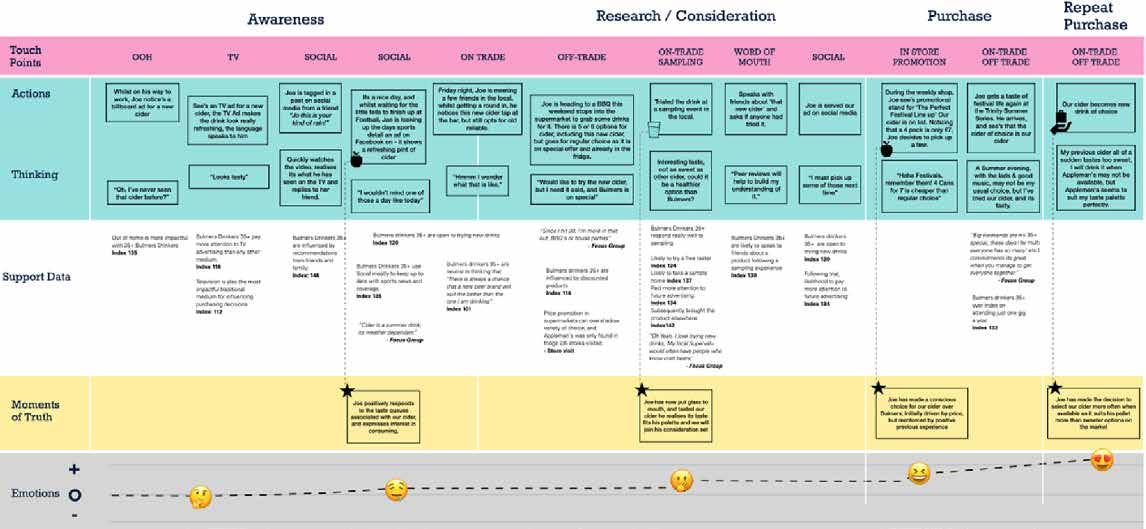
• A connections strategy simply outlines:
• Right message (what are we saying to deliver growth).
• Right place (what channel are we saying it in).
• Right time (the moment of truth when our message will have the most impact).
• Planning have a number of frameworks to communicate this strategy. The planner will determine which one is most appropriate to use and develop. This strategy is informed by:
• Audience insights from primary and secondary research.
• Media insights provided from media agency and media strategy.
• Sales and CX journey data from client.
• Once completed, this is briefed to the creative teams before they progress creative development through the line.
Further campaign canvas templates are available here
• Once the concept is approved the creative team move to development of agreed executions per channel, working with core team to ensure joined up response and communications mapping. Ensure media and other partner agencies involved at each stage and meetings put in diary where required and brand guidelines are followed.
This will then culminate in a 360 creative presentation with all mediums worked through.
In tandem with this 360 presentation, client service to develop full cost estimate in conjunction with department leads. Updated CPA to be supplied in tandem with this.
Once idea is approved, costs and CPA to be approved and the client might need to update their PO at this stage.
Hours to be managed and monitored weekly –as outlined in our finance section on page 41.
Once final approval on the creative concept has been received, the job is progressed into the appropriate studio department (i.e. digital/ broadcast/print/social) via a formal inter- departmental session.
Note: throughout the production process, planning should be consulted as scripts and messaging evolve to ensure they are still answering the consumer need.
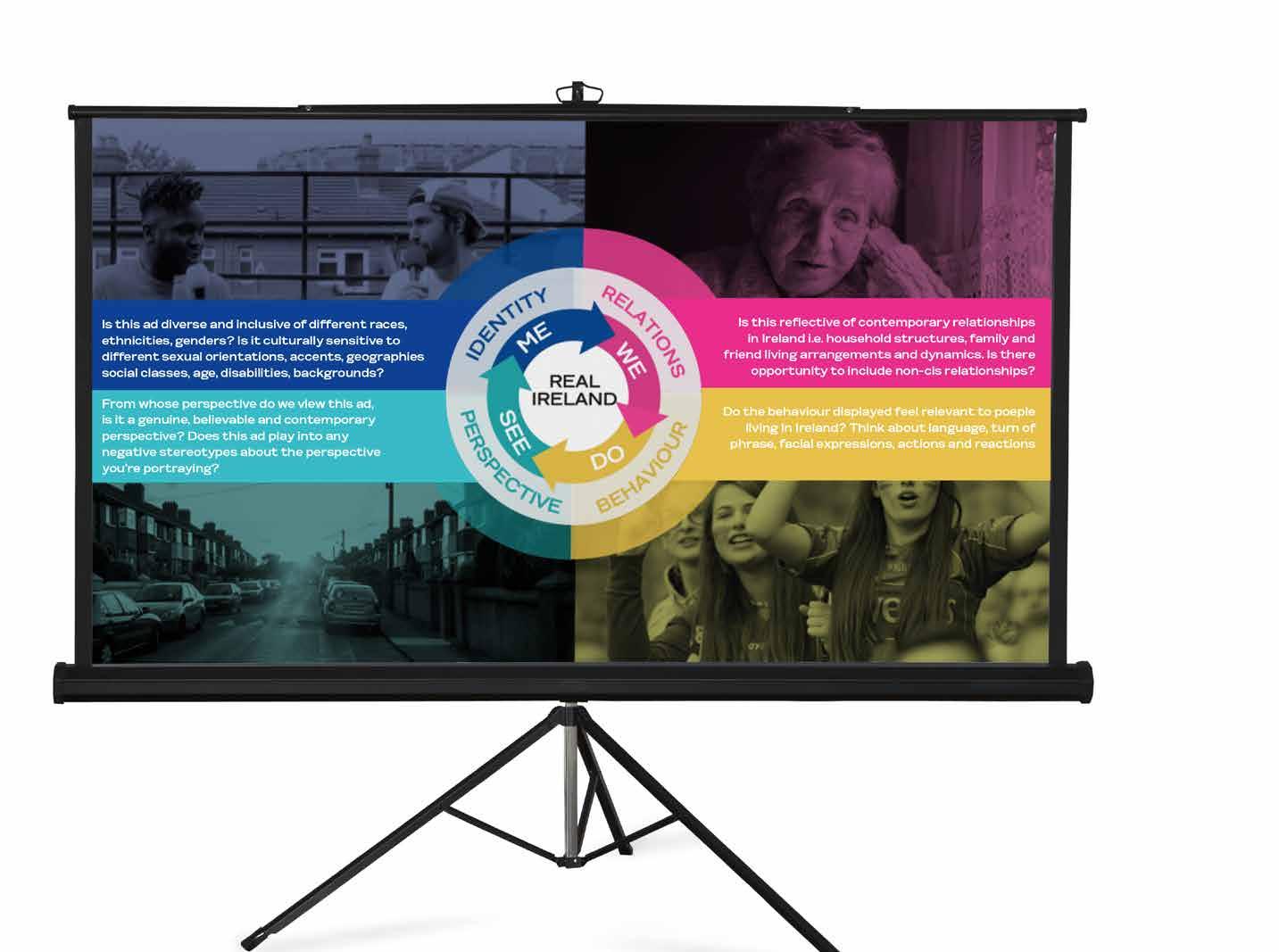
• Real Ireland Framework
• Firstly ensure the real Ireland framework tool is used to ensure we are representing modern Ireland.
• The real Ireland framework provides a list of questions to assess scripts, visuals, casting and language through. We should endeavour for our work to challenge what modern Irish culture looks like in some way.
• This process is led by Client Service and should be used at each stage of creative development, in partnership with production and creative teams.
• Where relevant, it can be used with clients. A planner can present the framework to clients as an explainer and a pre-cursor to any creative discussions. Final production schedule to be agreed with production leads and resource booked in order to meet supply deadlines.
Processes for working with the broadcast/ content/ print and digital departments are illustrated later in this handbook.
Note: Jobs in studio follow a rigid naming convention to ensure accurate versioning and to allow for continuity in the event of leave. This convention is as follows: job number (including client and product code), job name, (as created in Aura), artwork version, and initials of studio art worker/ designer etc, e.g.; -V5106C001234_ iPhone_Sale_ Press_ February_2022.
Weekly Production WIP’s should be set up with the clients involved and relevant partner agencies – in person where possible.
Note: Importance of status reports and CPAs STATUS REPORTS
• A weekly status is distributed to clients to reflect all jobs, and task-based daily statuses are distributed on larger, more complex projects.
• These status docs should be set up per client on an excel live/online document (full team and clients should be granted permission to this doc so they can access it at all times).
• These statuses are typically distributed via email ahead of the call and are supported by a weekly WIP meeting/ teleconference as required.
• The AM/AE is responsible for having this document updated ahead of any call with the client
In general, when working on a medium to large project it is important to issue a summary email at the end of every day to the client outlining key tasks delivered in that day and key priorities and responsibilities for the following day.
CPA’s
• Timings are incredibly important for all clients and we must be clear when they will receive what and when
• This helps our clients have the right stakeholders ready for review/sign off.
• All CPAs need to work back from live dates, ensuring that time is built in for the likes of digital trafficking (we know this takes 5 days).
• As per the estimate all assets must have time for 2 rounds of amends.
• CPA’s need to be updated on Hive in real time and shared with clients. This includes delays in feedback / approvals and the impact it will have on overall timings
• Account management own this process and the WIP –you are responsible for inviting other team members to contribute where relevant to it.
All creative is subject to robust ‘fresh eye’ at three key milestones in a project’s lifecycle – first stage creative, first artwork and final artwork. Our ‘fresh eye’ sign off must include one agency member who is not involved at all in the development of the work to ensure we gain a ‘fresh’ review of the work.
Upon final sign off, approved work is subject to a rigorous internal sign off process before dispatch via the various departments.
No assets should leave the building without CD sign off, if you are struggling to reach your CD please reach out to your AD for support in getting asset signed off.
Once final assets are signed off please ensure you have the teams set up and ready to dispatch, do not assume they know it is coming, stay in close contact with all teams throughout the process.
All final files must be saved in the job folder under final assets.
NB. The account lead (AD, GAD) must approve all work prior to dispatch.
• Once the campaign is completed, planning will support Client Service in pulling together a robust evaluation of performance.
• The PCA covers three core areas:
• Campaign metrics and performance
In collaboration with media agency to unpack performance of creative and showcase reach, digital, social, conversion metrics.

• In collaboration with client if they have on-going brand and communications tracking. If the client does not have this in place, a planner can work with the client to set up a bespoke research solution where relevant.
• Commercial impact and performance
In collaboration with clients who will share commercial performance against original KPI’s outlined in the client brief.
• Following this, every PCA must include learnings and recommendations for future campaigns and in terms of the agency/client ways of working.
• Client service work with planning to ensure agreement on both agency and client side of such metrics before work is commenced.
• If there are any gaps, most likely in relation to external measurement, we will work with our clients and their research partners to advise them on the best tracking to put in place.
• Check in with your clients once a campaign has gone live, perhaps weekly depending on the opportunities you have and knowing your client. Sometimes clients are able to share results as we go, and remember if something isn’t delivering, we can always review, tweak and re dispatch if needed.
• In tandem with the tracking of hard commercial metrics it is recommended that post-campaign reviews be conducted with all clients on medium to large projects, following a ‘Stop, Start, Continue’ process. This ensures continuous improvement in working practices and creative and strategic evaluation. This is the responsibility of client service to ensure this step is followed.

EVALUATING OUR CREATIVE WORK PRIMARY QUESTIONS
1
Does the creative work answer the brief : - Objectives?
-Insight? -Singl e minded message?
2
Is the idea cl ear and easy to comprehend through each execution?


3
Are the ideas and executions distinctive within the categor y?
4
Are the executions ‘on brand’ and does the brand/product play a central rol e?

5
Will this campaign progress the brand creatively from what they have done previously?
6
Are the executions inclusive and re ective of modern Ireland?
As part our commitment to inclusion and diversity, we use the Real Ireland framework in our creative development to challenge any biases inherent in how we think to ensure we’re representing modern Irish culture.
• KICK OFF SCHEDULED & SLACK GROUP SET UP: ideally before client brief lands - Client service to schedule kick off meeting and set up project slack group relevant team members included. CS to update Resource Director of incoming brief
• CLIENT BRIEF: shared by CS into slack group and all team members asked to read in advance of internal kick off meeting where it will be discussed and questioned as a multi departmental team
• HRS FOR COST ESTIMATE: CS to then set up estimate on aura and load project plan onto Hive based on estimated hours at this stage. CS to update RD at this point on key timings and team to be assigned once project plan reviewed by RD. Please see Hive ways of working instructions on page 31
• CPA: CPA from Hive project plan to be issued to client for review. Social brainstorm session to be included
• CREATIVE BRIEF: developed by planning as per template and approved by CD in advance. Ensure clear outline of social requirements included. Confirm social budget with clients upfront
• PRODUCTION BUDGET/TIMINGS: clarified by CS based on client budget/live date then shared in slack and included on internal creative briefing document
• MEDIA STRATEGY: client service to liaise with media agency to see if they have been briefed/have indicative media strategy and if not, when this will be ready to share
• AMBITION: for the project set and creative opportunity scrutinised by project team
• QUESTIONS: on client brief collated from all project team members by CS and shared with client
• CLIENT TOUCHES: agreement between planning/CS/Creative project leads as to whether a separate/prior strategy presentation needed before presenting initial creative work
• KEY MILESTONES: internal timings and key client milestones for project to be agreed by project team at kick off and updated in real time on Hive
• HOURS: that CS are quoting client for each dept to be discussed with dept leads and shared with core team once agreed
• CLIENT STRATEGY PRESENTATION: if project team agreed at the kick off to present strategy and creative brief with client, this is to be shared for client input/approval at this stage before moving into creative development
• EXPECTATION FOR CREATIVE PRESENTATION: discussed and agreed with project team at this stage before moving into creative development (e.g number of ideas & level of execution required)
• DATES: agreed with team for internal check ins and client presentation – all dates/times to be scheduled by CS at this stage so time held in all diaries and kept up to date on Hive
• CAMPAIGN IDEAS: multiple ideas developed that tackle the brief in different ways
• TISSUE EXECUTIONS: 2-3 indicative executions for each idea to bring to life
• CD REVIEW: before ideas shared with project team internally, creative team to ensure CD has reviewed in advance
• EVALUATE: Ensure creative is reviewed against agency creative evaluation questions on page x
• ADDITIONAL STRATEGY: based on chosen idea, discuss whether additional comms planning or social and content strategy required to help further creative development and sell the work into the client
• EXECUTIONS: finessed against key media examples to best sell the impact of each idea
• REAL IRELAND FRAMEWORK: audit of executions against “Real Ireland Framework” to ensure that our work is culturally appropriate to modern Ireland – done by Planning/Creative/CS leads on project team
• SCOPING: executions shared with production to ensure budget and timing considerations taken into account before client presentation. CS to co ordinate with production departments and creative to ensure required ballpark scoping is done in advance of client presentation
• CAMPAIGN SELL: Creative/Planning/CS leads to collaborate on most inspiring way to sell ideas for the particular client(s). The sell is everything
• CAMPAIGN SUMMARY: summarising the insight, idea and mechanics of the campaign roll out on one slide for the client
• CAMPAIGN CANVAS: if required – message breakdown per channel and KPIS for each if relevant
• COST/TIMINGS: agreement from production depts that executions being presented can be delivered within budget and on time, or agreement from core team to go in with ‘gold/silver/bronze’ budget options
CLICK HERE TO VIEW A TRAINING VIDEO ON ROUTEFINDER!
Set up the job correctly and set out how the job will flow through the agency
Create estimates and CPAs that will be updated in a timely manner as the job progresses. Ensure all on Hive and updated in real time.
Understand the creative challenge knowing the client, what do we feel will drive growth
Get the right people involved at the right time
Create the best stage to sell the work
Set up the job correctly and set out how the job will flow through the agency 1
Key summary points for CS 2 3 4 5 6 Communicate progress, timings and costs
Your profile:
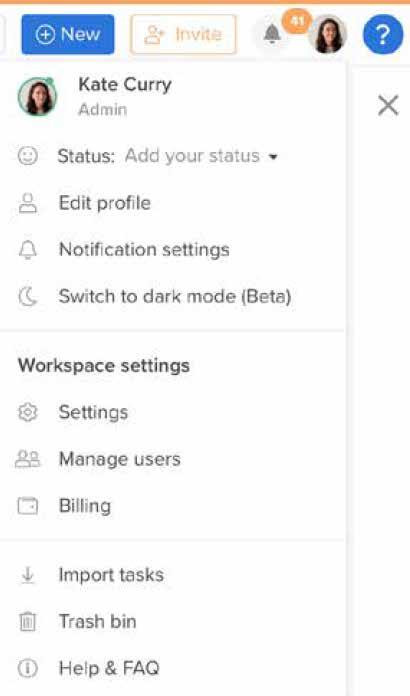
• Click on middle circle icon on the top right hand side
• Go to “Edit Profile” and add your picture
• Add your role
• Set date preferences
• Set start of the calendar week
• Notification options sit under “Edit Profile”, please leave all notifications switched on
Click on "Apps" on the left hand sidebar
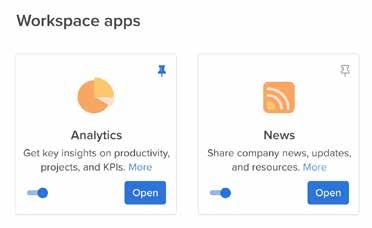
You can pin the apps to your left hand side bar by clicking on the pin at the top right hand side of the app modules.
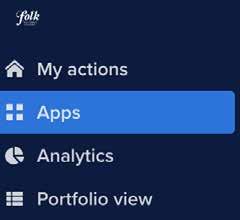
Turn on the following:
• Analytics
• News
• Portfolio Views
• Proofing & Approvals
• Time-Tracking
• Forms
• Notes
• Dependencies
• Messaging
• Project Baseline
• Risks & Issues
• Project Linking
• Hive Automate
• Calendar
• Mail - Chose OneDrive
• You can link Slack - more details can be found here https://help.hive.com/en/articles/446107-hive-for-slack
• Click on Projects on the left hand navigation
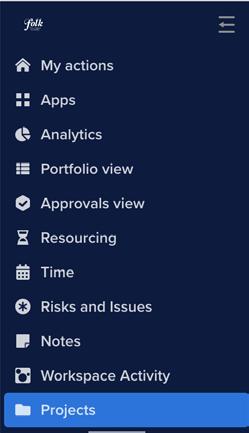
• Click the 3 dots
• In Active Projects scroll to the right hand side to the 3 dots

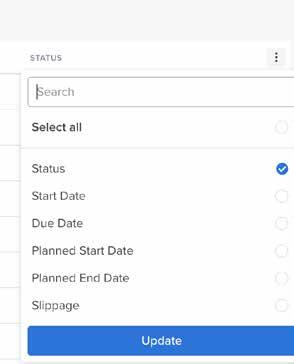
• Click, Start Date, End Date, Planned Start Date, Planned End Date
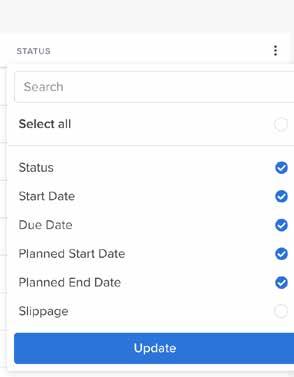
• These will now show on project screen
• Hoover under the P in Planned Start Date An Edit button will appear - click it
• Add your planned start date and click save


• Repeat for planned end date
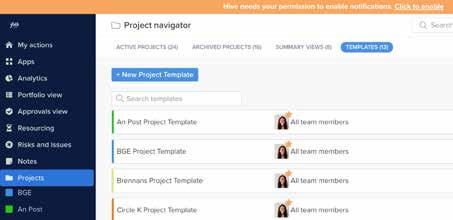
Click on “Templates” along the top bar
• Jobs must be set up in Hive
• All resource requirements must come through Hive
• To kick start a job you will need a job a number
• Once you have a job number come to "Projects" in Hive.
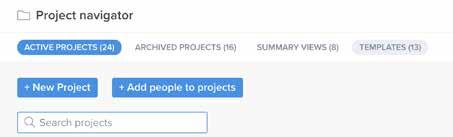
• Find your Client
• Hover over the Client bar on the right hand side and click on “Apply"
• Name your project using the convention, jobnumber-jobnameclientname
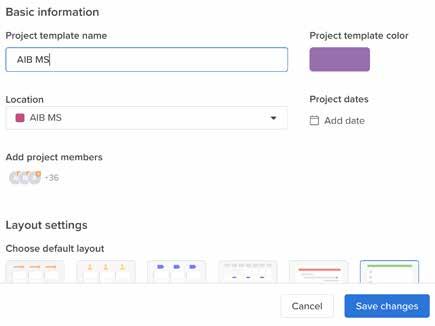
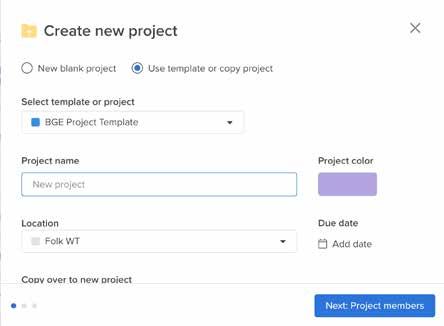
• Click on “Location” and save to Client folder
• Add a start and an end date (these can be projected start and end dates)
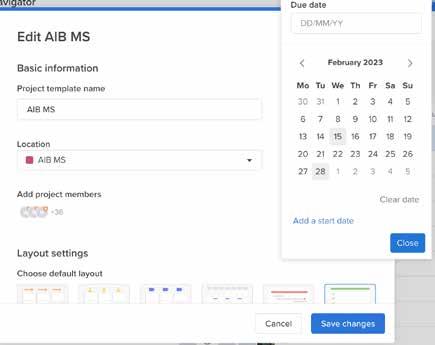

• Click “Next”
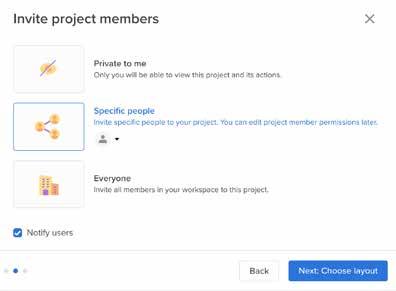
• Choose visible to “Specific People”, click the drop down menu, click “Teams” and chose your client team
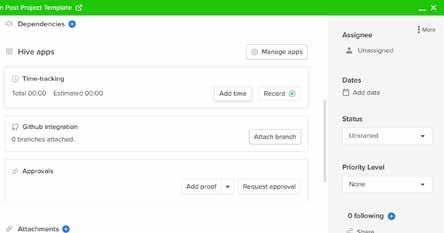
• The final step in the set up is to assign the creative team to Resource Director Curry. In Resource Director's absence please assign to the CD on the account.
• For all Tasks please add timings - the job should have a kick off date - key milestones and end date. Please allow appropriate time for each task.
• For all Creative tasks please add estimated time to complete task.
• The next step is to choose your project layout, this can be your preference and is changeable at any point in the campaign / project
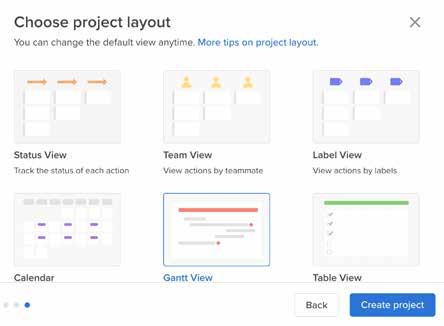
• All CS tasks should be assigned to yourself or CS colleagues. Please assign your AD to all CS tasks.
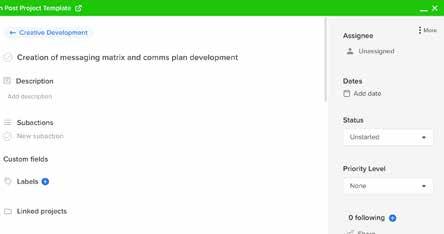
Important: You can use templates or chose to create your own project template for each job. If creating your own, please ensure to include all departments and stages.
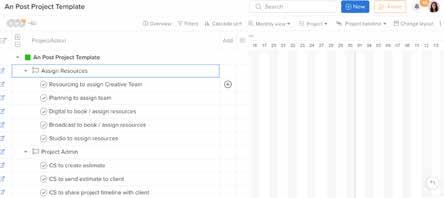
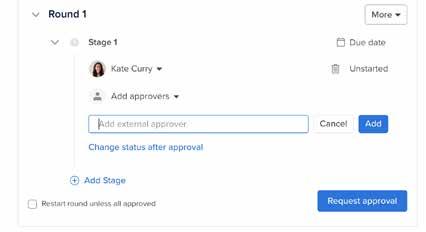
• For Client approvals on artwork and briefs you have a number of options, you can send them a link via Hive, through an email, or in-person.
• If you are sending a link via Hive, the Client can approve or give feedback this way.
• If you are sending va email or presenting in person, CS should mark up and feedback in Hive or, approve.
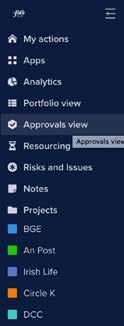
• You can review the history of approvals for jobs by clicking on “Approvals View” on the left hand side toolbar and selecting a project from the top bar.
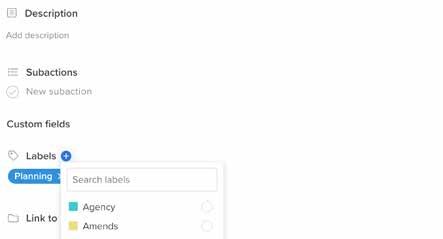
• All projects should start with two rounds of amends. If a client requires further rounds of amends, these must be added as a task in Hive. When adding, please open the task, click "Labels" and add "Amends". This will allow us to track additional amends across all projects. 24
Your profile:
• Click on middle circle icon on the top right hand side
• Go to “Edit Profile” and add your picture
• Add your role
• Set date preferences
• Set start of the calendar week
• Notification options sit under “Edit Profile”, please leave all notifications switched on
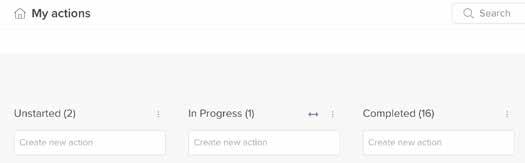
• You can check your daily and uncompleted tasks in My Actions.
• You will need to send your work to the relevant CD and CS
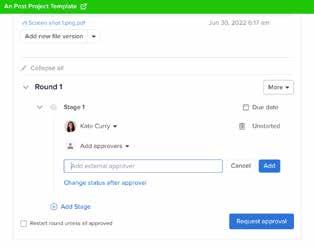
• For approvals on artwork, copy, images, VO’s or briefs, you need start an approvals process in the campaign in Hive,
• Click on any item listed and start that task.
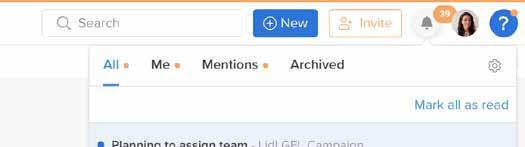
• You can also check your notifications for tasks to complete, you can find notifications in the top right hand corner.

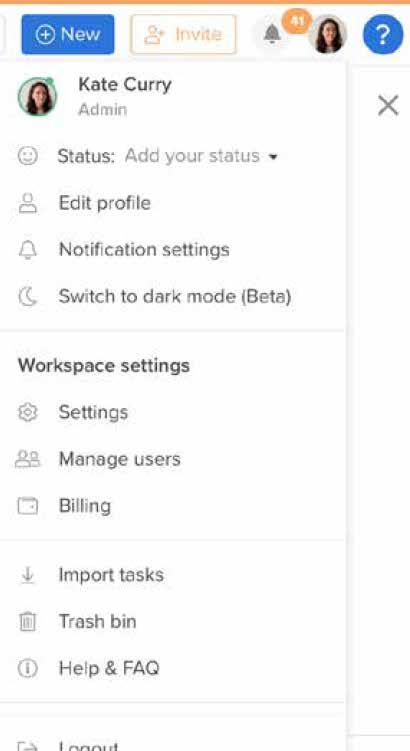
• Upload the items for approvals and select your CD and set a time for reply, a link will be sent via Hive.
• You can pin the apps to your left hand side bar by clicking on the pin at the top right hand side of the app modules.
• It is important that you follow this step even if the approval happens in person as we need to keep a record of approvals on all jobs
• Tasks assigned to you should have a time allotted to complete. This is not the total time for the job, just that specific task. You can check the time allotted here.
• If there is feedback, this is marked up and given within your approvals task, you can complete the amends and tick them as complete. Once the feedback has been addressed, you can send it back for final approval as you did the first time.
• When you start the task, please hit the button in the task to record your time. When you finish the task, please hit stop.
• You can review the history of approvals for jobs by clicking on “Approvals View” on the left hand side toolbar and selecting a project from the top bar.
LET’S BE RENOWNED FOR OUR CLIENT SERVICE AND BE A SELLING POINT FOR FOLK
Our vision for Client Service is to be renowned for the quality of our work – let’s be a major selling point for Folk.
There is an art to Client Service. It’s an all encompassing role – you are a relationship manager, project manager, finance manager, operations manager, sales person and problem solver all rolled into one.
In order to be this hybrid specialist and deliver excellence in your role you need to ensure you get the basics of client service right – at every level – consistently.

Client management, no matter what level you are at, is one of the most important parts of your job. The stronger your relationship the greater your ability to motivate clients to be brave in the pursuit of great work. You need to get under the skin of your clients –understand their business and culture, what makes them tick, what their personal goals are, what are their interests outside of work. It is essential to develop a personal relationship with them.
Don’t hide behind a laptop screen – pick up the phone, text, meet clients face to face.
Ultimately you want to be known as an extension of their marketing team. This will be key in helping build long term relationships with your clients. Like every relationship, it needs continuous investment – in the day to day processes, and the presentation of continued added value solutions and proposals. Our clients businesses is continuously evolving, we need to remain one step ahead.
Following process makes your job easier. It makes mistakes harder to make. It lets you spend less time on fixing problems, and more time refining your craft and focussing on the bigger picture and your clients. It makes us better at what we do, and delivers best-inclass service for our clients.
Our clients are reassured by process. Therefore, as a Folk employee, adherence to process is your Service Level Agreement and adherence to this process is a requirement of your job and part of your KPI’s.
Usage of agency systems daily such as Hive and Aura are also critical to project management success.
As outlined above client communications are a central part of the effective delivery of not only campaigns but also day to day management of the client – from the smallest jobs right through to the campaign development process.
Following any client discussion (including direct phone calls), a follow up note or contact report must be issued within 24 hours to confirm what was discussed and agreed on that call/interaction. These ensure a written record of key decisions, requests and actions that take place and they should be saved in the job bag.
The AE or AM are responsible for this, please do not share with your AD until you have regrouped yourselves. The AD can then make any additions before dispatch. All contact reports should cover next steps or an update on timings at the end.
Please present emails appropriately, make sure emails are clear and in the same font. We are an ad agency and this attention to detail is really important when replying to client (watchout – do not copy and paste from Slack as it is easily seen that it has been pasted).
Finally, ensure a swift response to client emails – even if you don’t have the answer to a request acknowledge that you have received the email and will revert as soon as possible – ensure that the client does not need to follow up to confirm you have received the email.
It is important to manage your own diary and your day in the most effective way possible for you.
It is often the case when managing a large project you will receive emails in bulk. Acknowledge the client email and if necessary mark it as unread so that you are reminded it is still to be actioned. Find slots in your day for flow time – to get project work done and block this time in your diary. Allow time for prep prior to a meeting.
In order to resource jobs efficiently and correctly we attend departmental resource meetings every week.
• It is extremely important these meetings are kept in diaries and attended. If for any reason you cannot attend please make sure the appropriate WIP is updated and let your team lead know so that any updates can be covered in the meeting.
• Please continue to remind your clients when these meetings take place – if the brief is not in ahead of these meetings you are not guaranteed resource and this should not be a surprise to the client.
• It is the AE & AM role to make sure that projects are up to date on Hive. This should be done in real time.
All new projects should be added to Hive in advance of resource requirements and Resource Director / Planning / Digital assigned to assign resource.
CPAs should be updated in real time and shared with the client after each update.
For all creative and studio requirements, create a task, add a brief description andwith time allocated and assign to the Resource Director.
– if your job is not included on this WIP it may not get resourced.
• The broadcast team hold this meeting every Monday at 11.00am.
• In this meeting they cover any production Broadcast requests.
• At the end of the meeting the Broadcast Director bring us through Caria bookings so that we are all aware of upcoming deadlines for media bookings.
• Please ensure the Broadcast WIP is updated ahead of this meeting.
• The Digital leads hold this meeting every Tuesday from 2.00pm – 4.00pm.
• The Digital Team Lead will share a time slot with you in advance of this meeting in the Digital Resource Slack.
• Please bring all updates for current and new work streams to this meeting so that the Digital Team Lead and the Digital Project Manager can book in your work.
• Head of Planning assigns brief to a Planner.
• CS to include Planner on briefing call with client.
• Planner writes brief
• Planners checks in with Creative Team before presenting back to the client
• Where possible and for ALL larger briefs, Creative Team should be on the initial brief response to the client. CS to ensure that time is allocated for rehearsal.

When CS hear/find out about a new project:
• For all creative work, contact Resource Director via appropriate client Slack Traffic channel with the following information:
• Client name
• Brief name
• Brief owner
• Job number
• Budget
• Timelines (include, first response and live date)



• Deliverables
• Metal Scale
• Creative team have sight of the time plan, including allotted hours to complete job
• Creative team are aware of and agree to deliverables and deadlines with oversight from Resource Director and Karl
• Creative team to pro-actively seek approval from CD before sharing with CS
• All jobs have two rounds of amends, anything more needs to be flagged with Resource Director and AD on the account

• For all strategic work, contact Head of Planning to assign a strategist. Please keep Resource Director updated on timings.
• All creative briefs to be shared with Resource Director and optional invite for larger internal briefings.
GOLD SILVER BRONZE PLATINUM
TTL, has four + comms channels Or Budget over 50k
Three + comms channels Or Budget over 20k
Two - comms channels Or Budget under 20k
Presents a unique creative or strategic opportunity
• If additional requirements emerge on any job, CS to inform Resource Director of additions. The Hive project plan and Aura estimate will also need to be updated

Given the nature of the industry we work in we will receive urgent job requests from clients. In order to manage the delivery of such requests and manage expectations of the client the clients should, as a matter of course be educated on the timelines for delivery of specific assets and the minimum time required to turn something around.
When a request is received from the client please follow this process:
Client service team account lead to trigger the request with resource director. Resource director to review and understand implications for current resourced jobs and present options to department team leads via a dedicated slack group. Team leads to agree if timelines can be met and who will deliver the work.
Client service lead to manage timelines and expectations with client. Create project on Hive and outline timings to the client that need to be adhered to, both from agency side and client side – the client will need to be available to approve work at speed. Please see overleaf examples of timings that will be needed to deliver urgent requests across print, radio, AV and digital. If less time is available we may not be able to deliver, please discuss with relevant leads.
The account team to ensure all costs in relation to urgent requests are estimated in as urgent a manner to allow the client make fully informed decisions in relation to changes required at speed.
Monday 9 00 am
Monday 10 am
Monday 10 .30 am
Monday 11am
Monday 4 .00 pm
Monday 4 .30 pm
Monday 5 00 pm
T uesday 10 am
T uesday 11 30 am
T uesday 12 pm
T uesday 12 .30 pm
T uesday 2 .30 pm
T uesday 3.30 pm
T uesday 4 .00 pm
T uesday 4 .30 pm
Bri ef recev i ed
Assets(Roug hs/Prev i ous Artwork) put the new j ob fol der on the serv er
C S bri ef studi o
Studi o assess artwork/roug hs and g i v e a accurate esti m ate on ti m e requi red
Studi o produce rst draft
Internal am ends
C S send to cl i ent for approv al
C l i ent feedback
Studi o produce am ended draft
Internal am ends
C S send to cl i ent for si g n o
C l i ent si g no
Studi o create ni shed art
Internal si g no
Studi o rel ease ni shed artwork
Radi o P roduc ti on s c he dul e - urge nt re que s t Li v e D ate E xampl e - 24 Apri l Ac ti on D ate (Late s t)
P ro duc t io n t o be brie f e d M o n 17 A pril
V O se l e c t e d M o n 17 A pril P ro duc t io n t o re a c h o ut t o A ge nt s/ St udio M o n 17 A pril
CS t o subm it sc ript f o r A ppro va l M o n 17 A pril P ro duc t io n t o c o n rm t im e f o r re c o rding Tue s 18 A pril
Co pyw rit e r t o c o n rm m usic t ra c k f o r re c o rding Tue s 18 A pril
R e c o rding - P ro duc t io n, CS, Co pyw rit e r a e nd We d 19 A pril
P ro duc t io n t o sha re 1st WIP
We d 19 A pril
F ee dba c k / A mm e nds We d 19 A pril
Cl ie nt sign o
We d 19 A pril
CS t o subm it na l c o py f o r a ppro va l We d 19 A pril
CS t o se nd pro do c ut io n c o py inst ruc t io ns Thurs 20 A pril
P ro duc t io n t o se nd c o py t o st a t io ns Thurs 20 A pril
/01'.2#3'4)'525
!%2-6.
!791=#71>1?91'#=7%.#>@91&A
BC#A%#D791=#>71(A9?1
E3#2>79-A2F2A%7"D%(7'2
B@1(7(&>1#>(212#%-1&1'
B@91&A#=11'D(>G
E4#2>79-A2F2A%7"D%(7'2
B@91&A#(--7%?(@
BC#A%#>%&=97.#CA%7"D%(7'#29H&;%==#A%#I7%'0>A9%&
I7%'0>A9%&#A%#21&'#!%(7'2#(&'#ICJK2#A%#1'9A%7
32A#J7(=A#I9>2#21&A#9&A%#2@(>G#>6(&&1@#=7%.#I7%'0>A9%&#;#59A6#J1.%#LM#=7%.#N?(&
B71(A9?1#=11'D(>G#FO..1&'2#%&#-9>2 I7%'0>A9%&#A%#21&'#2>79-A2#(&'#-9>2#A%#2A0'9%#=%7#LM#71>%7'9&H L%9>1;%?17#71>%7'9&H
C%0&'#.9P#Q#E('9%#21&A#=7%.#2A0'9% B71(A9?1#=11'D(>G#FO..1&'2#%%0&'#.9P#(&'#E('9% C%0&'#.9P#Q#E('9%#21&A#A%#>@91&A#=%7#(--7%?(@
/9.1#(@@%R1'#=%7#>@91&A#(..1&'2#A%#2%0&'#.9PF#E('9%F-9>2 89&(@#2%0&'#.9P#21&A#A%#1'9A%7#=%7#/7(>G@(" I7%'0>A9%&#A%#21&'#=9&(@#-9>2#=%7#(--7%?(@#;#BC#A%#21&'#A%#>@91&A
89&(@#29H&;%==#%&#-9>2#;#BC#A%#>%&=97.#R9A6#I7%'0>A9%& I7%'0>A9%&#A%#21&'#>@%>G#&0.D172#A%#1'9A%7#(&'#>%&=97.#29H&#%==#%&#-9>2 S'9A%7#A%#>@%>G#(&'#1P-%7A#$T8#Q#$I< I7%'0>A9%&#A%#0-@%('#>@%>G1'#>%-"#A%#-1(>6#(&'#'1@9?17#A%#2A(A9%&2 I7%'0>A9%&#A%#21&'#U(&1#$T8#A%#0-@%('#(&'#70&#=@(26#>17A# I7%'0>A9%&#A%#21&'#>@%>G1'#.-<#(&'#=@(26#>17A#A%#BC BC#A%#21&'#>@%>G1'#=9@1#(&'#=@(26#>17A#A%#2A(A9%&2#=%7#@%>(@#(--7%?(@ BC#A%#21&'#>%-"#9&2A70>A9%&2#A%#E(>61@#=%7#E('9%#(&'#/L E(>61@#A%#9&2A70>A#2A(A9%&2#%&#E('9%#(&'#/LB# I7%'0>A9%&#A%#'1@9?17#2%>9(@2#A%#BC
7'8#96:'.25#
V1"#.%.1&A#;#/9.9&H2#R9@@#D1#-0261'#%0A#9=#A692#
V1"#.%.1&A#;#/9.9&H2#R9@@#D1#-0261'#%0A#9=#A692#
2A1-#92#'1@("1'
V1"#.%.1&A#;#/9.9&H2#R9@@#D1#-0261'#%0A#9=#A692#
2A1-#92#'1@("1'
V1"#.%.1&A#;#/9.9&H2#R9@@#D1#-0261'#%0A#9=#A692#
2A1-#92#'1@("1'
When a last minute request comes in, digital should be notified right away, alongside the other department’s involved. They should be informed alongside the creative team.
BRIEF
As part of the brief, digital will need the following information:
• CS Lead
• Job Number
• Deadline
• Creative Team
• Budget (if tight)
• Invitation to a Slack channel
• Overview of the ask
• Outputs required including formats and specs (Design, Animation, DOOH, Digital Suite, Social Formats etc)
• What is the handover format/process. Is it direct to client, or media.
• + Any other information - The more information we know at the start, the better.
Once we have been briefed, we can then prioritise the job and agree the best resource for the project e.g., Internal vs eternal or Do we move an already scheduled job.
In the event that we are able to deliver the project internally, but it requires out of hours support, will the creative team/client be available to approve the asset after hours?
We are a business and as a member of the client service team you are core to driving and delivering revenue for the business. Training of the Folk ways of working and process will ensure effective financial management of your client account. The first step when working on a piece of business is to have a fundamental understanding of your clients contract.
Consider :
• Hourly rate
• PRIP/bonus structures
• Stance on mark-up
• Opportunities to make more revenue
• Resourcing plan

• Refunding or carrying over of hours
• Value adds we have committed to delivering
Please reach out to your team lead for the above information if you need further clarity.
The table below outlines in a snapshot the finance management process from client scope of work to pricing a particular project, managing scope creep (hours/costs going beyond original scope of job), management of costs and final reconciliation of a job.
Review your contract to ensure terms haven’t changed for the year in any way.
Develop your annual client plan and in turn Scope of Work.
Get client approval on Scope of Work and agree process for management of same e.g. monthly reconciliation meeting.
Prepare internal revenue plan and update revenue slack channel accordingly.
Client brief in and budget confirmed.
Draft estimate broken down per stage of the job to match CPA & Routefinder process. Full detail to be provided on estimate re what client will get as outputs at each stage. Thinking forward to number of presentations that will be required, layers of stakeholders etc.
Include separate job numbers for each stage and share with team.
Before going to client, Creative Director, Planning Director (and where relevant Social and Production Directors) approve hours for each stage based on deliverables/outputs being described.
Once original estimate approved the scope/ deliverables required on the job may change once media plan confirmed, or client requests different set of outputs.
Therefore each time scope changes, or new client requests mean additional time required at any stage, the estimate must be rescoped on Aura and the Hive project plan updated..
Consider downsizing deliverables instead of discount hours.
Review of time may be required with regard to work being on/off brief if there are re-works.
Every Tuesday rep on each client team must update tracker for previous weeks hours on each job and share with Client Service Director and Account/Business Director.
Highlighting to Account Director any anomalies such as additional time on job VS what was reasonable for outputs, time put on wrong job etc.
Account Director to then flag to Planning Director, resource director, Creative Director, or Social/Prod lead as relevant when this happens and ask clarity on cause.
Account Director to capture action that was agreed on their client tracker for discussion at reconciliation meeting.
Full hours reconciliation to happen at the end of the stage of the job if being part billed, or at the end of the entire job if client will not permit for part billing.
If job is 10% or more over hours, this is to be flagged to Client Service Director and the Client lead.
Monthly post billing any jobs over 10% hours to be presented to the Leadership Team and the Client Services Director by Account Director with rationale as to why that job ran over and hours were not/could not be billed to client.
(Please note not all clients have a retainer.)
• A retainer is a set number of hours agreed between a client and Folk and provides for a retained team on the business.
• The hours are agreed against the scope of work for the year.
• Retainer hours are set at an agreed value. Please ask your team lead if you are not sure of value.
• Using Vodafone as an example, each pillar has been allocated a set number of hours depending on the scale and complexity of the project, for the financial year.
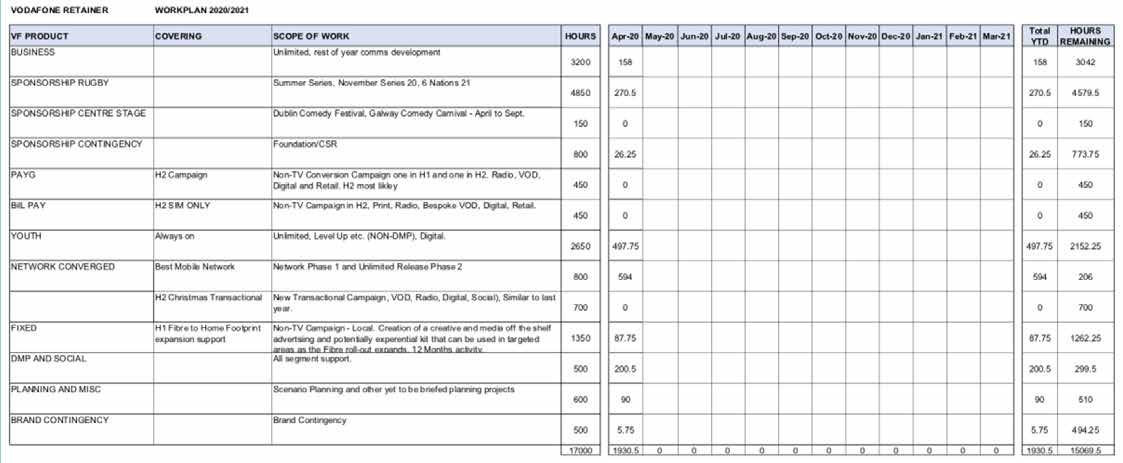
• Depending on what is agreed the retainer hours may only cover some team members time. Vodafone’s retainer covers planning/strategy, client service and creative resource, not production. See example of retainer overview:
• Production hours pay for the production team assigned to the business in Folk across broadcast, digital production, and studio.
• Production hours are the hours that are required from the production team to produce assets and final output.
• This can be anything from a static post that needs to be designed to a 30” TV ad that would require a shoot, pre and post production.
• Production hours are charged out an agreed price with your client. If you are unsure of what this amount is please touch base with your team lead.
• Production hours are scoped per job/campaign, and we work directly with the Production teams in order to do so (Broadcast, Digital, Studio etc).
• Production budgets can be agreed at the beginning of the financial year or on a project by project basis.
• No production budgets should ever be agreed to until all production teams agree to budget and outputs.
We include a contingency on all estimates for the following reasons:
• An estimate is an estimate and not the exact cost on a job. A contingency allows a small amount of wiggle room for third party costs and production over run.
• Taxis – At times we need to get transport to clients offices, or get a taxi after attending an event/shoot/ recording. This allows for this and will come under the appropriate job.
• Couriers.
• Shoot expenses.
• Any last minute requests in production – additional asset, amends to final assets dispatched.
If the contingency is not used, we do not draw down against the PO.
A contingency is typically 10% of the final estimate.
• Agree your process for managing with client.
• A scope of work is drawn up at the beginning of each job in order to estimate what resources will be needed to successfully complete the project.
• Estimates include a breakdown of retained hours and production hours.
• Estimates are supplied against the media plan deliverables or the assets a client has confirmed are required.
• All estimates allow time for 2 rounds of amends.
• Folk work with all departments in order to supply an accurate estimate.
• Third party – each client is different but please talk to your team lead in relation to third parties and mark ups, Vodafone for example we do not mark up third party costs, what you see on an estimate is what it costs e.g. Clearcast approval, VO, usage, etc.
• Once an estimate if approved by a client it must be inserted to Aura. This allows us to keep a better eye on tracking the finances of a project. Please see below instructions on page 42 on how to add an estimate to Aura.
• More than 2 rounds of amends were received/required. It is client services job to keep an eye on rounds of amends of amends and explicitly tell clients what round they are on. It will then not be a surprise if we need to update the SOW for them.
• Additional assets were required.
• Amends to final assets are required.
• If there was a rebrief.
MIGHT BE EASIER TO WATCH A VIDEO TUTORIAL? JUST CLICK HERE.
• When the requirements scope beyond what you originally estimated.
REASONS WHY:
• Lack of clarity and depth in the client brief and in turn to the original estimate.
• Clients trying to get extra work “on the cheap” (or worse – for free!) as the scale of the project/deliverables increases.
• Not cross referencing all steps in the Routefinder process/CPA you have provided with the estimate - they need to correlate.
• Internal hours are inaccurate and/or aren’t being managed correctly. Although all hours worked do need to be captured! Hours management and reporting is essential.
• For all estimates please reference our benchmarking estimate.
• This will give a good guide on what we should be charging per deliverable. Please remember each client is different and if ever in doubt please talk with your team lead.
• Time is money. What we sell is our time so hours management is essential on every job.
• Hours are logged and tracked on the agency’s management system (Aura) throughout the job’s lifecycle. This tool allows us to access a complete picture of the hours, third parties and miscellaneous costs applied to all jobs, and to reconcile these costs against the client estimate on a weekly basis.
• The account management role is to be aware at all times of the status of a job, and to report this in line with agreed Service Level Agreements.
• For instance, in some cases we are obliged to flag with the client when a job reaches 50% of the estimated hours. Significant changes to the estimate must formally be flagged to the client. This must be done on a proactive basis – the client must be made aware of potential issues before they happen, not informed of changes after the fact when there is no longer an opportunity to affect change.
• A deeper dive of hours across all jobs can be reported via a bespoke dashboard at the client’s discretion – typically on a monthly basis – covering hours by department, hours by personnel, hours by job, hours by job type, cumulative hours against work plan and third party cost efficiencies. This ensures complete transparency of agency hours and also facilitates both agency and client to consistently work together to drive efficiencies.
Estimated price
Client: XXXXX
Job name: XXXXX
Job number: XXXXX
Client contact: XXXXX
Account handler: XXXXX
Date: XXXXX
PO Number: XXXXX
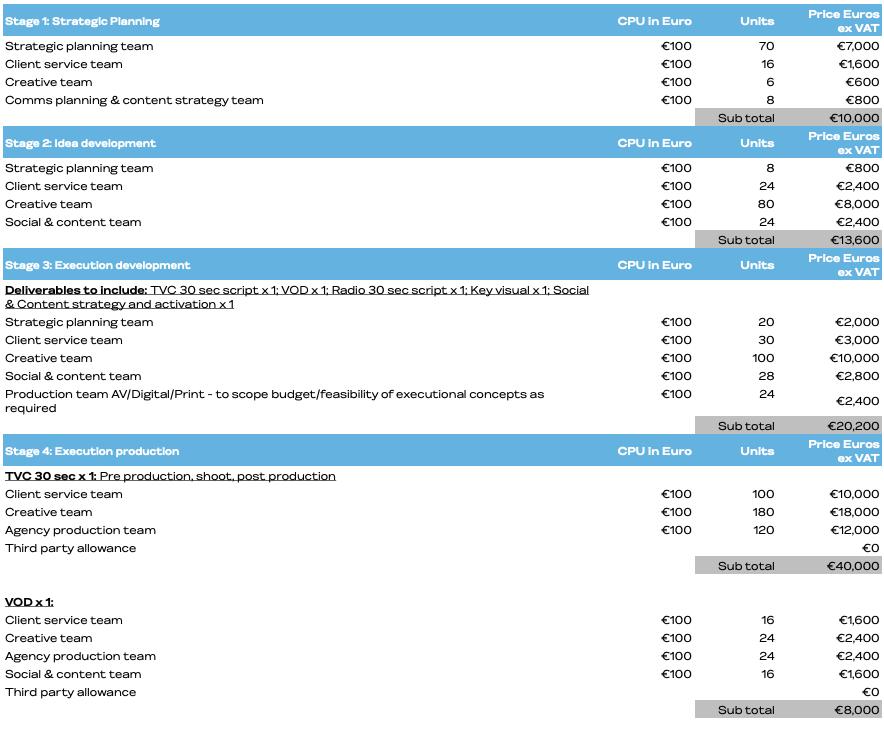
The following stages assume a standard TTL communications response to brief.
Hours cover time for strategic planning lead and core agency team to take client brief, interrogate problem to be solved and objectives, collate trends and insights under the themes of Consumer/Culture/Brand/Category, and develop creative brief. Includes time for 1 x strategy check in with client before moving into creative development. Assumes no requirement for primary quantitative or qualitative research. If primary research required, agency hours and third party costs to be scoped accordingly in consultation with the Planning Director overseeing the project.
Development of 3 creative routes for campaign idea to present to client on agreed date. Presentation will include tissue executions to bring campaign idea to life, but these will be proof of concept only and not fully developed scripts/ visuals/copy. Hours below cover one creative presentation and assume one campaign idea chosen to progress with. If a second presentation required at this stage, hours to be rescoped accordingly.
Assumes no third party costs required at this stage for likes of storyboard illustrations or mood films. If required, this will be scoped accordingly along with agency time to develop.
Once a single campaign idea chosen, executions to be fleshed out and crafted/finalised. If executional deliverables listed below change, estimate to be rescoped accordingly.
In stage 3 executions to be brought to sign off stage as scripts/storyboards/scamp visuals before moving into production in stage 4. Time covers two round of feedback/amends on each deliverable. If more rounds of feedback/amends from client, then hours to be rescoped accordingly.
Deliverables at this stage to be fleshed out to include: TVC 30 sec script x 1; VOD x 1; Radio 30 sec script x 1; Key visual x 1; Digital display x 1 standard suite; Social & Content strategy and activation x 1.
Once executions approved (scripts/storyboards/scamp visuals), time detailed in stage 4 to manage production is indicative only. Third party costs detailed below are allowances only based on current knowlege at time of estimate and may change depending on executional idea, or changes to media plan/scope.
Other assumptions made as follows:
• TVC 30 sec x 1: Agency time to cover pre production process, attendance at shoot day x 1, post production and delivery. Assumes shoot is in Ireland so no travel time or expenses accounted for. Depending on final script, agency time may need to be rescoped depending on complexity of production process. Third party costs allowance only to be rescoped depending on final script.
• VOD x 1: Assumes VOD is not just a cut down of TVC and is instead a fit for channel execution. However, hours detailed below assumes that footage required for VOD caught during TV shoot - so no separate shoot required. If additional shoot day (and production process) required for VOD, then agency hours and third party costs to be scoped accordingly.
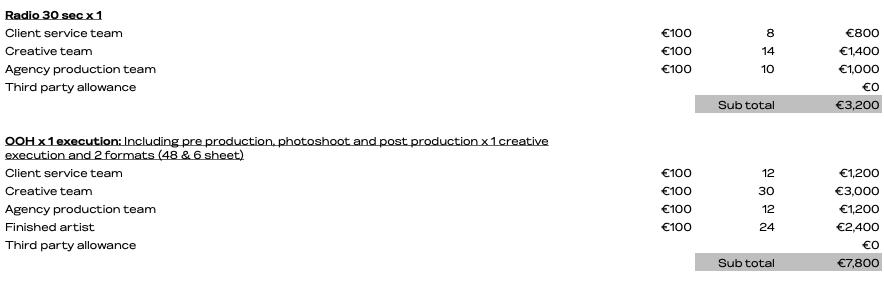
• Radio 30 sec x 1: Agency time to cover recording, edit and delivery of 1 x radio script. Third party costs allowance only.
• OOH x 1 execution: Assumes stills for photoshoot taken on set of TV. If separate shoot day required specifically for photography, additional agency hours will be required. Agency time to cover pre production, photoshoot management, post production and finished art. Covers 1 x creative execution across 2 formats - 48 sheet and 6 sheet. Third party costs allowance only to be rescoped depending on final concept.
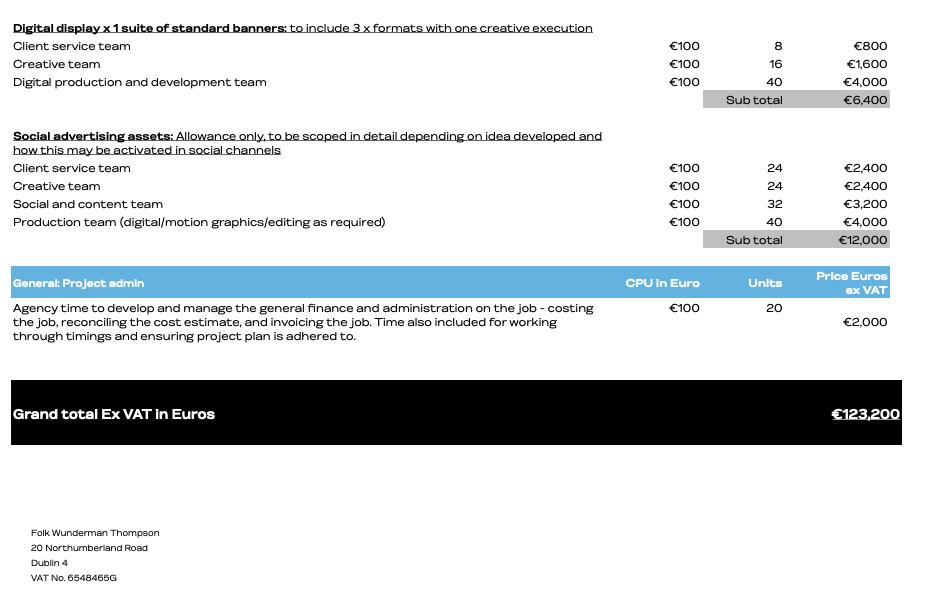
• Digital display x 1 suite of standard banners: Agency time allows for development and delivery of 1 suite standard banners with 3 x formats (e.g. MPU, Sky, Leaderboard)
• Social advertising assets: Agency time is indicative allowance only, to be scoped in detail depending on media plan and final assets required. This allowance assumes the requirement of bespoke channel specific social advertising assets - falling in line with the overall campaign idea and execution style. This allowance does not cover a social specific activation/campaign above and beyond the development of social advertising assets. If a separate idea and delivery is required for a stand alone social activation/campaign, this needs/has to be scoped separately.
• All hours are to be shared in the Slack channel so all departments know how many hours they have (they should be aware from when you were scoping, but we must constantly remind them).
• All hours and budgets need to be managed weekly.
• Hour reports – Each team should set up an hour tracker so that once you get the green light from Finance that all timesheets have been added you run your hours to ensure we are tracking as we would expect.
• Responsibility – AE & AM. By 10am every Tuesday, aura summary dashboard per job to be sent to the client service director for review - to ensure all jobs on track and any concerns re; job/third party costings can be flagged.
• Running the hours weekly helps us see if a job is taking more or less effort than expected, some clients ask for weekly reports and we must be in a position weekly to share.
• Please note this is a mandatory task that needs to be completed weekly and reported to your team lead. Please allocate time in your diary to do this.
• This system is in place to protect ourselves and our clients, as no one wants to tell the client that all their hours are gone and we hadn’t flagged. This should not be a conversation we should be having with our clients.
• By monitoring hours in real time, it allows you to have discussions with the client re; rescoping - ie if more hours are required to meet their requirements.

Client service must report revenue twice monthly. First revenue report is due mid month to forecast final billing for the month in question. You must report this figure to your team lead. Each team member will update their monthly revenue figures in a sharepoint folder broken down per client and updated in real time.
If your final billing figure is going to be different to the previous forecast this must be flagged with your team lead as soon as possible. Reasons for this might include delay in receiving a PO from client, or the project being moved into the following month.
Part invoicing happens predominantly on larger projects. As an agency we need to ensure we bill for working hours completed – some projects may span 3–4 months or longer so it is important to bill in part against the overall PO issued by the client.
Once the estimate is signed off your team lead will support you in determining phased billing – but the AM/ AE will be responsible for running the job hours weekly to monitor how the job is progressing in order to flag how much revenue can be taken in a particular month.
Estimates are created on our Aura system.
STEPS: Hit the Estimates tab on Aura.
To create a new estimate, press the + on the left-hand side
Your screen will look like this:
Press Next and your screen will come to this:
Once you are happy you have filled in all the lines you need, then hit the Descriptions and Settings tab. Press the Additional Info highlighted in blue. Much like a job set up these fields must be completed.
Fill in Client Contact, Folk Contact (that’s you!) and Client PO. Put TBC in if you do not have PO yet.
Your screen will look like this:
Account – Type in job number. For testing you can use
T5101K05683
Estimate Name – Call it anything that you need, like version 1 etc.
The other boxes will go to default settings. (You can overwrite if you need to).
Tick Display hours and rates columns for time estimating. Ignore the other two for now.
This brings up all the possible billing department options for you to use.
Please note you can overwrite these headings and descriptions, this is just a template to start with. All you need to do is double click on the wording and it will become editable.
Type in the number of hours (units) first and then a rate e.g. 10 hours at rate of €100, amount fills in at €1000.
You can add more lines by hovering over the column to the left of the work codes and a + sign appears. You can see it beside planning above.
Please note any lines that have no value will NOT appear on your estimate.
(FOR VODAFONE ONLY – If you need to add in retainer hours on an estimate then you type in your hours, then 0 in rate, then put in the text and it will appear on your estimate as a time only line.)
You then have the option to fill in a Header which will appear at the top of the estimate, or a Footer that will appear at the bottom.
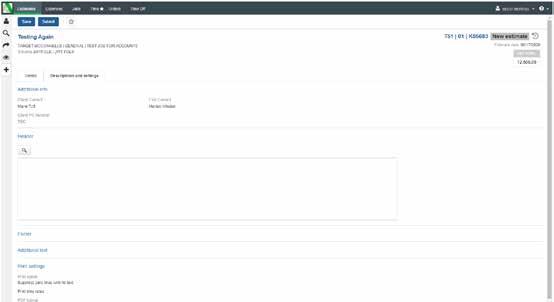
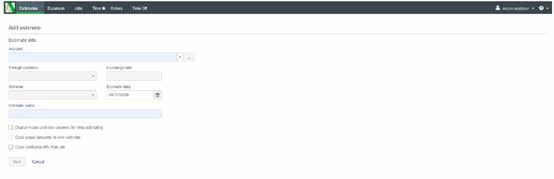
If you are 100% happy and done with your estimate creation, then you can press submit.
Once you press submit you CANNOT amend an estimate.
After pressing submit the estimate is now live on the job. Up the top right is the option to export the estimate.
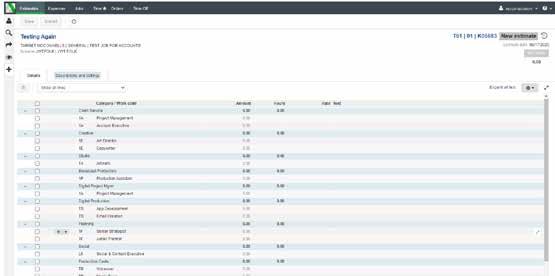
When engaging with the broadcast production team re; costing up broadcast and content assets an estimate will be supplied to you in the below template. At the end of your project you will request a final reconcilation of costs from the broadcast team and this will be the final costs billed to the client. Note: production PO’s are managed and tracked by the broadcast department.

A PO is essentially a contract between two parties. In the case of Folk and a client, the client is committing to buying our services and gives us insurance against non–payment. A PO must where possible be sought from the client before we begin work on a job. Equally, when we engage the services of suppliers, we must set up a PO to issue to them as we are committing to buying their product/service and they need this insurance against non payment. Suppliers will then quote this PO number on their invoices to us.
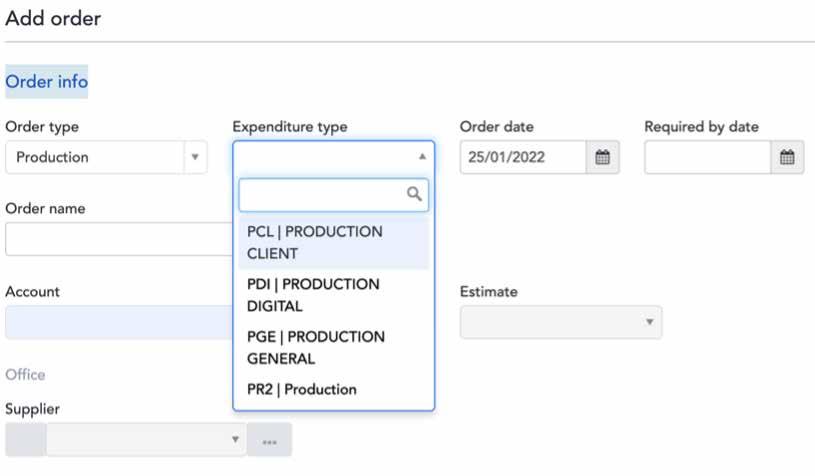
1. Select the orders tab at the top of the page
• Account will always be the job number you’re raising the PO for.
• Supplier will depend on what you’re ordering, an example here is Getty Images.
• If the supplier is not listed you will need to ask accounts to add it to Aura.
2. Select the + sign to add an order
3. Now you can fill in the details of your PO:
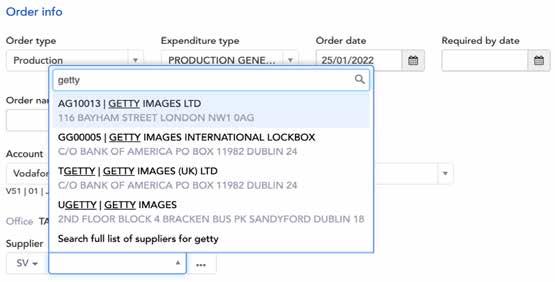
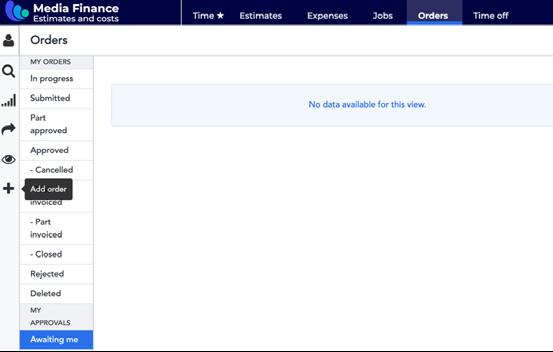

• Expenditure type will always be Production General.
• Order name example: ‘V5110G07506 Six Nations 2022 Getty Image’ (always include the job number as you’ll need to include it in the next line account).
4. Order Details, your work code will always be TB (recharge) unless stated otherwise.

For the description copy and paste the order name ‘‘V5110G07506 Six Nations 2022 Getty Image’
5. The total will be the amount you’re raising the PO for.

6. As you can see, you’re unable to submit or save the PO until you have included the description.
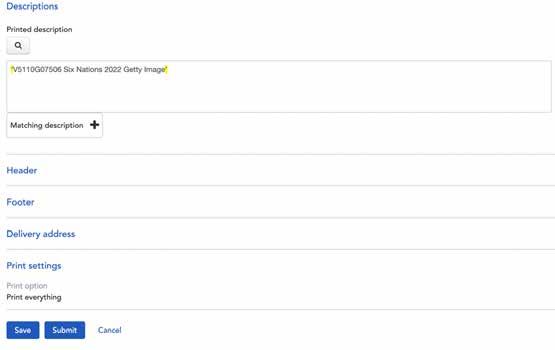
7. Once submitted at the top of the page you’ll see your PO number and an icon will appear where you can transfer the PO to a PDF.
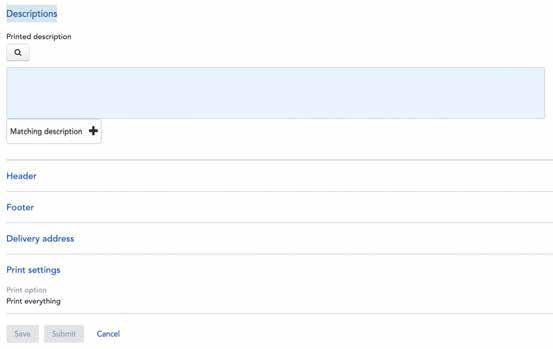
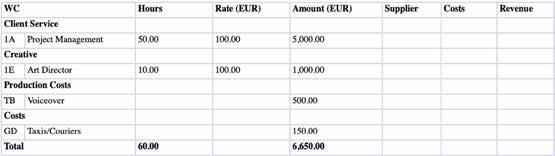
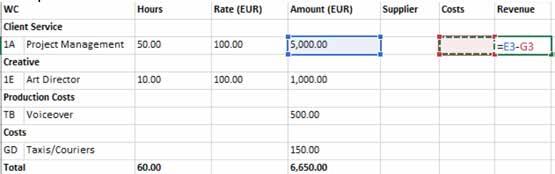
We will now use your estimates on Aura to create your invoices for accounts at month end to issue to clients.
First check your jobs dashboard and that the estimate and actuals columns are current and up to date.
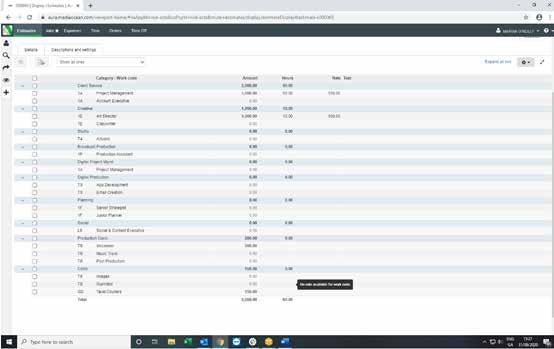
When your job is ready to bill, you have the PO and sign off from the client, and you are 100% happy with the final estimate on Aura, then all you need to do is:
1. Go into your final estimate on Aura, it should look like this:
3. This is how the template should now look:
2. On the top right click the export button and choose Excel.
As you can see the template totals everything for you. You can now delete the totals line i.e. Total Client Service, Total Creative and so on. The final total will not change.
(For Vodafone only – you can now delete all the Retainer hours too, as you won’t be billing these).
You then need to add on columns to the right. First column will be called Supplier, next column will be Costs and the final column will be called Revenue.
Your export should now look like this:
Drag the formula down the rest of the Revenue cells and it will copy.
You then can add in any costs that are on the job in the costs column, and note the supplier in the supplier column.
For time lines there should be no cost, unless a freelancer has worked on the job.
There should be a cost for any of the third party costs. You will end up with an invoice looking like this:
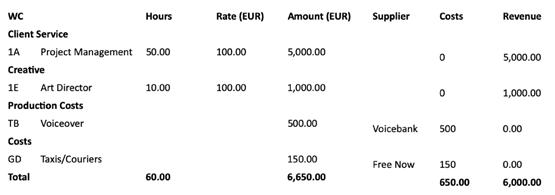
You then need to add in a formula in the Revenue column! Do not panic!!! It’s = then press on the Amount cell, then -, then press on the Costs cell, then press return.
Save this invoice on the server and email in to accounts for billing – noting the job number in the subject title of email.
As before you will also need to send a pdf of the estimate and a pdf of the PO from the client.
The Design Studio takes the concept work of Creative and produces fully resolved design artefacts to completed artwork. It also provides a graphic design service in the form of brand design, image creation and retouching.
The objective of the Studio is to produce outputs that display and enhance great creative, in a time-efficient and accurate manner, every time.

Studio should be the source for all final print files which leave the agency. The Art Directors are not here to do finished art, or multiple drafts of amendments; this takes away from their allocation of time on ideation and creative. Identifying the correct handover point from Creative to Studio is a matter for the CS lead to determine, in consultation with the Creative Director and the Design Director.
The following types of projects should be assigned to Studio:
• Graphic design of visual identities, logos, etc.
• Layout of print brochures, or brochureware that is to be housed online
• Out of home advertising
• Keynote presentation documents
• Large format print, such as display stands, POS, shopper marketing, etc.
• Retouching/image creation
• Illustration
• Wayfinding systems and signage.
Studio may on occasion fulfil briefs which are for digital or social advertising. These should be undertaken only if suggested as a route by the Digital Lead, who should always maintain some visibility of this workstream even though it is being delivered by a different team.
The Design Director should not be approached about digital projects unless it is with the blessing of the Digital Lead. If Studio do undertake digital projects, it will – as best as possible – fit in with the ways of working of the Digital team. However not all skillsets in the Digital team are represented within the Studio team, so not all Digital projects are transferrable to Studio.
Projects which are worked up by Studio fall broadly into two categories:
• Fast-moving, repeat or minor projects;
• Large campaign-driven projects.
These include standard items like press ad reqorks, eDMs, letters, etc. These projects can usually bypass art directors, and brought straight to Studio via the Design Director.
These are typically projects begun by the Creative Team. Studio should be briefed as early as possible in the process – it ensures there are no surprises when the job lands. They can also give technical guidance for the initial working roughs set up by Creative. A briefing meeting between the relevant client service, creative and Design Director should be scheduled. This meeting should clarify:
• The brief and concept of the overall campaign;
• The requirements expected from Studio;
• The status of the project, and the likely transition point between Creative and Studio;
• The ongoing oversight of Creative.
It is up to the submitter of the request to indicate who needs to be included on the circulation of drafts. It is possible a short-term Slack group will be set up for sharing conversation regarding the design work.
All studio projects, like creative projects are managed by the Resource Director and will follow the Hive project plan process to traffic and manage studio resource. Studio briefs should provide a number of details including:
• The job number and job title
• A full checklist of all items is required. This should include technical details like publication name, booking reference, exact measurements (in pixels for digital items, in millimetres for print items, with orientation clearly indicated), deadline dates and times, etc.
• A server link to where the job bag has been set up
• A server link to any relevant rough files, previous layouts to be followed, etc.
• The deadline on the job (and any intermediary-deadlines such as expected first draft)
• Any relevant media plans, publication specifications, technical data etc.
• Any required copy in soft-copy format
• Assets from the client, such as brand assets and guidelines, printing keylines, etc.;
• Links to previous items which are useful as a starting point for updates, or templates as a starting point for fresh items.
All of the above can be provided for in the Hive task, on Slack or both.
Where possible, all the requirements should be in server links, although small items suitable for email attachments can be attached to the mail (max. 10MB).
Large files should not be supplied by download link (such as WeTransfer) unless discussed with Studio and they have indicated this preference.
Once a Studio designer has been briefed, they take up direct liaison with whoever is managing the project.
The Studio keeps track of the sequence of all amends, in order to always be accountable. Studio designers will supply proof files of their work for checking and approval (internally and with clients). These proofs have sequential proof numbers at the start of their filenames (01, 02, etc).
Unless advised by the designer, these are low resolution proofs and are not intended to be final artwork.
Almost always, the versions will be sequential iterations. Occasionally, there may be two simultaneous versions, as options are being considered. This should always be clearly noted, as the last number sequentially may not be the final item.
Every round of amends takes time. For best practice, each request for amends back to the Studio should account for all relevant voices on the project – account management, client and creatives.
If an amend is requested from a client, it should be relayed to Studio in the clearest way possible – this may be via email, Slack, a note on pdf, or written on a printout.
Client sign-off should be clearly relayed to the studio artworker. It is often the case that technical amends and proofing will still need to be done, and this timing should be anticipated by client service and agreed with the artworker.
On approval of a proof, the designer will produce a high resolution file (with ‘HR’ at the start of the filename) which should also be approved by necessary stakeholders before being sent to print. The process for final proofing is detailed on page 53.
The responsibility to send artwork files to printers, media or clients lies with the Client Service lead, not the Studio designer, unless by alternative agreement. The designer should ensure to pass on any necessary instructions that needs to accompany the artwork.
Any proof file produced by printers can be routed to assigned designers or the Design Direction for inspection.
Often a project has multiple items with very similar content, such as a banner ad in a range of sizes, or a press ad going into a number of publications. It is best practice to treat one selected size (usually the largest) as the master file. Focus should be put on getting this item completed to everyone’s satisfaction, and only on completion of it should the other sizes be started. In this way, the same amend does not have to be timeconsumingly applied across multiple files, as is the case if all sizes are set up at first draft.
Studio are the source of purchase for stock images. We currently hold a credit accountwith Shutterstock, and images can be purchased from other libraries also, but may need to be paid on purchase. Studio can be briefed with a requirement, and conduct a picture search to identify possibilities. Or art directors can conduct their own search, for Studio to download. When an image is chosen, Studio will purchase and download the high-resolution file. The cost should be checked with Studio, and then a PO Number for that amount issued to your studio contact.
Studio provide a graphic design service for the production of visually appealing new business pitch and tender documents. Some content will be standard/ repeating; some content will be unique to that document.
A kick-off meeting should establish the following:
• Who is the core team on the project. The Client Service lead should be established as ‘key content provider’ to the assigned Studio designer. Others can contribute content directly by arrangement.
• What are the key timings on the project, especially deadline and availability of content;
• What is the delivery of the final document (if physical copies are required to be printed by a third-party, and this should be anticipated in the timings);
• What will be the running order of the document, and who will be responsible for the supply of each section;
• Will the overall look and size of the design be to a standard Folk Wunderman Thompson template, or bespoke for the pitch;
• Can repeating items like biographies, methodologies or staff diagrams be placed in advance of bespoke content;
• Which items may only be completed close to deadline, like strategy, creative or costings, so that this is well anticipated.
The timeline of the project should allow for sufficient proofing by all necessary inputters. Like all documents, it is more time-effective if someone is collating the changes rather than bringing them to the Studio piecemeal.
The Design Director should be consulted on projects which require the commissioning of print. He can advise on specialist printers, processes, and specifications. It may be possible that he liaises directly with printers and gathers quotations on behalf of project managers. However, all time taken to do so will be recorded against the project on timesheets; so the margin of profit being added to the costs should bear this in mind. It may be sufficient just to direct those involved in the project to the relevant printers.
The Design Director is also available to do press passes on site in printers, or advise on the quality control. Again, the time taken for this, including travel, is recorded on timesheets, so must be accounted for in the project costs.
The server is the ultimate single home for all Studio projects, with files housed in the established folder and filenaming convention conventions. A file living solely on an individuals desktop has the potential to seriously derail a project. The filing structure of a project, and the Studio folder within it, are explained in the diagram further in the document.
At times it can be misunderstood that there is a ‘Studio Server’, or that the Studio team have some kind of advanced access and ownership to the server, or a librarianship role. This is not the case. There is one agency server, and ultimately the project manager within CS owns the relevant server space. The designer is one of the many people tasked with feeding into the folders correctly and efficiently.
Do remember that time taken by the designers to download and upload files can be a drain on project time, particularly in working from home situations. If the designer is picking up a project from a member of the Creative team, then it is the responsibility of the creative to put the relevant files on server. The Client Service team member should ensure this happens correctly.
The briefing, drafting and approval of press ads follows the standard procedures for any print job.
When briefing, the client service team must supply the following information:
The name of the publication
The date the publication appears
The deadline of the paper (for national papers, usually the lunchtime before the day of publication; longer with regional papers and suppliments)
The dimensions in millimetres, clearly indicating which is width and height. A column size is not sufficient, as all papers have a different layout grid.
For national papers, there needs to be a URN, which is a booking number.
This information should all be available from the media company who is handling the booking.
Once full approval is given to the designers, the artwork is ready to dispatch.
Most national newspapers use an artwork supply system called AdSend, which we have an account with. Note, there is a cost which should be factored into the project costs. The designer will supply the artwork, and relay back confirmation.
Regional papers, some newspaper suppliments, and magazines do not use AdSend. Responsibility of supplying the artwork for these is lies with the client service team, not the Studio designer.
The diagram below shows the filing structure of a Studio project. This convention should always be maintained.
Main File Name
NB Account Management will always start the files
Creative
Any Creative files to do with the job
Broadcast Any final TV/ Radio files used by the Production Team
Artwork
This is where the Studio Team save their working layout files.
Links
Any high-res imagery contained in the final layouts.
Assets
Any additional logos, fonts, icons supplied for the job.
LoRes PDF Internal proofs produced by the Design Team for approval.
Project

Any Account Management files to do with the job


Studio
Any Creative files for print
Copy
Where the Copywriters save all scripts and copy files.
Packaged Files
All completed final packaged InDesign files.
Digital
Any Creative files for web
HiRes pdf
Final print-ready files for despatch to the Printers.
Roughs
All Art Directors’ working files from scamps, WIP, presentations etc.
Once approved the files are moved by the Design Team to the artwork folder.
All print artwork must be circulated for approval before it is dispatched.
The project lead from account management should get printouts of final artwork from the Studio finished artist, and place them in a blue folder with the sticker attached to the front. They are responsible for the swift circulation of the folder, and enacting any actions required.

The tick boxes have been designed with the relevant expertise with each role in mind, and should be ticked when that item has been carefully reviewed. Additionally, all reviewers should give a general review to the layout, and a full read of the text content.
In addition to the printouts, additional reference items like the pdf, InDesign layout file, or previous/companion items can be consulted.
It is mandatory that it is signed by the artworker, the studio director, the lead from client service, at least one creative. and a fresh pair of eyes from account management, it is recommended that an additional creative, also review the printouts.
When all approvals are confirmed, then the artwork can be dispatched.
The completed blue folders should be filed together, and kept as reference for six months.
All artwork needs to follow an approval process prior to dispatch. It is the role of the relevant account management person to co-ordinate this process.
1. Client sends email stating that artwork is signed off for print.
2. Artwork is made ready for print by a finished artist in studio.
3. Internal sign-off folder is circulated and completed by all relevant stakeholders (see page opposite).
4. Sign off folders should be signed as quickly as possible in order to get artwork out to print. If significant amends are required, the client must be made aware.*

5. If Folk are purchasing the printing, a PO should be issued and sent to the printer along with the artwork file. No work may go to a supplier without a PO number.
6. A proof must be supplied by the printer for each job. This must be agreed in advance if it is to be a physical proof or a digital proof.
7. Folk Wunderman Thompson to sign off the proof before it is sent to client.
8. The proof is sent to the client for final sign off.
9. Printed samples are delivered to Folk Wunderman Thompson before the full job is delivered to the client and are checked by the Design Director.
10. Approx 10 samples are sent to the client for approval.
11. Once approval is given, the Design Director advises the printer to deliver the final product quantity. If approved artwork is redispatched following a ‘technical’ amend (e.g. adding more bleed, changing file from double pages to single pages etc.), the new file must be formally approved. This stage entails printing out the new and old artwork, and the Design Director performing a ‘spot the difference’ to ensure that no artwork elements have inadvertently changed. Each person must physically sign the new artwork before it can be dispatched to print.
Any amends carried out during sign off procedure must be captured by the account management. It is their responsibility to decide whether or not the amends need to be flagged to the client before dispatching artwork. It is best practice to inform the client of all amends, even as just an ‘FYI’.
The production of all broadcast, audio and social content materials will be led by our broadcast production team. It requires close collaboration with the wider agency teams. The following steps will ensure the most efficient ways of working to deliver the best output for our clients.

1. Concept of TV production discussed with CS and Creative. Pre production meeting to take place with the broadcast team to discuss details.

2. The Broadcast Director to revert with Budget Sheet outlining quotes for all aspects of TV/radio/cinema/on line production to include artists, audio, music, VOs, rights, post production work and station delivery.
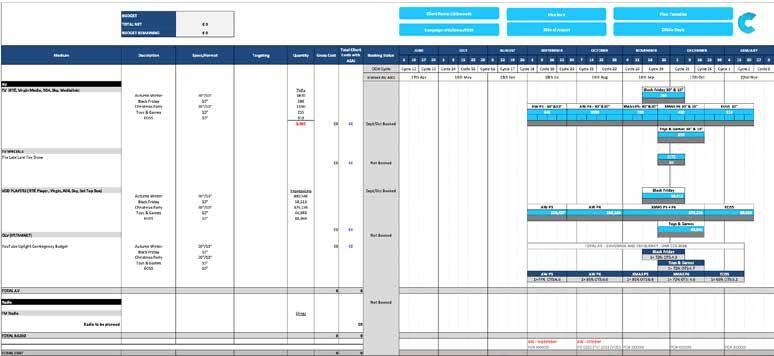
3. Guideline budget agreed with client in advance of any work being presented.
4. Once agreed, CS to sign budget sheet and return to the Broadcast Director. POs to be raised for all items listed in budget sheet before work commences.
5. Bear in mind that if anything changes in the original agreed brief, Mick needs to be notified as changes will usually mean additional costs.
6. TV production process now begins.
1. CS to obtain media schedules from relevant agency so that we know what ‘on air’ dates we are working to AND MAKE SURE TO PASS THE TIMINGS ON TO PRODUCTION. It is important to set up an automated email or scheduling a weekly phone call to your media agency contact on a weekly basis, to make sure that you have the most up-to-date media plan for your clients. This is where CARIA is so useful in that it shows us all TV and VOD bookings as soon as the media agency have made the booking. Bear in mind that it only covers TV and VOD – so you need to chase the media agency for details of any other media format.
2. Sufficient time needs to be allowed for script/copy approval from Clearcast and RTÉ as well and Client approval.
• If you are not familiar with them, media schedules can be difficult to read.
• The level of detail on what we receive from media agencies isn’t always enough – so for TV and VOD, you are better to go with what is on Caria, as this gives you the specific detail of what is booked by client/product. You have access to Caria (in a read only capacity) – so you can check to see what activity is booked on TV and VOD for your own clients.
• On receipt of a media schedule (which can be for a 12 month period) – you should isolate the current month and the following month, to make it easier for yourself to follow. It will change month on month anyway, so you don’t need to be looking at something that isn’t planned for 10 months time.
Scripts for both TV and Radio need to be approved well in advance of going into production. It is very important that you allow enough time for this – as UK TV stations in particular (Clearcast) have a 2 week clearance time line.
RTÉ Clearance is faster – they meet on Tuesday and Thursday for TV and Radio.
NI Radio goes through separate clearance to RTÉ –Production will do this so it is important to flag to them during the approval process if there is NI stations.
• All scripts need to be pre approved by RTÉ/UK stations.
• In almost all cases, Clearcast look after clearance for UK stations while RTÉ look after clearance for Irish stations.
The only time copy for UK stations won’t have to go through Clearcast, is when the product is unique to the Irish Market (e.g. An Post).
The broadcast team will confirm this to you when you send scripts to Broadcast production assistant for clearance.
• For non Clearcast clients, you need to get local approval from the UK stations. You can send the same attachments to the local approvers, as you send to RTÉ – at the same time.
• Copy clearance is a minefield. Scripts can be rejected for the most obscure reasons.
• While RTÉ will usually come back to you straight away, Clearcast have a 2 week approval process. This is why it is critical for broadcast team to get scripts to clearance as soon as you receive the scripts from Creatives.
• For any offer, all relevant T&Cs need to be included, together with substantiation for any claim made within a script.
• The Production Administrator will look after clearance from Clearcast. Please have a discussion with the broadcast team to identify what substantiation may be needed prior to the Production Administrator submitting copy for Clearcast. Also all substantiations must be submitted by client with client signature attached i.e. – Client Email signature will be sufficient.
• As soon as a CS member receives a script for TV or Radio, it needs to be sent for clearance, through the CLEARANCE email address – broadcast production assistant to be CC’d on these clearances so she can follow up once submitted.
• RTÉ have clearance meetings on a Tuesday and Thursday morning only at 9.15. They are quite strict about the timeline as they have a significant volume to get through and want to ensure that they can cover everything submitted. To make sure your submissions are included, you should send anything by close of play on the Monday and Wednesday prior where possible.
• Scripts need to be sent in Microsoft Word format – and you need to send a separate Word document for each separate script submitted. RTÉ will confirm receipt with a unique case number for your submission.
• Generally speaking, RTÉ will come back to you on the Tuesday/Thursday immediately after the meeting with approval or feedback where necessary. It is really only when there is anything that might be an issue that there will be any delay. While some of the guidelines are quite strict, the team in RTÉ are very helpful and will do what they can to get your scripts over the line. The Production Administrator should be able to advise if anything comes up regarding local clearance.
Station Address
RTÉ adclearance@rte.ie
To be sent by close of play Monday and Wednesday evenings.
Check with Production as to whether or not local approval will suffice C4 – local clearance localapproval@channel4.co.uk adsalesmedialinklocalapprovals@channel4.co.uk
Products specific to the Irish market only. Sky – local clearance DL-IrishLocalClearance@skyglobal.onmicrosoft.cwom Products specific to the Irish market only. Clearcast approval Send scripts/files to Production Clearcast requirements are more technical –broadcast production assistant/Eric will look after Clearcast approval.
Each Client Service person should look after their own scripts and approvals – everything you send to RTÉ’s ad clearance should be sent/received through the specific CLEARANCE email address. That way, clearance requests/approvals are located on a central email – and anyone can check to see whether a file has been submitted and/or approved or not if the specific CS person is out of the office. If you are getting local approval, you can send the same files to the local addresses shown above.
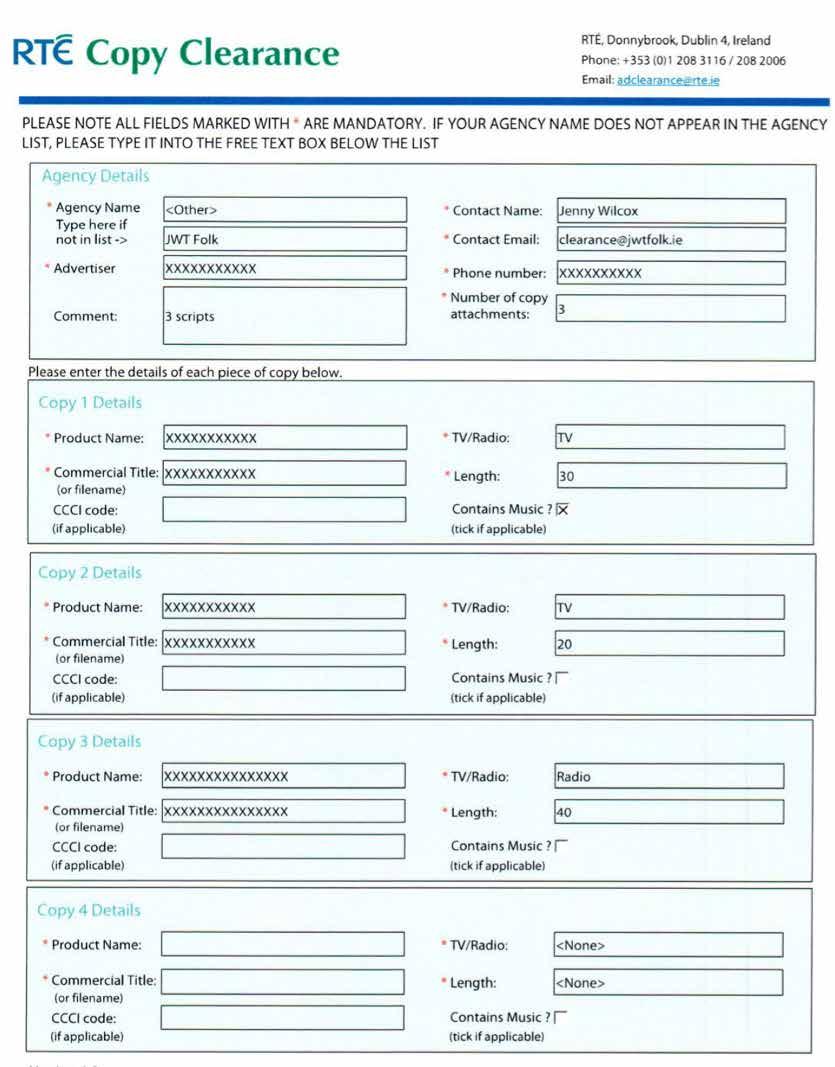
You should also save your approval emails with case numbers, for both RTÉ and Clearcast into the specific client folder on the server for ease of reference.
1. Clearcast look for more technical files for final approval – and the sheer volume of what goes through Clearcast makes it a 2 week approval process. Because it is more complex, the production department will continue to look after this. Immediately on receipt of an initial script from Creatives, it is your responsibility as a CS member, to send this script to the TV production department, so that they can send it through to Clearcast for approval. Once this is done, TV Production will send you the unique case number for your submission. You need to send any revisions to the original script to TV Production with the unique case number for resubmission to Clearcast.
2. All original and revised scripts for submission to Clearcast should be sent to the Production
Administrator immediately you receive them. Anytime a change is made to a script – it needs to be resubmitted, quoting the unique case number.
We need to be able to make any changes necessary well in advance of going into production.
3. Clearcast works in two stages – One is script approval, then TVC approval – the script approval is the most time consuming part but it is not the end of the CC process which is important to keep in mind – Final clocked TVC approval can take another 1-2 days.
4. There is an option to fast track on CC which guarantees you a response within 24 hours – cost is €500.
Mid way through production process, CS, Creative and Production catch up to confirm:
• Client service happy with progress to date.
• No change to on air date.
• Final requirements still the same (do we need edits, extra versions etc.)
• Check list that all required contracts are in place and signed and that any music track being used is licensed.
• Budget review to take account of any additional requests from client which would result in additional production costs.
• At this stage, first draft edits presented to Creative and if happy with output, shared with CS for feedback.
• Once CS and Creative teams are happy with edit, it is shared with Client for their input, amends and approval.
• When all approvals are in place, Production Check List is completed and needs to be signed by CS and the Broadcast Director.
(The purpose of this is to ensure that no ad goes to air without absolute assurance and clarity on our side that all procedures have been followed and completed).
• Once final approval is received from CS, the ad and copy instructions are delivered to all stations listed on the media schedule.
• When we are working with other production companies, studios, sound mixers etc it is important to note a few things.
• We book them for the hours and schedule agreed upon before we go in to production – if the client has changes/ updates that go outside if this it is important to inform them that there may be delays as these companies have other shoots and jobs they will be working on.
• This can vary per shoot but ask Production for a time frame and please inform the client of this and manage their expectations on timing.
• Copy instructions are sent through Caria – we have a slack channel where they should be sent and the Production Administrator will update Caria.
• The template here is ideal to work with rather than the media plan. Clock numbers will be added to the instructions by the Production Administrator for future use for CS.
• Cut off for stations for copy instructions on Caria is 12pm the day before – if we miss this deadline copy will not run the next day.
• Copy is sent to stations through Peach – production looks after this.
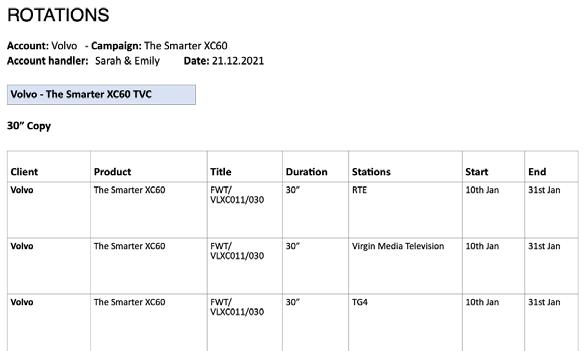
• Online Video Production follows the TV process, and VOD copy instructions now has to be supplied in the same way as TV, through the Caria system.
• The only exception here is YouTube. As YouTube won’t appear on Caria, we will be depending on the media agency to let us know when YouTube is running. The specifications for YouTube are different, and Production will arrange the correct file/specs for you when you need to them.
• Brief issued from CS to Production, TOGETHER WITH A MEDIA PLAN.
• Quotation drafted by Production for the job, based on hours required, voice over and associated costs, studio time and costs, number of stations and associated delivery costs.
• Again, you will need to make sure that you have sent the relevant scripts through for approval.
• Once budget is drafted it is sent to CS for approval and sign off. TV/Radio production will look after PO’s for all expected third party production costs.
• When sign off is agreed, studio time is booked to ensure on-air date is met.
• Samples of voice over artists are sent to CS or Creative for feedback and once approved are booked and contract for VO drafted by the production team, containing all information pertinent to the job, including running time, station information etc.
• On recording day, VO contract is signed by artist on conclusion of session.
• In terms of music, if a library track is used, production department. manages the contract with MCPS for use of the track. A copy of this contract will be retained by the agency.
• Following on from the recording session, a WAV version of the ad will be sent to client and to RTÉ for final approval. Once approved by both, ad is ready to be issued to stations. Production Check list needs to be completed and signed by CS and the Broadcast Director.
• Production will deliver the copy to stations through AdMailer – The cut off for copy is 12pm the day before. If we miss this deadline the copy will not air the following day.
(The purpose of this is to ensure that no ad goes to air without absolute assurance and clarity on our side that all procedures have been followed and completed).
• All Radio ads running on RTÉ or on stations in Northern Ireland need to approved in advance of recording. It’s a simple enough process but there are timelines.

• For RTÉ – the process is the same as for TV – you send the scripts to adclearance@RTÉ.ie.
• For Northern Ireland – you can upload your scripts to a website and they usually come back within 24/48 hours. The web address for this one is:
https://www.radiocentre.org
IRS – Independent Radio stations nationwide
Urban Media
(Main Cities – 9 stations – 8 ROI and 1 NI)
LMFM Louth/Meath
95FM Limerick
WLR Waterford
Q102 Dublin
Radio Kerry Dublin
Unless it is specified, U105 seldom runs for ROI campaigns – worth checking this with the media agency.
Media Central/Communicorp Group (in blue) (8 stations)
Newstalk National Station
Classic Hits 4FM
98FM Dublin
Spin 1038 Dublin
Station
Spin South West Kerry, Limerick, Clare, Tipperary, South West Laois
Beat Waterford

This process outlines the procedures to be completed for any digital project, including the development of a microsite, website, mobile app, social app or campaign landing page.
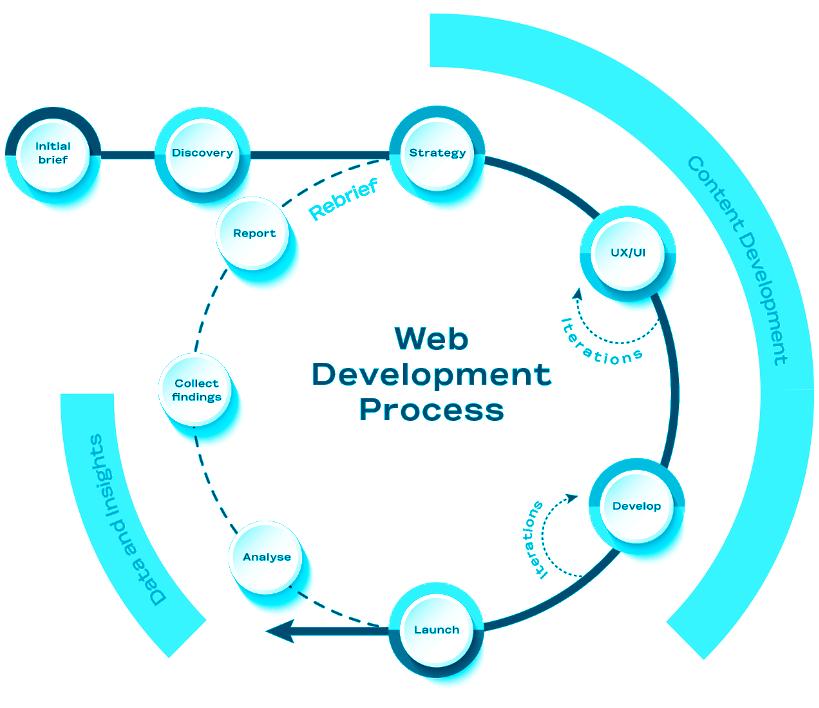
An internal project brief will need to be written by the Client Service and should be sent to the client for approval. This captures the top line details of the project including:
• Campaign background
• Objective of deliverable
• Functional requirements
• Creative guidelines
• Domain/requirements
• Hosting Requirements
• Budget
The purpose of the brief is to delve into the business goals, the objective of the outputs, the measurement for success and any surrounding factors that need to be taken into consideration.
The process requires conversation and collaboration to probe and understand the ‘why?’ rather than just the ‘how?’, to understand what the real output is to meet our clients business goals.
The production team should be agreed between the client service team, the technical lead (digital team), creative director and resource manager, based on both suitability and availability.
A pre-production meeting then takes place between the account handler and the digital strategy director to discuss the brief and what specs will be required for project completion.
Client Service then hand over to the digital team. Discovery puts us in a position of knowledge and understanding before we begin to write, design, and develop. It allows us to define and scope the project outputs and therefore ensure that the client, and their goals are going to be met.
We believe that any touchpoint on a website should be based around not just the needs of the business, but the needs of the user. With our approach, all designs, layouts, and development decisions will be based on insight, research, and an understanding of the user journey. This stage will include the following key outputs:
We will access the current content and performance to investigate if items can be categorised more effectively to create a better overall user experience. This step will be important in determining the approach to the re-design of each page.
We will conduct an audit of all the content which looks at a number of categories and measurements to determine the performance of the preceding content. These measures are defined below.
• URL
• Visits
• Time on page
• Bounce rate
• Content type
• Topic
• Keywords
• Word count
• Meta title
• Meta description
• Meta keywords
• Use of H1
• Use of H2
Based on our understanding of your websites content requirements, we will develop a new Information architecture/IA. This is sometimes referred to as a sitemap.
The purpose of the new IA is to identify and organise the websites content in a clear and understandable way and arrange it according to its relationship with other pages. Organising the website in this way allows us to design the navigation so that users can find what they need with less effort.
The digital team lead will define and develop a written specification to agree the outputs of the project based on our learnings and recommendations from the pre-production meeting and Discovery phase. The specification will include:
• Confirmed timelines & deliverable breakdowns
• comprehensive IA
• A content development plan
• CMS requirements
• Data capture requirements
• Hosting requirements
• Security requirements
• Integration details
• Domain/hosting
• Technical specifications
• Any out-of-scope costs (video content, photography, future updates, etc.)
The project spec should capture the complete project requirements, and once signed off by the client, will act as the single point of reference for developers, art directors, client service team, and any third parties involved in the production of the project.
The understanding of expected user behavior is key when developing a website. During this stage we will map out the sitemap (Information architecture/IA) and the different expected pathways (user journeys) of your audiences as they move from their point of entry, whether advertising driven, organic or direct, through each step of their journey. Within your user journeys, we will identify the following:
• Entry point.
• Exit point.
• Content
• Front end interactions required.
• Call to actions required.
• Content expectations, types, and requirements.
• Related content
• Data capture requirements.
Wireframes provide the client with a visual reference for the proposed user experience (UX) before designs have begun and ensures efficiencies once the project goes into the design phase, as most content and UX changes can be considered at this point.
Wireframing is the development of low fidelity desktop and mobile device page designs that allow us to very quickly create and test page structure and usability and adjust before committing to design. To help inform this, we may also review and take learnings from reference websites from the same industry.
Once we have fully tested wireframes, the art director should be scheduled to prepare the initial look and feel based key pages/ screens, which should be agreed between the art director, client service team and client.
The art director should be briefed and should receive the following final documents.
• Sitemap
• Wireframes
• Creative Guidelines
• Creative Assets
The production of the look and feel should consider and reflect everything that has been signed off within the spec.
Once we have agreement on the initial look and feel, we will design a custom user interface (UI) for both desktop and mobile devices for all pages. The design will be created in line with the organisational branding, partner and reference websites, content, and assets. The UI phase will include the following:
• Overall site design (e.g., header, footer, fonts, colours and illustrative site elements).
• Tone of voice and micro-copy considerations throughout the site.
• Content components to be used throughout the website to address how copy, imagery, videos, and other elements will be displayed and how they will adapt responsively between different screen sizes and devices.
The development phase consists of the following key stages:
Once we have finalised the custom design, we will begin implementing responsive HTML, CSS (SASS) and JavaScript. The website will be developed to be accessible, fast and will be WSC and WAI compliant.
The front end of the website will be built responsively, meaning that it will flex and adjust at various breakpoints across desktop, tablet and mobile so that the user is always viewing the content and assets in the best possible configuration.
All source files should be saved onto the server, within the project folder of the specific job in the following location;
Iterations should be stored in versioned folders (Version_01, Version_02 etc.) with this file naming convention:
Project Number_Campaign Name_File Name_ Type_01
The website will be developed in PHP and will be integrated for content management. Our primary CMS platform is WordPress. WordPress is an open source content management system and currently powers around 25% of all websites on the Internet. Open source means that every line of the code base has been analysed by thousands of independent developers to ensure that the best, fastest and most secure approach has been taken.
WordPress will allow us to develop a flexible and customised website, built to modern standards and it adheres to web development best practices. Furthermore the community of web developers that use WordPress reaches far and wide and allows us to tap in to this collective intelligence and bring that wealth of experience to your project.
The WordPress CMS will feature a web-based interface using a WYSIWYG editing tool that is similar to all word processing software, ensuring user familiarity. Full control over all content and pages will be provided, with the ability to add, edit and delete content such as written copy, downloads, and photography, while easily allowing for the creation of new sections or pages.
The CMS will be stable, secure, password protected and meticulously tested.
The QA and testing process is an essential part of every digital project.
There is an internal QA process for every type of digital
project, and it is the responsibility of the account handler, PM and developer to ensure that the necessary QA has been completed and passed by all relevant parties before the project is released to the client for review.
Folk will complete website testing prior to and following “Go Live”. The verification and testing component of the process comprises a full suite of test scripts to be carried out across the full extent of user scenarios and browser/ device combinations. For older browsers, Folk will verify that the site is functional, however some more advanced visual or UI functionality may not be available. A code freeze will begin once the website has been completed and agreement for deployment has taken place between the client and Folk. A code freeze will allow for the testing to begin and to be carried out efficiently without new development deployments taking place in the middle of testing.
If a project is developed by a third party, the account handler and digital team lead should agree if QA will be completed in house of by the third party.
Any issues picked up during the internal QA process need to be scheduled for amends. The project manager is responsible for ensuring that these amends are scheduled and completed, before a final internal QA is completed.
Once the project has passed internal QA, it is ready to be sent to the client for approval.

SEO will be used to increase discoverability on organic search and create intent with target users; by intent we mean using SEO to surface pages to those actively searching for content relating to the content on your website.
Working with the client, we will review the list of keywords the new website should be optimised with. We recommend the keywords are based on the current SERP within Google and Bing, from competitors, and based on keyword search volumes. These will then feature across the new website within key ranking elements, such as:
• H1 & H2 Titles
• URL Slugs
• Title Tags
• Body Copy
• Image Alt Text
We will need to set up several elements that will be utilised post launch to effectively track and measure website performance. These include Google Search Console, Bing Webmaster Tools and Google Analytics. We will also add redirects from the old website to the new site to maintain the existing SEO authority and mitigate against error codes.
To get Google and Bing to index the new sites more effectively, we will use both Search Console and Webmaster Tools to submit site maps for indexing post launch.
A key factor in improving ranking before launch is security. The website will be issued an SSL certificate, which will provide encryption for users visiting the website. The PM will work with the lead developer and client in implementing the SSL certificate.
All digital display and social project needs to be briefed into the digital team by Client Services. This is done by completing a Digital Briefing Document.
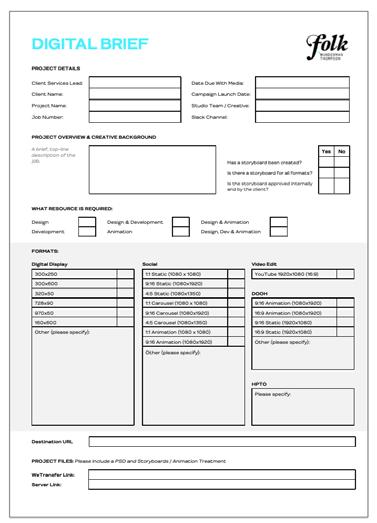
The brief for a Digital Display project should include:
• Project details including the client, contact name, internal creative team, timings and communication channels that exist (e.g., Slack channel).
• Overview of the project including details of what’s been completed and signed off so far.
• An overview of what resource is needed from the digital team to complete the project.
• Specific format outputs required for the project.
• Files and locations of files if creative is produced by the agency creative team.
The digital team have a weekly Digital WIP with the client services team. Display and social projects can be scheduled during that weekly session, during a 1-to-1 call with a PM or via email/Slack. However, the project is booked in, it must be done so with a completed Digital Briefing document. There is also a dedicated digital resource channel on Slack (#digitalresourcing) for submitting a briefing document.
The digital team schedule will usually be booked for approx. 1 week ahead at any given time.
However, there are gaps, and we can fit some smaller jobs in with shorter notice.
If we are outsourcing this project to a freelancer or third-party, we would advise that an extra 2 days is allowed at the beginning of the project to conform the specification and agree on the output of the project.
• All third-party costing should be agreed internally before being presented to the client.
• These should also be signed off by the Client Services Director before the digital team is given approval to proceed.
The digital or social campaign creative concept (typically an MPU) will be developed by the creative team and shared with the account manager to present to the client. Once the MPU is approved, all formats need to be designed by either the creative team or by a digital designer.
• Once all formats are approved by the client, these can move into production.
The following considerations must be carried out prior to and during production:
• Client to feedback/approve creative before production commences.
• Click through URL(s) to be confirmed with the client before build commences.
• Ensure click through URL is embedded for all formats.
• Ensure backup images are packaged / uploaded for all formats.
• Consistent naming convention including a (short) campaign name and ad size.
Once all formats are signed off, we package and send over the final files. Each job folder has a “Final Files” folder. The packaged file should be copied and compressed in this folder.
The process for the development of an eDM is as follows:
This brief consists of the client’s brief, confirming live date, design and content instructions and links.
The design will be created by the digital designer and visuals sent to the client in jpeg / PDF format for review.
Based on the visuals provided, the client will approve or suggest changes to the creative. Development will not proceed until the creative is fully signed off by the client.
If creative is produced externally, development cannot start until Photoshop PSD and URL links have been provided.
Once .html file is finished, the developer has to test the email on relevant devices to identify any potential bugs before sharing with the client.

Before sharing with the client, a test email should be sent to account management for review to identify potential bugs, verify copy and links.
Once the account handler is happy a test email should be sent to client, so they can check any animated elements, links, and content.
Small type changes etc can be made prior to completion, however after development, no major design amends should occur at this stage.
Once test email is signed off, if client or third party is responsible for sending them out, package (compress .html or .oft file in a folder) and send over the final file. Each job folder has a “Final Files” folder. The packaged file should be copied and compressed in this folder.

The importance of timesheets to our business is best illustrated by understanding our business model below:
STAFF COSTS ARE THE VAST MAJORITY OF OUR BUSINESS RECOVERING THESE COSTS ARE THE PRIMARY COMMERCIAL FOCUS NOT CHARGING THE TIME MEANS WE STILL HAVE TO COVER THE COSTS OF DOING THE WORK
As a business, we forecast revenue for each client, we create a scope of work for the year and from that figure we calculate how many people we will need to undertake the work.
If we get it wrong, we will either have too few people doing too much work, or we will have too many people, resulting in capacity and we could over-service clients or overwork briefs. Timesheets provide us with the data we need to ensure each client is resourced most efficiently and effectively.
In summary:
• We are consultants, we sell time.
• Timesheets must be completed daily so that we ensure we are charging the clients correctly.

• Protect time daily for yourself to fill out your timesheet –don’t leave till the end of the week, you won’t be able to remember what you did that day. The agency has set protected time in your calendar to complete your timesheets daily.
Completing your timesheet accurately is vital for the agency. They are reviewed each week. It is part of your contract of employment to complete. By submitting you are confirming that is how you have spent your time and what can be charged to your clients.
CLICK HERE FOR A HANDY VIDEO TUTORIAL ON DOING YOUR TIMESHEETS ON AURA!
Holidays should be booked on Aura using the Time Off tab as follows:
1. Top right – request time off.
2. Select dates.
3. Hit apply.
4. The time off type can be holiday or birthday (you are entitled to one day off for that).
5. If you want to take a half day, click on day and change to either am/pm.
6. Hit submit.
• Before applying for annual leave on Aura please send an email to your line manager and copying your department lead requesting the time off.
• For the Creative Team, please send a Slack message to the Creative Partner and Resource Director advising of the request.
• Your manager will get an email to authorise your holidays on Aura.
• It is your responsibility to ensure they are authorised.
• You should get an email back when they have done so.
• Once annual leave has been signed off please send a calendar invite to your team (click all day event, so it doesn’t take over the full day and appears at the top of the teams diary).
• Annual leave can be declined if it is short notice and if there is a direct clash with a team member. Please consult with your team and submit your request into Aura as early as you can.
• Summer Fridays (half day on one Friday in June, July and August) are given out as discretion of the agency and they are not part of our contract.
• If the leadership team confirm these are available to staff, you are able to take one half day a Friday for the months of June, July and August.
• These cannot be added to your existing annual leave.
• If at the time the account is busy and there is no one to hand your work over to we ask for flexibility and that your half day be taken on another Friday in the month.
• All staff are entitled to a day off to celebrate your birthday.
• If your birthday falls on a weekend, please select a day as close to it as possible.
• Like annual leave you must email your line manager, once approved this needs to be submitted to Aura – Select Birthday.
• Once approved please put an invite in your teams calendar – select all day event.
• Once the time has been booked off and the invite is in your teams diary it is your responsibility to ensure that your handover is completed in the correct format and that you have time scheduled with your team to talk through handover.
• Please see client service handover template overleaf.
• Job numbers and links should be included in handovers.
• Please have your out of office set up on your email while you are away with a note letting your client know you are away and who they should get in touch with – another agency staff member and their contacts should always be referenced in your out of office message.
• Please ensure your timesheets are complete before going on leave.

Insert Name Here
Returning: 1 January 2023
Job Insert job number and name here
Account Handler Include all members of client service you are handing over to, and who are currently working on the job here.
Clients Include the names of all clients who are working on the job here.
Agency team Include all non-CS members of the team here. Be sure to remember digital and production as well as creative.
Other contacts Include all relevant third party or partner agency contacts here If the contact is not someone used regularly on the account, include email addresses and/or phone numbers where relevant.
Notes 1. This section should be used to give all relevant background or timeline information that could be relevant.
2. This could be anything from links to the brief or previous rounds of creative on the server, to notes on resource, or upcoming client meetings that the creative is building towards.
3. While giving detail is essential here, bullet points help keep everything short and concise.
Actions 1. This section should include everything that’s required to be completed by the person or people you’re handing over to.
2. For each step, be sure to clarify who is to take the action, and when it needs to be completed by.
3. Before leaving the office, ensure that these asks match up to what has been booked in on Hive - and confirmed by Kate.
Finance An overview of where we are on cost estimates, time logged on the job and whether we’ve received a PO yet (hint - we should definitely have received a PO!)
Server Links All relevant server links - including cost estimates, briefs, previous rounds of creative, contact reports.
Job Insert job number and name here
Account Handler Include all members of client service you are handing over to, and who are currently working on the job here.
Clients Include the names of all clients who are working on the job here.
Agency team Include all non-CS members of the team here. Be sure to remember digital and production as well as creative.
Other contacts Include all relevant third party or partner agency contacts here. If the contact is not someone used regularly on the account, include email addresses and/or phone numbers where relevant.
Notes 4. This section should be used to give all relevant background or timeline information that could be relevant.
5. This could be anything from links to the brief or previous rounds of creative on the server, to notes on resource, or upcoming client meetings that the creative is building towards.
6. While giving detail is essential here, bullet points help keep everything short and concise.
Actions 4. This section should include everything that’s required to be completed by the person or people you’re handing over to.
5. For each step, be sure to clarify who is to take the action, and when it needs to be completed by.
6. Before leaving the office, ensure that these asks match up to what has been booked in on Hive - and confirmed by Kate.
Finance An overview of where we are on cost estimates, time logged on the job and whether we’ve received a PO yet hint - we should definitely have received a PO!)
Server Links All relevant server links - including cost estimates, briefs, previous rounds of creative, contact reports.
Job Insert job number and name here
Account Handler Include all members of client service you are handing over to, and who are currently working on the job here.
Clients Include the names of all clients who are working on the job here.
Agency team Include all non-CS members of the team here. Be sure to remember digital and production as well as creative.
Other contacts Include all relevant third party or partner agency contacts here. If the contact is not someone used regularly on the account, include email addresses and/or phone numbers where relevant.
Notes 7. This section should be used to give all relevant background or timeline information that could be relevant.
8. This could be anything from links to the brief or previous rounds of creative on the server, to notes on resource, or upcoming client meetings that the creative is building towards.
9. While giving detail is essential here, bullet points help keep everything short and concise.
Actions 7. This section should include everything that’s required to be completed by the person or people you’re handing over to.
8. For each step, be sure to clarify who is to take the action, and when it needs to be completed by.
9. Before leaving the office, ensure that these asks match up to what has been booked in on Hive - and confirmed by Kate.
Finance An overview of where we are on cost estimates, time logged on the job and whether we’ve received a PO yet hint - we should definitely have received a PO!)
Server Links All relevant server links - including cost estimates, briefs, previous rounds of creative, contact reports.
• Once the time has been booked off, send an invite to all your team members including the Resource Director and Creative Directors.
• Once the invite is in your teams' calendars, it is your responsibility to contact Resource Director to ensure cover for you existing jobs are booked in.
• Once you have confirmation on who will cover your jobs, please complete The Creative Team Handover. The handover template is saved on the server, please see location outlined on the right of this page.
• Once you have completed your handover document, set up a meeting to handover officially at least 24 hours before your time off. The Creative Director and Resource Director should be included in all handover meetings.
• If you are unwell and cannot make it into the work you must call your line manager on the phone. WhatsApp, texts and emails will not be accepted.
• If you have work that needs cover while off ill, please let us know and we can ensure that we get this work covered.
• The search function on the server is very useful.
• When looking for an asset or file but not sure where the folder is, simply go to the client folder (ie. Vodafone folder) and once in there, type in the asset name you’re looking for.
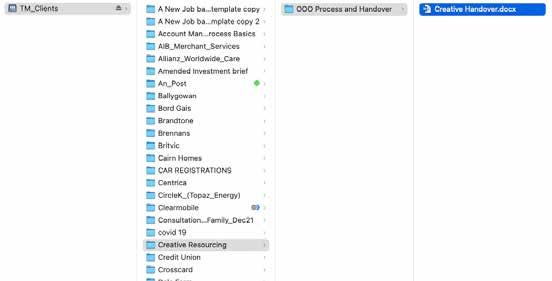
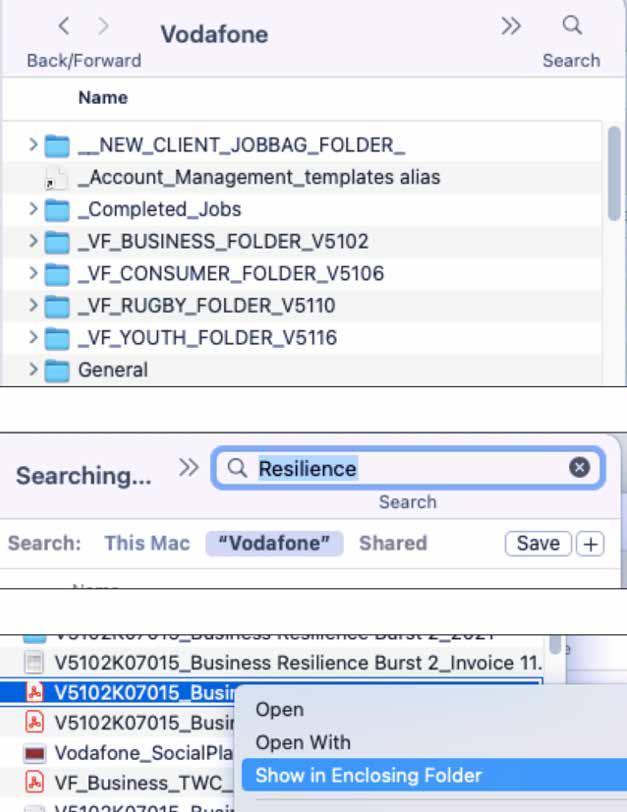
• Make sure the search is selected for the server, and not your Mac.

• It’ll then show you a range of assets.
Once you find one that matches your search, you can click right and select “Open enclosing folder” to get to the actual job folder as well.
The Slack search function is also great to find back files or discussions.
Type in your keyword and you can look through other slack channels, conversations, or look for specific files as well. (i.e. looking for a PDF, or video, etc.)
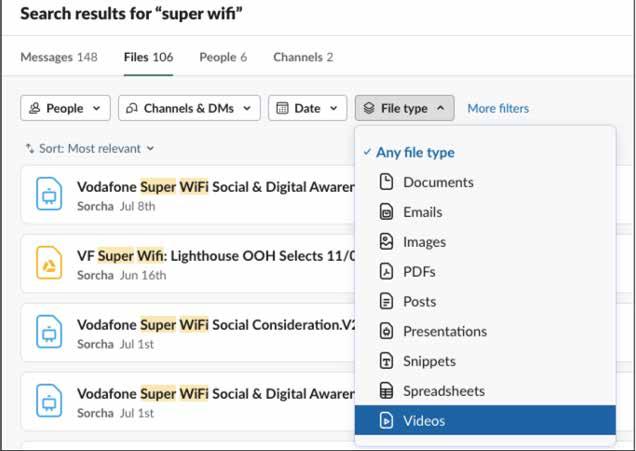
Log in on the Zoom 4 account from your browser (not the app) https://zoom.us/

• Select “Webinars” on left side
• Schedule a webinar
• Fill in the webinar’s details
• Select ”Registration required” so that people have to add in their email address upon starting.
• Remove the Webinar passcode
• Audio = computer audio
• Webinar options to select: Q&A; Enable practice session; Require authentication to join in; Automatically record (in the cloud)
• Schedule
• Under invitation, click ”Edit” to add in panelists (people that can talk during the event) // the panelists will automatically receive their own invite once added to the webinar as such.
• Under ‘Branding’, you can add details about the speakers (like name, role, picture…)
To practice ahead of the event, you can share the link to the event with people that want to test it out, and you can log in to zoom on your browser, select the webinar, and do “Start practice session”.
You also have access to a free 1 hour training, happening live every day with multiple time options:
https://support.zoom.us/hc/en-us/articles/360029527911
Below is a summary of important agency passwords and contact numbers for key suppliers:

ACCOUNT USERNAME PASSWORD LINK
Zoom LT
Zoom CS
Zoom Broadcast
Caria
Folk Apple ID
Admin Laptop
Vimeo
Courier
zoom3@folkwt.ie
zoom4@folkwt.ie
zoom5@folkwt.ie
client.service appleid@jwtfolk.ie
Administrator
digital@targetmcconnells.com
Target McConnells
F0lkWT2020!
F0lkWT2020!
F0lkWT2020!
Pa$$word23
F0lkWT2020*
Target%1007
An1@973bUiw7!
T232
THIS ONE IS THE WEBINAR ACCOUNT
STOCK IMAGES
Getty Account Shutterstock conor.swanton@jwtfolk.ie
Note: These logins should be used for browsing only, not for purchase.
https://cri.optimad.com/servlet/com. optimad.ecap.servlets.MainServle
www.deadline.ie
Ph: 016610000 Acc Manager: Office@deadline.ie
Our agency visual identity is very important. We speak with a strong purpose, and everything from our colourways, logo forms and creative imagery represents this.
It is important that all staff and stakeholders are vigilant in understanding and maintaining the consistencies and creative standards detailed within our brand guidelines with every touchpoint of the agency.
Please use this link to visit our Folk Brand Hub where you can download our brand guidelines, agency fonts and key agency templates.
https://www.wundermanthompson.com/hello/folk-brand-hub
Here at Folk Wunderman Thompson, we expect you to be plugged in as well as switched on. That’s why we have our trusty IT department, who are always there to, well, empower you.
However, where possible, we would encourage you to know the difference between your mac adaptors and your wireless routers.
So, if you can do it yourself, and it’s safe… do.
To help you along, here are some handy hints to navigate your way through all that tech.
Files can be transferred easily from a Mac to the Server and back again by drag and drop. If the file is large (GB rather than MB for example) this can take some time. For large files staff should be trying wherever possible to use Ethernet and connecting their Macs to the Ethernet ports in the building. (Please note that not all ports work and some Macs will require an adapter for Ethernet to connect).
Transferring large amounts of data over WiFi will also cause connectivity and speed issues for other users.
If a file is updated and copied back to the server under an updated file name, please remove the old and unwanted files to free up room and allow the server to function more effectively.
There are 2 printers in the building that can be accessed using a personal PIN that is issues to all staff.
When a job is sent to the printer, staff can use either printer in the building to access their work via the Work Flow menu.
The paper for the printers should be kept stocked by all using the printers. It is not an IT department task to refill the paper trays.
Toner can be ordered via IT and takes 2 days to arrive, so please contact itsupport@folkwt.ie if toner is required.
Our brand typeface is called WT Gothic, and was custom made for the Wunderman Thompson group. This font and guidelines can be found on the below link:
https://www.wundermanthompson.com/hello/folk-brandhub/font
The fonts can also be found on the TM_Library folder but first port of call is our agency web link.
To add fonts to your Mac, copy the font to your Mac desktop and then simply open the Font Book and drag the font into the Font Book.
(Font Book can be found using Spotlight or can be opened under Applications).
Currently, there are two IT support staff in Folk Wunderman Thompson. We have an IT Consultant and an IT Coordinator.
To ensure your queries are dealt with as quick as possible it’s important that you send them to itsupport@folkwt.ie, and not their personal accounts. This means that either of them can pick it up, or a covering IT technician if they are both away from their office.
The following is a step by step guide to setting up VPN on your Mac for accessing the server remotely.
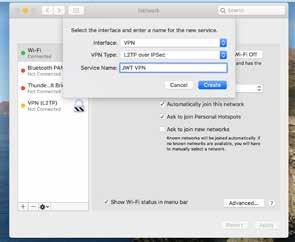
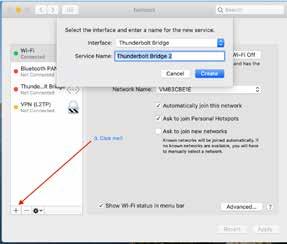
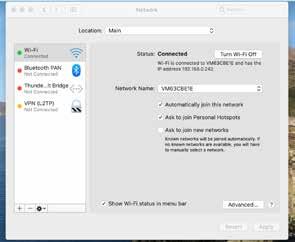
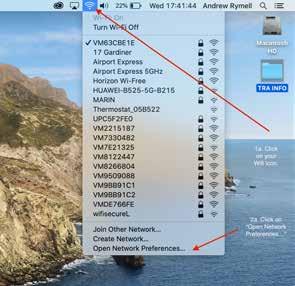
Please do not be over awed by the length and the amount of steps that follow, we have listed each and every step in some detail, so it looks complicated, but it is in fact quite simple and should only take you a few minutes to complete.
Please note! DO NOT try and connect to the VPN whilst on the office WiFi, you cannot VPN onto a system that you are already connected to, it will simply fail.
Instead, either do this at home, or if in the office, use a mobile HotSpot to connect.
So, let’s get started!
(Please note, in the pictures the server address changes, so just put in the one mentioned in the instructions!)
STEP 1
The first step is to click on the wifi Logo in the top menu. Then, from the dropdown menu, select “Open network preferences…”
The following will open up. You may find a small golden padlock in the bottom left corner. If so, this needs to be clicked on and the computers Administrator username and password put into the pop up box.
This will usually be Administrator and Target%1007 on Folk Macs.
If this fails, please contact us in IT and we can try and advise. If you are set up as an Administrator, this padlock will not be present.
Just select the + icon down in the bottom left. Simple as that! A little box will appear asking you to select an interface etc etc. Usually it will have a Thunderbolt listed, don’t worry if it does not on the older Macs, as we are going to change them to VPN!
Not really a step this one, just a picture showing that the VPN you have started to create will show up on the left hand side, like so:
Use the little dropdown menus to select the Interface as VPN, the VPN Type as L2TP over IPSec and then call your Service Name something like VPN. You can name it what you like.
Once these fields are completed, click on CREATE.
First, highlight the VPN service you created on the left hand side.
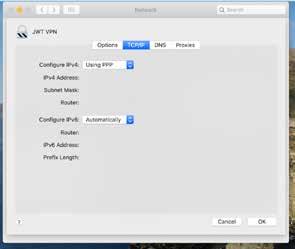
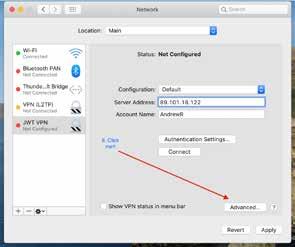
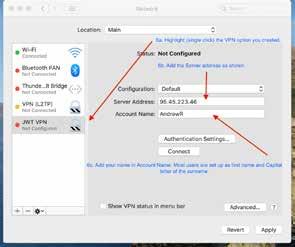
Then in Server Address enter the following: 95.45.223.46
Next, in the Account name, add your name in the same format shown.
Most general users are first name with Capital first letter, and the capital first digits of the surname. Please don’t add the name shown in this example as your connection will fail!
If you have an O’ name, it will be the first 2 letters, so OH, OG, OS etc.
If you are a Mc, it will be your first name followed by MC, so for example JoeOH, or JoeMC.
Hopefully that’s clear as mud!
Now click on the box that says “Authentication Settings…”
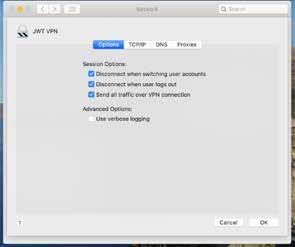
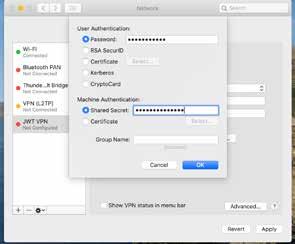
This will open the following:
Now just make sure your “Options” look like this:
Your Password is your capital initials (just 2) and Pa$$word2.
If you are an O’ or Mc, it’s just the first initials of each name. Foe example if you were called Joe, you would be, JOPa$$word2 or JMPa$$word2.
Then, under “Shared Secret” you put in the word northumberland
Then click OK once that’s done.
A difficult next step… Click on “Advanced…”
Select TCP/IP and just ensure it looks like this:
A tiny bit of work on the next step.
Click on DNS. Click on the +.
Then add the following: 8.8.8.8
Then click the + again and put in: 1.1.1.1
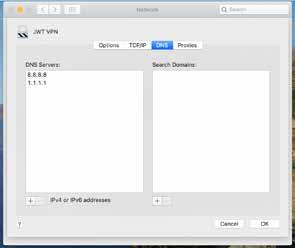
STEP 13
STEP 12
Just make sure the “Proxies” page looks like this:
Then, once you have done that, click OK and you will go back to the first window again!
Hopefully you will have something like this:
Now, before doing anything else, hit “Apply” down in the bottom right of the window, this will save your settings! (13a). Then highlight the VPN connection you created on the left side by clicking it just one. (13b) Then click on “Connect”.
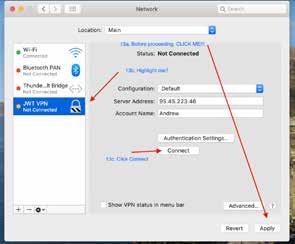
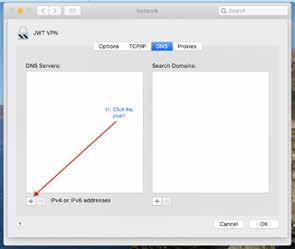
If all is well, you should see something like this:
At the top, the Status in connected (it can take 5-10 seconds on the timer there) and I have an IP address, so I have connected to the VPN. Unfortunately, it doesn’t always connect properly, so I have a little trick I use to make sure.
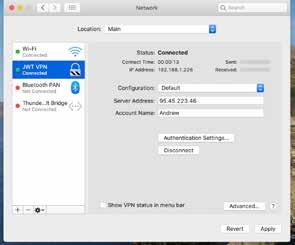
I open the Terminal application and paste in the following: Ping 192.168.1.2
I often do this prior to hitting the connect button and it shows me the following:
You can see that after typing in the ping command, it says “Request timeout” but as soon as I get successful connection, it changes to confirmation that it’s receiving from 192.168.1.2.
If the message does not change, I simply click to disconnect the VPN and then click Connect again until the 64 bytes message appears and I know I’m properly connected.
Now we are connected to the server, its time to access the files!
Click on the desktop and then press the command (cmd) and the K kets together
A “Connect to Server” box will appear.

Make sure the same address is entered and then hit Connect.
If all is well, you will now get the following and you can choose which server volumes you wish to access!
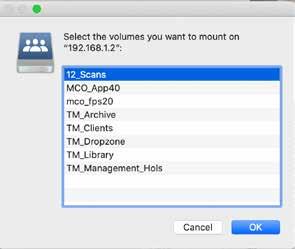
And that’s it! You’re done!! :)
And if you do get stuck, send the IT team an email at itsupport@folkwt.ie and they will arrange a time to help fix the issue.