GCSE Computer Science for OCR
Bubble sort
Key term
This algorithm is used to sort an unordered list by comparing adjacent items. It works like this:
adjacent items: items of data that are next to each other
1. Start at the beginning of the list of values.
Watch the bubble sort algorithm animation on Cambridge Elevate
2. Compare the first and second values. Are they in order? If so, leave them; if not, swap them. 3. Compare the second and third values. Are they in order? If so, leave them; if not, swap them. 4. Now move on to the third and fourth values, then the fourth and fifth values. Continue in this way to the end of the list, comparing each pair of values. Working through the list once is called the first pass. 5. Go through the list of values for a second time (which will be the second pass) or even a third time (the third pass), repeating steps 1–4 until there are no more swaps to be made.
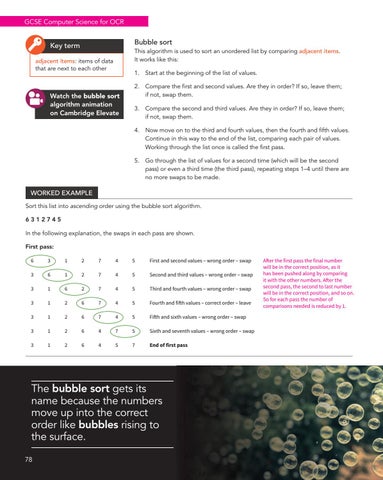
WORKED EXAMPLE Sort this list into ascending order using the bubble sort algorithm. 6312745 In the following explanation, the swaps in each pass are shown. First pass: 6
3
1
2
7
4
5
First and second values – wrong order – swap
3
6
1
2
7
4
5
Second and third values – wrong order – swap
3
1
6
2
7
4
5
Third and fourth values – wrong order – swap
3
1
2
6
7
4
5
Fourth and fifth values – correct order – leave
3
1
2
6
7
4
5
Fifth and sixth values – wrong order – swap
3
1
2
6
4
7
5
Sixth and seventh values – wrong order – swap
3
1
2
6
4
5
7
End of first pass
The bubble sort gets its name because the numbers move up into the correct order like bubbles rising to the surface. 78
After the first pass the final number will be in the correct position, as it has been pushed along by comparing it with the other numbers. After the second pass, the second to last number will be in the correct position, and so on. So for each pass the number of comparisons needed is reduced by 1.