5 Searching and sorting algorithms 4. Repeat these steps until the search criterion is found (if it is not found, it is not on the list).
Watch the binary search algorithm animation on Cambridge Elevate
Tip The binary search can only be used on sorted lists.
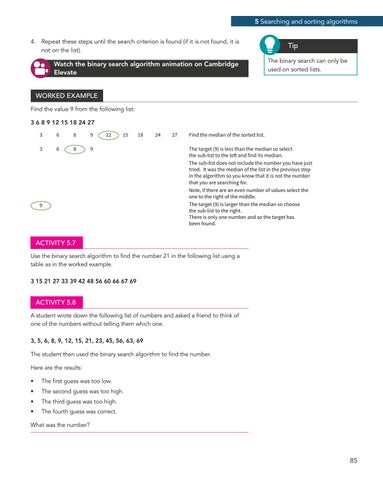
WORKED EXAMPLE Find the value 9 from the following list: 3 6 8 9 12 15 18 24 27 3
6
8
9
3
6
8
9
12
15
18
9
24
27
Find the median of the sorted list. The target (9) is less than the median so select the sub-list to the left and find its median. The sub-list does not include the number you have just tried. It was the median of the list in the previous step in the algorithm so you know that it is not the number that you are searching for. Note, if there are an even number of values select the one to the right of the middle. The target (9) is larger than the median so choose the sub-list to the right. There is only one number and so the target has been found.
ACTIVITY 5.7 Use the binary search algorithm to find the number 21 in the following list using a table as in the worked example. 3 15 21 27 33 39 42 48 56 60 66 67 69
ACTIVITY 5.8 A student wrote down the following list of numbers and asked a friend to think of one of the numbers without telling them which one. 3, 5, 6, 8, 9, 12, 15, 21, 23, 45, 56, 63, 69 The student then used the binary search algorithm to find the number. Here are the results: •
The first guess was too low.
•
The second guess was too high.
•
The third guess was too high.
•
The fourth guess was correct.
What was the number?
85