Cambridge IGCSE Programming Book
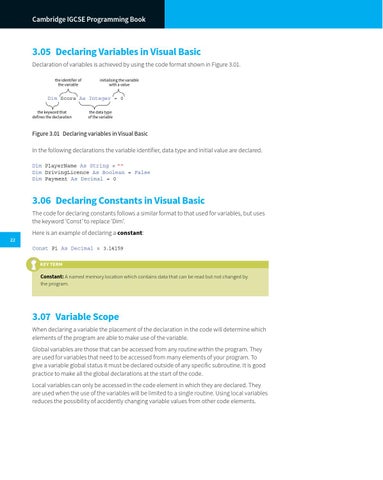
3.05 Declaring Variables in Visual Basic Declaration of variables is achieved by using the code format shown in Figure 3.01. the identifier of the variable
initialising the variable with a value
Dim Score As Integer = 0 the keyword that defines the declaration
the data type of the variable
Figure 3.01 Declaring variables in Visual Basic
In the following declarations the variable identifier, data type and initial value are declared. Dim PlayerName As String = '''' Dim DrivingLicence As Boolean = False Dim Payment As Decimal = 0
3.06 Declaring Constants in Visual Basic The code for declaring constants follows a similar format to that used for variables, but uses the keyword ‘Const’ to replace ‘Dim’. 22
Here is an example of declaring a constant: Const Pi As Decimal = 3.14159 KEY TERM
Constant: A named memory location which contains data that can be read but not changed by the program.
3.07 Variable Scope When declaring a variable the placement of the declaration in the code will determine which elements of the program are able to make use of the variable. Global variables are those that can be accessed from any routine within the program. They are used for variables that need to be accessed from many elements of your program. To give a variable global status it must be declared outside of any specific subroutine. It is good practice to make all the global declarations at the start of the code. Local variables can only be accessed in the code element in which they are declared. They are used when the use of the variables will be limited to a single routine. Using local variables reduces the possibility of accidently changing variable values from other code elements.