Cambridge IGCSE Programming Book
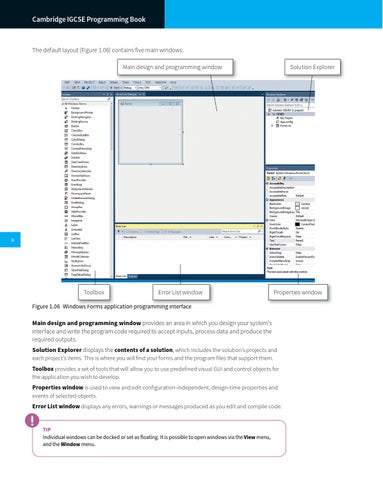
The default layout (Figure 1.06) contains five main windows. Main design and programming window
Solution Explorer
6
Toolbox
Error List window
Properties window
Figure 1.06 Windows Forms application programming interface
Main design and programming window provides an area in which you design your system’s interface and write the program code required to accept inputs, process data and produce the required outputs. Solution Explorer displays the contents of a solution, which includes the solution’s projects and each project’s items. This is where you will find your forms and the program files that support them. Toolbox provides a set of tools that will allow you to use predefined visual GUI and control objects for the application you wish to develop. Properties window is used to view and edit configuration-independent, design-time properties and events of selected objects. Error List window displays any errors, warnings or messages produced as you edit and compile code.
TIP Individual windows can be docked or set as floating. It is possible to open windows via the View menu, and the Window menu.