We are working with Cambridge Assessment International Education towards endorsement of this title. Any references or material related to answers, grades, papers or examinations are based on the opinion of the author(s). 2 Programming constructs
CONTINUED
TIP
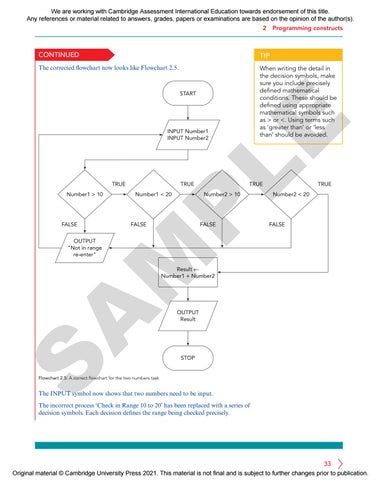
The corrected flowchart now looks like Flowchart 2.5.
When writing the detail in the decision symbols, make sure you include precisely defined mathematical conditions. These should be defined using appropriate mathematical symbols such as > or <. Using terms such as ‘greater than’ or ‘less than’ should be avoided.
LE
START
INPUT Number1 INPUT Number2
TRUE
FALSE
Number2 > 10
FALSE
FALSE
Number2 < 20
FALSE
M
OUTPUT "Not in range re-enter"
Number1 < 20
TRUE
TRUE
P
Number1 > 10
TRUE
S
A
Result ← Number1 + Number2
OUTPUT Result
STOP
Flowchart 2.5: A correct flowchart for the two numbers task
The INPUT symbol now shows that two numbers need to be input. The incorrect process ‘Check in Range 10 to 20’ has been replaced with a series of decision symbols. Each decision defines the range being checked precisely.
33 Original material © Cambridge University Press 2021. This material is not final and is subject to further changes prior to publication.