We are working with Cambridge Assessment International Education towards endorsement of this title. Any references or material related to answers, grades, papers or examinations are based on the opinion of the author(s). CAMBRIDGE IGCSE™ & O LEVEL COMPUTER SCIENCE: PROGRAMMING BOOK
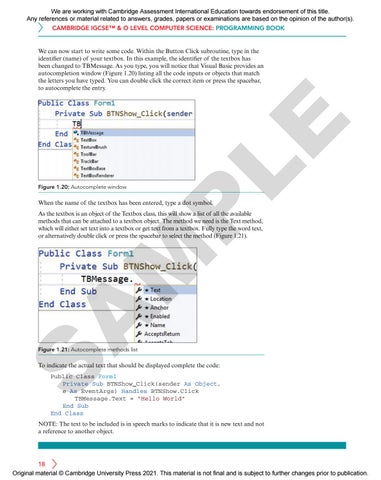
Figure 1.20: Autocomplete window
LE
We can now start to write some code. Within the Button Click subroutine, type in the identifier (name) of your textbox. In this example, the identifier of the textbox has been changed to TBMessage. As you type, you will notice that Visual Basic provides an autocompletion window (Figure 1.20) listing all the code inputs or objects that match the letters you have typed. You can double click the correct item or press the spacebar, to autocomplete the entry.
P
When the name of the textbox has been entered, type a dot symbol.
A
M
As the textbox is an object of the Textbox class, this will show a list of all the available methods that can be attached to a textbox object. The method we need is the Text method, which will either set text into a textbox or get text from a textbox. Fully type the word text, or alternatively double click or press the spacebar to select the method (Figure 1.21).
S
Figure 1.21: Autocomplete methods list
To indicate the actual text that should be displayed complete the code: Public Class Form1 Private Sub BTNShow_Click(sender As Object, e As EventArgs) Handles BTNShow.Click TBMessage.Text = "Hello World" End Sub End Class
NOTE: The text to be included is in speech marks to indicate that it is new text and not a reference to another object.
18 Original material © Cambridge University Press 2021. This material is not final and is subject to further changes prior to publication.