We are working with Cambridge Assessment International Education towards endorsement of this title. Any references or material related to answers, grades, papers or examinations are based on the opinion of the author(s). 1 Visual Studio Community
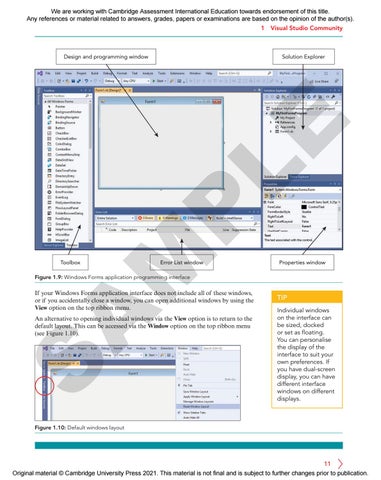
Solution Explorer
M
P
LE
Design and programming window
Toolbox
Error List window
Properties window
Figure 1.9: Windows Forms application programming interface
A
If your Windows Forms application interface does not include all of these windows, or if you accidentally close a window, you can open additional windows by using the View option on the top ribbon menu.
S
An alternative to opening individual windows via the View option is to return to the default layout. This can be accessed via the Window option on the top ribbon menu (see Figure 1.10).
TIP Individual windows on the interface can be sized, docked or set as floating. You can personalise the display of the interface to suit your own preferences. If you have dual-screen display, you can have different interface windows on different displays.
Figure 1.10: Default windows layout
11 Original material © Cambridge University Press 2021. This material is not final and is subject to further changes prior to publication.