We are working with Cambridge Assessment International Education towards endorsement of this title. Any references or material related to answers, grades, papers or examinations are based on the opinion of the author(s).
P
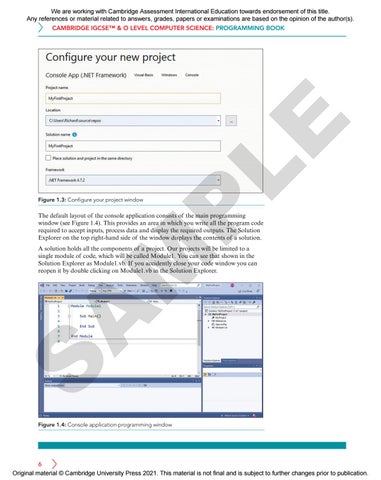
Figure 1.3: Configure your project window
LE
CAMBRIDGE IGCSE™ & O LEVEL COMPUTER SCIENCE: PROGRAMMING BOOK
The default layout of the console application consists of the main programming window (see Figure 1.4). This provides an area in which you write all the program code required to accept inputs, process data and display the required outputs. The Solution Explorer on the top right-hand side of the window displays the contents of a solution.
S
A
M
A solution holds all the components of a project. Our projects will be limited to a single module of code, which will be called Module1. You can see that shown in the Solution Explorer as Module1.vb. If you accidently close your code window you can reopen it by double clicking on Module1.vb in the Solution Explorer.
Figure 1.4: Console application programming window
6 Original material © Cambridge University Press 2021. This material is not final and is subject to further changes prior to publication.