We are working with Cambridge Assessment International Education towards endorsement of this title. Any references or material related to answers, grades, papers or examinations are based on the opinion of the author(s). CAMBRIDGE IGCSE™ & O LEVEL COMPUTER SCIENCE: PROGRAMMING BOOK
1.3 Getting started
P
LE
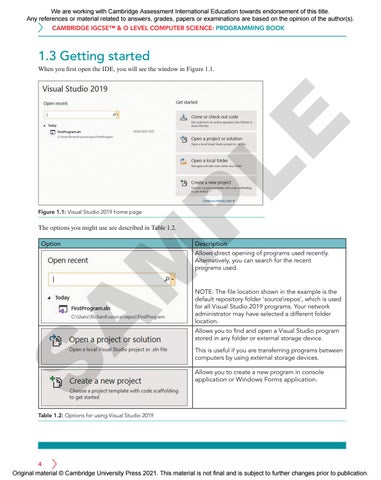
When you first open the IDE, you will see the window in Figure 1.1.
Figure 1.1: Visual Studio 2019 home page
The options you might use are described in Table 1.2.
Description
S
A
M
Option
Allows direct opening of programs used recently. Alternatively, you can search for the recent programs used.
NOTE: The file location shown in the example is the default repository folder 'source\repos', which is used for all Visual Studio 2019 programs. Your network administrator may have selected a different folder location. Allows you to find and open a Visual Studio program stored in any folder or external storage device. This is useful if you are transferring programs between computers by using external storage devices. Allows you to create a new program in console application or Windows Forms application.
Table 1.2: Options for using Visual Studio 2019
4 Original material © Cambridge University Press 2021. This material is not final and is subject to further changes prior to publication.