A/AS Level Computer Science for WJEC
0 1 2 3 4
1
2
3
4
5 6 7 8 9
5
6
7
8
9
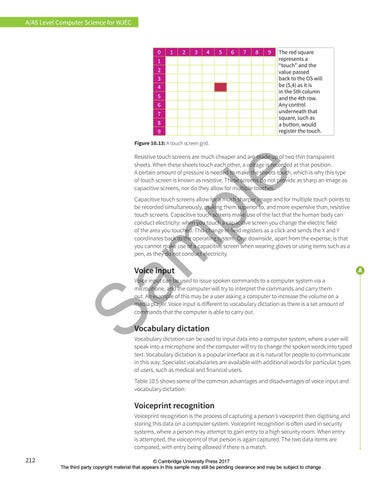
The red square represents a “touch” and the value passed back to the OS will be (5,4) as it is in the 5th column and the 4th row. Any control underneath that square, such as a button, would register the touch.
Figure 10.13: A touch screen grid.
e
Resistive touch screens are much cheaper and are made up of two thin transparent sheets. When these sheets touch each other, a voltage is recorded at that position. A certain amount of pressure is needed to make the sheets touch, which is why this type of touch screen is known as resistive. These screens do not provide as sharp an image as capacitive screens, nor do they allow for multiple touches.
Sa m
pl
Capacitive touch screens allow for a much sharper image and for multiple touch points to be recorded simultaneously, making them superior to, and more expensive than, resistive touch screens. Capacitive touch screens make use of the fact that the human body can conduct electricity: when you touch a capacitive screen you change the electric field of the area you touched. This change in field registers as a click and sends the X and Y coordinates back to the operating system. One downside, apart from the expense, is that you cannot make use of a capacitive screen when wearing gloves or using items such as a pen, as they do not conduct electricity.
Voice input
Voice input can be used to issue spoken commands to a computer system via a microphone, and the computer will try to interpret the commands and carry them out. An example of this may be a user asking a computer to increase the volume on a media player. Voice input is different to vocabulary dictation as there is a set amount of commands that the computer is able to carry out.
Vocabulary dictation Vocabulary dictation can be used to input data into a computer system, where a user will speak into a microphone and the computer will try to change the spoken words into typed text. Vocabulary dictation is a popular interface as it is natural for people to communicate in this way. Specialist vocabularies are available with additional words for particular types of users, such as medical and financial users. Table 10.5 shows some of the common advantages and disadvantages of voice input and vocabulary dictation:
Voiceprint recognition Voiceprint recognition is the process of capturing a person’s voiceprint then digitising and storing this data on a computer system. Voiceprint recognition is often used in security systems, where a person may attempt to gain entry to a high security room. When entry is attempted, the voiceprint of that person is again captured. The two data items are compared, with entry being allowed if there is a match.
212
© Cambridge University Press 2017 The third party copyright material that appears in this sample may still be pending clearance and may be subject to change.