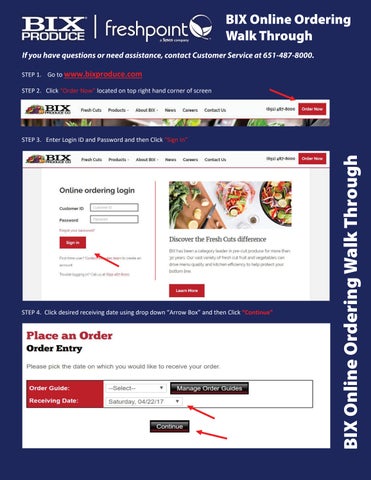
BIX Online Ordering Walk Through If you have questions or need assistance, contact Customer Service at 651-487-8000. STEP totowww.bixproduce.com STEP 1. Go Go towww.bixproduce.com www.bixproduce.com STEP1.1. Go STEP “Order Now” located on on toptop right hand corner of screen STEP 2.Click Click “Order Now” located on right top right hand corner of screen STEP2.2. Click “Order Now” located hand corner of screen
STEP desired receiving date using drop down “Arrow Box” and then Clickand “Continue” STEP 4.Click Click desired receiving date using drop down “Arrow Box” then Click “Continue” STEP4.4. Click desired receiving date using drop down “Arrow Box” and then Click “Continue”
BIX Online Ordering Walk Through
STEP Login IDID and Password andand then Click “Sign“Sign In” In” STEP 3.Enter Enter Login ID and Password and then Click “Sign In” STEP3.3. Enter Login and Password then Click