
Collaboration Insights

Also in this issue:

AUGI Members Reach Higher with Expanded Benefits
AUGI is introducing three new Membership levels that will bring you more benefits than ever before. Each level will bring you more content and expertise to share with fellow members, plus provide an expanded, more interactive website, publication access, and much more!
Basic members have access to:
• Forums
• HotNews (previous 12 months)
• AUGIWorld (previous 12 months)
DUES: Free
Student members have access to:
• Forums
• HotNews (previous 24 months)
• AUGIWorld (previous 24 months)
• AUGI Educational Offerings
DUES: $2/month or $20/year
Professional members have access to:
• Forums
• HotNews (full access)
• AUGIWorld (full access and in print)
• AUGI Library
• ADN Standard Membership Offer
DUES: $5/month or $50/year
Letter from the Editor AUGIWORLD

In the Architecture, Engineering, and Construction industry, collaboration has always been the quiet force behind successful projects. We talk about it often; sometimes so often that the word risks losing its meaning. But today, collaboration isn’t just a professional virtue. It’s a technical requirement, a cultural shift, and increasingly, the defining factor that separates high-performing teams from those struggling to keep pace.
What’s changed is not the need to work together, but the complexity of doing so. Our projects are larger, our timelines tighter, our tools more interconnected, and our stakeholders more distributed than ever. A single model now carries the weight of dozens of disciplines, hundreds of decisions, and thousands of dependencies. In this environment, collaboration is no longer a handshake — it’s a workflow.
True collaboration in AEC is built on three pillars: clarity, consistency, and curiosity.
Clarity means establishing shared expectations early and revisiting them often. Whether it’s a BIM Execution Plan, a CAD standard, or a simple folder structure, clarity removes friction. It frees teams to focus on design and problem-solving instead of deciphering file names or debating coordinate systems.
Consistency is the discipline that turns collaboration from aspiration into habit. It’s the reason a model opens cleanly, a sheet set behaves predictably, or a Civil 3D surface doesn’t balloon to 500 MB overnight. Consistency is not rigidity — it’s reliability. It’s the foundation that allows teams across offices, time zones, and specialties to trust each other’s work.
And then there’s curiosity, the trait we talk about least but need the most. Curiosity is what drives us to ask why a workflow exists, how a standard can be improved, or what another discipline needs from us to succeed. It’s the antidote to siloed thinking. It’s also the spark behind innovation—because every breakthrough in our industry begins with someone asking a better question.
As technology continues to evolve—AI-assisted design, cloud collaboration, digital twins—the human side of collaboration becomes even more important. Tools can connect us, but they can’t replace the relationships, communication, and shared purpose that make a project truly work.
So, as we look ahead, I encourage every team, every leader, and every contributor to revisit what collaboration means in their daily practice. Not as a buzzword, but as a craft. Not as a checkbox, but as a commitment.
Because in the AEC industry, collaboration isn’t just how we work. It’s how we build.
www.augi.com
Editors
Editor-in-Chief
Todd Rogers - todd.rogers@augi.com
Copy Editor
Miranda Anderson - miranda.anderson@augi.com
Layout Editor
Tim Varnau - tim.varnau@augi.com
Content Managers
3ds Max - Brian Chapman
AutoCADAutoCAD Architecture - Melinda Heavrin
BIM/CIM - Stephen Walz
BricsCAD - Craig Swearingen
Civil 3D - Shawn Herring
Electrical - Mark Behrens
Manufacturing - Kristina Youngblut
Revit Architecture - Jonathan Massaro
Revit MEP - Jason Peckovitch
Tech Manager - Mark Kiker
Inside Track - Rina Sahay
Advertising / Reprint Sales
Nancy Tanner - sales@augi.com
AUGI Executive Team
President
Eric DeLeon
Vice-President
Kristina Youngblut
Treasurer
Secretary
Shelby Smith
AUGI Board of Directors
Eric DeLeon
Chris Lindner
Frank Mayfield
Shelby Smith
Scott Wilcox
Kristina Youngblut
AUGI Advisory Board of Directors
Gil Cordle
Jason Peckovitch
Rina Sahay
Jeff Thomas III
Publication Information
AUGIWORLD magazine is a benefit of specific AUGI membership plans. Direct magazine subscriptions are not available. Please visit www.augi.com/account/register to join or upgrade your membership to receive AUGIWORLD magazine in print. To manage your AUGI membership and address, please visit www.augi. com/account. For all other magazine inquires please contact augiworld@augi.com
Published by:
AUGIWORLD is published by AUGI, Inc. AUGI makes no warranty for the use of its products and assumes no responsibility for any errors which may appear in this publication nor does it make a commitment to update the information contained herein.
AUGIWORLD is Copyright ©2026 AUGI. No information in this magazine may be reproduced without expressed written permission from AUGI.
All registered trademarks and trademarks included in this magazine are held by their respective companies. Every attempt was made to include all trademarks and registered trademarks where indicated by their companies.
AUGIWORLD (San Francisco, Calif.) ISSN 2163-7547
Bright Ideas for a Bright Future

AUGIWORLD brings you the latest tips & tricks, tutorials, and other technical information to keep you on the leading edge of a bright future.
THS Concepts Delivers Superior Surveying with BricsCAD
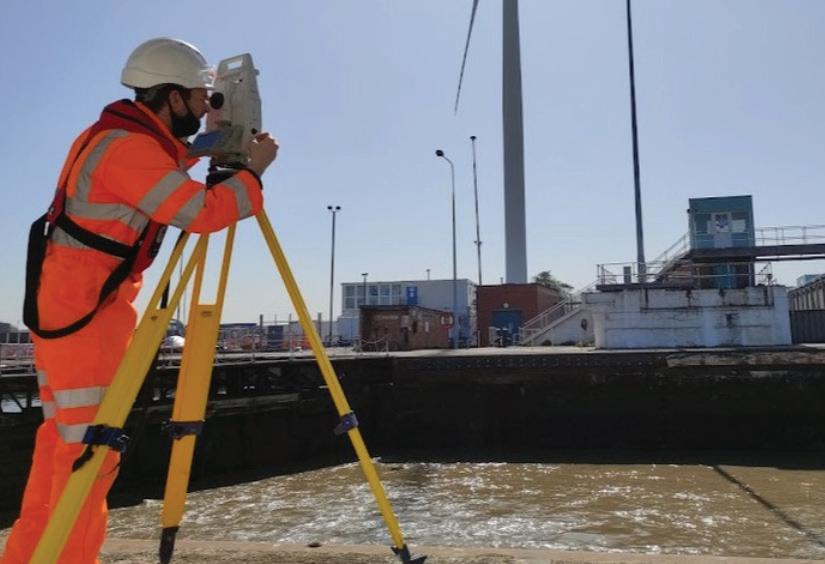
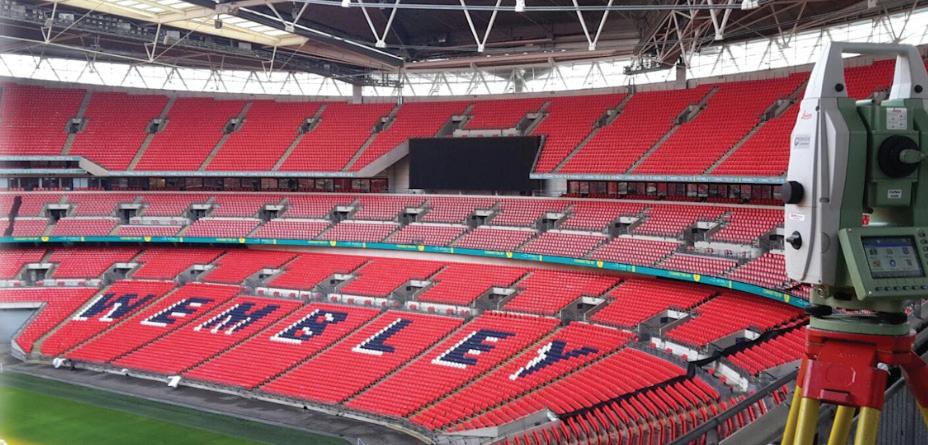
THS Concepts specializes in detailed surveying services, providing data-rich CAD drawings and reports for clients across London and the UK. (See Fig. 1) Their range of services includes monitoring, measured, and topographical surveys. From the initial survey to the precise setting out of the building, THS Concepts ensures seamless project support from start to finish. Their work spans prestigious UK sites such as Wembley Stadium, Hyde Park, Southend Pier, and Whitehall (Westminster), as well as international projects in Liberia, Scotland, and Spain.
THE CHALLENGE
As a small company, THS Concepts is always looking for opportunities to maximize operational efficiency. With their surveyors relying heavily on CAD software to process data and produce deliverables, finding a cost-effective, reliable solution that integrates well with geomatic surveying tools was crucial. The high annual costs and limited licensing options for individual users of their previous CAD software also made it difficult for the company to spend in other areas, such as investing in their staff and new equipment.
Additionally, any CAD alternative had to meet THS Concepts’ high standards for quality and functionality. The team needed a CAD platform that could seamlessly support their workflow, which involves creating detailed 2D drawings, working with point clouds, and developing topographical
and measured survey drawings. Maintaining the quality of their deliverables was key, as their clients choose them for producing designs that are both rich in detail and easy to understand.
THE SOLUTION
After evaluating CAD platforms, THS Concepts chose BricsCAD based on three key factors: reducing costs, gaining greater licensing flexibility, and ensuring long-term value from a platform that continues to advance with new features. From the available product levels, they use BricsCAD® Pro for 2D drafting, 3D modeling, and land surveying.
“Once you get used to BricsCAD, you can’t imagine going back. Our staff can operate in the same efficient manner. Our output is just as good. There’s absolutely no difference, because the transition is so simple for us,” explained Chris Horton, Operations Director at THS Concepts.
Ongoing Project at Wembley Stadium
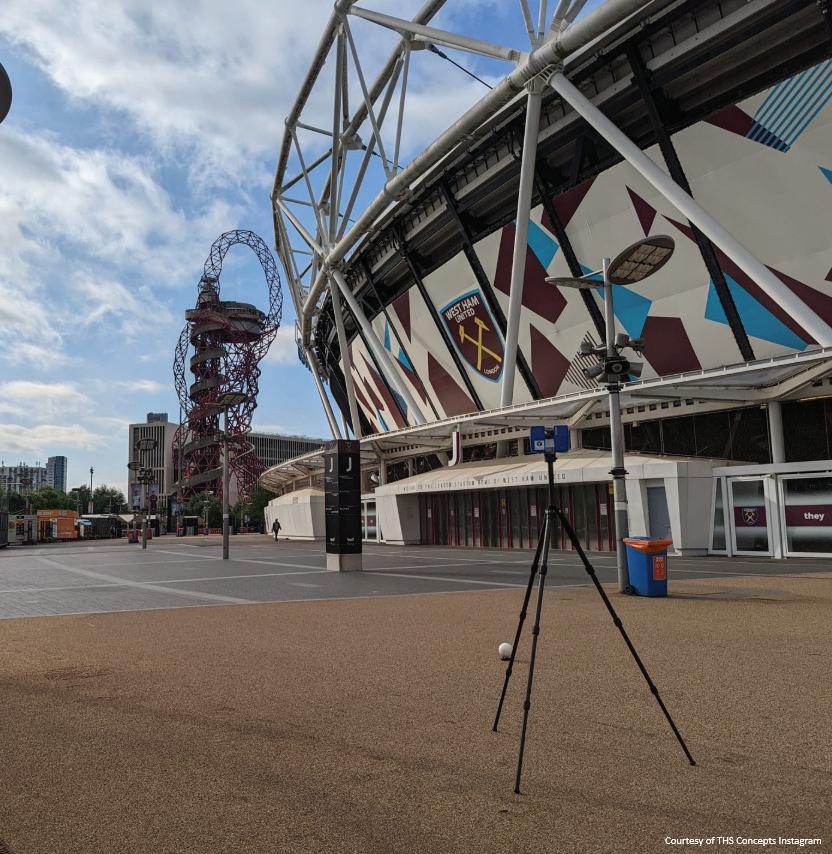
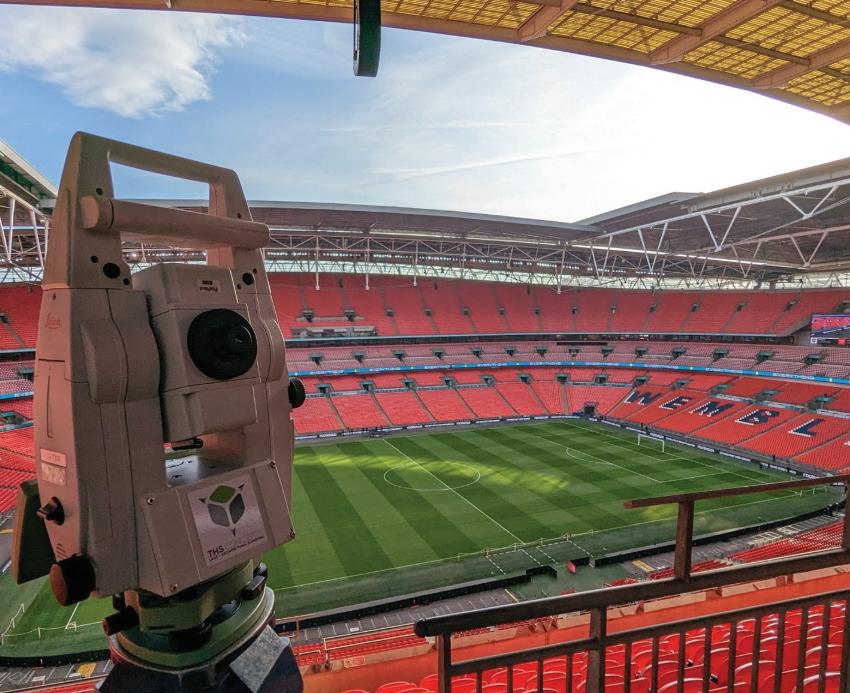
Wembley Stadium features a distinctive roof structure built around a 133meter-high arch that spans the venue. (See Fig. 2) At each end of the stadium, large retractable roof panels can open and close to regulate sunlight and airflow, helping the field’s grass grow. THS Concepts carries out precision monitoring of the stadium’s steel structure, focusing on how the main arch and the heavy retractable roof sections behave over time. Their surveys track tiny shifts in the steelwork
BricsCAD
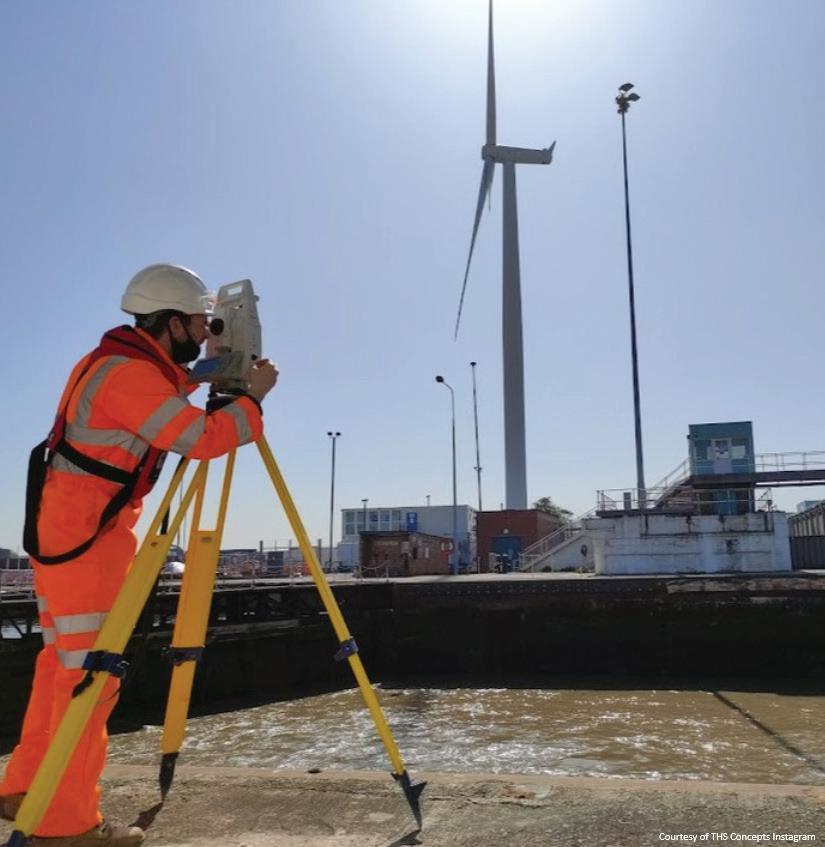
caused by the movement and weight of these roof elements, providing essential data that helps the stadium’s operators assess structural performance and plan ongoing maintenance. (Fig. 3)
“The significance of using BricsCAD at Wembley Stadium is that we can plot the positions of where things should be and the positions of where things are (on the roof). Then we put those points into a drawing so the client can visually see the differences,” explained Tom Ayre, Managing Director at THS Concepts.
SMOOTH MIGRATION TO BRICSCAD
The transition to BricsCAD was seamless, with a short adjustment period for staff, thanks to a familiar interface and similar commands and processes to their previous platform.
“It was a no-brainer for us. The challenges we anticipated during the transition turned out to be minimal. I have used different CAD software in the past with different companies, and it can take months to adjust. Fortunately, in this case, that wasn’t what happened,” noted Horton.
RESULTS & CONCLUSION
Since migrating to BricsCAD, THS Concepts has experienced significant benefits:
• Cost Savings
BricsCAD’s cost-effective model allows each surveyor at THS Concepts to have their own license, with more than 35% savings per license per year. These savings have been reinvested into the business to enhance equipment, improve workflows, and expand employee benefits.
• Efficiency and Functionality
BricsCAD has proven to be just as efficient and functional as their previous software. The THS Concepts team creates precise 2D drawings, works with point clouds, and produces topographical surveys. (See Fig. 4) Being able to import different point cloud file extensions into BricsCAD also saves the team about one hour per job.
• Enhanced Workflow
BricsCAD’s user-friendly interface and features, such as dynamic and parametric blocks, have streamlined the team’s workflow. The software’s stability and smooth operation ensure that projects are completed efficiently without compromising on quality.
• Client Satisfaction
THS Concepts places strong emphasis on the presentation of their drawings, ensuring clients receive clear, professional deliverables. Unlike competitors who rely heavily on automation, THS Concepts uses BricsCAD to create drawings with meticulous attention to detail. This focus on quality has set them apart in the industry.
• Seamless Collaboration
The team easily shares files, including PDFs, DWGs, and point cloud data, with their clients. BricsCAD’s compatibility with these formats ensures smooth collaboration and data exchange.
• Product Documentation and Tutorials
Using the Help Center resources, the team finds clear explanations of BricsCAD functionality and updates.
“The support requests I’ve sent have always been replied to very quickly, which is great. And the Help articles often explain what we’re trying to find out about a new tool or feature,” said Ayre.
Overall, BricsCAD has become a practical tool that fits naturally into their processes, helping them maintain high standards and support projects across the UK and beyond.
*This article was brought to you courtesy of the marketing content team at BricsCAD®. The BricsCAD staff work tirelessly to bring you stories about companies and users who love to use BricsCAD just like you. For more stories, visit https:// www.bricsys.com/customer-cases/
MORE ABOUT BRICSCAD
BricsCAD® is the true CAD alternative. We are the 2D and 3D CAD alternative that helps you switch smoothly, excel in the detail, and realize better value from day one. Download the free, 30-day trial of BricsCAD. Would you like free lessons? We have that available at BricsCAD Learning. Ready to migrate to BricsCAD? Download the free Migration Guide. Follow us today on LinkedIn and YouTube.

Mr. Craig Swearingen is a Senior Implementation and Customer Success Specialist at BricsCAD. Currently, Craig provides migration and implementation guidance, management strategies, and technical assistance to companies which need an alternative, compatible CAD solution. Craig spent 19 years in the civil engineering world as a technician, Civil 3D & CAD power user, becoming a support-intensive CAD/ IT manager in high-volume production environments. Craig is a longtime AUGI member (2009), a Certified Autodesk® AutoCAD® Professional, and he enjoys networking with other CAD users on social media.
Tech PrinciplesPart Two

In the last article, I began to list what I call Tech Principles. These are the foundational principles that drive the technology plans and actions you take. These are the guiding statements that communicate fundamental technology values. They reflect preferences for managing information technology to achieve the firm’s goals. If you have not read Part One, take some time to go back and look it over.
By writing your own principles and sharing them with your firm and team, you establish a shared understanding of strategic directions and help others understand what guides your tactical decisions and approach to tech.
PRINCIPLE 11 – MAKE MEASURED PROGRESS
We will make measured progress on the integration of new technology to see how or if it will fit into the technology portfolio via dedicated and focused discovery and embrace. This is best done using testing, proof of concept efforts, pilot projects and staged deployment to insure propagation. The entire time we maintain a mindset of making incremental progress and moving the ball forward. Small tech advancements make overall gains in how the firm can stay current and advance technology use.
PRINCIPLE 12 – ENHANCE TECHNOLOGY KNOWLEDGE
We will share knowledge with tech users to enhance their ability and productivity constantly increases. We will encourage tech learning to a baseline level of understanding then move to an advanced understanding of tools by all staff. We will create a learning environment where all staff will be encouraged to share best practices, tips and tricks. We will encourage project teams to be developed with a high level of tech knowledge as well as discipline and design skills.
PRINCIPLE 13 – DATA INTEGRITY AND SECURITY
All data will be maintained in reliable, secure environments that allow for collaboration while not compromising security. We will maintain stable, secure data with timely and complete backups. We will strive to ensure that those backups are never needed, but if they are, they can be quickly retrieved and restored.
PRINCIPLE 14 – OPEN SOURCE IS NOT THE ANSWER
We will not seek open-source or free tools to perform mission critical functions. We will not seek open source or free tools as single point repositories
for critical organizational data. While many of these tools may be unique, stable, cutting edge and desired by staff, we will look for commercially available tools with robust support systems in place. While we may not seek them out, we will not rule out open-source tools completely, just approach them with caution.
PRINCIPLE 15 – OFFLOAD THE TECHNOLOGY BURDEN FROM STAFF
We will seek to release the staff from any barriers to technology access and maintenance. We will make things easy to access, easy to understand and easy to use. We will increase tech support staff’s burden on technology maintenance to lighten the general staff’s burden. We will listen to complaints and respond with solutions. We will address annoyances that delay tech delivery.
PRINCIPLE 16 – SUPPORT STAFF CHARACTER MATTERS
Support staff will maintain a high degree of integrity, respect for all people, customer service focus and a sharing environment. As such we will seek to be honest in all conversations, listen with the goal of understanding and seek to communicate well. We will be kind to those we serve and generous in sharing our knowledge,
PRINCIPLE 17 – PROJECT CALENDARS RULE
Technology research, piloting, purchasing and deployment will strive to align with the organizational and project calendars. This means that new technology upgrades will respect the deliverables timeline and avoid disruptions. We will schedule new tech rollouts to work around flow of project delivery and not impact it in a negative way. This means that updates or upgrades will usually be done between projects or during project downtime as much as possible.
PRINCIPLE 18 – STAKEHOLDER INVOLVEMENT
We will be inclusive in our efforts to gather information from our staff related to technology use, adoption and pain points. We will reach deeply into the project environment to include user, managers, and even clients if appropriate, during our investigations of new technology and tech troubleshooting. We will listen to tech ideas from anyone and will encourage conversations related to
the benefits of new tools and detrimental impacts from existing tools.
PRINCIPLE 19 – EMBRACING INNOVATION
We will constantly be looking for new tools. We will be explorers and adventurers in our search for new tools and tech arenas to see how they may benefit our firm. The next tool is out there and we will find it. Once identified, we will courageously press forward with new technology that fits while ensuring no disruption in workflow. We will provide planned rollout timelines and share them with all staff.
PRINCIPLE 20 – NEVER STOP LEARNING
We will always be learning, researching, reading, trying, testing, enhancing and refining technology. We will attend user group meetings, conferences, vendor demos and training events. When we get training, we will share what we have learned.
A list of tech principles defines a mindset that can be use when approaching technology. They do not guarantee success, but they do explain what might enable success. You already have a set of principles you work from. They are in your head. You should write them down and review them to see if they help you hit your tech targets. Modify them if needed, and if they are good to go, share them with others.

Mark Kiker has more than 30 years of hands-on experience with technology. He is fully versed in every area of management from deployment planning, installation, and configuration to training and strategic planning. As an internationally known speaker and writer, he was a returning speaker at Autodesk University for twenty years. Mark has served as Draftsman, Principal Designer, CAD/BIM Manager, Systems Analyst, IT Director, CTO, CIO and AUGI Board President. He can be reached at mark.kiker@augi. com and would love to hear your questions, comments, perspectives and ideas for future topics.

Autodesk Informed Design: Collaboration with Guardrails
Ihad the opportunity to go bowling with my family recently. A cute little family was bowling next to us with a six-year-old. The first time I watched this six-year-old bowl, I learned something about digital transformation.
He walked up to the lane with absolute confidence. Picked up the ball. Launched it with enthusiasm. It rolled beautifully… straight into the gutter… Every time.
When the owner of the bowling alley noticed the little boy wasn’t having fun anymore, he pressed a button. Then the guardrails came up.
The lane didn’t change. The pins didn’t change. The ball didn’t change. What changed was the boundary. Now when the ball drifted left, it bounced back.
When it drifted right, it corrected again. The same energy. The same motion. But now, progress. The boy’s smile stretched across the entire lane. He was having fun again.
The guardrails didn’t bowl for him. They simply kept the game in play. That is what Autodesk Informed Design does for collaboration in AEC. This is collaboration with guardrails.
WHEN COLLABORATION HAS NO BOUNDARIES
In traditional AEC workflows, collaboration is often described as alignment between teams. But in practice, it looks more like a relay race with interpretation at every handoff.
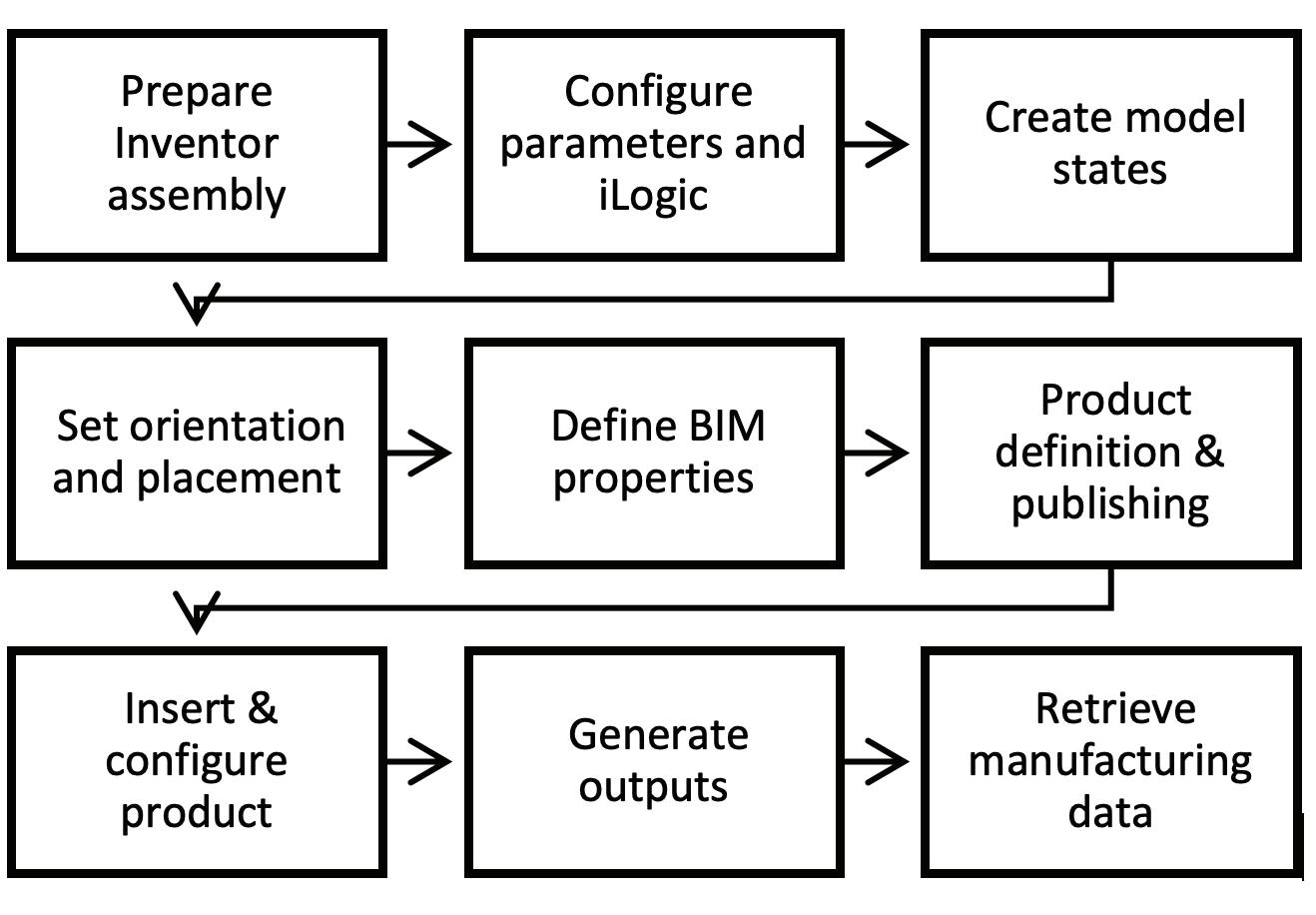
1. Engineering or a manufacturer defines a parametric product in Inventor.
Figure 1-Bowling with Guardrails
2. The architect places and adapts it in Revit. 3. Manufacturing reviews it for feasibility. 4. Fabrication translates it into production logic.
At each step, someone makes a decision. Adjusts a value. Tweaks a parameter. Assumes a tolerance.
Standards exist, of course. They live in:
• BIM manuals
• Engineering spreadsheets
• Naming conventions
• Email clarifications
• Tribal knowledge
But the standards are rarely embedded in the object itself. Which means collaboration depends on memory. And memory is unreliable. That is where the gutters live.
INFORMED DESIGN: SHIFTING THE LANE
Informed Design changes the structure of collaboration by embedding engineering intent directly into configurable digital products.
Instead of distributing editable models, teams publish rule-driven products through a web-based configuration interface.
Users can:
• Select approved options
• Adjust parameters within defined limits
• Generate project-specific variants
• Produce configuration-specific documentation Drive manufacturing-ready outputs
The collaboration shifts from “Did we follow the standard?” to “The standard is built in.” The ball still rolls. It just cannot fall off the lane.
WHAT ARE GUARDRAILS?
In Informed Design, guardrails are the embedded constraints that prevent invalid or non-compliant configurations. They include:
• Parameter Limits – Restricting values to engineering-approved ranges
• Option Dependencies – Preventing incompatible selections
• Locked Internal Logic – Protecting proprietary model behavior
• Required Metadata – Enforcing consistent documentation standards
• Automated Output Alignment – Ensuring manufacturing-ready results
Guardrails do not reduce flexibility. They ensure flexibility stays inside reality.
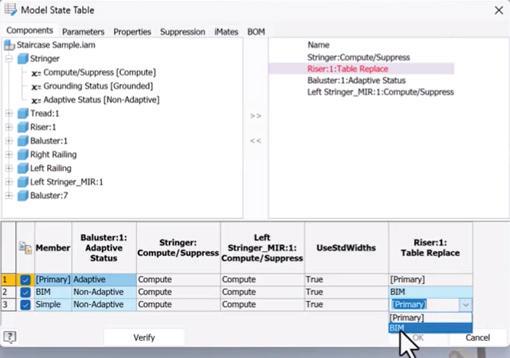
WHY GUARDRAILS MATTER
Without boundaries, collaboration becomes reactive. Errors are caught downstream. RFIs multiply. Manufacturing flags infeasible combinations. Teams revise and resend.
Guardrails move validation upstream. When engineering or a manufacturer defines a configurable product, it can: Restrict parameter ranges to real manufacturing tolerances
• Prevent incompatible option combinations
• Enforce required metadata
• Standardize naming conventions
Figure 2-Informed Design Workflow
Figure 3-Model States Table in Inventor
Informed Design
• Align outputs directly with production workflows
Invalid combinations simply cannot be selected. The system does not rely on discretion. It enforces compliance automatically. And that changes everything.
A CLEAR DIVISION OF ROLES
One of the quiet strengths of Informed Design is how clearly it defines ownership.
• Engineering defines and owns the rules.
• Design owns configuration.
• Manufacturing validates outputs.
• BIM and IT govern lifecycle and deployment.
When product logic is centralized and protected, designers are freed from editing fragile internal parameters. They configure within safe, intentional boundaries. Instead of collaboration being a negotiation, it becomes a shared system. This builds trust across disciplines.
PROTECTING INTELLECTUAL PROPERTY WHILE ENABLING ACCESS
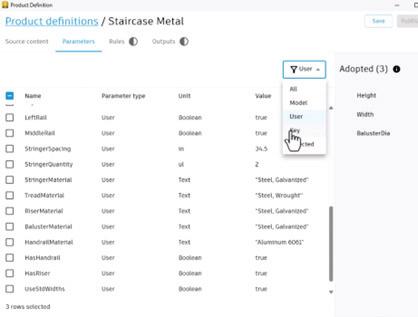
Manufacturers often face a difficult question: “How do we make our products easy to use without exposing how they work?”
Informed Design answers that elegantly. The underlying Inventor logic remains protected. The web interface exposes only approved configuration inputs. Designers gain flexibility. Engineering retains control.
The guardrails protect innovation as much as they protect process.
FROM CONCEPT TO COURSE: THE AUTODESK.COM/LEARN WORKFLOW
To make this approach practical and repeatable, the Informed Design course on Autodesk.com/learn walks through the complete collaborative lifecycle.
The course is structured to move from mindset to execution.
Below is a summary of that workflow.
1. Understanding the Framework
The course begins by reframing how we think about digital products.
Instead of modeling parts, we define configurable systems.
Key concepts include:
• What Informed Design is
• How it connects Inventor to a web-based configuration interface
• The difference between editable content and governed configuration
• Why collaboration benefits from embedded constraints
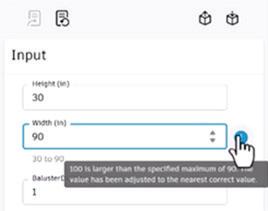
This stage establishes the philosophy: Guardrails are intentional. They are not limitations.
2. Preparing the Product in Inventor
The next phase focuses on engineering preparation.
Figure 4-Informed Design Product Definition Dialog
Figure 5-Informed Design Constraints
This is where the guardrails are designed.
Topics include:
• Structuring parametric assemblies for configurability
• Identifying which parameters should be exposed
• Locking internal logic
• Defining rule-driven behavior
• Testing stability under variation
This is the most critical collaborative step. If parameters are poorly defined, guardrails will be weak. If parameters are clear and constrained, collaboration scales.
The emphasis is always on clarity:
• Which variables should users control?
• Which must remain fixed?
• Which ranges prevent structural or manufacturing failure?
3. Publishing onto the Web App
Once the product logic is stable, it is published onto the Informed Design web interface.
This stage includes:
• Mapping parameters to user inputs
• Defining control types
• Setting default values
• Applying validation rules
This is the moment where engineering intent becomes collaborative experience. The complexity disappears behind the interface. The guardrails rise.
4. Inserting and Configuring the Product
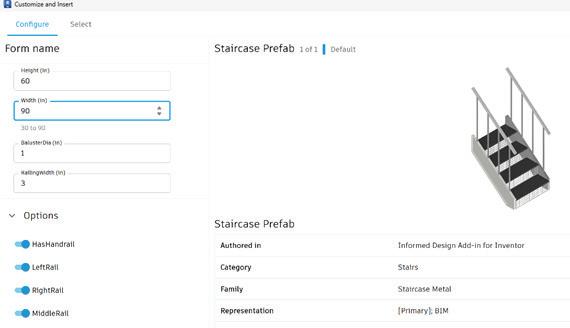
Informed Design
Designers do not need Inventor. They insert the configurable product and adjust parameters through the Informed Design form.
The course demonstrates:
• Adjusting exposed parameters
• Generating a project-specific variant
• Updating configurations without breaking logic
• Maintaining compliance automatically
This removes the traditional bottleneck of sending models back upstream for edits.
Design becomes faster. Engineering becomes protected. Collaboration becomes smoother.
5. Generating Outputs
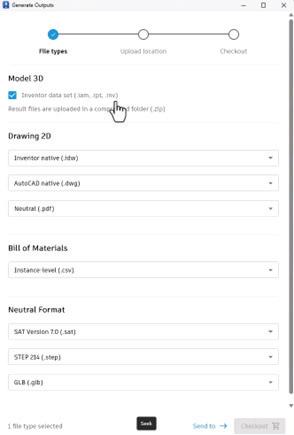
Perhaps the most powerful collaborative moment is what happens next.
Figure 6-Customize & Insert Dialog
Figure 7-Generating Manufacturing Outputs
Informed Design
• Configured products can generate:
• Configuration-specific documentation
• Manufacturing-ready outputs
• Validated assemblies
• Downstream-ready deliverables
There is no reinterpretation. The configuration is the source of truth. That continuity reduces risk dramatically.
6. Managing Files and Governance
Collaboration fails when governance fails.
The course addresses:
• Project file structure
• Version management
• Storage strategies
• Lifecycle governance
Guardrails are not only technical. They are operational. Without version control, even the best configuration system can fragment.
7. Scaling Across Teams
Finally, the course addresses scalability.
How do you:
• Update product definitions without disrupting projects?
• Maintain standards across offices?
• Govern changes responsibly?
• Integrate configuration into enterprise BIM strategies?
Informed Design becomes exponentially more powerful as organizations grow. Guardrails become infrastructure.
THE CULTURAL SHIFT
Informed Design does something subtle but profound. It shifts organizations from project thinking to product thinking. Instead of adapting standards per project, teams define products once and configure repeatedly.
1. Define once.
2. Configure many times.
3. Govern centrally.
This aligns naturally with:
• Industrialized construction
• Modular systems
• Enterprise BIM execution
• Digital transformation strategies
The bowling lane becomes repeatable. The guardrails stay in place.
GUARDRAILS AND CONFIDENCE
Some teams worry that constraints reduce flexibility. The opposite is true. When teams know they cannot create invalid configurations, they move faster. They experiment safely. They trust downstream processes. The ball still curves. It just scores more often.
CONCLUSION
Collaboration in AEC has always depended on shared standards. Informed Design elevates those standards from documentation to automation. It embeds engineering intelligence into configurable products. It aligns design and manufacturing through governed workflows. It protects intellectual property while enabling flexibility.
This is collaboration with guardrails.
And in an industry where complexity increases with every digital advancement, the organizations that win will not be those with the most freedom. They will be those with the clearest boundaries.
Because clarity scales.
And scalable clarity wins.

Michelle is a Fractional Chief Learning Officer who designs enterprise learning strategies that accelerate digital transformation and workforce capability. A former Autodesk Manager of Learning Content and ACI Platinum Instructor, she has led global learning initiatives, guided technology implementations, and aligned executive stakeholders around scalable, outcome-driven training ecosystems. Michelle bridges strategy, culture, and systems—embedding learning into business operations to improve performance, reduce risk, and future-proof talent in rapidly evolving industries. She can be reached at michelle@ collaborativeclam.com.

Physics-Informed Synthetic Data Generation: Bridging the Digital Twin Data Gap in Building Systems

THE HIDDEN CHALLENGE BEHIND SMART BUILDINGS
Modern buildings are becoming increasingly intelligent, equipped with sensors, automation systems, and digital twins that promise predictive maintenance and optimized operations. Yet beneath this technological promise lies a fundamental paradox: the AI systems designed to predict equipment failures lack the very thing they need most—real failure data.
Consider this: in a typical commercial building, HVAC equipment is designed to operate reliably for 10-20 years. When a chiller or cooling tower does fail, maintenance teams respond quickly, restoring service and moving on. These incidents are rarely documented in sufficient detail for machine learning purposes. Even when data is logged, failures represent less than 2% of operational states—far too sparse for training robust predictive models. Industry reports consistently show that
67% of organizations cite insufficient training data as the primary barrier to implementing AI-driven maintenance strategies.
This data scarcity problem isn’t merely academic— it has real operational consequences. Without adequate historical failure data, building operators cannot train reliable predictive maintenance systems, leading to reactive maintenance approaches that are both costly and inefficient. Equipment runs to failure, occupant comfort suffers, and energy efficiency opportunities are missed.
The solution emerging from advanced research combines reliability engineering principles, environmental physics, and operational realism: physics-informed synthetic data generation. Unlike purely statistical approaches that can produce data that looks plausible but violates fundamental physical laws, physics-informed frameworks generate synthetic datasets that respect thermodynamic constraints, reliability distributions, and real-world operational limitations.
Building Systems
UNDERSTANDING SYNTHETIC DATA: BEYOND STATISTICAL MIMICRY
To many, “synthetic data” might sound like fabricated or imaginary information—data that substitutes for the real thing but lacks authenticity. In reality, properly generated synthetic data represents something fundamentally different: it is data derived from validated physical models, reliability theory, and environmental dynamics that produce realistic scenarios which are statistically rare in practice but physically plausible.
The Physics-Statistical Divide
Traditional synthetic data generation approaches fall into two camps, each with significant limitations:
Statistical Generators use techniques like Generative Adversarial Networks (GANs) or Variational Autoencoders (VAEs) to learn patterns from existing data and generate new samples. While these methods can produce statistically similar outputs, they often violate physical constraints. A purely statistical generator might produce synthetic sensor data showing:
• Negative power consumption values
• Temperature readings that violate thermodynamic laws
• Humidity levels exceeding physical saturation limits
• Flow rates inconsistent with pump curves
Physics-Based Simulators use high-fidelity models (finite element analysis, computational fluid dynamics, building energy simulation tools like EnergyPlus) to generate data that perfectly respects physical laws. However, these approaches typically:
• Ignore operational realities (crew scheduling, spare parts availability)
• Require extensive computational resources
• Lack variability found in real-world operations
• Miss systemic effects like cascade failures
Neither approach alone captures the full complexity of building system failures in operational context.
The Physics-Informed Paradigm
Physics-informed synthesis represents a third way—merging the best of both worlds. It starts with validated physical models but layers on operational constraints, stochastic variability, and system interdependencies. The result is synthetic data that:
• Respects Physical Laws: Temperature-stress relationships follow Arrhenius kinetics; humidity effects conform to Peck corrosion models; load cycling impacts align with ASHRAE lifespan reduction trends
• Incorporates Operational Reality: Maintenance crews work business hours (with emergency coverage); spare parts have probabilistic availability and lead times; repairs compete for limited resources
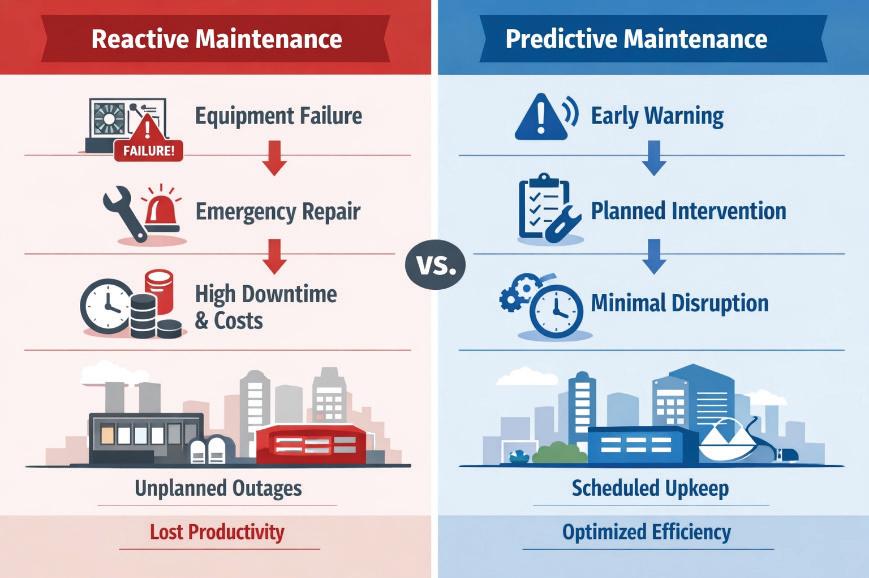
Figure 1 (Left) Traditional reactive maintenance workflow with equipment failure → emergency repair → high downtime costs, versus (Right) Predictive maintenance enabled by synthetic data showing early warning → planned intervention → minimal disruption
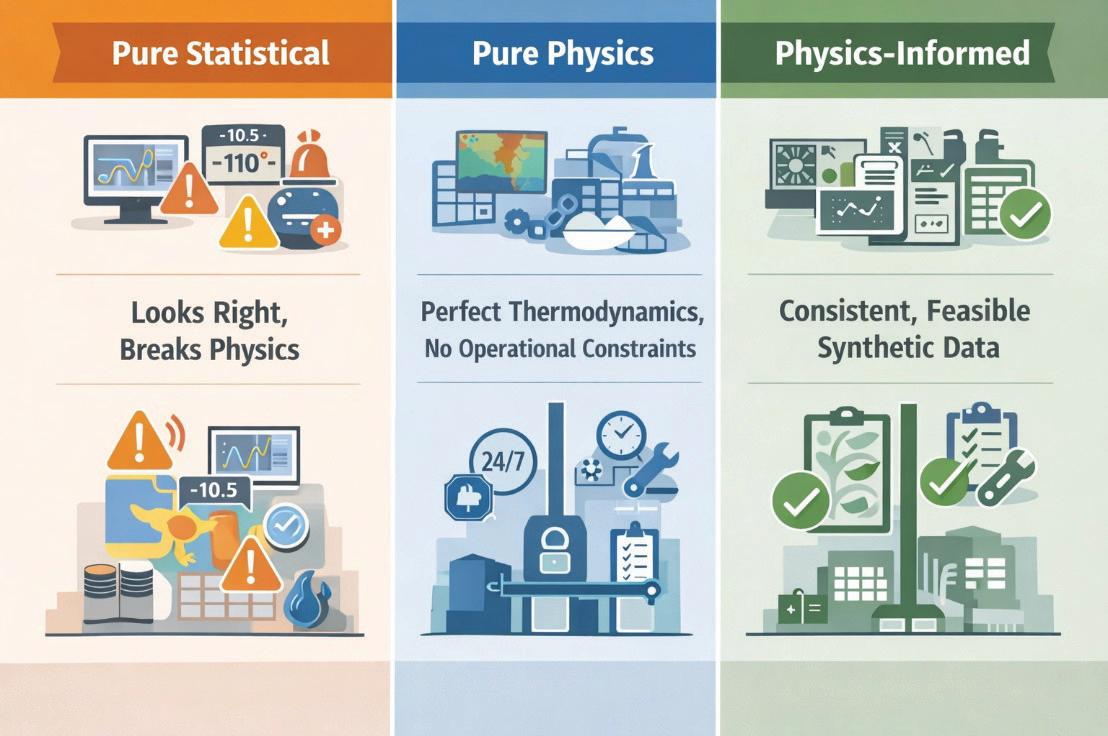
Figure 2 : (1) Pure Statistical approach with data that looks right but breaks physics, (2) Pure Physics simulation with perfect thermodynamics but missing operational constraints, (3) PhysicsInformed approach combining both with validation checkmarks
Building Systems
• Captures System Behavior: Central plant failures cascade to terminal equipment; environmental stressors accelerate degradation rates; temporal patterns reflect seasonal and occupancy-driven variations
• Maintains Statistical Validity: Failure distributions match Weibull reliability theory; downtime follows lognormal patterns; correlations between stressors and failures are preserved
THE FIVE-LAYER FRAMEWORK ARCHITECTURE
The framework implements a modular architecture organized into five interdependent layers, each addressing a specific aspect of the synthetic data generation challenge.
Layer 1: Asset Registry & Topology
At the foundation lies a comprehensive digital representation of the building’s HVAC system. This isn’t merely a list of equipment—it’s a structured hierarchy defining physical relationships and dependencies:
• Equipment Inventory: Chillers, pumps, cooling towers, fan coil units (FCUs), air handling units, each with manufacturer specifications, capacity ratings, and installation dates
• Spatial Topology: Floor-by-floor, zone-by-zone mapping showing which terminal units are served by which central plant equipment
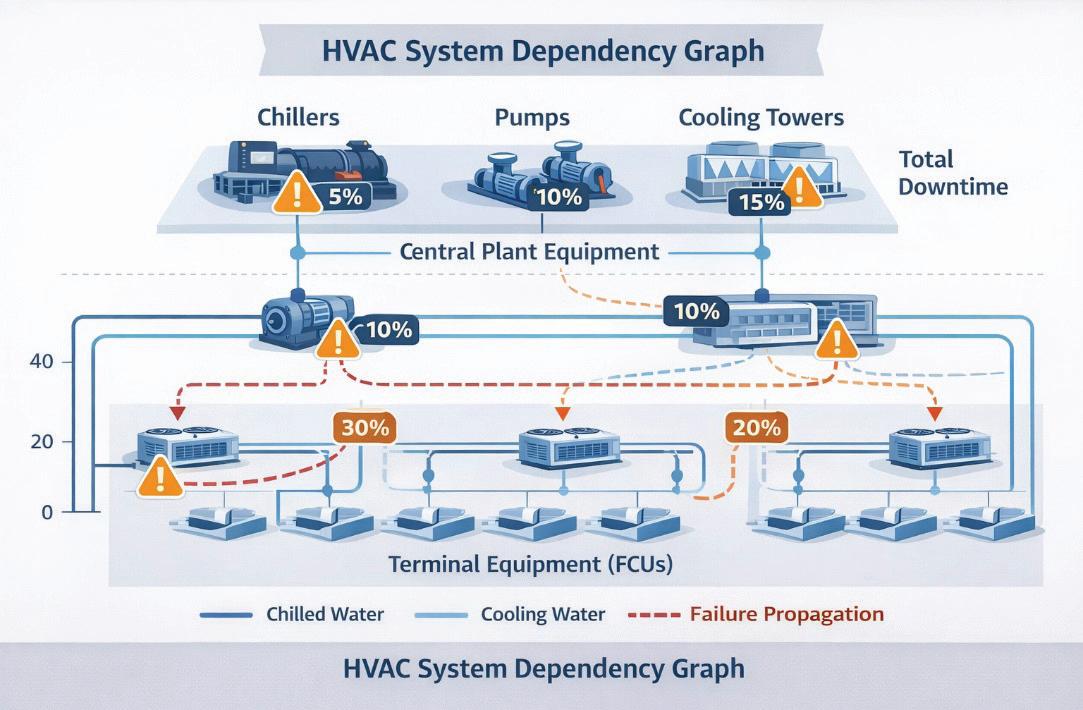
• Dependency Graphs: Directed acyclic graphs encoding how failures propagate (e.g., a chiller failure affects all FCUs on that refrigerant loop; a pump failure impacts all units on that distribution branch)
This layer enables the framework to understand not just individual components but system-level behavior—a crucial distinction when modeling cascade failures.
Layer 2: Environmental Stress Engine
Equipment degradation isn’t uniform—it accelerates under thermal stress, humidity exposure, and operational loading. This layer synthesizes environmental time series and computes acceleration factors for each asset:
Thermal Stress (Arrhenius Model): The Arrhenius equation quantifies how reaction rates— including degradation processes—accelerate with temperature:
AF_thermal = exp[(Ea/k) × (1/T_ref - 1/T_operating)]
Where:
• Ea = energy activation (0.5 eV for electronic components, per IEEE Std 1413)
• k = Boltzmann constant
• T_ref = reference temperature (298 K / 25°C)
• T_operating = actual operating temperature
For an HVAC heat pump operating at 35°C outdoor temperature, this yields an acceleration factor of ~3.2× compared to the 25°C baseline, meaning degradation proceeds more than three times faster during summer peaks.
Humidity Stress (Peck Model): Moisture accelerates corrosion and electrical failures through a powerlaw relationship:
AF_humidity = (RH_operating / RH_ref)^n
Where:
• RH = relative humidity (%)
• n = empirical exponent (typically 3, per MILHDBK-217F)
At 80% relative humidity versus a 60% reference, the acceleration factor reaches 2.4×.
Load Cycling Stress: ASHRAE field studies show that part-load cycling reduces equipment lifespan. The framework models this through an occupancyderived capacity factor:
AF_load = 1 + α × (CF - CF_design)
Where CF represents the capacity factor (0-1) sampled from building occupancy schedules, and α is a calibration parameter from ASHRAE RP-1493 data.
Combined Acceleration: These factors multiply to produce an overall acceleration affecting Weibull failure parameters:
AF_combined = AF_thermal × AF_humidity × AF_load
The framework generates realistic outdoor weather time series (temperature, humidity, solar radiation) using statistical distributions calibrated to locationspecific climate data (e.g., ASHRAE Climate Zone 3A for Mediterranean regions) and synthesizes occupancy profiles using beta distributions with temporal autocorrelation matching empirical office patterns.
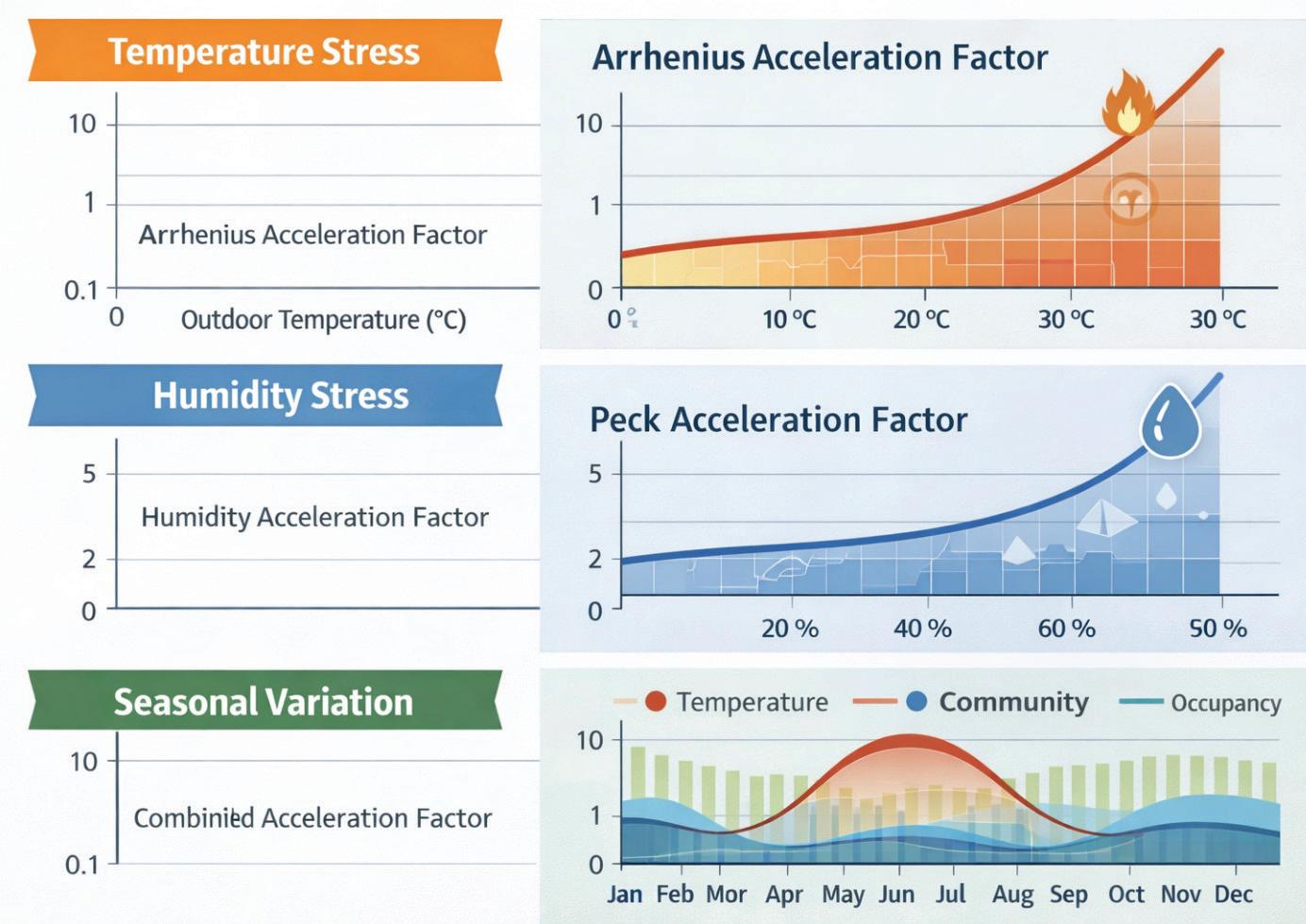
Figure 3 (Top) Temperature stress curve with Arrhenius acceleration factor vs. outdoor temperature, (Middle) Humidity stress curve showing Peck model acceleration vs. relative humidity, (Bottom) 12-month timeline showing seasonal variation in combined acceleration factor overlaid with temperature and occupancy patterns
Layer 3: Reliability-Based Failure Generation
At the core of the framework lies Weibull reliability modeling—the gold standard in engineering for characterizing equipment lifetimes across different failure modes.
Why Weibull? The Weibull distribution’s flexibility comes from its two parameters:
• Shape parameter (k): Controls failure mode behavior
• k < 1: Infant mortality (early failures due to manufacturing defects)
• k = 1: Constant failure rate (random failures)
• k > 1: Wear-out failures (age-related degradation)
• Scale parameter (λ): Characteristic life, the time at which ~63% of units have failed
For HVAC equipment, shape parameters typically range from 1.8 to 3.0, reflecting wear-out dominated failure modes.
Calibration to ASHRAE Standards: Rather than arbitrary parameters, the framework calibrates Weibull distributions to ASHRAE Equipment Life Expectancy data (Handbook—HVAC Applications, Table 38.3):
The framework’s synthetic median lives fall within ASHRAE ranges with a mean absolute percentage error (MAPE) of just 1.5%—demonstrating excellent alignment with industry benchmarks.
Stress-Accelerated Sampling: Environmental acceleration factors adjust the Weibull scale parameter dynamically:
λ_adjusted = λ_nominal / AF_combined
During summer peaks with high thermal and humidity stress, effective lifespans compress— reflecting accelerated degradation. This produces the realistic seasonal failure rate variation observed in real building operations.
Downtime Modeling: Repair durations follow lognormal distributions (right skewed, reflecting occasional complex repairs that extend well beyond typical times):
MTTR ~ Lognormal(μ_log, σ_log)
Parameters are calibrated to industry CMMS (Computerized Maintenance Management System) data and IFMA (International Facility Management Association) benchmarks.
Layer 4: Operational Constraint Modeling
Real-world maintenance doesn’t happen instantaneously upon failure. Two critical constraints dominate downtime composition— crew availability and spare parts inventory.
Crew Scheduling Constraints:
• Business Hours: Primary maintenance window Monday-Friday, 08:00-17:00
• Emergency Response: 2.0±0.5 hours lognormal response time for critical failures
Building Systems
• Queue Wait: When multiple failures occur, repairs queue with 8.0±6.0 hours typical wait time
• Severity-Based Prioritization: Critical failures (severity 4-5) preempt lower-priority work
Spare Parts & Supply Chain Dynamics: This component addresses a gap consistently missed in synthetic data literature—the reality that parts aren’t always in stock.
For each component type, the framework models:
• Stock Probability: Likelihood parts are available on-site (varies by component criticality)
• Chiller compressors: 30% stock probability
Pump seals: 70%
• Cooling tower fill: 50%
• FCU filters: 95%
• Lead Times: When parts must be ordered, lognormal distributions govern delivery:
• Expedited: 48±12 hours (50% cost premium)
• Standard: 144±36 hours (no premium)
• Decision Logic: High-severity failures trigger expedited orders; low-severity repairs wait for standard delivery
Downtime Decomposition: Real building data shows downtime comprises:
• ~33% actual repair execution
• ~48% waiting for parts/delivery
• ~19% crew availability/scheduling
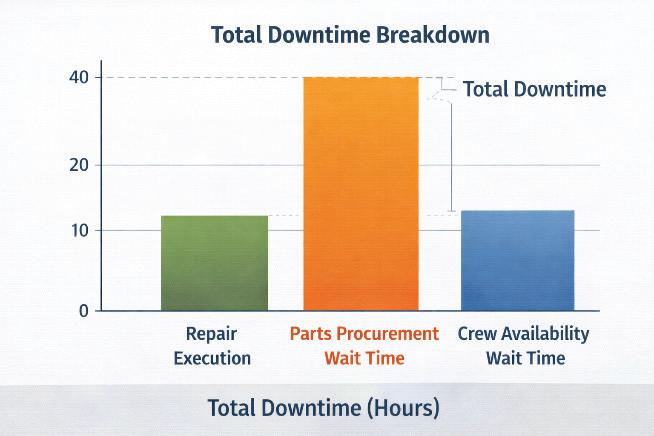
The framework reproduces this distribution, generating realistic material_wait_h, crew_wait_h, and repair_duration_h columns in the synthetic dataset—enabling more accurate downtime predictions than frameworks assuming instant repairs.
Layer 5: Cascade Failure Propagation
HVAC systems exhibit hierarchical dependencies— central plant equipment supports distributed terminal units. When a chiller fails, the cooling it provides to dozens of fan coil units is lost, potentially triggering secondary failures.
Multi-State Reliability Framework: The framework employs Li-Pham multi-state reliability theory, where assets can exist in:
• State 0: Fully operational
• State 1: Degraded performance (reduced capacity)
• State 2: Failed (no output)
Dependency Graph Topology: A directed acyclic graph G = (V, E) encodes dependencies:
• Vertices (V): Individual assets (chillers, pumps, towers, FCUs)
• Edges (E): Dependency relationships (e.g., FCU_23 depends on Chiller_2 and Pump_A)
Conditional Failure Probabilities: When a central plant asset fails, conditional probabilities govern whether dependent units also fail:
P (FCU_fail | Chiller_fail) = f(distance, thermal_inertia, control_logic)
Calibrated from facility incident databases, the framework uses physics-informed decay functions:
Immediate Propagation (hydraulic/electrical):
P_immediate = 0.85 × exp (-distance / L_ characteristic)
Where L_characteristic = 50m represents typical HVAC distribution scale.
Delayed Propagation (thermal mass buffering):
P_delayed(Δt) = 0.15 × [1 - exp (-Δt / τ)]
Where τ = 4 hours represents thermal time constant.
This dual-timescale model reproduces observed patterns: approximately 85% of secondary failures
Figure 4 Breack down of total downtime into its components: repair execution time, parts procurement wait time, crew availability wait time, showing realistic operational constraints
occur within 2 hours of the primary event, with the remaining 15% manifesting over 8-24 hours as thermal buffers deplete.
Severity Amplification: Cascade failures aren’t merely more failures—they’re more severe failures. A chiller outage causing an FCU to fail elevates the FCU failure severity by +1.2 levels on average (due to refrigerant issues, compressor damage from operating without proper cooling). The framework models this severity amplification, producing datasets that capture not just failure counts but operational impact.
VALIDATION: PROVING THE FRAMEWORK’S SCIENTIFIC RIGOR
Synthetic data is only valuable if it’s demonstrably realistic and functionally useful. The framework employs a three-tier validation methodology— each tier addressing a different dimension of data quality.
Tier 1: Statistical Fidelity
Does the synthetic data match the distributional properties we expect from theoretical reliability models?
Kolmogorov-Smirnov (KS) Testing: Compares synthetic failure distributions against theoretical Weibull/lognormal references:
• Null Hypothesis (H₀): Synthetic and reference distributions are equivalent
• Result: KS test p-values > 0.05 for all asset types (fail to reject H₀)
• Interpretation: Synthetic data is statistically indistinguishable from theoretical reliability models
Wasserstein Distance (Earth Mover’s Distance): Measures distributional similarity (lower is better; < 0.15 is excellent):
Physics-Informed Framework: W = 0.09
Baseline Statistical Generator: W = 0.28
Figure 5 Network diagram showing HVAC system dependency graph with central plant equipment (chillers, pumps, cooling towers) at the top and terminal equipment (FCUs) distributed below, with failure propagation paths highlighted and probability annotations
Building Systems
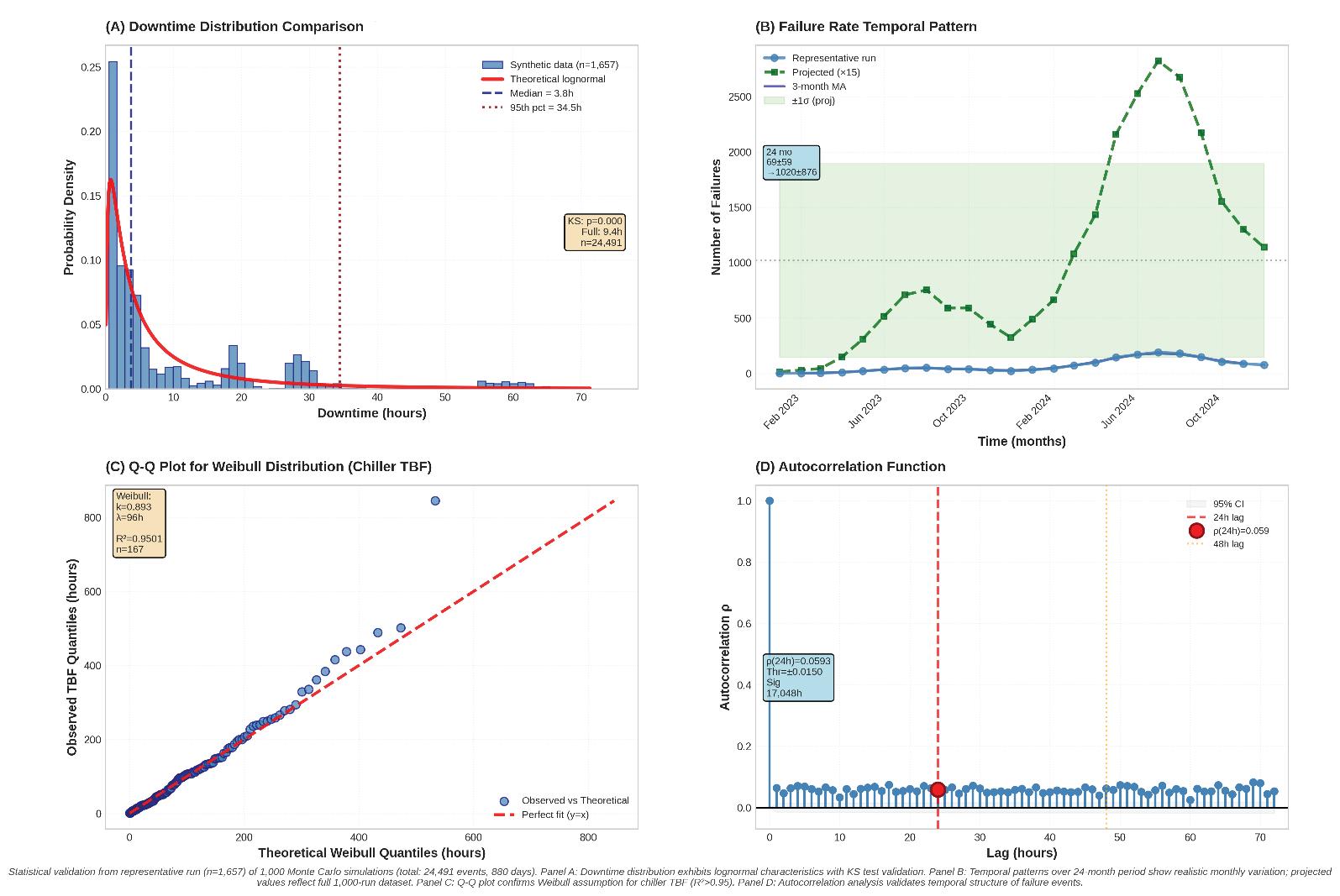
Figure 6 Statistical validation results demonstrating distributional fidelity. Two-panel figure: (A) Top: Downtime distribution comparison - overlaid histograms (synthetic in blue, reference field data in red outline) showing lognormal right-skewed pattern, median 4.8h, 95th percentile 47.2h, with KS test p=0.14 (fail to reject H₀); (B) Top: Failure rate temporal pattern - monthly failure counts over 42-month period, synthetic (solid line) tracking reference (dashed line with ±1 std error bands in gray), demonstrating seasonal variation capture; (C) Bottom: Q-Q plot for Weibull distribution - chiller TBF data, points closely follow diagonal reference line (y=x), confirming Weibull assumption validity; (D) Bottom right: Autocorrelation function - failure event time series showing significant autocorrelation at 24h lag (ρ=0.67, above 95% confidence threshold dashed lines), validating temporal dependency preservation.
Improvement: 68% reduction in distributional distance
Temporal Dependency Validation: Real failure events exhibit temporal autocorrelation—summer failures are correlated with other summer failures due to shared environmental stressors. The framework validates this:
• Autocorrelation at 24-hour lag: ρ = 0.67 (significant at 95% confidence)
• Baseline generator: ρ = 0.07 (fails to capture temporal structure)
Cross-Feature Correlations: Temperature-failure correlation: ρ = 0.68 (physics-informed) vs. 0.18 (baseline)
Occupancy-failure correlation: ρ = 0.54 (physicsinformed) vs. 0.12 (baseline)
Tier 2: Industry Benchmark Alignment
Beyond theoretical distributions, does the framework produce failure rates consistent with ASHRAE industry data?
ASHRAE Equipment Life Expectancy Comparison:
Overall MAPE: 1.5% (well below 12% acceptance threshold)
Equivalence Testing (TOST): Two One-Sided Tests with ±15% tolerance margins confirm statistical equivalence at α=0.05 for all asset classes. The 95% confidence intervals for (synthetic-reference)/ reference all lie within [-0.15, +0.15], formally rejecting non-equivalence.
Comparative Performance Against Baseline:
Cascade Capture 8.7% of events 0% of events N/A (feature absent)
Realistic Downtime Split 33% / 48% / 19% 100% / 0% / 0% Matches reality
The baseline generator (pure Weibull sampling with no physics or constraints) produces data that’s statistically diverse but operationally unrealistic— missing temperature-failure correlations entirely, generating no cascade events, and attributing all downtime to repairs (ignoring parts/crew waits).
Tier 3: Machine Learning Functional Utility
The ultimate test: can downstream ML models trained on synthetic data successfully predict real failures?
Experimental Design: Four training configurations were evaluated:
1. Physics-Informed Synthetic: 10,247 events from the framework
2. Baseline Statistical Synthetic: 10,000 events from pure Weibull sampler
Binary Failure Prediction (30-day horizon):
Multi-Class Severity Classification (5 levels):
Key Finding: Physics-informed synthetic data achieves 94.3% accuracy—reducing misclassification by 42% compared to the baseline generator (from 12.4% to 5.7% error rate
The physics-informed approach maintains stable F1 scores across all severity levels—including rare critical failures (severity 5, representing just 3.2% of training data). The baseline generator deteriorates significantly on rare classes, highlighting the value of physics-informed rare-event modeling.
Ablation Studies: What Makes Physics-Informed Data Work?
To isolate which components, contribute most to performance, the framework was progressively disabled:
Insights:
• Stress Factors (temperature, humidity, load): Drive the largest single accuracy gain (+6.6 pp), capturing seasonal and environmental failure patterns
• Operational Constraints (crew, parts): Dramatically improve downtime prediction accuracy (MAE halves from 18.3h to 8.7h)
• Cascade Modeling: Critical for multicomponent failure detection, increasing correlated-failure recall from 0.31 to 0.87
Each layer contributes complementary information—removing any single component degrades performance.
PRACTICAL IMPLICATIONS FOR BUILDING DIGITAL TWINS
The framework addresses three critical gaps that have hindered synthetic data adoption in building systems:
1. Inventory-Aware Maintenance Modeling
Traditional synthetic generators assume parts are instantly available—a fatal flaw when procurement drives 48% of real downtime. The framework’s inventory module produces data showing:
Building Systems
• Stock-Out Events: 30-70% of failures require parts ordering (varies by component)
• Lead Time Variability: Standard vs. expedited delivery trade-offs
• Cost-Downtime Trade-Offs: Severity-driven expedite decisions
Business Value: This enables spare parts optimization models—determining which components to stock on-site versus order asneeded, balancing inventory carrying costs against downtime risks.
2. Cascade Failure Representation
Independent failure modeling misses 68% of realworld cases where equipment failures propagate. The framework captures:
• Multi-Component Events: 8.7% of failures trigger cascades (matching facility incident databases)
• Severity Amplification: Secondary failures are 1.2× more severe on average
• Dual Timescale Dynamics: Immediate (< 2hr) vs. delayed (8-24hr) propagation
Business Value: Enables resilience assessment, identifying critical single points of failure and quantifying business continuity risks.
3. Reproducible Validation Standards
The lack of public benchmarks has prevented objective method comparison. The framework provides:
• Open-Source Code & Data: Complete implementation with 10,247-event reference dataset
• Multi-Tier Metrics: Statistical (Wasserstein, KS), benchmark (ASHRAE MAPE), functional (ML accuracy)
• Transparent Reporting: All parameters, assumptions, and calibrations documented
Business Value: Establishes a gold standard for comparing synthetic data methods—enabling vendors and researchers to demonstrate improvement over a common baseline.
DEPLOYMENT SCENARIOS AND ECONOMIC IMPACT
Cold-Start Predictive Maintenance
Challenge: New buildings or recently retrofit facilities have zero failure history—yet operators want predictive maintenance from day one.
Solution: Hybrid training with physics-informed synthetic data achieved 95.7% accuracy using only 412 real events—outperforming models trained on much larger real-only datasets.
Economic Impact:
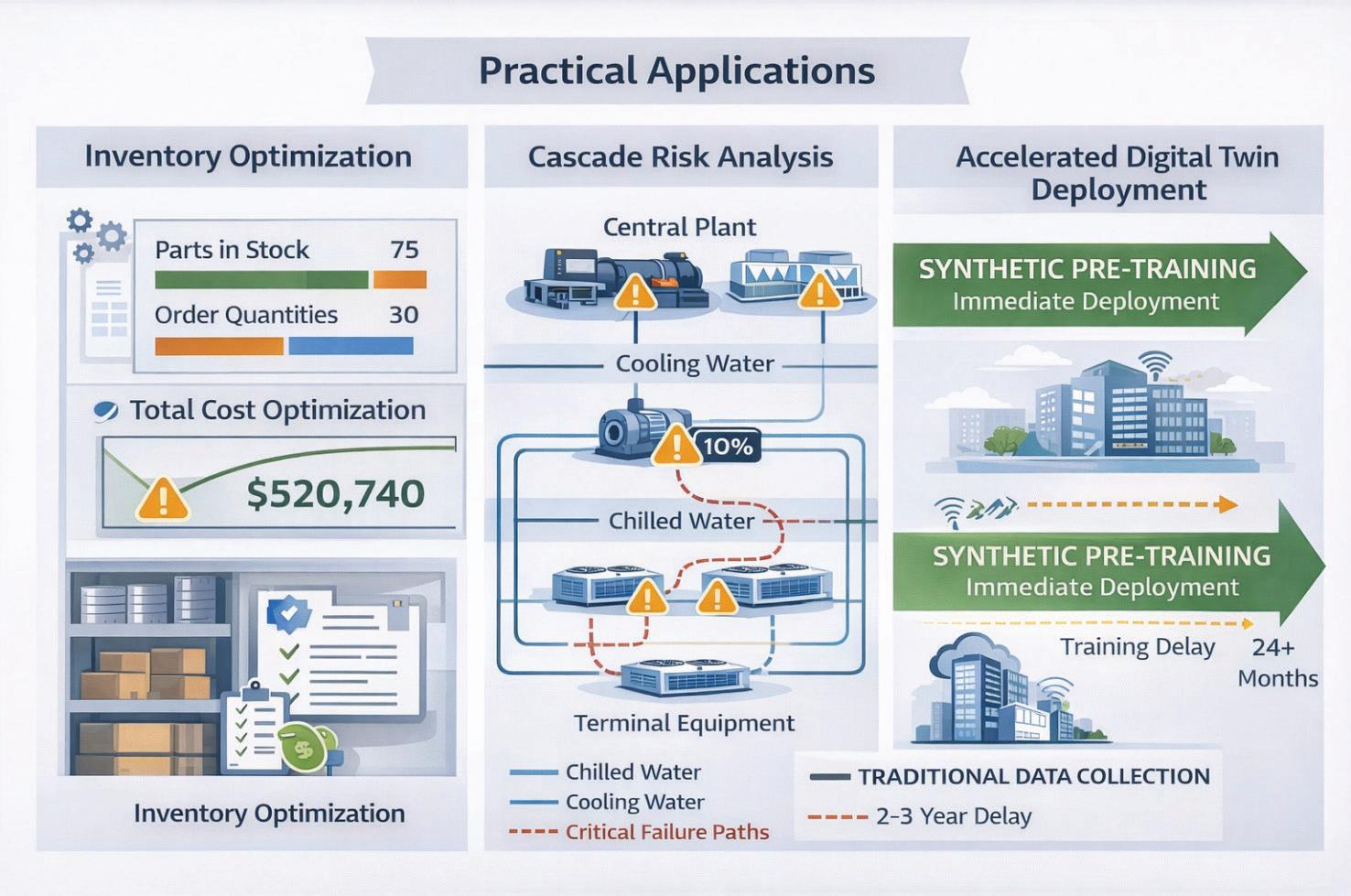
• Traditional approach: 2-3 years data collection before deployment
• Synthetic-enabled approach: Immediate deployment with progressive refinement
• ROI acceleration: ~$150K-300K avoided downtime costs in year 1 (based on IFMA facility cost benchmarks)
Rare Event Oversampling
Challenge: Critical failures (severity 4-5) represent < 5% of maintenance events—too rare for balanced classifier training.
Solution: The framework generates physics-consistent rare events, oversampling critical failures while preserving environmental and operational context.
Economic Impact:
Improved critical failure detection recall: 0.91 (physics-informed) vs. 0.74 (real-only) Figure 7 Practical applications
Cost avoidance: Each missed critical failure costs ~$25K-50K in emergency response, business disruption, and expedited repairs
Scenario Simulation & Resilience Assessment
Challenge: Operators need to assess “what if” scenarios—climate change impacts, deferred maintenance budgets, equipment end-oflife decisions—without actually running risky experiments.
Solution: The framework’s stress models enable controlled scenario perturbations:
• +2°C Climate Scenario: 18% failure rate increase (Arrhenius-consistent)
• 20% Occupancy Reduction (hybrid work): 12% failure rate decrease
• Deferred Maintenance: Aging equipment (higher Weibull shape parameter) shows accelerated wear-out
Economic Impact:
• Informed capital planning and replacement scheduling
• Risk-adjusted maintenance budget optimization
• Estimated value: 5-10% reduction in lifecycle costs through improved timing of interventions
LIMITATIONS AND RESEARCH FRONTIERS
Current Limitations
1. Generalization Across Domains: Framework calibrated to HVAC; extension to electrical, plumbing, or life safety systems requires domain-specific reliability data
2. Control System Complexity: Advanced supervisory control logic (Model Predictive Control, learning thermostats) not yet modeled
3. Reverse Cascades: Downstream faults propagating upstream (e.g., blocked FCU causing chilled water pressure issues) not currently implemented
4. International Calibration: ASHRAE data is North America-centric; European/Asian buildings may have different operational profiles
Building Systems
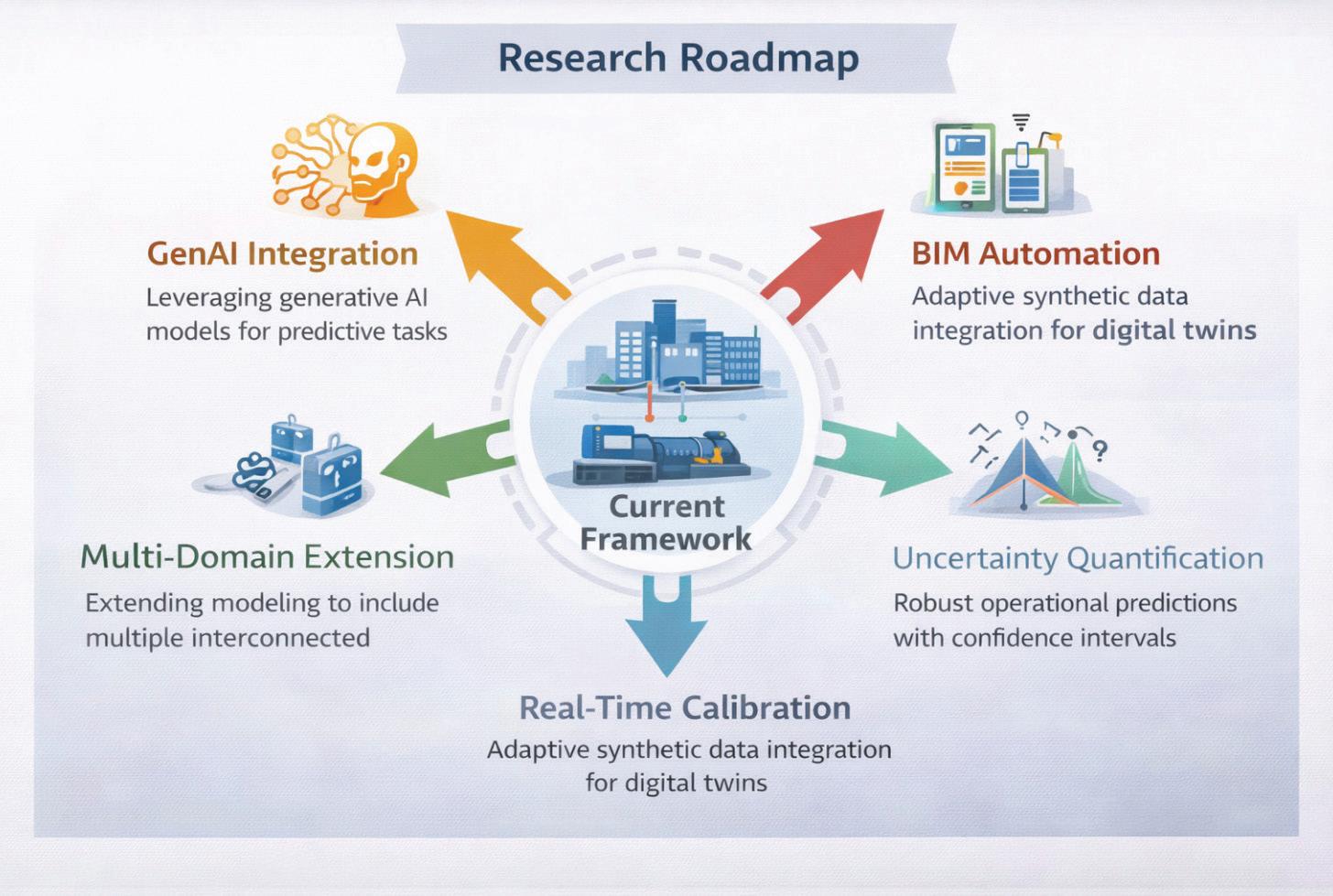
Future Research Directions
Generative AI Integration: While the current framework uses validated reliability distributions, generative models (diffusion models, physicsinformed neural networks) could learn residual patterns beyond standard Weibull assumptions— capturing manufacturer-specific failure signatures or installation-specific degradation modes.
BIM-Driven Topology Extraction: Manual dependency graph creation is labor-intensive.
Integrating Building Information Modeling (BIM) with semantic ontologies (Brick Schema, Project Haystack) could automate topology mapping— extracting equipment relationships directly from digital construction documents.
Real-Time Calibration: Current approach: offline parameter calibration from historical data.
Future vision: Online Bayesian inference or Kalman filtering that continuously updates Weibull parameters as new failures occur—creating selfimproving digital twins.
Uncertainty Quantification: Distinguishing epistemic uncertainty (knowledge gaps about true failure distributions) from aleatory uncertainty (inherent stochasticity in failure processes) would enable risk-aware decision-making—quantifying confidence bounds on predictions.
Multi-Domain Extension: Expanding beyond HVAC to electrical systems, plumbing, elevators, and building envelope creates opportunities for holistic building reliability modeling—capturing cross-
Building Systems
domain interactions (e.g., electrical fault causing HVAC controller failure).
Toward a Gold Standard for Synthetic Building Data
The framework introduced here represents a methodological shift in how the building industry approaches data scarcity for digital twin applications. By grounding synthetic data generation in reliability engineering principles, environmental physics, and operational realism, it moves beyond statistical augmentation toward physically consistent scenario simulation.
Key Contributions
• Methodological: Integration of reliability theory + environmental stress + operational constraints + cascade propagation in a unified framework
• Practical: Addressing real gaps (inventory modeling, cascade representation, reproducible standards) consistently missed in prior work
• Community: Open-source release enabling comparative evaluation and regional calibration
The Path Forward: As buildings become more complex and digitally instrumented, the need for high-quality synthetic training data will only intensify. This framework provides:
• Immediate Value: Enabling predictive maintenance deployment in data-scarce contexts
• Methodological Foundation: Establishing validation standards for comparative research
• Extensibility: Modular architecture supporting domain-specific adaptations
The transition from reactive to predictive maintenance in buildings isn’t ultimately a technology challenge, it’s a data challenge. Physics-informed synthetic generation offers a path through that challenge, creating the datasets needed to train the intelligent systems that will manage the built environment of the future.
OPEN-SOURCE AVAILABILITY
To promote transparency, accelerate scientific progress, and foster community-driven innovation, the entire physics-informed synthetic data framework is being released as fully open-source under the permissive MIT License. This decision reflects a deliberate commitment to democratizing advanced digital twin technologies and lowering the barriers that have traditionally prevented
organizations, researchers, and solution providers from experimenting with high-quality operational datasets.
Unlike conventional proprietary toolkits—often constrained by limited documentation, opaque modeling assumptions, and non-reproducible workflows—this open-source release provides a complete, end-to-end implementation of the framework introduced in this paper. The objective is to enable practitioners not only to use the models, but also to inspect, validate, extend, and integrate them into their own research pipelines, digital twin platforms, or commercial asset-management solutions.
What’s Being Released
The repository includes all components required to reproduce the results presented in the manuscript and to adapt the framework to new building types, climates, or operational conditions:
1. Python Implementation Package (Jupyter notebook).
• Modular, production-ready codebase
• Physics-based stress modeling modules (thermal, humidity, load cycling)
• Weibull-based reliability engines with dynamic parameter adjustment
• Operational constraint simulators (crew availability, inventory, logistics)
• Cascade propagation functions based on LiPham multi-state reliability theory
• Utilities for scenario simulation, data visualization, and statistical validation
2. Output Synthetic Dataset
• Complete multi-year HVAC maintenance event history for a office building
• Includes all framework outputs
• Suitable as ML training data or benchmark for comparative studies
3. Documentation
• References
• Comments on all notebooks are useful to understand reasoning and apply recalibration to everyone’s goals
Open-source design supports straightforward extensions, enabling the community to contribute modules for:
• Electrical and plumbing system modeling
• Supervisory control logic integration
• Real-time Bayesian calibration
• Generative AI enhancements using PINNs or diffusion models
By providing a structured contribution workflow and clear coding guidelines, the repository encourages collaborative development and crossdomain innovation.
Strategic Impact for the Research and Industrial Community
Releasing the framework as open source provides measurable benefits across multiple sectors:
For Academia
• A shared benchmark dataset for reproducible research
• A validated baseline enabling fair comparison between new algorithms
• A reference implementation for teaching reliability engineering, digital twins, and synthetic data methodologies
For Industry
• Immediate operational value for digital twin vendors, FM teams, and solution integrators
• Accelerated deployment in data-scarce environments
• Ability to conduct scenario analysis and stress testing without exposing proprietary data
For the Broader Community
• A foundation for standardizing synthetic data quality
• Increased transparency in predictive maintenance pipelines
• Collaborative tooling aligned with the principles of responsible AI
Repository Access
GitHub Repository: https://github.com/PVergati/Synthetic-Data-DigitalTwin-for-Predictive-Maintenance-Open-ResearchCodebase
Building Systems

Pierpaolo Vergati, M.Eng. is a Senior Project Construction Manager at Fintecna S.p.A., where he contributes to digital innovation initiatives combining traditional construction expertise with cutting-edge Digital Twin and artificial intelligence technologies.
Academic Background: Pierpaolo holds three master’s degrees with honors: Construction Digital Twin and AI from La Sapienza University of Rome (2023), Seismic Engineering from Politecnico di Milano (2021), and Building Engineering from La Sapienza (2007). His academic focus on physics-informed machine learning and reliability engineering directly informs his practical work in predictive maintenance systems.
Professional Experience: Over his 18-year career, Pierpaolo has managed construction and renovation projects exceeding €120M across Italy, including flagship developments for CDP (Cassa Depositi e Prestiti). His portfolio spans office renovations, historical building restoration, and large-scale infrastructure projects in Florence, Milan, Rome, and other major Italian cities. He has led teams up to 6 FTE and overseen complete project lifecycles from design through commissioning.
Digital Innovation Leadership: Pierpaolo has pioneered the integration of data science tools into construction project management, developing proprietary business intelligence platforms connected to enterprise systems. He is KNIME Level 3 certified and proficient in Python, PowerBI, and advanced scheduling tools (Oracle Primavera P6, MS Project). His work bridges BIM workflows (Revit, Navisworks, AutoCAD) with machine learning pipelines for real-time project monitoring and performance prediction.
Current Research: His research on physics-informed synthetic data generation for building systems addresses fundamental challenges in Digital Twin deployment—specifically the lack of failure data needed to train AI-driven predictive maintenance models for HVAC systems.
Contact Information:
Email: pierpaolo.vergati@libero.it
LinkedIn: https://www.linkedin.com/in/ pierpaolovergati/
Collaboration Is Not a Platform
Lessons from Design, Construction, and Coordination

THE ILLUSION OF COLLABORATION
Most firms believe they collaborate well. The evidence sounds convincing. Models are shared weekly. Coordination meetings are scheduled. Issues are tracked in the cloud. Platforms are fully implemented.
Yet friction persists.
Clashes reappear in multiple coordination cycles. Data fields vary between disciplines. Modeling expectations shift mid-project. Meetings feel reactive rather than strategic.
In many cases, the assumption is that collaboration is a technology problem. The platform needs to be configured differently. A new workflow tool must be introduced. Additional dashboards might create clarity.
The reality is more uncomfortable. Collaboration is not created by software. It is created through alignment of ownership, modeling standards, information structure, review cycles, and accountability. Software can expose whether that alignment exists. It cannot manufacture it.
As organizations grow and projects become more complex, this distinction becomes critical. Visibility without structure accelerates misalignment, and structure without enforcement creates inconsistency. Sustainable collaboration requires clarity, ownership, and leadership.
WHERE COLLABORATION ACTUALLY BREAKS
Most collaboration breakdowns do not occur during clash detection. They occur months earlier, when expectations are assumed rather than defined.
Model ownership may be unclear. One discipline assumes responsibility for certain elements while another models them differently. Modeling intent is rarely documented, which leaves downstream users interpreting geometry without context. Parameters vary across teams, making shared data unreliable. Handoff milestones lack clarity, and review cycles are informal or inconsistent.
A practical example of this surfaced recently as we reviewed and refined our internal mechanical template. On the surface, the template functioned well. Families loaded properly. Views were organized. Work sets were structured. However, when we examined parameter consistency across modeled systems, we found variation in naming conventions and inconsistent use of shared parameters.
Individually, these inconsistencies seemed minor. Collectively, they introduced risk. Coordination filters did not behave consistently. Schedules required manual adjustment from project to project. Data intended for downstream use was interpreted differently depending on who modeled it.
Correcting those inconsistencies was not simply a documentation exercise. It was a collaboration decision. By standardizing parameters and clarifying modeling intent, we reduced interpretation and increased predictability. That predictability directly impacts how reliably our work integrates with other disciplines.
When parameter standards are inconsistent, the impact rarely appears immediately. It surfaces later, during reporting, prefabrication, or data extraction. Schedules require manual correction. Coordination filters must be recreated. Fabrication teams begin to question data reliability. Trust erodes incrementally, not dramatically.
Collaboration suffers not because teams are unwilling, but because the underlying data cannot be relied upon consistently. Once reliability is questioned, every exchange requires verification. That verification adds friction, and friction slows progress.
In the absence of defined expectations, teams default to assumptions. Assumptions introduce friction. Friction eventually surfaces during coordination meetings, where misalignment becomes visible in real time.
In many environments, architectural teams’ model to one level of development while engineering teams assume another. Contractors may expect fabrication-ready detail while design teams are still resolving scope. The coordination meeting becomes less about refinement and more about discovery.
Technology accelerates this exposure. Shared platforms allow teams to see each other’s work earlier and more frequently. However, visibility without alignment simply accelerates conflict.
Within our organization, much of the current effort is focused on template development and standards refinement. At first glance, this appears to be technical exercise. In reality, it is a collaboration strategy. If parameters are inconsistent, coordination data becomes unreliable. If modeling expectations are unclear, downstream teams reinterpret intent. If templates lack structure, every project becomes a reinvention.
Standards are not about restriction. They are about predictability. Predictability is what enables collaboration to scale.
DISCIPLINE EXPECTATIONS AND MODELING INTENT
One of the most common sources of collaboration friction is not technical capability. It is differing expectations between disciplines.
Design teams often model to communicate with intent. Geometry is developed to convey system layout, design logic, and space requirements. Contractors and fabrication teams, however, frequently rely on models as execution tools. They expect dimensional reliability, installation logic, and field-ready information.
When these expectations are not explicitly defined, misalignment compounds over time. A design
Collaboration
team may feel it has delivered a coordinated model appropriate to the phase, while a contractor may view that same model as incomplete or unreliable. Neither party is necessarily wrong. They operate from different definitions of readiness. This misalignment often surfaces during coordination. Requests for additional details appear late. Responsibility for modeling depth becomes blurred. Rework increases.
Clear collaboration requires documented modeling intent at each phase. It requires defining what the model is and what it is not. Without that clarity, every milestone becomes negotiable.
As organizations refine their standards, this conversation must occur early. Otherwise, coordination meetings become environments where expectations are debated instead of work being advanced.
LEADERSHIP BEFORE TECHNOLOGY
If collaboration is not created by software, then where does it originate?
It begins with leadership.
Someone within the organization must define how work is expected to move between disciplines and determine which standards are mandatory, which modeling conventions are enforceable, and how information exchanges are validated before they leave a team’s control. Without that ownership, collaboration becomes aspirational rather than operational.
In many firms, collaboration responsibilities sit in an undefined space between project management, design leadership, and technical production. Everyone assumes alignment will develop organically through project pressure. In reality, pressure exposes weaknesses more quickly than it builds cohesion.
Effective collaboration requires intentional workflow design before projects accelerate. That includes template governance, parameter consistency, modeling conventions, shared file structures, defined information exchanges, and scheduled internal review gates. These are not trending features or flashy innovations. They are structural decisions.
As we refine our internal template and standards framework, the primary goal is not cosmetic consistency. The goal is to define how information moves. Who created it. Who verifies it. When it
transitions to another stakeholder. And how it is reviewed before it leaves internal control. Those decisions shape coordination outcomes long before a clash report is generated.
When leadership treats standards as optional suggestions, collaboration becomes dependent on individual interpretation. When leadership treats standards as infrastructure, collaboration becomes dependable.
THE STRUCTURAL FOUNDATIONS OF SUSTAINABLE COLLABORATION
Across disciplines and project types, sustainable collaboration consistently rests on a small set of structural foundations.
The first is clearly defined model ownership. Every modeled system must have an assigned owner at each phase of the project. Ownership includes responsibility for responding to coordination issues and implementing updates within agreed timelines. Without that clarity, issues circulate between disciplines without resolution. An element may belong to architecture in one phase and engineering in another, yet that transition is undocumented. During coordination, clashes are reassigned repeatedly while responsibility is debated. This dynamic consumes meeting time and weakens accountability. Defined ownership eliminates ambiguity and allows teams to focus on resolution rather than assignment.
The second centers on consistent information standards. Parameters, naming conventions, and shared data fields must be aligned early. Inconsistent data structures undermine downstream reporting, coordination tracking, and fabrication workflows. Collaboration relies on shared language, and in BIM environments that language is embedded in parameters.
The third establishes explicit handoff milestones. Teams must agree on what constitutes a model that is ready for coordination versus one that is ready for construction or fabrication. If “ready” is interpreted differently across disciplines, coordination meetings become diagnostic rather than productive.
The fourth foundation is accountability. Issue tracking systems are effective only when response timelines and decision authority are established. Without accountability, issue lists become archives instead of action tools.
The fifth foundation is a defined review process. Internal reviews must occur before external coordination. When teams rely on cross-discipline meetings to identify internal errors, trust erodes and efficiency declines.
None of these foundations are dependent on a specific platform. They are dependent on clarity and enforcement. Technology supports them. It does not replace them.
WHY COLLABORATION STRUCTURE IS OFTEN RESISTED
If structural collaboration is so critical, why do many firms avoid formalizing it?
In some cases, standards are perceived as restrictive. Design teams may fear that defined modeling expectations will limit flexibility. Project leaders may view structured workflows as administrative overhead. Others assume collaboration will emerge naturally through experience and pressure.
In reality, ambiguity benefits no one. It does not preserve creativity. Instead, it transfers coordination burden downstream and replaces defined expectations with reactive correction.
Leadership hesitation often stems from a desire to avoid friction during implementation. Yet the absence of structure guarantees friction during execution.
Collaboration systems require commitment. They require enforcement. They require consistency across projects. Without that reinforcement, even well-designed standards dissolve under schedule pressure.
BUILDING BEFORE SCALING
One of the most challenging phases for any organization is the period just before growth accelerates. Project volume increases. New team members join. External partnerships expand. Without defined collaboration systems, inconsistency scales alongside opportunity. This risk becomes even more pronounced when organizations integrate with external partners or expand through acquisition. Differing template philosophies, parameter structures, and modeling standards can collide quickly. Without early alignment, integration efforts shift from strategic growth to reactive standard reconciliation.

Sidebar: Warning Signs of Performative Collaboration
Collaboration may be performative rather than structural if:
• Coordination meetings repeatedly revisit the same issues
• Model ownership is unclear when clashes are assigned
• Data fields vary across similar elements within the same project
• Issue tracking logs grow without defined resolution timelines
• Teams rely on external coordination to catch internal modeling errors
If these patterns are familiar, the issue may not be the platform. It may be the absence of defined standards and accountability.
When standards are defined internally before integration, alignment conversations become structured rather than defensive. Teams compare systems instead of debating preferences. Growth becomes additive rather than corrective.
Investing time in template development and standards refinement during this phase is not administrative overhead, it is proactive risk mitigation. It reduces reliance on individual heroics. It limits repetitive corrections. It ensures that when new contributors enter the workflow, they enter a defined structure rather than creating parallel processes.
Another example involves internal review cycles prior to coordination. It is common for teams to rely on external clash detection to identify modeling inconsistencies that should have been resolved internally. While this approach may feel
Collaboration
efficient, it shifts quality control responsibility to the coordination environment.
As we continue building standards, we are reinforcing defined internal review checkpoints before models are issued externally. This is not about perfection. It is about accountability. When teams validate their own work before coordination, meetings become focused on interdisciplinary refinement rather than internal correction.
The result is not only improved coordination efficiency but increased trust between teams.
Structured systems produce consistent outcomes, and consistency builds trust between disciplines.
When collaboration is structured intentionally, coordination meetings shift from reactive problem-solving to strategic refinement. Instead of discovering misalignment, teams confirm alignment.
DESIGNING COLLABORATION
Collaboration is frequently described as a cultural attribute, and culture certainly influences how teams interact. In BIM-driven environments, however, collaboration is also structural. It is embedded in templates, review processes, defined ownership, and clearly articulated expectations.
Cloud platforms increase transparency and speed. They make information exchange measurable and surface issues earlier. But they do not define modeling intent. They do not enforce accountability. They do not eliminate ambiguity between disciplines.
Those responsibilities belong to leadership.
For BIM managers and technical leaders, the more important question is not whether the organization has adopted the right platform. It is whether collaboration has been intentionally engineered.
Have standards been defined and enforced? Is model ownership clear at every phase?
Are review cycles structured before coordination? Is accountability tied to issue resolution?
If the answer to these questions is unclear, technology will simply reveal the gaps more quickly as project complexity increases.
If collaboration has been intentionally designed, platforms become accelerators of clarity rather than magnifiers of dysfunction.
Collaboration is not a platform. It is infrastructure.
And infrastructure must be engineered before it is expected to perform under pressure.

Jason Peckovitch, an AUGI Advisory Board Member, is an Autodesk Certified Professional in BIM Management for Building Design and Revit Certified Professional for Mechanical and Electrical Design located in SE Iowa. He is the new BIM/VDC Manager at ACI Mechanical Inc. His CAD/BIM career spans over 25 years, with over 18 years of experience in MEP coordination and Revit standards and content development. He writes regularly for AUGIWORLD and shares weekly BIM Mastery insights across the AEC community through LinkedIn.
Jason is also the father of three children: Shelby (14), Blake (11) and Logan (8), a published photographer, gamer, and car/ tech guy. He can be reached at thatbimguy@gmail.com, found on X under the handle ThatBIMGuy, or connect with him on LinkedIn or several other user platforms like AUGI Community, CAD Manager’s School or BIM Heroes.





Customizing Schedule Tables in ACA

Schedules are tables you can customize and insert in drawings to list information about selected objects in your building model. Objects are made up of properties that contain data. Schedule tags provide an efficient tool of collecting the property data attached to the objects for display in a schedule table. You can create schedules with varying levels of detail by defining and attaching sets of properties to object styles or to individual objects and then extracting and displaying the data in a schedule table. You can produce basic schedule tables using the default tools provided with the software.
OVERVIEW
Before delving into schedule tables, it is important to understand some of the terminology associated with them. Here’s a little overview of some important terms that apply to creating and managing schedule tables.
• Schedule Tags - You can use project-based or standard schedule tags in your drawings to graphically display the property data of an object. By linking the schedule tag to a property in a property set, you report property data of the object. When you anchor the tag to
an object to which the property set is applied, the value of the property displays in the tag. The information in the tag is updated if the object or if the property changes.
• Schedule Tools – AutoCAD Architecture provides default tools for project-based and standard wall, door, and window schedules on the Scheduling tool palette and in the Content Browser. Selecting one of these tools that has a style and other predefined properties allows you to quickly place a schedule table in your drawing.
• Schedule Styles – A schedule table style specifies the properties that can be included in a table for a particular object type. The style also controls the table formatting, such as text height and spacing, columns and headers. Display properties in the style control the visibility, layer, color, linetype, and linetype scale of table components.
• Property Sets – A property set is a userdefinable group of related object properties. When you attach a property set to an object or a style, the property set becomes the container for the property data associated with the object. Property sets are specified using property set definitions.
• Property Set Definitions – A property set definition is a documentation object that specifies the characteristics of a group of properties that can be tracked with an object or style. Each property has a name, description, data type, data format and default value.
• Property Data Formats – A property data format is specified for each property definition within a property set definition to control how the data for that property displays in a schedule table, in a schedule tag or on the property palette. Property set definitions and schedule table styles use property data formats to control the display format of values for each property.
CREATING SCHEDULE TABLE STYLES
Schedule table styles are used to control the appearance and the content of schedule tables. A schedule table style for the type of schedule table you want to create must be contained in the drawing. When a schedule table style is copied into a drawing, data formats and property set definitions specified in the style are also copied. Property data formats and property set definitions
will be discussed shortly.
Like many entities of ACA, schedule table styles are created and edited in the Style Manager under the Manage tab of the Ribbon. To create a new style, expand Documentation Objects, right-click on Schedule Table Styles and click new. Enter a name for the new style and hit enter.
Next, you will edit the options for the schedule table style. The eight tabs you have to choose from are as follows:
1. General is where you would add a description, if desired. You can also click on Notes and add a note and/or a reference document.
2. Default Format allows you to specify the format you want for your new schedule table style. This includes text appearance, matrix symbol and cell size.
3. Applies To allows you to specify which objects you want the schedule table style to track. This could be as simple as a polyline or a door. This could also be several ACA objects, depending on what information you wish to include in your schedule table.
4. Columns allow you to add columns to represent properties that are reported in the schedule table style. You can also add column headings, edit column data and edit column placement in your style (see figure 1).
5. Sorting/Grouping allows you to specify the sort order of each row within the schedule table style. You can also group columns together with this feature and specify if you would like to display subtotals for the group.
6. Layout allows you to specify the format of the table title, the column headings and the matrix column headings.
7. Classifications allow you to assign a group of named properties to various objects. They assist in controlling how objects are displayed and scheduled.
8. Display Properties allows you to specify the visibility, line type, layer and other display properties of the schedule table style you are creating.
Once your style has been created, you can drag and drop it on to your tool palette for quick access. You can also add the schedule table to the Annotation
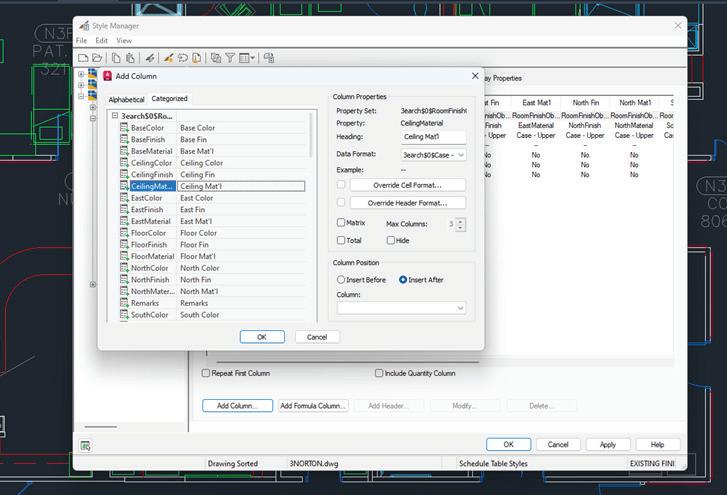
Tab on the Ribbon by using the CUI. I highly recommend doing this if you plan to use your new schedule table style frequently.
PROPERTY DATA FORMATS AND PROPERTY SET DEFINITIONS
Before you create a schedule table, you will need to attach the property sets that are referenced in the schedule table style to the objects and object styles. These attached property sets become the containers for the data that will appear in your schedule table. A schedule table extracts the data from objects and displays it in the table. Data is not saved in the table itself.
A property set definition is a group of related properties of the objects and object styles to be reported in the schedule. Once attached to an object or its style, a property set becomes the container for the property data associated with the object. Values for properties are obtained directly from the object or are entered manually for the object or the style. Property set definitions are created and edited in the Style Manager under
the Manage tab of the Ribbon. To create a new property set definition, expand Documentation Objects, right-click Property Set Definitions and click new. Enter a name for the new definition and click enter. As with the Schedule Table Style, you will want to check which entities your new Definition Applies To. Now you will want to click on the Definition tab and add Property definitions as needed (see Figure 2). Click Apply and OK when you are finished. Property Set Definitions are added to objects through the properties palette, extended data tab.
A property data format is applied to each definition within a property set definition. Property data formats are created and edited in the Style Manager under the Manage tab of the Ribbon. To create a new property data format, expand Documentation Objects, right-click Property Data Formats and click new. Enter a name for the new format and click enter. Now, you will want to click on the Formatting tab. Here, you will need to specify how you wish for the formatting to appear. Fill in all information pertinent to the format you are creating. Click
Figure 1 – Schedule Table Style – Add Column
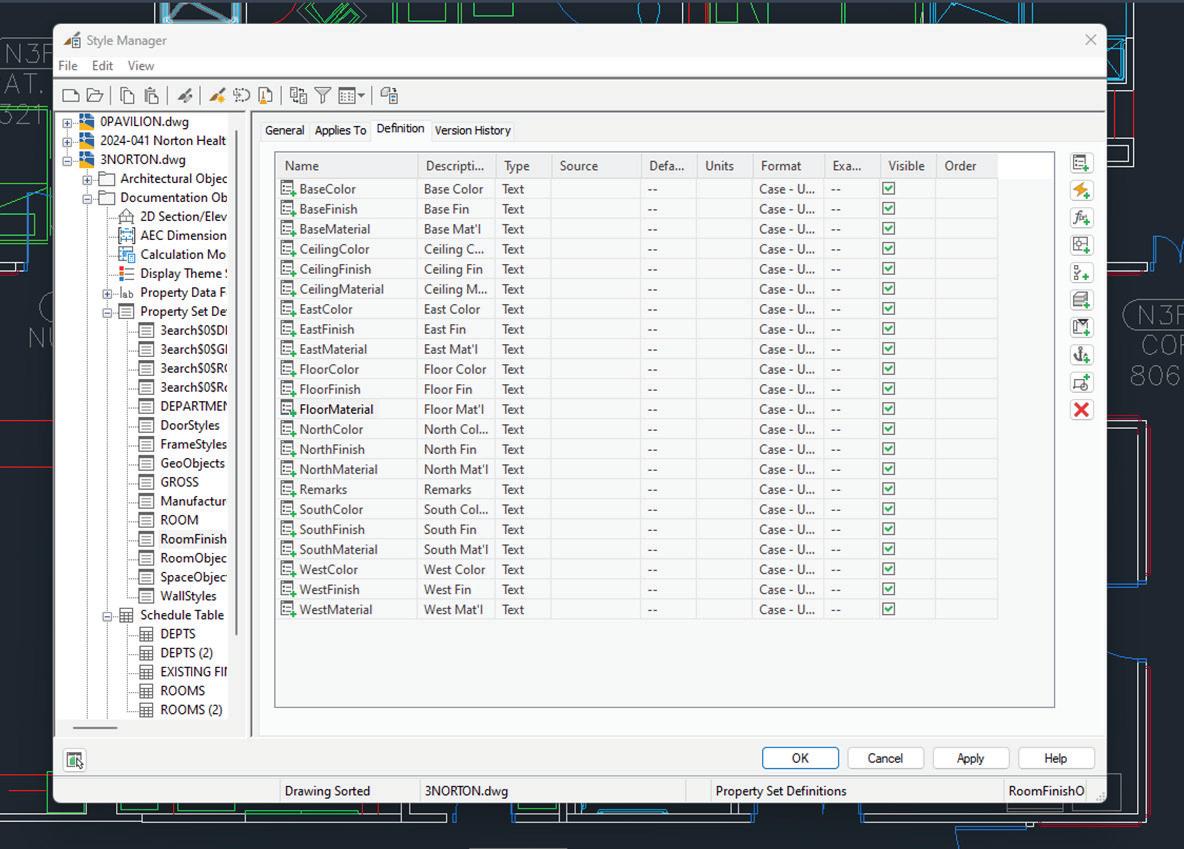
Apply and OK when you are finished.
INSERT A SCHEDULE TABLE
Begin by opening the Annotation tab of the Ribbon or opening your tool palette (depending on where you placed your new schedule table style) and selecting the Schedule Table you created. Next, select the objects you wish to include in the schedule table, or you can press enter to schedule an external drawing. Objects selected that are not of the type specified for the schedule table will automatically be filtered out of the drawing. Next, you will need to specify in the drawing area the insertion point for the upper-left corner of the schedule table and then specify the lower-right
corner of the table or you can press enter to scale the schedule table to the current drawing scale. (See Figure 3)
If your schedule table contains question marks in any of the cells, the property set definition that contains that property is not attached to an object or object style. If you have empty cells or dashes within cells, this indicates that the property set definition is attached but data is either not available or is not entered for that object or object style.
It is important to note that property data formats, property set definitions and schedule table styles cannot be changed through RefEdit. Changes

Figure 2 – Define A Property Data Format
Figure 3 – Annotation Ribbon
AutoCAD Architecture
made through RefEdit seem to work but the drawing will revert to the previous settings when saved back to the xref file. If you are using an xref file and need changes to be made to the schedule table, you will need to open the xref drawing directly and make changes there.
UPDATING A SCHEDULE TABLE
A schedule table will update changes automatically when the automatic update option is turned on. This option can be turned on by right clicking on the schedule table style on the tools palette and selecting properties. Under Selection you can choose to Add New Objects Automatically. If, however, the option is turned off, you can manually update a schedule table. To do this, select the schedule table, right click and click Update Schedule Table. Please note that when you select a schedule table in your drawing, the Schedule Table Tab appears in the ribbon. Updates and edits can be performed straight from the ribbon! (See Figure 4)
You can also add objects to or remove objects from a schedule table after it has been inserted in the drawing. All you have to do is select the schedule table, right-click, and click Selection. Next click either Add or Remove, depending on which you want to do. You then select the objects in the drawing that you want to add to or remove from the table and press enter.
You can even add hyperlinks, notes and reference documents to the schedule table. Double-click on the schedule table and then on the Properties Palette, click on the Extended Data tab and expand Documentation. Now click on the icon next to hyperlink, notes or reference documents, depending on which one you wish to add.
CREATING A SCHEDULE TABLE IN A PROJECT
Schedule tables can contain information from external references and block references, which typically must exist in the same drawing as the schedule table. Schedule tables now optionally specify an external drawing, which is scheduled as if it were an external reference in the same drawing as the table. The advantage to this is that the graphics of the external drawing do not need to be generated in order to fill out the data in the table.
To begin, open the sheet to contain the schedule table. Now, open the tool palette that you want to use and select a Schedule Table tool. On the Properties palette, expand Basic General. Select a style and instead of selecting objects in the drawing, press Enter. Specify the insertion point of the schedule table and specify the size of the schedule table. A schedule table with no rows is inserted into the drawing. Select the empty table, right-click and select Properties. On the Properties palette, expand Advanced External Source. For
Schedule External Drawing, select Yes. The External Drawing settings are displayed, with a list containing all drawings in the Views directory of the current project. Each drawing should correspond to a view defined in the project. If no project is active, the list contains all drawings in the last directory browsed. Select the view you want to schedule. If the desired external view drawing is not displayed in the list, select Browse and find it.
EXPORT A SCHEDULE TABLE
You can export the contents of a schedule table to a separate file, such as Microsoft Excel spreadsheet (XLS), Comma-separated values (CSV) and Tabdelimited text (TXT) files. In order to export to Microsoft Excel format, you must have Excel installed.
To begin, open the drawing file that includes the table you want to export. Select the schedule table and then click the Schedule Table tab, Modify panel, Export. The Export Schedule Table dialog box opens (see Figure 5). Select a file type to Save As. Enter a name for the file or click Browse to select
a file and click OK. The Format dialog box opens if you select an XLS file type for Save As Type. Now, convert the schedule values in the exported file by selecting Use Unformatted Decimal Value or Convert to Formatted Text. It is important to note that the format of values does not change in the drawing file. Selecting Convert to Formatted Text displays the architectural format (6’-0”) in Microsoft Excel. Click OK to format columns one at a time or select Apply to All Columns and click OK.

Melinda Heavrin is a CAD Coordinator & Facility Planner in Louisville, Kentucky. She has been using AutoCAD Architecture since release 2000. Melinda can be reached for comments and questions at melinda.heavrin@ nortonhealthcare.org.
Figure 5 – Export Schedule Table
Overcoming Collaboration Fatigue in CrossFunctional Teams

Have you ever walked out of an “alignment” meeting more exhausted than after a full day of production? Not because the work itself is difficult. Not because the goal lacks value. But because navigating the people required to make it happen can feel like a second job.
That’s collaboration fatigue at its finest and is something I’ve felt more times than I care to admit.
THE WORK IS CLEAR, BUT ALIGNMENT ISN’T
A significant part of my current role these days revolves around driving initiatives that typically cannot exist within a single team. Whether I’m driving new technology adoption and enablement, establishing model-based delivery frameworks, model health governance programs, template modernization and upkeep, product/platform rollouts, quality control workflows, or establishing digital delivery advancement strategies, none of it works in isolation. Every meaningful operational upgrade will cross boundaries and require engagement from multiple stakeholder groups.
Each initiative, to varying degrees, will affect project managers budgets and schedules, production teams focused on billable work, technology groups
balancing security and support, design and technology teams driving standards, operational leadership managing risk, and executive sponsors expecting measurable impacts.
When consistency across the organization is the goal, cross-functional alignment is not optional but is a foundational requirement. And not the superficial kind, either. Real cross-functional execution demands workshops, review sessions, stakeholder input, pilot programs, adjustments, change management, communication strategies, and continuous feedback loops.
YOU CAN’T INSTALL ALIGNMENT
What makes this even more interesting is how often “collaboration” is marketed either in the name or as a product feature, as if it can be purchased and installed.
Vendors frequently harp on how their platform “delivers collaboration,” and some go so far as to embed the word directly into the name of their tools and services like BIM Collaborate, Civil Collaboration, Collaboration Hub, etc. As if labeling it that way makes it inherently so.
When collaboration becomes a naming strategy rather than a demonstrated benefit, it can feel
performative. It reminds me of this restaurant chain by me called “Yummy Crab.” If the food is genuinely that good, you shouldn’t need to declare it in the title. In fact, overemphasizing it can feel like a disguise, or an attempt to convince rather than prove, and is very off putting at times.
Vendors should recognize that collaboration is an outcome, and should emerge as a natural byproduct of clarity, access, accountability, and shared visibility. When it works right, you don’t need the word stamped across the logo.
This matters because when organizations buy “collaboration” as a label instead of designing for alignment, they underestimate the work required. No software eliminates competing priorities. No dashboard resolves ego. No workflow automatically builds trust. Tools and technology can reduce friction, but they can’t replace leadership.
WHERE ALIGNMENT ACTUALLY BREAKS DOWN
Collaboration fatigue is not about being antiteamwork. It’s about the cumulative weight of navigating personalities, priorities, and politics while still trying to move the needle. Every initiative introduces a familiar cast of characters: the visionary who wants to move fast, the skeptic who wants data, the operational leader worried about disruption, the high performer resistant to new rules, the manager quietly concerned about shrinking authority, the constructive critic identifying roadblocks and every which way this won’t work, to name a few. Meetings among this cast of characters can quickly shift from advancing the initiative(s) to managing tone, expectations, and reactions. That constant calibration is draining.
Then there’s the “competing priorities” aspect that adds another layer of complexity. Most people we’re trying to align with aren’t necessarily resisting change but are visibly overloaded and overworked. They’re juggling client deadlines, staffing gaps, budget pressures, internal demands, and personal responsibilities. Even when they believe in the initiative, it’s rarely at the top of their list. The effort turns into a series of follow-ups: reviewing documents, testing workflows, revisiting the mission, goals and milestones, rescheduling meetings because half the team is underwater, etc. It’s important to recognize that typically this isn’t hostility, it’s bandwidth, but still costs a great deal of energy.
One of the more difficult realities to acknowledge is that self-interest sometimes hides behind collaboration. Not all alignment conversations are purely about shared outcomes and driving consistency for the greater good of the organization. Visibility, control, influence, protection of a team’s autonomy, or insulation from accountability can and will trickle in and subtly shape feedback and level of participation. You’ll start to notice when input becomes strategic rather than constructive, when discussions drift toward turf protection. That’s when fatigue shifts from logistical to emotional and politics start to come into play.
WHEN ALIGNMENT STARTS TO ERODE
Over time, I’ve learned to recognize several early tells of collaboration fatigue from myself and others. In myself, it tends to show up as dreading upcoming recurring alignment meetings, needing a break or feeling drained shortly after stakeholder conversations, becoming shorter or less patient, or simply just thinking it would be easier to advance the work alone. Within teams, it appears as passive agreement instead of genuine engagement in meetings, increased number of no shows, conversations that drift, or deadlines that quietly slip. If those signs are ignored, momentum erodes. It might not happen suddenly or dramatically, but quietly, which is the most dangerous kind.
Early in my career, my instinct was to push harder, which equated to more meetings, more reminders, and a heightened sense of urgency. That approach doesn’t reduce fatigue but amplifies it. What has worked better is being adaptable to different situations and levels of collaboration fatigue and adjusting how we lead the initiative with each group.
HOW I’VE LEARNED TO LOWER THE FRICTION
Establish a RASCII Model early on. If this step is missed, all accountability is lost. Revisiting ownership and clarifying roles and responsibilities from time to time can make a big difference. Not everyone needs equal input in every decision. Over-democratization slows progress and increases emotional drag. Clearly defining who decides, who advises, and who simply needs to be informed reduces friction almost instantly.
Identifying leadership for different phases or aspects of an initiative will provide increased sense of ownership, commitment, and sense of pride to
Collaboration
the successful outcomes of the project or initiative. Ensuring that the most logical stakeholder is put in a position to lead on a particular task allows the team to grow, learn new skills, share responsibility, and get more visibility as a key contributor and leader.
Establishing shared purpose before process is equally critical. When people are overloaded, logic alone does not move them. Relevance does. When an initiative is connected to fewer issues, cleaner models, reduced rework, smoother onboarding, or better project predictability, engagement shifts. Collaboration becomes practical rather than theoretical.
Respecting time relentlessly also matters. Meetings are often the hidden culprit behind fatigue. Clear agendas, defined decisions, pre-work when appropriate, concise follow-ups with action items, and shorter sessions (like 10–15-minute huddles or check-ins) with purpose change how people show up. When time is respected, energy improves.
Separating emotion from concern is another discipline. Strong personalities are not the enemy. Most objections conceal legitimate worries like risk exposure, increased workload, unclear expectations, or fear of losing control. Extracting the real issue rather than reacting to tone protects both the relationship and the initiative.
Momentum through small wins is powerful. Make it a point to celebrate and don’t lose sight of them. Large cross-functional efforts stall when progress feels abstract. Pilot successes, quick wins, testimonials, and early metrics renew energy. Visible progress reduces resistance because people can see the impact.
THE MINDSET THAT MADE IT SUSTAINABLE
The biggest shift I’ve noticed came when I stopped trying to eliminate friction. Just accept it. It’s part of the process. Alignment across departments will always include competing priorities, ego, ambiguity, and stress. That is not dysfunction. It is reality.
Instead of fighting friction, I began managing, both mine and the team’s, energy. That means choosing which battles truly matter, letting minor preferences go, not escalating every disagreement, giving space when people are overloaded, and holding firm only on the non-negotiables. It’s less about control and more about calibration.
WHY IT’S STILL WORTH IT
Despite the collaboration fatigue I’ve experienced, I would never trade collaborative leadership for isolated execution. I’ve seen the other side, and it’s always felt like you’re working against the grain. When alignment truly clicks, standards rise, adoption sticks, and teams feel supported rather than managed. Most importantly, progress no longer depends on one person pushing until they burn out.
So, yes, collaboration fatigue is real, but it isn’t a sign that teamwork is broken. It’s the natural byproduct of meaningful, boundary-spanning change and self-improvement. And although alignment can be (sometimes very) hard to achieve, when it’s done well, it turns individual effort into lasting transformation. That’s the cost of meaningful change.

Stephen Walz is, not only the BIM | CIM Content Manager for AUGIWORLD Magazine, but also the Digital Design Lead within HDR’s Applied Technology Office, a global leader in Engineering, Architecture, Environmental and Construction services.
Stephen has been in the AEC Industry since 2003, and with HDR since 2004 supporting multiple offices and regions and now supports all Business Groups and Market Sectors across HDR at a corporate level. In Stephen’s current role, his primary focus is to work with HDR’s Business, Technical and IT Leadership, as well as our technology vendors, to identify, evaluate and implement new platforms/tools/technologies supporting BIM | CIM processes and workflows, drive consistency with how HDR is leveraging various tools and platforms, and identifying ways to build skillsets and overall awareness across HDR to better serve their clients.
Stephen can be reached for comments or questions at Stephen.Walz@hdrinc.com or subscribe to his YouTube Channel for BIM | CIM, Data Integration, and Visualization workflow video demonstrations.



Free Samples– The Horse Edition

THE HORSE STANCE
With the Chinese Lunar calendar 2026 is the Year of the Horse. Riding on such a majestic creature invokes emotions of both awe and wonder. I had a chance to witness this up close and personal on a hiking trail while walking my dog. My over 60 pound dog just trembled in fear as this giant four legged creature slowly trotted passed us with the rider straddled over the saddle at about 4 to 5 feet off the ground. I was then immediately reminded of the so called “horse stance” (pronounced in Chinese as “Ma Bu”). This term is used to represent the foundational stance in Chinese martial arts mimicking the rider’s firmly straddled position over the horse. With an established horse stance you can build immense leg strength, stability, and mental focus. Likewise with AutoCAD, it’s extremely important to have a good foundational knowledge of the commands available to help you use the tool efficiently. One way to learn more AutoCAD commands is to uncover the many open source lisp routines that come installed free of charge with each version of AutoCAD. These lisp routines create additional command functions enhancing AutoCAD’s productivity and value.
FREE STUFF
With this article I’m going to continue the “Free Samples” series by focusing on three open source lisp routines that were introduced in different versions of AutoCAD. Like my previous “Free Samples” articles, I’ll first introduce the lisp command, explain what it does and discuss what came of it as AutoCAD continues to develop to the current version.
1) 3D.LSP
After AutoLISP was introduced in January 1986 with release 2.18, in less than a year and a half by April of 1987, free lisp routines like 3d.lsp “galloped” onto the scene to accompany the new AutoCAD release 2.6. At this point in time, AutoCAD was at its infancy attempting to break into the personal computer market and promote itself as a competitive two dimensional (2d) drafting tool. But Autodesk may have also foreseen the need to promote AutoCAD as a legitimate future powerhouse three dimensional (3d) design contender. Perhaps 3d.lsp was included to provide the commands needed to start the road down this visualization journey. With this first release, 3d.lsp added the following commands to
generate five basic 3d shapes known as Surfaces: Cone, Dish, Dome, Sphere and Torus
3d.lsp was written by two developers back in November of 1986 by the names of Simon Jones and Duff Kurland (see Figure 1)
Next, with release 9 in September 1987, 3d.lsp added a command called 3d matching the name of the lisp file. The 3d command offered the option to generate selected Surfaces at the command sub prompt:
Select 3D utility… Cone/DIsh/DOme/Sphere/ Torus:
Since release 9 offered the new icon dialog graphic user interface, inserting these basic 3d Surfaces
Free Samples
were presented in a new icon menu titled 3d Objects. Now you can visually see and select the picture corresponding to the Surfaces to be drawn (see figure 2).
Initially 3d.lsp generated Surfaces using 3d Faces. The drawback was that the Surfaces would be made up of a number of separate individual 3d Faces. But when release 10 came out in October 1988, 3d.lsp was modified to implement the newly introduced Surface commands such as Revsurf, Rulesurf and 3dMesh. The advantage of this is that the Surfaces were now made up of a single 3d Mesh instead of small tiny 3d Faces. In addition three more basic 3d shapes were added:
Box, Pyramid and Wedge (see Figure 2).
Then release 11 came out in October 1990 adding one more new command inside 3d.lsp called Mesh A Mesh object is based on four points that can be on different planes and then filled in based on the number of vertices entered in two directions (see figure 3).
For 3 years prior to release 11, 3d.lsp was the “top horse” offering the only commands to generate basic 3d shapes. But with release 11 Autodesk introduced a new competitor: Advanced Modeling Extension (AME). AME was an add-on to AutoCAD offering a different type of 3d object called Solids (aka 3d Solid) that allowed for Boolean operations such as Union, Add & Subtract. All AME commands were prefixed with the letters SOL. AME offered the following basic 3d shapes similar to those generated using 3d.lsp but with the following set of commands:
Figure 1: 3d Lsp
Figure 2: 3d Lsp Icon Menu
Figure 3: 3d Lsp Mesh
Free Samples
SolBox, SolCone, SolMesh, SolSphere, SolTorus and SolWedge (see figure 4)
Autodesk for some reason referred to these AME Solids as Primitives. It sounds like this term may have been used to describe these basic 3d shapes as elements at the early stage of development. Since AME was actually first released in October of 1990, which was also the year of the Horse, the Primitives could have been appropriately called “Ponies.” But coming back to the topic at hand, though AME added another basic 3d shape called SolCylinder, AME fell short of matching up to 3d.lsp. AME did not offer any comparable commands to generate the following shapes 3d.lsp made available: Dish, Dome and Pyramid
Perhaps Autodesk viewed Solids moving forward as the “dark horse” compared to the Surfaces, because when release 12 came out in June 1992, all the commands in 3d.lsp were renamed using the following prefixed letters AI_: AI_Box, AI_Cone, AI_Dish, AI_Dome, AI_Mesh, AI_ Pyramid, AI_Sphere, AI_Torus and AI_Wedge
This was to prepare the way for release 13 when it was shipped in November 1994. This version now incorporated AME as part of AutoCAD dropping the SOL prefix to all Solids modeling commands. Solids as Primitives can be generated using the following set of commands: Box, Cone, Mesh, Sphere, Torus and Wedge
For a number of years thereafter it continued to be neck and neck between Surfaces (from 3d.lsp) and Solids (from AME). AutoCAD continued to offer both options to generate basic 3d shapes without any further enhancements on either. Then AutoCAD 2007 busted onto the scene in March 2006 touting two major enhancements:
(1) A new heads up on screen Dashboard interface
(2) Redesigned Solids offering new features such as press and pull editing capabilities
Commands to generate the new and improved Solids were now prominently positioned on the top row of the Dashboard. Users can easily select these Solids over Surfaces to create basic 3d shapes and experience firsthand the ease of making edits (see figure 5).
Though Solids finally added the basic 3d shape of the Pyramid, it still lacked commands to generate comparable shapes of a Dish or Dome which 3d.lsp still held the edge on.
Then surprisingly Autodesk focused its attention on further development of Surfaces with the release of AutoCAD 2010 in March 2009. For the first time there’s now a built-in command called Mesh that
Figure 4: 3d Lsp AME
Figure 5: 3d Lsp Solids On Dashboard 2007
generates similar Surfaces as 3d.lsp. Entering Mesh at the command prompt, the following sub prompts appear: Enter an option [Box/Cone/CYlinder/Pyramid/ Sphere/Wedge/Torus/SEttings]
Notice like with Solids there’s now a matching Cylinder command under Mesh to generate this basic 3d shape. But also like Solids missing under Mesh are commands to generate a Dish or Dome as Surfaces.
Finally, in the current version of AutoCAD the following outlines the competing commands to generate the basic 3d shapes:
1) With Menubar set to 1 (enabled): Drawing Solids and Meshes can be accessed under the dropdown menu Draw > Modeling
2) Notice that Primitives are now associated with drawing Meshes (see Figure 6)
3) Using 3d Modeling Workspace: (a) Solids commands are available for selection under Ribbon > Home > Modeling panel (b) Meshes commands are available for selection under Ribbon > Mesh > Primitives panel (see Figure 6)
4) Using the Toolbar: (a) Drawing Solids can be accessed from toolbar: Modeling
5) (b) Drawing Meshes can be accessed from toolbar: Smooth Mesh Primitives (see Figure 6)
Free Samples
Surfaces using the Mesh command. This is unlike the original release 9 icon menu which used the commands associated with 3d.lsp to draw Surfaces (see Figure 2). This classic icon menu interface can be made to appear on the screen by entering the following at the command prompt:
7) (menucmd “I=image_3DObjects”) (menucmd “I=*”)
8) Notice that there’s no icon image to represent the Mesh command to generate a Cylinder but instead a Dish image is used (see Figure 7)
9) For drawing the original Surfaces using 3d.lsp enter at the command prompt:
10) (load “3d.lsp”)
11) Then enter command: 3d
You can find the location where 3d.lsp is installed with the current version of AutoCAD by entering the following at the command prompt: (findfile “3d.lsp”)
6) Using an Icon Menu: Embedded under CUI’s Legacy > Image Tile Menus > 3D Objects section is an icon menu definition to draw
Other than some minor modifications made since the release 12 version when the command name changes occurred, the majority of the 3d.lsp file remained unaltered. Since there is still no equivalent built-in commands to generate the basic 3d shape of a Dish or Dome as Solids nor with the Mesh command as Surfaces, this could be the reason for AutoCAD to continue to include 3d.lsp with each product release. To generate these missing basic 3d shapes as Surfaces at the command prompt enter: AI_Dish or AI_Dome
Figure 6: 3d Lsp Solids & Meshes Access 2027
Figure 7: 3d Lsp Legacy Image Tile Menus 3D Objects 2027
Free Samples
Of course you can also enter at the command prompt:
3d
Then enter Dish or Dome to generate these basic 3d shapes.
Note: The Dish and Dome Surfaces can be converted to Solids with the use of the Thicken command introduced in AutoCAD 2007
2) 3DARRAY.LSP
In less than a year from when Autodesk first released its flagship product, by October 1983
AutoCAD version 1.4 offered a very powerful 2d command called Array. As defined in the original acad.hlp file:
“The ARRAY command makes multiple copies of selected objects, in a rectangular or circular pattern.”
For someone like me who worked in the architectural field, the Array command’s rectangular option was extremely useful when it came to laying out items on floor plans that had a different spacing in the X vs Y axis (see Figure 8).
was released a month later, for some reason it was held back to be packaged with release 9 which came out six months afterwards in September 1987. As mentioned in the previous section Jones was also involved in writing 3d.lsp. Originally 3dArray.lsp contained the following three 3d editing functions: Rectangular Array (R-ARRAY), Circular or Polar Array (P-ARRAY) and Rotate (3drotate) (see Figure 9).
Then by June 1986 when release 2.5 came out other than the Circular Array option being renamed to the more popularly known Polar Array, there were no other modifications. Next by release 2.6 in April 1987, AutoCAD started to venture into the 3d modeling world by offering a few built-in commands to draw: 3d Line, 3d Face and other basic 3d shapes using 3d.lsp (as mentioned in the previous section). But AutoCAD still offered no major 3d editing tools.
This is when 3dArray.lsp “pranced” onto the scene offering a lisp option to array objects in 3d. Though written by Simon Jones originally in March 1987 and could have been included with AutoCAD 2.6 which
With this initial release the lisp file’s description clearly states the following caveats:
1) For both the Circular Arrays and Rotation functions, only specific 3d objects can be selected
2) For both the Circular Arrays and Rotation functions, the operation can only be performed restricted to the X axis or Y axis (see Figure 10 & 11)
3) For the Rectangular Arrays function, any objects both 2d or 3d can be selected and be
Figure 8: 3dArray Lsp R1.4 Array Command
Figure 9: 3dArray Lsp R9
Free Samples
arrayed in the X axis (columns), Y axis (rows) and Z axis (levels) (see Figure 12)
Then for some reason when AutoCAD release 11 came out in October 1990, 3dArray.lsp dropped the 3drotate function without any alternative command to replace it. Also, the original Circular Arrays restrictions have been removed. Now any
object 2d or 3d can be selected and the operation can be applied to any axis.
Finally, when AutoCAD release 12 came out in June 1992, a built-in Rotate3d command was offered to replace the removed 3drotate function originally included in 3dArray.lsp. Though release 12 touted custom dialog boxes with lisp commands such as DDModify, DDOsnap and DDVpoint (previously discussed in Free Samples - The Spring Edition), there was no dialog box graphic user interface (GUI) to represent either the traditional 2d Array command nor 3dArray.lsp function.
Then out of nowhere after zero development for over a decade AutoCAD 2005 came out in March 2004 sporting a new GUI for the 2d Array command. This offered not only a user interface to both the Array Rectangular and Polar options but also an opportunity to preview the result on the screen before execution (see Figure 13).
Like in similar cases in the past, Autodesk would make it possible for the end user to continue to have access to the original command line version of the Array command by preceding the command with a dash:
Command: -Array
After two more years, another surprise occurred when AutoCAD 2007 came out in March 2006 offering yet another built-in command like Rotate3d but this time called 3dRotate. To take advantage of this new built-in command, first set the drawing view to anything but plan view (Top/ Bottom on the ViewCube). When the command is invoked and an object is selected a gizmo (sounds like a name given to a stallion) would appear over the object for you to visually select an axis to rotate the selected object around (see Figure 14).
Figure 10: 3dArray Lsp Circular
Figure 11: 3dArray Lsp Rotate
Figure 12: 3dArray Lsp Rectangular
Figure 13: 3dArray Lsp Array GUI 2005
Free Samples
A stunning turn of events occurred in March 2011 when AutoCAD 2012 came out with a revamped Array command featuring the following enhancements:
1) 2d and 3d Array operations are now combined into a single command called Array
2) The Array GUI is dropped causing the user to select from the Ribbon or the Command line to respond to the sub command prompts
3) Note: The Array GUI is still accessible by executing the command: ArrayClassic
4) The end result of the arrayed objects can now be left intact as a single object which Autodesk labelled as “Associative”
Note: An Associative Array object can be modified after selection by changing the entries in the Properties window or with the also newly introduced command: ArrayEdit
(See Figure 15)
5) A preview of the different Array operations can now be seen on the graphic drawing area as the sub prompts are responded to using different values
6) In addition to the traditional Rectangular and Polar Arrays, there’s a third option added in the horse race called a Path Array
(See Figure 16)
Though the new enhanced built-in Array command can now do it all, for some reason 3dArray.lsp was not “put out to pasture” but continues to be packaged with each new release of AutoCAD. Other than some minor modifications made back in release 12, 3dArray.lsp file remains unchanged. You can find the location where 3dArray.lsp is installed with the current version of AutoCAD by entering the following at the command prompt: (findfile “3dArray.lsp”)
Since the following line of code is included in the acad####doc.lsp (#### = AutoCAD version number), the 3dArray.lsp file is automatically loaded each time AutoCAD opens a new or existing drawing: (autoload “3darray” ‘(“3darray”))
So there’s no need to load the lisp file but you can just enter 3dArray at the command prompt to execute the command.
Figure 14: 3dArray Lsp 3dRotate Gizmo 2007
Figure 15: 3dArray Lsp Array Rectangular Associative 2012
Figure 16 3dArray Lsp Array Command 2012
Free Samples
3) FILTER.LSP
As I briefly mentioned in the previous section, release 12 came out in June 1992 touting a major enhancement for both end users and developers. For the first time AutoCAD opened up the possibility for customizable dialog boxes using code called dialog control language (DCL). For the end user this provided a GUI to select and make entries on the screen which is far superior than having to sequentially enter responses at the command prompt. For the developer this opened up almost infinite possibilities to develop apps that are user friendly and easier to implement. For all who are interested in learning more about how to customize code using dialog boxes you can read up more on this topic in my first article on a series I call Dialog Fun Facts (January 2024 issue).
Autodesk even came up with a new term calling this kind of GUI as dynamic dialog (DD). Since this method of programming required both lisp and DCL, many of the free open source code that shipped with release 12 were prefixed with the letters DD (see Figure 17).
Filter.lsp (and Filter.dcl), however, was one of the few open source lisp files that “vaulted” onto the scene offering a custom dialog box interface but not named using the DD prefix (see Figure 17 & 18).
As stated in the description Filter.lsp is designed as a front end to the ssget function – filling out the filter list option. For those unfamiliar with lisp, the ssget function simply stated creates a selection set similar to the Select command. One of the features ssget supports is to create a selection set based on a given list filtering out matching objects and their properties. So without the need to learn code, a typical end user can use the Filters GUI (generated from the DCL file) to create a similar selection filter list.
Just like 3dArray.lsp, as discussed in the previous section, Filter.lsp is automatically loaded when a drawing opens. Unlike 3d.lsp and 3dArray.lsp, Filter.lsp can be executed as the top command or transparently in the middle of any active selection command prompt. For example first enter the command Select and then at the Select objects prompt enter an apostrophe as the prefix character prior to the function name to invoke the Filter command transparently: Command: Select Select objects: ‘Filter
Then the lisp routine automatically calls up the companion Filter.dcl file to present the Filter custom dialog box. You are now ready to generate your own filter list to narrow down the objects matching that list for selection (see Figure 19).
Figure 17: Filter Lsp Free Samples
Figure 18: Filter Lsp & DCL
Free Samples
A quick way to start populating the filter list is by doing the following:
1) Under the Select Filter column on the left choose an item like Arc from the dropdown list
2) Click the Add to List button and the Arc item is added into the filter list box at the top
3) Under the Named Filters column on the right in the edit box enter Arc and click the Save As button so that this filter list can be set Current again in the future
4) Click the Apply button
Now back at the Select objects command prompt enter ALL and only Arcs are selected. Hit Enter again to complete the transparent Filter command sequence. Since it’s a lisp function another way to execute Filter in the middle of an active selection prompt is to enter the following at the command line:
Select objects: (c:filter)
Back in the Filter GUI, here’s another way to start populating the filter list by doing the following:
1) First select the Clear List button to remove the Arc item from the filter list
2) Under the Select Filter column on the left this time click on the Add Selected Entity button
3) With the GUI dismissed select an object like
a Line drawn on the screen
4) The GUI returns with the filter list box automatically populated with all the properties of the selected Line
5) Select the following items one at a time followed by clicking on the Delete button to remove them from the filter list:
a. Normal Vector
b. Line End
c. Line Start
6) With only items Entity, Layer, Linetype and Color listed click the Apply button
Once again back at the Select objects command prompt enter ALL and only Lines matching the Layer, Linetype and Color properties are selected. Hit Enter twice to complete the transparent Filter and Select command sequence and the highlighted objects on the screen are the results matching the Filter command list for Arcs and Lines.
The Filters GUI actually offers options to select combination of objects like Arcs and Lines all in one shot. At the bottom of the Select Filter dropdown list includes powerful logical operators to perform compound selection filters. Also the Named Filters
Figure 19: Filter Lsp Dialog Box
Figure 20: Filter Lsp Compound Selection
are saved in a file called “filter.nfl”. This file should not be removed so that the Filters function can recall all saved filter lists for re-use. Since the filter. nfl file is a text file that can be opened using Notepad, developers can copy the contents to use in the lisp code (see Figure 20).
Though the first version of the Filter custom dialog box had a title labeled as: “Entity Selection Filters”, by the next release any occurrence of the word “Entity” was replaced with the then more popularly known term “Object”. Unfortunately, the height of the filter list box at the top is fixed in size defined in the DCL file. This made it a bit difficult to see more selection filter items without having to constantly scroll up and down the list. Though you do have the option to modify the DCL file to enter a larger height value, you would have to learn a bit of DCL code to successfully accomplish this task. Also additional changes to the height value in the DCL file would have to occur each time a different size is desired.
Nevertheless, this selection filter feature offered in Filter.lsp continued to be at the end users fingertips unmatched until AutoCAD 2000 came out in March 1999. This is when a similar and yet different selection filter command was introduced called QSelect or Quick Select (see Figure 21).
Free Samples
Unlike Filter.lsp, QSelect is not designed to be executed in the middle of an active selection prompt. But when objects are selected without executing a command, the Quick Select command is available for execution on the right mouse click Context menu.
Actually, QSelect is used more like the Find command. From a group of objects selected or from the entire drawing you either want to include or exclude them in a selection when matching properties are found.
Then out of the blue after four more years AutoCAD 2004 came out in March 2003 dropping Filter.lsp and Filter.dcl letting them ride into the sunset to their digital graveyard. The Filter command is now a built-in AutoCAD command but without any added features. The built-in Filter GUI now showed the AutoCAD logo in the title bar. In addition to showing smaller buttons for both Add to List and Substitute the major advantage offered with this built-in GUI is that the filter list box at top is now resizable in height (see Figure 22).
To simplify filtering selection sets yet again AutoCAD 2011 came out in March 2010 with another command called SelectSimilar. When the Pickfirst system variable is set to 1 and objects are selected, SelectSimilar command appears in the context menu with a right mouse click for execution.
In the case of SelectSimilar unlike QSelect, there’s no option to limit the search for similar objects to a specified selection. But all the objects in the entire drawing in the current drawing space is searched. Also unlike the Filter and QSelect commands, there’s no option to execute SelectSimilar again to add more found objects to the current selection set.
Figure 21: Filter Lsp QSelect 2000
Figure 22: Filter Lsp Filter Command 2004
Free Samples
SelectSimilar, however, does offer an option to set which similar properties to filter out. At the command prompt enter SelectSimilar and then enter SE to open the Select Similar Settings window (see Figure 23).
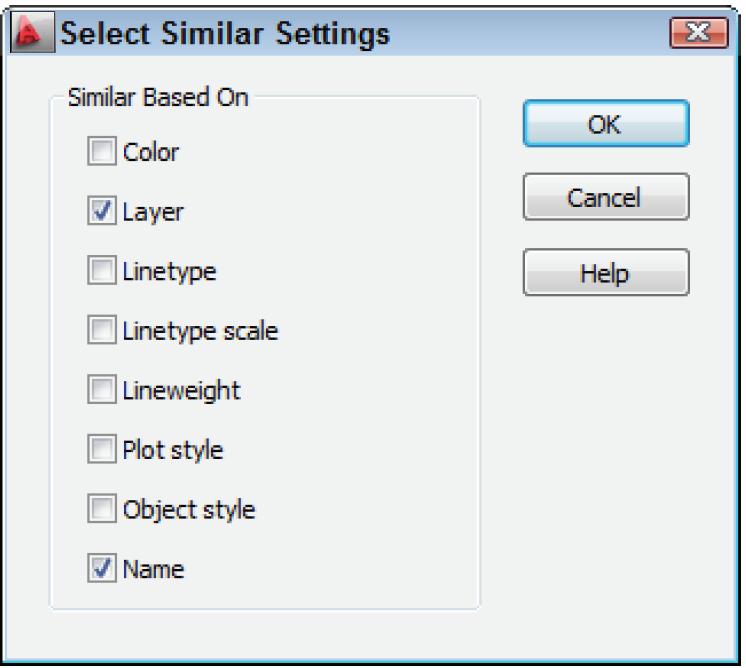
BACK ON THE SADDLE
Each of the three open source lisp files discussed have provided much needed functionality to the point that Autodesk has incorporated most if not all into the core flagship product. Two out of the three lisp functions are considered to be still needed so that they continue to accompany each installation up to the current version of AutoCAD. I’ve placed in a table summarizing the developmental process of all three lisp routines (see Figure 24).
Perhaps you’ve been a bit laid back for the past year but with this new release, it’s time to get “back
on the saddle.” In addition to exploring the new features, you should review the many previously introduced commands along with diving into the rich and free lisp functions made available to you in AutoCAD 2027.

Mr. Paul Li graduated in 1988 from the University of Southern California with a Bachelor of Architecture degree. He worked in the Architectural field for small to midsize global firms for over 33 years. Throughout his tenure in Architecture he has mastered the use and customization of AutoCAD. Using AutoLISP/ Visual Lisp combined with Dialog Control Language (DCL) programming he has developed a number of Apps that enhance the effectiveness of AutoCAD in his profession. All the Apps actually came out of meeting challenging needs that occurred while he worked in the various offices. He has made all the Apps available for free and can be downloaded from the Autodesk App Store. Though he recently retired from the Architectural profession, Paul continues to write articles depicting his past work experience. Some of these articles can be found in AUGIWorld magazine where he shares his knowledge learned. Paul can be reached for comments or questions at PaulLi_apa@hotmail.com
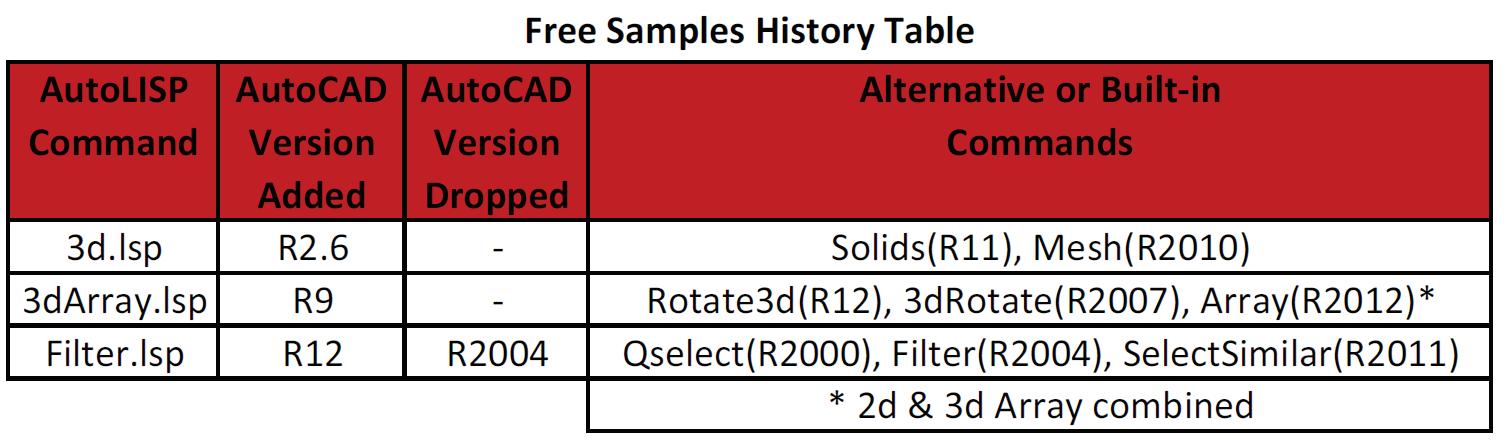
Figure 23: Filter Lsp SelectSimilar Settings 2011
Figure 24: Free Samples History Table