

Industry Standards

AUGI Members Reach Higher with Expanded Benefits
AUGI is introducing three new Membership levels that will bring you more benefits than ever before. Each level will bring you more content and expertise to share with fellow members, plus provide an expanded, more interactive website, publication access, and much more!
Basic members have access to:
• Forums
• HotNews (last 12 months)
• AUGIWORLD (last 12 months)
DUES: Free
Student members have access to:
• Forums
• HotNews (last 24 months)
• AUGIWORLD (last 24 months)
• AUGI Educational Offerings
DUES: $2/month or $20/year
Professional members have access to:
• Forums
• HotNews (full access)
• AUGIWORLD (full access and in print)
• AUGI Library
• ADN Standard Membership Offer
DUES: $5/month or $50/year



Letter from the Editor

This month’s theme is Standards. Standards can be industry based, company based, software based, etc. Below, I discuss industry standards.
The Architecture, Engineering, and Construction (AEC) industry is one of the most complex, collaborative, and risksensitive sectors in the world. Every project—whether a small renovation or a multibilliondollar infrastructure program—relies on a shared language of expectations, deliverables, and technical precision. That shared language is built on AEC standards
AEC standards define how information is created, organized, shared, and validated across disciplines. They ensure that architects, engineers, contractors, fabricators, and owners can work together efficiently and accurately. In an era of digital transformation, distributed teams, and increasingly integrated workflows, standards are no longer optional—they are foundational.
WHAT ARE AEC STANDARDS?
AEC standards are formalized rules, guidelines, and best practices that govern how project information is produced and exchanged. They cover a wide range of domains, including:
• CAD standards (layer naming, lineweights, annotation, plotting)
• BIM standards (model structure, LOD, naming conventions, file exchange)
• Documentation standards (sheet organization, symbols, abbreviations)
• Data standards (metadata, classification systems, file naming)
• Quality standards (review processes, coordination workflows)
• Interoperability standards (formats like IFC, RVT, DWG, PDF)
These standards may be internal to a firm, mandated by a client, or defined by industry bodies such as ISO, NIBS, AIA, NBIMS, or local authorities.
I hope you enjoy this month’s issue. And don’t forget, if you are interested in contributing to AUGIWORLD, please reach out to me at todd.rogers@augi.com.
AUGIWORLD
www.augi.com
Editors
Editor-in-Chief
Todd Rogers - todd.rogers@augi.com
Copy Editor
Miranda Anderson - miranda.anderson@augi.com
Layout Editor
Tim Varnau - tim.varnau@augi.com
Content Managers
3ds Max - Brian Chapman
AutoCAD - Tracy Chadwick
AutoCAD Architecture - Melinda Heavrin
BIM/CIM - Stephen Walz
BricsCAD - Craig Swearingen
Civil 3D - Shawn Herring
Electrical - Mark Behrens
Manufacturing - Kristina Youngblut
Revit Architecture - Jonathan Massaro
Revit MEP - Jason Peckovitch
Tech Manager - Mark Kiker
Inside Track - Rina Sahay
Advertising / Reprint Sales
Nancy Tanner - sales@augi.com
AUGI Executive Team
President
Eric DeLeon
Vice-President
Kristina Youngblut
Treasurer
Todd Rogers
Secretary
Shelby Smith
AUGI Board of Directors
Eric DeLeon
Chris Lindner
Frank Mayfield
Todd Rogers
Shelby Smith
Scott Wilcox
Kristina Youngblut
AUGI Advisory Board of Directors
Gil Cordle
Jason Peckovitch
Rina Sahay
Jeff Thomas III
Publication Information
AUGIWORLD magazine is a benefit of specific AUGI membership plans. Direct magazine subscriptions are not available. Please visit www.augi.com/account/register to join or upgrade your membership to receive AUGIWORLD magazine in print. To manage your AUGI membership and address, please visit www.augi. com/account. For all other magazine inquires please contact augiworld@augi.com
Published by:
AUGIWORLD is published by AUGI, Inc. AUGI makes no warranty for the use of its products and assumes no responsibility for any errors which may appear in this publication nor does it make a commitment to update the information contained herein.
AUGIWORLD is Copyright ©2026 AUGI. No information in this magazine may be reproduced without expressed written permission from AUGI.
All registered trademarks and trademarks included in this magazine are held by their respective companies. Every attempt was made to include all trademarks and registered trademarks where indicated by their companies.
AUGIWORLD (San Francisco, Calif.)
ISSN 2163-7547
Bright Ideas for a Bright Future

AUGIWORLD brings you the latest tips & tricks, tutorials, and other technical information to keep you on the leading edge of a bright future.
BricsCAD Mechanical: Sequence Smarter, Inspect Faster

In traditional workflows, assembly validation often happens late in the process, usually after prototypes are built or during pre-production checks. By then, errors can be expensive to fix. A missing constraint, an inaccessible fastener, or an overlooked collision can ripple through manufacturing, causing delays, rework, and increased costs.
Design for Assembly (DfA) principles emphasize early error detection and ergonomic optimization. The sooner you identify issues, the less impact they have on your schedule and budget. Every hour saved in design translates to faster delivery and reduced overhead.
Assembly design is a balancing act as every component must fit, function, and follow constraints. Miss one detail, and the cost of correction skyrockets. For teams working with complex assemblies, manual checks are no longer enough. BricsCAD® Mechanical introduces a smarter way to validate your designs before they hit production.
The business impact is clear:
• Reduce Assembly Time – Automated checks accelerate validation.
• Minimize Errors and Rework – Catch issues before they reach the shop floor.
• Improve Ergonomics and Safety – Validate tool access and stability upfront.
• Deliver Production-Ready Designs –Confidence from design to manufacturing.
BricsCAD Mechanical addresses these challenges with two powerful tools: BMSEQUENCE and BMASSEMBLYINSPECT
INTRODUCING BMSEQUENCE: BUILDING THE FOUNDATION
Before you can inspect an assembly, you need a logical order of operations. That’s where BMSEQUENCE comes in. (See Fig. 1) This command allows you to define the steps for assembly or disassembly, creating a structured workflow that mirrors real-world processes.
With BMSEQUENCE, you can: Organize components into a clear sequence.
• Generate thumbnails for each step for easy visualization.
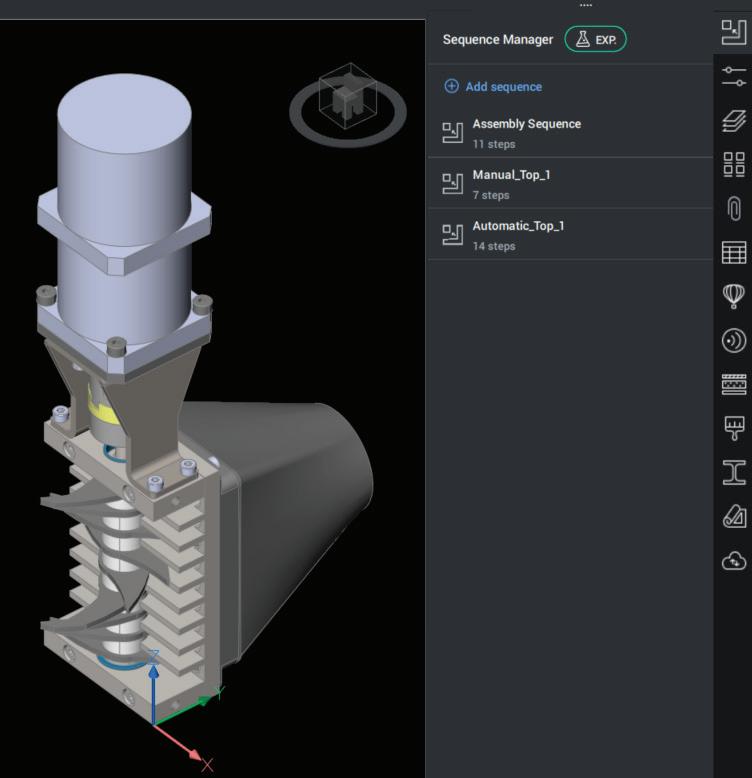
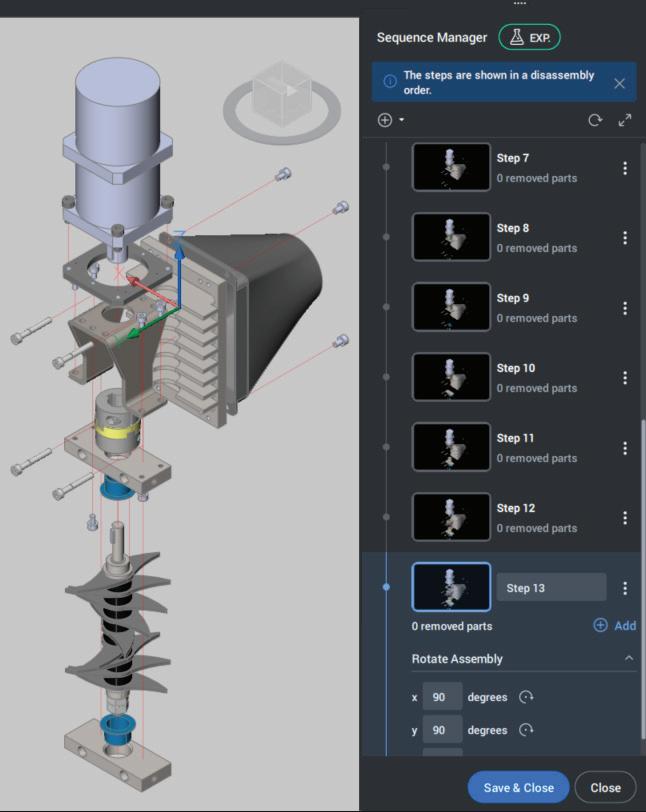
• Prepare your model for automated inspection.
Think of BMSEQUENCE as the blueprint for your assembly process. It ensures clarity and sets the stage for validation. (See Fig. 2)
Important Note: BMSEQUENCE is currently in Experimental mode in BricsCAD® V26. This means the feature is available for testing and feedback and may evolve in future releases. Even in its experimental state, BMSEQUENCE provides significant value for planning assembly logic.
MEET BMASSEMBLYINSPECT: YOUR AUTOMATED QUALITY CHECK
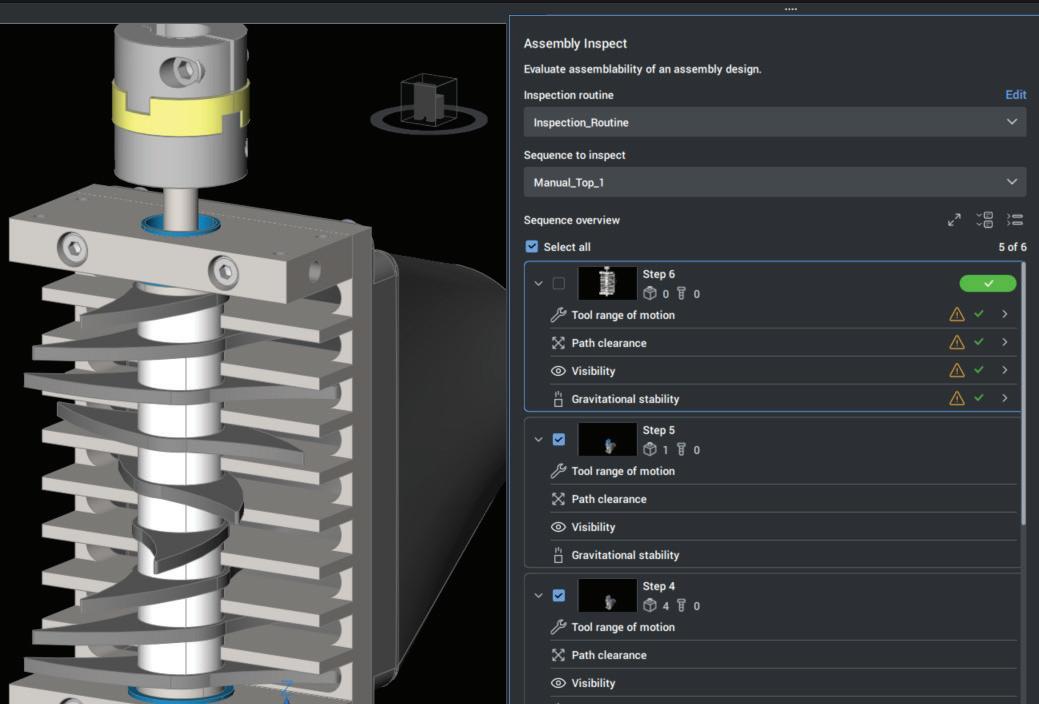
Once your sequence is defined, it’s time to validate. BMASSEMBLYINSPECT automates assembly checks, ensuring every step meets critical criteria. (See Fig. 3) Instead of relying on manual reviews, this tool evaluates your design against real-world conditions.
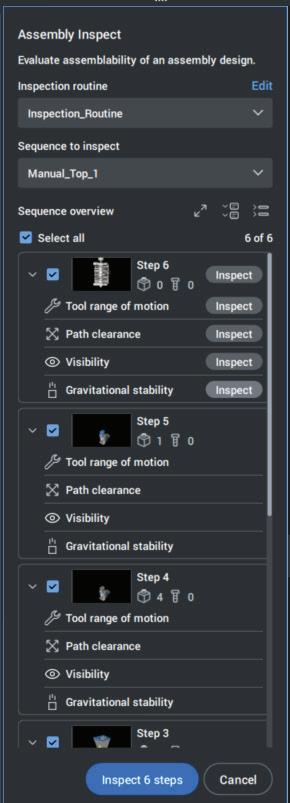
Figure 1
Figure 2
Figure 3
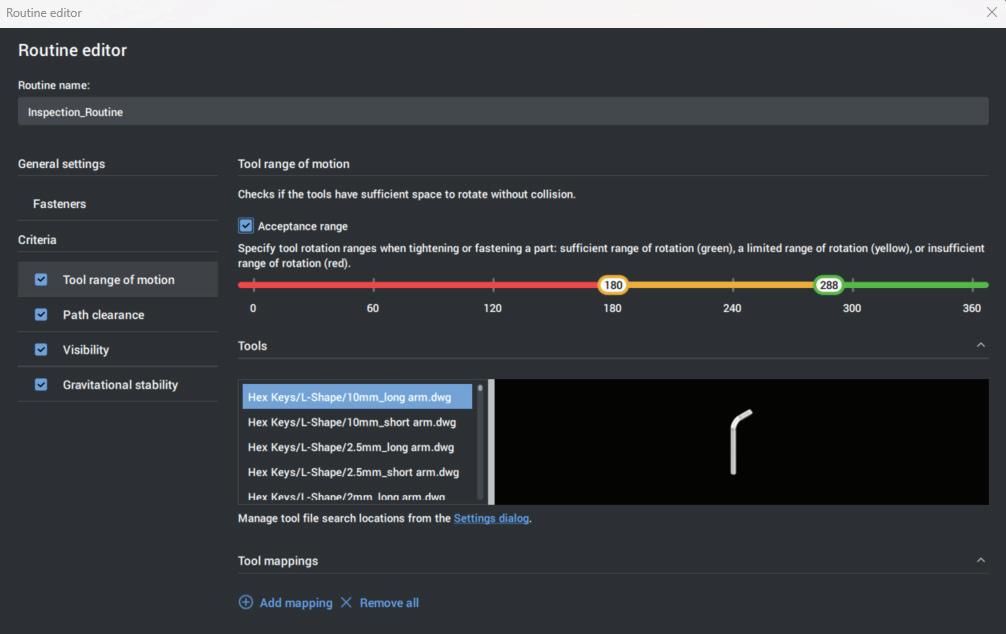
With the Routine Editor, you can:
BMASSEMBLYINSPECT checks for:
• Tool Accessibility – Can tools reach fasteners without interference?
• Gravitational Stability – Will parts remain stable during assembly?
• Collision Avoidance – Are there any interferences during motion?
The command provides instant feedback, highlighting issues before they become costly mistakes. You can inspect the entire sequence or focus on individual steps, giving you flexibility and control.
CUSTOMIZE YOUR INSPECTION WITH THE ROUTINE EDITOR
BricsCAD Mechanical doesn’t just automate checks; it gives you flexibility. The Routine Editor allows you to create or modify inspection routines for BMASSEMBLYINSPECT. This means you can tailor validation criteria to match your manufacturing requirements, whether that’s tool clearance, collision detection, or stability checks. (See Fig. 4)
Add new routines or edit existing ones.
• Define specific conditions for assembly steps.
• Save and reuse routines across projects for consistency.
This customization ensures your inspection process aligns perfectly with your production standards.
WORKFLOW IN ACTION
Here’s how these tools work together in practice:
1. Turn on Experimental Mode in BricsCAD Enable Experimental Mode to access BMSEQUENCE in V26. (Click here for more about Experimental Mode Instructions)
2. Create Your Assembly Sequence
Start with BMSEQUENCE. Define the order of operations for assembly or disassembly. This step ensures clarity and sets the foundation for inspection.
3. Run BMASSEMBLYINSPECT
Once your sequence is ready, launch BMASSEMBLYINSPECT. The tool evaluates each step, checking for accessibility, stability, and collisions. Issues are flagged visually, so you
Figure 4
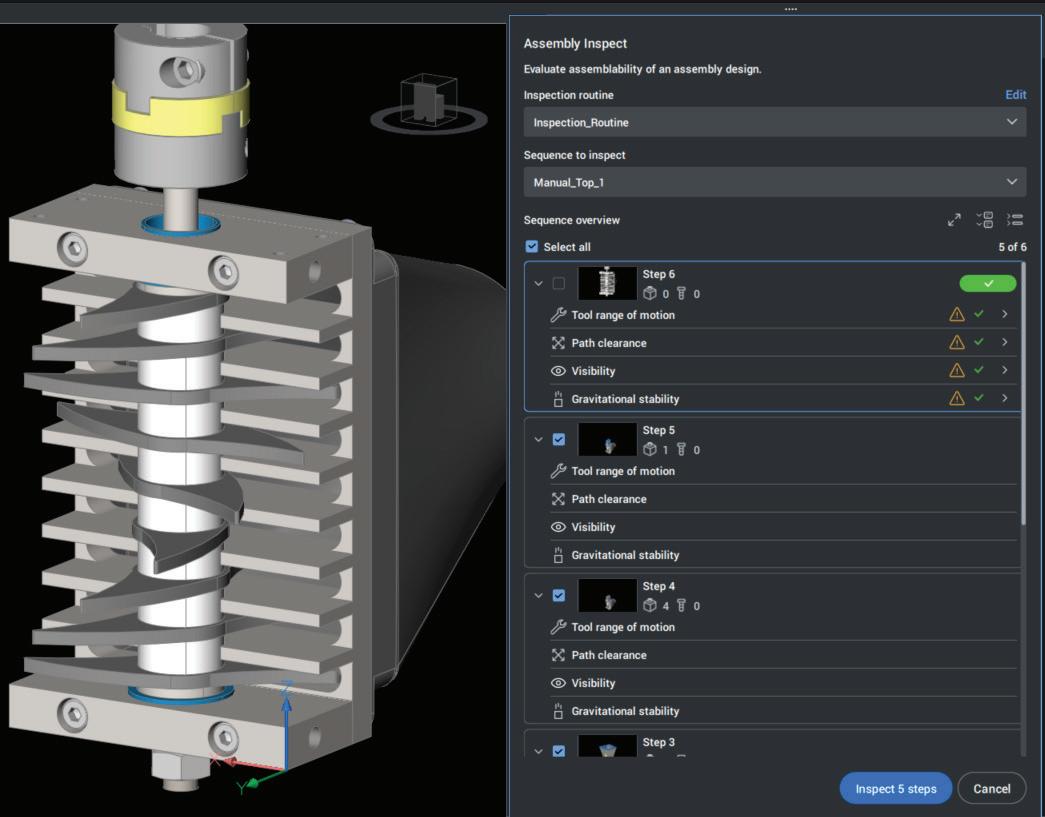
know exactly where to focus.
4. Customize with Routine Editor
If your project requires specific checks, open the Routine Editor to adjust or create routines that match your standards.
5. Resolve Issues Early
BricsCAD provides warnings and visual feedback, allowing you to correct problems before they impact production. Adjust constraints, reposition components, or modify sequences—all within the design phase.
WHAT VISUAL FEEDBACK INCLUDES
1. Thumbnails for Each Sequence Step
When you create an assembly sequence with BMSEQUENCE, BricsCAD generates thumbnails for every step. These thumbnails act as a quick visual reference, showing the component positions and movement at each stage. Instead
of scrolling through text-based lists, your team can instantly see what happens at each step.
2. Warnings and Highlighted Issues
During BMASSEMBLYINSPECT, BricsCAD flags problems visually:
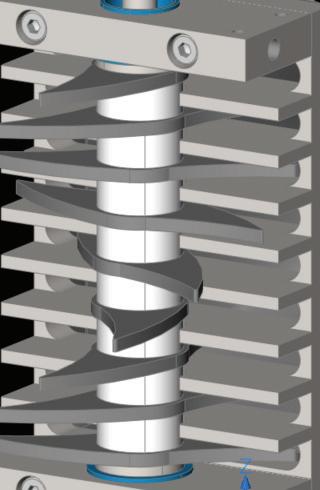
• Color-coded highlights for components with missing constraints.
• Icons or markers for collisions or tool accessibility issues.
This makes it easy to identify and prioritize fixes without digging through long reports.
3. Routine Editor Integration
If you customize inspection routines, the results still display visually—so even custom checks produce clear, graphical feedback. (See Fig. 5)
CONCLUSION
Automation isn’t just about speed, it’s about confidence. By integrating BMSEQUENCE and
Figure 5
BMASSEMBLYINSPECT
into your workflow, you gain:
• Predictability – Know your design will assemble as intended.
• Efficiency – Reduce time spent on manual checks.
• Cost Control – Avoid expensive rework and delays.
• Quality Assurance – Deliver designs that meet DfA standards.
In competitive markets, these advantages translate directly into profitability. Faster design cycles mean quicker time-to-market. Fewer errors mean lower production costs. And better ergonomics means safer, more efficient assembly processes.
Design validation isn’t a final step, it’s an ongoing process that shapes quality and efficiency. BricsCAD Mechanical empowers you to integrate validation early and often, reducing risk and accelerating delivery. Stop errors before they start. Sequence smarter. Inspect faster.
WE LISTEN, SPEAK UP!
Automation capabilities are fueling conversations about next-generation workflows, bringing 4D timeline intelligence not only to mechanical design for manufacturing, but also to BIM for construction and beyond. Imagine freezing a design at a precise stage of its maturity, generating accurate documentation instantly, and sharing that snapshot across teams. That’s the kind of innovation shaping the future.
If you share this vision, we want to hear from you. Reach out to keith.perrin@hexagon.com. Keith leads a passionate product management team committed to partnering with customers to define what’s next.
MORE ABOUT BRICSCAD
BricsCAD® is the true CAD alternative. BricsCAD is a native DWG-based design platform for 2D drafting, 3D modeling, BIM, surveying, and mechanical workflows. With AI-driven tools and cost-effective licensing, BricsCAD brings familiarity, compatibility, and performance to help the design industry break free from existing platforms. We are the true CAD alternative that helps you switch smoothly, excel in the detail, and realize better value from day one.
Download the free 30-day trial of BricsCAD. Would you like free lessons? We have that available at BricsCAD Learning. Ready to migrate to BricsCAD? Download the free Migration Guide. Follow us today on LinkedIn and Youtube.

Mr. Craig Swearingen is a Global Implementation Specialist and Consultant at BricsCAD. Currently, Craig provides migration and implementation guidance, management strategies, and technical assistance to companies which need an alternative, compatible CAD solution. Craig spent 19 years in the civil engineering world as a technician, Civil 3D & CAD power user, becoming a support-intensive CAD/ IT manager in high-volume production environments. Craig is a longtime AUGI member (2009), a Certified Autodesk® AutoCAD® Professional, and he enjoys networking with other CAD users on social media.


Ethics Built on Principles
Last time I wrote about Integrity. That the actions that you take will frame the thinking of others about you as a person with integrity or not. I mentioned that integrity is separate from ethics. Ethics are the principles and values that you follow, and Integrity is the actions you take to remain within those principles and values. Integrity is what we do. Ethics are why we do it.
BUILT ON PRINCIPLES
Ethics are the collection of principles and values that you have learned or developed over the years. Ethics takes into account truthfulness, transparency and what we do when no one is watching. It includes fairness and justice while respecting the rights of others. It moves us to help others and do not harm. It encourages accountability and virtue. It all boils down to the principles, presuppositions, perspectives, and purposes that determine our actions.
You may have many principles that were developed in childhood. Parents or teachers pass on principles. Later on, friends and bosses impart values to you. Writers, the media, religious and political leaders feed into the swirling air of guiding principles. All of it together is blended and helped you create a worldview that drives what you do today.
Most of us share some common baseline principles that allows us to all get along. Most of us usually act in an ethical way which makes society work. In society, laws define what is mandatory behavior (do this) or unallowed behavior (don’t do that), while ethics define what is the right thing to do (you should do this). It frames a higher standard of conduct.
ETHICS DRIVE ACTIONS
Actions taken, when they are not driven by shared principles or values, tend to be self-serving. If we act in a way that always seems to have outcomes that benefit ourselves, others may think it self-serving. Ethical behavior is not just emptying yourself of self-centered actions, but in making your movements focused. It is an active application of your principles and values when making decisions and taking action.
I am not going to lecture you in what personal principles and ethics you should have. The values you hold have been developed over the course of life and hopefully serve you well. What I want to talk about are tech principles and values. The approach you use when managing tech. The tactics you use when dealing with people. The starting points you use to make decisions related to new dilemmas or opportunities with technology.
PRESUPPOSITIONS, PERSPECTIVES, AND PURPOSES
Presuppositions and implicit assumptions come into play when talking about your principle driven tech behaviors. I assume that you have some technology principles already. You may not have them written down, fully thought out, or exhaustive, but you have them. They frame your approach to doing things with tech. You have perspectives that scaffold your ideas when building a tech plan. You have purposes and targets that you are trying to hit, or boundaries you are attempting to keep in place. These all work toward aligning your actions, methods, measures, expectations and outcomes under the umbrella of your principles.
GETTING STARTED
In the next article, I will discuss some tech principles that I have developed over the years, but first I want to lay down some general approaches on developing or expanding your principles.
IDENTIFY THE CORE
Begin with defining the scope of what you need to have at the core. These would be the big-ticket perspectives that make tech progress happen. Start off by just jotting down topics, then flesh out the details as you go. Don’t worry about missing something. The goal here is to get started and get ideas out of your head and on paper. Make a list, like how tech will be used, managed, training, research, rollouts, etc. Just think about what you have been doing for the last 6 months and start the list.
WRITE THEM DOWN
It helps me to write things down. It refines my thinking and lets me review what I have collected to see if anything is missing. It also allows me to share it with others and refer to it myself. Write down the topics that popped into your head when you began. Then add a sentence that unpacks each topic. Keep it short, but cover what needs to be defined. If you go past a paragraph on each topic, you are probably writing too much.
KNOW YOUR NON-NEGOTIABLE
Once you have some principles in place, don’t compromise on them. Like Integrity, maintaining your principles with consistency is key. If you change the values that you hold dear when under pressure or crowd influence, then they all become open to change. Apply then evenly, to everyone, at all times. I keep reminding myself… Every office,
every project, every purchase, every staff person, every file, every time.
BE FLEXIBLE AND ADAPTIVE
Be flexible and adaptive but do not sacrifice your core principles. You need to be open to new ideas and things that might call for an adjustment or clarification of the principles. This allows you to grow. Remember that you work for and with other people. They have principles and values also. Sometimes they clash with yours. When that happens, listen and adjust if needed.
It may sound like I am saying don’t compromise, but make sure you compromise. I hope it does not appear to be double minded. I am saying that if you have a well thought out and tested principle, then stick with it. Only reconsider them based on new information, lessons learned or changes in the tech environment. Here is an example from my past, if your principle is to always have a physical backup of the data onsite or in secure offsite, then the tech matures to allow for dependable offline cloud backup and storage, you should rethink your values. New tech allows for a change. The core principle (having backups) is maintained, the method (in the cloud) can change.
This should allow you to get a good start on defining the principles you want to live by with technology. Next time, I will share some of the tech principles I have developed over the years.

Mark Kiker has more than 30 years of hands-on experience with technology. He is fully versed in every area of management from deployment planning, installation, and configuration to training and strategic planning. As an internationally known speaker and writer, he was a returning speaker at Autodesk University for twenty years. Mark has served as Draftsman, Principal Designer, CAD/BIM Manager, IT Director, CTO, CIO and AUGI Board President. He can be reached at mark.kiker@augi. com and would love to hear your questions, comments, perspectives and ideas for future topics.
Property Sets for Pipe Networks in Civil 3D 2026 and How to Extend Them with Dynamo

In today’s AEC workflows, 3D models are no longer just geometric representations. Increasingly, experts are required to enrich their models with non-graphical data that supports design coordination, construction, asset management, and future maintenance. This requirement applies equally to infrastructure projects and to users of Autodesk Civil 3D 2026, especially when working with pipe network objects.
In this article, we will focus on pipes and structures (manholes) and demonstrate practical methods for adding and managing non-graphical information using Property Sets and Dynamo for Civil 3D. The goal is to show not only how to add data, but how to do it efficiently and at scale, which is critical in realworld projects.
Figure 1: Property sets icon
EXTENDED DATA AND PROPERTY SETS IN CIVIL 3D
Civil 3D allows users to attach non-graphical information to objects through Extended Data, which is exposed via Property Sets. These property sets can be accessed and managed through the Manage tab in Civil 3D.
To begin, navigate to: Manage > Define Property Sets
This opens the Property Set Definition Manager, where you can create and manage property sets assigned to Civil 3D objects such as pipes and structures.
Within a Property Set Definition, you can create different types of Property Definitions:
• Manual properties - values entered by the user
• Automatic properties - values derived directly from object parameters
• Formula based properties - values calculated using expressions
This flexibility makes property sets a powerful tool for enriching pipe network objects with meaningful data.
AUTOMATIC PROPERTIES AND FORMULA-BASED DEFINITIONS
For some basic parameters, Civil 3D already provides automatic properties that can be selected directly
from the list. These include attributes such as desctription, annotation or handle („index“ in some non English versions of Civil 3D).
However, not all useful parameters are always available in the automatic list, especially for structures (manholes) or pipes. In such cases, formula-based automatic properties can be used.
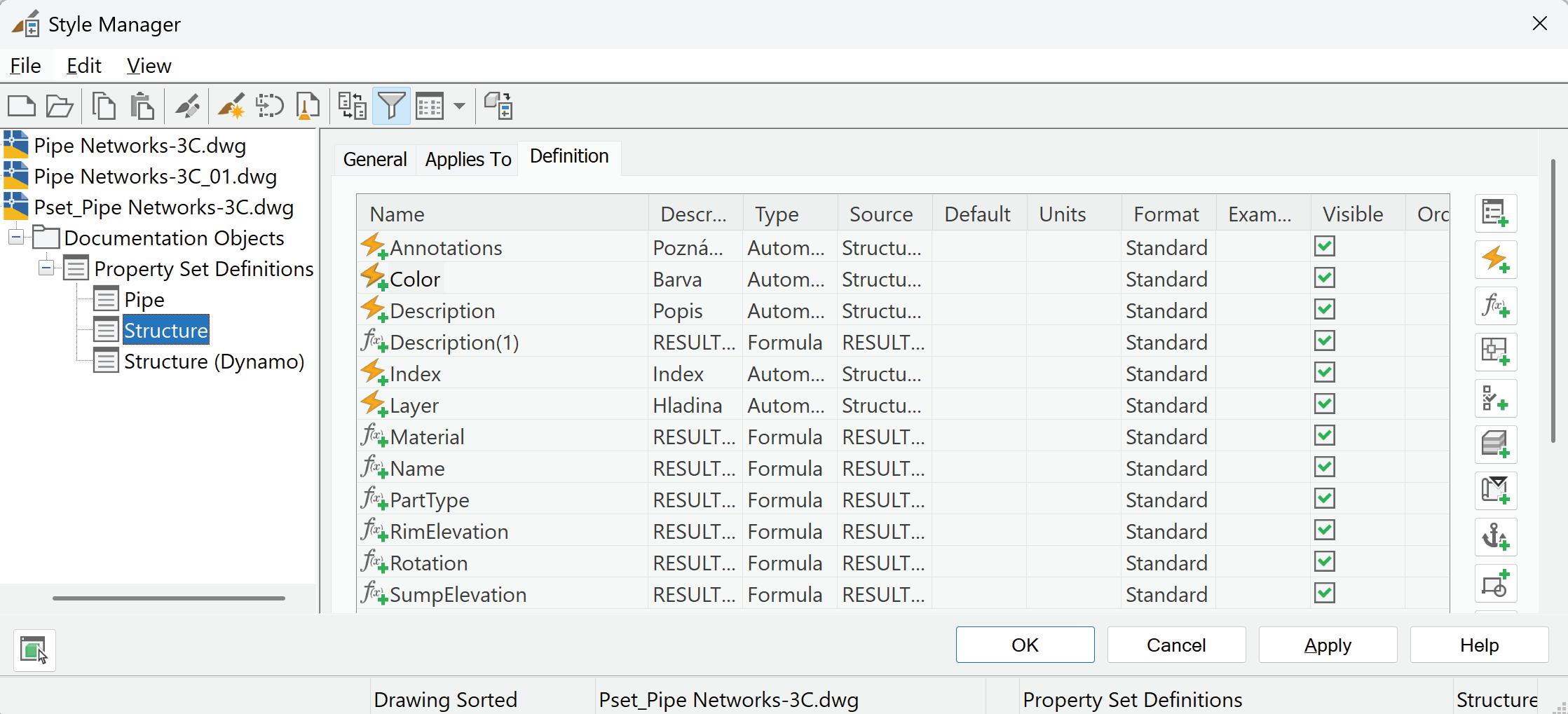
The good news is that these expressions are often simple and reusable.
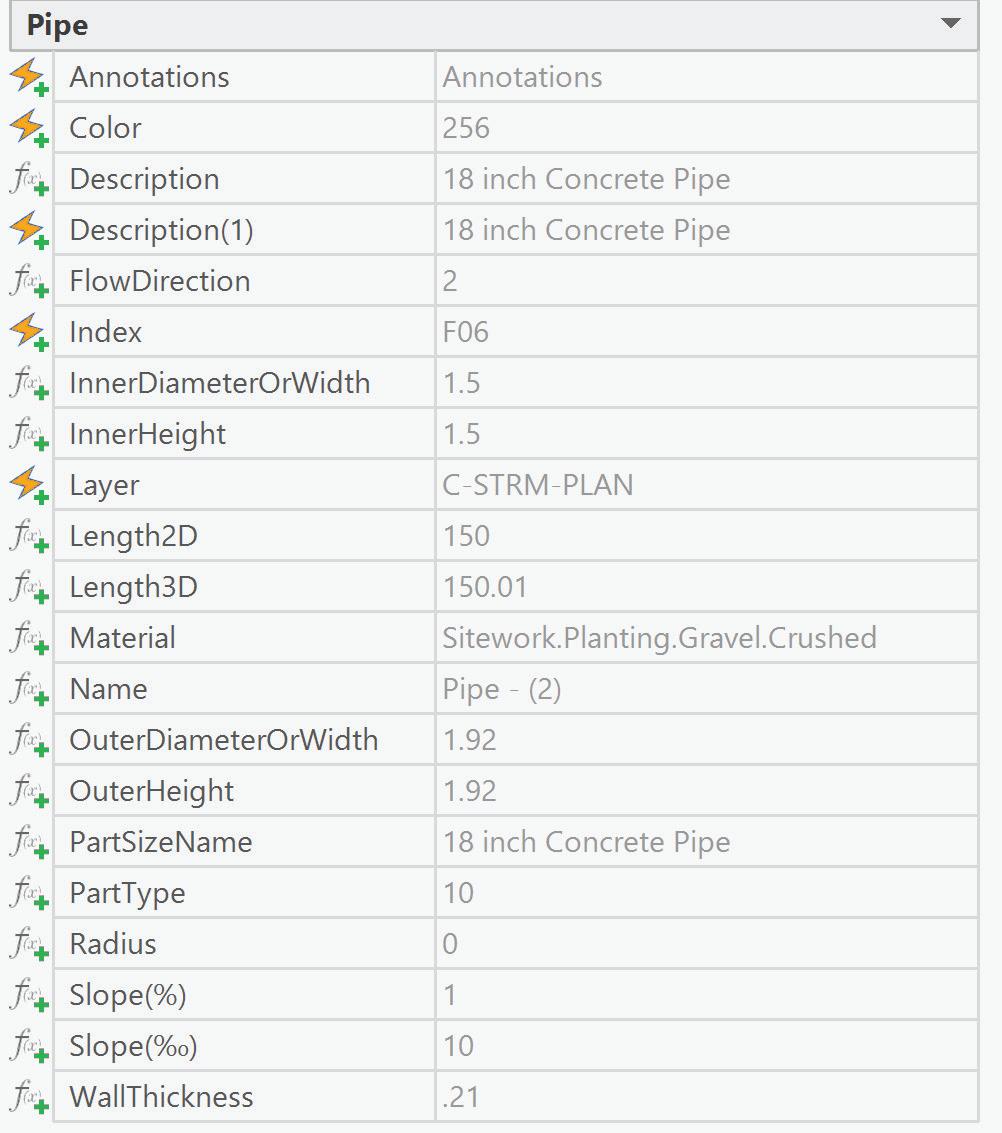
Extended data properties for pipe object containing automatic (lightning icon) and formula-based (function „f“ icon) are visible in the picture.
Figure 2: Property Set Manager
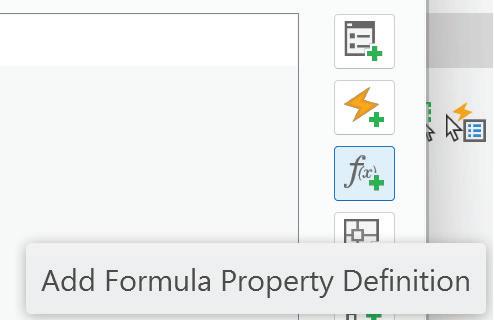
Figure 3: Formula Property Definition Icon
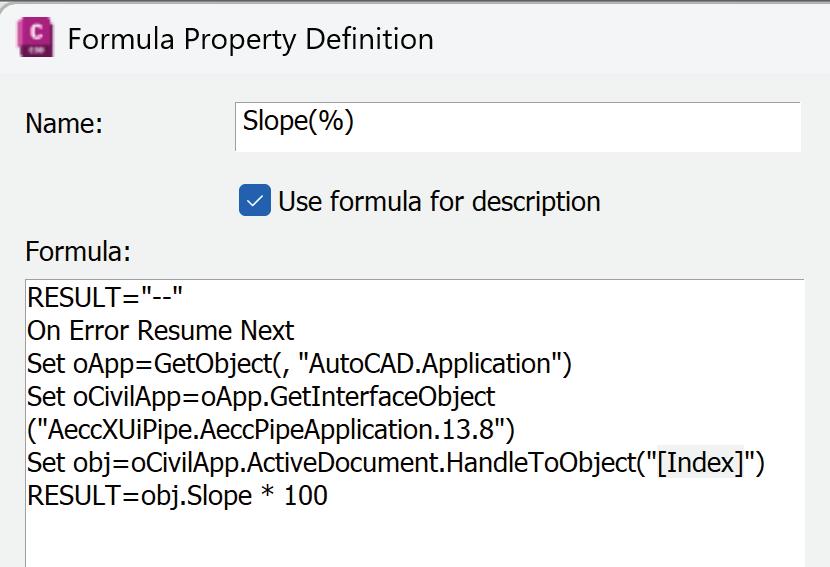
HOW FORMULA-BASED AUTOMATIC PROPERTIES WORK
A formula-based property definition evaluates an expression that references object data using its handle (index). The workflow is straightforward:
1. Create a new Formula-based Property Definition
2. Insert a short expression (code)
3. Reference the object handle (index) by double click
The only manual step required is to insert the object handle (index) into the expression. This can be done easily by double-clicking the handle value from the lower window of the Property Set Definition dialog.
Important note: The Handle must already exist as a property in the property set. Fortunately, it is available by default among automatic properties, so no extra configuration is needed.
Once defined, these code-based properties behave like native automatic properties and update dynamically.
WHEN AUTOMATIC PROPERTY SET DEFINITIONS ARE NOT ENOUGH
Property Set Definitions in Civil 3D form a solid
foundation for attaching non-graphical information to Civil 3D objects. In many cases, automatic and code-based property definitions are sufficient. However, real-world projects quickly reveal situations where Property Sets alone reach their limits and some of them are not available.
In these cases, attempting to rely on manual input is inefficient and introduces unnecessary risk of errors. This is precisely where Dynamo for Civil 3D becomes an essential and practical extension of Property Sets.
It is important to note that Dynamo does not replace automatic properties. Instead, it complements them. Values generated by Dynamo are typically written into text-type or numeric Property Set definitions, which can then be updated again at any time by re-running the Dynamo graph. This approach ensures that the model remains both data-rich and maintainable throughout the project lifecycle.
DYNAMO FOR CIVIL 3D 2026 FOR PIPE NETWORKS
One of the most important things in Civil 3D 2026 is Dynamo tool for automation boring manual tasks. Nodes are now grouped in a much more logical and intuitive way, making Dynamo significantly easier to use, even for engineers who are new to visual programming.
For pipe networks, the library now includes clearly structured nodes.
This organization removes much of the frustration traditionally associated with finding the right nodes and lowers the barrier to entry. Dynamo is no longer a niche tool for advanced users, but it is increasingly becoming a standard productivity tool for everyday Civil 3D workflows.
For pipes and structures, Civil 3D exposes a relatively little number of parameters through automatic property definitions. As a result, Dynamo is often optional.
In the image, you can see examples of such expressions for both pipes and structures, along with their resulting values displayed in Civil 3D object properties.
ADDING STRUCTURE DATA WITH DYNAMO
With Dynamo, property values can be written
Figure 4: Automatic and Formula-based Properties
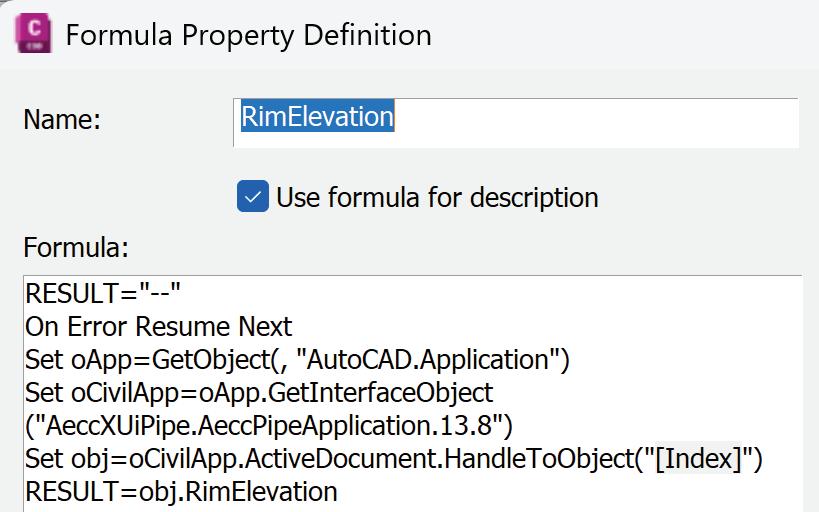
directly into Property Sets, even when Civil 3D does not expose them natively as automatic properties.
This approach allows users to build a complete information model, not limited by the default capabilities of the software.
WHY DYNAMO MATTERS
The true strength of Dynamo is not just automation, it is scalability.
The key phrase for this example is:
“For multiple structures at once.”
Manually editing Property Set values may be acceptable for one or two objects, but it quickly becomes impractical on real projects containing dozens or hundreds of structures.
Write results into multiple Property Set definitions in one operation and workflow for Dynamo graph and property values are in the pictures.
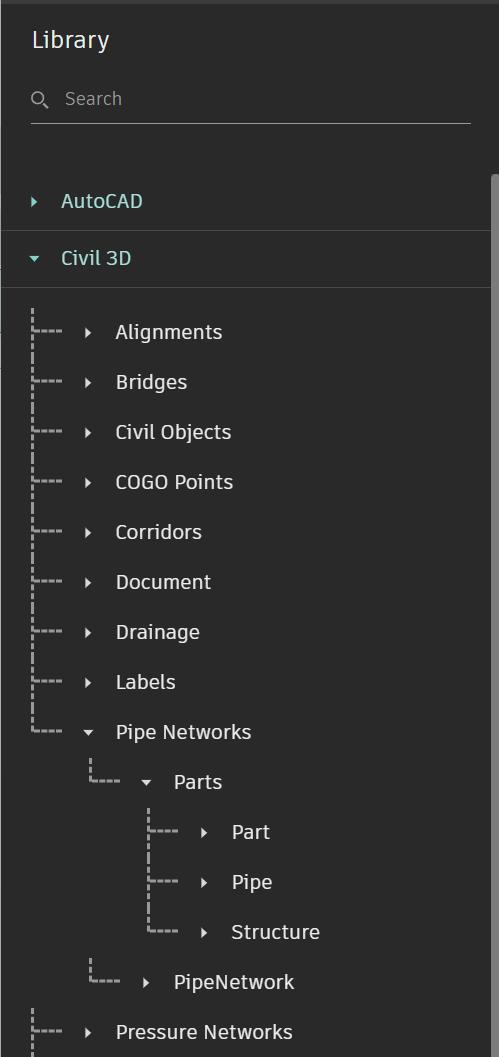
any other object too.
For beginners, this may initially seem complex. However, Dynamo’s visual nature makes data flow easy to understand, and once a basic graph is created, it can be reused and refined across projects. What initially feels like an advanced task quickly becomes a repeatable and reliable workflow. And there is Dynamo Player tool which is perfect for everyday usage.
CONCLUSION
As infrastructure BIM workflows continue to evolve, non-graphical information is becoming as critical as geometry itself. For Civil 3D users working with pipe networks, automatic or formula-based Property definitions provide a lightweight yet robust data backbone, while Dynamo for Civil 3D enables data enrichment, automation, flexibility, and scalable intelligence.
Advantage is that this workflow can be used for
Figure 5: Example Formula
Figure 6: Example Formula Structure
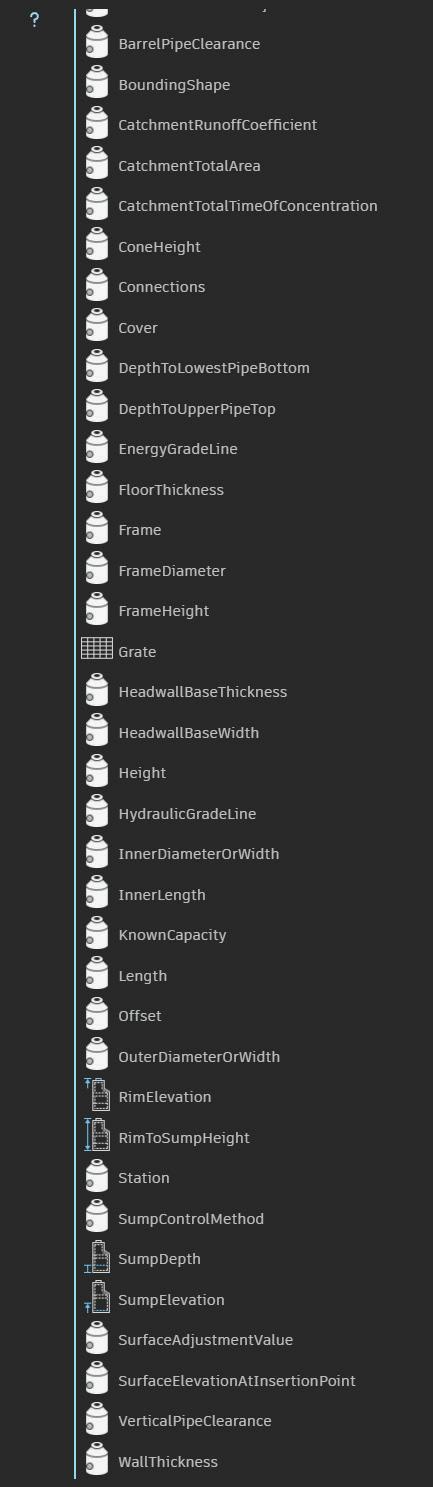
Users can transform pipe networks into fully informed, intelligent models that support design, construction, and long-term asset management.
In Civil 3D 2026, these tools are more accessible than ever. Dynamo is no longer “hard” or reserved only for specialists. It is a practical tool for engineers. With a modest investment in learning its fundamentals, users gain a significant advantage in efficiency, reliability, and professional BIM delivery.

Lukas Drbohlav is a civil engineer who graduated from Czech Technical University specializing in water management and hydraulic structures. He began his career working on environmental construction projects including land reclamation, remediation, terrain modifications, and sewerage systems for 5 years, where he became passionate about Civil 3D starting with the 2009 version.
He was serving as Services Manager for AEC Infrastructure EMEA at Graitec, an Autodesk Platinum Partner, he brings 9 years of experience in consulting and management roles. His expertise spans complex project delivery, team leadership, and developing innovative approaches to streamline design processes through technology integration. He enjoys helping others discover ways to simplify their work.
With extensive field experience in infrastructure consulting, Lukas Drbohlav focuses on helping engineering teams optimize their workflows through strategic implementation of Autodesk solutions. His practical approach to problem-solving and deep understanding of project challenges make him a trusted advisor for organizations looking to enhance their design efficiency and data management capabilities.
Contact Lukas Drbohlav via LinkedIn at https://www.linkedin. com/in/lukas-d-49558696/
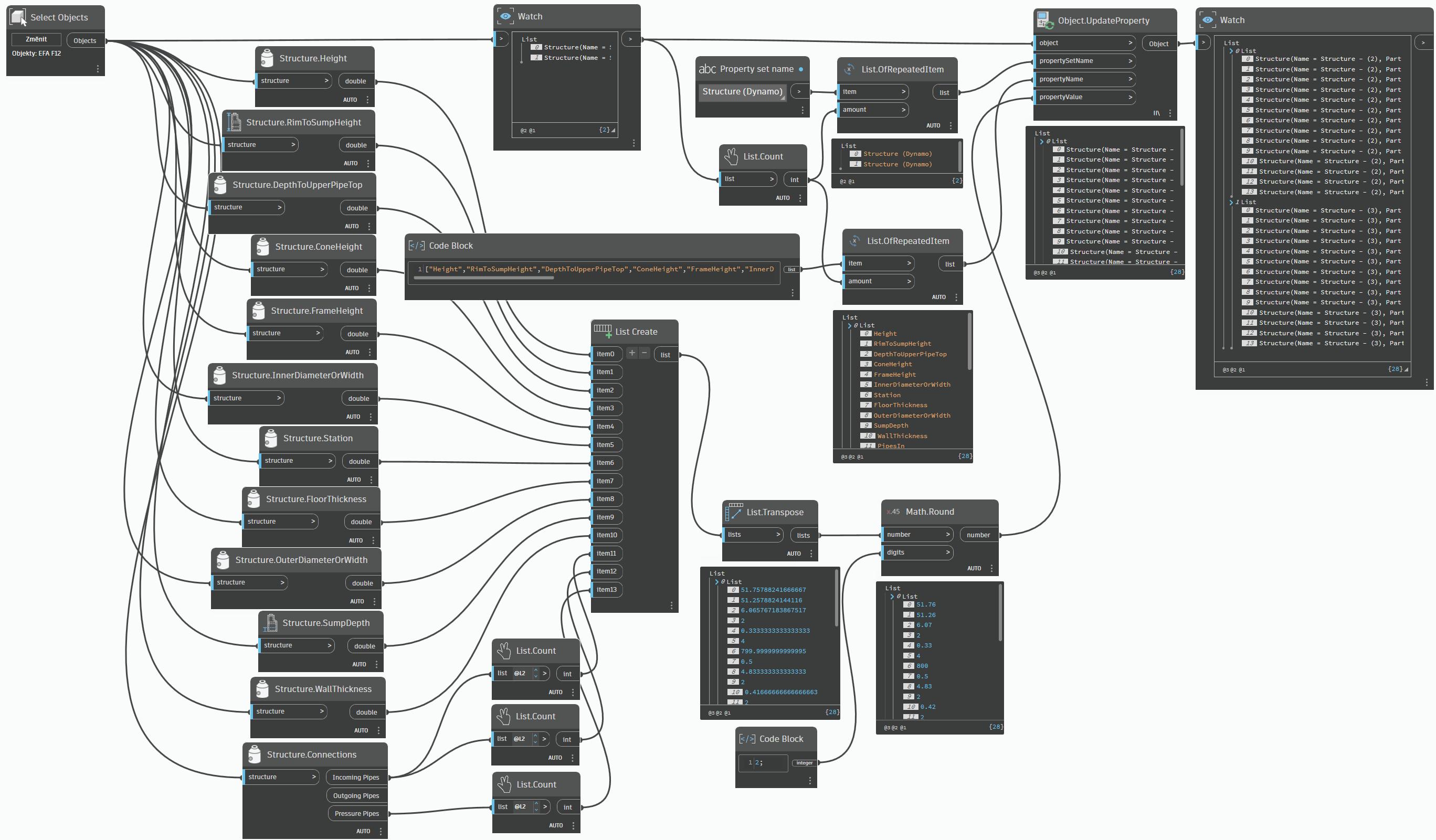
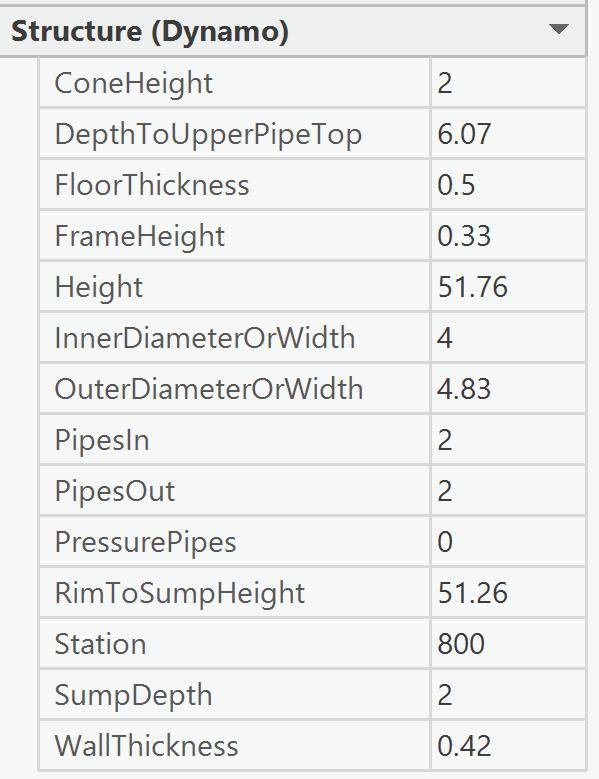
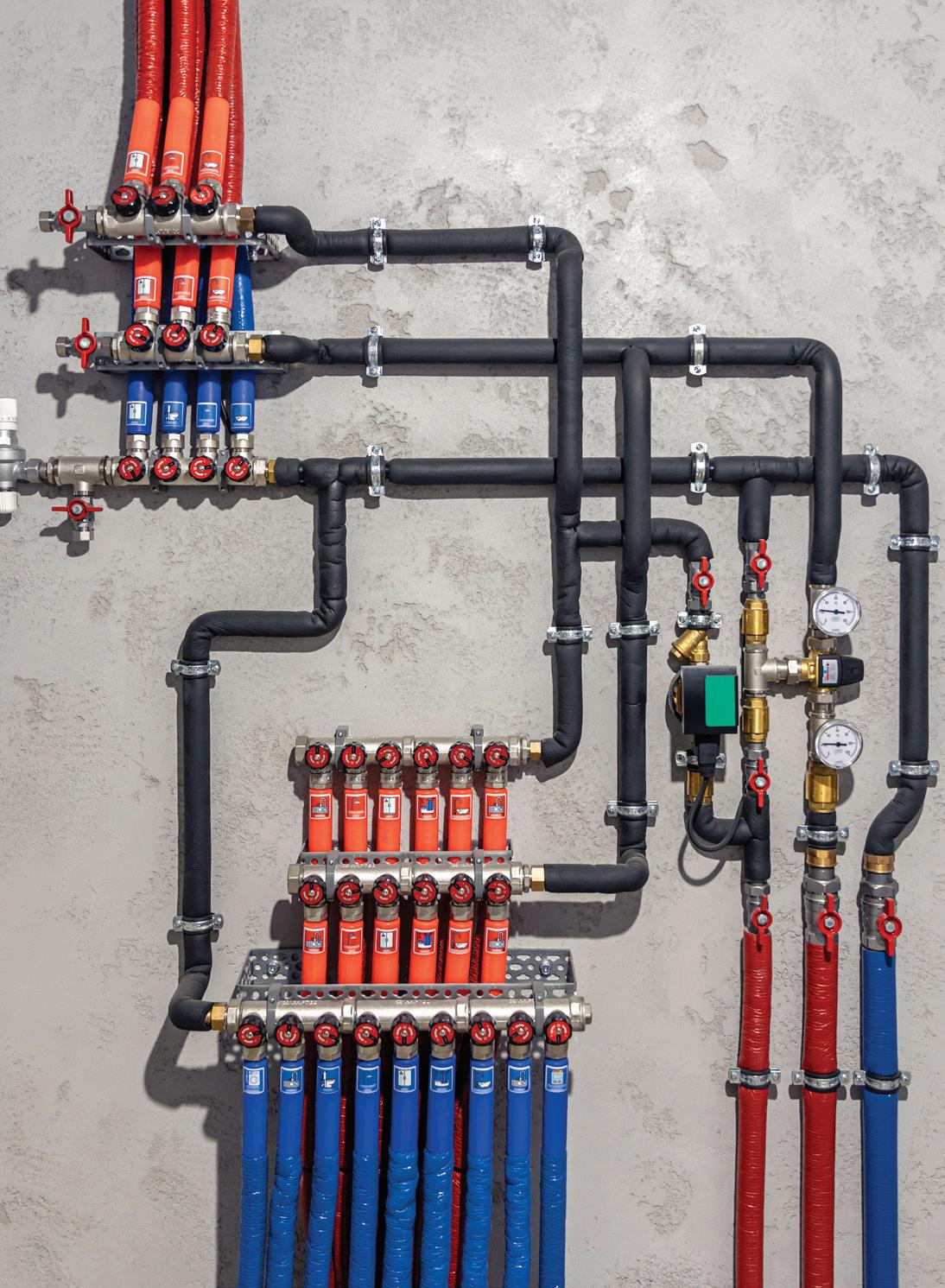
Figure 9: Dynamo Graph
Figure 10: Dynamo Property Values in C3D

AI in AEC: Why Cybersecurity Must Be Part of the Conversation
INTRODUCTION: THE INVISIBLE RISK BEHIND THE EXCITING FUTURE
Artificial Intelligence (AI) has become the centerpiece of nearly every conversation in design and construction. We talk about faster design iterations, smarter model coordination, automated documentation, and how AI might change the very way we think about architecture and engineering. Yet, amid the optimism, one critical topic is often left out of the dialogue: cybersecurity.
Every new AI capability we integrate into our workflows also introduces a new surface of risk, new entry points for data exposure, breaches, or intellectual property loss. As an industry that routinely manages sensitive client information, proprietary design logic, and government data, the AEC community cannot afford to treat AI as a neutral tool. It is both a powerful asset and a potential liability if not handled with equal attention to security.
AEC’S UNIQUE DATA VULNERABILITY
AEC firms are in a unique position. Our digital models are far more than pretty geometry, they’re repositories of specifications, materials, costs, phasing, schedules, and metadata about the real world. A single federated model can contain everything needed to reconstruct a project, reverseengineer a system, or reveal strategic client data.
When those models become training material for AI tools or are shared through public or poorly secured cloud platforms, the stakes are far higher than most realize.
Common risks include:
• Uploading proprietary Revit or CAD models to third-party AI platforms without understanding how the data is stored, retained, or reused.
• Using generative AI to produce scripts, schedules, or specifications that inadvertently expose internal file paths, project names, or client identifiers.
Relying on AI-driven automation that pulls from unsecured APIs or plugins built with limited cybersecurity oversight.
AEC data is often collaborative, but that same collaboration increases its exposure surface. When hundreds of stakeholders interact through cloud-based models, the weakest password,
misconfigured permission, or unsecured connection can open a door no one intended.
THE OVERLOOKED CYBER RISKS OF AI
AI doesn’t just amplify productivity; it amplifies risk. Here are some of the most common vulnerabilities introduced when firms adopt AI tools without a clear security framework.
1. Data Leakage
Generative AI systems process user input to learn patterns and improve responses. If employees upload models, specs, or confidential text into a public AI model, that data could be retained or surfaced in future outputs. Even anonymized data can sometimes be reconstructed to reveal project origins.
2. AI-Generated Code and Automation Scripts
As AI tools become capable of writing Dynamo scripts, Revit macros, or plug-in code, they can also introduce hidden vulnerabilities. Without a code review or validation process, firms may unknowingly deploy automation that bypasses safeguards or exposes internal directories.
One additional risk deserves emphasis: AI systems are designed to sound confident, even when they are wrong. Well-written outputs, plausible logic, or clean-looking scripts can create a false sense of certainty that bypasses the skepticism professionals would normally apply to work received from a third party. Over time, this can quietly erode critical thinking if AI-generated results are accepted without review. Treating AI output as a draft or recommendation, never as an authority, helps preserve professional judgment and prevents confident errors from becoming embedded in production workflows.
3. AI-Enabled Social Engineering
Bad actors now use AI to craft sophisticated phishing emails, fake RFIs, and cloned voice or video messages. When combined with real project data scraped from public sources, these can fool even seasoned professionals.
4. Data Poisoning and Prompt Injection
AI models can be manipulated through malicious inputs, “prompt injections,” that cause them to reveal data or perform unintended actions. In an environment where multiple team
AI in Cybersecurity

members experiment with prompts or plug-ins, this risk scales quickly.
5. Loss of Ownership and Intellectual Property
When firms use third-party AI platforms, the fine print often defines data ownership in vague or unfavorable terms. The result? Designs, details, or proprietary methods could be absorbed into another entity’s training data, erasing competitive advantage.
6. AI-Enhanced Malware and Evasion Tactics
AI is now being used to create more adaptive, evasive forms of malware and ransomware, malicious code that can rewrite or disguise itself in real time to bypass traditional security tools. Instead of the signature-based threats most firms are familiar with, these new attacks are dynamic, learning from each failed attempt and adjusting their behavior. AI can also assist attackers in identifying vulnerabilities faster than security teams can patch them, meaning the window of exposure can shrink from months to days, or even hours.
7. Automated Reconnaissance at Scale
AI also accelerates the early stages of a cyberattack. Tasks that used to require expertise and time, network scanning, infrastructure mapping, identifying weak credentials, or pinpointing high-value systems, can now be automated. This allows attackers to probe multiple organizations simultaneously, dramatically increasing both the speed and reach of their efforts. For AEC firms working on sensitive projects or distributed cloud
environments, this automation means attackers can find the “door left cracked open” long before anyone notices it was unlocked.
THE ILLUSION OF SAFETY
AEC teams often assume that because they work within reputable design software ecosystems or use encrypted cloud platforms, their data is automatically secure. Unfortunately, AI introduces complexity that even the best platforms can’t completely mitigate.
Consider this: once an AI model has been trained on data, that information cannot easily be extracted or “forgotten.” Even if a vendor promises deletion, the patterns learned from the data may persist. That means a firm’s design logic, its creative DNA, could remain embedded in a system forever outside its control.
The issue isn’t distrust in the technology companies that serve AEC; it’s understanding what questions to ask before connecting them to your intellectual property.
BUILDING A SECURITY-FIRST AI MINDSET
The good news is that strong cybersecurity practices for AI adoption are attainable. They require awareness, governance, and the same kind of disciplined thinking we already apply to BIM execution planning. Here’s how firms can begin.
1. Treat AI Systems as Critical Infrastructure
Before adopting any AI tool, identify:
• What data it touches.
• Where that data travels and is stored.
• Who has access and what permissions exist.
• How the vendor handles retention, encryption, and deletion.
As AI integrations grow more sophisticated, they often involve multiple services, plugins, data sources, and automated connections that are not always visible to end users. These hidden dependencies can introduce risk beyond what any single tool appears to touch. Firms should assume that unseen complexity exists and ensure that AI oversight, monitoring, and risk assessment are owned by qualified technical leadership, not left to individual experimentation or ad hoc decision-making.
Performing this mapping exercise clarifies risk exposure and ensures AI tools are subject to the same scrutiny as design data servers or financial systems.
2. Establish Clear AI Use Policies
Create internal policies that define acceptable and prohibited AI usage. For example:
• Prohibited: Uploading project files or client data into public AI chatbots or design tools.
• Allowed: Using internal or enterprise AI models trained only on approved company data.
• Required: Adding metadata tags or disclaimers to any AI-assisted deliverable.
This keeps everyone aligned and prevents wellintentioned experimentation from becoming accidental data leakage.
3. Address “Shadow AI” Early
Just as IT departments once battled “shadow IT”, unauthorized apps or plugins, organizations now face “shadow AI.” Employees may use free online AI tools without realizing the risk. Educate staff about approved tools, reporting processes, and why these controls protect everyone.
4. Validate AI Outputs
AI should accelerate design thinking, not replace human judgment. Always verify AIgenerated code, calculations, or documents before integrating them into production models. If an AI tool produces a Dynamo script, run it in a sandbox environment first.
5. Train for Awareness
Cybersecurity is no longer just an IT concern; it’s a professional skill. Training sessions should include examples relevant to designers:
• How to identify AI-related phishing attempts.
• Why “free” AI design tools may cost your firm its IP.
• How to safely test AI workflows inside a controlled environment.
The goal isn’t to create fear, it’s to foster confidence through understanding.
6. Build Incident Response Plans
Assume a breach will happen. Plan accordingly:
• Designate a response team.
• Document escalation procedures.
• Maintain logs of AI-assisted activities for traceability. Being prepared turns a potential crisis into a controlled event.
WHAT AI GOVERNANCE LOOKS LIKE IN PRACTICE
A simple, effective AI governance framework for AEC firms might include five pillars:
Pillar
Description
1. Policy Define permissible AI uses, data boundaries, and ethical considerations.
2. Access Control Manage user permissions and authentication for AI tools.
3. Validation Implement review processes for AI-generated outputs (scripts, documents, analytics).
4. Vendor Vetting Evaluate AI tool providers for compliance with ISO 27001, SOC 2, or other relevant standards.
5. Education Provide recurring training and communication on AI security best practices.
AutoCAD Architecture

This doesn’t have to be complex. Even a one-page “AI Use Charter” circulated company-wide can dramatically reduce risk.
THE INDUSTRY IMPLICATION: TRUST IS THE NEW DIFFERENTIATOR
AEC has long measured success by design quality, deadlines, and deliverables. But in an era of AI, another metric will define the most trusted firms: data integrity.
Clients are becoming more aware of digital risk. Some government and enterprise owners already require proof of AI governance in contracts. The ability to demonstrate that your firm manages AI responsibly, without jeopardizing data privacy or IP, will soon be as essential as insurance coverage or BIM execution plans.
As this awareness grows, firms may soon be evaluated not only on project outcomes, but on whether they meet emerging expectations for responsible AI use, data privacy, and governance. In the same way BIM standards and execution plans became markers of professional maturity, AI governance may evolve into a visible trust signal, demonstrating to clients that a firm takes innovation seriously without compromising data integrity or accountability.
In other words, cybersecurity is no longer a side conversation. It’s becoming a core part of professional competence.
A BALANCED PATH FORWARD
The goal isn’t to slow innovation or retreat from AI, it’s to adopt it responsibly. The same mindset that once guided us through CAD standards, model coordination protocols, and BIM execution plans should now guide our AI integration. The disciplines of consistency, clarity, and accountability still apply, they just take new forms.
We can be both curious and cautious. We can explore new possibilities while protecting what matters most: our clients’ trust and our firm’s intellectual capital.
CLOSING THOUGHT
Before you upload, automate, or generate your next AI-assisted deliverable, pause for a moment and ask:
“If this data were exposed, who could be harmed, and are we prepared to protect it?”
In the rush toward innovation, cybersecurity may not feel as exciting as generative design or automation. But it’s the discipline that ensures everything else we build with AI actually lasts.

Jeff Thomas III is a Technology Consultant with Arkance, specializing in design technology leadership, BIM Management, and standards development for architecture and engineering teams. With over 29 years in the AECO industry and a background in industrial design, Jeff focuses on helping firms modernize workflows responsibly, balancing innovation with data integrity, collaboration, and long-term digital health. He serves on the AUGI Advisory Board and is involved in his firms’ AI Taskforce, contributing to ongoing discussions around emerging technology, governance, and professional best practices in the AEC industry.






Rebuilding Standards: Learning from Real BIM Projects
RETHINKING BIM STANDARDS FROM DESIGN THROUGH FABRICATION
In our industry, the word standards often imply something formal and intentional: documented rules, approved templates, and clearly defined workflows that everyone follows. In practice, most standards don’t start that way at all. They emerge quietly through habits, repeated decisions, and legacy workflows that persist long after the conditions that created them have changed.
When I joined ACI Mechanical, I didn’t find an organization lacking standards. I found something more familiar: a collection of practices that had evolved over time, shaped by real projects, real constraints, and real people trying to get work out the door. Some of those practices worked well. Others worked only in very specific situations. And some no longer worked at all but continued to exist simply because they always had.
That became the starting point for this journey. Not to impose “best practices,” but to understand the standards that already existed whether they were acknowledged or not.
STARTING FROM REALITY, NOT A BLANK TEMPLATE
One of the most common mistakes made when creating standards is assuming that the absence of documentation means the absence of structure. In reality, most teams already operate within a set of informal standards, standards that live in habits, schedules, and model setups rather than manuals.
At ACI Mechanical, the first step was not building a template from scratch but studying what was already in use. Active projects provided invaluable insight into how models were actually being built and used. After I provided our VDC detailer with a list of specific items I was seeking, he worked through a variety of active projects to collect the information needed to inform the first version of the new ACI Revit Template. Rather than referencing a legacy ACI template, ACI had been utilizing the base CSUSA template. These reviews highlighted recurring patterns, some by design, some by chance, that persisted across different projects and helped guide the development of our updated standards.
Only by understanding that reality can standards be created that support consistency without disrupting productivity.
Rebuilding Standards
EVALUATING WHAT EXISTS: KEEP, IMPROVE, REMOVE
As patterns began to emerge, it became clear that not everything needed to change. Effective standards development isn’t about replacing everything; it’s about discerning what deserves to move forward.
Some workflows were clearly working. They were widely understood, consistently applied, and delivered value with minimal overhead. These became the foundation of elements worth keeping intact.
Other practices solved the right problems but did not scale well. They often relied on project-specific logic, excessive manual setup, or institutional knowledge held by a small number of individuals. These workflows didn’t need to be discarded, but they did need refinement if they were going to become true standards.
Then there were practices that added complexity without delivering long-term value. These were often legacy solutions, once useful, now outdated that introduced inconsistency, increased maintenance, or made coordination harder than it needed to be. Removing these elements was just as important as defining what stayed.
Standards aren’t only built by addition. They are strengthened through subtraction.
DESIGNING STANDARDS FOR DATA LONGEVITY
One of the guiding principles moving forward has been a deliberate shift away from project parameters and toward Shared Parameters reused
across as many schedules as possible. This is not about rigidity, it’s about longevity.
When parameters are consistent across projects, data becomes portable. Schedules become predictable. QA/QC becomes measurable. More importantly, models begin to support workflows beyond documentation, including coordination, reporting, and automation.
Standards should not be optimized solely for speed on a single job. They should be designed to support repeatability across many jobs.
WHEN FABRICATION ENTERED THE STANDARDS CONVERSATION
For a long time, Fabrication was not part of my workflow. I didn’t use it, didn’t see it widely adopted, and questioned why so much development effort was being invested in it. At the time, that skepticism made sense, Fabrication did not align with how I was delivering projects.
That perspective changed after joining ACI Mechanical.
As a subsidiary of Comfort Systems USA, Fabrication is not an optional workflow, it is a core component of how work is executed at scale. What once felt disconnected from design is now a critical bridge between modeling intent and construction reality.
Fabrication today is not what it was years ago. It has matured significantly, and more importantly, it has forced a deeper conversation about standards, data consistency, and trust in the model.
THE COST OF PROJECT-SPECIFIC THINKING
Many legacy workflows relied heavily on project parameters because they offer immediate flexibility. They are quick to create, easy to customize, and often feel like the fastest solution in the moment. Over time, however, that flexibility comes at a cost.
As projects accumulate, parameter counts grow. Schedules become increasingly specialized. Data definitions drift. What once felt efficient begins to undermine consistency and reuse. In extreme cases, projects can accumulate hundreds or even thousands of project parameters (gasp), making templates fragile and difficult to maintain.
Standards built on excessive project parameters rarely scale beyond a single project. They solve today’s problem at the expense of tomorrow’s workflow.
Rebuilding Standards
INHERITING STANDARDS WITHOUT BEING CONSTRAINED BY THEM
Comfort Systems provides a robust standard Fabrication profile that includes a wide range of predefined services. These profiles are not intended to be used blindly. Instead, subsidiaries like ACI Mechanical are encouraged to evaluate and adapt them to local workflows.
This approach mirrors effective standards development in general. A proven baseline provides a starting point, but real value comes from understanding where modification is necessary. Standards should support the people using them and not force teams to work around them.
REBUILDING TRUST IN THE MAJ TO CAMDUCT WORKFLOW
Historically, ACI Mechanical did not rely on MAJ exports from Revit to CAMDUCT. The workflow was unreliable, and manual data entry, while inefficient, was often the safer and more predictable option.
With support from Comfort Systems, that is changing. Work is currently underway to develop an ACI-specific Fabrication profile capable of producing reliable MAJ exports that preserve design intent and eliminate unnecessary re-entry of information.
The goal is not automation for its own sake. The goal is confidence, confidence that the data leaving the model can be trusted downstream.
FABRICATION AS A STANDARDS STRESS TEST
Fabrication doesn’t just expose the cracks in standards; it puts them under the spotlight. When models are handed off with the expectation to power fabrication and manufacturing, any weaknesses become glaring bottlenecks. Inconsistent parameters lead to costly delays, project-specific logic can throw entire workflows off track, and vague data definitions leave teams guessing rather than executing. The result isn’t just frustration, its lost time, wasted materials, and missed opportunities to deliver quality at scale.
Through these challenges, certain truths have become undeniable: Shared Parameters aren’t optional; they’re the foundation that links teams, tools, and processes. Reuse isn’t a luxury; it’s a necessity for speed and predictability. And
above all, consistency transforms standards from theoretical guides into real, manufacturable data. Today, standards are more than shortcuts for modelers, they’re the backbone of reliable, scalable fabrication.
STANDARDS ARE NEVER FINISHED
Standards aren’t fixed in place; they’re living frameworks that must continually adapt to the realities of the jobsite and the pace of innovation. As tools evolve, workflows shift, and teams encounter new challenges, standards must be refined through hands-on experience. It’s practical insights from detailers, fabricators, and project teams, those who use the standards day in and day out that drive meaningful improvement and ensure relevance over time.
Progress isn’t measured by perfection, but by clarity, consistency, and the ability to scale confidently. The real power of standards is unleashed when everyone trusts the process, knows what to expect, and can deliver quality results, project after project.
The best standards don’t force people to change how they work; they make good work easier to repeat.

Jason Peckovitch, an AUGI Advisory Board Member, is an Autodesk Revit Certified Professional for Mechanical and Electrical Design located in SE Iowa. He is the new BIM/VDC Manager at ACI Mechanical Inc. His CAD/BIM career spans over 25 years, with over 18 years of experience in MEP coordination and Revit standards and content development. He writes regularly for AUGIWORLD and shares weekly BIM Mastery insights across the AEC community through LinkedIn. Jason is also the father of three children: Shelby (14), Blake (11) and Logan (8), a published photographer, gamer, and car/ tech guy. He can be reached at thatbimguy@gmail.com, found on X under the handle ThatBIMGuy, or connect with him on LinkedIn or several other user platforms like AUGI Community, CAD Manager’s School or BIM Heroes.