Supporting construction frame Universal F
User Information Doka supporting construction frames
Variant 3 (horizontally-placed panels – directly onto the SC-frame)
b
c
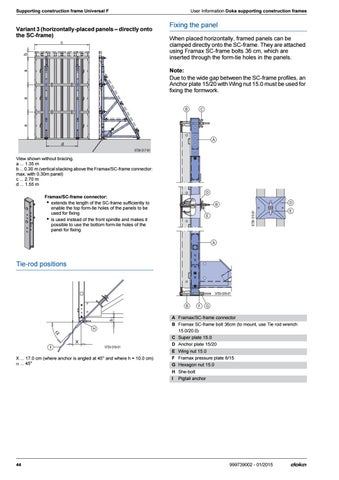
Fixing the panel When placed horizontally, framed panels can be clamped directly onto the SC-frame. They are attached using Framax SC-frame bolts 36 cm, which are inserted through the form-tie holes in the panels.
a
a
a
Note: Due to the wide gap between the SC-frame profiles, an Anchor plate 15/20 with Wing nut 15.0 must be used for fixing the formwork.
d 9739-317-01
View shown without bracing. a ... 1.35 m b ... 0.30 m (vertical stacking above the Framax/SC-frame connector: max. with 0.30m panel) c ... 2.70 m d ... 1.55 m
9739-319-01
Framax/SC-frame connector: ▪ extends the length of the SC-frame sufficiently to enable the top form-tie holes of the panels to be used for fixing ▪ is used instead of the front spindle and makes it possible to use the bottom form-tie holes of the panel for fixing
Tie-rod positions
h
9739-320-01
X 9739-318-01
X ... 17.0 cm (where anchor is angled at 45° and where h = 10.0 cm) ... 45°
44
A Framax/SC-frame connector B Framax SC-frame bolt 36cm (to mount, use Tie rod wrench 15.0/20.0) C Super plate 15.0 D Anchor plate 15/20 E Wing nut 15.0 F Framax pressure plate 6/15 G Hexagon nut 15.0 H She-bolt I Pigtail anchor
999739002 - 01/2015