learning LOVE OF
Technology: K through College
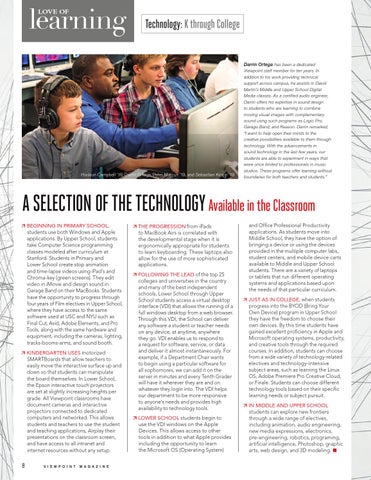
Hudson Campbell ’19, Darrin Ortega, Peter Marcus ’19, and Sebastian Kropp ’19
Darrin Ortega has been a dedicated Viewpoint staff member for ten years. In addition to his work providing technical support across campus, he assists in David Martin’s Middle and Upper School Digital Media classes. As a certified audio engineer, Darrin offers his expertise in sound design to students who are learning to combine moving visual images with complementary sound using such programs as Logic Pro, Garage Band, and Reason. Darrin remarked, “I want to help open their minds to the creative possibilities available to them through technology. With the advancements in sound technology in the last few years, our students are able to experiment in ways that were once limited to professionals in music studios. These programs offer learning without boundaries for both teachers and students.”
A SELECTION OF THE TECHNOLOGY Available in the Classroom BEGINNING IN PRIMARY SCHOOL, students use both Windows and Apple applications. By Upper School, students take Computer Science programming classes modeled after curriculum at Stanford. Students in Primary and Lower School create stop animation and time-lapse videos using iPad’s and Chroma-key (green screens). They edit video in iMovie and design sound in Garage Band on their MacBooks. Students have the opportunity to progress through four years of Film electives in Upper School, where they have access to the same software used at USC and NYU such as Final Cut, Avid, Adobe Elements, and Pro Tools, along with the same hardware and equipment, including the cameras, lighting, tracks-booms-arms, and sound booth. KINDERGARTEN USES motorized SMARTBoards that allow teachers to easily move the interactive surface up and down so that students can manipulate the board themselves. In Lower School, the Epson interactive touch projectors are set at slightly increasing heights per grade. All Viewpoint classrooms have document cameras and interactive projectors connected to dedicated computers and networked. This allows students and teachers to use the student and teaching applications, Airplay their presentations on the classroom screen, and have access to all intranet and internet resources without any setup.
8
V I E W P O I N T
M AG A Z I N E
THE PROGRESSION from iPads to MacBook Airs is correlated with the developmental stage when it is ergonomically appropriate for students to learn keyboarding. These laptops also allow for the use of more sophisticated applications. FOLLOWING THE LEAD of the top 25 colleges and universities in the country and many of the best independent schools, Lower School through Upper School students access a virtual desktop interface (VDI) that allows the running of a full windows desktop from a web browser. Through this VDI, the School can deliver any software a student or teacher needs on any device, at anytime, anywhere they go. VDI enables us to respond to a request for software, service, or data and deliver it almost instantaneously. For example, if a Department Chair wants to begin using a particular software for all sophomores, we can add it on the server in minutes and every Tenth Grader will have it wherever they are and on whatever they login into. The VDI helps our department to be more responsive to anyone’s needs and provides high availability to technology tools. LOWER SCHOOL students begin to use the VDI windows on the Apple Devices. This allows access to other tools in addition to what Apple provides including the opportunity to learn the Microsoft OS (Operating System)
and Office Professional Productivity applications. As students move into Middle School, they have the option of bringing a device or using the devices provided in the multiple computer labs, student centers, and mobile device carts available to Middle and Upper School students. There are a variety of laptops or tablets that run different operating systems and applications based upon the needs of that particular curriculum. JUST AS IN COLLEGE, when students progress into the BYOD (Bring Your Own Device) program in Upper School they have the freedom to choose their own devices. By this time students have gained excellent proficiency in Apple and Microsoft operating systems, productivity, and creative tools through the required courses. In addition, students can choose from a wide variety of technology-related electives and technology-intensive subject areas, such as learning the Linux OS, Adobe Premiere Pro Creative Cloud, or Finale. Students can choose different technology tools based on their specific learning needs or subject pursuit. IN MIDDLE AND UPPER SCHOOL students can explore new frontiers through a wide range of electives, including animation, audio engineering, new media expressions, electronics, pre-engineering, robotics, programing, artificial intelligence, Photoshop, graphic arts, web design, and 3D modeling. ■