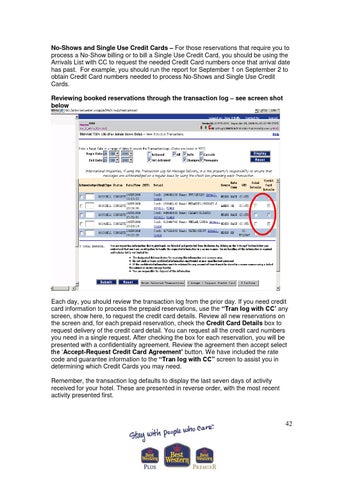
No-Shows and Single Use Credit Cards – For those reservations that require you to process a No-Show billing or to bill a Single Use Credit Card, you should be using the Arrivals List with CC to request the needed Credit Card numbers once that arrival date has past. For example, you should run the report for September 1 on September 2 to obtain Credit Card numbers needed to process No-Shows and Single Use Credit Cards. Reviewing booked reservations through the transaction log – see screen shot below
Each day, you should review the transaction log from the prior day. If you need credit card information to process the prepaid reservations, use the “Tran log with CC’ any screen, show here, to request the credit card details. Review all new reservations on the screen and, for each prepaid reservation, check the Credit Card Details box to request delivery of the credit card detail. You can request all the credit card numbers you need in a single request. After checking the box for each reservation, you will be presented with a confidentiality agreement. Review the agreement then accept select the ‘Accept-Request Credit Card Agreement’ button. We have included the rate code and guarantee information to the “Tran log with CC” screen to assist you in determining which Credit Cards you may need. Remember, the transaction log defaults to display the last seven days of activity received for your hotel. These are presented in reverse order, with the most recent activity presented first.
42