EGYPTIAN
ARCHAEOLOGY
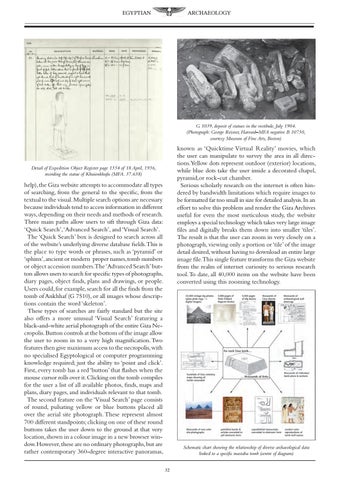
G 1039, deposit of statues in the vestibule, July 1904. (Photograph: George Reisner, Harvard–MFA negative B 10750, courtesy Museum of Fine Arts, Boston)
known as ‘Quicktime Virtual Reality’ movies, which the user can manipulate to survey the area in all directions.Yellow dots represent outdoor (exterior) locations, while blue dots take the user inside a decorated chapel, pyramid,or rock-cut chamber. Serious scholarly research on the internet is often hindered by bandwidth limitations which require images to be formatted far too small in size for detailed analysis.In an effort to solve this problem and render the Giza Archives useful for even the most meticulous study, the website employs a special technology which takes very large image files and digitally breaks them down into smaller ‘tiles’. The result is that the user can zoom in very closely on a photograph, viewing only a portion or ‘tile’ of the image detail desired, without having to download an entire large image file.This single feature transforms the Giza website from the realm of internet curiosity to serious research tool.To date, all 40,000 items on the website have been converted using this zooming technology.
Detail of Expedition Object Register page 1354 of 18 April, 1936, recording the statue of Khuienkhufu (MFA. 37.638)
help),the Giza website attempts to accommodate all types of searching, from the general to the specific, from the textual to the visual. Multiple search options are necessary because individuals tend to access information in different ways, depending on their needs and methods of research. Three main paths allow users to sift through Giza data: ‘Quick Search’,‘Advanced Search’, and ‘Visual Search’. The ‘Quick Search’ box is designed to search across all of the website’s underlying diverse database fields.This is the place to type words or phrases, such as ‘pyramid’ or ‘sphinx’,ancient or modern proper names,tomb numbers or object accession numbers.The ‘Advanced Search’ button allows users to search for specific types of photographs, diary pages, object finds, plans and drawings, or people. Users could, for example, search for all the finds from the tomb of Ankhhaf (G 7510), or all images whose descriptions contain the word ‘skeleton’. These types of searches are fairly standard but the site also offers a more unusual ‘Visual Search’ featuring a black-and-white aerial photograph of the entire Giza Necropolis.Button controls at the bottom of the image allow the user to zoom in to a very high magnification. Two features then give maximum access to the necropolis,with no specialised Egyptological or computer programming knowledge required; just the ability to ‘point and click’. First, every tomb has a red ‘button’ that flashes when the mouse cursor rolls over it. Clicking on the tomb compiles for the user a list of all available photos, finds, maps and plans, diary pages, and individuals relevant to that tomb. The second feature on the ‘Visual Search’ page consists of round, pulsating yellow or blue buttons placed all over the aerial site photograph. These represent almost 700 different standpoints; clicking on one of these round buttons takes the user down to the ground at that very location, shown in a colour image in a new browser window. However, these are no ordinary photographs, but are rather contemporary 360-degree interactive panoramas,
Schematic chart showing the relationship of diverse archaeological data linked to a specific mastaba tomb (centre of diagram) 32