MAY-JUNE 2020 | VOLUME XXXV NUMBER 3
www.saem.org
SPECIAL COVID-19 ISSUE SPOTLIGHT COVID-19 SURVIVOR DR. DARA KASS ON THE CRITICAL ROLE OF ACADEMIC EM PHYSICIANS IN DIRECTING COVID MESSAGING
AN OPEN LETTER TO SAEM RESIDENTS AND MEDICAL STUDENTS page 86
Leading the advancement of emergency care through education and research, advocacy, and professional development in academic emergency medicine.
SAEM STAFF Chief Executive Officer Megan N. Schagrin, MBA, CAE, CFRE Ext. 212, mschagrin@saem.org Director, Finance & Operations Doug Ray, MSA Ext. 208, dray@saem.org Manager, IT Dan San Buenaventura Ext. 225, DSanBuenaventura@saem.org Manager, Accounting Hugo Paz Ext. 216, hpaz@saem.org Director, Governance Kat Nagasawa, MBA Ext. 206, knagasawa@saem.org Sr. Managing Editor, Publications and Communications Stacey Roseen Ext. 207, sroseen@saem.org Manager, Digital Communications Snizhana Kurylyuk Ext. 201, skurylyuk@saem.org Director, Foundation and Business Development Melissa McMillian, CNP Ext. 203, mmcmillian@saem.org Manager, Business Development John Landry, MBA Ext. 204, jlandry@saem.org
Director, Membership & Meetings Holly Byrd-Duncan, MBA Ext. 210, hbyrdduncan@saem.org Sr. Manager, Membership George Greaves Ext. 211, ggreaves@saem.org Education Manager Andrea Ray Ext. 214, aray@saem.org Membership & Meetings Coordinator Monica Bell, CMP Ext. 202, mbell@saem.org Meeting Assistant Maja Keska Ext. 219, mkeska@saem.org AEM Editor in Chief Jeffrey Kline, MD AEMEditor@saem.org AEM E&T Editor in Chief Susan Promes, MD AEMETeditor@saem.org AEM/AEM E&T Manager Stacey Roseen Ext. 207, sroseen@saem.org AEM/AEM E&T Peer Review Coordinator Taylor Bowen tbowen@saem.org Chair, SAEM Pulse Editorial Advisory Task Force Sharon Atencio, DO sharonatencio@me.com Associate Editor, SAEM BOD D. Mark Courtney, MD Associate Editor, RAMS Shana Zucker, szucker@tulane.edu
2020–2021 BOARD OF DIRECTORS James F. Holmes, Jr., MD, MPH President University of California Davis Health System
Angela M. Mills, MD Secretary Treasurer Columbia University
Amy H. Kaji, MD, PhD President Elect Harbor-UCLA Medical Center
Ian B.K. Martin, MD, MBA Immediate Past President Medical College of Wisconsin
Christopher R. Carpenter, MD, MSc Washington University in St. Louis School of Medicine Wendy C. Coates, MD Los Angeles County-Harbor -UCLA Medical Center Michelle D. Lall, MD Emory University Nehal Naik, MD George Washington University
Ava Pierce, MD UT Southwestern Medical Center, Dallas Jody A. Vogel, MD, MSc, MSW Denver Health Medical Center University of Colorado School of Medicine Richard E. Wolfe, MD Beth Israel Deaconess Medical Center/ Harvard Medical School
To our members: While you combat COVID-19 we want you to know that we're standing behind you cheering you on. We're grateful for your commitment to helping others and the sacrifices you're making to help all of us get through this pandemic. We’re proud to serve and support you as you care for the sick during this time of great need. You are true heroes to all of us, and this issue of Pulse is dedicated to you. —Your SAEM Staff
SPECIAL COVID-19 ISSUE 3
President’s Comments Emergency Physicians: Heroes in the House of Medicine
4
Spotlight COVID-19 Survivor Dr. Dara Kass on the Critical Role of Academic EM Physicians in Directing COVID Messaging
10
Conferencing During COVID-19: Five Tips for Creating an Engaging Virtual Didactics Experience
12
Learning in the Time of COVID-19
14
Visiting Rotations During the COVID-19 Outbreak
16
The Intersection of Social Determinants of Health, Health Equity, and COVID-19
20
Ethics During a Pandemic: A Primer
24
The Importance of a Rapid, Code-Status Conversation Guide for Seriously Ill Older Adults During Novel Coronavirus 2019
28
A Primer for Managing Global Pandemics
32
March Madness SOAP Notes, 2020
36
COVID-19 Convos: How to Have the Difficult Conversation You Never Wanted to Have
38
Responding to the Homeless Community During the COVID-19 Pandemic: Lessons From King County, WA
40
Simulation-Based Teaching and Learning in the Era of COVID-19
44
COVID-19 Gone Viral
46
SARS-CoV-2/COVID-19 Lung Ultrasound Recommendations
50
Tackling the COVID-19 Crisis: Lessons From the Wilderness
53
Applying Wilderness Medicine Skills During COVID-19
54
The Unique Challenges Faced by Women Physicians During the COVID-19 Pandemic
56
Building Your COVID-19 Wellness Toolkit
60
In the Nick of Time: Rapid Launch of a COVID-19 Respiratory Care Unit
62
COVID Scarce Resources Demand Difficult Discussions
64
Sex and Gender-Specific Implications for COVID-19: Getting It Right in Real Time
66
Looking for Your Dream Job? Be Careful What You Wish For!
68
Heavy Lies the Mask of the Hero
70
Starting a COVID-19 Clinical Study in One Day
72
Retired. Covid-19. Now what?
74
COVID-19 Reflections
86 96
COVID-19 Resources and Information
98
Briefs and Bullet Points
103
Academic Announcements
104
Now Hiring
SAEM Pulse is published bimonthly by the Society for Academic Emergency Medicine,1111 East Touhy Ave., Ste. 540, Des Plaines, IL 60018. (847) 813-9823 The opinions expressed in this publication are those of the authors and do not necessarily reflect those of SAEM. © 2020 Society for Academic Emergency Medicine. All rights reserved. No part of this publication may be reproduced, stored, or transmitted in any form or by any means without prior permission in writing from the copyright holder.
SPECIAL COVID-19 ISSUE Emergency Physicians: Heroes in the House of Medicine
Ian B.K. Martin, MD, MBA Medical College of Wisconsin 2019–2020 SAEM President
“The chance to heal the sick and comfort the suffering is a high professional and personal privilege.”
Welcome to the sixth and last edition of my President’s Comments. Ordinarily, I would use this opportunity to take you on a walk down “memory lane”— enumerating our Society’s many achievements during my tenure as president. But we will leave it to history to be the judge of the impact of my presidency. These times are far from ordinary, as each and every one of us battles from the front lines the COVID-19 pandemic. So instead, I will use this opportunity to rally our “troops and remind us why being a physician— especially an emergency physician — is the greatest, professional honor and privilege. Those of you who know me personally, know that I wholeheartedly believe we physicians have the best “job” in the world. The word “job” doesn’t do what we do as physicians justice. Some would consider medicine a “career.” I consider it a calling. A calling is magnetic and all-consuming — a life to which most physicians and even judges and clergy can relate. Like members of the clergy and judges, we physicians are always in “character.” We are always seen as healers and even when “off duty,” our physician persona is never far away — whether leaping into action to aid a passenger complaining of shortness of breath on a crowded plane; guiding and comforting a friend as he or she is confronted with end-of-life decisions after a long battle with cancer; or teaching first aid and cardiopulmonary resuscitation (CPR) at the local high school. Our physician identity is core and omnipresent, whether or not we embrace it or even want it. The chance to heal the sick and comfort the suffering is a high professional and personal privilege. Patients entrust us quite literally with their lives and share with us personal details not confided to even their closest loved ones. But this privilege comes at a price paid by utmost professionalism, tremendous sacrifice, and selfless duty — behaviors successful physicians usually master early in their careers. While every specialty in the “house of medicine” is unique and plays its role, the COVID-19 pandemic has put our specialty front and center for all to witness. Our colleagues from other specialties, our families and friends, our communities, and now the media, see and hear of the life-saving difference we emergency physicians are making to the care of patients during this scourge. You and I know we make this
difference every minute of every hour of every day, pandemic or not — whether it’s quickly establishing spontaneous circulation in an active individual after he or she suffers a cardiac arrest due to ventricular fibrillation; restoring normal hemodynamics and relieving dyspnea by performing an expeditious tube thoracostomy in an injured patient; or saving a member of our community from a lethal overdose during the unrivaled opioid epidemic. So see, we emergency physicians have always been the heroes in health care, and fortunately now the rest of the world can see it too. I have never been prouder to be a physician — especially an emergency physician — as I am now, and any self-doubt you may have had I hope is gone. As I said in a recent message to our members, the sacrifices you make every day are worthy of respect and gratitude. But during this COVID-19 pandemic, more than ever, you deserve an extra measure of appreciation for your extraordinary commitment to our specialty and to the elevation of the human condition during this time of crisis. As I sign off, I thank you for entrusting this great Society to me this past year. Serving as your president has been a high honor of my professional life. But leading a national society is a team effort and as such, much of the credit for our success as an organization goes to the SAEM Board of Directors and the SAEM staff—so thank you. And as I intimated earlier, as a “silver lining” to this COVID-19 pandemic, I leave this post reminded of why we should be prouder than ever to be physicians — specifically emergency physicians. I hope you share this sentiment. You all are in my thoughts and prayers. Please stay safe during this challenging time. I am confident that we will weather this storm. Keep your chins up, and take care of yourselves and of each another.
ABOUT DR. MARTIN: Ian B.K. Martin, MD, MBA, is professor and system chair of the Department of Emergency Medicine and professor of medicine at the Medical College of Wisconsin (MCW). He served SAEM previously as president-elect, secretary-treasurer, and an at-large member of the Society’s Board of Directors. Dr. Martin is a founding member and past-president of SAEM’s Global Emergency Medicine Academy (GEMA).
3
SPOTLIGHT COVID-19 SURVIVOR DR. DARA KASS ON THE CRITICAL ROLE OF ACADEMIC EM PHYSICIANS IN DIRECTING COVID MESSAGING Like a deadly tsunami, COVID-19 has surged across the globe at breakneck speed, carrying with it a tide of misinformation and disinformation and leaving behind a tidemark of ambiguity and fear. Passed along by major media outlets and on social media pages, the flow of COVID-related news has been constant and often confusing. People looking for a lifeline and finding nothing solid to grasp, have reacted as drowning people often do: they’ve panicked. They’ve hoarded toilet paper, hurled insults, placed blame. Others have ignored warnings altogether. Into this swirling swell of uncertainty has stepped a team of academic physicians who are leveraging their influence to direct the flow of COVID-19 messaging and amplify as many voices within emergency medicine and critical care as possible. By making their stories heard and allowing others to be part of their experiences they’re seeking to inform and educate the public at a critical moment in time when misinformation and disinformation literally can kill. Each has a personal narrative to this historic moment and an opportunity, compelled by a sense of obligation, to share it.
This is Dr. Dara Kass’s story. SAEM PULSE | MAY-JUNE 2020 | SPECIAL COVID-19 ISSUE
When you first heard about COVID-19, did you think it would be as serious as it has turned out to be?
4
When the virus was in China I didn’t take it as seriously as when it got to Italy, because I didn’t really know what to trust; I was a little suspicious. But when we heard from the ground in Italy, from the EM docs and surgeons, about what was happening to them, all of a sudden we started paying attention. We talked about the virus in January, but I didn’t personally understand the scale to which it would affect our lives until mid- to late February. By March it had moved from this thing that we thought about to this thing that we only thought about.
How is this medical crisis different from others you’ve faced? This is unlike anything I’ve ever encountered because it’s everywhere. It’s in every community group I have, it’s affected everyone I know. I know almost as many people who have been affected or infected, as have not. Most of them have been fine quarantining at home, but the way this has penetrated every aspect of the lives of people I love and live with is astounding. The other thing that’s different about this crisis is that it’s everything at once. It’s the community spread, it’s the economic impact, it’s the fact that all our kids’ schooling has changed. Every way we gather and connect, love and live has been upended by this virus that is not the plague. It doesn’t cause skin changes, it doesn’t cause obvious visual symptoms, it just causes you to feel terrible, and then to stop breathing, with all microvascular changes that are difficult to see until the end. So, it’s easy to
“We talked about the virus in January, but I didn’t personally understand the scale to which it would affect our lives until mid- to late February.”
minimize/trivialize COVID-19 because it’s a virus. Ebola was Ebola. Which is also a virus, but nobody called Ebola just “a virus.” They called it Ebola. And COVID does not sound as ominous as Ebola.
How much risk should health care providers be expected to take? I don’t think medical providers should take any risk, but I’m almost resigned to the fact that no matter how much PPE we wear we’re all going to get this virus. I will be shocked if anyone in New York City who does front line patient care winds up not being infected in the end, just because it is everywhere. It’s not
that we’re seeing COVID patients while unprotected, it’s the fact that you’ll see someone for an ankle sprain and they’ll cough on you and you won’t realize it or you won’t think about it because you’re looking at their ankle, and then you realize that you got it on your forehead and then you touched your forehead. So in New York City, and that’s all I can speak to, we all feel vulnerable, no matter what. We’re not walking around in Tyvek suits all the time, and yet we are all the time surrounded by COVID. Even before Dr. Kass began treating coronavirus patients, she had sent her children, ages 12, 10, 7, to live
with their grandparents in neighboring New Jersey. Health care workers were becoming infected and she knew it was just a matter of time before she would become infected too. Sure enough, on a weekend in early March, Dr. Kass had completed two 12-hour shifts treating coronavirus patients in a New York City emergency room, the epicenter of America's outbreak. By Monday, she had developed symptoms — fever, fatigue, muscle aches, cough, chest pains, headache, shortness of breath, loss of taste and smell. She continued on Page 6
5
continued from Page 5
was confirmed positive for COVID-19 three days later. With her kids safe, she quarantined at home. A week later, after her house was thoroughly disinfected, her kids came home and she moved into a midtown Manhattan hotel, in a room that had been converted to house doctors during the crisis.
Did it surprise you when you tested positive for COVID-19?
SAEM PULSE | MAY-JUNE 2020 | SPECIAL COVID-19 ISSUE
I wasn’t surprised, I just didn’t think I’d get it so fast! I don’t see patients regularly, I wasn’t intubating anyone, and I had only been working one shift in the ED per week. But the weekend I was infected, I happened to work two shifts in a row and although I wasn’t treating a high volume of COVID patients I think I touched a contaminated surface and then touched my face. I was symptomatic the next day. By the third day of symptoms I began to think, “Oh, this is it!” But I was not surprised. In fact, I had already moved my kids out of our house knowing I was probably going to get it and also knowing that 80 percent of transmissions happen within the house. And I didn’t want my kids to get it because my son had a liver transplant a few years ago and I didn’t know what that might mean for him.
6
What was your first thought when you tested positive? I was both relieved and scared. I was relieved because I had proof that I wasn’t crazy, but I was scared because I had this virus and we didn’t yet know who responded to it well and who responded badly. At the same time, I was diagnosed, a couple of my friends were admitted to the hospital. And so, it sounds scary. You just wake up every day thankful for your breath.
How and what did you tell your kids? Telling my kids was the hardest part because they were already afraid. In fact, one of my sons, when we were talking about why they needed to move out, was worried they were going to die. So, I needed them to know I was okay. I told them over FaceTime. I just looked at them and said ,“Guys, don’t I make coronavirus look good?” while trying
“I definitely think COVID has been a tipping point for telehealth in the United States, and especially in New York.” to make them crack a smile. And they were like, “Yeah, you don’t look so bad.” And I was able to say, “See I told you guys!” What they don’t yet know (at the time of this interview) is that my nextdoor neighbor died of COVID. I didn’t tell them because they won’t notice for a while that he’s gone, and I don’t want them thinking about it in real-time. Like I said, where we live a lot of people have it. It’s very real.
the things that I advocated for very early on and very actively, was making sure that the information around telehealth was available to all New Yorkers so that they could call a telehealth service and ask questions. We’ve seen an exponential rise in calls to telehealth services across all platforms which contributed to keeping people safe at home and making sure they didn’t crowd the hospital system.
How do you maintain some semblance of normalcy in the era of COVID-19?
Have you found patients to be receptive to and comfortable with telehealth and, if not, how do you put them at ease?
I have a big family that loves my kids very much. My parents and my sister did school with them. Now they’re home and I’m (at the time of this interview) in a hotel. A lot of our interaction has been digital, through Facetime. So that’s that. It isn’t easy, but everyone in this moment is making sacrifices, and this is one of mine. While Dr. Kass was in quarantine recovering from the disease, she continued to consult virtually with patients using telemedicine technologies. Once the COVID outbreak started, all the telemedicine clinics in New York City saw the number of patients they were seeing explode.
Do you see COVID-19 as the tipping point for telehealth in the U.S.? I definitely think COVID has been a tipping point for telehealth in the United States, and especially in New York. Using telehealth to manage patient care has been integral to survival in New York City. Patients are advised across the board that if they have any symptoms, they should call a telehealth provider first and if their telehealth provider tells them to go to the hospital they should. If we didn’t have telehealth to keep people out of the hospital who had mild disease or anxiety around disease presentation, our health systems would have been immediately overwhelmed. So, one of
Patients have been unbelievably receptive to telehealth. In fact, I think it surprised a lot of them at how much better they felt after talking to a telehealth provider. Because treatments for COVID-19 are so nonspecific to the virus right now, we telehealth providers provide a lot of patient counseling and emotional support. For me personally, because I had the illness, being able to see a patient on the computer, connect with their on eyes and say “I’m sitting here infected with the coronavirus as well and I’m okay,” immediately put them at ease. So, doing telehealth through the course of my illness, was not just great for me — because I got to see how many people were just like me and recovering fine at home — it was a comfort to patients because I could identify with them immediately. Emergency physicians are accustomed to treating critically ill patients during times of emergency. But COVID-19 is a war unlike any that’s been fought before and its casualties are not only those who become hospitalized with the illness but those who treat them. The compassionate healers are hurting, their well-being and resilience eroded by an ongoing battle with no clear end in sight. When the crisis is over and all that they’ve seen, done, felt,
and pushed away rises to the surface, what will be the mental and emotional toll?
How are you and your coworkers handling the emotional strain and physical stress of dealing with COVID-19? What are you doing to decompress? Everyone does their own thing. I have a friend who bakes bread. A lot of people go on runs, although with everyone in New York City wearing masks all the time, that’s hard. I go for walks, although I was quarantined for a significant amount of time this past month, so that wasn’t allowed. I process a lot of the emotion by talking to my friends all of the time. I also think I’m processing a lot of the stress and anxiety through my role in educating the public and my desire to be useful as humanly possible. For me, that “pay it forward” mentality helps me deal with the stress. I have access to the media so I go on TV, I have antibodies so I can go into a COVID-only hospital. Those are things I feel like I’m doing that are useful to others and at the same time helpful to my own mental and emotional well-being.
What kinds of decisions have you been forced to make that you never thought you would? The biggest decision for me personally was to separate myself from my family but honestly, a lot of people made that decision. It's been more than a month, and I haven't seen my kids and I don’t know how I’m going to decide when to see them. There's really no good data to tell you when, after you’ve been infected, you are no longer contagious. So, for now, they live at home, and I live in a hotel. We’ll see what happens. Medically, I have personally found that there haven’t been a lot of decisions that I have been forced to make that are counter to what I would normally do. I have been around a lot of the critical cases but haven’t been primarily managing them, so most of the decisions I’m making are about who to admit and who not to admit. I’m still advocating to admit the patients I feel need to be admitted even given the scarcity of beds perspective. I still want to make patient decisions based on what patients need, and I’m still able to do that.
What scares you the most? What I fear most is the potential PTSD of
the health care workforce. There’s a lot of unprocessed anxiety that we’re trying to process but can’t because the virus is everywhere, especially in New York City. It’s all we do, and it is all-consuming. We’re all masked up and gowned up and separated from each other. You can’t even drink coffee anywhere because you’re wearing a mask all the time! Plus, there’s just so much to process: the overwhelming amount of death and critical care patients, physicians of all backgrounds working in the emergency room — something we’re appreciative of, but not used to. Everything has changed, every zone of the ED is different, and there are so many moving parts. It just feels jarring. And we’re all working more clinically than we ever have before. Academic medicine is on hold and I don’t know what it will look like on the other end or the impact it will have on the emergency medicine workforce.
What gives you hope? What gives me hope is that this is highlighting how great and necessary emergency medicine is. People have always been aware, in general, of what we do, but now what we do is being recognized more broadly and by a larger audience. More importantly, physicians from other departments are wanting to join us on the front lines and that is remarkable to me. Maybe after all of this, what we do as emergency physicians won’t seem as ancillary to them. And that is what gives me hope for emergency medicine —that our space in the house of medicine will be redefined. Three weeks after her initial exposure to COVID-19, Dr. Kass was back on the front lines buoyed by some good news: The results of an antibody test showed
continued on Page 8
7
SAEM PULSE | MAY-JUNE 2020
continued from Page 7
8
she is likely immune to COVID-19 and therefore eligible to donate plasma for COVID-19 clinical trials which are testing whether plasma donations from recovered COVID-19 patients can be used to treat patients who are currently ill with the disease. Since receiving the news she’s been paying it forward by spending time working in COVID-only hospitals, where she is able to provide personal touch, comfort, and care in a way her stillvulnerable colleagues ensconced in Tyvek and PPE cannot. She’s also been using her platform as an influencer to combat misinformation,
educate the public, and amplify the voices of marginalized experts on the front lines of COVID19. She’s everywhere these days: CNN, the Today Show, Dr. Oz, Fox and Friends, MSNBC, PBS News Hour, Wall Street Journal, The Guardian, People magazine… even Buzzfeed.
You’ve had multiple interviews these past weeks. What is the one thing you haven’t been asked that you wish you had been, and how would you answer that question? Why are you doing this? Why are you putting yourself out there? The answer is this: It turns out (and I didn’t realize this at the beginning) that people need to feel connected to the front line
through somebody who feels familiar to them. By being connected to the media I’m able to connect other people to the media. We have put together a consortium — a squad — of doctors and other health care workers who are being supported by a team. Most of the people you’ve seen on TV are all being supported by this squad of unpaid volunteers who are helping us stay organized and connected with the bookers on TV and the writers in the media. They make sure the stuff we’re contributing as op-eds is being reported, because as doctors and other front line workers, we wouldn’t be able to do this by ourselves. And the other part is, if we’re not organized, we will over-message
each other. So for instance, if we know somebody is submitting an article on the racial disparities of coronavirus diagnosis and treatment and somebody else is submitting an article on the family struggles of physicians on the front lines and what we’re doing with our kids and another person is doing something on the emotional trauma, we can broaden our message across platforms that aren’t just the New England Journal of Medicine. The reason I do People magazine, or Dr. Oz, or Fox and Friends, or MSNBC in addition to the regular academic journals or MedScape is because although we, as academic emergency physicians, are used to a continuous life of learning and are constantly asking questions and giving answers, there are lots of people who don’t look to science and data. There are many people who just look to the President of the United States, or their favorite commentator, or their favorite pundit, or maybe their favorite celebrity for news and information. And for the first time, most of those people are looking to us! So we’re doing Instagram Live with Katie Couric, basketball players, or presidential candidates like Pete Buttigieg. We’re making ourselves available like Anthony Fauci who’s going on tour. It’s critically important that we, as emergency medicine doctors, front line workers, scientists, and public health officials, interact with the public in a way that we haven’t before because they need us to be their source of information. In a lot of ways we are out-messaging the other messengers. So to sum it up, the one question I wish I had been asked is “Why are you doing this?” And my answer would be: If we don’t more people will die.
“So to sum it up, the one question I wish I had been asked is “Why are you doing this?” And my answer would be: If we don’t more people will die.”
About Dr. Dara Kass Dara Kass, MD, is a New York City-based emergency room doctor and associate professor of emergency medicine at Columbia University Irving Medical. She is an advocate for the advancement of women in medicine and a founding member of Time's Up Healthcare, working to root out sexual and gender harassment in medicine. She is also the founder and CEO of FemInEM, a blog and conference with a mission of promoting gender equity in emergency medicine since its inception in 2015. She also currently serves as the Director of Equity and Inclusion Initiatives at Columbia University Medical Center. In addition to her work on promoting gender equity in medicine, Kass serves on the board of the nonprofit ORGANIZE, working to reform the organ donation system. She is also a board member of AFFIRM Research, an organization advocating for a public health approach to solving the epidemic of gun violence. She previously served on the Board of Directors for the Academy of Women in Academic Emergency Medicine between 2012–2015. While treating patients during the Coronavirus disease (COVID-19) pandemic, Dr. Kass became infected. Since then, she has become a prominent voice advocating for access to personal protective equipment and more effective measures to combat the spread of the disease.
9
SPECIAL COVID-19 ISSUE Conferencing During COVID-19: Five Tips for Creating an Engaging Virtual Didactics Experience By Kimberly Bambach MD, and Andrew King, MD on behalf of the SAEM Education Committee COVID-19 has brought traditional, inperson didactic sessions to a halt as we seek to protect each other by social distancing. Many residencies have transitioned to a virtual model for weekly didactic conferences, yet adapting to this new format can be disorienting for both educators and learners. Social distancing is necessary to flatten the pandemic curve, but COVID-19 will not stop us from continuing to learn and develop professionally in emergency medicine. The following tips will help ease the transition to virtual didactics so that you can create an engaging learning environment despite the necessary physical distance.
SAEM PULSE | MAY-JUNE 2020 | SPECIAL COVID-19 ISSUE
Choose a Platform to Fit Your Needs
10
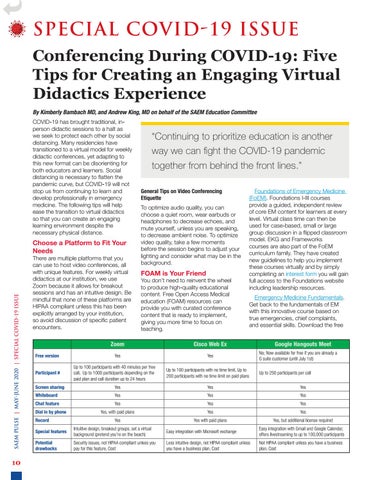
There are multiple platforms that you can use to host video conferences, all with unique features. For weekly virtual didactics at our institution, we use Zoom because it allows for breakout sessions and has an intuitive design. Be mindful that none of these platforms are HIPAA compliant unless this has been explicitly arranged by your institution, so avoid discussion of specific patient encounters.
Free version Participant #
“Continuing to prioritize education is another way we can fight the COVID-19 pandemic together from behind the front lines.” General Tips on Video Conferencing Etiquette To optimize audio quality, you can choose a quiet room, wear earbuds or headphones to decrease echoes, and mute yourself, unless you are speaking, to decrease ambient noise. To optimize video quality, take a few moments before the session begins to adjust your lighting and consider what may be in the background.
FOAM is Your Friend
You don’t need to reinvent the wheel to produce high-quality educational content. Free Open Access Medical education (FOAM) resources can provide you with curated conference content that is ready to implement, giving you more time to focus on teaching.
Zoom
Cisco Web Ex
Yes
Yes
Up to 100 participants with 40 minutes per free call, Up to 1000 participants depending on the paid plan and call duration up to 24 hours
Foundations of Emergency Medicine (FoEM). Foundations I-III courses provide a guided, independent review of core EM content for learners at every level. Virtual class time can then be used for case-based, small or large group discussion in a flipped classroom model. EKG and Frameworks courses are also part of the FoEM curriculum family. They have created new guidelines to help you implement these courses virtually and by simply completing an interest form you will gain full access to the Foundations website including leadership resources. Emergency Medicine Fundamentals. Get back to the fundamentals of EM with this innovative course based on true emergencies, chief complaints, and essential skills. Download the free
Up to 100 participants with no time limit, Up to 200 participants with no time limit on paid plans
Google Hangouts Meet No; Now available for free if you are already a G suite customer (until July 1st) Up to 250 participants per call
Screen sharing
Yes
Yes
Yes
Whiteboard
Yes
Yes
Yes
Chat feature Dial in by phone Record
Yes
Yes
Yes
Yes, with paid plans
Yes
Yes
Yes
Yes with paid plans
Yes, but additional license required
Special features
Intuitive design, breakout groups, set a virtual background (pretend you’re on the beach)
Easy integration with Microsoft exchange
Easy integration with Gmail and Google Calendar, offers livestreaming to up to 100,000 participants
Potential drawbacks
Security issues, not HIPAA compliant unless you pay for this feature, Cost
Less intuitive design, not HIPAA compliant unless you have a business plan, Cost
Not HIPAA compliant unless you have a business plan, Cost
learner workbook and send an email for access to the facilitator guide. Emergency Medicine Reviews and Perspectives (EM:RAP). EM:RAP is posting a suggested weekly curriculum during this transition period. Each weekly curriculum includes a summary of activities for that day with links to videos and additional FOAM assignments for asynchronous review. They are providing all residency directors with three months of free access.
Think Small
Conferencing may have gone virtual, but that doesn’t mean it has to be impersonal. Zoom has a feature for creating breakout groups so that you can connect with learners in a more intimate, small group setting. Learners may not leave the couch, but there are numerous ways to use breakout sessions creatively to avoid monotony. • Flip the classroom. The flipped classroom model promotes active learning, resident engagement, and maximizes didactic time. Learners prepare with self-directed learning prior to the small group session and small group time focuses on exercises to apply that knowledge. For example, prior to the conference learners may listen to a podcast or complete a reading and then apply that knowledge to a clinical case with prepared questions posed by a facilitator. • Get in the game. Breakout sessions also provide an opportunity to play educational games in a setting that is less intimidating. To make distance learning fun, use platforms like Kahoot or create your own Jeopardy-style game. • Small group sessions based on flipped classroom activities or gamified lectures may also incorporate tools for learner assessment. • Consider acknowledging each member of the small group at the beginning of the session. Small groups can be separated by PGY level or mixed to incorporate peer-to-peer teaching. In our experience, residents tend to utilize the chat function heavily so be sure at the beginning of the session to encourage verbal dialogue.
Embrace Collaboration
We are all in this together, working toward the common goal of training excellent emergency physicians. Although changing gears may have left gaps in
your curriculum, this is the perfect time to get creative and embrace collaboration with other institutions to fill those gaps. Here are some suggestions: Invite a guest speaker or team up with another program. Reach out to friends at other institutions independently or via your program’s alumni network to arrange a collaboration. Academic Life in Emergency Medicine (ALiEM) has compiled several resources for remote learning, including a list of speakers willing to provide virtual guest lectures on 170+ topics including emergency medicine core content, wellness, gender and equity, professional development, and many more. (You can nominate yourself or a colleague to speak as well.) ALiEM has also compiled a list of EM residency programs by conference day and time to help you find a collaborator that aligns with your program’s protected time. Participate in an ALiEM Connect session. Join a live, one-way educational telecast hosted by premier speakers in emergency medicine. Moderated backchannel discussions can be found on the Slack learning management system. The first ALiEM session, held on March 25, was attended by 60+ programs across the country. Future connect sessions are in the works.
Seek Feedback
As emergency physicians, you are already paragons of flexibility. Listening to your audience and adjusting along the way is key to adapting to a new learning environment. Reach out to residents and
faculty for feedback on what is working well and to identify areas for growth. Remember: The first sessions will not be perfect, and that is to be expected. Completely overhauling didactics overnight is no easy feat, so be kind to yourself along the way and learn from these challenges. Coming together virtually has benefits that extend far beyond the acquisition of medical knowledge. It reinforces our sense of community and shared purpose. Virtual didactics create an opportunity to see each other’s faces, hear each other’s voices, and check in from a wellness standpoint during this difficult time. Although we are apart, we are not alone. Continuing to prioritize education is another way we can fight the COVID-19 pandemic together from behind the front lines.
ABOUT THE AUTHORS Dr. Kimberly Bambach is chief resident in the department of emergency medicine at The Ohio State University Wexner Medical Center. Dr. Andrew King is an associate professor, associate residency program director, and medical education fellowship director in the department of emergency medicine at The Ohio State University Wexner Medical Center.
11
SAEM PULSE | MAY-JUNE 2020 | SPECIAL COVID-19 ISSUE
SPECIAL COVID-19 ISSUE
12
Learning in the Time of COVID-19 By Suzana Tsao, DO At the start of this year I had big plans for my third-year emergency medicine clerkship. I really wanted to focus on improving the classroom component. Did I need to add more games and fun to the case discussion? Maybe more small group sessions would be more engaging? Then COVID-19 hit, and everything was turned upside down.
Because you will likely not have the time or resources to convert everything into online sessions, the first step is to identify the essential learning concepts or topics for your students. Are there parts of the curriculum that are no longer relevant? These papers will give you a sense of these "must have" topics:
clerkships (M3 Curriculum), fourth year clerkships (M4 Curriculum), and pediatric emergency medicine (Peds EM Curriculum). As an added bonus, there are also MS3 and MS4 online sample tests your students can take. In addition, Dr. Page Bridges has compiled a list of Online/ Asynchronous Resources.
One consequence of this pandemic is that many medical schools temporarily closed their clinical rotations. For most of us, this will mean a shortened clinical clerkship supplemented by an online component. This huge endeavor will require a lot of time and effort. It can feel overwhelming to balance this new teaching responsibility along with an increased clinical load while also dealing with the emotional toll of this disease. One of the ways I am coping with this new stress is by looking for the silver linings, i.e. things I would not have done or appreciated pre-COVID. At home, this has meant daily bike rides and games of basketball with my kids. In medical education it has meant looking at the clerkship curriculum in a new light.
•E mergency medicine clerkship curriculum: an update and revision
3. An opportunity to collaborate and innovate with each other!
•D eveloping a third-year emergency medicine medical student curriculum: a syllabus of content
From the very beginning of this pandemic, we have all been out there sharing resources and helping each other out. This strengthens our already amazing community and gets us out of our educational silos. This is our time to collaborate and innovate, so if you have an idea and/or are looking for help, join the CDEM community.
Three Medical Education Silver Linings 1. A n opportunity to refine our clerkships into deliberate, focused, and high yield experiences.
Of these essential topics, determine which experiences require an inperson session (e.g. procedure workshops) and which can be transitioned to an online format.
2. A chance to discover all the great Free Open Access Medical Education (FOAMed) content! Now that you have your list, don’t reinvent the wheel. There is a lot of great content already out there. For my students' curriculum, I like to use a mix of podcasts, videos, and blog sites. The Clerkship Directors in Emergency Medicine (CDEM) curriculum site has a number of brief, high yield articles based on the core clinical concepts for third year
ABOUT THE AUTHOR Dr. Suzana Tsao is associate professor and the clerkship director for emergency medicine at the University of Pennsylvania's Perelman School of Medicine. She is a member of SAEM's Clerkship Directors in Emergency Medicine (CDEM).
“One consequence of this pandemic is that many medical schools temporarily closed their clinical rotations. For most of us, this will mean a shortened clinical clerkship supplemented by an online component.” 13
SAEM PULSE | MAY-JUNE 2020 | SPECIAL COVID-19 ISSUE
SPECIAL COVID-19 ISSUE
14
Visiting Rotations During the COVID-19 Outbreak By the CDEM Visiting Students Task Force This article was collaboratively reviewed and edited by 2019–2020 CDEM President Kathy Hiller, MD, MPH COVID-19 is significantly impacting students’ education. In March, medical schools suspended students' participation in patient care activities based on AAMC guidance. Since then, the AAMC has outlined that this pause in clinical activities should remain in effect at each school until there is no longer an ongoing (or anticipated) significant community spread of COVID-19. Students should also have sufficient access to PPE (with adequate training in its use) along with promptly available COVID-19 testing. This updated AAMC guidance on return to the clinical setting is specific to required rotations. While there remains marked uncertainty as
to when students will fully return to the clinical learning environment, this pause will undoubtedly affect their ability to complete away rotations, often considered a crucial aspect of the emergency medicine residency application process. SAEM’s Clerkship Directors in Emergency Medicine (CDEM) academy agrees with the Consensus Statement Regarding SLOEs and Away Rotations from CORD’s Advising Students Committee in Emergency Medicine (ASC-EM). Specifically, clerkship directors (CDs) should encourage their students to go on fewer (if any) away rotations. Clerkships that invite visiting students should prioritize learners who come from schools without an EM residency, and who would otherwise be
unable to obtain a SLOE (standardized letter of evaluation). CDs should also be transparent about their institution’s ability to host visitors, making updates to the appropriate resources (VSLO, SAEM Clerkship Directory, EMRA Match, program website, etc.). This should avert unnecessary frustration from students applying to clerkships that are not truly available. The away rotation application process is already stressful for learners. A CDEM group is also collecting, via a survey, data specific to away rotation availability in the context of COVID-19. With the national suspension of students' participation in the clinical learning environment, many students interested in EM may be unable to do their home EM rotation until the
“CDEM supports CORD’s efforts to recalibrate program directors’ (PDs) expectations as to what constitutes a “complete” application package. It is likely that most students will have no SLOEs from outside institutions.” ABOUT THE CDEM VISITING STUDENTS TASK FORCE r. G. Carolyn Clayton is a D clerkship director and associate professor of emergency medicine at Rush Medical College and medical director, emergency department operations at Rush University Medical Center. Dr. David Gordon is the associate program director and undergraduate education director for the division of emergency medicine, Duke University. late summer. This will limit capacity for institutions to invite visitors and may result in SLOEs being uploaded after the typical start of the interview season. CDEM supports CORD’s efforts to recalibrate program directors’ (PDs) expectations as to what constitutes a “complete” application package. It is likely that most students will have no SLOEs from outside institutions. CDEM agrees with CORD’s consensus statement calling for PDs to consider one SLOE (including from a home rotation) to be sufficient. In this unprecedented year, SLOE writers should note institutional-specific circumstances that reflect any loss of away rotation opportunities for their students. CDEM also encourages CDs to develop distance learning opportunities for their students. If a student needs to be quarantined during their EM clerkship, that learner (assuming they are not
ill) should continue to have access to educational activities in order to meet the rotation’s learning objectives. CDs have already been harnessing novel learning modalities such as video conferencing and online learning modules. These best practices have been shared among the CDEM community via its Listserv. With most students likely only having one SLOE, this situation highlights the need for more widespread use of standardized interinstitutional clinical assessment measures, such as the National Clinical Assessment Tool for Medical Students in Emergency Medicine (NCAT-EM). Finally, this evolving situation pushes CDs to truly embody the spirit of adaptability that defines our specialty. As mentors to students seeking to become emergency physicians, CDs are encouraged to provide reassuring and positive guidance.
Dr. J.V. Nable is an assistant professor and clerkship director in the department of emergency medicine at Georgetown University School of Medicine and MedStar Health in Washington, DC. Dr. Rahul Patwari is an associate professor of emergency medicine and associate dean for curriculum at Rush Medical College in Chicago, Illinois.
Dr. Morgan Wilbanks is the director of the third-year emergency medicine elective at the Medical College of Wisconsin.
About CDEM Clerkship Directors in Emergency Medicine (CDEM) represents the interests of undergraduate medical educators in emergency medicine. It serves as a unified voice for EM clerkship directors and medical student educators and provides a forum for them to communicate, share ideas, and generate solutions to common problems. For more information, visit the CDEM webpage. As an SAEM member, you may now join as many academies* and interest groups as you choose. Just log into your member profile and click on the "Update (+/-) Academies and Interest Groups" button.
15
SPECIAL COVID-19 ISSUE
SAEM PULSE | MAY-JUNE 2020 | SPECIAL COVID-19 ISSUE
The Intersection of Social Determinants of Health, Health Equity, and COVID-19
16
By Edgardo Ordonez MD, MPH, Marquita Hicks MD, MBA, Ava Pierce MD, Alden Landry MD, MPH, Jason Rotoli MD, Tiffany Mitchell MD, Leon D. Sanchez MD, MPH, Ayobami Olufadeji MD, MBA, Jacqueline Ward-Gaines MD, Jeff Druck MD As we look at the effect of COVID-19 on marginalized and underrepresented populations, similar themes of disenfranchisement and a disproportionately negative impact on lower socioeconomic status (SES) groups are emerging. These themes are rooted in implicit bias and social determinants of health. As has been shown in a myriad of publications, these two elements combine to result in the inequitable administration of care (fewer referrals for life-saving procedures and transplants, and poorer overall health markers for these populations). Similar effects can already be seen in correlation to COVID-19, such as lack of access to food and food insecurity, inability to adequately perform social distancing, insufficient disease education, increased unemployment rates in lower SES groups, increased rates of
prejudice, and less access to equitable care. Social distancing has been recommended by many health organizations and public health officials to "flatten the curve" and lessen the impact of the COVID-19 spread. While proven to decrease the burden of pandemics in the past, it brings to light the inequities that continue to exist in today's society. In order to limit contact with others and curb the spread of COVID-19, several cities and states have set forth stay-at-home orders that discourage or restrict people from leaving their homes, except for essential activities. Around the country, there have also been closures of nonessential businesses and schools. What has become evident is that social distancing is a privilege not afforded by many vulnerable populations.
While we grapple with this global crisis, those who have high-paying jobs or can work from home are impacted less by social distancing than others. Multigenerational households, which may be common in low-income families, carry a more substantial burden of adhering to these strict measures. Many individuals cannot afford to stay at home for an extended period due to a lack of paid sick leave; others cannot easily access medical care or COVID-19 testing because they do not have health benefits. Some may have essential jobs in retail or service with low wages that also require regular public interaction. The loss of income for those that live paycheck to paycheck can put them on the brink of poverty; thus, for individuals who continue to be employed, the only option may be to show up to work, even at the risk of exposing themselves
“Many individuals cannot afford to stay at home for an extended period due to a lack of paid sick leave; others cannot easily access medical care or COVID-19 testing because they do not have health benefits.” or potentially others to COVID-19. Consider the effect on those who are homeless, prisoners, the elderly living in nursing homes or senior communities, and those who are socioeconomically disadvantaged and how it relates to mitigating the spread of COVID-19 — these at-risk groups are even more likely to be affected by the disease and the social determinants of health. Education or the lack thereof is a well-known social determinant that has amplified the transmission of COVID-19. In any pandemic, there is misinformation, but in populations that have decreased health literacy, misinformation can propagate and is compounded by the lack of access to primary providers to help dispel myths. The availability of social media propaganda makes it the
primary resource for assessing health risks and making informed decisions in some disadvantaged populations. One such rumor was that "African Americans cannot catch COVID-19” and were somehow “immune.” Food insecurity and housing instability can be exacerbated in times like this and will undoubtedly disproportionately affect marginalized communities. Families with children may struggle with childcare issues if they are forced to continue to work during school closures. Many of these families depend on the school systems as a source of providing nutrition for their children. While the novel coronavirus does not discriminate based on socioeconomic status, its cumulative impact will hit low-income communities of color the hardest. Latinx,
Black, and Native American people are disproportionately harmed by health disparities, as evidenced by the rates of diabetes, hypertension, and asthma. These groups will suffer the most during this pandemic. The economic inequality can further deepen health inequities and widen the gap between racial and ethnic health disparities that already exist. It is for these reasons the socioeconomically disadvantaged are more likely to contract the disease and also suffer its consequences, health-related and not. According to public health officials, COVID-19 has disproportionately affected people of color. Early data on death rates reveals a racial disparity in deaths in continued on Page 18
17
SAEM PULSE | MAY-JUNE 2020 | SPECIAL COVID-19 ISSUE
18
“In any pandemic, there is misinformation, but in populations that have decreased health literacy, misinformation can propagate and is compounded by the lack of access to primary providers to help dispel myths.� Continued from Page 17 Illinois, Louisiana, Michigan, New York, and New Jersey. Chicago Mayor Lori Lightfoot said, "this new data offers a deeply concerning glimpse into the spread of COVID-19 and is a stark reminder of the deep-seated issues which have long created disparate health impacts in communities across Chicago." In Illinois, black people represent only 15 percent of the state population but account for 43 percent of the people who have died from COVID-19, and 28 percent of those who tested positive. Similar trends are seen in New York City, one of the hardest-hit regions. In New York City, the age-adjusted death rates for
Hispanic and black people are twice what they are for white people. Hispanic and black people have a death rate of approximately 23 and 20 deaths per 100,000 people respectively. The rate for white people is 10 per 100,000. This data is alarming and sobering and rings true across the nation. Based on current demographic data that has been publicly shared, it is estimated that nearly 3,300 of the 13,000 deaths (at the time of the Associated Press report) were 42 percent black. African Americans only accounted for 21 percent of the total population in the areas covered by the analysis. Communities of color are being disproportionately impacted by COVID-19, adding to a growing body
of data, which suggests that structural racism is a significant social determinant of health inequities. As we have witnessed an increased number of COVID-19 patients, this pandemic has also sparked an increase in xenophobia and racist, anti-Asian sentiments. Microaggressions appear to have become more common since the outbreak. There are news reports of Asian Americans being targeted, spit upon, yelled at, and physically assaulted. People of Asian descent are being harassed while attempting to perform basic tasks like obtaining groceries. This blatant racism has caused increased fear in the lives of our colleagues, staff, students, friends, and family. Additionally, this discrimination
REFERENCES AND RESOURCES •R esponding to COVID-19: How to Navigate a Public Health Emergency Legally and Ethically •C ovid-19: control measures must be equitable and inclusive •B lack Americans Face Alarming Rates of Coronavirus Infection in Some States •C OVID-19 in NYC: Data • V irus Is Twice as Deadly for Black and Latino People Than Whites in N.Y.C. •O utcry over racial data grows as virus slams black Americans • S pit On, Yelled At, Attacked: Chinese-Americans Fear for Their Safety • S ome Asian business owners report decline amid Coronavirus paranoia, others hope it doesn't hit them
ABOUT THE AUTHORS
has led to declines in income for Asian owned businesses. This xenophobia has further isolated a vulnerable population, especially those with limited English proficiency. Emergency medicine doctors are also victims of this bias. Many Asian American EM doctors have reported an increase in verbal abuse from patients in the ED. National and state health care policies and procedures should be created to prioritize those who are most vulnerable in order to mitigate risk in these often-forgotten populations. Popular social media sites must find a way to block inaccurate messaging and instead become a conduit for health agencies to spread knowledge. Economic policies should be created to support the lower SES group as they will be impacted more than other economic groups. We should avoid propagating prejudice and marginalization by recognizing implicit bias with regards to the testing and treatment of those who are part of a vulnerable group. We must be cognizant of the disproportionate impact of COVID-19 on at-risk populations: Black and brown people are dying at much higher rates because, in the US, these populations at baseline are more impoverished, have less access to health care, and live in higher density environments. Combined with their greater reliance on public transportation in cities and a lower ability to work from home given the types of jobs they hold, they are more likely to get infected, and once infected, more likely to die. Without understanding these effects of social determinants of health and attempting to address these obvious flaws in our delivery of health care, we will always have a biased and inequitable system.
r. Edgardo Ordonez is D an assistant professor of emergency medicine and internal medicine at Baylor College of Medicine. He is also an active member of SAEM’s Academy for Diversity and Inclusion in Emergency Medicine (ADIEM). r. Leon D. Sanchez is D vice chair for emergency department operations at Beth Israel Deaconess Medical Center and associate professor of emergency medicine at Harvard Medical School. Dr. Ayobami Olufadeji is a clinical instructor at Harvard Medical School and an emergency physician at Beth Israel Deaconess Medical Center. r. Marquita N. Hicks is the D assistant dean for student inclusion and diversity and an associate professor in the department of emergency medicine at Wake Forest School of Medicine. Dr. Jeff Druck is assistant dean for student affairs and a physician in the department of emergency medicine at the University of Colorado School of Medicine.
Dr. Ava Pierce is the associate chair of diversity and inclusion and an associate professor in the department of emergency medicine at UT Southwestern Medical Center. Dr. Jason M. Rotoli is the associate residency program director and an attending physician in the Department of Emergency Medicine at the University of Rochester. r. Jacqueline Ward-Gaines D is director of the Diversity & Inclusion Committee, Denver Health Emergency Medicine Residency and a physician in the department of emergency medicine at the University of Colorado School of Medicine. Dr. Alden Landry, MD, is assistant dean for diversity and community partnership at Harvard Medical School and assistant professor of emergency medicine at Beth Israel Deaconess Medical Center. Dr. Landry is also an assistant professor in the department of social and behavioral sciences at Harvard T.H. Chan School of Public Health. Dr. Tiffany Mitchell is a thirdyear emergency medicine resident at Jacobi Medical Center in the Bronx, NY.
About ADIEM The Academy for Diversity & Inclusion in Emergency Medicine (ADIEM) works towards the realization of our common goals of diversifying the physician workforce at all levels, eliminating disparities in health care and outcomes, and insuring that all emergency physicians are delivering culturally competent care. Joining ADIEM is free! Just log into your member profile. Click “My Account” in the upper right navigation bar. Click the “Update (+/-) Academies and Interest Groups” button on the left side. Select the box next to the academy you wish to join. Click “save.”
19
SPECIAL COVID-19 ISSUE
SAEM PULSE | MAY-JUNE 2020 | SPECIAL COVID-19 ISSUE
Ethics During a Pandemic: A Primer
20
By Gerry Maloney, DO You are in the midst of another shift during the COVID-19 pandemic. You have two patients already intubated for a suspected COVID-19 pneumonia and two more who are demonstrating worsening respiratory distress and an increasing oxygen requirement. There are only two ventilators currently available. One of the intubated COVID-19 patients suddenly becomes profoundly bradycardic and hypotensive. The nurse rushes to get help as the patient appears in imminent danger of going into cardiac arrest. There are 12 nurses and four physicians currently out sick with COVID-19 infections. You are worried about the risk to your team from resuscitating the COVID-19 patient and, given that you are already running
short-staffed, about the ability of the department to remain functional if more providers and staff are out sick. Who should you place on the ventilator, knowing that whomever is unable to be put on the ventilator will likely die? Should you perform CPR on the COVID-19 patient who arrests, knowing he will likely have a poor outcome regardless and may sicken crucial staff in the process of trying to save him? The hospital has no set plan for this and tells you to use your best judgment. Disaster bioethics is considered a subsection of the broader field of public health ethics, which looks at the ethical allocation of resources at a public health level. Most of the education emergency physicians receive in bioethics is at
the individual level — we focus on the four core principles of beneficence, nonmaleficence, autonomy, and justice. Public health ethics is focused on these principles, specifically justice, in terms of equitable distribution of resources and reducing disparities, at a societal level; however, these normative ethics (how we ought to think and act) are supplanted during a crisis by the pressing need to allocate scarce resources and do the most good with them. Public health ethics focuses on social justice and reducing disparities; disaster ethics, however, recognizes that there will be disparities (not everyone will get the resources they need) and instead focuses on trying to equitably distribute the resources that are available (fairness or justice). The ethical principle of utilitarianism comes
“Ideally there should be a team that makes decisions about ventilator rationing so that the individual provider does not have to deal with the emotional trauma of deciding who should and shouldn’t be intubated.” into play during a disaster. While often looked at as “the end justifies the means,” it is better defined as, “whatever actions cause the greatest societal good are the ethically correct ones,” and therefore is much different during a disaster than during routine, everyday life. With that background, how should a physician go about determining who should get which resources in a disaster such as the current pandemic we face? There is guidance (see references) although we have not, in our lifetimes, needed to apply it on such a large scale. The last pandemic of this magnitude was the 1918-19 influenza pandemic, and our
resources have changed so vastly since that period it is not a good comparator. Regardless of the resources, there will be difficult choices to make that we rarely have to make in our usual practice.
Ventilators
Emergency medicine is in many respects the ideal specialty to deal with issues of resource allocation, as we are used to the concept of triage. Resource allocation requires a plan to identify who gets priority for the scarce resource(s). The most pressing example of this is seen in situations where there are more patients needing a ventilator than
there are ventilators available. In normal practice, we allow patients the choice of determining life-sustaining care; in a disaster situation, we override the normal principles of autonomy and beneficence in the name of the greater good. There may be some patients who need a ventilator who will decide they do not want to be placed on a ventilator, which allows others to have the resource; however, there may be patients who want to be placed on the ventilator who will not be able to get a ventilator. A patient
continued on Page 22
21
SAEM PULSE | MAY-JUNE 2020 | SPECIAL COVID-19 ISSUE
Continued from Page 21
22
may wish to decline a ventilator so an equally sick family member can have it; however, if there are multiple patients needing the ventilator, even that act of altruism may not be able to be honored. Even more difficult is a decision to extubate someone who is already on the ventilator. Again, in an ideal situation, patients in the intensive care unit would be assessed daily to determine who can be safely extubated, or who is doing poorly and can be extubated and given palliative care. It is possible that if that decision cannot be made of the ICU patients the emergency physician may have to extubate a patient in the emergency department. Criteria for who should get placed on a ventilator and who should be taken off the ventilator need to be established and they need to be objective. Certain factors, such as premorbid level of functioning (e.g. alert and active vs. severely demented, nonverbal or bedbound), presence of disease that would significantly shorten their lifespan (e.g. severe heart failure or
“By developing criteria everyone can agree on and apply with
allocating ventilators, and having objective guidelines for when
emergency physicians can help to mitigate some of the horrifi pandemic in resource-stretched environments.� stage IV lung cancer), evidence that they would otherwise not likely survive the event (e.g. shock, evidence of multi-organ failure), or an active DNR/ POLST order should be determined, if possible, prior to intubation and may be used as criteria to determine that these patients will not be intubated. These criteria can similarly be used to determine who among the already intubated may be extubated in order to release the ventilator to someone who is likely to benefit less (i.e., a patient likely to die regardless of whether they remain on the ventilator or not). If there are not criteria already in place at a statewide level, then the hospital should seek to develop its own criteria as soon as possible. (This is a decision
that should be made at as high a level as possible.) Ideally there should be a team that makes decisions about ventilator rationing so that the individual provider does not have to deal with the emotional trauma of deciding who should and shouldn’t be intubated. An organized system (e.g. first come-first served, lottery) should be settled on to apply to cases where there are multiple patients with otherwise equal clinical pictures and the scarce resource must be rationed among them.
Cardiopulmonary Resuscitation CPR on a COVID-19 patient is a controversial topic. Many patients with COVID-19 who arrest are not likely to be able to be resuscitated, and the risk of infection to the treating providers
h equanimity in terms of
n to attempt resuscitation,
fic burden of dealing with a
is significant. If the resuscitation is not taking place in a negative pressure room, the risk of infection to surrounding patients is also serious. There has been much discussion already about not performing CPR on COVID-19 patients. While a blanket statement regarding not performing CPR on COVID-19 patients is not ethical (as some patients may stand a good chance of recovery, or their arrest may not be due to their disease but to another issue such as a medication error or ventilator malfunction), the response of resuscitating everyone who desires it is not feasible during this pandemic. The best response to this question is to apply the concept of medical futility: If the patient would not be expected to have any reasonable benefit from the
intervention, then the intervention should not be performed, especially if there is risk of harm to another in doing so. This has been the standard by which other heroic procedures, such as open thoracotomy in trauma, have been measured. Is the benefit to the patient great enough to offset the risk to others from the procedure? If the answer for a COVID-19 patient is that resuscitation is not expected to result in any difference in the anticipated outcome, then resuscitation should not be performed. One concern that many physicians have is that in some states, such as New York, performing CPR is a legal obligation in most cases where the patient is not DNR. The answer here is to lobby state governments to change the law or provide doctors with broad immunity to civil and criminal liability during this crisis, as New York appears to be doing (although the precise application of its new law is unclear). There are many theoretical guidelines for triaging scarce resource but few that have been looked at through the lens of a widespread crisis such as the COVID-19 pandemic. Emergency
physicians in resource-strapped areas will need to make hard decisions with varying levels of institutional support. By developing criteria everyone can agree on and apply with equanimity in terms of allocating ventilators, and having objective guidelines for when to attempt resuscitation, emergency physicians can help to mitigate some of the horrific burden of dealing with a pandemic in resource-stretched environments.
Additional Readings
Informing the Gestalt: An Ethical Framework for Allocating Scarce Federal Public Health and Medical Resources to States During Disasters Allocating Scarce Resources in Disasters: Emergency Department Principles
ABOUT THE AUTHOR Gerald Maloney, DO, Louis Stokes Cleveland VA Medical Center, U.S. Department of Veterans Affairs, is an associate professor of medicine and emergency medicine at Case Western Reserve University.
23
SAEM PULSE | MAY-JUNE 2020 | SPECIAL COVID-19 ISSUE
SPECIAL COVID-19 ISSUE
24
The Importance of a Rapid, CodeStatus Conversation Guide for Seriously Ill Older Adults During Novel Coronavirus 2019 By Kei Ouchi MD, MPH and Naomi George MD, on behalf of the SAEM Academy of Geriatric Emergency Medicine Executive Committee Throughout the world, the novel coronavirus 2019 (COVID-19) outbreak is stressing the limits of health care systems. Due to the rush of critically ill patients suffering from complications of COVID-19 presenting to hospitals, health care system’s capacity to care for such patients is being threatened daily. For older adults with serious, life-limiting illness (i.e., terminal illness with less than
one-year prognosis), the decision to initiate critical care/intubation is complex and emotional. Since 75 percent of older adults (≥65years) visit the emergency department (ED) in the last six months of life, and up to 99 percent of such patients lack advance directives, emergency physicians are tasked to complete the hardest conversations and shared-decision making regarding life-
saving and scarce resources during the COVID-19 pandemic. Emergency physicians must recognize that the best possible outcome after survival may be “worse than death.” More than 70 percent of older adults prefer quality of life rather than life extension. Yet, one in three older adults die in the hospital after intubation, and most survivors would
“More than 70 percent of older adults prefer quality of life rather than life extension. Yet, one in three older adults die in the hospital after intubation, and most survivors would go to places other than home with limited life-expectancy.” go to places other than home with limited life-expectancy. For older adults with mild to moderate physical disability admitted to the ICU, 26 percent would die, and among the survivors, 54 percent would develop a severe disability. Furthermore, more than 60 percent of older adults consider “cannot get out of bed” or “rely on breathing machine to live” as equal to or “worse than death.” The vast majority (87 percent) of seriously ill older adults who are hospitalized express that they would even trade one year of a five-year lifespan to avoid dying in the ICU. At this clear turning point in an older adult’s life, emergency physicians are tasked to delineate patient’s values and what he/
she considers “worse than death” in the context of best possible outcomes to provide goal-concordant care. To help emergency physicians navigate this difficult conversation, we have designed the rapid code status conversation guide.
The Rapid Code Status Conversation Guide: A Road Map to Goal-Concordant Care Using an Informed Assent
Most emergency physicians are trained in informed consent, where potential benefit, harm, and alternative of treatment are explained in order to ask which option the patient/surrogate would prefer. Presenting limited choices at the end of
life corners the patient/surrogate and, emotionally overwhelmed, many choose the path of least resistance by selecting “full code.” Instead, we advocate for an informed assent approach in decision-making (Figure 1, a work-inprogress guide for future peer-reviewed publication). In an informed assent approach, emergency physicians do not ask the patient/surrogate to decide but rather they ask them to allow the clinicians to assume this decision. Emergency physicians must seek to understand continued on Page 26
25
SAEM PULSE | MAY-JUNE 2020 | SPECIAL COVID-19 ISSUE
“In an informed assent approach, emergency physicians do not ask the patient/surrogate to decide but rather they ask them to allow the clinicians to assume this decision.”
26
Continued from Page 25
patient’s baseline function, quality of life, and what the patient would be willing to live for. By thoughtfully integrating the probability of survival and expected physical disability after ICU stay, emergency physicians must make a recommendation for intensive care focus on recovering from respiratory failure or focused on patient comfort. Understanding what states patients consider “worse than death” would
allow emergency physicians to make recommendations with confidence and certainty. Therefore, the emergency physician’s task is to identify seriously ill patients who would consider the best possible outcome “worse than death.” The rapid code status conversation guide would allow emergency physicians to succinctly obtain this information in the time-pressured emergency department setting. Standardization of the code status conversations by emergency physicians is of paramount importance during the current COVID-19 pandemic.
ABOUT THE AUTHOR Dr. Ouchi is an assistant professor of emergency medicine at Harvard Medical School and is clinically active as an emergency physician and a home hospital physician at Brigham and Women’s Hospital. Dr. Ouchi’s research focuses on serious illness communication and advance care planning interventions in the ED. kouchi@partners.org @KeiO97
About AGEM The Academy of Geriatric Emergency Medicine (AGEM) works to improve the clinical care of older patients, prepare trainees to care for older patients, and advance the geriatric EM research agenda. Joining AGEM is free! Just log into your member profile. Click “My Account” in the upper right navigation bar. Click the “Update (+/-) Academies and Interest Groups” button on the left side. Select the box next to the academy you wish to join. Click “save.”
FIGURE 1: RAPID CODE STATUS CONVERSATION GUIDE Goal: Identify patients who PREFER symptom/comfort-oriented treatments AND consider the best possible outcome of mechanical ventilation/CPR “worse than death.” Is this patient at high risk for poor outcome? v v v v
Serious illness (ESRD, Home O2, etc.) OR Frail elder OR Patient resides in a nursing home or LTAC Suspected COVID in age > 70
Does the patient have a DNR/DNI? v YES à Confirm these choices v NO à Proceed to ED Code Status Conversation
STEPS
WHAT TO ASK
Ask what they know
Hello. I am Dr. _____. I am sorry to meet you this way. What have you heard about what has happened today to your [loved one]?
Break bad news
Warning shot: I am afraid I have serious news. Would it be OK if I share? Headline: Your [mother] is not breathing well from [pneumonia/COVID]. with her other health issues, I am worried she could become/is very sick and may even die.
Establish urgency. Align
We need to work together quickly to make the best decisions for her care.
Baseline function
To decide which treatments might help your (mother) the most, I need to know more about her. What type of activities was she doing day-to-day before this illness? Has she previously expressed wishes about the kinds of medical care she would or would not want?
Patient’s Values (select appropriate questions)
If time is short, what is most important to her? How much would she be willing to go through for possibility of more time? What abilities are so crucial to her that she would consider life not worth living if she lost them? Are there states she would consider worse than dying?
Summarize
What I heard is ___. Did I get that right?
Make recommendations
We will use all available medical treatments that we think will help your loved one recover from this illness. For her, this means care focused on ___. We will do ___ and not do ___.
Forecast [If the they elect ICU care]
I hope these treatments will help your [mother]. We are still worried about how sick she is – ICU team will discuss with you how (your mother) is responding to treatment in the next 24 to 48 hours.
Version 04/03/2020 v2
27
SPECIAL COVID-19 ISSUE
A Primer for Managing Global Pandemics
SAEM PULSE | MAY-JUNE 2020 | SPECIAL COVID-19 ISSUE
By William Weber MD, MPH on behalf of SAEM's Global Emergency Medicin Academy (GEMA)
28
In March of 2020, the World Health Organization (WHO) declared a pandemic of the viral infection COVID-19, caused by the novel SARSCoV-2 coronavirus. Outbreaks of infectious diseases frequently occur around the globe. Without intervention, infections — whether influenza, measles, or Ebola — can propagate throughout a population. Outbreaks progress through a series of stages. The WHO and other organizations have distinct interventions at each of these stages. Managing a global outbreak requires integration between epidemiologists, legislators, and physicians. This article outlines a framework for outbreaks of infectious disease, covering stages and responses.
Emergence
Emergence or introduction refers to the first human case of an infectious disease. Most commonly, mutations of known pathogens in animal hosts
create novel pathogens with virulence in humans. Examples of such zoonotic transmission are malaria (avian) and the 2009 H1N1 influenza (swine). COVID-19 appears to originate from a mutation of a similar pathologic coronavirus from either a bat or pangolin. However, pathogens can also mutate within human populations, leading to increased infectivity or morbidity. An example is the emergence of methicillin-resistant staphylococcus aureus (MRSA). The first human case of a new disease is termed the “index case” (colloquially: patient zero). While the emergence of a new disease cannot be completely prevented, quick identification and a robust response can arrest potential pandemics. What to do at this stage: • Ensure good public health infrastructure for reporting and responding to new threats • Support safety and sanitation for those working around animals • Steward antibiotic resources to decrease bacterial resistance
Outbreak
The index case will first transmit a novel disease locally, affecting close contacts. A clustering of similar cases will often be identified by emergency physicians, and public health officials will investigate the cases. Early on, the offending pathogen (bacterial, viral, environmental) is often unknown. Investigation involves extensive testing in order to isolate the infectious agent. In the case of SARS-CoV-2, genetic analysis of bronchoalveolar lavage was conducted after multiple patients in Wuhan, China presented with severe upper respiratory tract infections of unknown etiology. Once the causative is isolated, research can begin developing laboratory tests based on nucleic acid sequences, as well as considering treatment or vaccine targets. Concurrently with researching the pathogen, public health officials and epidemiologists will begin contact tracing. Contact tracing involves identifying people who have been exposed to known cases, warning them
“While the emergence of a new disease cannot be completely prevented, quick identification and a robust response can arrest potential pandemics.” about precautions to take and following up regularly to monitor for symptoms. The goal is isolation of the infective agent to a limited number of hosts, usually within a single community or region. Contact tracing also allows epidemiologists to trace infections back to common exposures. In the case of COVID-19, a wholesale seafood market linked many of the cases. Through contact tracing, public health officials closed the seafood market immediately, a full week before identifying SARS-CoV-2.
What to do at this stage: • Identify patterns of disease with unexplained etiology • Report outlier cases to the local health department, especially atypical clusters • Trace the contacts of patients with novel illness • Isolate the cause of the disease
Amplification
Infections have a basic reproductive number (R0), which is the average number of people who contract
the infection from a single infected person. If the number is greater than one, the infection will experience exponential growth over time unless health organizations take action. For instance, the seasonal influenza has an R0 near 1.3 and SARS-CoV-2 has an R0 between 2-3. A sustained outbreak with exponential growth is termed amplification and results in case numbers
continued on Page 30
29
“Emergence of an infection in an underdeveloped health system can have devastating consequences on locals who may not be able to access oxygen, intravenous fluids, or a hospital.”
SAEM PULSE | MAY-JUNE 2020 | SPECIAL COVID-19 ISSUE
Continued from Page 29
30
rising quickly. In a world connected by flights, travelers can quickly disseminate an infection to different regions, contributing to a pandemic. Public health officials first attempt to contain the infection within a geographic area. Containment may involve a variety of different interventions. In the case of COVID-19, Chinese officials began screening travelers from Wuhan for symptoms, then broadened to quarantine the entire city of Wuhan. Soon after, countries such as the United States banned foreign nationals of endemic countries from entering. As outbreaks appeared in other locations, local governments repeated the same patterns of mitigation (e.g., contact tracing, quarantine). The confluence of global travel and large socioeconomic disparities leads to
ethical concerns of travel from endemic regions. Emergence of an infection in an underdeveloped health system can have devastating consequences on locals who may not be able to access oxygen, intravenous fluids, or a hospital. A notable instance of this was the introduction of cholera to Haiti by United Nations Peacekeepers in 2010 while they were assisting with earthquake relief efforts. More than 700,000 people were infected and more than 7,000 perished from the disease. Whether vacationers or humanitarians, people should be thoughtful to avoid unintended consequences of travel. Sudden exponential growth in the number of patients strains local health systems. To support health systems, public health techniques attempt to either increase the supply of health care or decrease the demand for health care. Hospital and emergency department capacity may be temporarily expanded
to account for both the “worried well” and new cases of the infection. Measures such as social distancing and hand hygiene decrease the R0 of an infection, slowing the growth rate. While an infection may reach most of the population, a slower growth rate decreases the incidence of the infection, termed “flattening the curve.” What to do at this stage: • Enact measures to limit local spread (e.g., social distancing, hand hygiene) • Limit population movement to prevent regional and global spread • Communicate clearly and consistently with the public about the threat • Prepare health systems for logistical challenges of personnel, facilities, and supplies • Research and share best practices for treatment • Care for the sick in a constantly changing environment
Key Terms OUTBREAK: A sudden increase in cases of an infection, generally in a limited region
EPIDEMIC: An outbreak affecting a whole country or large region
PANDEMIC: An epidemic affecting continents or the whole world
Reduced transmission
Eventually, transmission of the infection slows down, either from lack of susceptible hosts or development of effective treatments. If people recover from the infection, they often have immunity, conferring resistance to reinfection. Vaccination against a pathogen can also provide similar protection. When enough of the population has resistance to an infection, it makes amplification of an infection extremely difficult. Effective treatments for an infection decrease the time a person is infectious, thereby reducing the risk of transmission to others. With ongoing intervention, an infection can be eliminated from geographic regions or potentially even eradicated altogether. What to do at this stage: • Develop vaccines and effective treatments for infections • Encourage the population to get vaccinated • Test possible cases and treat patients early to prevent local spread
Whether diagnosing the first cases of an outbreak, researching the effectiveness of emergent interventions, or reminding parents to vaccinate their children, emergency physicians play key roles at the forefront of pandemic prevention and mitigation. Understanding our role in the framework of identifying and treating outbreaks helps us work in concert with public health officials to keep the world healthy.
CONTROL - reducing new cases to a manageable level in a specific area
ABOUT THE AUTHOR Dr. William Weber is a thirdyear resident and incoming International Emergency Medicine Fellow at the University of Chicago. He has worked in Zambia, Ecuador, and South Africa. Dr. Weber is a member of the SAEM Global Emergency Medicine Academy and serves on the Public Health and Injury Prevention Committee of ACEP.
About GEMA
ELIMINATION - reducing new cases to zero in a specific area
ERADICATION - reducing new cases to zero worldwide
The Global Emergency Medicine Academy (GEMA) focuses on improvement of the worldwide delivery of emergency medical care. Joining GEMA is free! Just log in to your member profile. Click “My Account” in the upper right navigation bar. Click the “Update (+/-) Academies and Interest Groups” button on the left side. Select the box next to the academy you wish to join. Click “save.”
31
SAEM PULSE | MAY-JUNE 2020 | SPECIAL COVID-19 ISSUE
SPECIAL COVID-19 ISSUE
32
March Madness SOAP Notes, 2020 By Patricia Nouhan MD, Margarita Pena MD, Amanda-Lynn Marshall MD, MPH, Robert Dunne MD, and Robert Takla MD, MBA The SOAP note (an acronym for subjective, objective, assessment, and plan) is the most common method of documentation used by providers to input notes into patients’ medical records. They allow providers to record and share information in a universal, systematic and easy to read format.
Week 1: “A Chill in the Air” S: SUBJECTIVE Emergency Department Administrator (ADMIN): We are watching with concern and scientific interest as COVID-19 cases and deaths unfurl in Washington state. The events haven’t hit close to home yet at our Level I Trauma Center in Detroit. We are busy as usual in our 70 bed ED and 16 bed ambulatory care area with a 110,000/ year volume, 28-bed Clinical Decision Unit (CDU), and three-year emergency medicine (EM) residency program with 36 total trainees. Program Director (PD): ABEM sends Carl Chudnofsky, MD to speak to our residents about board certification. Two faculty and three newly elected chief residents are excited to attend CORD Academic Assembly in New York City. Excited to learn more about COVID-19 and prepare for a new academic year in July. Resident: Prior to the pandemic taking hold in the United States I try to make sense of the onslaught of information regarding COVID-19. Emotions oscillate frequently. Although I knew there would be challenges throughout my residency training, I never could have imagined something of this magnitude. This pandemic will irrevocably shape my residency training and the face of emergency medicine from this point onward.
O: OBJECTIVE • ED volume: 274/day; CDU census 22/day • PPE training for all ED providers (attendings, residents, and advanced practice clinicians) • Transfers from other facilities and primary care physician (PCP) offices for possible COVID-19 patients. Still seeing positive influenza A/B
A: ASSESSMENT
O: OBJECTIVE
• Preparation Phase: Departmental meeting; long COVID-19 discussion
• ED volume: 278/ day; CDU census 19/day
P: PLAN
• One ED zone is designated as our COVID-19 unit
• Prepare ED faculty backup schedule • Two-page COVID-19 process update sent to all providers • Isolation of suspected COVID-19 patients in three, negative-pressure ED rooms planned • Coordinate plans with infection prevention and control
Week 2: “Calm Before the Storm” S: SUBJECTIVE ADMIN: Seeing few suspected COVID-19 cases; many well enough to go home. Testing process is cumbersome — need to fill out multiple forms and obtain a PUI (person under investigation) number. Results take 5-7 days to return from the state public health department. PD: One faculty member leaves CORD early. Chief residents and I use hand sanitizer often, avoiding handshakes and hugs with colleagues and former residents. Everyone looks well. New York City is bustling. Resident: Like a call to arms, we prepare for the COVID-19 pandemic and address how we might lessen its toll on our patient population and strain on hospital resources. Our resident didactic curriculum is quickly transformed to take place on a virtual platform to deliver content focused on preparing us for the increased application of critical care in the emergency department as patient acuity rises with the community spread of disease. Despite some of the feelings of anxiety and uncertainty I feel, I shift my focus to the constructive outcomes that have come forth as a result of this unfortunate situation. The anticipation of the “surge” forecasted in the weeks ahead has served as a nidus for innovation and collaboration in our emergency department.
• Hospital institutes a “No Visitor” policy unless clinically necessary and appropriate, then only one allowed • First patient requiring ED intubation; using GlideScope and DAR electrostatic filters when bagging patients post intubation and doing aerosolized treatments • ED faculty back-up schedule is established • Medical Screening Exam (MSE) occurring at the ED entrance prior to triage and placing masks on any patient presenting with any COVID-19 symptoms prior to entering • PPE for ED providers: N95 + goggles/ face shield + gown/gloves if patient requires any potential aerosolizing procedure; otherwise, simple mask + eyewear or mask with shield • Residents: out-of-state and international travel restrictions placed on EM residents unless an emergency and is approved by the PD; emergency backup call schedule created, and lectures switched to asynchronous learning • For their safety, no students, volunteers, or research associates allowed in the department • One attending likely COVID-19 and in self-quarantine; not a CORD attendee
A: ASSESSMENT • Heightened preparations: multiple meetings and guidelines developed within ED
P: PLAN • Interfaced with the community for transfer to supervised quarantine for the homeless; ED emergency back-up schedule. • Drive-by MSE process for nonemergent possible COVID-19 (but no COVID-19 testing) continued on Page 34
33
Continued from Page 33
Week 3: “Drinking Water from a Fire Hose”
SAEM PULSE | MAY-JUNE 2020 | SPECIAL COVID-19 ISSUE
S: SUBJECTIVE
34
Admin: Curbside COVID-19 MSE begins outside our center lobby; temperatures in the 40s require heating elements for our team. Departmental adjustments are being made on an hourly basis. Exponentially more COVID-19 patients of high acuity — lower volumes but high acuity. PD: We match all 12 resident positions! St. Patrick’s Day comes and goes with no celebration. First virtual didactics on Google hangout proceed smoothly. Residents concerned with appropriate PPE—uncomfortable and in short supply. Certified Registered Nurse Anesthetists (CRNA) team joins our ED team for high risk intubations; residents concerned about procedure numbers. Helped videotape core faculty member with innovative research idea from 2006 of ventilating two patients with one ventilator. Rotators drop out from another site and our residents must cover shifts in April. Residents from some off-service rotations pulled to work in the ED.
Resident: think back one year ago when I matched at my program — my top choice because its strong sense of camaraderie resonated with me. As the threat of COVID-19 takes root in the city of Detroit, I consider myself fortunate to answer the call to serve alongside my emergency medicine family.
• COVID-19 Process Updates: Now 10 pages long. Feels like drinking from a fire hose.
O: OBJECTIVE
S: SUBJECTIVE
• ED and CDU average census drops to 247/day and 10/day. Checking for influenza A/B and if positive, not COVID-19 testing. Started Covid19 biweekly Q&A with all ED providers; very helpful with important issues brought up regarding day-to-day operations and concerns. Drive through assessments ramped up with some days seeing 25 patients.
Admin: Very low census with very high acuity. Pediatric volume drops to less than 20 per day. CDU staffed down to 14 beds and providers also covering 15-bed ED Behavioral Health Unit. PPE coming from regional sources. ICU bed capability expanded by converting multiple floors to ICU beds and PICU now an adult unit. Entire ED is essentially a COVID-19 unit. Efforts to cohort patients to one-third of the ED are impossible.
A: ASSESSMENT • Physician stressors changing: Unknowns about disease course in our community; patient conversations are more difficult without certainties; less physical touch and no visitors stoke patient fears; multiple daily changes in departmental policies take place
P: PLAN • Biweekly COVID-19 virtual department meetings to discuss operations and concerns are helpful
• PPE availability changes day to day and there is resupply through the local health care coalition
Week 4: “Into the Storm”
PD: Total of five EM residents pulled thus far from clinical duty because of possible COVID-19 symptoms. Minimum of seven days off and return only if asymptomatic last three consecutive days without antipyretics. Limited, slow testing makes the process of covering the department difficult. ED residents are stepping up and eager to return after their quarantines. Receive 4:30 am call from incident command because of multiple simultaneous ICU
"Prior to the pandemic taking hold in the United States I try to make sense of the onslaught of information regarding COVID19. Emotions oscillate frequently. Although I knew there would be challenges throughout my residency training, I never could have imagined something of this magnitude." admissions from a local nursing home. All hands on deck. My drive into the hospital is snowy and strange with the sight of multiple expectant robins jumping in the road seeming to look for a warm nesting place. The robin’s red feathers stand out against the white snow. Time passing at hyper-speed while at work. Resident: “Code blue: Intensive Care Unit, code blue: Intensive Care Unit” rings out multiple times before my shift begins. Prior to the pandemic, the overhead call rarely caused me to break stride. Now it evokes a heaviness in my heart as another COVID-19 patient is likely losing their battle upstairs. I utter a silent prayer and push the feeling aside.
O: OBJECTIVE • ED Volume continues to drop: 221/day; CDU Census 7/day
A: ASSESSMENT
reengaged, now hopefully with natural immunity. Searching for more sources of PPE that fit our residents. Anxiety is high but so is the support in our department and hospital. Patient cases are extreme. Low oxygen saturations in the 50s and 60s with the patient still speaking in full sentences. Patients crash quickly. Every chest x-ray looks horrible. Our ICUs are expanding on to multiple units. Our admission process is streamlined. PPE is cumbersome to wear an entire shift, but we do so to conserve PPE and protect ourselves fully. Resident: There was a tickle in the back of my throat and the urge to cough. It must be the long hours of wearing my N95. A pediatric trauma, minutes out, is called overhead. The short walk to the resuscitation bay leaves me winded. I take a deep breath and steel myself as the EMS stretcher bursts through the doors...I will let my chiefs and PD know.
• Michigan Governor Whitmer declares state of disaster which opens FEMA funds/supplies
O: OBJECTIVE
P: PLAN
• Three-fourths of ED patients are COVID-19 with high acuity demanding much effort and resources
• COVID-19 Process Updates now 23 pages long
• ED Volume all new low at 174/day; CDU census 5/day
Week 5: “April Storms”
• Death of a young consulting resident shakes us
S: SUBJECTIVE
• Three ED faculty and nine ED residents pulled from duty for symptoms
ADMIN: Predicted surge coming to Michigan by first two weeks of April. We are focusing on roadblocks in emergency care and work diligently to anticipate the next hurdles: increase supply stream of PPE, new electronic order sets, continued outside triage and MSEs; challenge with behavioral health and nursing home facilities to take back stable COVID-19 positive patients and offload our ED PD: Three of eight residents pulled from duty now returning to work. ED providers
A: ASSESSMENT • Is the surge curve near its peak? We will reassess next week. • Off-loading admission holds in our ED with transfers to in-system open sites • Uplifting “Heroes Work Here” sign outside of our ED entrance • Much support from the community with food, PPE, and funds provides emotional support.
P: PLAN • COVID-19 Process Updates now 45 pages long • Rapid COVID-19 testing now available in-house, which will help • We are persistent in our preparation and resolve • We will continue to engage the hidden enemy despite the risk.
ABOUT THE AUTHORS r. Patricia Petrella Nouhan is D emergency medicine program director at Ascension St John Hospital, Detroit
r. Margarita E. Pena is medical D director, Clinical Decision Unit, and associate emergency medicine program director, Ascension St. John Hospital, Detroit. She is a member of SAEM’s Observation Medicine Interest Group. Dr. Amanda-Lynn Marshall is a PGY-1 emergency medicine resident at Ascension St. John Hospital, Detroit
Dr. Robert Dunne is vice chief of emergency medicine and the EMS medical director at Ascension St. John Hospital, Detroit. Dr. Robert Takla is medical director and chair of emergency medicine at Ascension St. John Hospital, Detroit.
35
SPECIAL COVID-19 ISSUE
COVID-19 Convos: How to Have the Difficult Conversation You Never Wanted to Have SAEM PULSE | MAY-JUNE 2020 | SPECIAL COVID-19 ISSUE
By Rita Manfredi MD, FACEP and Breanne Jacobs MD
36
There he sat, bolt upright, struggling for every breath — a 65-year-old male with diabetes and heart disease who had every symptom of COVID-19. He needed a ventilator and there was only one left in the hospital. We quickly got him intubated and sighed with relief when we saw he was able to breathe again. But then terror returned: Will this man ever make it off the ventilator to return home or speak to his family again? What were we going to do with the next patient who needed a ventilator? We didn’t have another one to offer. The looming possibility of rationing supplies and interventions, such as PPE and ventilators, haunts all of us on the front lines. Statistics surrounding the case fatality rate of COVID-19 are particularly grim for our elderly patients. In China the virus killed eight percent of patients in the 70–79 age range and 15
percent of patients 80 years and older (China CDC Weekly; JAMA Network). Almost half of those who became critically ill with the virus, died. Data from the first month of the pandemic in the United States indicated higher intensive care unit admissions than those in China, with a similar overall case fatality rate of 2-3 percent. Stated plainly, those who become critically ill with COVID-19 have a high mortality rate whether they have a ventilator or not. There is no more critical time than now to have the conversation you never wanted to have: the one about setting goals and plans regarding medical care and treatments, otherwise known as advance care planning. Any physician can have an advance care planning conversation with a patient during a primary care visit or even in the emergency department. Mr. Fred Rogers, of Mr. Roger’s Neighborhood,
said it best: “Anything human is mentionable, and anything mentionable can be manageable.” Talking about death and bad outcomes makes this unwanted COVID-19 conversation manageable. This article provides a simple approach to having difficult conversations that focus on end of life preferences.
Step 1 Ask the patient or family member to identify the health care proxy, i.e. the person or persons who will be the patient’s representative when he can no longer speak for himself. Health care proxies can be spouses, adult children, siblings, or any other designated person. Ensure that everyone involved in the patient’s care is involved in the discussion to keep open the option to renegotiate whenever circumstances change.
“Anything human is mentionable, and anything mentionable can be manageable.” Step 2
Step 4
In order to answer thorny questions, we first must know what it is that we value. Take a moment to ask questions such as: “What is most important to you or your loved one?” “What gives purpose and meaning to your life?” We have had patients tell us being at family gatherings with everyone they love is most important. Others have said that their independence is essential. One gentleman most valued working on his antique cars. Responses will be varied and very personal to each individual. What is important to one individual might not be as important to another.
Offer a recommendation. Language is everything. Studies indicate that what listeners understand is often different than what physicians intend. Certain phrases can lead families to feel abandoned and forced to choose between aggressive curative care and giving up. As emergency physicians we should propose realistic goals. For example:
Step 3 Once you know what your patient values, you can move on to “the Difficult Question You Never Wanted to Ask”: “If you are so sick that you are unlikely to recover and would require artificial life support during the time you have left, would you prefer to continue on artificial life support or would you choose to allow a natural death?” Everyone will probably have a different answer for this question. Some may say, “I prefer nature to take its course; I want to die naturally.” Others may say, “Keep me alive at all costs, no matter what; I can’t bear the thought of dying.” What is most important is that the decision is based on the patient’s values, not on what his family, or even what you as the provider, prefers that he chooses.
“Given that you said you most value being at home and hugging your children, I would like to suggest home hospice.” “My recommendation is that we accept that he will not live much longer and allow him to die peacefully.” Planning for end of life is not a new phenomenon, but the presence of COVID-19 has made us all a little more aware of our own mortality and that of those we love. While we hope for the best
Instead of saying…
outcome (that very few people become ill and/or die) we must be practical and prepare for the worst.
ABOUT THE AUTHORS Rita A. Manfredi, M.D., is an associate clinical professor of emergency medicine at the George Washington University School of Medicine and Health Sciences and board certified in hospice and palliative medicine. Breanne Jacobs MD, MA is an assistant clinical professor of emergency medicine at the George Washington University School of Medicine and Health Sciences. Her research interests include medical ethics and palliative care as well as the advancement of women in emergency medicine.
Try using this language… • Would you like us to initiate artificial life support or would you prefer to allow a natural death?
• Do you want us to do everything possible?
• This virus is so deadly that no matter what we do, given her age and comorbidities, it is not clear she’d survive • What do I need to know in order to do a better job of taking care of you?
• We’ll refrain from extraordinary measures…
• Your comfort and dignity are my top priority.
• I’m going to make it so he won’t suffer
• Can we agree not to escalate care, which is going to prolong the dying process?
• It’s time we talk about pulling back…
• I want to help you live meaningfully in the time that you have left
• Will you agree to discontinue care?
• What can I do to help fulfill your wish to be at home with your family?
• I think we should stop aggressive therapy
• Let’s concentrate on improving your quality of life
37
SPECIAL COVID-19 ISSUE
Responding to the Homeless Community During the COVID-19 Pandemic: Lessons From King County, WA SAEM PULSE | MAY-JUNE 2020 | SPECIAL COVID-19 ISSUE
By Elizabeth M. Dorn MD, DTMH, Callan E Fockele MD, MS, Herbert C. Duber MD, MPH
38
While emergency medicine providers are caring for the rising number of COVID-19 positive patients across the country, public health officials advocate for social distancing and shelter-in-place mandates in order to flatten the curve of this pandemic; however, individuals living homeless offer a unique challenge to disease containment. Individuals living homeless are not only more vulnerable to this disease because of their high incidence of comorbid conditions, they also serve as important vectors in the disease’s rapid spread because of their exposure to crowded shelters, day centers, and other congregant spaces where they receive essential services.
11,000 experiencing homelessness, approximately one-third of whom live in shelters, King County also has one of the largest homeless populations in the country. As a result, it was imperative that the region develop a clear strategy and actionable plan as it pertains to this highly vulnerable population. In this article we describe some of the key considerations and actions taken in the region as a way to providing insight to other communities that are considering how best to create a multifaceted, regional strategy to address the distinct needs of a heterogeneous homeless population.
King County, Washington, which includes Seattle, experienced the first outbreak of COVID-19 in the United States. With more than
First, congregant facilities should consider opportunities for social distancing and prevention. Opening new shelters and redistributing clients
Consider Opportunities for Social Distancing
to reduce crowding has the potential to mitigate disease transmission. Further, allowing individuals who live in tents and recreational vehicles to continue staying in locations where they are able to selfisolate serves a similar purpose. This requires that communities immediately stop encampment removals. Providing additional sanitation and hygiene access through portable washing stations is also beneficial.
Prioritize Testing Second, health care providers, including those in the emergency department, should consider testing individuals living homeless as a priority population. This means that providers need to make sure they take a sufficient social history to understand a patient’s housing status. Given the ease with which COVID-19 is transmitted, discharging patients to a congregant setting without appropriate
“Individuals living homeless are not only more vulnerable to this disease because of their high incidence of comorbid conditions, they also serve as important vectors in the disease’s rapid spread because of their exposure to crowded shelters, day centers, and other congregant spaces where they receive essential services.� testing can lead to a rapid outbreak among patients who have limited health care access and may be at a higher risk of poor outcomes.
Develop I & Q Facilities Third, local and regional entities need to consider how best to house individuals diagnosed with COVID-19, yet medically stable enough for outpatient management. Developing isolation and quarantine (I&Q) facilities that serve the homeless community poses many challenges. When designing these sites, entities must also consider common comorbidities such as substance use disorders and psychiatric diseases. This requires that wraparound services are available on site that can meet the needs of those who require I&Q. Equally important, ensuring rapid and efficient access to these facilities through a common call center or other mechanism is critical for busy emergency departments that may feel the increased burden of sick COVID-19 patients.
Develop Systems for Follow-up Finally, not all patients living homeless and diagnosed with COVID-19 require relocation to an I&Q facility. Specifically, individuals who are able to self-quarantine (e.g., staying in a tent or recreational vehicle) may be discharged if appropriate follow-up can be facilitated. This requires a close relationship and open communication with community partners. Developing a reporting system and data sharing mechanism can significantly reduce barriers to follow-up, curtail unnecessary admissions, and prevent propagation of COVID-19. Despite agreement on the principles outlined above, and the tireless efforts of those on the front lines in King County, we still face many challenges in creating a system that responds to the unique needs of our homeless patients. With new cases in our shelter system each day, time is short, and the time for action is now.
ABOUT THE AUTHORS Dr. Dorn is an associate clinical professor of emergency medicine in the department of emergency medicine at the University of Washington School of Medicine. Dr. Fockele is a fourth-year emergency medicine resident (and future population health research fellow) at the University of Washington School of Medicine. Dr. Duber is an associate professor and population health section head in the department of emergency medicine at the University of Washington School of Medicine.
39
SAEM PULSE | MAY-JUNE 2020 | SPECIAL COVID-19 ISSUE
SPECIAL COVID-19 ISSUE
40
Simulation-Based Teaching and Learning in the Era of COVID-19 By Nur-Ain Nadir MD, Jane Kim MD EdD, Ambrose Wong MD, MSEd and Michael Cassara DO, MSEd on behalf of SAEM's Simulation Academy The coronavirus disease 2019 (COVID-19) has significantly altered clinical education in emergency medicine (EM). From cessation of medical school clerkship rotations, to limitations of critical procedures to senior residents, there is a need to continue clinical learning in a safe and effective manner despite limitations due to measures to control the pandemic. Although simulation offers an obvious solution, mandates of social distancing make it nearly impossible to implement traditional simulation-based learning. Yet, students and resident learners need to learn and graduate on time to replenish our work force — a need
that is more palpable now than ever before. Simulation also allows for practice and testing of new equipment and workflow related to COVID-19, especially as clinical guidelines and our understanding of best practices for managing the disease rapidly evolve. The official position of the SAEM Simulation Academy is that it is imperative for EM to embrace innovative simulation-based strategies to support undergraduate, graduate, and continuing education and training during the COVID-19 pandemic. Proposed innovations and strategies should aim to:
• preserve the fundamental educational strengths of simulation-based learning, specifically deliberate practice/master learning, reflection and feedback, and learner psychological safety (Issenberg, 2005); • fit within the existing social distancing and health worker safety paradigms (e.g. six feet apart, groups of three or less, minimize exposure to virus); • implement within the context of existing clinical learning structures (e.g. regularly scheduled shifts). Some trends in simulation learning that meet the above criteria include virtual simulations, just-in-time training, in-situ simulations and telesimulations.
Figure 1. Immersive platforms use head mounted display devices to literally immerse learners in an interactive virtual environment.
“...it is imperative for EM to embrace innovative simulation-based strategies to support undergraduate, graduate, and continuing education and training during the COVID-19 pandemic.” Virtual Simulations Virtual simulations range from screenbased and mobile application-based games to head mounted display (HMD)based immersive games (Checa and Bustillo, 2020). The Society for Simulation in Health care (SSIH) and the International Nursing Association of Clinical Simulation and Learning (INACSL) have recently called for nursing graduation clinical requirements to be replaced by virtual learning, in the face of the COVID-19 epidemic. Can virtual learning offer a potential alternative to clinical training for current undergraduate medical education? How about for residency training? This is a controversial issue and is beyond the scope of this article; however, if this pandemic lasts for a year or longer, as projected, there could be
worsening shortages in trained physicians in the near future. This may necessitate a consideration of creative alternative strategies, such as virtual reality gaming, to fulfil certain specific graduation requirements.
Screen Based Platforms Serious games that project clinical cases and prompt users to respond to clinical cues have existed for a number of years. The American Heart Association in recent years has incorporated such e-learning platforms for online Advanced Cardiovascular Life Support (ACLS) and Pediatric Advanced Life Support (PALS) classes. An emergency medicine-specific online option is the VirtualMedSchool platform that is currently in use in the Netherlands. Using an EM-based ABCDE
approach, the platform runs learners through various emergency scenarios and also differentiates between junior and senior level learners. Another screenbased gaming option is the electronic application “Full Code” which is easily downloadable on any smart phone and runs through the full gambit of EM cases. Learners are able to practice acute resuscitations, develop differentials, and practice dispositioning patients all from the convenience of their smart devices.
Head Mounted Display (HMD) Immersive Platforms Immersive platforms use HMD devices to literally immerse learners in an interactive virtual environment (Figure 1). Learners continued on Page 42
41
42
SAEM PULSE | MAY-JUNE 2020 | SPECIAL COVID-19 ISSUE
Figure 2. An intubation hood/plexiglass shield.
“...it is imperative for EM to embrace innovative simulation-based strategies to support undergraduate, graduate, and continuing education and training during the COVID-19 pandemic.” C ontinued from Page 41
can interact with various aspects of this environment through gaming paddles. Healthscholars and Enduvo are examples of HMD-based learning platforms that appear to offer a variety of didactic options which are customizable to an organization’s needs. The learner and groups of learners can wear virtual goggles and participate together in the care of patients in the virtual clinical environment. This is particularly useful for rare scenarios such as active shooter situations or disasters. Use of this platform to ramp up training during COVID-19 is a good example of the utility of this platform and is currently under investigation.
Just-in-Time Training As learners, specifically residents, continue to report to work in emergency departments across the globe, this may provide an ideal time for implementing just-in-time training (JiTT) specifically for procedural training. JiTT provides learners with just the right amount of information, exactly when they most need it. One way to do this is to establish procedure carts with a mounted intubation task trainer, central line task trainer, and chest tube task trainer and allow learners to practice their skills immediately prior to the performance of the procedure. JiTT is also ideal for on-the-job training such as donning and doffing powered, air-
purifying respirators (PAPRs), intubating from behind plastic hoods (Figure 2) and resuscitating COVID-19 suspected or positive patients.
In-Situ Simulations The current COVID-19 crisis is a “blackswan” (low frequency, high acuity) event. Simulations are most effective for addressing low-frequency/high acuity clinical cases. Nationwide, novel strategies for airway management and critical resuscitations are being implemented. There is a need for training on strategies such as running a cardiac or trauma code with as few participants as possible and intubating patients from behind plexiglass screens. There is perhaps a more defined role for in-situ simulations to address these needs now, more than ever before.
Telesimulations One possible solution to simulation challenges is to televise in-situ simulations to at-home learners to participate in the teledebriefs, or conduct entirely virtual telesimulations using a combination of videoconferencing technology and virtual private network (VPN) to computers that operate vital sign monitors (e.g. Laerdal LLEAP). Peer-to-peer debriefing promotes active learning in the audience and has been shown to offer learning advantages at least at the undergraduate level. The same strategy can be employed for instruction of graduate learners.
ABOUT THE AUTHORS Dr. Nadir is an emergency physician practicing in Modesto, California. She is the presidentelect of the SAEM Simulation Academy and the founding residency director at the Kaiser Permanente Central Valley where she is also simulation faculty. She is an associate professor at the Kaiser Permanente Bernard Tyson School of Medicine. Dr. Kim is an assistant professor at SUNY Downstate Medical Center and a board-certified emergency medicine attending at Kings County Hospital Center in Brooklyn, New York. She is a leader in medical education and simulation and is currently the director of the division of simulation for the department of emergency medicine and medical director of the Center for Health care Simulation at Downstate. Dr. Kim is highly involved in the development and execution of the simulation curriculum for the College of Medicine. Dr. Wong is an emergency physician and an assistant professor of emergency medicine at Yale School of Medicine. He is the current secretary of the SAEM Simulation Academy and the director of simulation research and associate fellowship director at the Yale Center for Medical Simulation. Dr. Cassara is an emergency physician practicing in Northwell Health at North Shore University Hospital in Manhasset, New York. He is the current president of the SAEM Simulation Academy, the departmental director of simulation, and codirector of the Northwell Health EMSL Simulation Fellowship. He is an associate professor at the Zucker School of Medicine, Hofstra Northwell School of Graduate Nursing and PA Studies, and the Hofstra University School of Education.
About Simulation Academy The SAEM Simulation Academy focuses on the development and use of simulation in emergency medicine education, research, and patient care. Joining an SAEM academy is free! Just log in to your member profile. Click “My Account” in the upper right navigation bar. Click the “Update (+/-) Academies and Interest Groups” button on the left side. Select the box next to the academy you wish to join. Click “save.”
43
SAEM PULSE | MAY-JUNE 2020 | SPECIAL COVID-19 ISSUE
SPECIAL COVID-19 ISSUE
44
COVID-19 Gone Viral By Sabena Vaswani, MD and Eric Lee, MD As COVID-19 crisis unfolds at lightning speed, health care professionals are desperately searching for solutions. The rapid spread of the novel virus has led to a dearth of evidence-based medicine, rattling every physician in the world. Providers do not know which weapons to bring to the battle. Physicians are turning to social media to share clinical findings and promote discoveries in real time because traditional journals and medical literature cannot keep pace. Specifically, Twitter, Zoom, YouTube, and GoFundMe have been instrumental in treatment, education, and fundraising. Twitter allows doctors to disseminate information quickly in as few as 280
characters. Tweets are now informing medical practice. For instance, the “silent hypoxemic” phenotype mystified physicians. Challenging the notion of early intubation, doctors in New York City podcasted, blogged, and tweeted photos to urge colleagues to consider noninvasive airway management in these patients first. The nested comments have transformed into ad hoc peer reviews among doctors and scientists worldwide. However, it is important to note that character limitations and lack of editing can also be dangerous. In turn, tweets may raise more questions than answers. Furthermore, emergency medicine,
more than other specialties, tends to embrace social media and FOAMed. In light of the pandemic, most COVID-19 content has adopted the FOAMed model. Traditionally, medical literature is blocked behind paywalls and subscriptions. However, video conferencing and streaming services like Zoom and YouTube are facilitating interdisciplinary discussions among infectious disease specialists, emergency physicians, and intensivists. These videos are publicly hosted on YouTube and Vimeo, allowing open access to everyone. This collaborative model is preventing specialties from developing practices in echo chambers.
The demands of COVID-19 have also forced health care workers from different backgrounds to flex outside of their core specialties to help manage high volumes of critical patients. Existing FOAMed critical care content has been pivotal in addressing knowledge gaps. Physicians and nurses are utilizing FOAMed resources to learn ICU concepts, including ventilation, sedation and paralytics, and vasopressor management. From a personal perspective, video conferencing has also connected our communities and our hospitalized patients to loved ones despite strict quarantines. These platforms are integral in flattening the curve by assisting with adherence to social distancing.
“Physicians are turning to social media to share clinical findings and promote discoveries in real time because traditional journals and medical literature cannot keep pace.”
Finally, social media has shined a light on the lack of federal leadership and coordination in combating the disease. On Twitter, health care workers laid bare the initial inadequacies in pandemic preparedness, ranging from PPE to ventilators. Social media has promoted an “all-hands-on-deck” approach. Health care workers have exposed many shortcomings in the COVID-19 response, which in turn galvanized many citizens into action. Subsequently, the health care system has benefited strongly from crowdsourced efforts via donations, GoFundMe campaigns, and PPE marketplaces like GetUsPPE.org and HumankindNOW.org. The virus has infected our health, our minds, and our economies; therefore, the transmission of information must outpace the transmission of the virus. Technology has made this possible. As a result, social media has been one of the most valuable treatments during the COVID-19 pandemic.
ABOUT THE AUTHORS Dr. Sabena Vaswani is a resident at Maimonides Medical Center. She tweets @SabenaVaswani.
Dr. Lee is assistant clerkship director at Maimonides Medical Center in Brooklyn. He tweets @EricLeeMD
45
SAEM PULSE | MAY-JUNE 2020 | SPECIAL COVID-19 ISSUE
SPECIAL COVID-19 ISSUE
46
SARS-CoV-2/COVID-19 Lung Ultrasound Recommendations By Timothy Jang MD, Creagh Boulger MD, Jennifer Carnell MD, Kristin Dwyer MD, MPH, Robert Huang MD, Elaine Situ-LaCasse MD, and Lori Stolz MD on behalf of SAEM's Academy of Emergency Ultrasound It is challenging to differentiate between SARS-CoV-2/COVID-19 and other common causes of dyspnea such as congestive heart failure, community acquired pneumonia, or another viral illness in the setting of acute respiratory distress. Furthermore, as more patients present to the emergency department with concern for possible SARS-CoV-2/COVID-19 infection, hospital resources are being rapidly consumed and may soon exceed capacity. Thus, common diagnostic studies such as chest radiographs
(CXR) and computed tomography (CT) may not be readily available. In addition, performing these tests will expose additional health care workers to a patient under investigation (PUI) for SARS-CoV-2/COVID-19 and may also require radiology suite decontamination, thus making the suite unusable for a period of time. Subsequently, this would require additional supplies and personal protective equipment (PPE). Recent reports from China and Italy recommend the use of lung ultrasound to facilitate early identification of
patients who develop acute respiratory distress syndrome (ARDS) associated with SARS-CoV-2/COVID-19 (See references) and suggest that early use of lung ultrasound could improve upon the physical exam, be more helpful than CXR, and avoid the overuse of CT. In the Italian cohort, most patients with ARDS from SARS-CoV-2/COVID-19 had a diffuse B-line pattern with skip/ spared areas. In the Chinese cohort, 87 percent of patients with SARSCoV-2/COVID-19 had peripheral rather than central infiltrates, 82 percent
Figure 1. P roposed workflow to integrate POCUS into management of COVID-19 PUI patients being admitted from the emergency department. Special thanks to Alan Chiem, MD, board of directors, Society of Clinical Ultrasound Fellowships for his workflow diagrams.
“Consider point-of-care lung ultrasound in all patients under investigation for SARS-CoV-2/COVID-19 infection requiring hospitalization.” had bilateral infiltrates, and most had posterior-inferior infiltrates rather than anterior or apical infiltrates, and pleural effusions were rare (SSRN, Intensive Care Medicine, American Journal of Roentgenology).
Primary Recommendations
The purpose of these recommendations is to provide guidance for physicians serving on the front line of evaluation and treatment of patients who may have SARS-CoV-2/COVID-19. While acknowledging that emerging evidence is sparse and mostly unvalidated, we believe these recommendations represent the best of what is currently known and balance an expeditious use of resources, minimizing unnecessary exposure for health care workers, and maintaining a safe environment of care.
• When complete lung ultrasound is not possible, studies can be focused on the bilateral inferior and posterior zones for findings most consistent with SARSCoV-2/COVID-19 infection but would be less likely to identify alternative diagnoses of respiratory distress.
• Consider point-of-care lung ultrasound in all patients under investigation for SARS-CoV-2/COVID-19 infection requiring hospitalization (see Figure 1 for proposed workflow).
• Key findings that might suggest SARS-CoV-2/COVID-19 rather than alternative causes of dyspnea include confluent B-lines, skip regions within the B-lines, pleural thickening
or irregularity, and/or sub pleural consolidations in a peripheral, bilateral, posteroinferior pattern. Patients with SARS-CoV-2/COVID-19 are less likely to exhibit pleural effusions on their lung ultrasound. • Strongly consider point-of-care ultrasound to assess for other causes of dyspnea (e.g. pericardial effusion, right heart strain, left ventricular and right ventricular function). This may decrease other resource utilization and other provider exposure through decreased ancillary testing. • If there are positive findings on pointof-care ultrasound, consider deferring continued on Page 48
47
Figure 2. P roposed workflow for integration of POCUS in mass triage scenarios associated with COVID-19. Special thanks to Alan Chiem, MD, board of directors, Society of Clinical Ultrasound Fellowships for his workflow diagrams. C ontinued from Page 47
SAEM PULSE | MAY-JUNE 2020 | SPECIAL COVID-19 ISSUE
“Training in point-of-care lung ultrasound
48
CT unless there is a clear need to evaluate for other potential etiologies of the patient’s symptoms. This would preserve resources for patients in whom the CT findings would be more urgently needed and avoid the lengthy disinfection time required after use in patients under investigation for SARSCoV-2/COVID-19 infection. • Consider utilizing ultrasound to confirm endotracheal and central line placement in order to decrease additional ancillary testing, resource utilization, and exposure of other health care workers.
Additional Recommendations
• Training in point-of-care lung ultrasound should be provided for all physicians participating in the evaluation and treatment of potential SARS-CoV-2/COVID-19 infections. • Serial/daily lung ultrasound exams can be done to monitor for evolution
should be provided for all physicians participating in the evaluation and treatment of potential SARS-CoV-2/COVID-19 infections.” of pathology and should be recorded to facilitate development of ongoing treatment and diagnostic protocols. • Optimal infection control requires, at minimum, that the ultrasound probe and entire ultrasound machine be wiped down with an appropriate germicidal agent that includes virucidal activity against SARS-CoV-2/ COVID-19 in between every use in patients with potential SARS-CoV-2/ COVID-19 infection. Additional measures that should be considered whenever possible include: - using a plastic drape over the ultrasound machine and a standard,
sterile probe sheath, especially when used in a room with a patient on high flow O2, noninvasive pressure ventilation (e.g., BiPAP/CPAP), nebulized respiratory treatments, or other aerosolizing procedure; - removing shelving and excess probes from the machine or ultrasound cart before entering the room to minimize viral surface exposure; and - using a machine with a touchscreen rather than one with a keyboard to avoid the possibility of viral exposure in cracks and crevices that could be harder to disinfect.
ABOUT THE AUTHORS r. Timothy Jang is the director D of emergency ultrasonography at Harbor-UCLA Medical Center, professor of clinical emergency medicine at the David Geffen School of Medicine at UCLA, and an associate editor of Academic Emergency Medicine. Dr. Creagh Boulger is the associate director of the division of ultrasound and the ultrasound fellowship director at Ohio State University Wexner Medical Center
• Given concerns for infection control and ease of use between patient encounters, strong consideration should be given to handheld ultrasound units that can be used entirely within a standard sterile probe sheath, allowing for decreased risk of infection. When possible, these smaller units may be kept in a patient’s room to avoid being taken from patient-to-patient. • Current personal protective equipment (PPE) recommendations for noninvasive procedures in patients with possible SARS-CoV-2/COVID-19 should be maintained for all ultrasound exams. As ultrasound exams involve the provider being in close proximity to the patient, careful attention to proper PPE should be made. • In a disaster situation, when normal ED triage protocols cannot be safely maintained, point-of-care lung ultrasound can aid initial triage to evaluate a patient’s acute respiratory symptoms for SARS-CoV-2/COVID-19 infection (see Figure 2 for proposed workflow) to help with rapid early disposition. Based on the experience from Bergamo, Italy, providers performing the medical screening exam (MSE) can perform a focused lung ultrasound assessment as well
as ambulation trial while monitoring pulse oximetry. Consistent with their recommendations: - Patients with normal vital signs, a normal lung ultrasound, and normal pulse oximetry with ambulation (as well as potentially other normal pointof-care tests, such as ECG) may be considered for discharge to home with self-quarantine and telephone or telehealth follow-up. - Patients with abnormal lung ultrasound and/or abnormal pulse oximetry with ambulation should be triaged for further evaluation in the emergency department and possible admission. REFERENCES/RESOURCES 1. Can Lung US help critical care clinicians in the early diagnosis of Novel Coronavirus (COVID-19) pneumonia? 2. A preliminary study on the ultrasonic manifestations of peripulmonary lesions of non-critical novel coronavirus pneumonia (COVID-19) 3. F indings of lung ultrasonography of novel corona virus pneumonia during the 2019-2020 epidemic 4. R elation Between Chest CT Findings and Clinical Conditions of Coronavirus Disease (COVID-19) Pneumonia: A Multicenter Study 5. C OVID-19 outbreak: less stethoscope, more ultrasound 6. G uidelines for cleaning and preparing external- and internal-use ultrasound transducers and equipment between patients as well as safe handiling and use of ultrasound coupling gel 7. E mplify EM Podcast: An interview with Andrea Duca, MD, Emergency Physician in Bergamo, Italy
Dr. Jennifer Carnell is an associate professor and ultrasound director for the department of emergency medicine at Baylor College of Medicine and works clinically at Ben Taub County Hospital. Dr. Kristin Dwyer is an assistant professor at the Warren Alpert Medical School of Brown University and serves as the director of both the emergency ultrasound division and dellowship at Brown. Dr. Rob Huang is the emergency medicine residency program director, the associate director of clinical ultrasound, and an assistant professor of emergency medicine at Michigan Medicine at the University of Michigan. He is the 2020–2021 president-elect of SAEM’s Academy of Emergency Ultrasound (AEUS). r. Elaine Situ-LaCasse is an D assistant professor of emergency medicine and the director of emergency ultrasound education at the University of Arizona College of Medicine-Tucson and Banner University Medical Center-Tucson. Dr. Lori Stolz is the ultrasound director at the University of Cincinnati and the 2019–2020 president of SAEM’s Academy of Emergency Ultrasound (AEUS).
About AEUS The Academy of Emergency Ultrasound is an international forum bringing together clinician sonologists with the common goal of advancing patient care and safety through the use of bedside ultrasound. Joining AEUS is free! Just log in to your member profile. Click “My Account” in the upper right navigation bar. Click the “Update (+/-) Academies and Interest Groups” button on the left side. Select the box next to the academy you wish to join. Click “save.”
49
SAEM PULSE | MAY-JUNE 2020 | SPECIAL COVID-19 ISSUE
SPECIAL COVID-19 ISSUE
50
Tackling the COVID-19 Crisis: Lessons From the Wilderness By Sarah Kleinschmidt, MD Over a few short weeks this winter, the novel coronavirus epidemic emerged and disrupted our usual patterns of clinical practice, education, and research. Uncertainty reigned over everything from molecular testing options to the societal and economic impact. As providers, our safety, personal lives, and pre-existing plans were called into question, suddenly balanced with overwhelming population needs. As I navigated this volatile landscape, I realized I was drawing on a unique and unexpected skillset: my wilderness medicine and leadership training. This experience began long before medical school, first through wilderness first aid certification and short backpacking trips. Through a decade-long career in outdoor education I honed these skills by leading varied experiences such as survival solos for school-aged children, therapeutic interventions for troubled teenagers, and wilderness medicine classes for licensed providers. While the value of wilderness training is not always apparent in an urban academic ED, I believe the intangible skills from these experiences are invaluable now as we tackle the COVID crisis as physicians and health system leaders.
Improvisation
A mountain biker had suffered a bimalleolar ankle fracture more than four miles from the nearest motorized access. With limited supplies to splint this unstable and deformed extremity, we looked with new imagination at his shin pads, fleece layers, and hydration bladder, eventually building a splint that immobilized yet allowed for neurovascular checks and patient comfort. Wilderness and other limited-resource environments allow us to practice medicine in the face of scarcity. We learn to value and put to use everything at our disposal and force ourselves to clarify what exactly is needed for patient care — a flexible and fluid process that cannot be taught by flashcards nor assessed through multiple-choice examinations. As our shared scarcity is now driving necessary innovation, from
“We each need to take responsibility for our own well-being, illness risk, and symptoms, while also caring for the colleagues around us. A resilient workforce is one in which everyone has practiced these roles and built relevant leadership skills.”
sharing ventilators to 3D printing of new PPE, there is new value in this innovative mindset.
pathology and the environment, rather than our personal failures.
Perspective
A group of teenagers and staff set out to hike five miles across the desert to a cache of food and fresh water. An unfortunate combination of weather, terrain, and medical and psychiatric events left us stranded in the dark, in thigh-deep snow and frigid temperatures, without the needed supplies. Less than an hour later our group was sharing stories around a warm fire, drinking melted snow, and eating an unusual but warm dinner.
A hiker was lost, somewhere on the east side of the ridge with a depleted cell phone battery and no supplies. As dusk turned to dark, we searched all of the parking lots and trails without success, eventually reaching a difficult decision to pause our efforts. We balanced the risk to him, with above-freezing temperatures and no known medical conditions, versus the risk to rescuers who would be conducting a grid search in steep technical terrain. Before we convened again at daylight, the lost hiker had found his way downhill to a highway and a police officer who reunited him with coffee, his vehicle, and his grateful family. Throughout EMS and especially in volatile conditions, we learn the importance of rescuer safety. One ill or injured patient is exponentially easier to care for than an entire team that requires medical care. Even faced with decompensating patients in acute respiratory distress, we now remind ourselves that our safety is worth those seconds, that slow is smooth and smooth is fast. Working in remote and low-resource settings teaches us this discipline and the patience to protect ourselves while accepting that patient outcomes are determined by their
Resilience
Wilderness teaches us the true nature of resilience — the ability to adapt to and thrive in a wide range of circumstances. It was here that a mentor taught me the acronym AFGO, which stands for “Another Friggin’ Growth Opportunity” — a way of reframing hardship as something to lean into with curiosity and tenacity. Those who have practiced this mindset will find it easier to meet basic needs and find gratitude, connection, and hope in unexpected circumstances.
Shared leadership
I had barely graduated from high school when I found myself alone with three young hikers — one crying, one limping, and all of us passing backpacks and continued on Page 52
51
SAEM PULSE | MAY-JUNE 2020 | SPECIAL COVID-19 ISSUE
Continued from Page 51
52
headlamps between the rocks of a technical canyon. My boss was hours away and our trip leader was well out of earshot, searching for the trail ahead. I quickly learned to make decisions and take responsibility. Is it safe to move forward? What is the next best step? Should I pass a message up to the rest of the group? Wilderness teaches us that everyone has a leadership role, including a responsibility to lead ourselves and our peers, and actively follow those in positions of power. We learn to respect a chain of command without sitting back and waiting for instructions — a mindset we need now more than ever. A resident isolated in a patient room will need to begin resuscitation while also calling for help. We need working clinicians to pass on relevant information about illness patterns and operational insights, and top-down decisions will function best when delivered with respect and transparency. We each need to take responsibility for our own well-being, illness risk, and symptoms, while also caring for the colleagues around us. A resilient workforce is one
in which everyone has practiced these roles and built relevant leadership skills. I learned many of these lessons in wilderness settings, including through formal training such as the National Outdoor Leadership School (NOLS) 4-7-1 Leadership Model. Many others have learned from other resourcelimited experiences, including military experience, global health work, personal hardship, and even prior disaster response. As our current crisis begins to ease, we can seek out the experiences and expertise that will prepare us for future challenges.
How to get involved
Find opportunities for expeditions, leadership and wilderness medicine training at wms.org and nols.edu.
ABOUT THE AUTHORS Dr. Sarah Kleinschmidt is a senior resident at Boston Medical Center and an instructor for NOLS Wilderness Medicine
Applying Wilderness Medicine Skills During COVID-19 By Sally Trout MD and Lara Phillips MD on behalf of the SAEM Wilderness Medicine Interest Group When you picture wilderness medicine, what do you see? Hiking the Appalachian Trail? Climbing in Utah? Trekking to Everest base camp? How about New York City? Two months ago, the idea of wilderness medicine in Manhattan would have been laughable, but that was then and this is now: in the unprecedented time of COVID-19. Despite the name, wilderness medicine is not limited to the backcountry. The earliest leaders in the field conceptualized it as the provision of resource-limited care under austere conditions. Isn’t that exactly what we are facing in hospitals around the world that are saturated with COVID-19 patients with dwindling resources?
Scene Safety
Scene safety is the first rule of wilderness medicine. This acknowledges the unforgiving nature of the practice environment, which may be swift water, a steep ravine, or a high risk of contracting infection during a pandemic. Much like they would cautiously approach any scene in the backcountry, scanning for life-threatening wildlife or unstable terrain, providers coming on to their shifts during the COVID pandemic must make an extra effort to protect their own health with personal protective equipment (PPE). As this pandemic evolves, we are seeing PPE, respiratory supplies, and health care providers as increasingly important and scarce resources. Both in wilderness medicine and the COVID-19 pandemic, ethical considerations as to the appropriate triage and allocation of those resources are paramount. Whether you are an expedition physician deciding who on your team most needs the last tank of oxygen or a physician in an ICU deciding who gets the last available ventilator, the goal is the same: Provide the best care to the most people.
Adaptability and Innovation
Adaptability and innovation are hallmarks of wilderness medicine. Finite resources and unpredictable environments necessitate creative solutions that can range from improvised splints from hiking
supplies to litters constructed of climbing rope. We’re seeing similar inventiveness in hospitals across the country. Health systems are leveraging professionals from all clinical departments to care for the surge of patients while biotech firms have developed processes to decontaminate and reuse PPE. Drive-through testing sites and expanded telehealth services are reducing unnecessary exposures. In ICUs, the controls for ventilators and infusions have been shifted outside patient rooms to decrease response times and conserve PPE. This flexibility to use extant resources in new ways or to find alternative means to accomplish the same task is engrained in wilderness medicine; it is no less critical during a pandemic.
course leaders, it was adapted for online delivery to an expanded audience. The rebranded Wilderness and Disaster Emergencies and Response Through Telemedicine elective was delivered through a virtual platform and featured much of the original course content with some timely additions. Students learned about altitude physiology and dive medicine alongside COVID-19 journal club and incident command system practice scenarios. The parallels between wilderness medicine and the current pandemic are strikingly evident. As for our soon-to-be intern class, we will use these skills to rise to the occasion, prepared for whatever challenges may come on the front lines.
Camaraderie
Lastly, there is a special camaraderie among those who practice wilderness medicine. This spirit, likely forged through harsh conditions, is not exclusive to the field. It is growing amongst all departments in medicine and surgery and is both a buoy and a beacon in the face of uncertainty. These are lessons being learned by this year’s rising intern class. The Breckenridge Wilderness and Environmental Medicine elective for senior medical students, operated by the Sidney Kimmel Medical College and the Wilderness Medical Society, was one of the countless nationwide electives forced to cancel in the wake of the coronavirus outbreak. Thanks to great interest among the students and
ABOUT THE AUTHORS r. Trout is a recent graduate D of The Ohio State University College of Medicine and incoming orthopedic surgery resident at Northwell Health on Long Island. She is a candidate for fellowship in the Academy of Wilderness Medicine. Dr. Phillips is an emergency medicine attending at Thomas Jefferson University and the codirector of the Breckenridge Wilderness and Environmental Medicine elective.
53
SPECIAL COVID-19 ISSUE
SAEM PULSE | MAY-JUNE 2020 | SPECIAL COVID-19 ISSUE
The Unique Challenges Faced by Women Physicians During the COVID-19 Pandemic
54
By Devjani Das MD, Valerie Dobiesz MD, MPH, Michelle Lall MD, MHS, and Pooja Agrawal MD, MPH on behalf of SAEM's Academy for Women in Academic Emergency Medicine The recent outbreak of SARS-CoV-2 (COVID-19) has placed immense pressure on our global health care system. In the United States, the current crisis has been compounded by limited hospital capacity and equipment, diminished staff workforce, budgetary constrictions, and scant personal protective gear — all of which has made an already devastating pandemic even more alarming. Globally, women account for almost 70 percent of health care workers, who usually serve, in some capacity, on the front lines. Recent data show that in the United States, just over one-third of all physicians are women. In addition, women still primarily bear the burden of care at home. While many households have outsourced some of these added
responsibilities (e.g. childcare and the daily operations of the home); during this current pandemic, many of these duties have largely fallen disproportionately on the shoulders of women. In this piece, we highlight some of the unique challenges being felt by women emergency physicians during the COVID-19 crisis. These observations are based on a survey sent to AWAEM members that asked a single question: What unique challenges have you been facing as a woman physician during this COVID-19 pandemic?
Parenting
Many respondents cited the difficulty of parenting during the pandemic as the major stressor outweighing all else.
In addition to extra meetings for work and shift preparation, women whose children are home from school feel the burden and responsibility of making sure their kids are completing schoolwork, bathed, fed, etc. — all while fearing for their own personal safety and for the safety of their families. Others, particularly single parents, expressed anxiety over the difficulty of finding childcare now that, due to COVID-19, their previously-established primary childcare is no longer an option. For those with school age children, homeschooling is akin to a full-time job, requiring time, effort, and focused assistance to complete assignments, organize activities sent from teachers, create schedules that are often, invariably, derailed.
In addition, many respondents feel anxiety and concern for their elderly parents as well as the burden of ensuring that they are safe and their needs are being met.
Pregnancy/Post-Pregnancy
Pregnant physicians feel conflicted and stressed trying to balance their risk of COVID-19 exposure with a desire and perceived duty to be treated equally and take on equal risk at work as their nonpregnant colleagues. Others acknowledge the difficulty of having their plans and efforts to conceive a child called into question because of their higher risk of exposure to COVID-19 in the ED work environment. Delayed IVF procedures and (complications to) previously arranged transfers, due to COVID-19, create additional stress for pregnant physicians. Many nursing parents say that finding how and where to safely pump is a struggle, while others have made the heartbreaking decision to handle their baby as little as possible or to physically separate themselves from their families all together.
Microaggressions
A few women physicians feel they have taken a step backward in terms of being accepted and respected as physicians, especially as patients struggle to realize that they are the physicians caring for them and their loved ones. “It's even harder for patients to realize that I am their doctor when I'm all garbed up in PPE!” Others feel that the unique challenges within their hospital systems stem from the fact that a large portion of the administrative leadership staff are men who are not necessarily sensitive to the challenges women face during these times. “Visibility and ultimately amplification for men is easier during this time, while women are holding down the fort.”
Unity
What many respondents agree upon is that there are a multitude of stressors being felt by all physicians, regardless of gender, during this pandemic. Most front line health care providers are worried
about the daily struggle of not having adequate PPE, potentially infecting loved ones and themselves, and the impact COVID-19 may have for everyone. “I'm trying to manage my own stress response and my own mental and physical health as we navigate this ‘new normal’ of homeschooling, social isolation, constantly changing policies and data, and keeping connected to other folks while being disconnected.” While the struggle is real, here are some tips to help women physicians successfully navigate through this difficult time: • Find people in your life who you can talk to, share with, and debrief about this new, altered reality. You are not in this alone! If you are a member of AWAEM, consider engaging the resources that AWAEM has put together including the AWAEM WhatsApp chat, the Zoom wellness hours, and the wellness buddy system. • If and when you have the chance, enjoy the gift of time with your family and/or loved ones. • Appreciate the outpouring of support from our communities and remember that people are grateful for the work we do. Even within the house of medicine emergency physicians are being recognized and appreciated on a global scale for the difficult job we do. • If you need added emotional support during these trying times, don’t hesitate to reach out to available mental health or employee assistance programs.
ABOUT THE AUTHORS Dr. Das is the director of undergraduate point-of-care ultrasound medical education and assistant professor at the Columbia University Vagelos College of Physicians and Surgeons. Dr. Dobiesz is the director of internal programs, STRATUS Center for Medical Simulation, in the department of emergency medicine at Brigham & Women's Hospital and a core faculty, Harvard Humanitarian Initiative, Harvard Medical School. Dr. Lall is an associate professor and director of well-neing, equity, diversity and inclusion in the department of emergency medicine at Emory University in Atlanta, GA. She is the immediate past president of AWAEM and a member-at-large on the SAEM Board of Directors. Dr. Agrawal is the director of global health education in the Yale Department of Emergency Medicine and president of the SAEM Academy for Women in Academic Emergency Medicine (AWAEM).
About AWAEM The Academy for Women in Academic Emergency Medicine works to promote the recruitment, retention, advancement and leadership of women in academic emergency medicine. Joining AWAEM is free! Just log in to your member profile. Click “My Account” in the upper right navigation bar. Click the “Update (+/-) Academies and Interest Groups” button on the left side. Select the box next to the academy you wish to join. Click “save.”
55
SAEM PULSE | MAY-JUNE 2020 | SPECIAL COVID-19 ISSUE
SPECIAL COVID-19 ISSUE
56
Building Your COVID-19 Wellness Toolkit By Kimberly Bambach, MD and Andrew King, MD on behalf of the SAEM Education Committee Heightened stress, forced quarantine, social distancing, and seemingly endless work hours with minimal personal protective equipment can certainly hinder our personal wellness as we work on the front lines fighting this unprecedented pandemic. We are constantly burdened with anxiety and perpetual worry for our friends, families, colleagues, and ultimately, ourselves. Ironically, in order to combat the rapid spread of this virus, we must distance ourselves from our network of support at a time when we need one another the most. Finding ways to cultivate personal wellness as we weather this storm is more important now than ever before. Here are a few practical tools to help you care for yourself as you care for your patients.
“Consider this quarantine an opportunity to reconnect or strengthen the relationships with your significant others and children.� Stay Connected
Social distancing does not have to mean social isolation. Invite your friends and colleagues for a Zoom hangout or start a weekly Zoom happy hour. With a free subscription, you can host a video call with up to 100 people for up to 40 minutes at a time. You can play trivia, charades, or Jeopardy, or sing karaoke
as potential fun virtual activities. This is also a great way to commiserate with colleagues about your experiences in the emergency department, catch up with loved ones with whom you are unable to visit, and reconnect with old friends. Another way to share an experience from a distance is to watch Netflix
“COVID-19 is creating a tremendous emotional burden for emergency physicians to carry. You are not alone, and it can be therapeutic to discuss what you are experiencing both openly and confidentiality.” together with Netflix Party, a free browser plug-in that synchronizes video playback along with a group chat feature so you can enjoy the show together. This could either be used strictly for entertainment and socializing with friends and family, or as an educational opportunity to discuss a film with controversial content. If you are at home with your family, take this opportunity to focus on slowing down and emphasizing quality time together. As emergency physicians, we live hectic lives that are constantly busy. We work all shifts, so naturally we miss family dinners and children’s bedtimes. Consider this quarantine an opportunity to reconnect
or strengthen the relationships with your significant others and children.
designed for patients facing illness, and their families.
Practice Mindfulness and Seek Support
COVID-19 is creating a tremendous emotional burden for emergency physicians. You are not alone, and it can be therapeutic to discuss what you are experiencing both openly and confidentiality. Your employer may offer a free Employee Assistance Program (EAP) that provides counseling. If you are an EMRA/ACEP member, you can access free counseling 24/7 through the ACEP Wellness and Assistance Program. You
We are constantly bombarded with COVID-related information both at work and at home. Taking time for meditation may help decrease stress and anxiety, and it can be as simple as focusing on deep breathing for just 60 seconds. Headspace is offering free subscriptions for health care providers including guided meditations, relaxation exercises, and tools to improve sleep. Meditation Rx is another free resource, an app originally
continued on Page 58
57
C ontinued from Page 57
SAEM PULSE | MAY-JUNE 2020 | SPECIAL COVID-19 ISSUE
“Whether reinvigorating an interest in a prior
58
can also find free, confidential peer support from a volunteer psychiatrist via the Physician Support Line from 8 a.m.– midnight, seven days a week. Creating a mantra that inspires you can help align your actions and intentions in times of stress. The Academic Life in Emergency Medicine (ALiEM) article, Why You Should Have a Mantra During These Stressful COVID-19 Times, coaches you through creating a mantra. It also contains a worksheet to help you reflect on your values and find a mantra that resonates with you. For example, you may choose, “I will give my patients my kindness,” or “This too shall pass.” If you are seeking a deeper understanding of evidence-based tactics on maintaining wellness or prefer a more structured approach, you can take a free online course. The Ohio State University is hosting an upcoming webinar series Staying Calm and Well in the Midst of the COVID-19 Storm, or
hobby or exploring new interests, use this time as a gift to recharge your personal battery.” you can take Dr. Laurie Santos’ popular Yale course The Science of Well-Being on Coursera.
or exploring new interests, use this time as a gift to recharge your personal battery. Here are some suggestions:
Take a Break from COVID-19
• Enjoy the outdoors. In the words of Wendell Berry, "When despair for the world grows in me...I come into the peace of wild things.” Going for a walk, run, or bike ride allows you to social distance while embracing the beauty of nature.
If you are suffering from acute COVID-19 information overload and you find that it is monopolizing your mental bandwidth, give yourself permission to distance yourself from the news or social media and set a “blackout time.” Then step back and distract yourself with something that brings you joy, creates levity and is completely devoid of the pandemic. This can also be a time to seek comfort in your interests outside of medicine and to focus on activities that make YOU happy. Whether reinvigorating an interest in a prior hobby
• Exercise, and encouraging your friends to do the same, by sharing your workouts on the Strava app. You can set new physical fitness goals and exercise from home without any specialized equipment with free online workouts from Les Mills on Demand, Nike, and Fitness Blender.
• Read for pleasure. Reading can transport your mind to a different place. If you are looking for a book to inspire and empower you, “The Alchemist” by Paul Coelho or “You Are Here” by Thich Nhat Hahn are great books to start with. • Explore your creativity. Start a home improvement project, paint along with Bob Ross, or dust off your sewing machine to make surgical caps for your coworkers. • Expose yourself to new ideas. Ted Talks are a great way to explore topics outside of the field of medicine. • Complete tasks that have been on the backburner. You know that half written paper or the project you’ve been avoiding...dedicate some time to finally completing those tasks.
Perform Acts of Kindness
Even the smallest acts of kindness can create a huge boost in morale. There are many little things you can do that are contact-free even if you are quarantined: • Offer to drop off groceries, post mail, or run an errand for at-risk neighbors,
especially older adults who may be struggling to access the necessities. • Send a handwritten note. It takes just a few minutes and the recipient will appreciate the time and thought. • If you know someone who is currently ill, send them a care package with fresh fruit, snacks, books, or other potential comforts. • If you are heading into shift, consider bringing coffee or food to your coworkers to brighten their day. • If your time permits or you have a partner who is now working from home, consider contacting your local animal shelter to foster or adopt a pet in need of a home due to the pandemic. • Something as simple as saying thank you on-shift or giving praise to your coworkers costs nothing but is greatly appreciated and can fill up your wellness tank, too. As emergency physicians, you are choosing to positively impact the lives of your patients during this unprecedented time in medicine. You are protecting our patients, our communities, and one
another. Although you lack capes and superpowers, remember that you are all heroes, and during this difficult time be sure to treat yourselves as such! We sincerely hope that you can use these tools, while treating yourselves with compassion on the difficult road ahead.
ABOUT THE AUTHORS r. Kimberly Bambach D is chief resident in the department of emergency medicine at The Ohio State University Wexner Medical Center. r. Andrew King is an D associate professor, associate residency program director, and medical education fellowship director in the department of emergency medicine at The Ohio State University Wexner Medical Center.
59
SPECIAL COVID-19 ISSUE
In the Nick of Time: Rapid Launch of a COVID-19 Respiratory Care Unit
SAEM PULSE | MAY-JUNE 2020 | SPECIAL COVID-19 ISSUE
By Kristi Maso MD, MPH, Amy Kenny MD, and Ian B.K. Martin MD, MBA
60
On March 14, 2020, Froedtert and Medical College of Wisconsin (MCW) Froedtert Hospital Emergency Department (ED) saw its first COVID19-positive patient; just 96 hours later, an ED-based and operated Respiratory Care Unit (RCU) was opened. The goal of the RCU is to provide safe, focused care for persons under investigation (PUI) and patients confirmed to have COVID-19. This 14-bed unit, previously purposed as an Observation Unit, was transformed into a fully-functioning, self-contained space to treat all levels of respiratory complaints, ranging from mild upper respiratory symptoms to respiratory failure. The RCU serves to concentrate staff and resources in an area specifically designed to provide comprehensive care, while cohorting PUIs and confirmed COVID-19 individuals away from other patients in the main ED.
Respiratory Care Unit Flow and Operations The RCU is open 24 hours a day, seven days a week and staffed by emergency medicine physicians (three, eight-hour,
single-coverage shifts) and advanced practice providers (two, eight-hour AM and two, eight-hour PM shifts). Additional staff include four nurses, one technician, one health unit coordinator, and a dedicated respiratory therapist. The RCU is directly adjacent to the triage area of the main ED. Any patient that presents to the ED with a primary respiratory complaint and/or fever, thought to stem from SARS-CoV2 infection, is cared for in this novel, dedicated unit. Patients presenting by ambulance are directed to the RCU based on the prehospital notification and/or direction from the nurse shift flow coordinator. Patients presenting to triage are placed in a surgical mask, interact with a “greeter nurse� wearing full personal protective equipment (PPE), provide their chief complaint, and are escorted to the RCU or directed to the traditional triage area. In times of surge beyond the 14-room capacity, patients suspected or confirmed to have COVID-19 don masks while seated in chairs spaced six feet apart in the RCU, entirely avoiding the main ED waiting room.
Registration is completed by phone, limiting physical interaction between the registration staff and PUIs or confirmed positive COVID-19 patients. Vital signs and limited nurse assessments are performed in the RCU in preparation for care by a physician or advanced practice provider (APP). Low-acuity patients suspected of having COVID-19 or known to have COVID-19 receive expedited care (often in a single physician or APP) interaction to include obtainment of a clinical history, a focused examination, limited diagnostic testing, and education/ discharge instructions. Standardized discharge instructions emphasize the importance of selfquarantine and social distancing. These patients are quickly discharged from the ED and contacted by phone with the results of any pending, diagnostic tests. Higher-acuity patients in the RCU often require multiple interventions and interactions with the physician, APP, and/or staff. Given this need, the RCU is fully equipped for definitive airway management and resuscitation to include in-unit medications for rapid sequence intubation as well as
hemodynamic support. In addition, the unit houses premade intubation bins, airway adjuncts, and other respiratory care supplies.
“The RCU serves to concentrate staff and resources in an area specifically designed to
Protocolized management of acute hypoxemic respiratory failure includes a novel trial of heated, high-flow nasal cannula therapy paired with awake self-proning for patients suspected or confirmed to have COVID-19. For patients requiring endotracheal intubation, standardized ventilator management protocols consistent with evidence-based acute respiratory distress syndrome (ARDS) guidelines are used to minimize lung injury. Education and preshift orientation to the RCU is performed in real-time and electronically through developed pathways and guidelines, preshift checklists, tips sheets, and use of a train-the-trainer model.
provide comprehensive care, while cohorting PUIs and confirmed COVID-19 individuals away from other patients in the main ED.�
Lastly, when warranted, sicker patients are admitted directly from the RCU to the appropriate level of care.
Results
Over a two-week period of time, the RCU has seen significant increase in patient volume, age, and acuity, reinforcing the benefit of a dedicated unit to care for an increasingly critically ill patient population.
ABOUT THE AUTHORS Dr. Kenny is an associate professor and medical director at the Froedtert and Medical College of Wisconsin department of emergency medicine.
Froedtert Hospital RCU Dashboard RCU patients per day
Daily average age of RCU patients 59
60
50
40
Age
40 30
30
20
20
10
10
10
0
0 Mar 16
Mar 18
Mar 20
Mar 22
Mar 24
Mar 26
Mar 28
Mar 30
Apr 1
Mar 16
Mar 18
Mar 20
Arrival date [2020]
Mar 22
Mar 24
Mar 26
Mar 28
Mar 30
Apr 1
Mar 28
Mar 30
Apr 1
Arrival date [2020]
Percentage of RCU patients admitted
Daily average ESI of RCU patients 1
2
ESI
r. Martin is professor and D system chair of the Department of Emergency Medicine and professor of medicine at the Medical College of Wisconsin (MCW). He is the immediate past president of the Society for Academic Emergency Medicine.
50 Number of patients
Dr. Maso is an assistant professor as well as one of the medical directors in the department of emergency medicine. Dr. Maso also splits her clinical time with the department of medicine in the division of pulmonary and critical care at the Medical College of Wisconsin as an assistant professor in the medical intensive care unit.
3
4
5 Mar 15
Mar 22 Arrival Week [March 2020]
Mar 29
Mar 16
Mar 18
Mar 20
Mar 22
Mar 24
Mar 26
Arrival date [2020]
61
SPECIAL COVID-19 ISSUE
SAEM PULSE | MAY-JUNE 2020 | SPECIAL COVID-19 ISSUE
COVID Scarce Resources Demand Difficult Discussions
62
By Rita Manfredi MD, Breanne Jacobs MD, MA, and Jenny Cato-Castillo MD, on behalf of the SAEM Wellness Committee Early in the surge of COVID-19 patients coming to the emergency department (ED), an elderly man with poorly controlled COPD arrived by EMS in respiratory distress. Per EMS, this patient was full code. The patient was intubated and went into cardiac arrest 10 minutes later. Return of spontaneous circulation was obtained and a central line and two pressors were started. Over the next few hours, while the patient boarded in the ED, it was clear he was unlikely to survive until the next day. The emergency physician (EP) recounted how difficult it was to speak to the family by phone about goals of care for this patient. The family asked to see their loved one, but with no visitors allowed, the EP utilized Facetime for a final glimpse. COVID-19 has made it imperative
that we ask our patients about their health care preferences in the setting of serious disease — even if the circumstance is inopportune. Although COVID-19 is a serious illness, so is end stage heart disease, end stage COPD, and end stage renal disease. COVID-19 has made it apparent that when patients present with these serious diseases, discussions in the ED about patient goals are necessary. Many EP’s are uncomfortable with or choose not to talk about advance care planning (i.e. what the patient desires for treatment care) because it is anxiety-provoking and they may not know what to say. As COVID-19 continues to ramp up, rapid advance care planning discussions in the ED are essential for our criticallyill patients. What we do in the ED sets the trajectory for the patient’s course
in the ICU. For example, if we intubate someone who prefers not to be on a ventilator, then we have set in motion a series of events that end in further interventions that the patient and family do not want. COVID-19 has shown us that asking patients difficult questions about future care will enable us to optimize their present care.
Rapid ED Advance Care Planning
How do we do this in five minutes or less? Dr. Kei Ouchi, an assistant professor of emergency medicine at Harvard Medical School, developed a rapid ED Advance Care Planning talking guide for use in the ED which includes four main principles: 1. Start with finding out if the patient has a health care proxy or agent and then
“COVID-19 has made it imperative that we ask our patients about their health care preferences in the setting of serious disease — even if the circumstance is inopportune.” break the bad news of a life-threatening condition or possible death. 2. Quickly establish the patient’s baseline function and ask about what he or she values most in his or her life. 3. Ask the difficult question: “If you become so sick that you require artificial life support, would you prefer to stay on artificial life support until you die or would you prefer a natural death?” 4. Give your recommendation and a plan based on the patient’s goals and values. There will be much emotion surrounding this conversation so it is critical to respond to the emotion by imagining what you would want the physician to say to you if you were in the same situation.
Crisis Mode: The Time of Scarce Resource Allocation The fair allocation of scarce resources, such as ventilators or PPE during public health emergencies, requires clinicians to modify their practices and prioritize their communities above the individual. When crisis mode time arrives, we move from an autonomous approach to one where justice is the prevailing principle. Fortunately, we do not have to make these tough decisions alone. States and hospitals have developed guidelines for use during national crises when scarce resource utilization is necessary; however, we must be prepared to explain these protocols and decisions in a manner that patients understand. How will you respond when the family member of a COVID-19 patient presents in respiratory distress and asks, “Why can’t my 90-year-old grandma go to the ICU?” Or “How are you going to save my mother?” How do we talk about this difficult subject of giving care to one patient and not to another?
Begin the conversation by sharing your hospital’s guidelines. For example: “Here’s what EM General Hospital is doing for patients with this condition. Across our region every hospital is
working together to spread out our resources in the best way possible. I realize we don’t have enough. This is a time where I wish we had more for every single person in this hospital.” Or… “I wish circumstances were different. The hospital/state has given us strict guidelines to follow in offering ICU care to critical patients. Our hospital is operating over capacity and it is not possible for us to increase our capacity so quickly. I realize this must be disappointing to hear.”
Using a short, concise statement sans medical jargon, tell the patient and family what this means for the patient’s care. For example:
“So, for you, Mrs. Jones, what this means is that we care for you on the medical floor and do everything we can to help you feel better and fight this virus. We will focus on comfort care. Since your severe illness is unlikely to improve from a higher level of care, we won’t transfer you to the ICU or start artificial life support.” Always affirm the care you will provide, making sure to discuss what will be done first before talking about what won’t be done. As mentioned previously, these discussions evoke strong emotions. It is critical to respond to those emotions. For example: “This can be really hard to hear. I wish things were different.” Dr. Tony Back of Vital Talk emphasizes that the more you respond to emotional cues, the more information your patient will retain.
Lastly, emphasize that the same rules apply to everyone. For example:
“We are using the same rules with every patient in this hospital. We are not singling you out.” When we return to the case of the elderly, intubated COPD patient on pressors we discover that the emergency physician employed some of the language discussed previously. The physician was able to align with the
family and facilitate their understanding. They subsequently elected to admit their beloved grandfather to hospice, making him DNR. The patient died in a private room with compassionate palliative care a few hours later. We hope we will never get to the stage of scarce resource allocation, but we must be realistic and practical and prepare for a situation that most of us have never encountered before. Difficult discussions will always be difficult, but the more we normalize these conversations, the easier it will become for both the physician and the patient. RESOURCES 1. Vital Talk 2. ED Code Status Conversation Guide 3. COVID-19 Communication Skills
ABOUT THE AUTHORS Dr. Jenny Castillo is an assistant professor of emergency medicine at Columbia University Irving Medical Center, the director of wellness with a program of research focusing on emergency department well-being initiatives and the co-founder of NYC EM Well-being Alliance, an organization promoting collaboration across regional institutions. Dr. Rita Manfredi-Shutler is an associate professor of clinical emergency medicine at George Washington University, member of the SAEM Wellness Committee, and board certified in hospice and palliative medicine. Dr. Breanne Jacobs is an assistant clinical professor of emergency medicine at the George Washington University School of Medicine and Health Sciences. Her research interests include medical ethics and palliative care as well as the advancement of women in emergency medicine.
63
SPECIAL COVID-19 ISSUE
SAEM PULSE | MAY-JUNE 2020 | SPECIAL COVID-19 ISSUE
Sex and Gender-Specific Implications for COVID-19: Getting It Right in Real Time
64
By Lauren A. Walter, MD and Alyson J. McGregor, MD on behalf of the SAEM Sex and Gender in Emergency Medicine (SGEM) Interest Group As we observe the exponential rise in the number of individuals in the US who are infected with COVID-19, we find ourselves racing against time. How quickly can we develop novel strategies to protect ourselves, to develop needed treatments and vaccines, and to make effective recommendations for prevention? Let’s pause for just a moment to get this right. If history can serve as hindsight, there is one thing for certain: this is the time to disaggregate the data on the front end. Evidence has shown that men and women are not identical when it comes to susceptibility, symptom presentation, response to treatment, and outcomes in the face of many infectious diseases including influenza, MERS, SERS, and sepsis.
Already, data from Wuhan, China note that the majority (51%-66.7%) of COVID-19 patients have been male with refractory disease and death (2.8% death rate for men versus 1.7% for female). (Clin Infect Dis, Lancet) Currently, men represent 58 percent of COVID-19 infected patients in Italy and 70 percent of COVID-related deaths. As coronavirus cases and deaths in the United States continue to soar, where is the sex-specific, comprehensive data with regards to U.S. patients? Appreciating these observations will assist in understanding how sex specific factors affect susceptibility and severity of infection. Sex hormones have been demonstrated to effect immune system response with males suffering from a
less robust engagement and increased morbidity and mortality from viral respiratory illnesses. Males also lack a second copy of many of the immune related genes on the X chromosome. Gender-related behavioral and cultural variables also influence current COVID-19 epidemiology. Smoking, in particular, has been implicated as a significant contributor to disease severity and gender-specific patterns are similar in China, Italy, and the U.S. where the smoking rates are much higher in men. Not to mention, women have been shown to be more cognizant of health care issues related to themselves and their families, which translates into a greater trend toward preventive health strategies such as hand hygiene.
“Sex hormones have been demonstrated to effect immune system response with males suffering from a less robust engagement and increased morbidity and mortality from viral respiratory illnesses.” As emergency medicine researchers and public health strategists search to find effective mechanisms for prevention and treatment, the inclusion of new sex- and gender-specific epidemiologic observations will be crucial towards optimizing treatment breakthroughs and emotional wellness for both men and women. Sex- and gender-based medicine acknowledges the interrelationship between sex and gender on health outcomes and promotes consideration of this variable in both research and clinical practice. The clock is ticking, and the pandemic is spreading; however, our response to COVID-19 can still be optimized in real time. Sex and gender have already proven to be crucial variables in the short history of COVID-19. We have the opportunity to showcase the importance of disaggregating data by sex and incorporating the observations of sociocultural gender on global health.
RESOURCES
•C linical characteristics of refractory COVID-19 pneumonia in Wuhan, China • E pidemiological and clinical characteristics of 99 cases of 2019 novel coronavirus pneumonia in Wuhan, China: a descriptive study •C OVID-19 and Italy: what next? • S ex-Based Differences in Susceptibility to Severe Acute Respiratory Syndrome Coronavirus Infection •C linical determinants of the severity of Middle East respiratory syndrome (MERS): a systematic review and meta-analysis • The science behind “man flu” • The X chromosome and sex-specific effects in infectious disease susceptibility • S ex difference and smoking predisposition in patients with COVID-19 •N umber of Smokers by Age and Gender in Italy 2018 • A re There Gender Differences in Tobacco Smoking? • A Health Care Consumer Gender Gap • E pidemiological investigation on hand hygiene knowledge and behaviour: a cross-sectional study on gender disparity
ABOUT THE AUTHORS Lauren A. Walter, MD, is an associate professor of emergency medicine at the University of Alabama at Birmingham, Birmingham, AL.
Alyson J. McGregor, MD, is an associate professor of emergency medicine at Warren Alpert Medical School of Brown University, Providence, RI. Drs. Walter and McGregor are coeditors of the SAEM Pulse SGEM column “Did You Know?”
SGEM "Did You Know?" is a recurring SAEM Pulse submission designed to represent concise facts that demonstrate how patient sex and gender effect emergency care. We welcome submissions. Please send contributions to the co-editors Lauren Walter and Alyson J. McGregor at sgem@lifespan.org.
65
SAEM PULSE | MAY-JUNE 2020 | SPECIAL COVID-19 ISSUE
SPECIAL COVID-19 ISSUE
66
Looking for Your Dream Job? Be Careful What You Wish For! By Chad Mayer MD, PhD I had just laid down for a pre-nightshift nap when I got the call. I had gotten THE job — my first choice, post-residency job in the Pacific Northwest. I would be working at the busiest emergency department in Washington, at Providence Regional Medical Center in Everett. With all of my family in the Seattle area, it was where our family wanted to be. Several months in, I had a faculty appointment at Washington State University and was loving working in a busy community setting with rotating residents. I was finally an attending after 10 years of working toward my MD/PhD and residency training at The Ohio State University. Over the winter, as we dipped into the flu season, volumes began increasing as school-age kids got seasonal illness. I read with interest about a new virus that was emerging in China but had so far only been in the center of the country. On January 21, I sent a text to my graduating class with grim humor: our hospital system had the first coronavirus case in the United States – a young man who had traveled to China felt symptomatic, and proceeded to do everything right, including self-isolating and presenting himself to the hospital. He was admitted upstairs. People who knew me occasionally asked about it or joked about it, but the patient did not present through the emergency room (ER), and as an ER physician I had no information. I simply noted the emails suggesting that the medical staff should be reassured by the precautions taken concerning this patient. On January 24, my classmate texted that coronavirus had appeared in Chicago, but there were still not many cases. It would be another couple of weeks before cases began appearing with frequency. On March 2 I learned how to use a CAPR (controlled air-purifying respirator) while evaluating patients who had been exposed at what is now the hardest-hit nursing home in the area: LifeCare of Kirkland. Over the following weeks, cases began rising both here and worldwide, and the scope of the problem became apparent, as did our glaring lack of standardized health care protocols and supplies of PPE. Seemingly overnight, my dream job placed me in the middle of
“This pandemic has already canceled most of life as we know it and we are left wondering what life will be like in the weeks and months that lie ahead.” the pandemic, and our county and the neighboring county began seeing huge spikes in the number of patients testing positive, needing ICU care, and ultimately succumbing to the virus. Protocols regarding PPE, screening for patients, and admission criteria were changing daily and sometimes hourly. At first, testing was dictated by a narrow travel screen, then an expanded travel screen, then high-risk exposure, and finally, anyone with symptoms. In speaking with classmates and following online forums for emergency physicians I discovered that some tests were coming come back in 24 hours while others were taking several days. Likewise, some algorithms halted testing if the flu was positive; others simply tested for both. There were anecdotal cases of COVID-19 patients with only GI symptoms, or with vague complaints such as weakness, who later tested positive after spiking a fever. Where I work we are fortunate to have a very dedicated medical director who is available at all times to answer any questions and provides frequent updates of our status on the pandemic. As the disease has spread, we’ve continued to receive ve up-to-date guidelines on having end-of-life conversations, dealing with code status talks, and other aspects of care. Although our hospital is filled with COVID-19 rule-out patients, our emergency department has become the calm before an anticipated storm, with patients too afraid to come in for minor complaints. Only the respiratory complaints keep coming with regularity. No visitors are allowed. We have a dedicated pod for respiratory complaints, cohorting all likely COVID-19 rule-outs. To eliminate turnover time and cleaning we have done away with curtains on the sliding doors and instead have foldable dividers outside in the hall for
privacy. After I evaluate a likely COVID-19 patient, all of my subsequent updates and reevaluations are done through the nursing phone, so I do not have to reenter the room. Despite this, there is anxiety at home over my job. We are expecting our third child and I am wondering if I will be allowed in the OR for the C-section. Worse, what if my wife develops COVID-19 symptoms in the days before delivery? Our city is on lockdown. Relatives, friends, and even a former classmate are COVID-19 positive or showing symptoms. This pandemic has already canceled most of life as we know it and we are left wondering what life will be like in the weeks and months that lie ahead. Before beginning every shift I am required to have my temperature checked and I must attest to a lack of symptoms; nevertheless, the rapid-fire detective work of emergency medicine is still exciting and I still look forward to seeing what I will discover at work each day. There has been an outpouring of support from my friends and family as well as our community. Thoughts and prayers have been sent out through social media. People are working on sewing masks and donating food to the department. Perhaps this forced period of confinement and reflection will help us all reconsider what is important. But for now, I need to go to work.
ABOUT THE AUTHORS r. Mayer is a community D physician at Providence Regional Medical Center in Everett, Washington and a faculty member at Washington State University. Dr. Mayer is the immediate past president of SAEM RAMS.
67
SAEM PULSE | MAY-JUNE 2020 | SPECIAL COVID-19 ISSUE
SPECIAL COVID-19 ISSUE
68
Some of our many SAEM emergency medicine masked heroes.
Heavy Lies the Mask of the Hero By Jessica L. Nelson, MD The first time I was called a hero was when I was a resident flying with Air Care in Cincinnati. We landed at the scene of a high-speed, motorcycle accident. On arrival, we found our patient unresponsive with multiple injuries and hemorrhagic shock. The flight nurse and I placed a tourniquet, transfused blood and plasma, intubated the patient, and transported him to the hospital. The patient was in the ICU for a prolonged period of time, but eventually he had a full recovery. I received a note of thanks from the patient’s family, and in it was that word, “hero.” That word hit me like a bucket of cold water to the face. There is an incredible responsibility that comes with heroism, and it was a responsibility that I was not yet ready to own. I was still in training, and thus preferred to stay in the protective shadows of the attendings, nurses, paramedics, and many others that I worked with who had more experience and who I felt were more worthy of the honor that comes with such a title. COVID-19, along with disrupting just about everything else, has also changed the public perception of doctors, nurses, and other health care workers. This is a virus that has shown no mercy towards us. We have been thrust into the spotlight and are being celebrated as heroes throughout the world as we risk our lives to save others. Now, I am no longer in training. Instead, as a dual-trained emergency medicine physician and intensivist, I am feeling the full impact and range of emotions that comes with being a “hero” on the front line. The weight of this expectation is simultaneously uplifting and overwhelming. Before COVID-19, it was easy to forget what the emergency department (ED) can mean to the community. I simply arrived to every shift and did my part to help clear the never-ending queue in the waiting room. The ED may be perceived as a place of refuge where hope is possible, but it’s also where I went to work every week and complained about the taste of the cafeteria coffee. My sense of routine has now been replaced with an anxiety that I've never before experienced. Before every shift, questions and fears knock around my brain like billiard balls: Will I be able to lead and protect my team? Will I be exposed to
Dr. Nelson wearing personal protective equipment.
this virus and, if so, will I infect my family? Will I make the right medical and ethical decisions for my patients? Do the families of those we can’t save still think we’re heroic? Despite this, the times that I feel the least anxious are when I’m actually at work. We are all wearing masks and goggles, but the teams and the camaraderie have not changed. There is still the dark humor and the occasional curse word. I am teased for my Minnesota accent that comes out at 2 a.m., and we compete over who has the worst sweat stains after spending an hour doing sterile procedures in double layers of plastic gowns. Post-nightshift breakfasts have been temporarily suspended, but there is donated food in the break room and virtual happy hour on Saturdays. I have been pulled to work in new EDs and ICUs with
residents, fellows, nurses, respiratory therapists, and other team members that I have never met. Yet, the dynamic has somehow always been the same. I have never been so thankful for the motley crews in the ED and ICU who have met this challenge head on. The constant responsibility of heroism may be overwhelming for any one of us alone, but I have learned how easy it is to shoulder its weight together.
ABOUT THE AUTHORS Dr. Nelson is an emergency physician and intensivist at Barnes Jewish Hospital in St. Louis, as well as an assistant professor at the Washington University School of Medicine.
69
SAEM PULSE | MAY-JUNE 2020 | SPECIAL COVID-19 ISSUE
SPECIAL COVID-19 ISSUE
70
Starting a COVID-19 Clinical Study in One Day By Andrew Chang, MD, MS Given the alarming rise in COVID-19 cases, especially in nearby New York City, Albany Medical Center erected a testing tent and drive-thru on Thursday, March 12. At their peaks, each tent/drive-thru was testing more than 200 patients per day. A few days later, the New York State Department of Health contacted me, wanting our help running a study commissioned by the Centers for Disease Control and Prevention (CDC). The study was to look at alternative ways to diagnose COVID-19 using nasal swabs and saliva. The potential benefits would be enormous: patients could be given or mailed test kits that they could then mail back, decreasing potential exposure for both patients and health care workers. Health care workers could reduce their usage of valuable PPE by not performing nasopharyngeal (NP) swabs. Testing via nasal swabs and saliva would also allow manufacturers of NP swabs and viral transport media to catch up in their production, since the critically low supply of these nationwide is a major reason that more patients can’t be tested. Because of a federal grant, which I submitted on Tuesday, March 17, I hadn’t given a lot of thought to this COVID-19 study; however, the following afternoon, I was stunned to receive an email with a mandate from Governor Cuomo instructing me to start the study the very next day. I felt a genuine sense of panic: I’ve been conducting clinical trials for 15 years, but to start a trial in one day seemed nearly impossible. I spent that afternoon talking with major stakeholders, including senior leadership in our incident command center; our IRB, which confirmed that informed consent was unnecessary since this was a public health emergency; our ED nursing leadership team, since the nurses would be collecting the specimens; and the department of health, to coordinate logistics. I remember when I first talked to senior leadership they could sense my unease with the deadline. But one person calmly said, “If we can erect and operationalize
“I’ve been conducting clinical trials for 15 years, but to start a trial in one day seemed nearly impossible.” a tent in one day, we can get your study started in a day.” Another helpfully pointed out, “You’ve been mandated to start by tomorrow. That means you have until midnight tomorrow.”
The department of health took the remaining test kits and finished the study at another drive-thru. The study results look promising, and we hope to publish it soon.
All right, I thought to myself, let’s put every minute to good use.
Looking back, I’m still stunned by what we were able to accomplish in one day. It’s amazing what’s possible when you have the support of senior administration and work with people as dedicated as our nurses and medical students. Everyone involved believed that what we were doing had the potential to help countless fellow citizens, and that allowed us to start this study in a single day.
Thursday started in the predawn hours as my colleague, Dr. Michael Waxman, and I spent the entire day overcoming obstacle after obstacle. Dr. Waxman also recruited numerous medical students whose assistance proved to be invaluable. The adrenaline rush that kept us going was driven not only by the mandate, but also by the exponential rise in COVID-19 cases and deaths in New York City. Through the hard work of many different people, we managed to start the study at 8 p.m. that night! After spending Friday and Saturday in the tent, we had to shut down due to a lack of our own testing supplies.
ABOUT THE AUTHORS Dr. Chang is the Vincent P. Verdile, M.D. '84 Endowed Chair for Emergency Medicine and Vice Chair of Research and Academic Affairs at Albany Medical Center in Albany New York.
71
SAEM PULSE | MAY-JUNE 2020 | SPECIAL COVID-19 ISSUE
SPECIAL COVID-19 ISSUE
72
Retired. Covid-19. Now what? By Vicken Y. Totten, MD
What am I feeling?
Can I go back to work? Should I? They don’t want me back at my old shop. What about volunteering anywhere else? The critical access hospitals usually need people. The local county medical society doesn’t have concrete plans yet. And it takes SO LONG to get privileges. Anyway, where? And (sarcastically) they want me to do ACLS, ATLS, PALS and BLS again, even though I’ve been BC in EM for over 3 decades. Yes, I really don’t want to spend two thousand dollars for the privilege of working in your tiny ED.
Frustrated. I miss medicine.
But wait! Do I have the right to risk my family? Or, do I have the obligation to free up a younger (and potentially more valuable) doc? What about telehealth? Where? With whom? Should I try to start a “Portable ER” of my own? Should I just hunker down and wait it out?
Scared. I have been expecting a pandemic since I was a teenager, all the while feeling young and strong, and likely to live through it. Now it has come when I am old and vulnerable. Guilty. I still could be working. There are my peeps, my colleagues, putting themselves in the way of harm, and here am I, sitting it out. Safe at home. How dare I? Stupid. I don’t have to look for trouble. It will find me, regardless. Smart. I have read all the posts, I have reviewed how to make one ventilator manage 4 patients, I can sew a mask, I have a real ventilator from my woodshop. And curious. So curious. I always want to see what’s around the next bend. How will this work out?
I am sure that Change is the only Constant.
ABOUT THE AUTHORS Dr. Vicken Totten, an academic emergency physician, recently retired after 40 years of practice. After a family medicine residency and two years in the National Health Service Corps (NHSC), she started her emergency medicine career riding circuit in low-volume, remote emergency rooms in California. After a decade or so, she achieved academia, eventually becoming firstly Emergency Medicine Research Director and lastly Institutional Research Director. Six months into retirement COVID hit, and she deployed herself to an Indian Health Service (IHS) location a few times, to help out.
73
SAEM PULSE | MAY-JUNE 2020 | COVID REFLECTIONS
COVID-19 REFLECTIONS
74
Photographer: Guylaine LaRose
Not just another day Thoughts are running through my head, I can’t help but wonder if I’ll soon be dead.
I know that you are going to die, But to you I will lie.
But this is the job I do, To be there for you.
That you will see your loved ones once more, Knowing they can’t get through the door.
Even though I am filled with fear, Know that my ambulance will always be near.
Just know that, when you took a last breath, And your body passed over to death.
And fears be damned, When you ask me to hold your hand.
You were not alone.
Paramedic178276
Doctor speaking with a patient… “My husband just died in the ICU.” I want to console her, put a hand on her, but I find myself hesitating. I know she's been exposed. I can only hope the tears above my mask express what my actions cannot.” Photographer: Lynn Jiang, MD
75
COVID-19 REFLECTIONS What I know about COVID-19 By James Bishop MD In the beginning, I knew nothing of this disease. And it was the unknown that bothered me the most: Will it really come here and if so, how long will it last? Will I get it…or just some of us…or all of us…or none of us? Is it in my scrubs? Or in my hair? Will I carry it home to my family? When I wash my hair, is it ok to touch my face? Will my kids get it? Or my spouse? Should I sleep in a different bed? Or a different house? Double glove? Triple glove? Does it even matter? I wished that I knew more about this disease. But now, I do know some things. I know that PPE is miserable to wear, and claustrophobic. I know that N95 masks hurt and create a sore on the bridge of my nose. I know the goggles provided to me don't fit over my glasses, but the ones I found in my garage fit just fine. I know a band aid placed over the bridge of my nose can be a lifesaver, but a duoderm works better.
I know that the only thing more stressful than being at work is not being there. I know insomnia. I know that surreal feeling of walking into a room to help a patient whose life is in danger, but by doing so, now so is mine. I know shock when I learn a physician colleague is on a ventilator, and he’s only 49 years old. I know relief when my 60-yearold asthmatic colleague miraculously recovers. I know fear when I enter a room to intubate a patient and I know loneliness as the door closes behind me. I know peace, when the procedure is successful. I know death. I know that helpless feeling of knowing who is going to crash before they get admitted to a bed. And then the guilt of feeling proud I could predict it was going to happen. I know anger when I walk into a room and the patient keeps removing their mask, and coughing or spitting, or is upset that they can't get a shoulder MRI today.
I know people finally understand a little of what we do, and no one is asking anymore if I’m “still just an ER doctor.” I know I like emergency medicine. I know I see my colleagues in a different way, as people who is not just saving lives, but risking their own as well. I know I am proud to be part of such a noble group. I know there is light at the end of the tunnel.
ABOUT THE AUTHORS Dr. Bishop practices emergency medicine at the Ascension Health Providence Hospitals in Southfield and Novi, MI. James is board certified by the American Board of Emergency Medicine and completed an Emergency Medicine residency at Ascension St. John Hospital, Detroit, MI. He received his medical degree from Wayne State University School of Medicine, Detroit MI and a baccalaureate from the University of Michigan, Ann Arbor, MI. James enjoys playing tennis, satire and downhill skiing with his family. jbishop@iep-pc.com
SAEM PULSE | MAY-JUNE 2020 | COVID REFLECTIONS
I know about social distancing, and telemedicine. I know how to conduct a good physical exam from six feet away. I know that if I don’t eat or drink for over
nine hours, I get a pretty big headache. I know hugging my son helps. I know Facebook does not.
76
Christopher Bennett, MD, MA, Harvard Emergency Medicine, Massachusetts General Hospital | Brigham and Women’s Hospital
(Left top) Closed playgrounds during the COVID-19 pandemic. (Left bottom) Emergency medicine resident work shoes spilling over out of our already-filled cubby in the midst of pandemic-driven storing of work clothes/shoes/ jackets in our resident locker rooms (Right) Social Distancing. I took a long walk to one of the bridges spanning the Mississippi River and caught a glimpse of people social distancing, emphasized by their shadows, as they walked below along the riverside trails and sidewalks. Taking the photo through the bars of the bridge railing emphasized how we feel trapped and isolated and cut off from people during this time of isolation. Photographer: Ellen Dore, MD, Regions Hospital Emergency Medicine Residency, St. Paul, MN (Left) How many other have used this chair to deliver bad news? Pieces of our souls, scattered on this hallway floor.” (Right) We are no longer practicing emergency medicine. We are now practicing disaster medicine. Photographer: Lynn Jiang, MD, attending physician, emergency medicine, Weill Cornell Medical Center.
77
COVID-19 REFLECTIONS
From the Front Lines to the Sidelines By Chris Gallway, NRP, FP-C
SAEM PULSE | MAY-JUNE 2020 | COVID REFLECTIONS
“This might be one of the hardest things you have ever had to do, but somehow, even here, strength is rising up within you” - Morgan Harper Nichols
78
I am a father of two boys, ages one and three. My wife is a physician assistant. I am a paramedic for the largest hospital in Suffolk County, NY, and I am also the EMS supervisor for a small fire department where I oversee 30 EMTs and paramedics and work closely with the volunteers. When COVID-19 hit the United States, I knew there was a high likelihood that I or my wife would become infected… I just didn’t think it would happen so soon. Like most health care professionals, I was scared, but I felt ready to do as much as I could as we began this battle against a silent enemy that we knew nothing about. As a supervisor, I spent countless hours building our stock of PPE so that all of my employees and volunteers had everything they needed to be protected from this virus. I would continuously search my distributors' e-commerce sites and hit the refresh
“This might be one of the hardest things you have ever had to do, but somehow, even here, strength is rising up within you” - Morgan Harper Nichols. button hoping that PPE would change from “back order” to “in stock.” When it finally did, I purchased it as soon as possible. The stress of making sure all of my employees and volunteers had the best protection for this pandemic was perhaps more stressful than the thought of actually getting the virus. At the hospital, policies were constantly changing, and patients were rapidly getting sicker. I have worked in EMS for 10 years, but in these few short weeks I’ve seen some of the scariest things I have ever seen. Our transfer center has become progressively
busier and the act of donning full PPE and then disinfecting our ambulance quickly between patients increasingly exhausting. In addition to transporting an abundance of rule-out COVID-19 patients, we also transferred confirmed COVID-19 patients who had been intubated. These patients were some of the sickest patients I have ever seen. Like most, I initially thought the elderly population was most risk, but when I transported a healthy, COVID-positive 18-year-old to the ED, I quickly learned that COVID-19 doesn’t care about age. She was intubated shortly after
I transferred her. Everything I saw and experienced caused anxiety like I’ve never experienced before. My anxiety became so bad that I couldn’t sleep at night, and every ache made me wonder "Is this it?" How can I take care of my two boys if I have this virus? What if my boys get it? What if my wife gets this virus? All those questions that worried me for weeks were eventually answered. On Friday March 27, 2020, I woke up with body aches and a headache. I knew deep down that this was the coronavirus, but I could not accept it, so I went back to sleep. I woke up again a short time later, feeling dramatically worse and with a fever. I couldn’t fathom how this could be happening after all of the precautions I had taken. It seemed impossible! I wondered “what should I do?” One thing I knew: I needed to stay away from my family.
My time with COVID-19 was a roller coaster. Some days I felt fine, other days I felt like I was going to end up in the hospital. It came in waves, and just when I thought I was starting to get better, the symptoms returned and were worse. I started a vitamin regimen of Vitamic C, Vitamin B1, and Zinc, and I kept myself busy going for walks and doing deep breathing exercises every hour. I am also fortunate enough to be part of a large EMS family that constantly checked up on me and helped me stay positive. My wife was only a day behind me and had similar symptoms, so we helped each other through. Luckily my kids got over it pretty quickly, with only a few days of fevers and decreased appetites. They also kept me and my wife on our toes wanting to play... nevermind that we were sick!
Later that day, I drove to the field emergency room at Stony Brook University Hospital to get swabbed. I received my results three days later: positive. In that time, my wife, both of my children, and my parents had become symptomatic and ended up being positive as well.
I am writing this as I finish my recovery. These weeks have been the scariest weeks of my life. When you test positive with a virus of this magnitude, and all you see in the news is the rising death toll and impending equipment shortage, it is impossible not to be afraid. My family lost a very close family friend to COVID-19,
which was extremely difficult on all of us. I couldn't help but worry about myself, my wife, my kids, and my parents. But we stuck together, supported each other, and made sure everyone was doing everything they could to stay positive, healthy, and avoid a visit to the hospital. When I return to the front line, it will be with a new appreciation for this virus and the mental and physical toll it takes. I am rejoining this fight as a COVID-19 survivor, and I am fighting in honor of Frank O. I am still scared, and I am still apprehensive, but I am stronger now and I am ready to rejoin my coworkers to do battle against this atrocious virus.
ABOUT THE AUTHORS Chris Gallway, NRP, FP-C is a critical care paramedic for Stony Brook Medicine (Stony Brook, NY) and EMS supervisor for the North Lindenhurst Fire Department (Lindenhurst, NY). He is husband to a physician assistant, and father to two young boys.
79
SAEM PULSE | MAY-JUNE 2020 | COVID REFLECTIONS
My name is 陳傳傑. I am an ER Doctor. I am Chinese American. I am Not A Virus. Jeff Chen, an emergency medicine resident at Mass General Hospital and Brigham & Women’s Hospital in Boston.
80
Signage from the large capacity external site we created. Cars drive up and we simply collect the nasal swab while people remain in their cars, to reduce interaction and improve efficiency. This one site alone is able to process 540 cars per day, running 8 am–5 pm Photographer: Daniel Bachmann, MD, associate professor and director of emergency preparedness. The Ohio State University Department of Emergency Medicine
No one to play with. My 10 year old son who is dying to have someone play football with him. We listen to him beg my husband all day long, even when they have played multiple times already. I think this picture captures how a lot of us feel with social isolation. Photographer: Amanda Wood MD, Emergency Medicine, St. Joseph Mercy Hospital, Ann Arbor, MI.
Honoring Front Line Heroes Around the Globe We here at SAEM join with a thankful global community in paying tribute to front line heroes around the world, represented in small part by a few of our many heroic SAEM members‌
Dr. Murat Çetin, Tekirdag State Hospital, Turkey
Sleeping RN. Heroes, but not invincible. Some heroes wear capes; others, N95s and scrubs. Photographer: Lynn Jiang, MD, attending physician, emergency medicine, Weill Cornell Medical Center.
Emergency medicine residents, Conemaugh Memorial Medical Center, Johnstown, Pennsylvania, USA
81
SAEM PULSE | MAY-JUNE 2020 | COVID REFLECTIONS
Dr. Farhat Anjum Mattoo, Dr. Sulaiman Al Habib Hospital, Saudi Arabia
82
Top and bottom: Department of Emergency Medicine, The Ohio State University Wexner Medical Center, Columbus, Ohio, USA
Peerless Hospital, Kolkata, West Bengal, India
Centre Hospitalier Universitaire Sainte-Justine, Montreal, Quebec, Canada
Parc TaulĂ University Hospital, Sabadell, Spain
A special video tribute to some of our SAEM heroes EMS physicians, Department of Emergency Medicine, Stony Brook University Hospital, Stony Brook, New York, USA
83
When the World Stops, You Keep Going Healthcare Heroes like you rise to the occasion every day to protect patients. It’s our responsibility to protect you. You Are a Healthcare Hero Across the country clinicians are answering the call every day to protect patients. We need your help. Will you join us in the fight to contain the spread of COVID-19? 727.485.9855 EVPS.com/EM-Careers
84
CLINICIAN STRENGTH Thank you, clinicians, for leading the fight against COVID-19
Find COVID-19 clinician resources at
teamhealth.com/covid-19
85
SPECIAL COVID-19 ISSUE
AN OPEN LETTER TO SAEM RESIDENTS AND MEDICAL STUDENTS From RAMS President Andrew Starnes, MD, RAMS Medical Student Representative Dhriti Sooryakumar, and the 2020–2021 RAMS Board When we sought the opportunity to serve as RAMS leaders, we certainly didn’t anticipate the experience of leading in such unprecedented times as these. Undoubtedly you too have found yourselves in circumstances you probably didn’t expect. To that end, we hope this serves as a message of unity and hope that inspires us to come together as an EM community to support and uplift each other. In times like these everyone plays a vital role. We are grateful to each one of you for the incredible dedication, heart, and determination you are showing the world right now. SAEM’s mission is to “lead the advancement of academic emergency medicine through education and research, advocacy and professional development.” By working to fulfill that mission, we, as your RAMS leaders, stand ready to support you in the important work you are doing. We know that challenges such as these are best overcome through collaboration and by leveraging the best available resources — all of which SAEM is well-equipped to provide. With that in mind, we’d like to share a few simple principles that we hope will encourage you and help you navigate these unprecedented circumstances: • You are not alone, and you are not powerless. • Know the resources available to you and rely on quality information. • This process will be painful, but it will make us better. • We are here to support you.
You are not alone, and you are not powerless. Wellness considerations are certain to fall lower on the daily list of priorities during the COVID-19 pandemic. Those of us with a history of mental health struggles are especially vulnerable in these times. You cannot withdraw and you cannot push yourself without giving thought toward your own needs. Both for yourself and those around you, slow down, look around, and recharge as much as possible. Reach out to your program’s or university’s counselors or resources. You’ll find a few great resources in the suggestions and resources page that follows. For residents, many of you will have difficult choices to make regarding how to provide the best care both for yourselves and for your patients. We affirm that these are personal decisions made in unique circumstances, and we will continue to advocate for our members to be supported
in their conclusions. We also encourage you to engage your program leadership and be as involved as possible as a stakeholder in the development of your institutional protocols.
A special note to our valued medical students… We deeply appreciate how strongly many of you want to contribute during this crisis; however, because each institution has different restrictions in place for the safety and protection of its medical students, it may not be possible for you to contribute clinically at this time. We encourage you to reach out to your administration, resident physicians, and attendings to see what needs they may have and how you can contribute. Many schools have started telephone COVID-19 screenings which you may be able to participate in or help launch. Additionally, you can support local blood drives and/ or use this opportunity to engage in research projects. We also encourage you to use your social media to request PPE donations to local emergency departments. Finally, many residents and physicians have expressed immense gratitude for the medical students who have been helping them with daily tasks such as dog walking, babysitting, and running errands. We sincerely thank and acknowledge the great contributions of the many medical students nationally who have mobilized at their universities to create such a support network. You are helping more than you know. These acts of kindness and support matter greatly in times of crisis and you are very appreciated. We will continue to keep you updated as we learn of additional opportunities and have more information. Please remember that we are here to support and advocate for you as much as possible during this time.
Know the resources available to you and rely on quality information.
SAEM, RAMS, and other organizations have tools, staff, programs, and other resources to support you during this time in a variety of ways. You’ll find a full list of helpful COVID-19 resources, including available SAEM Foundation grants, COVID-19 papers from SAEM journals, and SAEM-hosted COVID-19 webinars, here. In addition, please do your part to educate yourself. Know your hospital’s protocols for triage, treatment, PPE conservation, and how to don and doff PPE to ensure you do not risk self-contamination during this critical step in care. Importantly, we urge you to serve as examples to your peers and nonmedical acquaintances and only endorse material that has been peer-reviewed and verified from a reputable source. You can also be an example by adhering to recommended practices and local guidelines such as social distancing, hand washing, and the like. SAEM, along with eight emergency medicine organizations, issued a joint statement entitled “Solidarity of Purpose,” which gives recommendations for protecting yourself and others from infection. We also encourage you to take advantage of the unique academic opportunities available during and following this pandemic by being active in research, publishing, and advocacy efforts. And if you missed the SAEM20 Virtual Meeting May 12–15, you can view video of the sessions — more than 15 hours of SAEM20 educational content — on SAEM’s YouTube channel. Finally, we will each make significant sacrifices before this hardship has passed and we commend you for your bravery and diligence during this difficult period. Thankfully, the American Board of Emergency Medicine (ABEM) has made a temporary policy change to protect the board eligibility status of emergency medicine residents during this uncertain time. ABEM will accommodate any two-week quarantine period without negatively affecting your Board Eligibility. You can read the details here.
Regarding the upcoming application cycle… There is currently much uncertainty on a national level regarding home and away EM rotations, SLOEs, and many factors surrounding the application this year. Please know that major organizations are working nationally to ensure that this application cycle will be as flexible and fair as possible for students from every institution and for foreign medical graduates. Residency programs are aware that there are unprecedented restrictions on away and home EM rotations and are currently thinking together how best to adapt their interview and selection processes to these changes. Formal recommendations are currently in place from the Council of Residency Directors in Emergency Medicine (read their official statement here). Restrictions on rotations will vary by institution; we encourage you to reach out to your EM advisors to discuss your options as the situation evolves. If you are unable to do an away rotation, consider doing an EM subspecialty rotation such as toxicology, ultrasound, or EMS. Additionally, there are many online EM modules available through SAEM and resources such as the
"WITH THE SPIRIT OF INNOVATION AND DEDICATION TO PATIENT CARE THAT EMERGENCY MEDICINE PHYSICIANS ARE KNOWN FOR, WE WILL NAVIGATE THIS ORDEAL IN A WAY THAT WILL FURTHER SOLIDIFY EMERGENCY MEDICINE AS A PREMIERE SPECIALTY." ALiEM AIR Series (amongst others), which you can use to keep your EM knowledge robust and boost your application. Your best resource, however, is to stay in close contact with your advisors and discuss your options with them. As your RAMS leaders, we will do everything possible during these uncertain times to advocate on your behalf and provide with up-todate information and opportunities regarding the application process.
This process will be painful, but it will make us better. Ultimately, with the spirit of innovation and dedication to patient care that emergency medicine physicians are known for, we will navigate this ordeal in a way that will further solidify emergency medicine as a premiere specialty. SAEM and RAMS is proud to stand with you and alongside you. You are remarkable individuals doing incredible things and we will support your efforts to lead wherever you may be. Please continue to engage with us and one another through social media. Use hashtags #SAEM, #StayAtHome, #GetMePPE, and #RAMS to share your successes, your needs, and your experiences.
We are here to support you. Please feel free to reach out to us with any suggestions, needs, or concerns. You can also contact your RAMS board members through RAMS@SAEM.org. With your help and input, we will be able to accomplish the RAMS mission of giving “residents and medical students a stronger voice within the SAEM community by developing educational content and annual meeting programming, promoting mentorship and career development, and identifying leadership and advocacy opportunities.” We are here for you and so appreciate your feedback.
87
COVID-19 CRISIS LEADS TO MED STUDENT’S FIRST EXPOSURE TO WILDERNESS MEDICINE AND NEED FOR DIVERSITY By Lauren Coaxum, MS4 Due to COVID-19, the end of my fourth year of medical school has not gone as planned. As the threat of the virus grew, my institution canceled clinical rotations. Thankfully, they were able to quickly come up with options for virtual rotations as a solution for those of us who needed to complete electives. This is how I was given my first taste of wilderness medicine: I signed up for “Wilderness and Disaster Emergencies and Response through Telemedicine: A Virtual Experience Elective.” As an African American woman, I was never quite sure if there was a place for me in this kind of setting. These types of activities are pretty far outside of my comfort zone. I grew up in a black, middle-class family in the suburbs; the extent of my adventures are quite tame compared to those I learned about in the class. I have never hiked to the top of a mountain or even been camping. That is not to say that I lack a love of nature. My favorite childhood memories involve afternoons fishing with my dad and long walks in nature with my mom. Prior to taking this class, my interest in nature alone did not seem like enough to warrant my involvement in wilderness medicine-related activities. I quickly realized that I was wrong in my apprehension to get involved. It turns out that I am really interested in wilderness medicine! As a rising emergency medicine intern, the topics are interesting and applicable to several aspects of my life. This led me to question why I had been so reluctant to get involved in wilderness medicine activities up until now. It also made me consider why there seems to be such a stark lack of diversity in this area of medicine. After spending time
researching diversity, specifically that of African Americans, in outdoor recreation, and wilderness medicine, I felt like many others echoed the unconscious thoughts that I had with relation to these topics. Oftentimes, African Americans do not feel welcome or safe in wilderness environments. And this feeling of discomfort is derived from past experiences, systemic racism, and socioeconomic factors. This discomfort and lack of diversity amongst physicians are just a couple of things that contribute to a lack of representation in wilderness medicine. Thinking about this leads me to wonder what can be done to increase diversity in wilderness medicine. How can we work towards making people from all backgrounds feel safe in enjoying these kinds of environments? For me, it took a unique circumstance in my undergraduate medical education to finally feel comfortable exploring the field of wilderness medicine. Now I am looking forward to engaging in more wilderness medicine-related experiences throughout my medical career. I would like for others to have that opportunity without these extraordinary circumstances.. ABOUT THE AUTHOR: Lauren Coaxum is a 4th-year medical student at Sidney Kimmel Medical College at Thomas Jefferson University and will be starting her Emergency Medicine Residency at Duke this summer.
TIPS FOR OPTIMIZING THE ED EXPERIENCE FOR “WALKING WELL” GERIATRIC PATIENTS IN THE ERA OF COVID-19 By Surriya Colleen Ahmad, MD I work as a resident in New York City. One of the first patients I saw in the emergency department (ED), when the COVID-19 surge was just beginning, was a 95-year-old woman who had come in with a mild cough. She was signed out to me by the previous team. The woman lives alone, but has a parttime home health aide and a close relationship with her daughter who lives nearby. She appeared clinically very well with nearly perfect vitals. I spent time with this patient and spoke with her at length regarding how she was feeling, her home life, and what she had done during the previous week. She told me that apart from going shopping with her home health aide, she had been staying at home. I remember seeing her lying in bed after my evaluation and later seeing her ambulating back to bed from the bathroom assisted by only her rolling walker, doing a wonderful job and not short of breath. The previous team had sent a COVID-19 test and labs. Upon review, there were no glaring lab abnormalities and her chest x-ray was clear. My thought was to get her home as soon as possible, if that’s what the patient and her daughter wanted…and that’s what we did.
• If a family member is not present, call and update them.
My encounter with this patient, as well as my personal experience with my older parents, 69 and 80, and a grandmother who just turned 90, inspired the following tips for optimizing the ED experience for “Walking well” geriatric patients in the era of COVID-19:
• Suggest that the patient order groceries via telephone and have them delivered to her door.
• Slow down and spend time talking to these patients, especially if they are well enough to talk. You can get most of the history from them. Ask them what their wishes are and how safe they feel at home. If they express any concern about being home alone, attempt to address these issues in the hospital with social work, which may entail increasing the number of hours for home health aide. Be empathetic!
• If the patient is well enough to be sent home, have a dynamic discussion with the patient, the family/caretaker, and the social worker to try to optimize this process. • Give really good discharge instructions, especially regarding warning signs to watch for. • Arrange for follow-up, even if it’s only via telephone or telemedicine. If you are concerned enough, you can call the patient yourself in 1-2 days. • Even though it may be hard for the patient, stress the importance of self-isolation during this time, including social distancing from family and friends who aren’t showing symptoms. For those who do come into contact with the patient at home, encourage use of a face covering and limit exposure. Encourage hand washing! • To decrease loneliness and anxiety, encourage check-ins with family via video chat if possible, or via telephone
ABOUT THE AUTHOR: Surriya Colleen Ahmad, MD, is a fourth year resident in the combined emergency medicine/internal medicine residency program at SUNY Downstate and Kings County. surriya.ahmad@downstate.edu @emergencyimprov
89
MEDICAL STUDENTS: SIDELINED BY COVID-19, BUT STILL HELPING THE FRONT LINE By Rahul Gupta, MS4 In early March 2020, the progressive and alarming nature of COVID-19 quickly removed medical students across the country from hospital wards, away rotations, board exam studies, pre-clinical studies, and subsequently from much of society via social distancing. In an event unprecedented in recent generations, many medical students made their way back to their hometowns to spend time with family and friends while others held fort near school. Regardless, most medical students had one trait in common: the desire to use their clinical acumen and education and put it into action to perform the duties that brought them to medicine in the first place. With an increasingly alarming concern regarding the severity of the COVID-19 pandemic, medical students immediately formed taskforces to volunteer their time and find ways to remotely aid their colleagues working and sacrificing their health on the front lines. At the Penn State College of Medicine, students identified health systems gaps and met with the administration to brainstorm strategies to overcome these barriers. Many of the medical students researched these gaps on their own, but many also learned about them as part of a Penn State Translating Health Systems course, which had its curriculum transformed overnight in order to keep students informed about the up-to-date impact of the active COVID-19 pandemic on the health system. Within hours of it being clear that the country was in crisis mode, hundreds of medical students, physician assistant students, and nursing students
"MOST MEDICAL STUDENTS HAD ONE TRAIT IN COMMON: THE DESIRE TO USE THEIR CLINICAL ACUMEN AND EDUCATION AND PUT IT INTO ACTION TO PERFORM THE DUTIES THAT BROUGHT THEM TO MEDICINE IN THE FIRST PLACE. " had signed up to bring themselves as close to the front line as they are permitted to be. Students initially offered to provide childcare, run errands, and cook food for the medical staff — many of whom were working around the clock — but they were quickly rejected as that would require in-person presence. Still driven to use their capabilities, students utilized their free time away from remote didactics to identify a wide variety of tasks that the administration started to
warm up to. Student task groups were formed ranging from telehealth triage of patients with potential symptomatology or exposure to curation and compilation of novel and reputable research in all aspects of the COVID-19 pandemic for clinicians, the legal team, and even the hospital administration. Other students have been involved in contact tracing with the Pennsylvania Department of Health to follow up on potential exposures and whereabouts of COVID-19 positive patients. Some students have even taken up knitting and stitching to produce cloth masks or used their engineering background to 3D-print masks for resource-deficient hospitals. Hospital administration and clinicians have started to notice pressing health systems gaps being filled by medical students utilizing their expertise and actively brainstorming ideas for clinical and public support, thereby allowing for resources/ staff to be used in other areas of need. On a daily basis, the administration continues to be inundated with exceptional ideas for student task forces, many of which are being staffed and made operational within hours of recruitment. And the Penn State College of Medicine students are not alone in this endeavor; this has become a national trend — all behind the scenes. Students are hopping onto phone calls with administration and students from institutions around the country to train and disseminate ideas for medical student participation during the COVID-19 pandemic. Across the country, graduating fourth-year medical students, who only recently matched into their respective specialties via a virtual Match Day in mid-March, are moving to request early graduation in order to provide more manpower on the front lines. During such pressing times, students are simply not content with a “vacation” from the hardships and challenges associated with the rigorous course of medical school. Many students entered the field of medicine to gain the unique skillset to aid during challenging times such as these.
During the initial stages of the pandemic, medical students were told, understandably, that they would burden hospital resources and possibly pose an infection risk. Some students, just hours away from taking their USMLE Step 1 board exam after several weeks of studying around-the-clock — were left uncertain of their futures. Other students canceled weddings that had been planned months. Yet, when the COVID-19 pandemic demonstrated a threat to our communities, students around the country dropped everything and stepped up in any way that they could. These efforts demonstrate not only the altruism of medical students, but also the qualities, knowledge, and values that they are being instilled with during the course of their medical education. I am deeply fascinated by the growth that my student peers have shown, from bewildered first-year medical students to now valuable components of the health care system. This movement further demonstrates that students understand the field of medicine beyond what is taught in the books and tested on board exams. They understand the incorporation of health systems and humanities, and more importantly, they understand the value that they bring to the field of medicine even when not directly involved with patient care. They are actively transforming into health care providers and subsequently providing us a glimpse of what can be expected of the future generation of physicians.. ABOUT THE AUTHOR: Rahul Gupta is a fourth-year medical student at Penn State University College of Medicine.
91
REFLECTION ROUNDS FOR RESIDENTS DURING THE TIME OF COVID-19 By Jeffrey T. Sakamoto, MD and Al’ai Alvarez, MD The field of medicine, and emergency medicine (EM) in particular, involves working in a stressful environment where we experience high levels of anxiety and vicarious trauma. Since the beginnings of COVID-19, the uncertainty surrounding this unprecedented situation has led to a heightened level of unease. Therefore, it is becoming even more important to find ways to decompress and allow our minds to release the tension surrounding our day-to-day issues, whether personal or work-related. Clearing the clutter and creating a clear headspace allows us to have the resiliency to withstand the emotional challenges imposed by this pandemic. This, in turn, allows us to provide optimal care for our patients. Due to the high levels of burnout in EM, physician wellbeing has become a hot button topic, with different strategies emerging to address this issue. While there is no one solution for all, one important initiative that has gained traction is peer discussion groups. Various levels of formality have been employed to promote this initiative, from casual gettogethers to moderator-facilitated discussions. Implemented first in medical schools in the early 2000s, reflection rounds were developed to create a space for trainees to discuss their experiences, from struggles to triumphs, on their
"CLEARING THE CLUTTER AND CREATING A CLEAR HEADSPACE ALLOWS US TO HAVE THE RESILIENCY TO WITHSTAND THE EMOTIONAL CHALLENGES IMPOSED BY THIS PANDEMIC. THIS, IN TURN, ALLOWS US TO PROVIDE OPTIMAL CARE FOR OUR PATIENTS. "
journeys to becoming physicians. There is art and consolation to storytelling. Expressing challenging experiences with peers in a confidential, psychologically-safe environment allows participants the opportunity to discuss, debrief, and make sense of their emotional responses. Through shared experience, learners feel supported and not alone. In addition to processing experiences through finding meaningfulness, the reflection of experiences helps trainees develop better selfawareness and understanding of their own emotions, which is key to developing resiliency and compassion. First reported in the EM literature in a brief article by Wen et al. published in the Canadian Journal of Emergency Medicine in 2012, a few residencies have started to implement this type of peer discussion group. At our institution, Stanford has successfully integrated reflection rounds into the medical school curriculum. At the onset of this pandemic, our EM residency program sought to find additional outlets for residents to share experiences that have greatly impacted them. We quickly mobilized a team and implemented our own version of reflection rounds. The Stanford EM residency reflection rounds have a few unique factors compared to prior published methods. First, physically distancing has made it necessary for us to host our meetings virtually which has limited the development of personal connections to a computer screen or the speaker of a phone. To overcome this challenge, and to capture everyone’s emotional responses (through facial expressions), we keep the group small (1-2 moderators and 5-6 participants) and request that participants turn on their video cameras. Second, faculty who evaluate residents do not serve in the role of moderators. (By happenstance, one of the main moderators is a retired EM physician, who now has a chaplain role in the university.) This setup ensures the psychological safety of trainees, thus allowing them to have an honest, vulnerable conversation among peers. The Stanford EM reflection rounds begin with introductions, followed by a reflection on something or someone we are grateful for. This step is important for setting the overall tone of the meeting. The moderator reminds everyone to respect the ground rules of confidentiality and vulnerability and then leads the group through a meditation exercise on mindfulness. With a clearer headspace, participants are then led to reflect on one particular event that deeply affected them. Participants are given a chance to share their stories and hear responses from the moderator and from their peers. Stories range from anxiety about becoming sick from COVID-19, to tough discussions with their own family members, to challenging patient encounters that evoke moral injury. To give a concrete example, I recently shared a story about an elderly patient who, as I was suturing a laceration on her face from a fall, thanked me for caring for her. At the time, I was preoccupied with my seemingly never-ending to-do list and, as a result, I missed what should have been a beautiful moment of gratitude. I reflected on my guilt for having overlooked this opportunity to connect with my patient. While I felt validated through nods of agreement from the group, reflecting on this experience also made me more mindful of being present for these small moments of gratitude that are part of what create meaning in my work.
The Stanford EM reflection rounds conclude with the moderator asking us to share one takeaway from the meeting, one thing we hope for ourselves, and one thing we hope for our group. This allows for a collective summarization of important lessons from the session and provides a sense of optimism and hope for the weeks to come. Reflection and introspection are important aspects of EM physician lives. Reflection with our peers allows us to decompress and deconstruct difficult decisions and normalize the complex series of emotions we face every day. While not for everyone, reflection rounds can be an effective method for becoming more aware of our emotions, creating connections with one other, and uncovering the meaningfulness in our work that first inspired us to say yes to the vocation of medicine. ABOUT THE AUTHORS: Dr. Jeffrey T. Sakamoto is chief resident, Stanford Emergency Medicine Residency and a member of the RAMS Wellness and Resiliency Committee.
Dr. Al’ai Alvarez is assistant program director, Stanford Emergency Medicine Residency and a member of the SAEM Wellness Committee.
93
COVID-19: TEACHING US NEW THINGS ABOUT CARE DELIVERY FOR THE FUTURE By Rohit Sangal, MD What an incredible time to be an administrative fellow! Almost at the flip of a switch we have moved from continuous quality improvement, endless boarding discussions, and research meetings to a disaster and emergency preparedness mindset. It has been satisfying to see department leadership come together and troubleshoot solutions, from creating new COVID-related provider notes and discharge instructions to operationalizing external tents at three emergency departments simultaneously. Even though we know how to respond to short term disasters, this is uncharted territory. Fortunately, before the surge hit us, we were able to glean lessons from our colleagues from across the nation and the world who were the first to be hit hard. As a fellow I have had a chance to work on a myriad of projects from drafting staffing models (What happens if we lose 25 percent of our workforce to quarantines?) to identifying and vetting new sources of personal protective equipment — all while witnessing firsthand the crisis management leadership skills exhibited by senior department faculty. It is like an administrative and disaster fellowship compacted together in one! That is not to say this has not been an extraordinarily challenging time. There are many matters that need to be dealt with during this crisis — whether managing physician
concerns about payment, creating intubation teams to minimize staff exposures, training staff on PAPRs or scripting visitor policies, guidelines are constantly changing, and communication is a major hurdle. Information is a neverending process. Particularly for COVID, because we do not have a large body of evidence to fall back on, it feels like the information changes every hour. This has been compounded by emails from hospital leadership and national organizations that sometimes do not fit within the operational model of the emergency department. Communicating changes in protocol that have been approved by leadership but conflict with hospital guidelines is difficult. To combat confusion, we implemented a daily e-mail that highlights 3-5 key changes to process and workflow but also contains current department guidelines on PPE and care algorithms. This, combined with regular townhall-style meetings, has helped get the clinicians on the same page. In addition to working behind the scenes to get the department ready for COVID-19, I also work clinically, which has been essential to see where our messaging fails when tested in real time. I catalog issues to take back and troubleshoot and provide ways for staff to submit questions and feedback so we can try and better understand
operational problems when we are not working in the department. This helps our response time. We have not been able to fix everything, but we are chipping away at the list! I still think back to an interaction between myself and another team member caring for a patient with respiratory symptoms. The patient was a middle-aged man who had shortness of breath, cough, and chills at home. Per our protocols, he was placed in a negative pressure room. Our suspicion for COVID-19 was high, as was decompensated heart failure. Six months ago we would have placed him on a trial of BiPAP for his tachypnea, however guidance both internally and externally suggested early intubation. This is because noninvasive positive-pressure ventilation (NIPPV) does not appear to prevent intubation and causes undo risk to health care workers by aerosolizing the virus. As the resident and I were discussing possible intubation and PPE, another member of the team approached asking about the care plan. This person voiced concerns that we were acting unethically in the case of this patient by foregoing BiPAP when we would have trialed it in the past. Never before had I been accused of such behavior and it was disheartening to say the least. Despite my explanations, I was unconvincing, but fortunately an ICU bed was available to quickly transition care. This story is not about the patient’s final outcome (the patient survived); instead, it causes me to think about team dynamics before this pandemic. Regarding cardiac arrest or trauma resuscitation in residency, I knew the roles of everyone involved — from who was drawing up mediations to obtaining IV access to holding c-spine, etc. It felt choreographed and smooth (which it was because we practiced together) and it became routine. But something about this pandemic has changed this dynamic. I lost sleep that night thinking about the comments made to me that day. Sure, I have had patients yell, curse, even threaten me, but it was surprisingly hurtful coming from someone on
my team. I attribute most of the disruption in team dynamic to problems in disseminating the deluge of conflicting information from leadership, social media, and the press. This change in how we deliver care has disrupted the routine and drives disagreement. The matter becomes particularly challenging when it involves elderly patients who are not only more likely to have a poor outcome with COVID-19 but are also likely to have other diagnoses on the differential which require different treatment plans. We need to recognize that providers have the unenviable position of having limited information to make rapid decisions with profound effects. This contributes to the anxiety and stress we feel on the front line. We need to create appropriate support systems and foster team dynamics under this chronic stressor. We are trying new things and responding with rapid cycle innovations. If something works at another institution, let’s try and adapt it for our flow. We also crowd source ideas from faculty and see what is feasible using our resources and staff. To try to maintain a sense of sanity and normalcy during this crazy, stressful period of time, we have days when we "unplug" our phones and faculty hosts non-COVID-19 virtual gathering and discussions. Ultimately, COVID will teach us new things about how we can deliver care and shape that same care delivery moving into the future. ABOUT THE AUTHOR: Dr. Sangal is an administrative fellow and clinical instructor at Yale Department of Emergency Medicine. Rohit.sangal@yale.edu
95
COVID-19 RESOURCES AND INFORMATION SAEM Journals Announce Online COVID-19 Collections To facilitate the rapid dissemination of COVID-19 findings, Academic Emergency Medicine and AEM Education and Training are fast-tracking submissions related to COVID-19 and making the latest research available in the following online collections of accepted, citable COVID-19 articles: • AEM Online COVID-19 Collection • AEM E&T Online COVID-19 Collection
COVID-19 National Grand Rounds Webinars Now Available on YouTube During the month of April SAEM was pleased to present two National Grand Rounds webinars on COVID-19. Both webinars are now available in video format on SAEM YouTube: Lessons Learned from an Academic Health System in New York City (April 4) Medical leaders from Columbia University, Weill Cornell Medicine, and NewYork–Presbyterian shared their experiences and lessons learned in treating COVID-19 From Katrina to COVID-19: Emergency Care for the Underserved During Times of Crisis (April 29) Medical leaders from Louisiana State University Health Sciences Center (LSU Health) New Orleans shared their experiences and lessons learned in treating the underserved during the COVID-19 pandemic.
SAEM Foundation to Award Up to $50,000 in Grant Funding for COVID-19 Research In Emergency Care The SAEM Foundation has announced a new funding opportunity for emergency care providers to study the COVID-19 pandemic. SAEM Foundation will award up to $50,000 in grants of various sizes to research the diagnostics, safety, therapeutics, disaster preparedness, or other aspects of emergency patient care during the COVID-19 crisis. The full funding announcement can be found online. Applications must be submitted by June 1, 2020 to be considered for funding.
96
Your Donations to SAEMF Help Sustain Research and Educational Research Training During the COVID-19 Crisis Current SAEM Foundation grantees are facing many challenges with their research during this time of COVID-19 crisis: • Enrollment for emergency care research that requires patient contact has halted in the ED to save Personal Protective Equipment (PPE) for clinicians and to practice social distancing • Some institutions are converting part of their emergency departments or research facilities into respiratory distress units for increased patient care • Academicians are being called to work more clinical shifts to take care of patients • Research staff have been reassigned to “other duties as directed” • Focus has largely shifted to COVID-19 research With this uncertainty and these widespread changes, the full impact on emergency medicine as a whole is still unknown. Please donate today and help the SAEMF sustain research and educational research training during and long after the COVID-19 pandemic.
SAEM Foundation Issues Automatic Six-month Extensions for Grantees The SAEM Foundation recognizes that the COVID-19 pandemic is having a significant effect on emergency care and emergency care research. For this reason, the SAEM Foundation is offering an automatic sixmonth extension to all SAEM Foundation grantees. To confirm that you would like a six-month extension for your SAEM Foundation grant, email grants@saem. org. If you cannot accept a six-month extension due to an overlap with another funded grant, please also contact grants@saem.org.
For a curated list of additional resources aimed at providing knowledge to emergency care physicians fighting the COVID-19 pandemic, please visit SAEM’s COVID-19 Resources page.
ICYMI: SAEM20 Virtual Meeting COVID-19 Sessions
SAEM Statements RE: COVID-19
SAEM wrapped up a successful virtual meeting last week featuring several special sessions on COVID-19. In case you missed out, the sessions were recorded and are available for viewing: • Telehealth in EM During the COVID Crisis: Lessons Learned • COVID-19 Keynote Address with Dr. Leana Wen • Special Sessions on COVID-19 • RAMS Maintaining Momentum: Resident and Medical Student Education and Research in the Era of COVID-19 A full recap of the SAEM20 Virtual Meeting will be reported in the July-August issue of SAEM Pulse.
• ACEP and SAEM’s Joint Statement on Research During the COVID-19 Pandemic • SAEM’s Position Statement Regarding PPE for Those Working in the Emergency Department • SAEM’s Position Statement on COVID-19 • SAEM Signs Onto AEM’s Position Statement on Protections for Emergency Medicine Physicians During COVID-19
Remembering One of Our Own… Lorna M. Breen, MD, medical director of the emergency department at New York Presbyterian Allen Hospital in Manhattan died by suicide on April 26, 2020. This battle-weary warrior fought valiantly on behalf of her patients against COVID-19. Her heart was tender; her spirit brave and true. She carried the weight of the sick and vulnerable upon her shoulders with compassion and courage. Faithful to her calling until the end, she fought the good fight until there was no fight in her left, and on April 26, 2020 our humble hero became another casualty in this ongoing battle. Let us honor Dr. Breen by dedicating ourselves all the more to the high calling of caring for our patients and elevating the human condition in times of great need. But let us do so in her memory — with an extra measure of understanding, love, and kindness to one another. If you are having thoughts of suicide, or if someone you know exhibits warning signs of suicide, call the National Suicide Prevention Lifeline at 1-800-273-8255 (TALK) or go to SpeakingOfSuicide.com/resources for a list of additional resources. The Lifeline provides free, confidential support for people in crisis or emotional distress, 24/7, year-round. The Lifeline also offers an online chat for people who prefer to reach out online rather than by phone. The International Association for Suicide Prevention and Befrienders Worldwide also can provide contact information for crisis centers around the world.
97
BRIEFS AND BULLET POINTS SAEM NEWS Applications Are Open for the Inaugural ARMED MedEd
Apply now for the inaugural ARMED MedEd (Advanced Research Methodology Evaluation and Design Medical Education) course. The course builds upon the fundamental knowledge and skills of health professions education researchers and equips them to design a high-quality medical education research project and grant proposal. Taught by leading experts, the course is recommended for individuals who have already completed an introductory course in health professions education research or are presently enrolled in a fellowship or graduate degree program. Application deadline is August 31, 2020. Visit the ARMED MedEd webpage for all the details, including course fees and schedule.
Apply for the Advanced Research Methodology Evaluation and Design Course
Applications are being accepted for the 2020-2021 Advanced Research Methodology Evaluation and Design (ARMED) course. Taught by leading experts in academic emergency medicine, the purpose of the course is to equip junior faculty (within five years of graduation), fellows, and senior residents who are interested in pursuing a career in research, with the fundamental knowledge and skills to design a high-quality research project and grant proposal. Application deadline is July 31, 2020. Visit the ARMED webpage for all the details, including course fees and schedule.
Planning to Attend ARMED? Apply for One of Three Available Scholarships!
If you are a senior resident or fellow who is interested in pursuing a researchoriented career, we invite you are encouraged to apply to attend for the Advanced Research Methodology Evaluation and Design (ARMED) course, SAEM is pleased to provide three scholarships to help offset the costs of required attendance at three live workshops associated with the course.
98
Scholarship recipients will have their tuition to these live these events waived and be reimbursed up to $1,000 for the cost of registration, travel, and housing. Scholarship applications are due July 31. For scholarship details, visit the ARMED Scholarship webpage.
Introducing a New Research Resource From SAEM: Collaborator Connection
Do you have a study for which you’d like the help of other collaborators? Are you an investigator looking for a study to join? Are you a study group wanting specific assistance? SAEM is piloting a database to connect researchers across the country on projects of mutual interest. Visit the SAEM Collaborator Connection webpage for all the details!
Fellowship Approval Deadline Extended to May 31 for New and Renewal Applications
In an effort to promote standardization of training for fellows, the SAEM Fellowship Approval Program is available for eligible programs to earn SAEM endorsement as an approved fellowship in administration, disaster medicine, education scholarship, geriatrics, global EM, research, and wilderness. Programs may apply at any time, but are encouraged to apply in the spring (deadline extended until May 31!) for approval starting July 1. To view a list of approved fellowships, visit the SAEM Fellowship Directory.
Proposals Now Being Accepted for 2022 SAEM Consensus Conference in New Orleans
Proposals are now being accepted for the 2022 SAEM consensus conference, to be held May 10, 2022 at SAEM22 in New Orleans, LA. The primary objective of the SAEM consensus conference is to generate a research agenda for important, unanswered questions facing emergency care that leads to highquality, funded research projects of varying scopes from a variety of funding sources. The consensus conference is not a “state of the art” lecture series but is intended primarily to create the research agenda that is needed to advance knowledge of the topic area. Proposals
must be submitted by 5 p.m. local time, August 1, 2020. Submission guidelines and instructions may be found on the consensus conference webpage.
SAEM to Participate in 2020 Emergency Medicine Day, May 27
For the last two years, Emergency Medicine Day has been recognized on May 27 around the world; starting this year SAEM will joining in the celebration. The objective of this annual international event is to unite the world population and decision-makers to think and talk about emergency medical care. By highlighting emergency medicine’s around-theclock rapid responses to all unplanned situations for each patient subgroup, while simultaneously serving as the safety net for the vulnerable and forgotten, “Emergency Medicine Day” provides an opportunity for the global emergency medicine community to remind our citizens and political leaders from whence emergency medicine came and where we need to go. Visit the Emergency Medicine Day website for more information, including ideas for events and activities, and downloadable promotional materials.
SAEM JOURNALS AEM E&T Selects Dr. Danielle Miller for 2020-2021 Fellow-in-Training Editor Program
Danielle Miller, MD, emergency medicine (EM) clinical instructor and medical education scholarship fellow at Stanford University, Danielle Miller, MD has been selected for the Fellow-in-Training Editor Program for AEM Education and Training (AEM E&T) journal. The fellow appointment to the editorial board of AEM E&T is intended to mentor a medical education fellow in the process of peer review, editing, and publishing of education research manuscripts. Dr. Miller completed her EM residency at Northwestern University. Her research has been in simulation-based mastery learning for graduate medical education. She has also performed research in gender disparities in medicine. Dr. Miller is a recent recipient of an
SAEMF Education Research Grant for designing a simulation-based curriculum and web-based modules to teach core entrustable professional activity (EPA) 10 to medical students. Congratulations Dr. Miller!
Emergency Providers’ Familiarity with Firearms: A National Survey by Dr. Andrew R. Ketterer, et al., is now available. Read EIC Kline’s commentary. AEM E&T
The Latest Issues of AEM and AEM E&T Are Now Available!
Full issue PDFs of the March and April issues of Academic Emergency Medicine (AEM) and AEM Education and Training (AEM E&T) are now available for download… or read the issues online! • Download full PDF of March AEM or read online • Download full PDF of April AEM or read online • Download full PDF of April AEM E&T or read online
Listen Up! Here are the Newest Journal Podcasts
Here are the latest podcasts from the March and April issues of SAEM journals:
Derek L. Monette, MD
The Design and Implementation of a Professional Development Program for Physician Assistants by Dr. Derek L. Monette, et al. Read interim EIC Coates’s commentary.
All journal podcasts are also available on iTunes.
The following individuals were recently named by Academic Emergency Medicine (AEM) and AEM Education and Training (AEM E&T) journals as Outstanding Peer Reviewers for 2019:
AEM Randomized Trial of Therapy Dogs Versus Deliberative Coloring (Art Therapy) to Reduce Stress in Emergency Medicine by Dr. Jeffrey Kline, et al. Read EIC Kline’s commentary.
Joshua Davis MD
Nikhil Goyal MD
Jessica Nelson MD
Ryan Pedigo MD
Kaushal Shah MD
AEM
Bernard Chang MD
Robert Ehrman MD
Peer reviewers are essential to presenting the high-quality, original research and academic contributions that fill the pages of SAEM’s journals. The Outstanding Peer Reviewer designation is given annually to peer reviewers who meet criteria for excellent performance.
SAEM RAMS Ross Fleischman MD
Jeffrey Hom MD
Brandon Maughan MD
Danielle McCarthy MD
Paul Musey MD
Jill Stoltzfus PhD
AEM and AEM E&T Editor-in-Chef Picks
Here are the latest picks and corresponding commentaries from Jeffrey A. Kline, MD, editor-in-chief (EIC) of Academic Emergency Medicine Jeffrey A. Kline, MD (AEM) and Wendy Coates, MD, interim EIC of AEM Education and Training (AEM E&T).
James Ahn MD
SAEM Journals Name Outstanding Peer Reviewers for 2019
AEM Education and Training: • Rethinking Residency Conferences in the Era of COVID-19 Academic Emergency Medicine: • Application of Different Commercial Tourniquets by Laypersons: Would Public-access Tourniquets Work Without Training? • I Want a Dog to Relieve my Stress in the Emergency Department • Emergency Providers’ Familiarity with Firearms: A National Survey • Difficult to Breathe — It Could be Pneumonia
AEM E&T
Dr. Arthur M. Pancioli is Featured in Latest RAMS Ask-a-Chair Podcast
The newest RAMS Ask-a-Chair podcast features Arthur M. Pancioli, MD, Richard C. Levy Chair and professor of emergency medicine, University Arthur M. Pancioli, MD of Cincinnati College of Medicine. Dr. Pancioli reveals how he developed an interest in stroke research and built a successful research career. He offers guidance to medical students and residents who hope to develop a career in clinical research and/or administration and gives advice on continued career development once settled into a junior faculty role. Dr. Pancioli also discusses what he sees as the greatest challenges facing medical education today. Continued on Page 100
99
SAEM leaders, L to R: Amy H. Kaji, MD, PhD; Angela M. Mills, MD; Christopher R. Carpenter, MD, MSc; Wendy C. Coates, MD; Michelle D. Lall, MD; Ian B.K. Martin, MD, MBA; Ava Pierce, MD; Jody A. Vogel, MD, MSc, MSW; Richard E. Wolfe, MD; Nehal Naik, MD
SAEM NEWS
Members-at-Large Christopher R. Carpenter, MD, MSc Washington University in St. Louis School of Medicine
Elections are over, the results have been tabulated, and SAEM is pleased to present your leadership for 2020–2021. Congratulations to the newly elected individuals below whose names are italicized, who join their esteemed colleagues in the following leadership categories.
Wendy C. Coates, MD Harbor-UCLA Medical Center
Introducing Your 20202021 SAEM Leaders!
Michelle D. Lall, MD Emory University Ava Pierce, MD UT Southwestern Medical Center, Dallas Jody A. Vogel, MD, MSc, MSW Denver Health Medical Center University of Colorado School of Medicine Richard E. Wolfe, MD Beth Israel Deaconess Medical Center/ Harvard Medical School Resident Member Nehal Naik, MD George Washington University
SAEM Nominating Committee Chair Amy H. Kaji, MD, PhD
SAEM Immediate Past President James F. Holmes, Jr., MD, MPH Elected Members Katherine Hiller, MD, MPH Alexander T. Limkakeng, Jr., MD, MHSc James F. Holmes, Jr., MD, MPH
The Board of Directors of the Society President James F. Holmes, Jr., MD, MPH University of California Davis Health System President-Elect Amy H. Kaji, MD, PhD Harbor-UCLA Medical Center Secretary-Treasurer Angela M. Mills, MD Columbia University, Vagelos College of Physicians and Surgeons Immediate Past President Ian B.K. Martin, MD, MBA Medical College of Wisconsin
100
Committee/Task Force Representative To be elected by the Board of Directors in 2020-2021 Past President Representative To be elected by the Board of Directors in 2020-2021
SAEM Bylaws Committee Louis J. Ling, MD (Chair) Nikhil Goyal, MD Bryn Mumma, MD, MAS
Academy Leaders
The following individuals were elected to their respective academy executive committees for the 2020–2021 term. For a full slate of each academy’s leadership, click the academy link.
Academy of Administrators in Academic Emergency Medicine (AAAEM) Treasurer David Christiansen, MBA Members-at-Large Travis W. Schmitz, PhD, MBA Janet L. Sherry Academy for Diversity & Inclusion in Emergency Medicine (ADIEM) President-Elect Alden Landry, MD MPH Secretary-Treasurer Venkata (Ramana) Feeser, MD Member-at-Large Cassandra Kim Bradby, MD Renee C. Johnson, MD, MPH Edgar Ordonez, MD, MPH Development Officer Anika Backster, MD Academy of Emergency Ultrasound (AEUS) President-Elect Lindsay Taylor, MD, RDMS, RDCS, RVT Treasurer Christopher D. Thom, MD, RDMS Research Officer Daniel Theodoro, MD, MSCI Academy of Geriatric Emergency Medicine (AGEM) President-Elect Scott M. Dresden, MD, MS Secretary Kei Ouchi, MD, MPH Treasurer Lauren Cameron Comasco, MD Members-at-Large Jill M. Huded, MD Tim F. Platts-Mills, MD, MSc Resident Representative Emily A. Benton, MD Medical Student Representative Angel Li Academy for Women in Academic Emergency Medicine (AWAEM) President-Elect Devjani Das, MD Vice President: Corporate Development Neha Raukar, MD, MS
Vice President: Education Kathleen Ogle, MD Vice President: Membership Alexandra Mannix, MD Secretary Valerie Dobiesz, MD, MPH Treasurer Amy Zeidan, MD Resident Member Taylor Stavely, MD Clerkship Directors in Emergency Medicine (CDEM) President-Elect Nicole Dubosh, MD Secretary Amy Cutright, MD Treasurer Joseph B. House, MD Members-at-Large Suzana Tsao, DO Audrey Tse, MD Global Emergency Medicine Academy (GEMA) President-Elect Jennifer Newberry, MD, JD Secretary Matthew Strehlow, MD
2020–2021 RAMS Board President Andrew Starnes, MD, MPH, Wake Forest School of Medicine Secretary-Treasurer Jeff Sakamoto, MD, Stanford-Kaiser Emergency Medicine Residency Program Immediate Past President Nehal Naik, MD, George Washington University
Andrew Starnes, MD, MPH
Daniel Nicholas Jourdan
Jeff Sakamoto, MD
Vytas Karalius, MD, MPH, MA
Treasurer Saadiyah Bilal, MD, MPH Member-at-Large Kristiana Kaufmann, MD, MPH Sean Kivlehan, MD, MPH Medical Student/Resident Representative Mercy Dickson, MD, MBA Development & Grants Officer Adam R. Aluisio, MD IT Chair Branden Skarpiak, MD SAEM Program Committee Liaison Shama Patel, MD Simulation Academy President-Elect Nur-Ain Nadir, MD MHPE Secretary Ambrose H Wong, MD, MSEd Treasurer Sara Hock, MD Member-at-Large Tina Chen, MD Neel Naik, MD Jessica M Ray, PhD Glenn Paetow, MD MACM
The AACEM Executive Committee President Peter Sokolove, MD, University of California, San Francisco President-Elect Deborah Diercks, MD, MSc, UT Southwestern Medical Center, Dallas Secretary-Treasurer Richard J. Hamilton, MD, Drexel University College of Medicine Immediate Past President Michael D. Brown, MD, MSc, Michigan State University College of Human Medicine Members-at-Large Lewis S. Nelson, MD, Rutgers New Jersey Medical School Terry Kowalenko, MD, Medical University of South Carolina College of Medicine Continued on Page 102
Members-at-Large Adrian A. Cotarelo, MD, St. John's Riverside Hospital
Members-at-Large Aaron R. Kuzel, DO, MBA, University of Louisville School of Medicine
Alexis del Vecchio, University of South Carolina School of Medicine - Greenville
Wendy W. Sun, MD, Yale - New Haven Health
Hamza Ijaz, MD, University of Cincinnati Daniel Nicholas Jourdan, SOM at East Carolina University
Medical Student Representatives Ryan D. Pappal, Washington University in St. Louis
Vytas Karalius, MD, MPH, MA, Northwestern University
Dhriti Sooryakumar, The Ohio State University
Nehal Naik, MD
Adrian A. Cotarelo, MD
Alexis del Vecchio
Hamza Ijaz
Aaron R. Kuzel, DO, MBA
Wendy W. Sun, MD
Ryan D. Pappal
Dhriti Sooryakumar
101
SAEM RAMS Dr. Kim Bambach/The Ohio State University Win RAMS Video Contest
SAEM RAMS is pleased to announce that the winning video in the SAEM RAMS 2020 Video Contest was produced by Kim Bambach, MD, of The Ohio State University Wexner Medical Center. The topic of this year’s contest was “What makes academic emergency medicine the best field of medicine to practice?” Congratulations Dr. Bambach and The Ohio State University!
ACADEMY NEWS
Academy of Emergency Ultrasound is Accepting Nominations for Awards
Every year, the Academy of Emergency Ultrasound (AEUS) recognizes members who have excelled in research and education. This year, AEUS has added three awards: two to recognize early career faculty in research and education and one to recognize a faculty member who has contributed to our field and community through teaching, research, and service. Visit the AEUS awards webpage for the full roster of awards. Nominate members here until June 15, 2020.
SAEM E-Resources SAEM Membership Guide, part of our new member onboarding initiative, highlights all the programs, services, and opportunities the Society offers its members, takes new members through the ins and outs of the organization and shows them the ropes, and gives all members the tools and information to make the most of their SAEM membership… all in one fun, easy-to-use, interactive format. Academic Promotion Toolkit provides a brief, pragmatic approach to the promotion process. Endorsed by seven SAEM Academies, this “Quick Guide to Promotion for the Uninitiated,” is intended to provide a useful framework to help assistant professors reach the associate professor milestone.
SAEM FOUNDATION Now Available: Two New Research Learning Series Lectures!
Using Text in Our Research: A Primer on Natural Language Processing presented by Richard Andrew Taylor, MD, MHS, assistant professor of Richard Andrew Taylor, MD emergency medicine; director, ED Clinical Informatics and Analytics, Yale School of Medicine. Emergency Care Research with Older Adults: Recruitment Strategies presented by Manish N. Shah, MD, MPH, a professor in the BerbeeWalsh Department of Emergency Medicine at the University of Wisconsin School of Manish N. Shah, MD Medicine and Public Health where he also holds the John & Tashia Morgridge Chair for Emergency Medicine Research. For all upcoming RLS webinars, lectures, podcasts and other online education on popular emergency medicine topics, visit the RLS webpage.
102
AWAEM Toolkit is a helpful digital guide that offers advice and resources for the challenges and opportunities which arise for women in academic emergency medicine. Chapters cover topics including professional development, mentoring, promotion, recruitment/support, grant writing, developing scholarship, wellness, and gender-specific needs. SAEM Academic Career Guide is a comprehensive professional guidebook for students, residents, fellows, and early career emergency physicians interested in pursuing a career in academic emergency medicine (EM). It includes highlights, strategies, and tips to work toward positions such as department chair, residency program director, clerkship director, designated institutional official, and dean. Useful for anyone who is still growing in their career in academic EM. RAMS Roadmaps: The Definitive Guide to Academic Careers in Emergency Medicine for Residents and Students provides guidance to the second-year medical student looking to get into an emergency medicine residency, to individuals looking for timelines and insider advice on advanced training, and even to seasoned attendings transitioning to academia.
ACADEMIC ANNOUNCEMENTS Dr. Erik Hess is Named New Emergency Department Chair at Vanderbilt
SAEM President Ian Martin, MD, Receives Drexel Distinguished Graduate Award
Erik Hess, MD, MSc, professor and interim chair of the Department of Emergency Medicine at the University of Alabama at Birmingham (UAB) School of Medicine, has been named the new chair of the Department of Emergency Medicine for Vanderbilt University Medical Center. Dr. Hess is a Erik Hess, MD, MSc member of the editorial board of Academic Emergency Medicine. He will join the Vanderbilt faculty on July 1.
SAEM 2020 President, Ian B.K. Martin, MD, MBA, was awarded the 2020 WMC/MCP Distinguished Graduate Award from Drexel University College of Medicine (formerly Hahnemann School of Medicine). The award recognizes a WMC or MCP graduate who is highly acclaimed for excellent service and Ian B.K. Martin, MD, MBA professional accomplishments, leadership in the medical profession, participation in professional organizations, or scholarly activity that brings recognition to the medical school and the Alumni Association. In addition to serving in various positions on the SAEM Board of Directors, most recently as the BOD president, Dr. Martin is a founding member and past-president of SAEM’s Global Emergency Medicine Academy. His many awards include the Marcus L. Martin Leadership in Diversity and Inclusion Award. Congratulations Dr. Martin!
Dr. Lisa Moreno is First Female Elected to Lead AAEM Lisa Moreno-Walton, MD, professor of emergency medicine, director of research, and director of diversity for the section of emergency medicine at at LSU Health New Orleans School of Medicine, has been elected president-elect of the American Academy of Emergency Medicine (AAEM). Lisa Moreno-Walton, MD She is the first female to hold the position. After serving a two-year term as president-elect, Dr. Moreno will serve a two-year term as president of the specialty society of emergency medicine. Dr. Moreno also serves as Director of the Latino Scholars Program at LSU Health New Orleans School of Medicine and Director of Viral Testing at University Medical Center’s Department of Emergency Medicine. She is a founding member of SAEM’s Academy for Diversity and Inclusion in Emergency Medicine (ADIEM). Her many awards include the SAEM Marcus L. Martin Leadership in Diversity and Inclusion Award and the ADIEM Outstanding Academician Award. Congratulations Dr. Moreno!
Susan Sedory is ACEP’s First Female Executive Director Susan Sedory, MA, CAE, has been named the new executive director of the American College of Emergency Physicians (ACEP). She assumes her role effective July 31, 2020. Ms. Sedory will be ACEP’s fourth executive director—and first female in this position—in the College’s more than 50-year history. Ms. Susan Sedory, MA, CAE Sedory has been the executive director of the Society of Interventional Radiology since 2011. Congratulations Ms. Sedory!
SUBMIT YOUR ANNOUNCEMENT! The SAEM Pulse Academic Announcements section publishes academic appointments, promotions, retirements, grant awards, research announcements, published papers, etc. Send your content (50-75 words max) to newsletter@saem.org. The next content deadline is June 1, 2020 for the July/August 2020 issue. 103
NOW HIRING POST YOUR OPEN JOBS IN FRONT OF OUR QUALIFIED CANDIDATES! Accepting ads for our “Now Hiring” section! Deadline for the next issue of SAEM Pulse is June 1. For specs and pricing, visit the SAEM Pulse advertising webpage.
Vice Chair for Clinical Operations Department of Emergency Medicine The Department of Emergency Medicine at the Medical College of Wisconsin (MCW) seeks a visionary and highly-motivated board-certified Clinician Leader to join the Department as an Associate or Full Professor for the position of Vice Chair for Clinical Operations. The Vice Chair will report directly to the System Chair of the Department of Emergency Medicine and be responsible for the development and implementation of strategic plans for the patient care mission of the Department in conjunction with Department Chair. The successful Vice Chair for Clinical Operations shall provide oversight, direction, and leadership for the clinical operations of all practices staffed by the Medical College of Wisconsin Department of Emergency Medicine.
Our Department maintains a thriving clinical practice including: Froedtert and MCW (F&MCW) Froedtert Hospital Emergency Department (level 1 adult trauma center); Children’s Wisconsin (level 1 pediatric trauma center); Clement J. Zablocki Veterans Affairs Medical Center Emergency Department; F&MCW Froedtert Moorland Reserve Health Center (free-standing) Emergency Department; F&MCW Froedtert Menomonee Falls Emergency Department; and a series of soon-toopen, community-based, neighborhood hospital Emergency Departments. Across this myriad of clinical practices, our faculty, fellows, residents, and advanced practice providers (APPs) care for more than 200,000 patient visits each year. Our Department is home to a competitive training program of 36 residents, which attracts top-notch housestaff from medical schools across the nation. Many of our faculty members, fellows, residents, APPs, and staff are engaged in a host of extramurally-funded, cutting-edge, investigative research. Inquiry in the areas of cardiac arrest and resuscitation, injury, EMS, and others have garnered MCW a reputation as an Emergency Medicine research powerhouse. Successful candidates should be residency-trained and board-certified in Emergency Medicine by the ABEM. Desired qualities and skills include prior management and leadership experience at Service Chief or Medical Director level in an academic medical center. The candidate should have successful demonstration of operational improvements and innovations in clinical operations. The candidate should have documented academic accomplishments to be appointed at the Associate Professor or Professor level, with or without tenure, at the Medical College of Wisconsin.
Please submit a CV, letter of interest, and a list of references to: Ian B.K. Martin, M.D., M.B.A., FACEP, FAAEM Professor with Tenure and System Chairman, Department of Emergency Medicine, Professor, Department of Medicine The Medical College of Wisconsin Medical School at imartin@mcw.edu. The Medical College of Wisconsin is an equal employment opportunity and affirmative action employer. All qualified applicants will receive consideration for employment without regard to race, color, religion, sex, sexual orientation, gender identity, national origin, disability, protected veteran status, or any other characteristic protected by law.
104
VICE CHAIR OF RESEARCH The newly established Department of Emergency Medicine at Weill Cornell Medicine, led by Dr. Rahul Sharma, is seeking a highly motivated Vice Chair of Research at the Associate Professor or Professor level, preferably tenure track, to join the leadership team. The Vice Chair of Research position represents a major leadership appointment in the Department. The individual will report directly to the Department Chair and will provide leadership and oversight of the research mission for the Department. The Vice Chair must be visionary, demonstrate expertise in leading research in EM, and possess the ability to work across disciplines within a large, diverse organization. The Department has a highly-dedicated faculty, including junior, mid-career, and senior members with a diverse mix of clinical, research and educational interests. The Vice Chair of Research will be expected to develop and lead research education and mentorship for faculty and residents. Successful candidates will have a demonstrated track record of independently funded research, publication in high-impact, peer-reviewed journals, strong mentorship skills and clear evidence of promoting the academic careers of junior faculty. We offer a highly competitive salary, a generous support package to ensure the candidates transition and continued success, a comprehensive benefits package, and a generous retirement plan. The Emergency Department at New York Presbyterian-Weill Cornell Medical Center serves as one of the major campuses of the fully accredited four-year New York Presbyterian Emergency Medicine Residency Program. Our Emergency Department is a high volume, high acuity regional trauma, burn and stroke center caring for more than 90,000 adult and pediatric patients. Faculty also have the opportunity to work at our New York Presbyterian-Lower Manhattan Hospital ED campus, which is a busy community hospital seeing 45,000 annual visits. We offer programs in Telemedicine, Medical Toxicology, Geriatric Emergency Medicine, Wilderness Medicine, Global Emergency Medicine, Simulation and Ultrasound. In addition, we offer fellowships in Geriatric Emergency Medicine, Healthcare Leadership and Management, Pediatric Emergency Medicine as well as PA and NP residencies in Emergency Medicine. Please submit a Curriculum Vitae and Cover Letter to the Chair of the Search Committee Sunday Clark, MPH, ScD emjobs@med.cornell.edu
emed.weill.cornell.edu New York Presbyterian Hospital-Weill Cornell Medicine is an equal opportunity employerMinorities/Women/Vets/Disabled encouraged to apply.
105
Exciting opportunities at our growing organization • Core Emergency Medicine and PEM Faculty positions • EM Medical Director • EMS Medical Director / EMS Fellowship Director • Vice Chair, Clinical Operations & Strategy Development • Vice Chair, Research Penn State Health, Hershey PA, is expanding our health system. We offer multiple new positions for exceptional physicians eager to join our dynamic team of EM and PEM faculty treating patients at the only Level I Adult and Level I Pediatrics Trauma Center in Central Pennsylvania. What We’re Offering: • Salaries commensurate with qualifications • Sign-on Bonus • Relocation Assistance • Retirement options, Penn State University Tuition Discount, and so much more! What We’re Seeking: • Core Emergency Medicine trained physicians with additional training in any of the following: Toxicology, Ultrasound, Geriatric Medicine, Pediatric Emergency Medicine, Research • Completion of an accredited Emergency Medicine Residency Program and Fellowship for PEM positions • BE/BC by ABEM or ABOEM • Observation experience is a plus
What the Area Offers: We welcome you to a community that emulates the values Milton Hershey instilled in a town that holds his name. Located in a safe familyfriendly setting, Hershey, PA, our local neighborhoods boast a reasonable cost of living whether you prefer a more suburban setting or thriving city rich in theater, arts, and culture. Known as the home of the Hershey chocolate bar, Hershey’s community is rich in history and offers an abundant range of outdoor activities, arts, and diverse experiences. We’re conveniently located within a short distance to major cities such as Philadelphia, Pittsburgh, NYC, Baltimore, and Washington DC.
FOR MORE INFORMATION PLEASE CONTACT:
Heather Peffley, PHR FASPR at: hpeffley@pennstatehealth.psu.edu Penn State Health is committed to affirmative action, equal opportunity and the diversity of its workforce. Equal Opportunity Employer – Minorities/Women/Protected Veterans/Disabled.
106
Department of Emergency Medicine Yale University School of Medicine Fellowship Programs
Department of Emergency Medicine Department of Emergency Medicine Yale University of Medicine Yale University School School of Medicine Fellowship Programs Fellowship Programs
The Research fellowship is a 2-3-year program focused on training clinician scholars as independent researchers in Emergency The Research fellowship is a 2-3-year program focused on training clinician scholars as independent researchers in Emergency Medicine. Scholars will earn a Medicine. Scholars will earn a Master of Health Sciences degree from Yale combining clinical experience with extensive training in Master of Health Sciences degree from Yale combining clinical experience with extensive training in research methods, statistics and research design. With the researchguidance methods, statistics and research design.coach Withmentors, the guidance contentprogram, experts and professional coach the of research content experts and professional the scholarof willresearch develop a research complete a publishable project and mentors, submit a grant develop application aprior to completion of the program. The program is credentialed by theand Society for Academic Medicine. Forto further information, scholar will research program, complete a publishable project submit a grantEmergency application prior completion of the L. Bernstein, MD, steven.bernstein@yale.edu. program.contact The Steven program is credentialed by the Society for Academic Emergency Medicine. For further information, contact Steven L. The fellowship in Emergency Ultrasound is a 1 or 2-year program that will prepare graduates toas lead an academic/community emergency ultrasound The Research is a 2-3-year program focused on training clinician scholars as researchers independent in program. Emergency The Research fellowship is fellowship a 2-3-year program focused on training clinician scholars independent inresearchers Emergency Bernstein, MD, steven.bernstein@yale.edu. The 2-year option includes a Master of Health Sciences with a focus on emergency ultrasound research. This fellowship satisfies recommendations of all major
Medicine. Scholars will earn a Master of and Health Sciences degree from Yaleclinical combining clinical experience with extensive Medicine. Scholars will earn a Master of Health Sciences degree from Yale experience with extensive training in training in societies for the interpretation of emergency ultrasound, will include exposure tocombining aspects of program development, quality assurance, properties of coding research methods, statistics and research design. With the guidance of research content experts and professional coach mentors, the research methods, statistics and research design. With the guidance of research content experts and professional coach mentors, the and billing, research. The program consists of time in the ED performing bedside examinations, examination QA an and academic/community review, research into new The fellowship inand Emergency Ultrasound is structured a 1 or 2-year program that will prepare graduates to lead scholarand will develop a research program, complete aproject publishable project and submit grant application prior toofcompletion applications, education in the academic/community arenas. We have a particular focus on emergency echo aand utilize state ofcompletion the art equipment, as well as of the scholar will develop a research program, complete a publishable and submit a grant application prior to the emergency ultrasound program. The 2-year option includes Master of Health Sciences with a focus on emergency ultrasound image review. Information our Society Section can beAcademic found at a http://medicine.yale.edu/emergencymed/ultrasound/ further information, contact The program isabout credentialed by the Society for AcademicMedicine. Emergency ForFor further information, contact Steven L. program.wireless Theprogram. program is credentialed by the for Emergency ForMedicine. further information, contact Steven L. Chris research. This fellowship satisfies recommendations of all major societies for the interpretation of emergency ultrasound, and will Moore, MD, RDMS, RDCS, chris.moore@yale.edu, or apply online at www.eusfellowships.com. Bernstein, MD, steven.bernstein@yale.edu. Bernstein, MD, steven.bernstein@yale.edu.
The fellowship EMS is aof 1-year programdevelopment, that provides training in all aspects of EMS,properties including academics, administration, medical research, include exposure to inaspects program quality assurance, of coding and billing, andoversight, research. The program teaching, and clinical components. The performing ACGME-accredited program focuses on operational EMS, with QA the fellow actively participating in into the system’s physician consists of structured time in the ED bedside examinations, examination and review, research new applications, The fellowship in Emergency Ultrasound is a 1 or 2-year program that will prepare graduates to lead an academic/community The fellowship Emergency Ultrasound is ato1theorFirefighter 2-year program that will prepare graduates to lead an academic/community responsein team, and all fellows offered training I or II level. A 1-year MPH program is available for fellows choosing additional research training. and education in thegraduate academic/community arenas. We have a and/or particular focus echo and utilize state art emergency ultrasound program. 2-year option includes a Master ofon Health Sciences with a system, focus on emergency ultrasound emergency program. The 2-yearforoption includes a Master of Health Sciences with aorfocus on emergency ultrasound Theultrasound fellowship will be prepared aThe career in academic EMS medical direction ofemergency a local regional EMS and for the of newthe ABEM For further information, contact David Cone, david.cone@yale.edu. equipment, as wellexamination. asThis wireless image review.recommendations Information about our Section can be research. fellowship satisfies ofMD, all major societies for found the interpretation emergencyand ultrasound, and will research.subspecialty This fellowship satisfies recommendations of all major societies for the interpretation ofatemergencyofultrasound, will The Administration fellowship is a 2-year thatdevelopment, will prepare graduates to assume administrative leadership positions privateRDMS, orand academic practice. include exposure aspects of program program quality assurance, ofbilling, coding andin billing, research. TheThe program http://medicine.yale.edu/emergencymed/ultrasound/ For further information, contact Moore, MD, RDCS, include exposure to aspects of to program development, quality assurance, properties of properties coding andChris and research. The program fellow will acquire experience intime allperforming facets of emergency department clinical examinations, operations, working with department hospital administrative leaders. Fellows consists of structured in the ED performing bedside examination QAand and review, research into new applications, consists of structured time in the ED bedside examinations, examination QA and review, research into new applications, chris.moore@yale.edu, or apply online at www.eusfellowships.com. will complete the Executive MBA program at the Yale School of Management as part of their Administrative Fellowship. In addition, the candidate will assume a
and education in the academic/community arenas. We have a particular focus onecho emergency echo andofutilize the art and education in the arenas.departmental We have aactivities. particular on emergency and utilize state the artstateinofconjunction leadership role academic/community on one or more projects supporting The focus fellow will work directly with department administrative leadership
equipment, asiswell asOperations. wireless image Information about our Section can found at academics, administration, medical equipment, well wireless image review. Information about our Section can be found at beMHS, withas the Vice Chair for Clinical For further information, contact Arjun Venkatesh, MD, MBA, arjun.venkatesh@yale.edu. The fellowship in as EMS a 1-year program thatreview. provides training in all aspects of EMS, including http://medicine.yale.edu/emergencymed/ultrasound/ For further information, contact Chris MD, RDMS, RDCS, http://medicine.yale.edu/emergencymed/ultrasound/ For further information, contact Chris Moore, MD, RDMS, RDCS, The Global Health and International Emergency Medicine fellowship is a 2-year program offered by Yale in partnership with the London School Hygiene oversight, research, teaching, and clinical components. The ACGME-accredited program focuses onMoore, operational EMS,ofwith the fellow chris.moore@yale.edu, or apply online at www.eusfellowships.com. & Tropical Medicine (LSHTM). Fellows will develop a strong foundation in global public health, tropical medicine, humanitarian assistance and research. They chris.moore@yale.edu, or apply online at www.eusfellowships.com. actively will participating in the system’s physician response team, and all fellows offered training to the Firefighter I or II level. A 1-year receive an MCs from LSHTM, a diploma in Tropical Medicine (DTM&H) and complete the Health Emergencies in Large Populations (HELP) course offered MPH program isfellowship available for fellows choosing additional research training. The fellowship graduate will be prepared for a career in by theThe ICRC in Geneva. In addition, fellows spend 6 months in the field working with on-going Yale global health projects or on an independent project they in EMS is a 1-year program that provides in aspects of EMS, includingadministration, academics, administration, medical The fellowship in EMS isinformation, a 1-year program that provides training in alltraining aspects ofall EMS, including academics, medical develop. For furthermedical contact theof fellowship director, Hani Mowafi, MD, MPH, and hani.mowafi@yale.edu. academic EMS and/or direction a local or regional EMS system, for the new ABEM subspecialty examination. oversight, research, and clinical components. The ACGME-accredited program focuses onEMS, operational EMS, with the fellow oversight,NIDA research, teaching, andteaching, clinical components. The ACGME-accredited program focuses on operational with the fellow K12: Partneringcontact with Yale’s ClinicalCone, and Translation Sciences (CTSA). Robert Wood Johnson Foundation Clinical Scholars Program, the Center for For further information, David MD, david.cone@yale.edu. actively participating in the system’s physician response and all fellows offered to theI or Firefighter I or II level. A 1-year actively participating in the system’s physician response team, and all team, fellows offered training to thetraining Firefighter II level. A 1-year Interdisciplinary Research on AIDS (CIRA) and the VA Connecticut Healthcare we are offering the Yale Drug Abuse, HIV and Addiction Scholars K12 Research
MPH program is available for fellows choosing additional Thegraduate fellowship graduate bea aMaster prepared MPH program is available for fellows choosing research training. The training. fellowship be prepared for career infor a career in Career Development Program. The DAHRS K12 additional Scholars Program provides anresearch outstanding 2-3year research trainingwill experience thatwill offers of Health The Administration fellowship ismedical a 2-year that will prepare graduates assume administrative leadership positions in Science, a mentored research program asofwell asprogram career activities. Forto further information, Gailexamination. D’Onofrio, MD, MS, academic EMS and/or of aleadership local ordevelopment regional system, and for the newcontact ABEM subspecialty examination. academic EMS and/or medical direction adirection local or and regional EMS system,EMS and for the new ABEM subspecialty gail.donofrio@yale.edu. For further information, contact David Cone, MD, david.cone@yale.edu. private or academic practice. The fellow will acquire experience in all facets of emergency department clinical operations, working For further information, contact David Cone, MD, david.cone@yale.edu. The Wilderness is a 1-year leaders. program that provides the content of medical knowledge MBA and skills in being able for and to provide with department and Medicine hospitalfellowship administrative Fellows willcore complete the Executive program at to theplan Yale School of care in an environment that is limited by resources and geographically separated from definitive medical care in all types of weather and evacuation situations. The Administration fellowship is a 2-year program that will prepare graduates to assume administrative leadership positions The Administration fellowship is a 2-year program that will prepare graduates to assume administrative leadership positions in Management as part their Administrative Fellowship. In addition, theWilderness candidate willeducation. assumeThe a leadership role aon oneand ornational more in The fellow will beofsupported to obtain the Diploma in Mountain Medicine and other Medical fellow will become leader private or academic Theacquire fellow will experience allDavid facets ofdepartment emergency department clinicalworking operations, working private oreducation academic practice. Thepractice. fellow will experience in all facets ofinemergency clinical in the growing specialty of wilderness medicine. Foracquire further information, contact Della-Giustina, MD, FAWM,operations, david.della-giustina@yale.edu. projects supporting departmental activities. The fellow will work directly with department administrative leadership in conjunction with department and hospital administrative leaders. Fellows will complete the Executive MBA program at the Yale School of with department and hospital administrative leaders. Fellows will complete the Executive MBA program at the Yale School of Medical fellowship is a 1-year program that provides training in all aspects of simulation education, including high fidelity mannequin with the The Vice ChairSimulation for Clinical Operations. For further information, contact Arjun Venkatesh, MD, MBA, MHS, Management as part of their Administrative Fellowship. In addition, the candidate will assume a leadership role on one or more simulation with computer program training, acquisition of debriefing skills and procedural simulation. The fellow will participate in all education programs for Management as part of their Administrative Fellowship. In addition, the candidate will assume a leadership role on one or more arjun.venkatesh@yale.edu. medical students, residents and faculty at the new Yale Center for Medical Simulation (opened the winter of 2014-15). The fellow will receive training in research
projectsdepartmental supporting departmental Thework fellow will work withadministrative department administrative in conjunction projects supporting activities. Theactivities. fellow will directly with directly department leadership in leadership conjunction methodology through the Research Division ofOperations. the Department of further Emergency Medicine andcontact participate in the Venkatesh, medical education through Yale Medical with the Vice Chair for Clinical For information, Arjun MD,fellowship MBA, MHS, with the Vice Chair for Clinical Operations. For further information, contact Arjun Venkatesh, MD, MBA, MHS, School. The fellow willInternational also have the opportunity to participate in an international exchange theprogram Yale-China Association Xiangya of Medicine. with For the The Global Health and Emergency Medicine fellowship is athrough 2-year offered by YaleSchool in partnership arjun.venkatesh@yale.edu. arjun.venkatesh@yale.edu. further information, contact Leigh Evans MD, leigh.evans@yale.edu.
London School of Hygiene & Tropical Medicine (LSHTM). Fellows will develop a strong foundation in global public health, tropical The Clinical Informatics fellowship is a 2-year program that provides ACGME-approved training in all aspects of clinical information. The program is medicine, humanitarian assistance research. They will Inreceive anisMCs from LSHTM, aprogram diploma ininHaven Tropical The Global Health and and International Emergency Medicine fellowship is a 2-year offered byHealth YaleMedicine inwith partnership with the The Global Health and International Emergency Medicine athe2-year program offered byYale-New Yale partnership the(DTM&H) administered through the Yale Department of Emergency Medicine.fellowship the first year, fellow will rotate between the and Veterans and complete the Health Emergencies inTropical Large(LSHTM). Populations (HELP) course by the ICRC in addition, fellows Affairs. Major blocks will devoted to electronic health records,Fellows clinical decision support,offered databases and data analysis, andGeneva. quality and safety. Experimental London School Hygiene & Medicine (LSHTM). develop a strong inIn global public health, spend tropical London School of Hygiene &ofbe Tropical Medicine will Fellows develop awill strong foundation infoundation global public health, tropical be combined with didactic classes and conferences. The second year is dedicated to learning and project leadership. The fellow will 6medicine, monthslearning in medicine, thewill field working with on-going Yale global health projects oran onMCs anadvanced independent they For further humanitarian and research. They will receive from LSHTM, aTropical diploma indevelop. Tropical Medicine (DTM&H) humanitarian assistance andassistance research. They will receive an MCs from LSHTM, a diploma inproject Medicine (DTM&H) attend the American Medical Informatics Association annual meeting. The program prepares fellows for Clinical Informatics Board examination. For further and theMelnick, HealthMD, Emergencies in Large Populations (HELP) course the ICRCIninaddition, Geneva.fellows In addition, information, contact theEmergencies fellowship director, Hani Mowafi, MD, MPH, hani.mowafi@yale.edu. and complete the complete Health in Large Populations (HELP) course offered by theoffered ICRC by in Geneva. spendfellows spend information, contact Ted MHS, Edward.melnick@yale.edu. 6 months in the field working with on-going Yalethat global health projects or on an project independent project they For further 6 monthsThe in Educational the field working with on-going global health projects an independent develop. For develop. further Leadership fellowship is aYale 1 or 2-year program provides or theon training and education to developthey academic emergency physicians to have the
contact the fellowship director, Hani Mowafi, MD, MPH, hani.mowafi@yale.edu. information, contact theand fellowship director, Mowafi, MD, MPH, hani.mowafi@yale.edu. NIDA K12: Partnering with Yale’s and Translation Sciences (CTSA). Robert Johnson Foundation Clinical Scholars skills,information, knowledge experience to beClinical strongHani educators and leaders in Emergency Medicine education withWood the focus on developing leaders in EM residencies in Undergraduate Education. The Research fellow will beon an AIDS Assistant(CIRA) Residencyand Program and an integralHealthcare member of the we education faculty. They Program,orthe Center forMedical Interdisciplinary the Director VA Connecticut are offering thewill Yale be supported to attend leadership as well as using other resources, CORD and(CTSA). ACEP to further their education. For further information, contactScholars NIDA K12: Partnering with Yale’s Clinical andinternal Translation Sciences Robert Wood Johnson Foundation Clinical NIDAAbuse, K12: Partnering with Yale’s training Clinical and Translation Sciences (CTSA). Robert Wood Johnson Foundation Clinical Scholars Drug HIV and Addiction Scholars K12 Research Career Development Program. The DAHRS K12 Scholars Program provides David Della-Giustina, MD, FACEP, FAWM, david.della-giustina@yale.edu. Center for Interdisciplinary Research on AIDS (CIRA) and the VA Healthcare ConnecticutweHealthcare wethe areYale offering the Yale Program, the Program, Center forthe Interdisciplinary Research on AIDS (CIRA) and the VA Connecticut areresearch offering an outstanding 2-3year research training experience that offers a Master of Health Science, a mentored program as well as All require the applicant to be BP/BC emergency physicians and offer an appointment as an Instructor Drug Abuse, HIV and Addiction Scholars K12 Research Career Development Program. The DAHRS K12 Scholars Program provides Drug Abuse, HIV and Addiction Scholars K12 Research Career Development Program. The DAHRS K12 Scholars Program provides career and leadership development activities. For further contact D’Onofrio, MD, MS, gail.donofrio@yale.edu. to the faculty of training the Department ofinformation, Emergency Medicine at Gail Yale University School Medicine. an outstanding 2-3year research experience that offers a Master of Health Science, aofmentored research program as well as an outstanding 2-3year research training experience that offers a Master of Health Science, a mentored research program as well as Applications are available at the Yale Emergency Medicine web page http://medicine.yale.edu/emergencymed/ and are due by career and leadership development For further contact information, contact GailMD, D’Onofrio, MD, MS, gail.donofrio@yale.edu. career and leadership development Foractivities. further information, D’Onofrio, gail.donofrio@yale.edu. Novemberactivities. 15, 2020, with the exception of the Wilderness Gail Fellowship, which are dueMS, by October 15, 2020. Yale University and Yale-New Haven Hospital are affirmative action, equal opportunity employers and women, persons with disabilities, protected veterans, and members of minority groups are encouraged to apply.
107
CLIMATE CHANGE. OUR WORLD IN CHANGE.
BE THE CHANGE.
As we envision the world after COVID-19, we have a once-in-a-generation opportunity to reinvigorate our communities, institutions, and the trajectory of future public health crises — including that from a rapidly changing climate.
CLIMATE & HEALTH SCIENCE POLICY FELLOWSHIP
Become an expert clinical voice schooled in the science, facile with health policy, and a confident, connected advocate for the most complex health policy challenges of our time. Prior Fellows' work: Co-authored the 4th National Climate Assessment; Lancet Countdown US Policy Brief; New England Journal of Medicine supported by:
Field study in Puerto Rico, Ecuador, Lebanon, Guatemala, and India
Policy work at AGU, American Meteorological Society, CDC, NIHS, and US GCRP
For more information, and to apply, please go to bit.ly/CHSPFellow
UMass Emergency Medicine Fellowships
Seven robust fellowship training opportunities are available in a premiere academic setting www.umassmed.edu/emed/fellowship Contact: Jean Baril at 508-421-1750 Email: Jean.Baril@umassmed.edu
Global and Social Emergency Medicine Fellowship
108
Department of Emergency Medicine University of North Carolina at Chapel Hill, Department of Emergency Medicine is currently recruiting for full-time faculty openings for 2020-2021. Full-time faculty are currently being recruited with expertise in Administration, Research and Ultrasound. Successful applicants will be Board Certified/Board Prepared in Emergency Medicine. UNC Hospitals is a 950-bed Level I Trauma Center. The Emergency Department sees upward of 70,000 high acuity patients per year. Applicants should send a letter of interest and curriculum vitae to: Gail Holzmacher, Business Officer (gholzmac@med.unc.edu), Department of Emergency Medicine, Phone: (919)843-1400. The University is an equal opportunity, affirmative action employer and welcomes all to apply without regard to age, color, gender, gender expression, gender identity, genetic information, national origin, race, religion, sex, or sexual orientation. We also encourage protected veterans and individuals with disabilities to apply.
109
Clinical and Translation Science Fellowship Transforming clinical emergency medicine! www.umassmed.edu/emed/fellowship Contact: Jean Baril at 508-421-1750 Email: Jean.Baril@umassmed.edu
• Launch your career in research that directly impacts health systems, clinicians, and patients • Develop research skills essential to studying the translation of evidence based practices into routine care in emergency settings • Earn your Masters of Science in Clinical Investigation • Work with internationally recognized EM translation and implementation science mentors
Yale University School of Medicine Department ofDepartment Emergency Medicine Department of Emergency Medicineof Emergency Medicine Yale University School of Medicine NIDA Fellowship Yale University School K12 of Medicine Fellowship Programs
Fellowship Programs
Seeking qualified applicants for the Yale Drug Abuse, Addiction and HIV Research Scholars (DAHRS) program, a three year post-doctoral program preparing investigators for careers focusing on drug abuse, addiction and HIV in general medical settings. Scholars earn the Master in Health Sciences research degree that combines vigorous research methodology, statistics and design didactics in issmall group sessions andgraduates seminars topics relatedto lead to andrug abuse, The fellowship in Emergency is a 1 or program that will prepare graduates academic/community The fellowship in Emergency Ultrasound a 1 or 2-year program that willUltrasound prepare to 2-year lead ancovering academic/community emergency ultrasound 2-yearwith option includes a Master ofultrasound Health Sciences with a focus on emergency ultrasound emergency ultrasound program. The 2-year option includes a Masterprogram. of HealthThe Sciences a focus on emergency addiction and recommendations HIV, leadership, grant writing and responsible conduct of research. Candidates research. fellowship satisfies all majorultrasound, societies forand thewill interpretation of emergency ultrasound, and will research. This fellowship satisfies ofThis all major societies for therecommendations interpretation of of emergency include exposure to aspectsproperties of program qualityand assurance, of coding and billing, and research. The program include exposure to aspects of program development, quality assurance, ofdevelopment, coding and billing, research.properties The program research project(s), multiple manuscripts, and apply for consists of structured timeexamination in the ED performing bedsideresearch examinations, examination QAindependent and review, researchfunding. into new applications, consists ofcomplete structured timementored in the ED performing bedside examinations, QA and review, into new applications, and education the academic/community arenas. We have a particular focus and education in the academic/community arenas. We have in a particular focus on emergency echo and utilize state of the art on emergency echo and utilize state of the art Additional information and application instructions: http://medicine.yale.edu/dahrs. Applicants well our as wireless equipment, as well as wireless image review. equipment, Informationasabout Section image can be review. found atInformation about our Section can be found at http://medicine.yale.edu/emergencymed/ultrasound/ further information, http://medicine.yale.edu/emergencymed/ultrasound/ For further information, contact Chris Moore,For MD, RDMS, RDCS, contact Chris Moore, MD, RDMS, RDCS, may also contact Gailchris.moore@yale.edu, D’Onofrio, MD, MS dahrs@yale.edu or apply online at www.eusfellowships.com. chris.moore@yale.edu, or apply online at www.eusfellowships.com.
Thefocused Research fellowship is a 2-3-year focused researchers on training clinician scholars as independent researchers in Emergency The Research fellowship is a 2-3-year program on training clinician scholarsprogram as independent in Emergency Medicine. Scholars will earn Master of Health degree Yale combining Medicine. Scholars will earn a Master of Health Sciences degree from Yalea combining clinicalSciences experience withfrom extensive training in clinical experience with extensive training in research statistics and research the guidancecoach of research content research methods, statistics and research design. With methods, the guidance of research contentdesign. expertsWith and professional mentors, the experts and professional coach mentors, the scholar will developproject a research program, complete a publishable and submit scholar will develop a research program, complete a publishable and submit a grant application prior toproject completion of the a grant application prior to completion of the program.forThe programEmergency is credentialed by the For Society for information, Academic Emergency Medicine. program. The program is credentialed by the Society Academic Medicine. further contact Steven L. For further information, contact Steven L. Bernstein, MD, steven.bernstein@yale.edu.Bernstein, MD, steven.bernstein@yale.edu.
Theprovides fellowship in EMS is aaspects 1-yearof program that provides trainingadministration, in all aspects ofmedical EMS, including academics, administration, medical The fellowship in EMS is a 1-year program that training in all EMS, including academics, oversight,The research, teaching, and clinical components. ACGME-accredited oversight, research, teaching, and clinical components. ACGME-accredited program focuses on The operational EMS, with theprogram fellow focuses on operational EMS, with the fellow actively participating system’s physician team, and Iall training to the Firefighter I or II level. A 1-year actively participating in the system’s physician response team, and in allthe fellows offered trainingresponse to the Firefighter or fellows II level.offered A 1-year MPH programresearch is available for fellows choosinggraduate additional research training. fellowship graduate will be prepared for a career in MPH program is available for fellows choosing additional training. The fellowship will be prepared for aThe career in academic EMS and/or medical and direction a local or regional EMS examination. system, and for the new ABEM subspecialty examination. academic EMS and/or medical direction of a local or regional EMS system, for theofnew ABEM subspecialty further information, contact David Cone, MD, david.cone@yale.edu. For further information, contact David Cone,For MD, david.cone@yale.edu.
Yale University and Yale-New Haven Hospital are affirmative action, equal opportunity employers and women, persons with disabilities, protected veterans, and members of minority groups are encouraged to apply.
The Administration fellowship is to a 2-year that willleadership prepare graduates The Administration fellowship is a 2-year program that will prepare graduates assumeprogram administrative positionsto inassume administrative leadership positions in academicinpractice. The will acquire experience all facets of emergency department clinical operations, working private or academic practice. The fellow will private acquire or experience all facets of fellow emergency department clinicalinoperations, working with department andcomplete hospital administrative Fellowsatwill the of Executive MBA program at the Yale School of with department and hospital administrative leaders. Fellows will the Executive leaders. MBA program the complete Yale School 110 Management part of the theircandidate Administrative Fellowship. In addition, Management as part of their Administrative Fellowship. In as addition, will assume a leadership role onthe onecandidate or more will assume a leadership role on one or more projects activities. The fellow will work directly with department administrative leadership in conjunction projects supporting departmental activities. The fellowsupporting will work departmental directly with department administrative leadership in conjunction
WASHINGTON DC – The Department of Emergency Medicine at the George Washington University is offering Fellowship positions beginning July 2021: Clinical Research
Operations Research
Disaster & Operational Medicine
Simulation in Medical Education
Emergency Ultrasound
Sports Medicine
Health Policy
Telemedicine/Digital Health
International Emergency Medicine
Ultrasound for Family Medicine
Medical Leadership & Operations
Wilderness Medicine
Medical Toxicology
Wilderness & Telemedicine Combined Fellowship
Fellows receive an academic appointment at The George Washington University School of Medicine & Health Sciences and work clinically at a site staffed by the Department. The Department offers Fellows an integrated, interdisciplinary curriculum, focusing on research methodologies and grant writing. Tuition support for an MPH or equivalent degree may be provided, as per the fellowship’s curriculum. Complete descriptions of all programs, application instructions, and Fellowship Director contacts can be found at: https://smhs.gwu.edu/emed/education-training/fellowships
Employers, are your recruiting efforts effective? Specific targeted career websites, like EM Job Link, deliver the most highly qualified talent and have the best return on investment. Our candidates are made up of the specific professionals you want to reach. If you want the best and brightest candidates, you need to go where they job search – EM Job Link. Along with posting your jobs in front of qualified candidates at EM Job Link, you can search our resume bank for talent as well. Post today or speak to an expert who can help create a customized recruiting solution to get you great candidates.
SUBMIT YOUR ANNOUNCEMENT! The SAEM Pulse Academic Announcements section publishes academic appointments, promotions, retirements, grant awards, research announcements, published papers, etc. Send your content (50-75 words max) to newsletter@saem.org. The next content deadline is June 1, 2020 for the July/August 2020 issue. 111
THANK YOU To our brave and dedicated emergency physicians, nurses, and other medical staff who are on the front lines answering the call to care for the most vulnerable in our society during this time of great need.