/ Review
iZotope Neoverb NIGEL JOPSON gets a reverb assistant
unwound and replaced with more subtle or appropriate plug-ins. But delays and reverbs have been played to with every overdub and double-track, musical choices of vibe and tempo have been made around them, and removing or substituting something which every musician has tuned their performances to is very difficult.
Friendly Neoverb
T
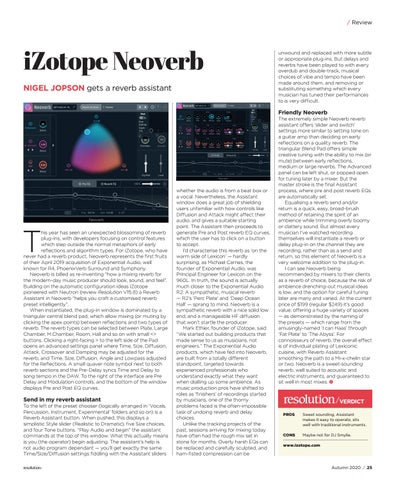
his year has seen an unexpected blossoming of reverb plug-ins, with developers focusing on control features which step outside the normal metaphors of early reflections and algorithm types. For iZotope, who have never had a reverb product, Neoverb represents the first fruits of their April 2019 acquisition of Exponential Audio, well known for R4, PhoenixVerb Surround and Symphony. Neoverb is billed as re-inventing “how a mixing reverb for the modern-day music producer should look, sound, and feel”. Building on the automatic configuration ideas iZotope pioneered with Neutron (review Resolution V15.8) a Reverb Assistant in Neoverb “helps you craft a customised reverb preset intelligently”. When instantiated, the plug-in window is dominated by a triangular central blend pad, which allow mixing (or muting by clicking the apex points) between reflections and two types of reverb. The reverb types can be selected between Plate, Large Chamber, M.Chamber, Room, Hall and so on with small <> buttons. Clicking a right-facing > to the left side of the Pad opens an advanced settings panel where Time, Size, Diffusion, Attack, Crossover and Damping may be adjusted for the reverb, and Time, Size, Diffusion, Angle and Lowpass adjusted for the Reflections. A small quaver note symbol next to both reverb sections and the Pre-Delay syncs Time and Delay to song tempo in the DAW. To the right of the interface are Pre Delay and Modulation controls, and the bottom of the window displays Pre and Post EQ curves.
Send in my reverb assistant
To the left of the preset chooser (logically arranged in ‘Vocals, Percussion, Instrument, Experimental’ folders and so on) is a Reverb Assistant button. When pushed, this displays a simplistic Style slider (Realistic to Dramatic), five Size choices, and four Tone buttons. “Play Audio and begin” the assistant commands at the top of this window. What this actually means is you (the operator) begin adjusting. The assistant’s help is not audio program dependant — you’ll get exactly the same Time/Size/Diffusion settings fiddling with the Assistant sliders
whether the audio is from a beat box or a vocal. Nevertheless, the Assistant window does a great job of shielding users unfamiliar with how controls like Diffusion and Attack might affect their audio, and gives a suitable starting point. The Assistant then proceeds to generate Pre and Post reverb EQ curves, which the user has to click on a button to accept. I’d characterise this reverb as ‘on the warm side of Lexicon’ — hardly surprising, as Michael Carnes, the founder of Exponential Audio, was Principal Engineer for Lexicon on the 960L. In truth, the sound is actually much closer to the Exponential Audio R2. A sympathetic, musical reverb — R2’s ‘Perc Plate’ and ‘Deep Ocean Hall’ — sprang to mind. Neoverb is a sympathetic reverb with a nice solid low end, and a manageable HF diffusion that won’t startle the producer. Mark Ethier, founder of iZotope, said “We started out building products that made sense to us as musicians, not engineers.” The Exponential Audio products, which have fed into Neoverb, are built from a totally different standpoint, targeted towards experienced professionals who understand exactly what they want when dialling up some ambience. As music production pros have shifted to roles as ‘finishers’ of recordings started by musicians, one of the thorny problems faced is the often-impossible task of undoing reverb and delay choices. Unlike the tracking projects of the past, sessions arriving for mixing today have often had the rough mix set in stone for months. Overly harsh EQs can be replaced and carefully sculpted, and ham-fisted compression can be
The extremely simple Neoverb reverb assistant offers ‘slider and switch’ settings more similar to setting tone on a guitar amp than deciding on early reflections on a quality reverb. The triangular Blend Pad offers simple creative tuning with the ability to mix (or mute) between early reflections, medium or large reverbs. The Advanced panel can be left shut, or popped open for tuning later by a mixer. But the master stroke is the final Assistant process, where pre and post reverb EQs are automatically set. Equalising a reverb send and/or return is a quick, easy, broad-brush method of retaining the spirit of an ambience while trimming overly boomy or clattery sound. But almost every musician I’ve watched recording themselves will instantiate a reverb or delay plug-in on the channel they are recording, rather than as a send and return, so this element of Neoverb is a very welcome addition to the plug-in. I can see Neoverb being recommended by mixers to their clients as a reverb of choice, because the risk of ambience drenching-out musical ideas is low, and the option for careful tuning later are many and varied. At the current price of $199 (regular $249) it’s good value, offering a huge variety of spaces — as demonstrated by the naming of the presets — which range from the amusingly-named ‘I can Haas’ through ‘Fat Plate’ to ‘The Abyss’. For connoisseurs of reverb, the overall effect is of individual plating of Lexiconic cuisine, with Reverb Assistant smoothing the path to a Mi-x-chelin star or two. Neoverb is a sweet-sounding reverb, well suited to acoustic and electric instruments, and guaranteed to sit well in most mixes.
VERDICT PROS Sweet sounding, Assistant makes it easy to operate, sits well with traditional instruments. CONS
Maybe not for DJ Smylie.
www.izotope.com
Autumn 2020 / 25