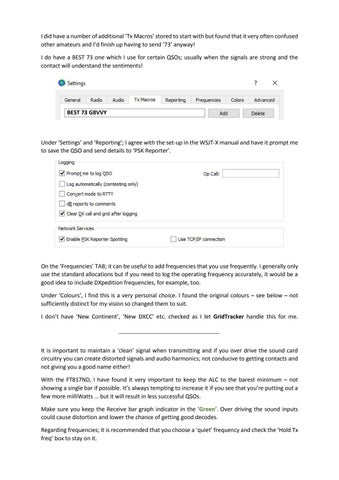
I did have a number of additional ‘Tx Macros’ stored to start with but found that it very often confused other amateurs and I’d finish up having to send ‘73’ anyway! I do have a BEST 73 one which I use for certain QSOs; usually when the signals are strong and the contact will understand the sentiments!
BEST 73 G8VVY
Under ‘Settings’ and ‘Reporting’; I agree with the set-up in the WSJT-X manual and have it prompt me to save the QSO and send details to ‘PSK Reporter’.
On the ‘Frequencies’ TAB; it can be useful to add frequencies that you use frequently. I generally only use the standard allocations but if you need to log the operating frequency accurately, it would be a good idea to include DXpedition frequencies, for example, too. Under ‘Colours’, I find this is a very personal choice. I found the original colours – see below – not sufficiently distinct for my vision so changed them to suit. I don’t have ‘New Continent’, ‘New DXCC’ etc. checked as I let GridTracker handle this for me.
It is important to maintain a ‘clean’ signal when transmitting and if you over drive the sound card circuitry you can create distorted signals and audio harmonics; not conducive to getting contacts and not giving you a good name either! With the FT817ND, I have found it very important to keep the ALC to the barest minimum – not showing a single bar if possible. It’s always tempting to increase it if you see that you’re putting out a few more milliWatts … but it will result in less successful QSOs. Make sure you keep the Receive bar graph indicator in the ‘Green’. Over driving the sound inputs could cause distortion and lower the chance of getting good decodes. Regarding frequencies; it is recommended that you choose a ‘quiet’ frequency and check the ‘Hold Tx freq’ box to stay on it.