Colop | Sponsored Article experience gained over the past few years as well as feedback from the reseller channel and end consumers. Faber points out, however, that it’s much more than just an update of a previous product. He says: “The desire to create something new, something unprecedented, is plain to see in the unique contemporary design of the Colop’s HQ in Wels, Austria product.” Developed in collaboration with Viennese design agency Spirit Design, the new Printer prides itself on its high-quality design and timeless elegance. As a standard, the Printer is available with a black or white handle, but the actual colour of the product is not evident until the image card is inserted. The stamp is available in eight different basic designs, which can be created using the colours black, white, red, green and blue. Initially, the new Printer will be available in the four most important sizes: 10 (imprint size 10 x 27 mm), 20 (14 x 38 mm), 30 (18 x 47 mm) and 40 (23 x 59 mm). Two further sizes will be added to the range in due course.
Personalisation tools The standout feature of the stamp, however, is the option to create your own design for the XXL image window. Colop first devised the concept of personalised stamp product designs using image cards around ten years ago. With the new Printer, it’s taking this concept to the next level, as Franz Ratzenberger, Head of International Sales & Marketing, explains: “The extra large image window – with dimensions previously unavailable in the world of stamps – can be personalised with great ease by using simple paper image cards. This makes every Printer unique, just like its owner or user.” Whether it’s used for personal photos, QR codes, company logos, cartoons or typography, this feature offers a multitude of options for the user and is ideal for creating an eye-catching personalised product. Colop’s E-Business team has created two new tools that make it easy to create a unique and professional design for the image card, both on the front and the back.
For B2B customers, a new software solution called the ImageCard Designer has been developed. This enables for example rubber stamp makers and retailers to simply, quickly and flexibly design the card for themselves or for their customers. The company logo and address of a rubber stamp maker, for example, can be placed on the image card, so that customers bear them in mind for new or repeat orders. The Printer could also display the logo of a company that uses the stamp as a promotional gift for its customers. Alternatively, it could simply display the logo of the company using the stamp itself, becoming part of its corporate identity and providing it with a consistent image both outside and inside the company. Head of E-Business Alexander Zicha, who developed the personalisation tools together
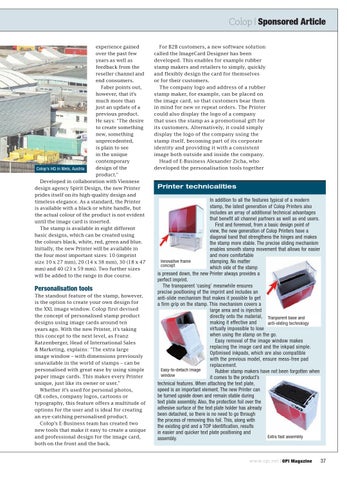
Printer technicalities In addition to all the features typical of a modern stamp, the latest generation of Colop Printers also includes an array of additional technical advantages that benefit all channel partners as well as end users. First and foremost, from a basic design point of view, the new generation of Colop Printers have a diagonal band that strengthens the hinges and makes the stamp more stable. The precise sliding mechanism enables smooth stamp movement that allows for easier and more comfortable Innovative frame stamping. No matter concept which side of the stamp is pressed down, the new Printer always provides a perfect imprint. The transparent ‘casing’ meanwhile ensures precise positioning of the imprint and includes an anti-slide mechanism that makes it possible to get a firm grip on the stamp. This mechanism covers a large area and is injected directly onto the material, Tranparent base and making it effective and anti-sliding technology virtually impossible to lose when using the stamp on the go. Easy removal of the image window makes replacing the image card and the inkpad simple. Optimised inkpads, which are also compatible with the previous model, ensure mess-free pad replacement. Easy-to-detach image Rubber stamp makers have not been forgotten when window it comes to the product’s technical features. When attaching the text plate, speed is an important element. The new Printer can be turned upside down and remain stable during text plate assembly. Also, the protection foil over the adhesive surface of the text plate holder has already been detached, so there is no need to go through the process of removing this foil. This, along with the existing grid and a TOP identification, results in easier and quicker text plate positioning and Extra fast assembly assembly.
w w w.opi.net | OPI Magazine
37